


JQUERY EXAMPLE 
http://www.youtube.com/kamleshutube
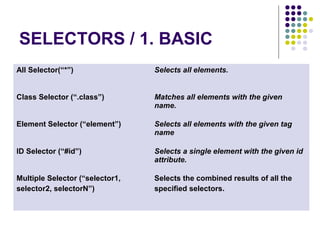
SELECTORS / 1. BASIC 
All Selector(“*”) Selects all elements. 
Class Selector (“.class”) Matches all elements with the given 
name. 
Element Selector (“element”) Selects all elements with the given tag 
name 
ID Selector (“#id”) Selects a single element with the given id 
attribute. 
Multiple Selector (“selector1, 
selector2, selectorN”) 
Selects the combined results of all the 
specified selectors.
http://www.youtube.com/watch?v=jWSodFG2XMg
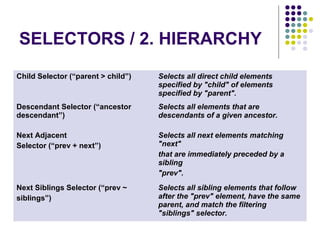
SELECTORS / 2. HIERARCHY 
Child Selector (“parent > child”) Selects all direct child elements 
specified by "child" of elements 
specified by "parent". 
Descendant Selector (“ancestor 
descendant”) 
Selects all elements that are 
descendants of a given ancestor. 
Next Adjacent 
Selector (“prev + next”) 
Selects all next elements matching 
"next" 
that are immediately preceded by a 
sibling 
"prev". 
Next Siblings Selector (“prev ~ 
siblings”) 
Selects all sibling elements that follow 
after the "prev" element, have the same 
parent, and match the filtering 
"siblings" selector.
http://www.youtube.com/watch?v=ATN8KoTONts
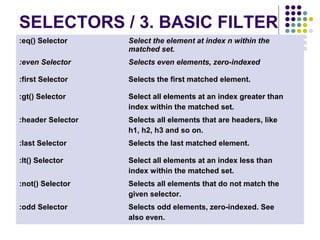
SELECTORS / 3. BASIC FILTER 
:eq() Selector Select the element at index n within the 
matched set. 
:even Selector Selects even elements, zero-indexed 
:first Selector Selects the first matched element. 
:gt() Selector Select all elements at an index greater than 
index within the matched set. 
:header Selector Selects all elements that are headers, like 
h1, h2, h3 and so on. 
:last Selector Selects the last matched element. 
:lt() Selector Select all elements at an index less than 
index within the matched set. 
:not() Selector Selects all elements that do not match the 
given selector. 
:odd Selector Selects odd elements, zero-indexed. See 
also even.
http://www.youtube.com/watch?v=pUXxG1oCgkE
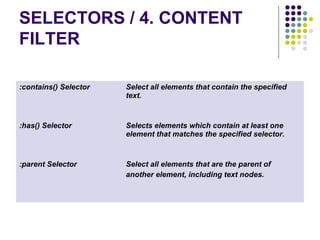
SELECTORS / 4. CONTENT 
FILTER 
:contains() Selector Select all elements that contain the specified 
text. 
:has() Selector Selects elements which contain at least one 
element that matches the specified selector. 
:parent Selector Select all elements that are the parent of 
another element, including text nodes.
http://www.youtube.com/watch?v=1xu0clYY7-Y
SELECTORS / 5. ATTRIBUTE 
[attribute|=value] Selects elements that have the specified attribute with a value 
either equal to a given string or starting with that string 
followed by a hyphen (-). 
[attribute*=value] Selects elements that have the specified attribute with a value 
containing the a given substring. 
[attribute~=value] Selects elements that have the specified attribute with a value 
containing a given word, delimited by spaces. 
[attribute$=value] Selects elements that have the specified attribute with a value 
ending exactly with a given string. 
[attribute=value] Selects all elements that are matched specified value 
[attribute!=value] Select elements that either don't have the specified attribute, 
or do have the specified attribute but not with a certain value. 
[attribute^=value] Selects elements that have the specified attribute with a value 
beginning exactly with a given string. 
[attribute] Selects elements that have the specified 
attribute, with any value. 
[attribute=value] 
[attribute2=value2] 
Matches elements that match all of the specified attribute 
filters.
http://www.youtube.com/watch?v=tdujPn8HNr4
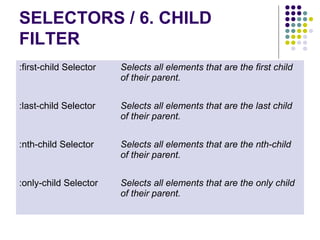
SELECTORS / 6. CHILD 
FILTER 
:first-child Selector Selects all elements that are the first child 
of their parent. 
:last-child Selector Selects all elements that are the last child 
of their parent. 
:nth-child Selector Selects all elements that are the nth-child 
of their parent. 
:only-child Selector Selects all elements that are the only child 
of their parent.
http://www.youtube.com/watch?v=11tKyyhBBzY
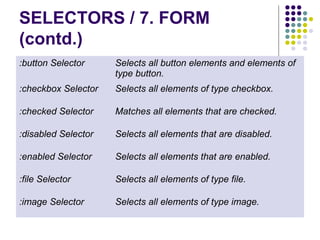
SELECTORS / 7. FORM 
(contd.) 
:button Selector Selects all button elements and elements of 
type button. 
:checkbox Selector Selects all elements of type checkbox. 
:checked Selector Matches all elements that are checked. 
:disabled Selector Selects all elements that are disabled. 
:enabled Selector Selects all elements that are enabled. 
:file Selector Selects all elements of type file. 
:image Selector Selects all elements of type image.
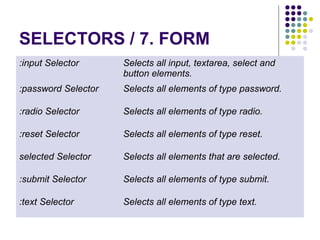
SELECTORS / 7. FORM 
:input Selector Selects all input, textarea, select and 
button elements. 
:password Selector Selects all elements of type password. 
:radio Selector Selects all elements of type radio. 
:reset Selector Selects all elements of type reset. 
selected Selector Selects all elements that are selected. 
:submit Selector Selects all elements of type submit. 
:text Selector Selects all elements of type text.
http://www.youtube.com/watch?v=9snkUllPv9A
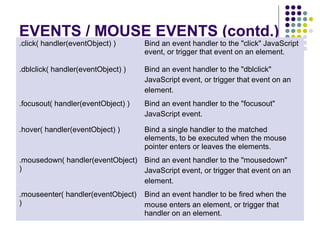
EVENTS / MOUSE EVENTS (contd.) .click( handler(eventObject) ) Bind an event handler to the "click" JavaScript 
event, or trigger that event on an element. 
.dblclick( handler(eventObject) ) Bind an event handler to the "dblclick" 
JavaScript event, or trigger that event on an 
element. 
.focusout( handler(eventObject) ) Bind an event handler to the "focusout" 
JavaScript event. 
.hover( handler(eventObject) ) Bind a single handler to the matched 
elements, to be executed when the mouse 
pointer enters or leaves the elements. 
.mousedown( handler(eventObject) 
) 
Bind an event handler to the "mousedown" 
JavaScript event, or trigger that event on an 
element. 
.mouseenter( handler(eventObject) 
) 
Bind an event handler to be fired when the 
mouse enters an element, or trigger that 
handler on an element.
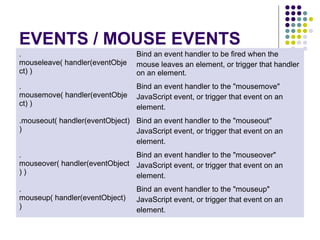
EVENTS / MOUSE EVENTS 
. 
mouseleave( handler(eventObje 
ct) ) 
Bind an event handler to be fired when the 
mouse leaves an element, or trigger that handler 
on an element. 
. 
mousemove( handler(eventObje 
ct) ) 
Bind an event handler to the "mousemove" 
JavaScript event, or trigger that event on an 
element. 
.mouseout( handler(eventObject) 
) 
Bind an event handler to the "mouseout" 
JavaScript event, or trigger that event on an 
element. 
. 
mouseover( handler(eventObject 
) ) 
Bind an event handler to the "mouseover" 
JavaScript event, or trigger that event on an 
element. 
. 
mouseup( handler(eventObject) 
) 
Bind an event handler to the "mouseup" 
JavaScript event, or trigger that event on an 
element.
http://www.youtube.com/watch?v=HDMIUaoiiMk
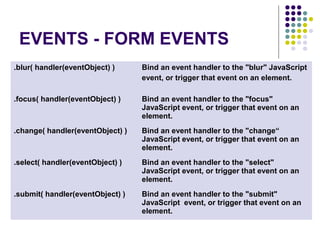
EVENTS - FORM EVENTS 
.blur( handler(eventObject) ) Bind an event handler to the "blur" JavaScript 
event, or trigger that event on an element. 
.focus( handler(eventObject) ) Bind an event handler to the "focus" 
JavaScript event, or trigger that event on an 
element. 
.change( handler(eventObject) ) Bind an event handler to the "change“ 
JavaScript event, or trigger that event on an 
element. 
.select( handler(eventObject) ) Bind an event handler to the "select" 
JavaScript event, or trigger that event on an 
element. 
.submit( handler(eventObject) ) Bind an event handler to the "submit" 
JavaScript event, or trigger that event on an 
element.
http://www.youtube.com/watch?v=Ltb0TUO8qsw
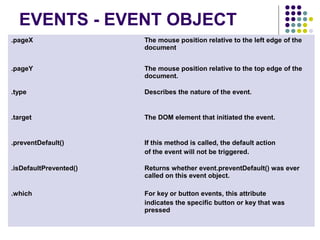
EVENTS - EVENT OBJECT 
.pageX The mouse position relative to the left edge of the 
document 
.pageY The mouse position relative to the top edge of the 
document. 
.type Describes the nature of the event. 
.target The DOM element that initiated the event. 
.preventDefault() If this method is called, the default action 
of the event will not be triggered. 
.isDefaultPrevented() Returns whether event.preventDefault() was ever 
called on this event object. 
.which For key or button events, this attribute 
indicates the specific button or key that was 
pressed
http://www.youtube.com/watch?v=4PvYg4D2R1w
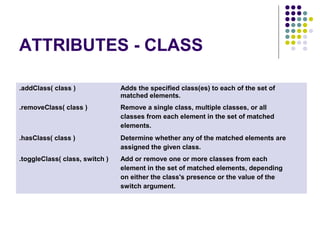
ATTRIBUTES - CLASS 
.addClass( class ) Adds the specified class(es) to each of the set of 
matched elements. 
.removeClass( class ) Remove a single class, multiple classes, or all 
classes from each element in the set of matched 
elements. 
.hasClass( class ) Determine whether any of the matched elements are 
assigned the given class. 
.toggleClass( class, switch ) Add or remove one or more classes from each 
element in the set of matched elements, depending 
on either the class's presence or the value of the 
switch argument.
http://www.youtube.com/watch?v=CPJpIpm7qCs
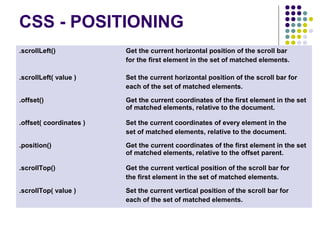
CSS - POSITIONING 
.scrollLeft() Get the current horizontal position of the scroll bar 
for the first element in the set of matched elements. 
.scrollLeft( value ) Set the current horizontal position of the scroll bar for 
each of the set of matched elements. 
.offset() Get the current coordinates of the first element in the set 
of matched elements, relative to the document. 
.offset( coordinates ) Set the current coordinates of every element in the 
set of matched elements, relative to the document. 
.position() Get the current coordinates of the first element in the set 
of matched elements, relative to the offset parent. 
.scrollTop() Get the current vertical position of the scroll bar for 
the first element in the set of matched elements. 
.scrollTop( value ) Set the current vertical position of the scroll bar for 
each of the set of matched elements.
http://www.youtube.com/watch?v=zWX0ZzYrS_4
TRAVERSING -TREE 
TRAVERSAL (cont.) 
.children( [ selector ] ) Get the children of each element in the set of 
matched elements, optionally filtered by a 
selector 
.closest( selector ) Get the first ancestor element that matches 
the selector, beginning at the current 
element and progressing up through the 
DOM tree. 
.find( selector ) Get the descendants of each element in the 
current set of matched elements, filtered by a 
selector. 
.next( [ selector ] ) Get the immediately following sibling of each 
element in the set of matched elements, 
optionally filtered by a selector. 
.nextAll( [ selector ] ) Get all following siblings of each element in 
the set of matched elements, optionally 
filtered by a selector.
TRAVERSING -TREE 
TRAVERSAL (cont.) 
.nextUntil( [ selector ] ) Get all following siblings of each element 
up 
to but not including the element matched 
by 
the selector. 
.parent( [ selector ] ) Get the parent of each element in the 
current 
set of matched elements, optionally filtered 
by a selector. 
.parents( [ selector ] ) Get the ancestors of each element in the 
current set of matched elements, optionally 
filtered by a selector. 
.prev( [ selector ] ) Get the immediately preceding sibling of 
each 
element in the set of matched elements, 
optionally filtered by a selector.
TRAVERSING -TREE 
TRAVERSAL 
.prevAll( [ selector ] ) Get all preceding siblings of each element in 
the set of matched elements, optionally filtered 
by a selector. 
.prevUntil( [ selector ] ) Get the ancestors of each element in the 
current set of matched elements, optionally 
filtered by a selector. 
.siblings( [ selector ] ) Get the siblings of each element in the set of 
matched elements, optionally filtered by a 
selector.
http://www.youtube.com/watch?v=1M4hThjV1vs 
http://www.youtube.com/watch?v=_z74QVjOOiA
TRAVERSING - FILTERING 
.eq( index ) Reduce the set of matched elements to the one at 
the specified index. 
.filter( selector ) Reduce the set of matched elements to those that 
match the selector or pass the function's test. 
.is( selector ) Check the current matched set of elements 
against a selector and return true if at least one 
of these elements matches the selector 
.not() Remove elements from the set of matched 
elements. 
.slice( start, [ end ] ) Reduce the set of matched elements to a subset 
specified by a range of indices. 
.map( callback(index, domEl) ) Pass each element in the current matched set 
through a function, producing a new jQuery 
object containing the return values.
http://www.youtube.com/watch?v=z_9IzPfxkrw
TRAVERSING - 
MISCELLANEOUS 
.add( selectors, [ context ] ) Add elements to the set of matched elements 
.andSelf() Add the previous set of elements on the stack to 
the current set. 
.contents() Get the children of each element in the set of 
matched elements, including text nodes. 
.end() End the most recent filtering operation in the 
current chain and return the set of matched 
elements to its previous state.
http://www.youtube.com/watch?v=rU1SNaVs2ic
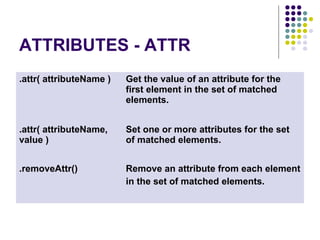
ATTRIBUTES - ATTR 
.attr( attributeName ) Get the value of an attribute for the 
first element in the set of matched 
elements. 
.attr( attributeName, 
value ) 
Set one or more attributes for the set 
of matched elements. 
.removeAttr() Remove an attribute from each element 
in the set of matched elements.
http://www.youtube.com/watch?v=UvkCRCXHVzI
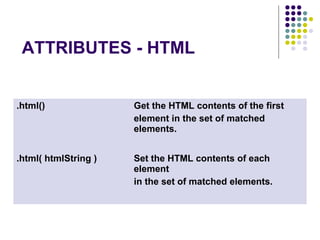
ATTRIBUTES - HTML 
.html() Get the HTML contents of the first 
element in the set of matched 
elements. 
.html( htmlString ) Set the HTML contents of each 
element 
in the set of matched elements.
http://www.youtube.com/watch?v=JqzA9T3OfNM
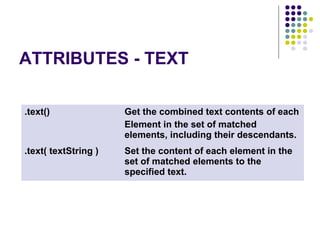
ATTRIBUTES - TEXT 
.text() Get the combined text contents of each 
Element in the set of matched 
elements, including their descendants. 
.text( textString ) Set the content of each element in the 
set of matched elements to the 
specified text.
http://www.youtube.com/watch?v=NiQGohUxKiA
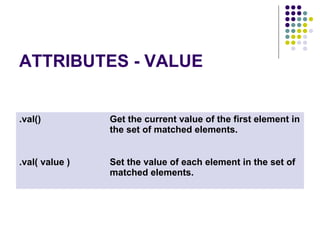
ATTRIBUTES - VALUE 
.val() Get the current value of the first element in 
the set of matched elements. 
.val( value ) Set the value of each element in the set of 
matched elements.
http://www.youtube.com/watch?v=o_K6q3QxJ7Y
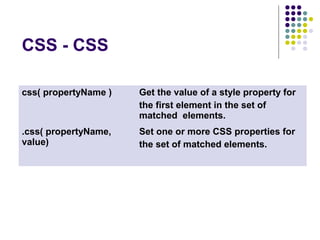
CSS - CSS 
css( propertyName ) Get the value of a style property for 
the first element in the set of 
matched elements. 
.css( propertyName, 
value) 
Set one or more CSS properties for 
the set of matched elements.
http://www.youtube.com/watch?v=ROewNE8mc_A
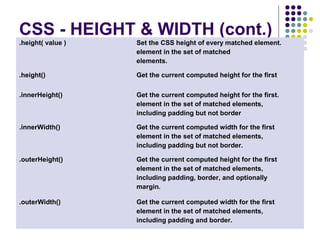
CSS - HEIGHT & WIDTH (cont.) 
.height( value ) Set the CSS height of every matched element. 
element in the set of matched 
elements. 
.height() Get the current computed height for the first 
.innerHeight() Get the current computed height for the first. 
element in the set of matched elements, 
including padding but not border 
.innerWidth() Get the current computed width for the first 
element in the set of matched elements, 
including padding but not border. 
.outerHeight() Get the current computed height for the first 
element in the set of matched elements, 
including padding, border, and optionally 
margin. 
.outerWidth() Get the current computed width for the first 
element in the set of matched elements, 
including padding and border.
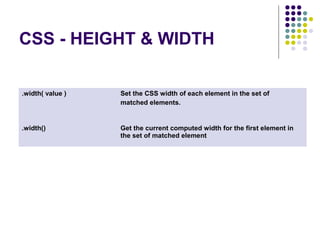
CSS - HEIGHT & WIDTH 
.width( value ) Set the CSS width of each element in the set of 
matched elements. 
.width() Get the current computed width for the first element in 
the set of matched element
http://www.youtube.com/watch?v=faxfelPFFjc
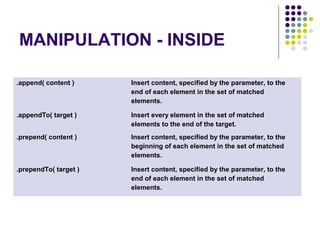
MANIPULATION - INSIDE 
.append( content ) Insert content, specified by the parameter, to the 
end of each element in the set of matched 
elements. 
.appendTo( target ) Insert every element in the set of matched 
elements to the end of the target. 
.prepend( content ) Insert content, specified by the parameter, to the 
beginning of each element in the set of matched 
elements. 
.prependTo( target ) Insert content, specified by the parameter, to the 
end of each element in the set of matched 
elements.
http://www.youtube.com/watch?v=egkrz9baf9I
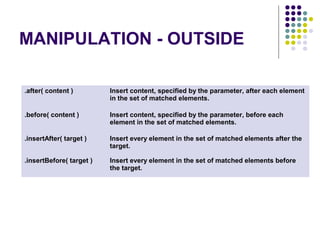
MANIPULATION - OUTSIDE 
.after( content ) Insert content, specified by the parameter, after each element 
in the set of matched elements. 
.before( content ) Insert content, specified by the parameter, before each 
element in the set of matched elements. 
.insertAfter( target ) Insert every element in the set of matched elements after the 
target. 
.insertBefore( target ) Insert every element in the set of matched elements before 
the target.
http://www.youtube.com/watch?v=cSBmIJJJ_XA
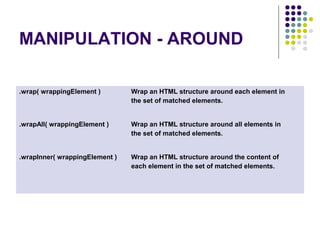
MANIPULATION - AROUND 
.wrap( wrappingElement ) Wrap an HTML structure around each element in 
the set of matched elements. 
.wrapAll( wrappingElement ) Wrap an HTML structure around all elements in 
the set of matched elements. 
.wrapInner( wrappingElement ) Wrap an HTML structure around the content of 
each element in the set of matched elements.
http://www.youtube.com/watch?v=cSBmIJJJ_XA
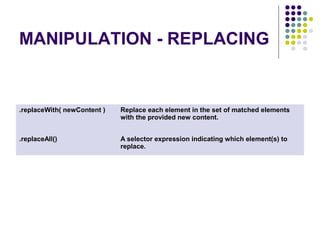
MANIPULATION - REPLACING 
.replaceWith( newContent ) Replace each element in the set of matched elements 
with the provided new content. 
.replaceAll() A selector expression indicating which element(s) to 
replace.
http://www.youtube.com/watch?v=WA6G1eVF7Po
EVENTS - HANDLER 
ATTACHMENT 
.bind( eventType, [ eventData ], handler 
(eventObject) ) 
Attach a handler to an event for the 
elements. 
.unbind( eventType, handler 
(eventObject) ) 
Remove a previously-attached event 
handler from the elements. 
.die() Remove all event handlers previously 
attached using .live() from the elements. 
.live( eventType, eventData, handler ) Attach a handler to the event for all 
elements which match the current 
selector, now or in the future. 
.one( eventType, [ eventData ], handler 
(eventObject) ) 
Attach a handler to an event for the 
elements. The handler is executed at 
most once per element.
http://www.youtube.com/watch?v=krpWZ7kIXt8 
http://www.youtube.com/watch?v=Axa7kKbC4Ec 
http://www.youtube.com/watch?v=Axa7kKbC4Ec
EFFECTS - BASIC 
.hide( duration, [ callback ] ) 
Hide the matched elements. 
.show( duration, [ callback ] ) 
Display the matched elements.
http://www.youtube.com/watch?v=674_VLph2vU
EFFECTS - SLIDING 
.slideDown( [ duration ], [ callback ] ) 
Display the matched elements with a sliding motion. 
.slideToggle( [ duration ], [ callback ] ) 
Display or hide the matched elements with a sliding motion. 
.slideUp( [ duration ], [ callback ] ) 
Hide the matched elements with a sliding motion.
http://www.youtube.com/watch?v=2UQrqp4HKjw
EFFECTS - FADING 
.fadeIn( [ duration ], [ callback ] ) 
Display the matched elements by fading them to opaque. 
.fadeOut( [ duration ], [ callback ] ) 
Hide the matched elements by fading them to transparent. 
.fadeTo( duration, opacity, [ callback ] ) 
Adjust the opacity of the matched elements.
http://www.youtube.com/watch?v=g2c44rYWfmI
Thank You

jquery examples

  • 1.
  • 2.
    SELECTORS / 1.BASIC All Selector(“*”) Selects all elements. Class Selector (“.class”) Matches all elements with the given name. Element Selector (“element”) Selects all elements with the given tag name ID Selector (“#id”) Selects a single element with the given id attribute. Multiple Selector (“selector1, selector2, selectorN”) Selects the combined results of all the specified selectors.
  • 3.
  • 4.
    SELECTORS / 2.HIERARCHY Child Selector (“parent > child”) Selects all direct child elements specified by "child" of elements specified by "parent". Descendant Selector (“ancestor descendant”) Selects all elements that are descendants of a given ancestor. Next Adjacent Selector (“prev + next”) Selects all next elements matching "next" that are immediately preceded by a sibling "prev". Next Siblings Selector (“prev ~ siblings”) Selects all sibling elements that follow after the "prev" element, have the same parent, and match the filtering "siblings" selector.
  • 5.
  • 6.
    SELECTORS / 3.BASIC FILTER :eq() Selector Select the element at index n within the matched set. :even Selector Selects even elements, zero-indexed :first Selector Selects the first matched element. :gt() Selector Select all elements at an index greater than index within the matched set. :header Selector Selects all elements that are headers, like h1, h2, h3 and so on. :last Selector Selects the last matched element. :lt() Selector Select all elements at an index less than index within the matched set. :not() Selector Selects all elements that do not match the given selector. :odd Selector Selects odd elements, zero-indexed. See also even.
  • 7.
  • 8.
    SELECTORS / 4.CONTENT FILTER :contains() Selector Select all elements that contain the specified text. :has() Selector Selects elements which contain at least one element that matches the specified selector. :parent Selector Select all elements that are the parent of another element, including text nodes.
  • 9.
  • 10.
    SELECTORS / 5.ATTRIBUTE [attribute|=value] Selects elements that have the specified attribute with a value either equal to a given string or starting with that string followed by a hyphen (-). [attribute*=value] Selects elements that have the specified attribute with a value containing the a given substring. [attribute~=value] Selects elements that have the specified attribute with a value containing a given word, delimited by spaces. [attribute$=value] Selects elements that have the specified attribute with a value ending exactly with a given string. [attribute=value] Selects all elements that are matched specified value [attribute!=value] Select elements that either don't have the specified attribute, or do have the specified attribute but not with a certain value. [attribute^=value] Selects elements that have the specified attribute with a value beginning exactly with a given string. [attribute] Selects elements that have the specified attribute, with any value. [attribute=value] [attribute2=value2] Matches elements that match all of the specified attribute filters.
  • 11.
  • 12.
    SELECTORS / 6.CHILD FILTER :first-child Selector Selects all elements that are the first child of their parent. :last-child Selector Selects all elements that are the last child of their parent. :nth-child Selector Selects all elements that are the nth-child of their parent. :only-child Selector Selects all elements that are the only child of their parent.
  • 13.
  • 14.
    SELECTORS / 7.FORM (contd.) :button Selector Selects all button elements and elements of type button. :checkbox Selector Selects all elements of type checkbox. :checked Selector Matches all elements that are checked. :disabled Selector Selects all elements that are disabled. :enabled Selector Selects all elements that are enabled. :file Selector Selects all elements of type file. :image Selector Selects all elements of type image.
  • 15.
    SELECTORS / 7.FORM :input Selector Selects all input, textarea, select and button elements. :password Selector Selects all elements of type password. :radio Selector Selects all elements of type radio. :reset Selector Selects all elements of type reset. selected Selector Selects all elements that are selected. :submit Selector Selects all elements of type submit. :text Selector Selects all elements of type text.
  • 16.
  • 17.
    EVENTS / MOUSEEVENTS (contd.) .click( handler(eventObject) ) Bind an event handler to the "click" JavaScript event, or trigger that event on an element. .dblclick( handler(eventObject) ) Bind an event handler to the "dblclick" JavaScript event, or trigger that event on an element. .focusout( handler(eventObject) ) Bind an event handler to the "focusout" JavaScript event. .hover( handler(eventObject) ) Bind a single handler to the matched elements, to be executed when the mouse pointer enters or leaves the elements. .mousedown( handler(eventObject) ) Bind an event handler to the "mousedown" JavaScript event, or trigger that event on an element. .mouseenter( handler(eventObject) ) Bind an event handler to be fired when the mouse enters an element, or trigger that handler on an element.
  • 18.
    EVENTS / MOUSEEVENTS . mouseleave( handler(eventObje ct) ) Bind an event handler to be fired when the mouse leaves an element, or trigger that handler on an element. . mousemove( handler(eventObje ct) ) Bind an event handler to the "mousemove" JavaScript event, or trigger that event on an element. .mouseout( handler(eventObject) ) Bind an event handler to the "mouseout" JavaScript event, or trigger that event on an element. . mouseover( handler(eventObject ) ) Bind an event handler to the "mouseover" JavaScript event, or trigger that event on an element. . mouseup( handler(eventObject) ) Bind an event handler to the "mouseup" JavaScript event, or trigger that event on an element.
  • 19.
  • 20.
    EVENTS - FORMEVENTS .blur( handler(eventObject) ) Bind an event handler to the "blur" JavaScript event, or trigger that event on an element. .focus( handler(eventObject) ) Bind an event handler to the "focus" JavaScript event, or trigger that event on an element. .change( handler(eventObject) ) Bind an event handler to the "change“ JavaScript event, or trigger that event on an element. .select( handler(eventObject) ) Bind an event handler to the "select" JavaScript event, or trigger that event on an element. .submit( handler(eventObject) ) Bind an event handler to the "submit" JavaScript event, or trigger that event on an element.
  • 21.
  • 22.
    EVENTS - EVENTOBJECT .pageX The mouse position relative to the left edge of the document .pageY The mouse position relative to the top edge of the document. .type Describes the nature of the event. .target The DOM element that initiated the event. .preventDefault() If this method is called, the default action of the event will not be triggered. .isDefaultPrevented() Returns whether event.preventDefault() was ever called on this event object. .which For key or button events, this attribute indicates the specific button or key that was pressed
  • 23.
  • 24.
    ATTRIBUTES - CLASS .addClass( class ) Adds the specified class(es) to each of the set of matched elements. .removeClass( class ) Remove a single class, multiple classes, or all classes from each element in the set of matched elements. .hasClass( class ) Determine whether any of the matched elements are assigned the given class. .toggleClass( class, switch ) Add or remove one or more classes from each element in the set of matched elements, depending on either the class's presence or the value of the switch argument.
  • 25.
  • 26.
    CSS - POSITIONING .scrollLeft() Get the current horizontal position of the scroll bar for the first element in the set of matched elements. .scrollLeft( value ) Set the current horizontal position of the scroll bar for each of the set of matched elements. .offset() Get the current coordinates of the first element in the set of matched elements, relative to the document. .offset( coordinates ) Set the current coordinates of every element in the set of matched elements, relative to the document. .position() Get the current coordinates of the first element in the set of matched elements, relative to the offset parent. .scrollTop() Get the current vertical position of the scroll bar for the first element in the set of matched elements. .scrollTop( value ) Set the current vertical position of the scroll bar for each of the set of matched elements.
  • 27.
  • 28.
    TRAVERSING -TREE TRAVERSAL(cont.) .children( [ selector ] ) Get the children of each element in the set of matched elements, optionally filtered by a selector .closest( selector ) Get the first ancestor element that matches the selector, beginning at the current element and progressing up through the DOM tree. .find( selector ) Get the descendants of each element in the current set of matched elements, filtered by a selector. .next( [ selector ] ) Get the immediately following sibling of each element in the set of matched elements, optionally filtered by a selector. .nextAll( [ selector ] ) Get all following siblings of each element in the set of matched elements, optionally filtered by a selector.
  • 29.
    TRAVERSING -TREE TRAVERSAL(cont.) .nextUntil( [ selector ] ) Get all following siblings of each element up to but not including the element matched by the selector. .parent( [ selector ] ) Get the parent of each element in the current set of matched elements, optionally filtered by a selector. .parents( [ selector ] ) Get the ancestors of each element in the current set of matched elements, optionally filtered by a selector. .prev( [ selector ] ) Get the immediately preceding sibling of each element in the set of matched elements, optionally filtered by a selector.
  • 30.
    TRAVERSING -TREE TRAVERSAL .prevAll( [ selector ] ) Get all preceding siblings of each element in the set of matched elements, optionally filtered by a selector. .prevUntil( [ selector ] ) Get the ancestors of each element in the current set of matched elements, optionally filtered by a selector. .siblings( [ selector ] ) Get the siblings of each element in the set of matched elements, optionally filtered by a selector.
  • 31.
  • 32.
    TRAVERSING - FILTERING .eq( index ) Reduce the set of matched elements to the one at the specified index. .filter( selector ) Reduce the set of matched elements to those that match the selector or pass the function's test. .is( selector ) Check the current matched set of elements against a selector and return true if at least one of these elements matches the selector .not() Remove elements from the set of matched elements. .slice( start, [ end ] ) Reduce the set of matched elements to a subset specified by a range of indices. .map( callback(index, domEl) ) Pass each element in the current matched set through a function, producing a new jQuery object containing the return values.
  • 33.
  • 34.
    TRAVERSING - MISCELLANEOUS .add( selectors, [ context ] ) Add elements to the set of matched elements .andSelf() Add the previous set of elements on the stack to the current set. .contents() Get the children of each element in the set of matched elements, including text nodes. .end() End the most recent filtering operation in the current chain and return the set of matched elements to its previous state.
  • 35.
  • 36.
    ATTRIBUTES - ATTR .attr( attributeName ) Get the value of an attribute for the first element in the set of matched elements. .attr( attributeName, value ) Set one or more attributes for the set of matched elements. .removeAttr() Remove an attribute from each element in the set of matched elements.
  • 37.
  • 38.
    ATTRIBUTES - HTML .html() Get the HTML contents of the first element in the set of matched elements. .html( htmlString ) Set the HTML contents of each element in the set of matched elements.
  • 39.
  • 40.
    ATTRIBUTES - TEXT .text() Get the combined text contents of each Element in the set of matched elements, including their descendants. .text( textString ) Set the content of each element in the set of matched elements to the specified text.
  • 41.
  • 42.
    ATTRIBUTES - VALUE .val() Get the current value of the first element in the set of matched elements. .val( value ) Set the value of each element in the set of matched elements.
  • 43.
  • 44.
    CSS - CSS css( propertyName ) Get the value of a style property for the first element in the set of matched elements. .css( propertyName, value) Set one or more CSS properties for the set of matched elements.
  • 45.
  • 46.
    CSS - HEIGHT& WIDTH (cont.) .height( value ) Set the CSS height of every matched element. element in the set of matched elements. .height() Get the current computed height for the first .innerHeight() Get the current computed height for the first. element in the set of matched elements, including padding but not border .innerWidth() Get the current computed width for the first element in the set of matched elements, including padding but not border. .outerHeight() Get the current computed height for the first element in the set of matched elements, including padding, border, and optionally margin. .outerWidth() Get the current computed width for the first element in the set of matched elements, including padding and border.
  • 47.
    CSS - HEIGHT& WIDTH .width( value ) Set the CSS width of each element in the set of matched elements. .width() Get the current computed width for the first element in the set of matched element
  • 48.
  • 49.
    MANIPULATION - INSIDE .append( content ) Insert content, specified by the parameter, to the end of each element in the set of matched elements. .appendTo( target ) Insert every element in the set of matched elements to the end of the target. .prepend( content ) Insert content, specified by the parameter, to the beginning of each element in the set of matched elements. .prependTo( target ) Insert content, specified by the parameter, to the end of each element in the set of matched elements.
  • 50.
  • 51.
    MANIPULATION - OUTSIDE .after( content ) Insert content, specified by the parameter, after each element in the set of matched elements. .before( content ) Insert content, specified by the parameter, before each element in the set of matched elements. .insertAfter( target ) Insert every element in the set of matched elements after the target. .insertBefore( target ) Insert every element in the set of matched elements before the target.
  • 52.
  • 53.
    MANIPULATION - AROUND .wrap( wrappingElement ) Wrap an HTML structure around each element in the set of matched elements. .wrapAll( wrappingElement ) Wrap an HTML structure around all elements in the set of matched elements. .wrapInner( wrappingElement ) Wrap an HTML structure around the content of each element in the set of matched elements.
  • 54.
  • 55.
    MANIPULATION - REPLACING .replaceWith( newContent ) Replace each element in the set of matched elements with the provided new content. .replaceAll() A selector expression indicating which element(s) to replace.
  • 56.
  • 57.
    EVENTS - HANDLER ATTACHMENT .bind( eventType, [ eventData ], handler (eventObject) ) Attach a handler to an event for the elements. .unbind( eventType, handler (eventObject) ) Remove a previously-attached event handler from the elements. .die() Remove all event handlers previously attached using .live() from the elements. .live( eventType, eventData, handler ) Attach a handler to the event for all elements which match the current selector, now or in the future. .one( eventType, [ eventData ], handler (eventObject) ) Attach a handler to an event for the elements. The handler is executed at most once per element.
  • 58.
  • 59.
    EFFECTS - BASIC .hide( duration, [ callback ] ) Hide the matched elements. .show( duration, [ callback ] ) Display the matched elements.
  • 60.
  • 61.
    EFFECTS - SLIDING .slideDown( [ duration ], [ callback ] ) Display the matched elements with a sliding motion. .slideToggle( [ duration ], [ callback ] ) Display or hide the matched elements with a sliding motion. .slideUp( [ duration ], [ callback ] ) Hide the matched elements with a sliding motion.
  • 62.
  • 63.
    EFFECTS - FADING .fadeIn( [ duration ], [ callback ] ) Display the matched elements by fading them to opaque. .fadeOut( [ duration ], [ callback ] ) Hide the matched elements by fading them to transparent. .fadeTo( duration, opacity, [ callback ] ) Adjust the opacity of the matched elements.
  • 64.
  • 65.