uddeIM Quick-start picture-book

                                                              Links:
                                                              •    Joomlapolis
                                                              •    Community Builder
                                                              •    Membership
                                                              •    Tutorials


                                                              Promotion:
                                                              •   Use “pic-book”
                                                                  coupon code and
                                                                  get 15% off any
                                                                  Joomlapolis
                                                                  product or
                                                                  subscription


                              uddeIM Quick-start with basic
                              Community Builder integration


© 2004-2012 Joomlapolis.com
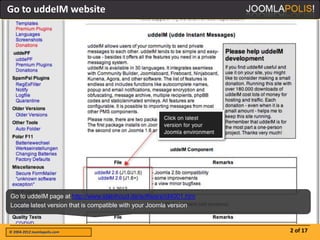
Go to uddeIM website


Go to uddeIM page at http://www.slabihoud.de/software/id4001.htm
Locate latest version that is compatible with your Joomla version


© 2004-2012 Joomlapolis.com                                         2 of 17
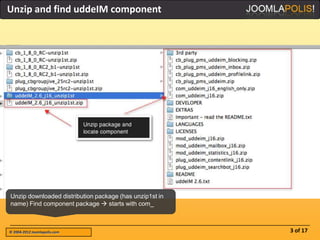
Unzip and find uddeIM component


Unzip downloaded distribution package (has unzip1st in
name) Find component package  starts with com_


© 2004-2012 Joomlapolis.com                              3 of 17
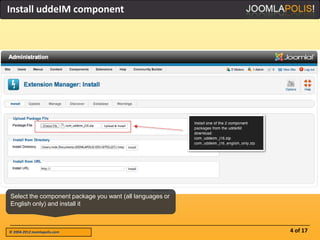
Install uddeIM component


Select the component package you want (all languages or
English only) and install it


© 2004-2012 Joomlapolis.com                               4 of 17
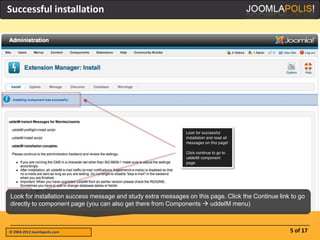
Successful installation


Look for installation success message and study extra messages on this page. Click the Continue link to go
directly to component page (you can also get there from Components  uddeIM menu)


© 2004-2012 Joomlapolis.com                                                                         5 of 17
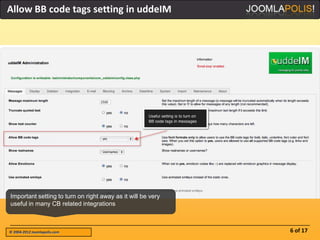
Allow BB code tags setting in uddeIM


Important setting to turn on right away as it will be very
useful in many CB related integrations


© 2004-2012 Joomlapolis.com                                  6 of 17
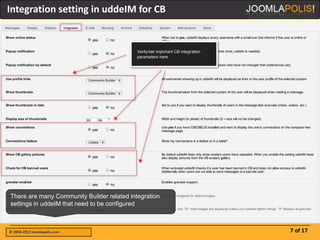
Integration setting in uddeIM for CB


There are many Community Builder related integration
settings in uddeIM that need to be configured


© 2004-2012 Joomlapolis.com                            7 of 17
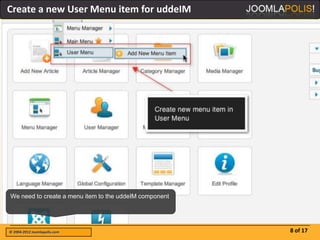
Create a new User Menu item for uddeIM


We need to create a menu item to the uddeIM component


© 2004-2012 Joomlapolis.com                             8 of 17
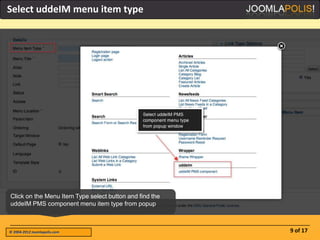
Select uddeIM menu item type


Click on the Menu Item Type select button and find the
uddeIM PMS component menu item type from popup


© 2004-2012 Joomlapolis.com                              9 of 17
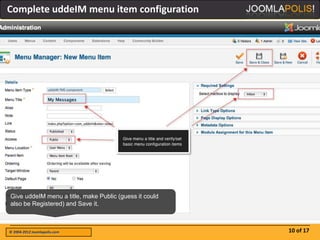
Complete uddeIM menu item configuration


Give uddeIM menu a title, make Public (guess it could
also be Registered) and Save it.


© 2004-2012 Joomlapolis.com                             10 of 17
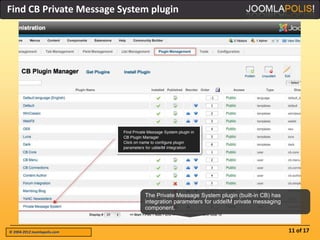
Find CB Private Message System plugin


                              The Private Message System plugin (built-in CB) has
                              integration parameters for uddeIM private messaging
                              component.


© 2004-2012 Joomlapolis.com                                                         11 of 17
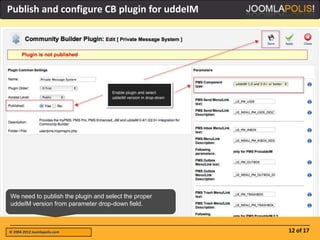
Publish and configure CB plugin for uddeIM


We need to publish the plugin and select the proper
uddeIM version from parameter drop-down field.


© 2004-2012 Joomlapolis.com                           12 of 17
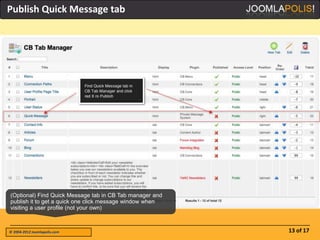
Publish Quick Message tab


(Optional) Find Quick Message tab in CB Tab manager and
publish it to get a quick one click message window when
visiting a user profile (not your own)


© 2004-2012 Joomlapolis.com                               13 of 17
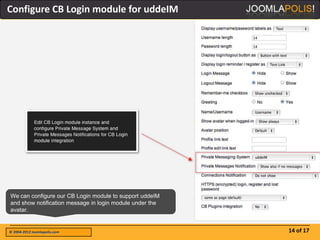
Configure CB Login module for uddeIM


We can configure our CB Login module to support uddeIM
and show notification message in login module under the
avatar.


© 2004-2012 Joomlapolis.com                               14 of 17
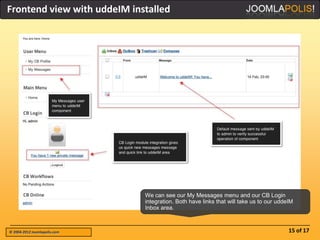
Frontend view with uddeIM installed


                              We can see our My Messages menu and our CB Login
                              integration. Both have links that will take us to our uddeIM
                              Inbox area.


© 2004-2012 Joomlapolis.com                                                             15 of 17
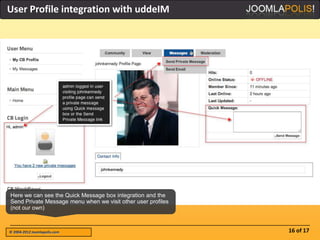
User Profile integration with uddeIM


Here we can see the Quick Message box integration and the
Send Private Message menu when we visit other user profiles
(not our own)


© 2004-2012 Joomlapolis.com                                   16 of 17
Thank you for viewing

                                                                             Did you like this?
      Other available books                                                  • Comment here
                                                                             •   Vote for CB
                                                                             •   Become a member
                                                                             •   More picture-
                                                                                 books


 • GroupJive Quick-start                              • Kunena Quick-start
 • Installation               • CB Quick-start        • Installation
 • Basic configuration                                • CB Integration


 • CB Connections
 • Configuration              • CB User Lists         • GropJive & Kunena
 • Operations                 • Basic configuration   • GroupJive & uddeIM


      New Joomlapolis Picture-books are being continuously created
                           Click here to see full list


© 2004-2012 Joomlapolis.com                                                                 17 of 17

Jpb udde im-quickstart

  • 1.
    uddeIM Quick-start picture-book Links: • Joomlapolis • Community Builder • Membership • Tutorials Promotion: • Use “pic-book” coupon code and get 15% off any Joomlapolis product or subscription uddeIM Quick-start with basic Community Builder integration © 2004-2012 Joomlapolis.com
  • 2.
    Go to uddeIMwebsite Go to uddeIM page at http://www.slabihoud.de/software/id4001.htm Locate latest version that is compatible with your Joomla version © 2004-2012 Joomlapolis.com 2 of 17
  • 3.
    Unzip and finduddeIM component Unzip downloaded distribution package (has unzip1st in name) Find component package  starts with com_ © 2004-2012 Joomlapolis.com 3 of 17
  • 4.
    Install uddeIM component Selectthe component package you want (all languages or English only) and install it © 2004-2012 Joomlapolis.com 4 of 17
  • 5.
    Successful installation Look forinstallation success message and study extra messages on this page. Click the Continue link to go directly to component page (you can also get there from Components  uddeIM menu) © 2004-2012 Joomlapolis.com 5 of 17
  • 6.
    Allow BB codetags setting in uddeIM Important setting to turn on right away as it will be very useful in many CB related integrations © 2004-2012 Joomlapolis.com 6 of 17
  • 7.
    Integration setting inuddeIM for CB There are many Community Builder related integration settings in uddeIM that need to be configured © 2004-2012 Joomlapolis.com 7 of 17
  • 8.
    Create a newUser Menu item for uddeIM We need to create a menu item to the uddeIM component © 2004-2012 Joomlapolis.com 8 of 17
  • 9.
    Select uddeIM menuitem type Click on the Menu Item Type select button and find the uddeIM PMS component menu item type from popup © 2004-2012 Joomlapolis.com 9 of 17
  • 10.
    Complete uddeIM menuitem configuration Give uddeIM menu a title, make Public (guess it could also be Registered) and Save it. © 2004-2012 Joomlapolis.com 10 of 17
  • 11.
    Find CB PrivateMessage System plugin The Private Message System plugin (built-in CB) has integration parameters for uddeIM private messaging component. © 2004-2012 Joomlapolis.com 11 of 17
  • 12.
    Publish and configureCB plugin for uddeIM We need to publish the plugin and select the proper uddeIM version from parameter drop-down field. © 2004-2012 Joomlapolis.com 12 of 17
  • 13.
    Publish Quick Messagetab (Optional) Find Quick Message tab in CB Tab manager and publish it to get a quick one click message window when visiting a user profile (not your own) © 2004-2012 Joomlapolis.com 13 of 17
  • 14.
    Configure CB Loginmodule for uddeIM We can configure our CB Login module to support uddeIM and show notification message in login module under the avatar. © 2004-2012 Joomlapolis.com 14 of 17
  • 15.
    Frontend view withuddeIM installed We can see our My Messages menu and our CB Login integration. Both have links that will take us to our uddeIM Inbox area. © 2004-2012 Joomlapolis.com 15 of 17
  • 16.
    User Profile integrationwith uddeIM Here we can see the Quick Message box integration and the Send Private Message menu when we visit other user profiles (not our own) © 2004-2012 Joomlapolis.com 16 of 17
  • 17.
    Thank you forviewing Did you like this? Other available books • Comment here • Vote for CB • Become a member • More picture- books • GroupJive Quick-start • Kunena Quick-start • Installation • CB Quick-start • Installation • Basic configuration • CB Integration • CB Connections • Configuration • CB User Lists • GropJive & Kunena • Operations • Basic configuration • GroupJive & uddeIM New Joomlapolis Picture-books are being continuously created Click here to see full list © 2004-2012 Joomlapolis.com 17 of 17