Joomla 2.5 Quick-start picture-book

                                                                    Links:
                                                                    •    Joomlapolis
                                                                    •    Community Builder
                                                                    •    Membership
                                                                    •    Tutorials


                                                                    Promotion:
                                                                    •   Use “pic-book”
                                                                        coupon code and
                                                                        get 15% off any
                                                                        Joomlapolis
                                                                        product or
                                                                        subscription


                              Getting started with Joomla 2.5 the
                              picture-book way


© 2004-2012 Joomlapolis.com
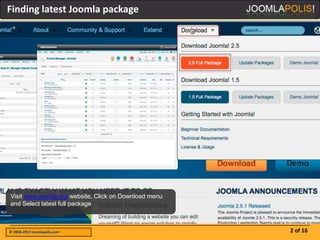
Finding latest Joomla package


Visit www.joomla.org website, Click on Download menu
and Select latest full package


© 2004-2012 Joomlapolis.com                            2 of 16
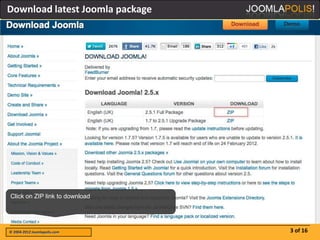
Download latest Joomla package


Click on ZIP link to download


© 2004-2012 Joomlapolis.com      3 of 16
Unzip and inspect


Unzip Joomla package and inspect contents


© 2004-2012 Joomlapolis.com                 4 of 16
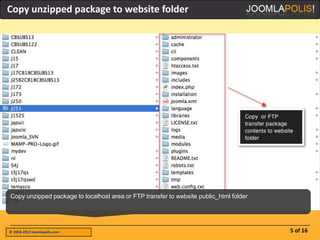
Copy unzipped package to website folder


Copy unzipped package to localhost area or FTP transfer to website public_html folder


© 2004-2012 Joomlapolis.com                                                             5 of 16
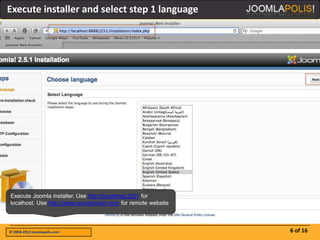
Execute installer and select step 1 language


Execute Joomla installer. Use http://localhost/J251 for
localhost. Use http://www.yourdomain.com for remote website


© 2004-2012 Joomlapolis.com                                   6 of 16
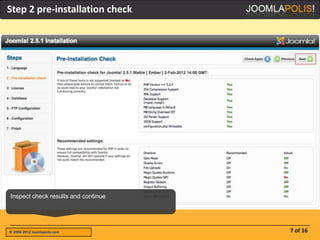
Step 2 pre-installation check


Inspect check results and continue


© 2004-2012 Joomlapolis.com          7 of 16
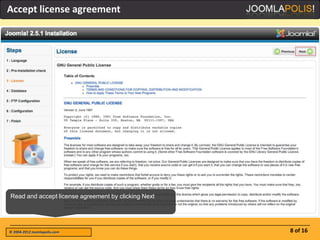
Accept license agreement


Read and accept license agreement by clicking Next


© 2004-2012 Joomlapolis.com                          8 of 16
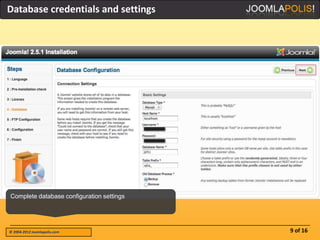
Database credentials and settings


Complete database configuration settings


© 2004-2012 Joomlapolis.com                9 of 16
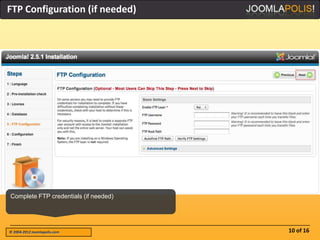
FTP Configuration (if needed)


Complete FTP credentials (if needed)


© 2004-2012 Joomlapolis.com            10 of 16
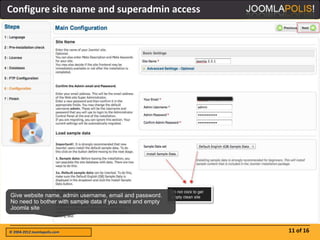
Configure site name and superadmin access


Give website name, admin username, email and password.
No need to bother with sample data if you want and empty
Joomla site


© 2004-2012 Joomlapolis.com                                11 of 16
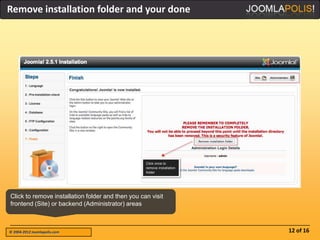
Remove installation folder and your done


Click to remove installation folder and then you can visit
frontend (Site) or backend (Administrator) areas


© 2004-2012 Joomlapolis.com                                  12 of 16
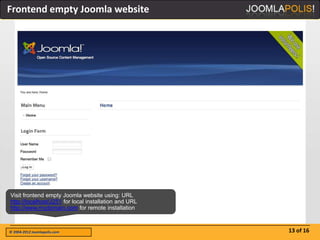
Frontend empty Joomla website


Visit frontend empty Joomla website using: URL
http://localhost/J251 for local installation and URL
http://www.mydomain.com for remote installation


© 2004-2012 Joomlapolis.com                            13 of 16
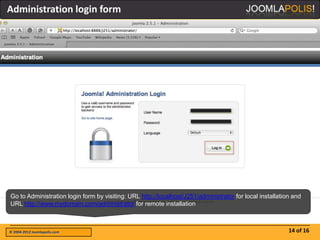
Administration login form


Go to Administration login form by visiting: URL http://localhost/J251/administrator for local installation and
URL http://www.mydomain.com/administrator for remote installation


© 2004-2012 Joomlapolis.com                                                                               14 of 16
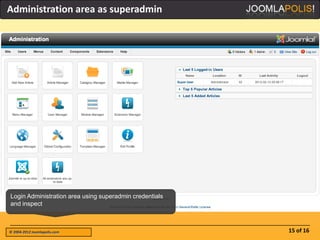
Administration area as superadmin


Login Administration area using superadmin credentials
and inspect


© 2004-2012 Joomlapolis.com                              15 of 16
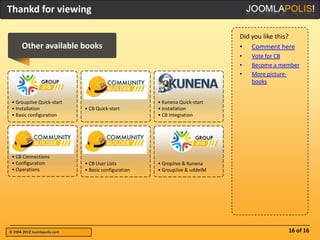
Thankd for viewing

                                                                             Did you like this?
      Other available books                                                  • Comment here
                                                                             •   Vote for CB
                                                                             •   Become a member
                                                                             •   More picture-
                                                                                 books


 • GroupJive Quick-start                              • Kunena Quick-start
 • Installation               • CB Quick-start        • Installation
 • Basic configuration                                • CB Integration


 • CB Connections
 • Configuration              • CB User Lists         • GropJive & Kunena
 • Operations                 • Basic configuration   • GroupJive & uddeIM


© 2004-2012 Joomlapolis.com                                                                 16 of 16

Jpb joomla25-quickstart

  • 1.
    Joomla 2.5 Quick-startpicture-book Links: • Joomlapolis • Community Builder • Membership • Tutorials Promotion: • Use “pic-book” coupon code and get 15% off any Joomlapolis product or subscription Getting started with Joomla 2.5 the picture-book way © 2004-2012 Joomlapolis.com
  • 2.
    Finding latest Joomlapackage Visit www.joomla.org website, Click on Download menu and Select latest full package © 2004-2012 Joomlapolis.com 2 of 16
  • 3.
    Download latest Joomlapackage Click on ZIP link to download © 2004-2012 Joomlapolis.com 3 of 16
  • 4.
    Unzip and inspect UnzipJoomla package and inspect contents © 2004-2012 Joomlapolis.com 4 of 16
  • 5.
    Copy unzipped packageto website folder Copy unzipped package to localhost area or FTP transfer to website public_html folder © 2004-2012 Joomlapolis.com 5 of 16
  • 6.
    Execute installer andselect step 1 language Execute Joomla installer. Use http://localhost/J251 for localhost. Use http://www.yourdomain.com for remote website © 2004-2012 Joomlapolis.com 6 of 16
  • 7.
    Step 2 pre-installationcheck Inspect check results and continue © 2004-2012 Joomlapolis.com 7 of 16
  • 8.
    Accept license agreement Readand accept license agreement by clicking Next © 2004-2012 Joomlapolis.com 8 of 16
  • 9.
    Database credentials andsettings Complete database configuration settings © 2004-2012 Joomlapolis.com 9 of 16
  • 10.
    FTP Configuration (ifneeded) Complete FTP credentials (if needed) © 2004-2012 Joomlapolis.com 10 of 16
  • 11.
    Configure site nameand superadmin access Give website name, admin username, email and password. No need to bother with sample data if you want and empty Joomla site © 2004-2012 Joomlapolis.com 11 of 16
  • 12.
    Remove installation folderand your done Click to remove installation folder and then you can visit frontend (Site) or backend (Administrator) areas © 2004-2012 Joomlapolis.com 12 of 16
  • 13.
    Frontend empty Joomlawebsite Visit frontend empty Joomla website using: URL http://localhost/J251 for local installation and URL http://www.mydomain.com for remote installation © 2004-2012 Joomlapolis.com 13 of 16
  • 14.
    Administration login form Goto Administration login form by visiting: URL http://localhost/J251/administrator for local installation and URL http://www.mydomain.com/administrator for remote installation © 2004-2012 Joomlapolis.com 14 of 16
  • 15.
    Administration area assuperadmin Login Administration area using superadmin credentials and inspect © 2004-2012 Joomlapolis.com 15 of 16
  • 16.
    Thankd for viewing Did you like this? Other available books • Comment here • Vote for CB • Become a member • More picture- books • GroupJive Quick-start • Kunena Quick-start • Installation • CB Quick-start • Installation • Basic configuration • CB Integration • CB Connections • Configuration • CB User Lists • GropJive & Kunena • Operations • Basic configuration • GroupJive & uddeIM © 2004-2012 Joomlapolis.com 16 of 16