CB GroupJive Quick-start Picture-book

                                                                 Links:
                                                                 •Joomlapolis
                                                                 •Community Builder
                                                                 •Membership
                                                                 •Tutorials

                                                                 Please note that
                                                                 Joomlapolis Advanced
                                                                 Membership is needed
                                                                 to get GroupJive


                                                                 Promotion:
                                                                 •Use “pic-book”
                                                                 coupon code and get
                                                                 15% off any
                                                                 Joomlapolis product
                                                                 or subscription
                         Getting started with CB GroupJive the
                         Picture-book way !


© 2004-2012 Joomlapolis.com
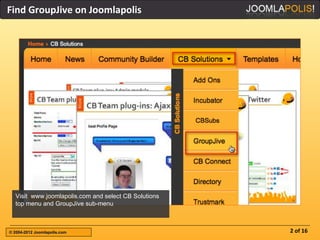
Find GroupJive on Joomlapolis


  Visit www.joomlapolis.com and select CB Solutions
  top menu and GroupJive sub-menu


© 2004-2012 Joomlapolis.com                           2 of 16
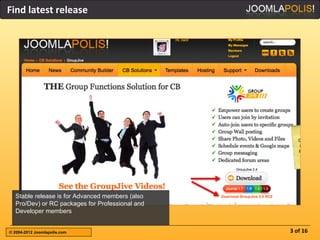
Find latest release


  Stable release is for Advanced members (also
  Pro/Dev) or RC packages for Professional and
  Developer members


© 2004-2012 Joomlapolis.com                      3 of 16
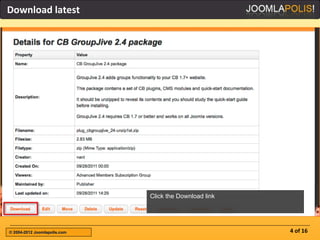
Download latest


                              Click the Download link


© 2004-2012 Joomlapolis.com                             4 of 16
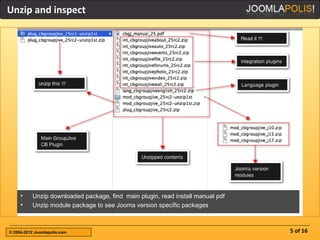
Unzip and inspect


     •    Unzip downloaded package, find main plugin, read install manual pdf
     •    Unzip module package to see Jooma version specific packages


© 2004-2012 Joomlapolis.com                                                     5 of 16
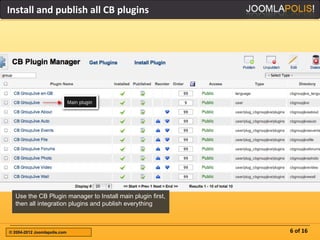
Install and publish all CB plugins


  Use the CB Plugin manager to Install main plugin first,
  then all integration plugins and publish everything


© 2004-2012 Joomlapolis.com                                 6 of 16
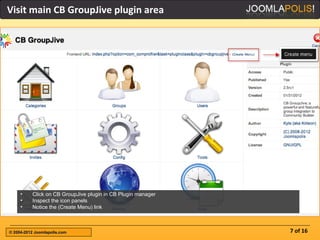
Visit main CB GroupJive plugin area


     •    Click on CB GroupJive plugin in CB Plugin manager
     •    Inspect the icon panels
     •    Notice the (Create Menu) link


© 2004-2012 Joomlapolis.com                                   7 of 16
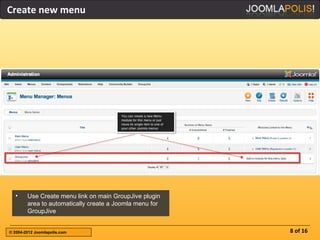
Create new menu


  •     Use Create menu link on main GroupJive plugin
        area to automatically create a Joomla menu for
        GroupJive


© 2004-2012 Joomlapolis.com                              8 of 16
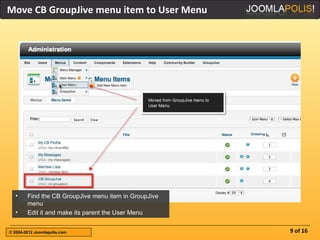
Move CB GroupJive menu item to User Menu


  •     Find the CB GroupJive menu item in GroupJive
        menu
  •     Edit it and make its parent the User Menu


© 2004-2012 Joomlapolis.com                            9 of 16
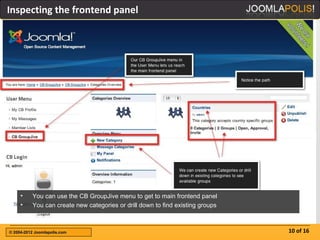
Inspecting the frontend panel


     •    You can use the CB GroupJive menu to get to main frontend panel
     •    You can create new categories or drill down to find existing groups


© 2004-2012 Joomlapolis.com                                                     10 of 16
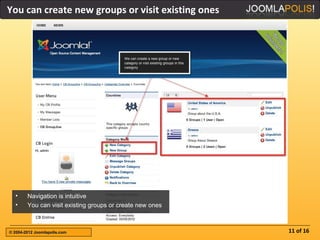
You can create new groups or visit existing ones


  •     Navigation is intuitive
  •     You can visit existing groups or create new ones


© 2004-2012 Joomlapolis.com                                11 of 16
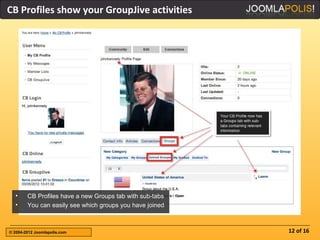
CB Profiles show your GroupJive activities


  •     CB Profiles have a new Groups tab with sub-tabs
  •     You can easily see which groups you have joined


© 2004-2012 Joomlapolis.com                               12 of 16
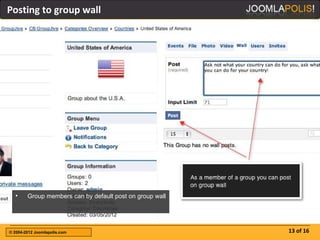
Posting to group wall


  •     Group members can by default post on group wall


© 2004-2012 Joomlapolis.com                               13 of 16
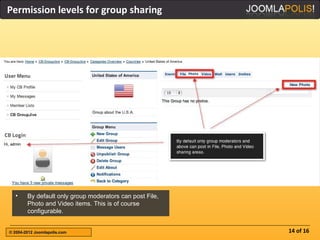
Permission levels for group sharing


  •     By default only group moderators can post File,
        Photo and Video items. This is of course
        configurable.


© 2004-2012 Joomlapolis.com                               14 of 16
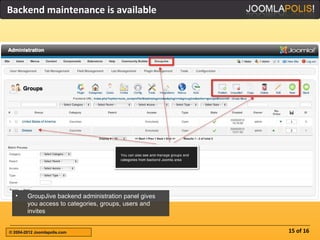
Backend maintenance is available


  •     GroupJive backend administration panel gives
        you access to categories, groups, users and
        invites


© 2004-2012 Joomlapolis.com                            15 of 16
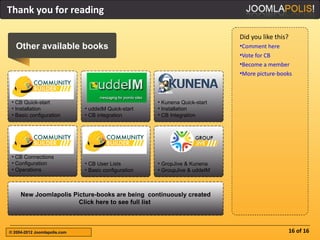
Thank you for reading

                                                                             Did you like this?
   Other available books                                                     •Comment here
                                                                             •Vote for CB
                                                                             •Become a member
                                                                             •More picture-books


 • CB Quick-start                                     • Kunena Quick-start
 • Installation               • uddeIM Quick-start    • Installation
 • Basic configuration        • CB integration        • CB Integration


 • CB Connections
 • Configuration              • CB User Lists         • GropJive & Kunena
 • Operations                 • Basic configuration   • GroupJive & uddeIM


     New Joomlapolis Picture-books are being continuously created
                       Click here to see full list


© 2004-2012 Joomlapolis.com                                                                       16 of 16

Jpb group jive-quickstart

  • 1.
    CB GroupJive Quick-startPicture-book Links: •Joomlapolis •Community Builder •Membership •Tutorials Please note that Joomlapolis Advanced Membership is needed to get GroupJive Promotion: •Use “pic-book” coupon code and get 15% off any Joomlapolis product or subscription Getting started with CB GroupJive the Picture-book way ! © 2004-2012 Joomlapolis.com
  • 2.
    Find GroupJive onJoomlapolis Visit www.joomlapolis.com and select CB Solutions top menu and GroupJive sub-menu © 2004-2012 Joomlapolis.com 2 of 16
  • 3.
    Find latest release Stable release is for Advanced members (also Pro/Dev) or RC packages for Professional and Developer members © 2004-2012 Joomlapolis.com 3 of 16
  • 4.
    Download latest Click the Download link © 2004-2012 Joomlapolis.com 4 of 16
  • 5.
    Unzip and inspect • Unzip downloaded package, find main plugin, read install manual pdf • Unzip module package to see Jooma version specific packages © 2004-2012 Joomlapolis.com 5 of 16
  • 6.
    Install and publishall CB plugins Use the CB Plugin manager to Install main plugin first, then all integration plugins and publish everything © 2004-2012 Joomlapolis.com 6 of 16
  • 7.
    Visit main CBGroupJive plugin area • Click on CB GroupJive plugin in CB Plugin manager • Inspect the icon panels • Notice the (Create Menu) link © 2004-2012 Joomlapolis.com 7 of 16
  • 8.
    Create new menu • Use Create menu link on main GroupJive plugin area to automatically create a Joomla menu for GroupJive © 2004-2012 Joomlapolis.com 8 of 16
  • 9.
    Move CB GroupJivemenu item to User Menu • Find the CB GroupJive menu item in GroupJive menu • Edit it and make its parent the User Menu © 2004-2012 Joomlapolis.com 9 of 16
  • 10.
    Inspecting the frontendpanel • You can use the CB GroupJive menu to get to main frontend panel • You can create new categories or drill down to find existing groups © 2004-2012 Joomlapolis.com 10 of 16
  • 11.
    You can createnew groups or visit existing ones • Navigation is intuitive • You can visit existing groups or create new ones © 2004-2012 Joomlapolis.com 11 of 16
  • 12.
    CB Profiles showyour GroupJive activities • CB Profiles have a new Groups tab with sub-tabs • You can easily see which groups you have joined © 2004-2012 Joomlapolis.com 12 of 16
  • 13.
    Posting to groupwall • Group members can by default post on group wall © 2004-2012 Joomlapolis.com 13 of 16
  • 14.
    Permission levels forgroup sharing • By default only group moderators can post File, Photo and Video items. This is of course configurable. © 2004-2012 Joomlapolis.com 14 of 16
  • 15.
    Backend maintenance isavailable • GroupJive backend administration panel gives you access to categories, groups, users and invites © 2004-2012 Joomlapolis.com 15 of 16
  • 16.
    Thank you forreading Did you like this? Other available books •Comment here •Vote for CB •Become a member •More picture-books • CB Quick-start • Kunena Quick-start • Installation • uddeIM Quick-start • Installation • Basic configuration • CB integration • CB Integration • CB Connections • Configuration • CB User Lists • GropJive & Kunena • Operations • Basic configuration • GroupJive & uddeIM New Joomlapolis Picture-books are being continuously created Click here to see full list © 2004-2012 Joomlapolis.com 16 of 16