Creating your first CB User List

                                                                        Links:
                                                                        •    Joomlapolis
                                                                        •    Community Builder
                                                                        •    Membership
                                                                        •    Tutorials


                                                                        Promotion:
                                                                        •   Use “pic-book”
                                                                            coupon code and
                                                                            get 15% off any
                                                                            Joomlapolis
                                                                            product or
                                                                            subscription


                              Community Builder user list quick-start
                              guide


© 2004-2012 Joomlapolis.com
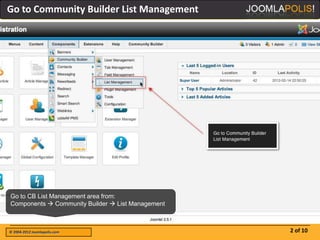
Go to Community Builder List Management


Go to CB List Management area from:
Components  Community Builder  List Management


© 2004-2012 Joomlapolis.com                        2 of 10
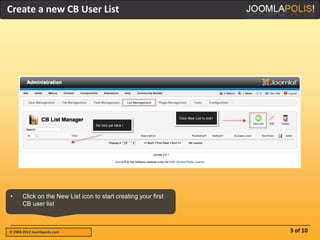
Create a new CB User List


•      Click on the New List icon to start creating your first
       CB user list


© 2004-2012 Joomlapolis.com                                      3 of 10
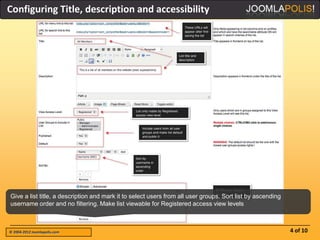
Configuring Title, description and accessibility


Give a list title, a description and mark it to select users from all user groups. Sort list by ascending
username order and no filtering. Make list viewable for Registered access view levels


© 2004-2012 Joomlapolis.com                                                                                 4 of 10
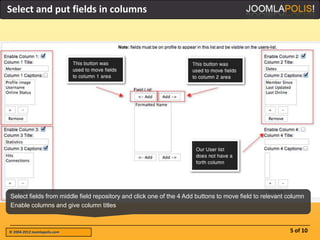
Select and put fields in columns


Select fields from middle field repository and click one of the 4 Add buttons to move field to relevant column
Enable columns and give column titles


© 2004-2012 Joomlapolis.com                                                                             5 of 10
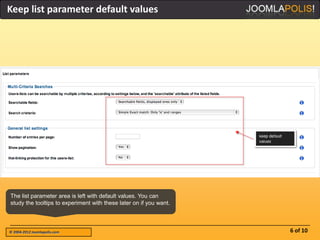
Keep list parameter default values


The list parameter area is left with default values. You can
study the tooltips to experiment with these later on if you want.


© 2004-2012 Joomlapolis.com                                         6 of 10
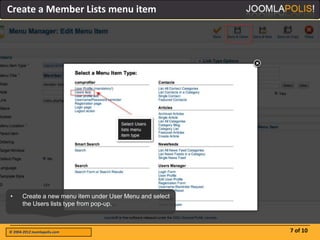
Create a Member Lists menu item


•      Create a new menu item under User Menu and select
       the Users lists type from pop-up.


© 2004-2012 Joomlapolis.com                                7 of 10
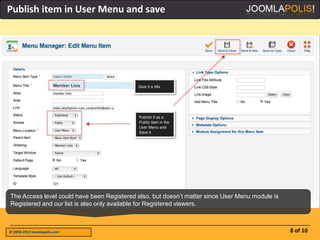
Publish item in User Menu and save


The Access level could have been Registered also, but doesn’t matter since User Menu module is
Registered and our list is also only available for Registered viewers.


© 2004-2012 Joomlapolis.com                                                                      8 of 10
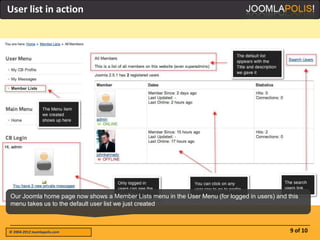
User list in action


Our Joomla home page now shows a Member Lists menu in the User Menu (for logged in users) and this
menu takes us to the default user list we just created


© 2004-2012 Joomlapolis.com                                                                    9 of 10
Thank you for viewing

                                                                            Did you like this?
      Other available books                                                 • Comment here
                                                                            •   Vote for CB
                                                                            •   Become a member
                                                                            •   More picture-
                                                                                books


 • GroupJive Quick-start                             • Kunena Quick-start
 • Installation               • uddeIM Quick-start   • Installation
 • Basic configuration        • CB integration       • CB Integration


 • CB Connections             • CB Connections
 • Configuration              • Configuration        • GropJive & Kunena
 • Operations                 • Operations           • GroupJive & uddeIM


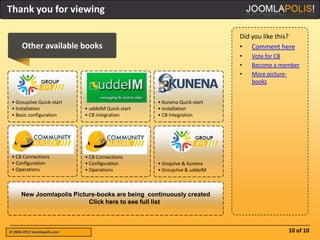
      New Joomlapolis Picture-books are being continuously created
                           Click here to see full list


© 2004-2012 Joomlapolis.com                                                                10 of 10

Jpb cb-user list-quickstart

  • 1.
    Creating your firstCB User List Links: • Joomlapolis • Community Builder • Membership • Tutorials Promotion: • Use “pic-book” coupon code and get 15% off any Joomlapolis product or subscription Community Builder user list quick-start guide © 2004-2012 Joomlapolis.com
  • 2.
    Go to CommunityBuilder List Management Go to CB List Management area from: Components  Community Builder  List Management © 2004-2012 Joomlapolis.com 2 of 10
  • 3.
    Create a newCB User List • Click on the New List icon to start creating your first CB user list © 2004-2012 Joomlapolis.com 3 of 10
  • 4.
    Configuring Title, descriptionand accessibility Give a list title, a description and mark it to select users from all user groups. Sort list by ascending username order and no filtering. Make list viewable for Registered access view levels © 2004-2012 Joomlapolis.com 4 of 10
  • 5.
    Select and putfields in columns Select fields from middle field repository and click one of the 4 Add buttons to move field to relevant column Enable columns and give column titles © 2004-2012 Joomlapolis.com 5 of 10
  • 6.
    Keep list parameterdefault values The list parameter area is left with default values. You can study the tooltips to experiment with these later on if you want. © 2004-2012 Joomlapolis.com 6 of 10
  • 7.
    Create a MemberLists menu item • Create a new menu item under User Menu and select the Users lists type from pop-up. © 2004-2012 Joomlapolis.com 7 of 10
  • 8.
    Publish item inUser Menu and save The Access level could have been Registered also, but doesn’t matter since User Menu module is Registered and our list is also only available for Registered viewers. © 2004-2012 Joomlapolis.com 8 of 10
  • 9.
    User list inaction Our Joomla home page now shows a Member Lists menu in the User Menu (for logged in users) and this menu takes us to the default user list we just created © 2004-2012 Joomlapolis.com 9 of 10
  • 10.
    Thank you forviewing Did you like this? Other available books • Comment here • Vote for CB • Become a member • More picture- books • GroupJive Quick-start • Kunena Quick-start • Installation • uddeIM Quick-start • Installation • Basic configuration • CB integration • CB Integration • CB Connections • CB Connections • Configuration • Configuration • GropJive & Kunena • Operations • Operations • GroupJive & uddeIM New Joomlapolis Picture-books are being continuously created Click here to see full list © 2004-2012 Joomlapolis.com 10 of 10