Joomla! Exntension

Khmer Joomla
http://www.khmerjoomla.org

Prepared by: Sitthykun LY
Web Developer and Consultant
Tel: 012/090 30 60 49
Email: ly.sitthykun@gmail.com
Joomla Extension




Basically a Joomla extension is any program or
application that extends the core functionality of
the Joomla! CMS. Think forum, directory,
comments, galleries, so on and so on,
something you could blow on…
There are three types of extension:


Component



Module



Plugin
Joomla Extentsion




Before you will use it. Let's me review some
features
Joomla separates two parts:


Front End



Back End



Joomla depends on files and database



Joomla Extension Address


http://extensions.joomla.org/extensions/
Joomla Extension


What?



Why?



How?



Example
What is a Joomla component?


A component is an extension that enhances the
core functionality of your Joomla CMS. This is
usually displayed in the “main content” section
of your website. Think forum, image gallery,
contacts. So on and so on.
Why do you need component?





Example: If you want to upgrade your web base
to be a forum. So you must create component
by yourself or download
Then your web has a forum
But you must validate the source code and/or
background of the component
How to install and uninstall?


Administrator Site > Extensions > install /
uninstall


Install: click install






1. Upload Package File: Offline installation
2. Install from Directory: Offlince installation
3. Install from URL: Online installation

Uninstall: click component > choose the component
name and click Uninstall
How to use?


After you installed.



How to test?




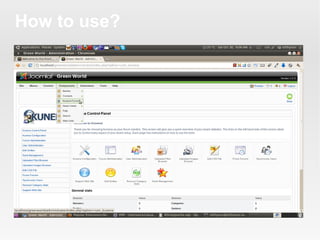
Back End: click components menu and find your
component name
Front End:





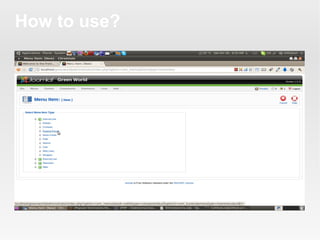
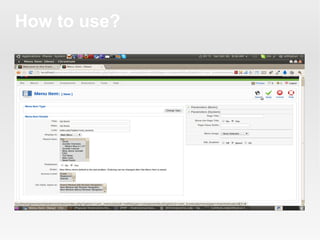
Create a link page: Menus > Menu items > New
Menu Item: [New] Click on Component name >
Customize yourself > Save
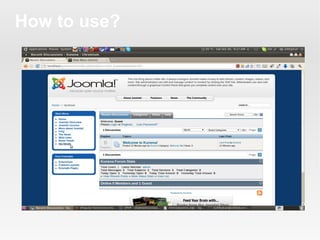
Go to front end click your link
How to use?
How to use?
How to use?
How to use?
What is a Joomla module?


A module, for the most part, is a program to
create content that surrounds your “main
content” section. These are mainly displayed in
the different module positions: top, left, right,
etc. Joomla modules usually go hand-in-hand
to display certain information from other
installed components. Ex: display latest forum
post made on your forum component, display
random images from your image gallery
component, display latest news, most popular
articles, so on and so on. Even the menus are
modules. Note: You can display modules in
“main content”, but that’s another how-to.
Why do you need module?




Because it's a feature. It can show your tool for
your purpose
It can run with other modules and component
How to install and uninstall?


Back to slide 7



Just change Component to module
How to use?


After you installed



Select block for appearing module's position






You can set position up to your block but refer
to your template.
How many blocks in your template?
How to know your position name in your
template?



Where are these?



How to know ordering?
How many blocks in your template?


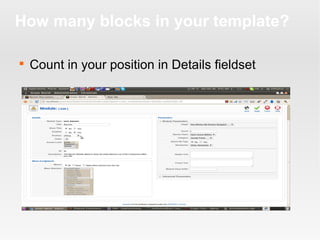
Count in your position in Details fieldset
Where are these?


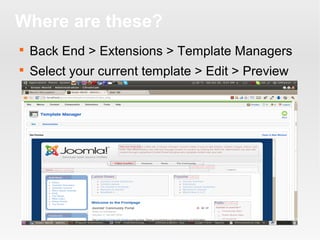
Back End > Extensions > Template Managers



Select your current template > Edit > Preview
How to know ordering?


Extension > Modules > Select module item



Detail > Order
What is a Joomla plugin?


This is usually a trigger that is used to
immediately extend the functionality of your
“main content”. Think gallery inside of content.
Think comments; think automatic thumbnails,
editor, so on and so on.
Why do you need plugin?




Because we add the feature to your component
or module.
Ex: editor ...
How to install and uninstall?


Back to slide 7



Just change component to plugin
How to use?


Refers to the plugin



Example


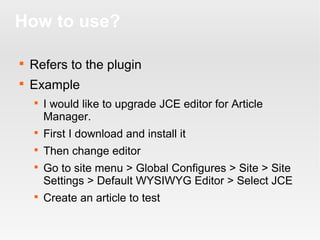
I would like to upgrade JCE editor for Article
Manager.



First I download and install it



Then change editor





Go to site menu > Global Configures > Site > Site
Settings > Default WYSIWYG Editor > Select JCE
Create an article to test
Reference


http://www.joomlathug.com/quick-tips/general/what



http://joomla.org/
Thank you!
Good luck!!
See you later!!!

Joomla basic-iii undersrtanding-installing-configuring-joomla-extensions

  • 1.
    Joomla! Exntension Khmer Joomla http://www.khmerjoomla.org Prepared by:Sitthykun LY Web Developer and Consultant Tel: 012/090 30 60 49 Email: ly.sitthykun@gmail.com
  • 2.
    Joomla Extension   Basically aJoomla extension is any program or application that extends the core functionality of the Joomla! CMS. Think forum, directory, comments, galleries, so on and so on, something you could blow on… There are three types of extension:  Component  Module  Plugin
  • 3.
    Joomla Extentsion   Before youwill use it. Let's me review some features Joomla separates two parts:  Front End  Back End  Joomla depends on files and database  Joomla Extension Address  http://extensions.joomla.org/extensions/
  • 4.
  • 5.
    What is aJoomla component?  A component is an extension that enhances the core functionality of your Joomla CMS. This is usually displayed in the “main content” section of your website. Think forum, image gallery, contacts. So on and so on.
  • 6.
    Why do youneed component?    Example: If you want to upgrade your web base to be a forum. So you must create component by yourself or download Then your web has a forum But you must validate the source code and/or background of the component
  • 7.
    How to installand uninstall?  Administrator Site > Extensions > install / uninstall  Install: click install     1. Upload Package File: Offline installation 2. Install from Directory: Offlince installation 3. Install from URL: Online installation Uninstall: click component > choose the component name and click Uninstall
  • 8.
    How to use?  Afteryou installed.  How to test?   Back End: click components menu and find your component name Front End:    Create a link page: Menus > Menu items > New Menu Item: [New] Click on Component name > Customize yourself > Save Go to front end click your link
  • 9.
  • 10.
  • 11.
  • 12.
  • 13.
    What is aJoomla module?  A module, for the most part, is a program to create content that surrounds your “main content” section. These are mainly displayed in the different module positions: top, left, right, etc. Joomla modules usually go hand-in-hand to display certain information from other installed components. Ex: display latest forum post made on your forum component, display random images from your image gallery component, display latest news, most popular articles, so on and so on. Even the menus are modules. Note: You can display modules in “main content”, but that’s another how-to.
  • 14.
    Why do youneed module?   Because it's a feature. It can show your tool for your purpose It can run with other modules and component
  • 15.
    How to installand uninstall?  Back to slide 7  Just change Component to module
  • 16.
    How to use?  Afteryou installed  Select block for appearing module's position    You can set position up to your block but refer to your template. How many blocks in your template? How to know your position name in your template?  Where are these?  How to know ordering?
  • 17.
    How many blocksin your template?  Count in your position in Details fieldset
  • 18.
    Where are these?  BackEnd > Extensions > Template Managers  Select your current template > Edit > Preview
  • 19.
    How to knowordering?  Extension > Modules > Select module item  Detail > Order
  • 20.
    What is aJoomla plugin?  This is usually a trigger that is used to immediately extend the functionality of your “main content”. Think gallery inside of content. Think comments; think automatic thumbnails, editor, so on and so on.
  • 21.
    Why do youneed plugin?   Because we add the feature to your component or module. Ex: editor ...
  • 22.
    How to installand uninstall?  Back to slide 7  Just change component to plugin
  • 23.
    How to use?  Refersto the plugin  Example  I would like to upgrade JCE editor for Article Manager.  First I download and install it  Then change editor   Go to site menu > Global Configures > Site > Site Settings > Default WYSIWYG Editor > Select JCE Create an article to test
  • 24.
  • 25.

Editor's Notes