SM
JobGateway

December Release Overview

Highlights & Features

December 9, 2013
2

JOBGATEWAYSM >> DECEMBER RELEASE OVERVIEW – HIGHLIGHTS & FEATURES

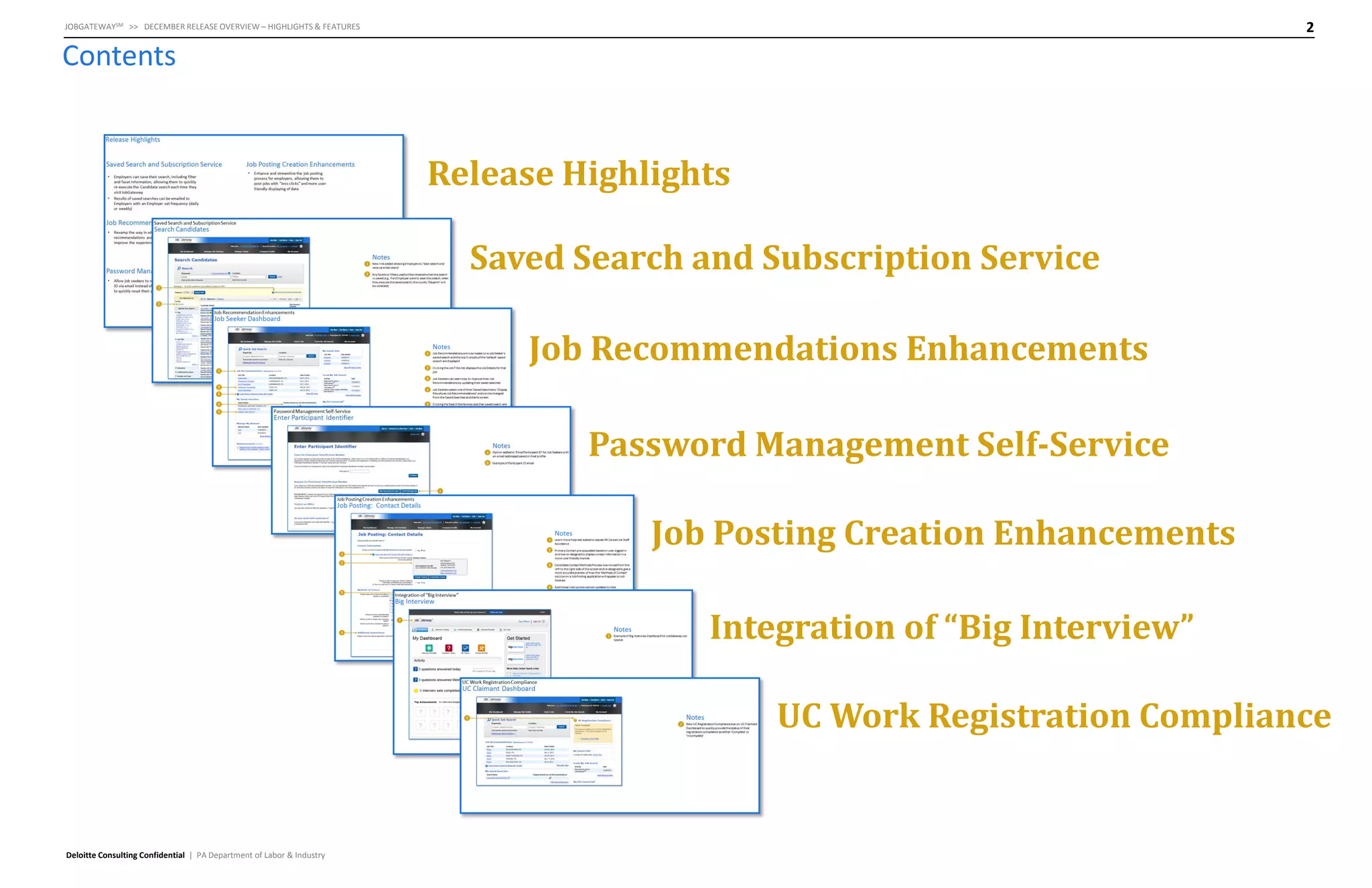
Contents

Release Highlights
Saved Search and Subscription Service
Job Recommendations Enhancements

Password Management Self-Service
Job Posting Creation Enhancements
Integration of “Big Interview”
UC Work Registration Compliance

Deloitte Consulting Confidential | PA Department of Labor & Industry
Release Highlights
4

JOBGATEWAYSM >> DECEMBER RELEASE OVERVIEW – HIGHLIGHTS & FEATURES

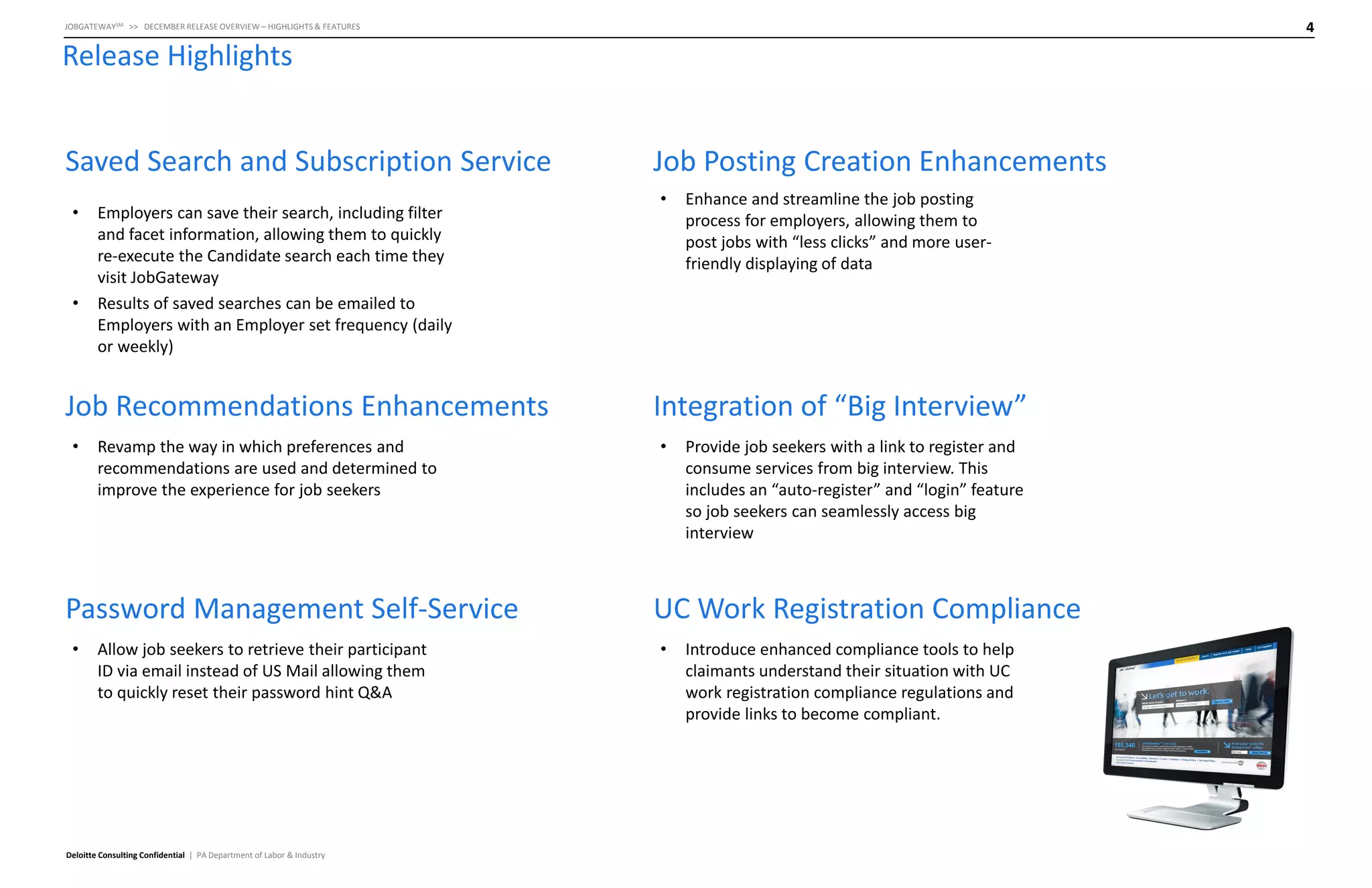
Release Highlights
Saved Search and Subscription Service
•

•

Employers can save their search, including filter
and facet information, allowing them to quickly
re-execute the Candidate search each time they
visit JobGateway
Results of saved searches can be emailed to
Employers with an Employer set frequency (daily
or weekly)

Job Recommendations Enhancements
•

Revamp the way in which preferences and
recommendations are used and determined to
improve the experience for job seekers

Password Management Self-Service
•

Allow job seekers to retrieve their participant
ID via email instead of US Mail allowing them
to quickly reset their password hint Q&A

Deloitte Consulting Confidential | PA Department of Labor & Industry

Job Posting Creation Enhancements
•

Enhance and streamline the job posting
process for employers, allowing them to
post jobs with “less clicks” and more userfriendly displaying of data

Integration of “Big Interview”
•

Provide job seekers with a link to register and
consume services from big interview. This
includes an “auto-register” and “login” feature
so job seekers can seamlessly access big
interview

UC Work Registration Compliance
•

Introduce enhanced compliance tools to help
claimants understand their situation with UC
work registration compliance regulations and
provide links to become compliant.
Saved Search and Subscription
Service
6

JOBGATEWAYSM >> DECEMBER RELEASE OVERVIEW – HIGHLIGHTS & FEATURES

Saved Search and Subscription Service

Search Candidates

Notes
1
2

1

2

Deloitte Consulting Confidential | PA Department of Labor & Industry

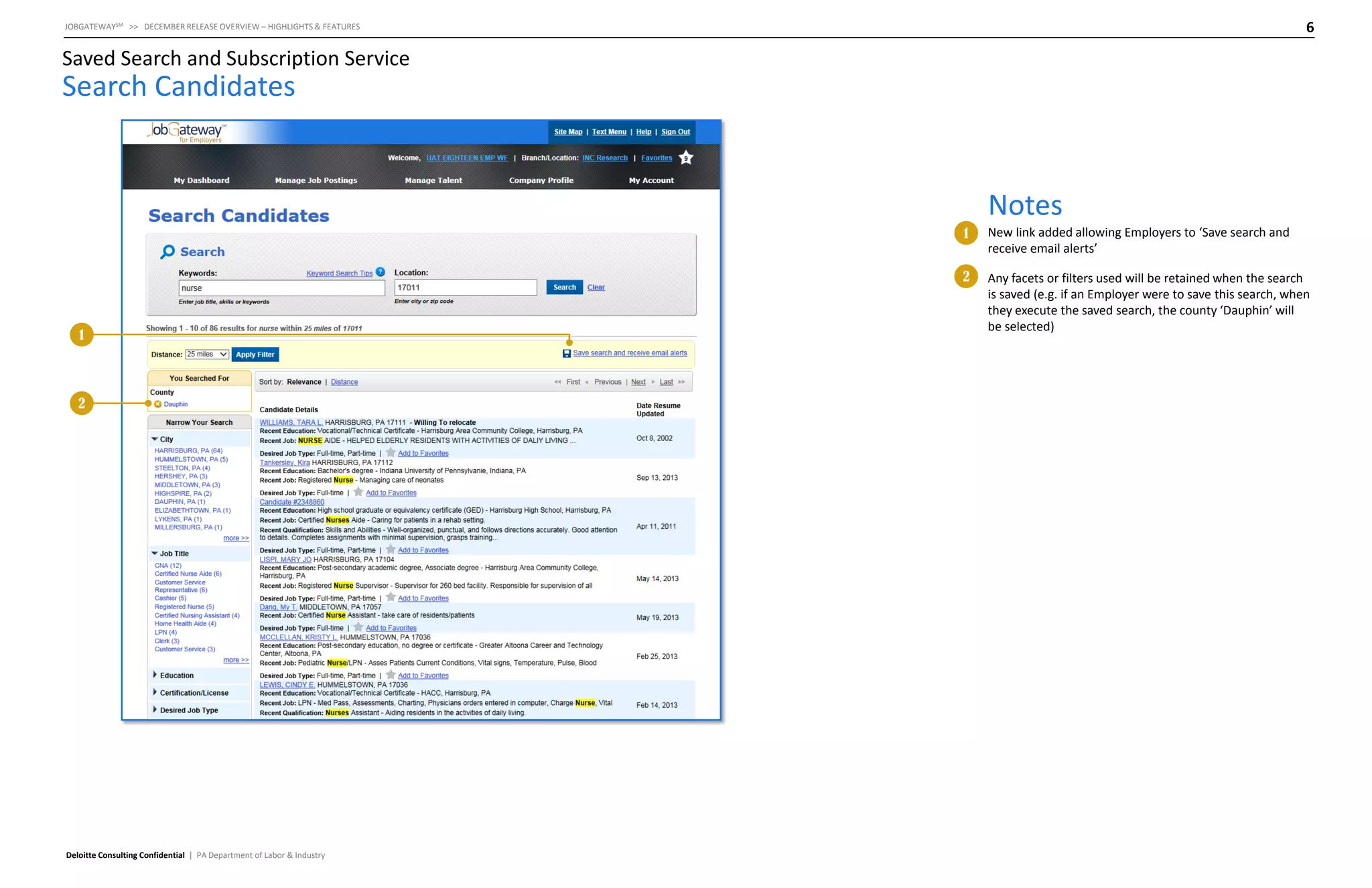
New link added allowing Employers to ‘Save search and
receive email alerts’
Any facets or filters used will be retained when the search
is saved (e.g. if an Employer were to save this search, when
they execute the saved search, the county ‘Dauphin’ will
be selected)
7

JOBGATEWAYSM >> DECEMBER RELEASE OVERVIEW – HIGHLIGHTS & FEATURES

Saved Search and Subscription Service

Search Candidates – Create Saved Searches and Email Alerts

Notes
1

1

2

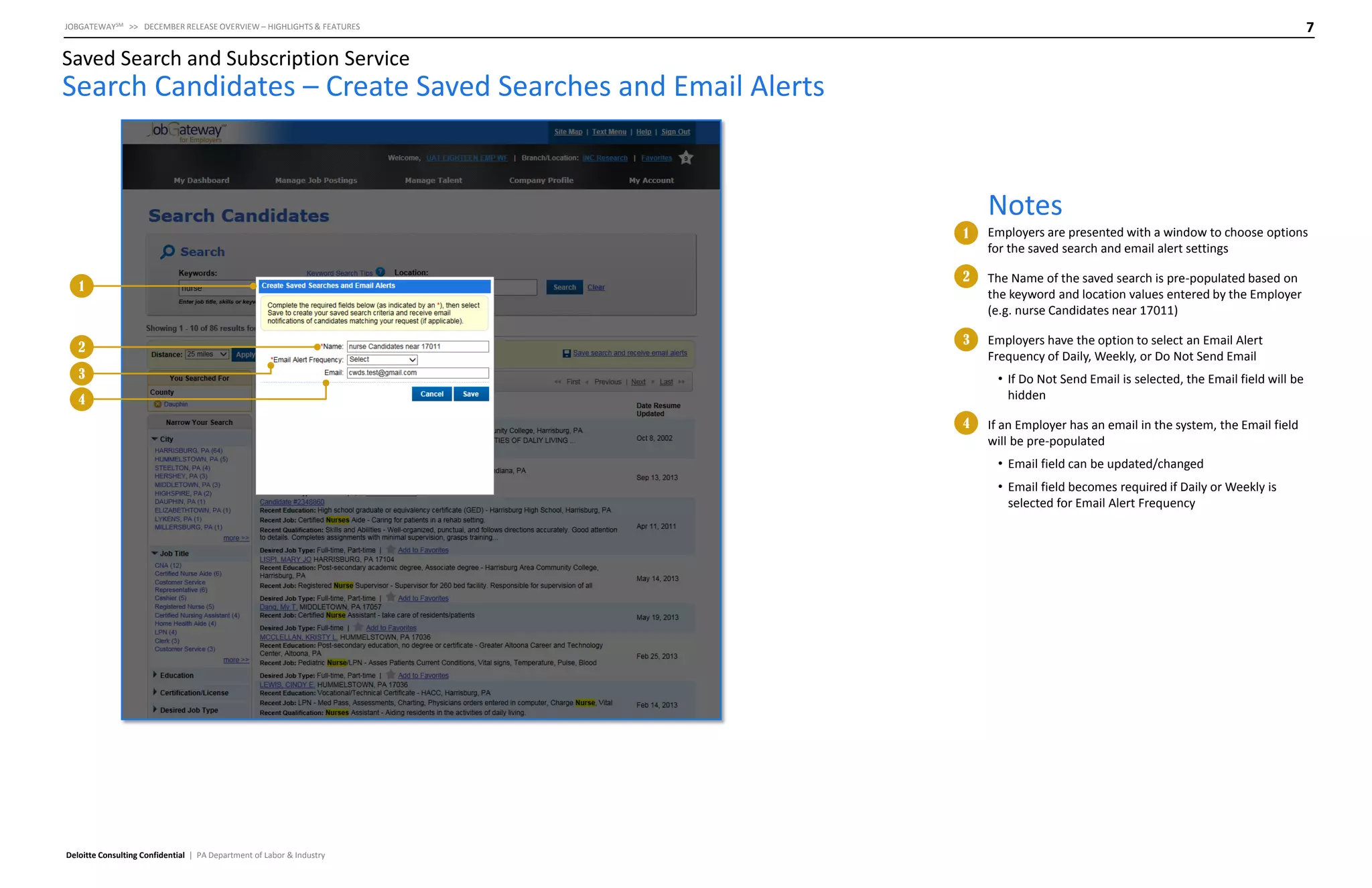
Employers are presented with a window to choose options
for the saved search and email alert settings

2

The Name of the saved search is pre-populated based on
the keyword and location values entered by the Employer
(e.g. nurse Candidates near 17011)

3

Employers have the option to select an Email Alert
Frequency of Daily, Weekly, or Do Not Send Email

3

• If Do Not Send Email is selected, the Email field will be
hidden

4
4

If an Employer has an email in the system, the Email field
will be pre-populated
• Email field can be updated/changed
• Email field becomes required if Daily or Weekly is
selected for Email Alert Frequency

Deloitte Consulting Confidential | PA Department of Labor & Industry
8

JOBGATEWAYSM >> DECEMBER RELEASE OVERVIEW – HIGHLIGHTS & FEATURES

Saved Search and Subscription Service

Search Candidates – Confirm Your Email

Notes
1

1

Deloitte Consulting Confidential | PA Department of Labor & Industry

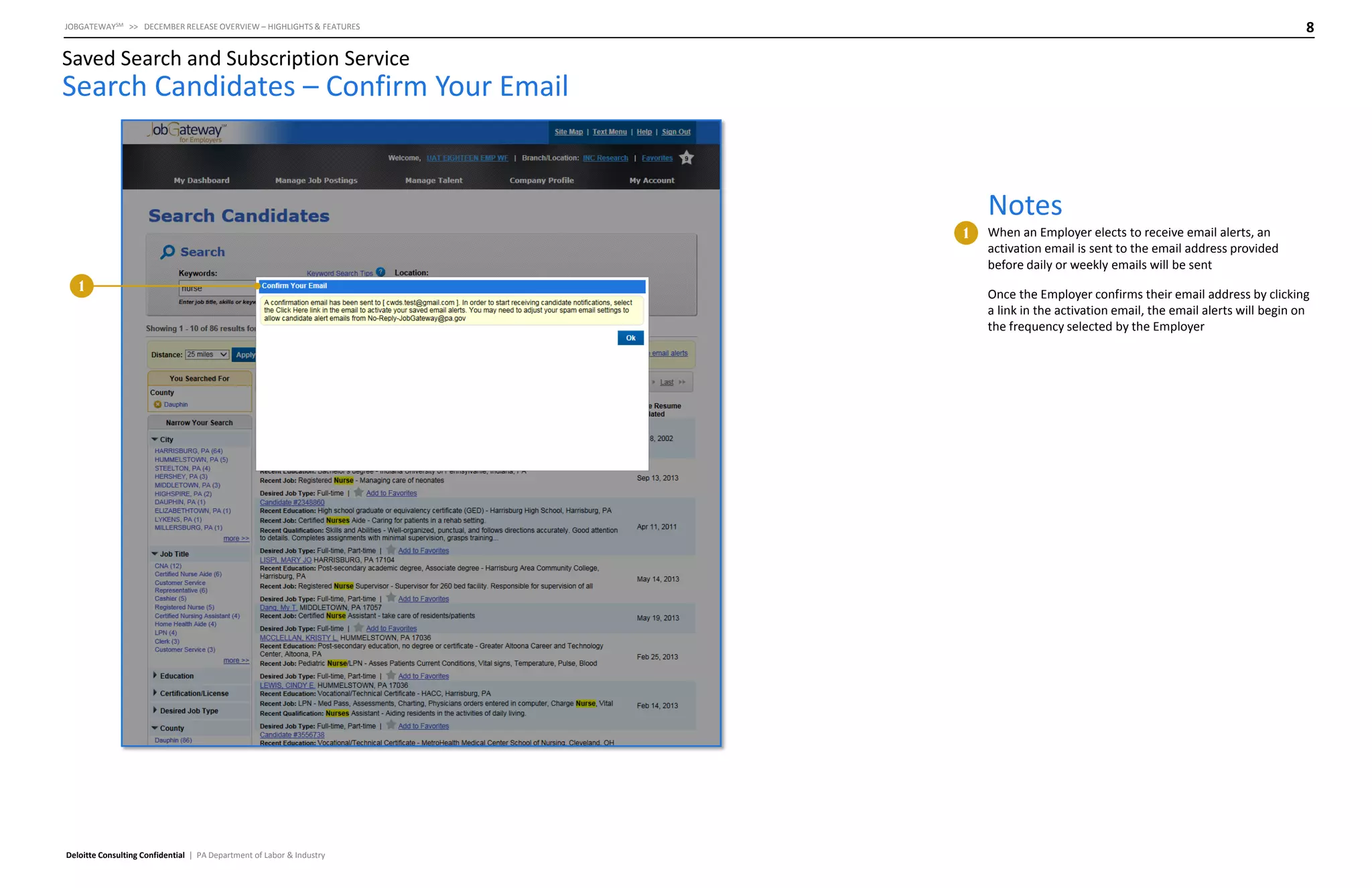
When an Employer elects to receive email alerts, an
activation email is sent to the email address provided
before daily or weekly emails will be sent
Once the Employer confirms their email address by clicking
a link in the activation email, the email alerts will begin on
the frequency selected by the Employer
9

JOBGATEWAYSM >> DECEMBER RELEASE OVERVIEW – HIGHLIGHTS & FEATURES

Saved Search and Subscription Service

Saved Search Email Confirmation

Notes
1

Deloitte Consulting Confidential | PA Department of Labor & Industry

1

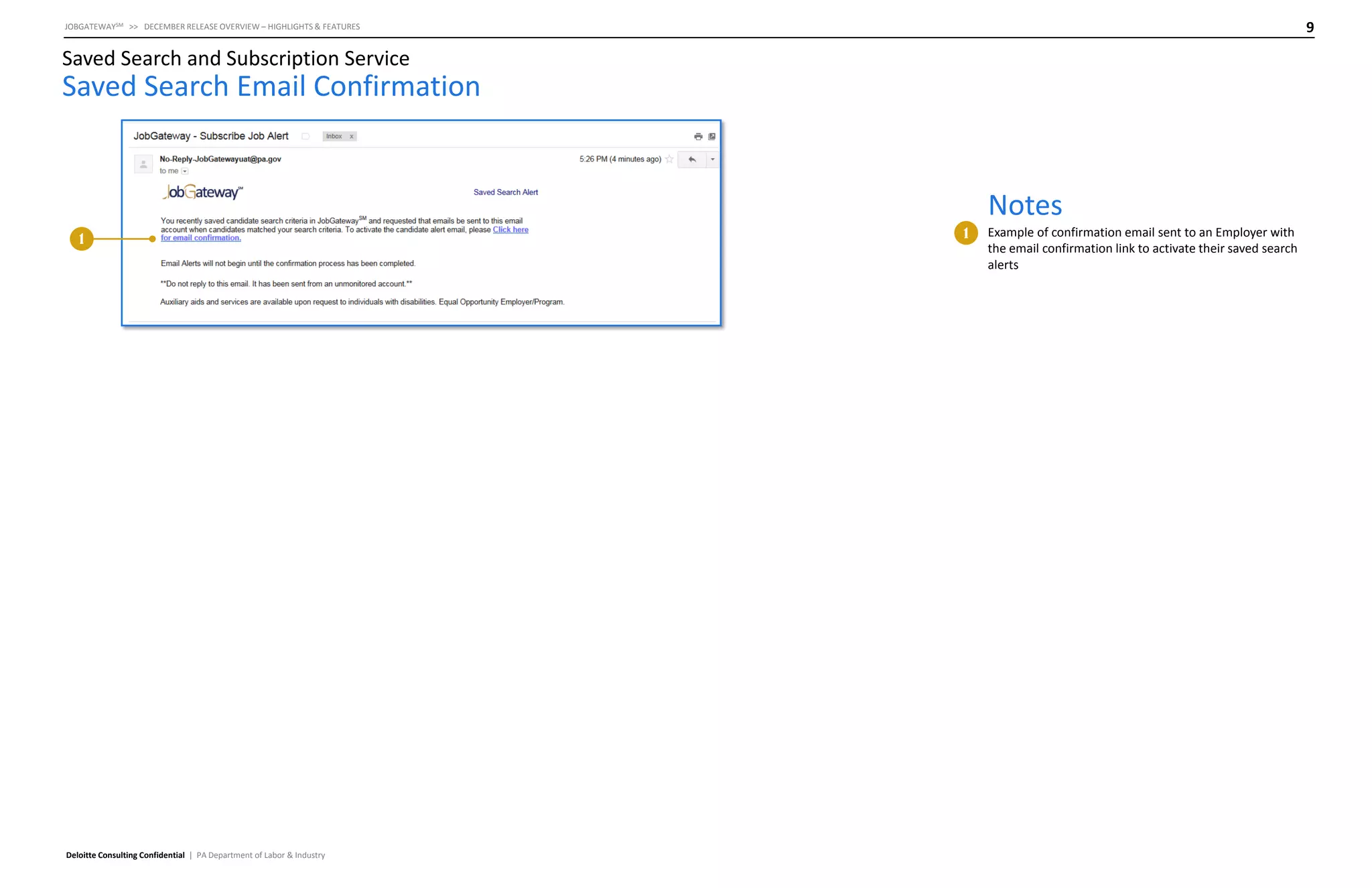
Example of confirmation email sent to an Employer with
the email confirmation link to activate their saved search
alerts
10

JOBGATEWAYSM >> DECEMBER RELEASE OVERVIEW – HIGHLIGHTS & FEATURES

Saved Search and Subscription Service

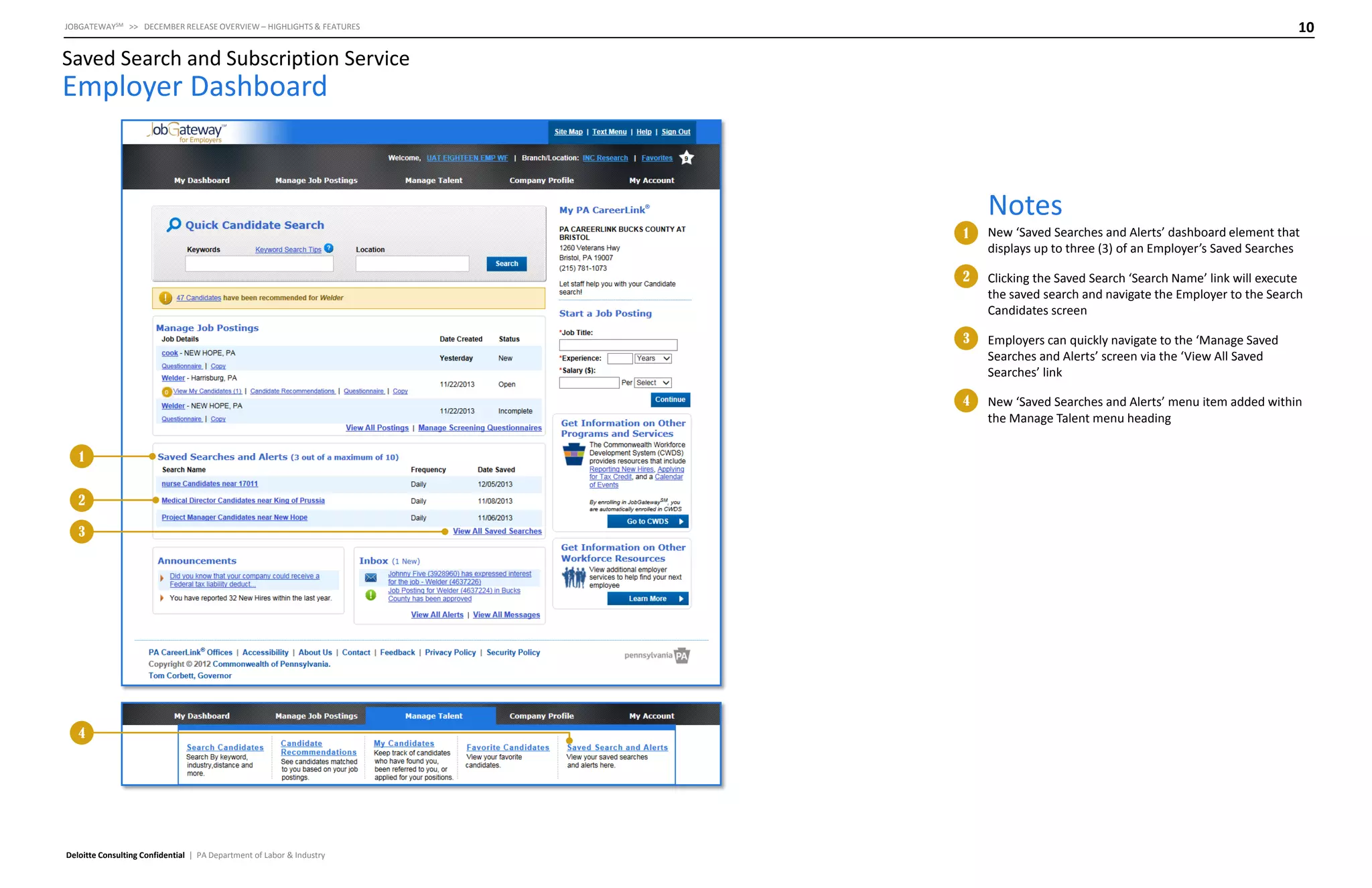
Employer Dashboard

Notes
1
2

3

4

Deloitte Consulting Confidential | PA Department of Labor & Industry

Employers can quickly navigate to the ‘Manage Saved
Searches and Alerts’ screen via the ‘View All Saved
Searches’ link

4

2

Clicking the Saved Search ‘Search Name’ link will execute
the saved search and navigate the Employer to the Search
Candidates screen

3

1

New ‘Saved Searches and Alerts’ dashboard element that
displays up to three (3) of an Employer’s Saved Searches

New ‘Saved Searches and Alerts’ menu item added within
the Manage Talent menu heading
11

JOBGATEWAYSM >> DECEMBER RELEASE OVERVIEW – HIGHLIGHTS & FEATURES

Saved Search and Subscription Service

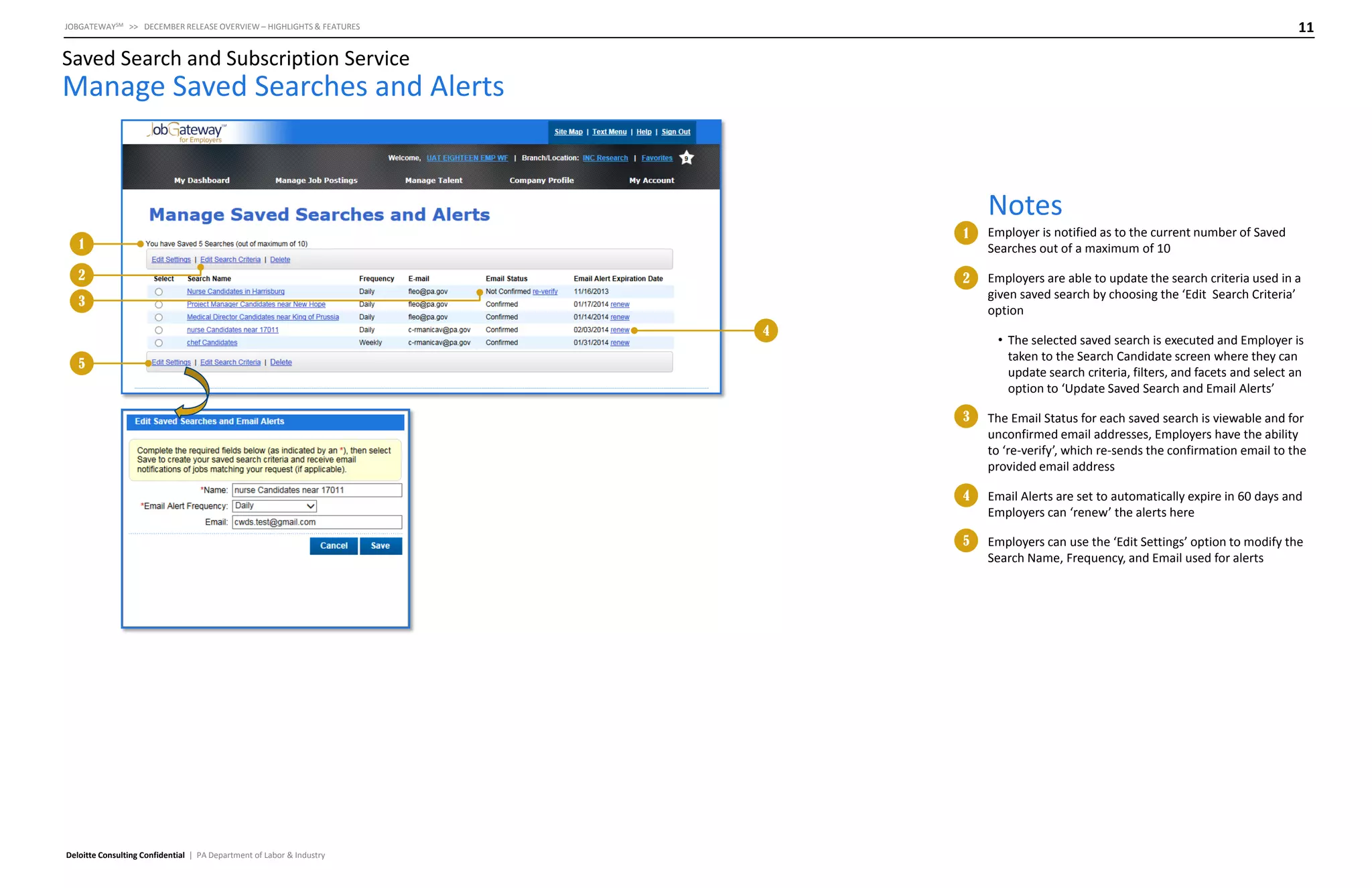
Manage Saved Searches and Alerts

Notes
1

2

Employer is notified as to the current number of Saved
Searches out of a maximum of 10

2

1

Employers are able to update the search criteria used in a
given saved search by choosing the ‘Edit Search Criteria’
option

3
4

• The selected saved search is executed and Employer is
taken to the Search Candidate screen where they can
update search criteria, filters, and facets and select an
option to ‘Update Saved Search and Email Alerts’

5

3

4

Email Alerts are set to automatically expire in 60 days and
Employers can ‘renew’ the alerts here

5

Deloitte Consulting Confidential | PA Department of Labor & Industry

The Email Status for each saved search is viewable and for
unconfirmed email addresses, Employers have the ability
to ‘re-verify’, which re-sends the confirmation email to the
provided email address

Employers can use the ‘Edit Settings’ option to modify the
Search Name, Frequency, and Email used for alerts
12

JOBGATEWAYSM >> DECEMBER RELEASE OVERVIEW – HIGHLIGHTS & FEATURES

Saved Search and Subscription Service

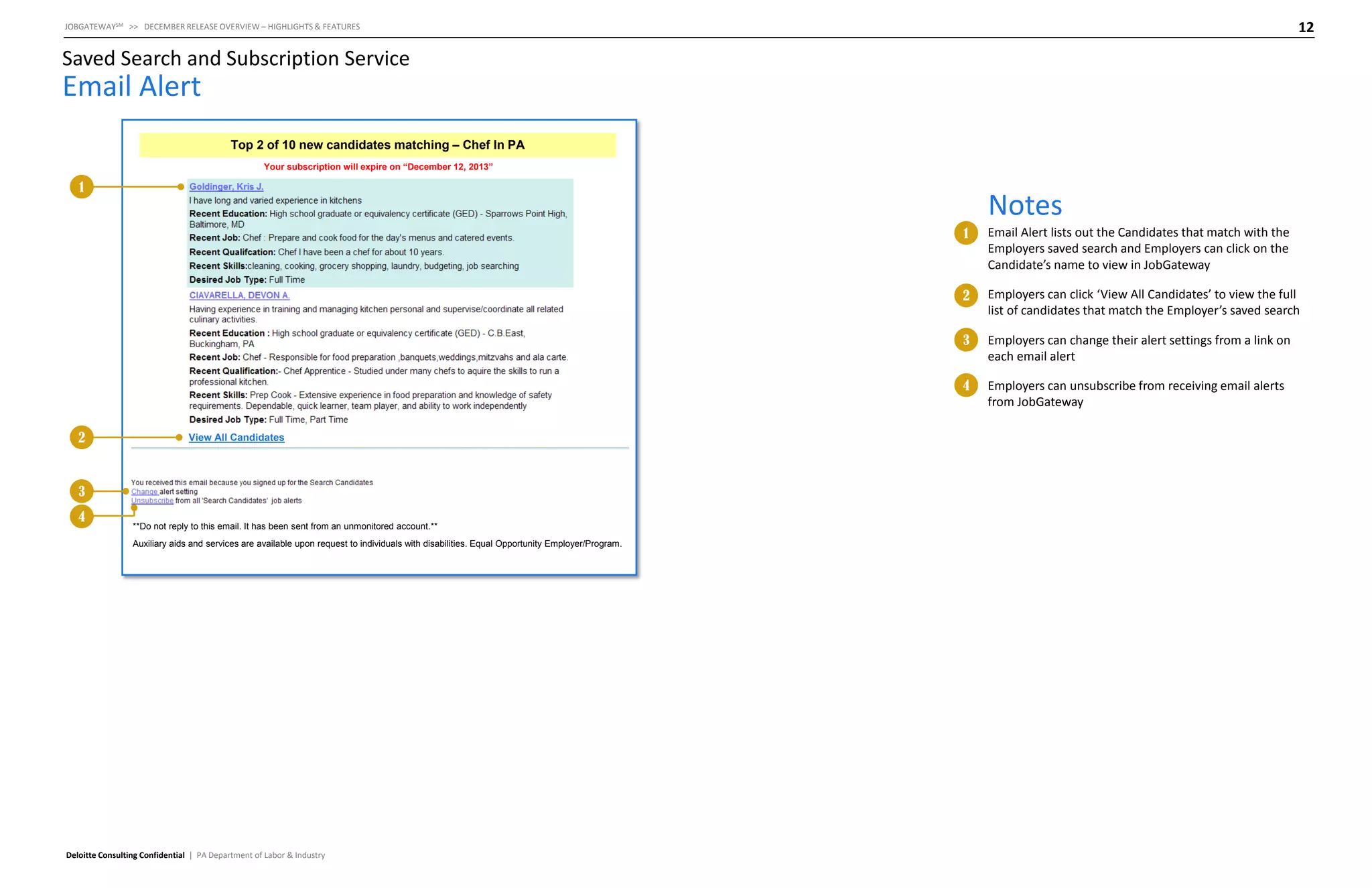
Email Alert
Top 2 of 10 new candidates matching – Chef In PA
Your subscription will expire on “December 12, 2013”

1

Notes
1

2

3
4

**Do not reply to this email. It has been sent from an unmonitored account.**
Auxiliary aids and services are available upon request to individuals with disabilities. Equal Opportunity Employer/Program.

Deloitte Consulting Confidential | PA Department of Labor & Industry

Employers can change their alert settings from a link on
each email alert

4

View All Candidates

Employers can click ‘View All Candidates’ to view the full
list of candidates that match the Employer’s saved search

3

2

Email Alert lists out the Candidates that match with the
Employers saved search and Employers can click on the
Candidate’s name to view in JobGateway

Employers can unsubscribe from receiving email alerts
from JobGateway
13

JOBGATEWAYSM >> DECEMBER RELEASE OVERVIEW – HIGHLIGHTS & FEATURES

Saved Search and Subscription Service

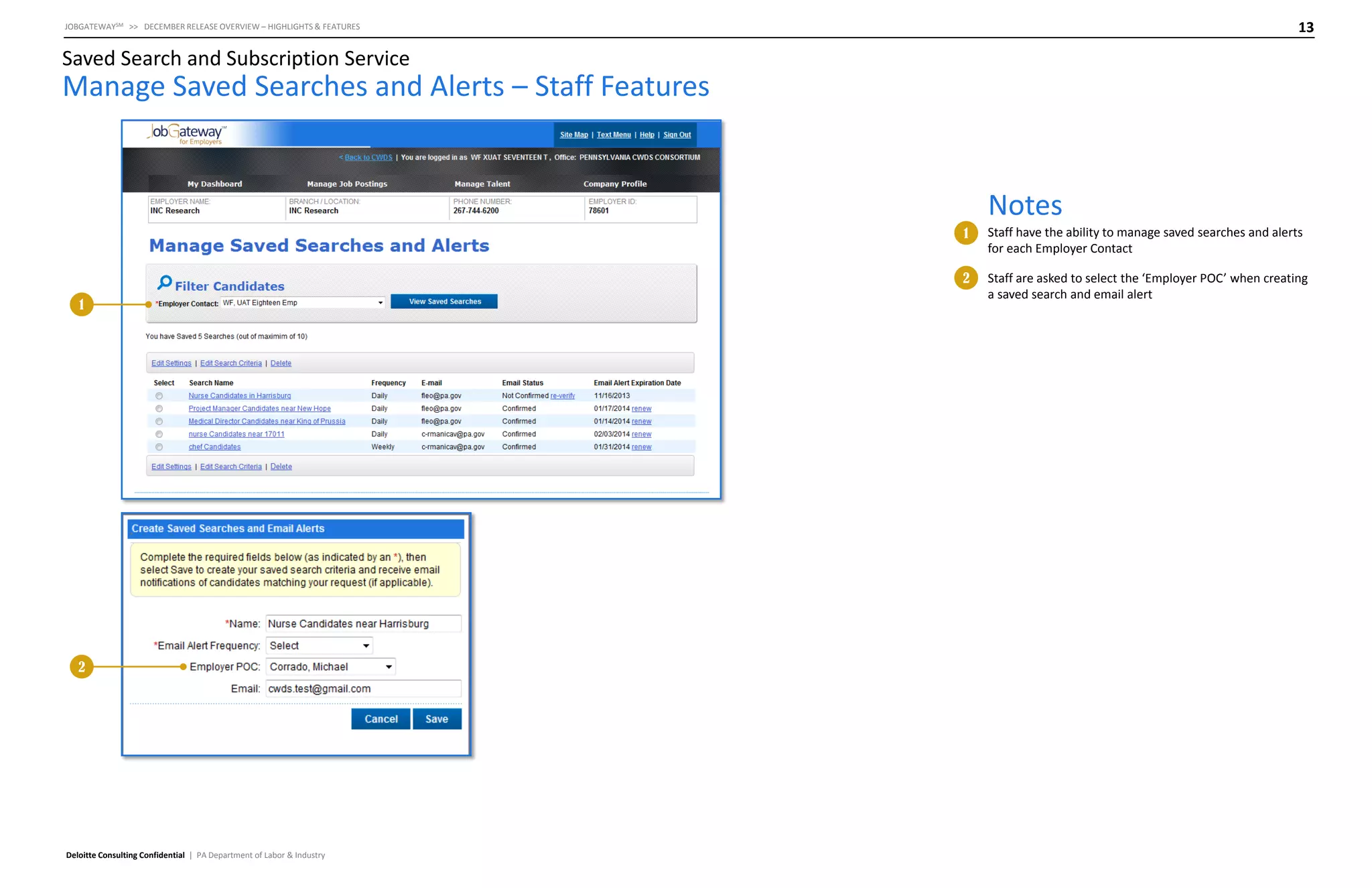
Manage Saved Searches and Alerts – Staff Features

Notes
1
2
1

2

Deloitte Consulting Confidential | PA Department of Labor & Industry

Staff have the ability to manage saved searches and alerts
for each Employer Contact
Staff are asked to select the ‘Employer POC’ when creating
a saved search and email alert
Job Posting Creation
Enhancements
15

JOBGATEWAYSM >> DECEMBER RELEASE OVERVIEW – HIGHLIGHTS & FEATURES

Job Posting Creation Enhancements

Job Posting: Contact Details

Notes
1

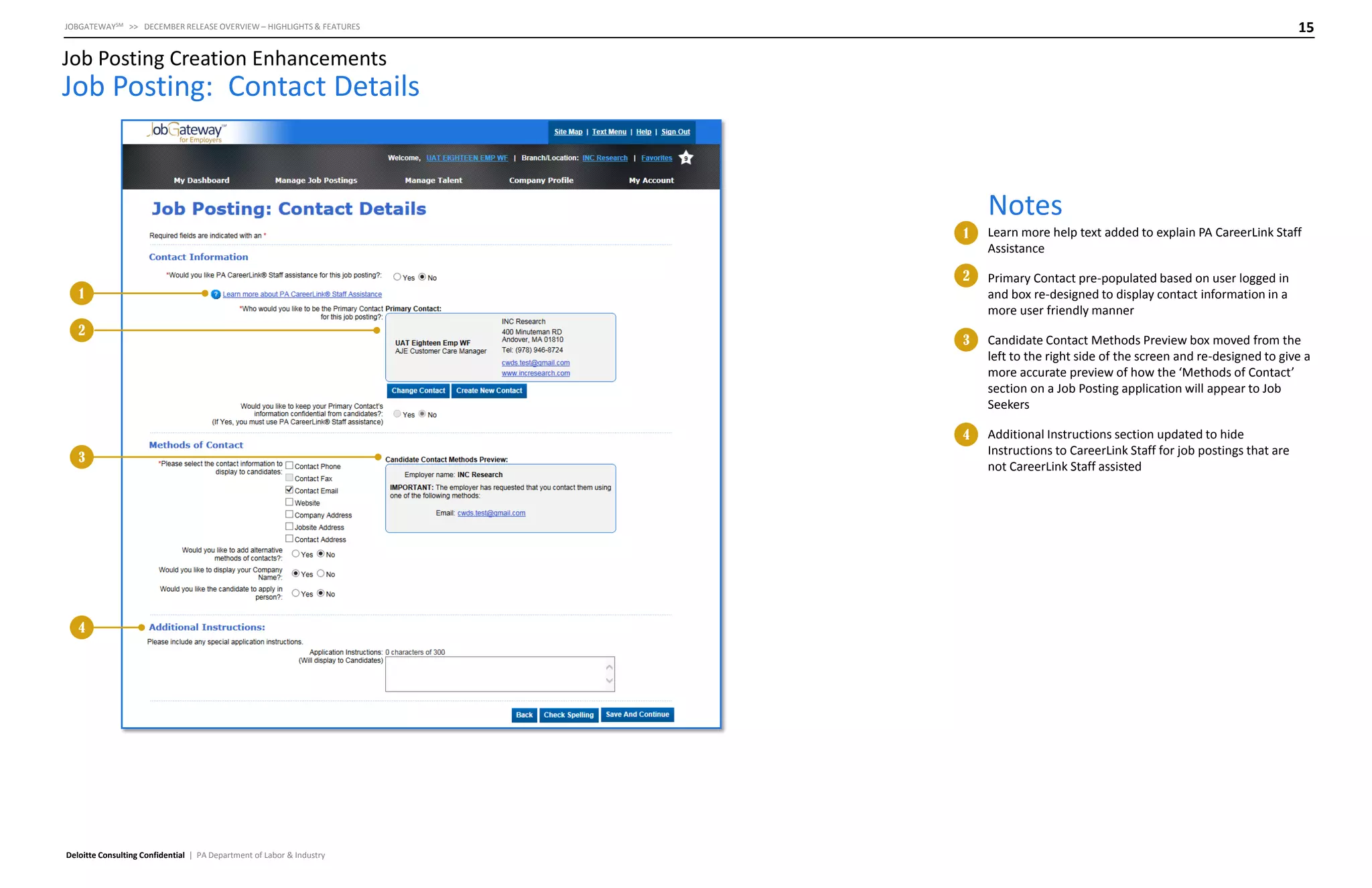
Learn more help text added to explain PA CareerLink Staff
Assistance

2

Primary Contact pre-populated based on user logged in
and box re-designed to display contact information in a
more user friendly manner

3

Candidate Contact Methods Preview box moved from the
left to the right side of the screen and re-designed to give a
more accurate preview of how the ‘Methods of Contact’
section on a Job Posting application will appear to Job
Seekers

4

Additional Instructions section updated to hide
Instructions to CareerLink Staff for job postings that are
not CareerLink Staff assisted

1
2

3

4

Deloitte Consulting Confidential | PA Department of Labor & Industry
Job Recommendation
Enhancements
17

JOBGATEWAYSM >> DECEMBER RELEASE OVERVIEW – HIGHLIGHTS & FEATURES

Job Recommendation Enhancements

Job Seeker Dashboard

Notes
1

2

2

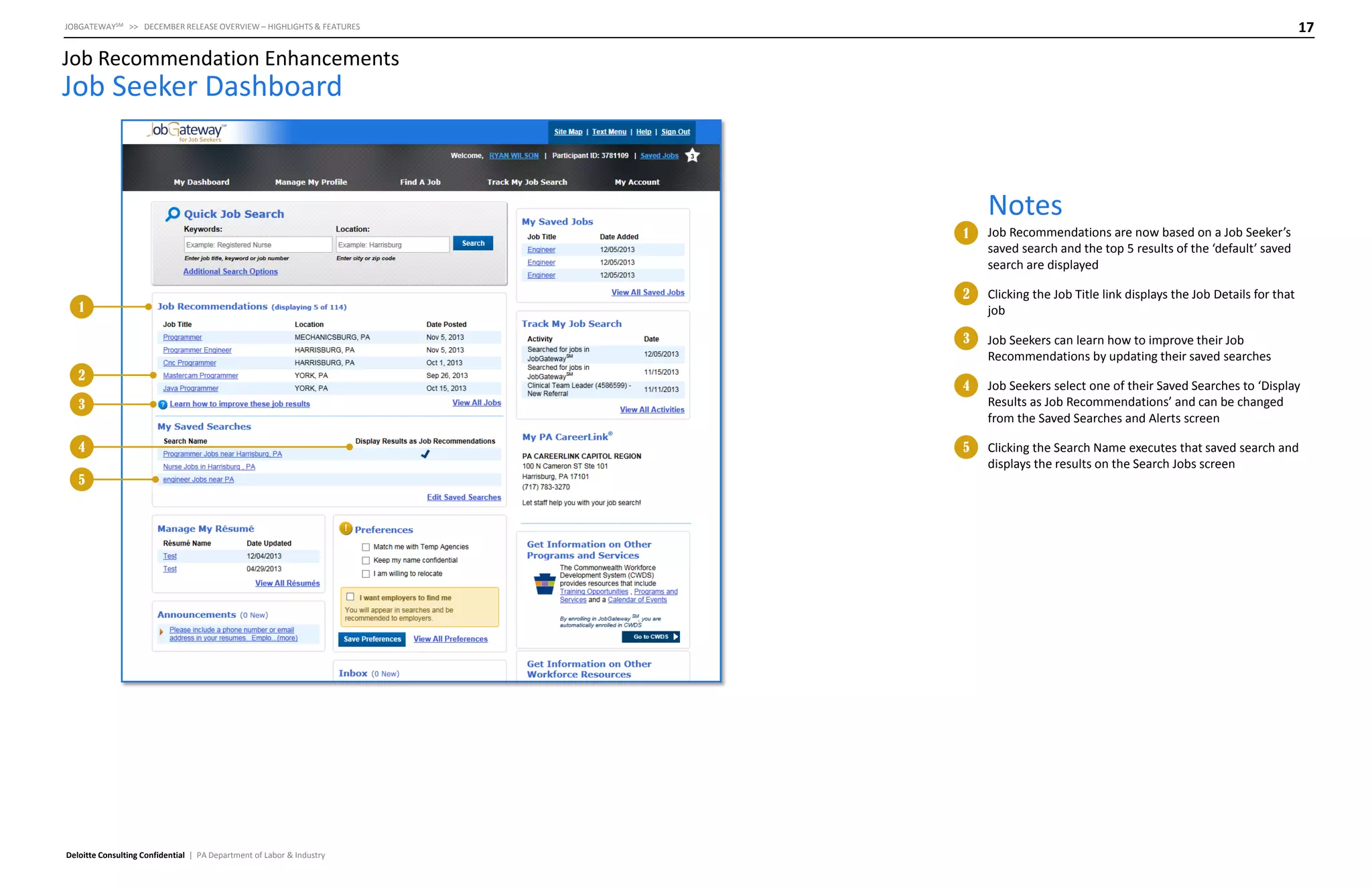
Clicking the Job Title link displays the Job Details for that
job

3

1

Job Recommendations are now based on a Job Seeker’s
saved search and the top 5 results of the ‘default’ saved
search are displayed

Job Seekers can learn how to improve their Job
Recommendations by updating their saved searches

4

Job Seekers select one of their Saved Searches to ‘Display
Results as Job Recommendations’ and can be changed
from the Saved Searches and Alerts screen

5

Clicking the Search Name executes that saved search and
displays the results on the Search Jobs screen

3
4
5

Deloitte Consulting Confidential | PA Department of Labor & Industry
18

JOBGATEWAYSM >> DECEMBER RELEASE OVERVIEW – HIGHLIGHTS & FEATURES

Job Recommendation Enhancements

Job Seeker Dashboard

Notes
1

2

3

Deloitte Consulting Confidential | PA Department of Labor & Industry

2

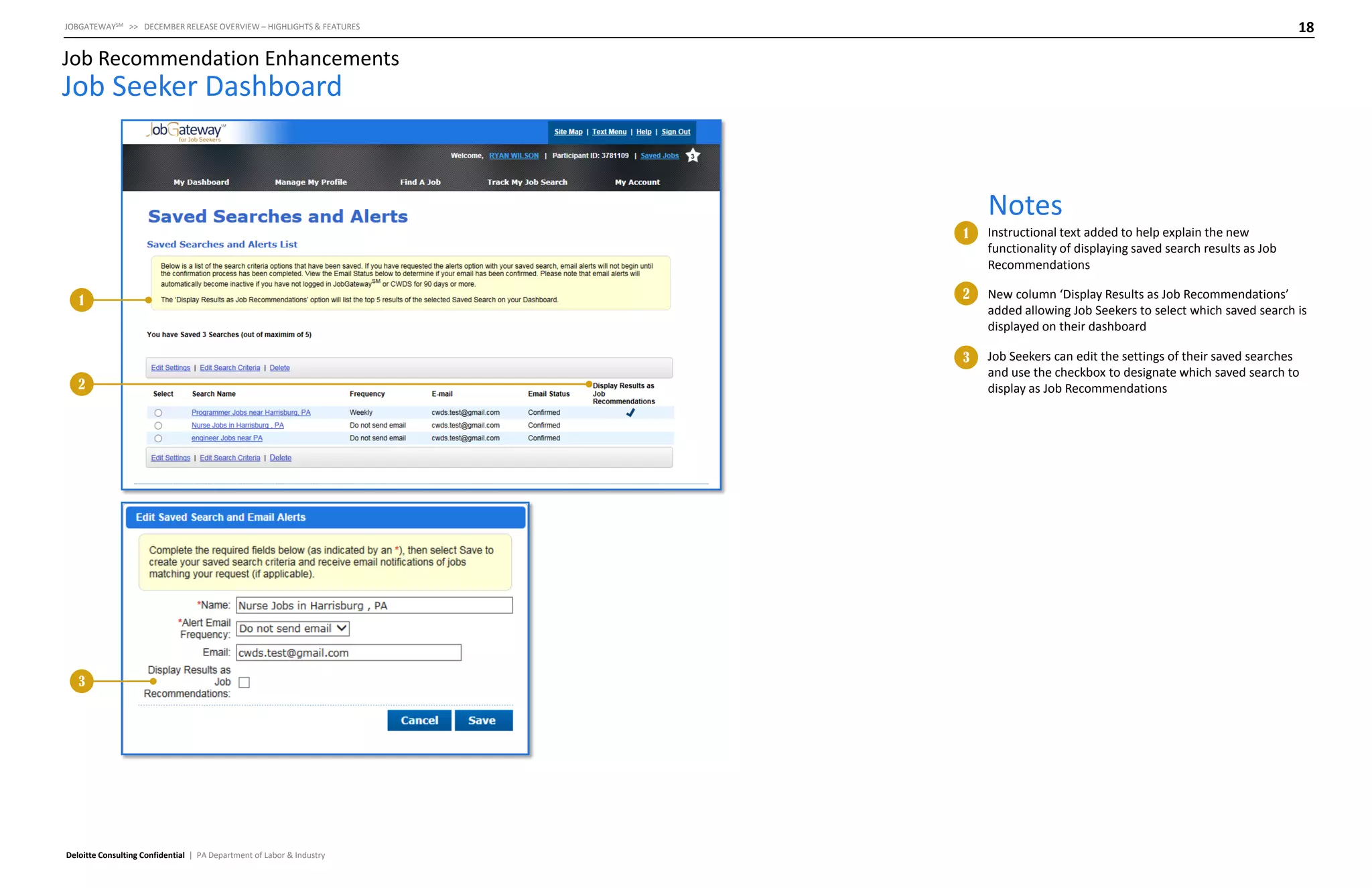
New column ‘Display Results as Job Recommendations’
added allowing Job Seekers to select which saved search is
displayed on their dashboard

3

1

Instructional text added to help explain the new
functionality of displaying saved search results as Job
Recommendations

Job Seekers can edit the settings of their saved searches
and use the checkbox to designate which saved search to
display as Job Recommendations
19

JOBGATEWAYSM >> DECEMBER RELEASE OVERVIEW – HIGHLIGHTS & FEATURES

Job Recommendation Enhancements

JobGateway Mobile for Job Seekers

Notes
1

105
1

Deloitte Consulting Confidential | PA Department of Labor & Industry

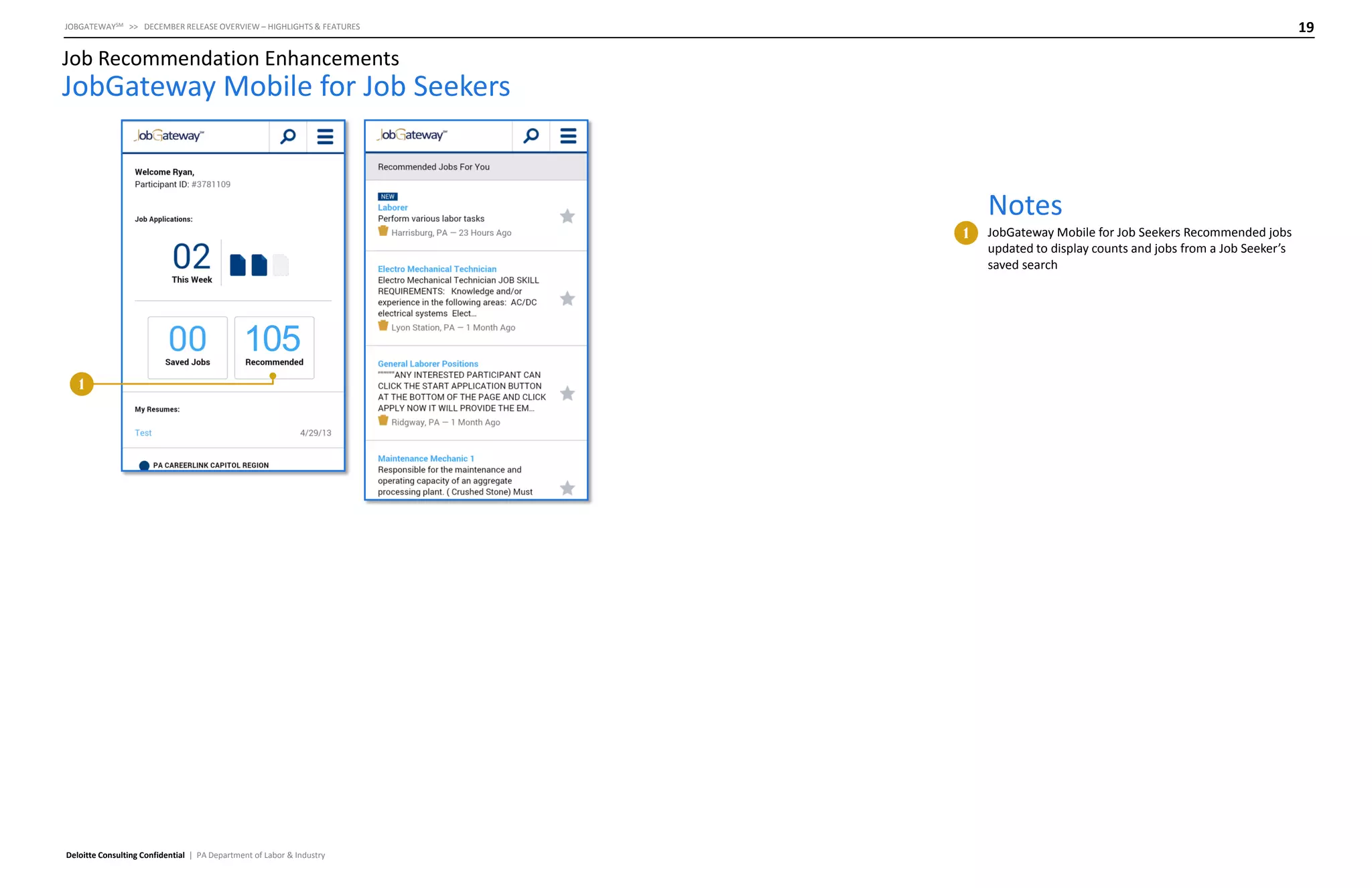
JobGateway Mobile for Job Seekers Recommended jobs
updated to display counts and jobs from a Job Seeker’s
saved search
Password Management SelfService
21

JOBGATEWAYSM >> DECEMBER RELEASE OVERVIEW – HIGHLIGHTS & FEATURES

Password Management Self-Service

Enter Participant Identifier

Notes
1
2

1

2

Deloitte Consulting Confidential | PA Department of Labor & Industry

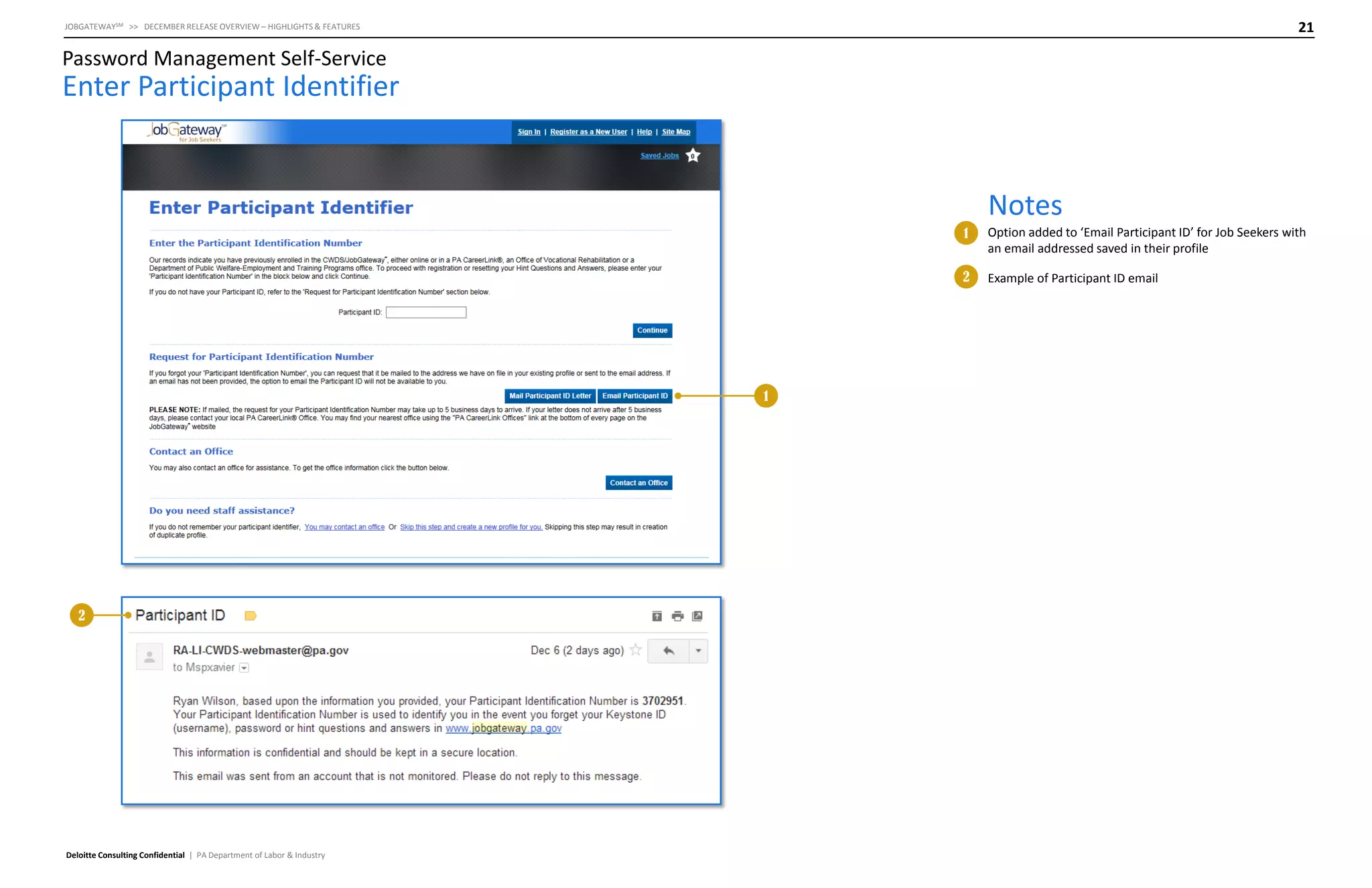
Option added to ‘Email Participant ID’ for Job Seekers with
an email addressed saved in their profile
Example of Participant ID email
Integration of “Big Interview”
23

JOBGATEWAYSM >> DECEMBER RELEASE OVERVIEW – HIGHLIGHTS & FEATURES

Integration of “Big Interview”

Job Seeker Dashboard
1

3

Notes
1
2

5

Deloitte Consulting Confidential | PA Department of Labor & Industry

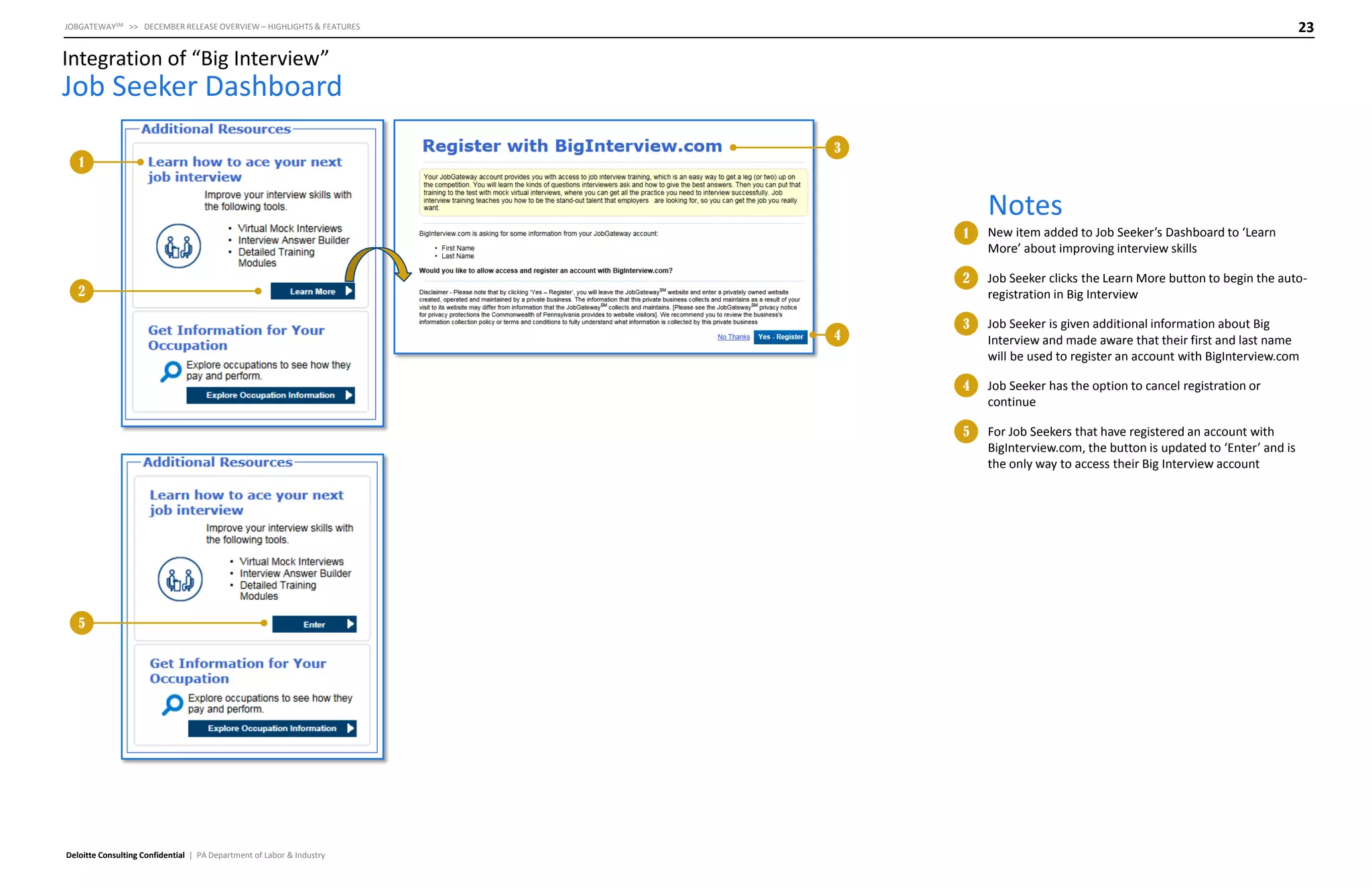
3

Job Seeker is given additional information about Big
Interview and made aware that their first and last name
will be used to register an account with BigInterview.com
Job Seeker has the option to cancel registration or
continue

5

4

Job Seeker clicks the Learn More button to begin the autoregistration in Big Interview

4

2

New item added to Job Seeker’s Dashboard to ‘Learn
More’ about improving interview skills

For Job Seekers that have registered an account with
BigInterview.com, the button is updated to ‘Enter’ and is
the only way to access their Big Interview account
24

JOBGATEWAYSM >> DECEMBER RELEASE OVERVIEW – HIGHLIGHTS & FEATURES

Integration of “Big Interview”

Big Interview
1

Notes
1

Deloitte Consulting Confidential | PA Department of Labor & Industry

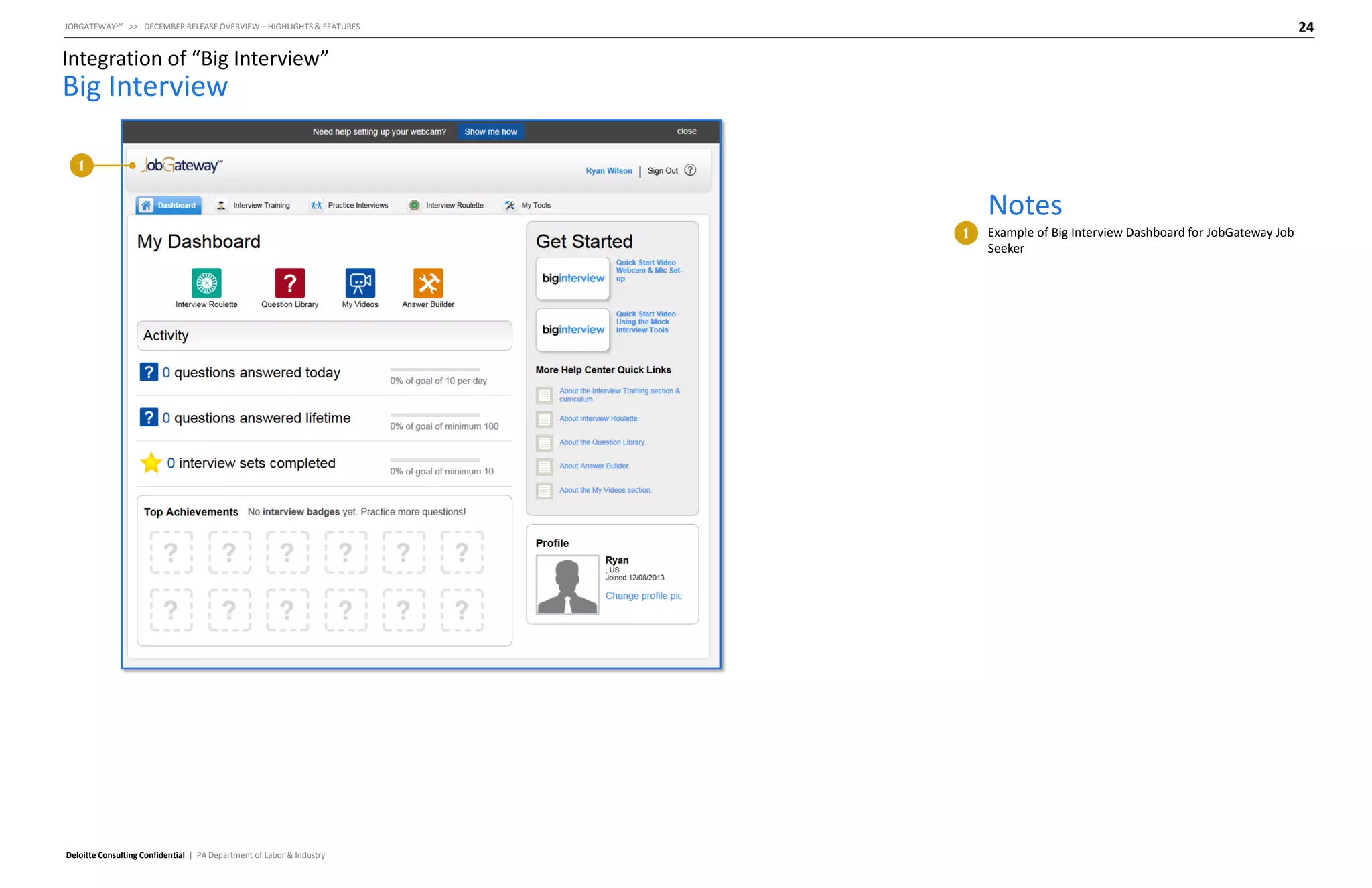
Example of Big Interview Dashboard for JobGateway Job
Seeker
UC Work Registration
Compliance
26

JOBGATEWAYSM >> DECEMBER RELEASE OVERVIEW – HIGHLIGHTS & FEATURES

UC Work Registration Compliance

UC Claimant Dashboard

Notes

1

1

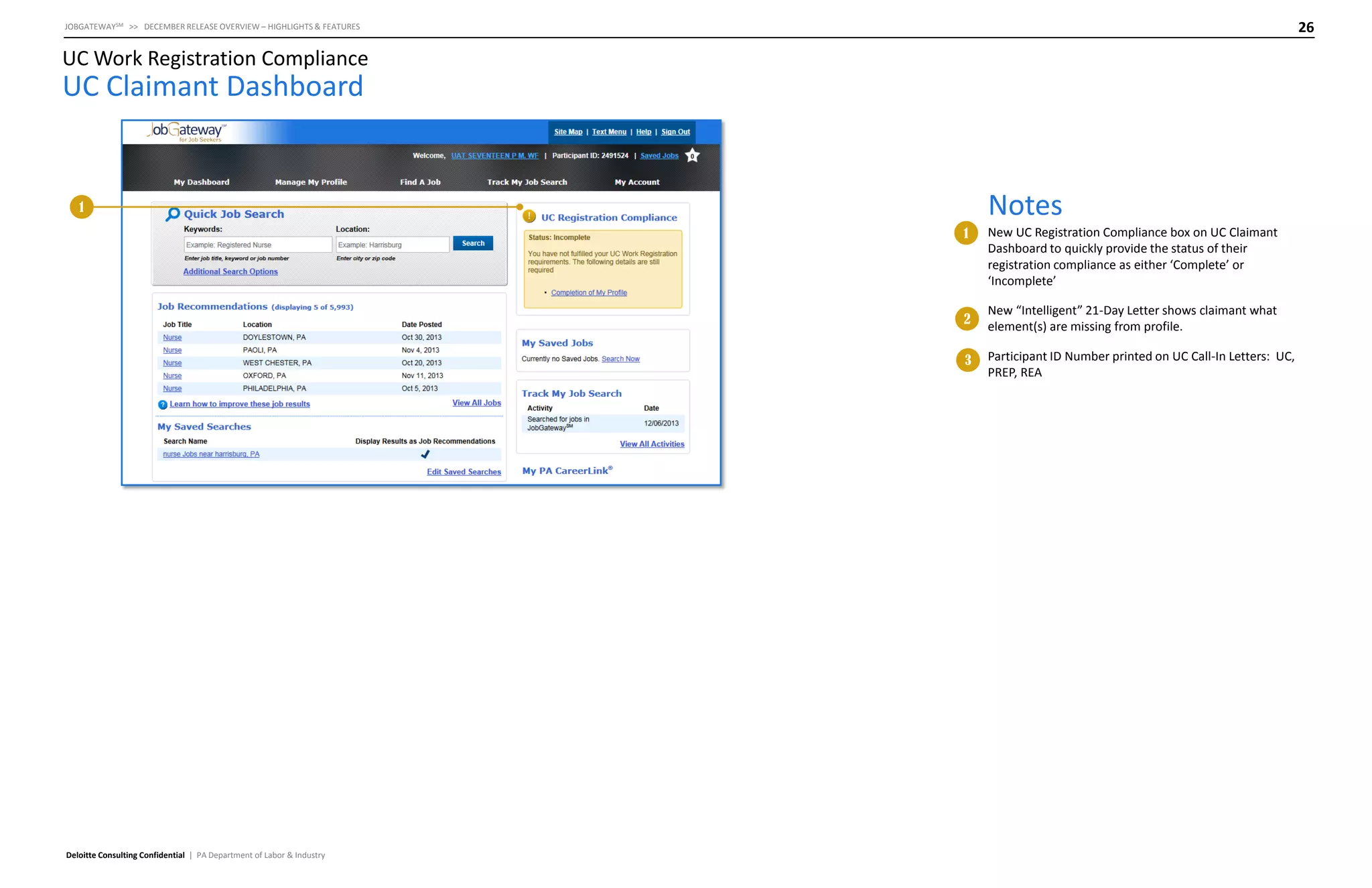
2

New “Intelligent” 21-Day Letter shows claimant what
element(s) are missing from profile.

3

Deloitte Consulting Confidential | PA Department of Labor & Industry

New UC Registration Compliance box on UC Claimant
Dashboard to quickly provide the status of their
registration compliance as either ‘Complete’ or
‘Incomplete’

Participant ID Number printed on UC Call-In Letters: UC,
PREP, REA

Job Gateway 7.9 Release Overview

  • 1.
  • 2.
    2 JOBGATEWAYSM >> DECEMBERRELEASE OVERVIEW – HIGHLIGHTS & FEATURES Contents Release Highlights Saved Search and Subscription Service Job Recommendations Enhancements Password Management Self-Service Job Posting Creation Enhancements Integration of “Big Interview” UC Work Registration Compliance Deloitte Consulting Confidential | PA Department of Labor & Industry
  • 3.
  • 4.
    4 JOBGATEWAYSM >> DECEMBERRELEASE OVERVIEW – HIGHLIGHTS & FEATURES Release Highlights Saved Search and Subscription Service • • Employers can save their search, including filter and facet information, allowing them to quickly re-execute the Candidate search each time they visit JobGateway Results of saved searches can be emailed to Employers with an Employer set frequency (daily or weekly) Job Recommendations Enhancements • Revamp the way in which preferences and recommendations are used and determined to improve the experience for job seekers Password Management Self-Service • Allow job seekers to retrieve their participant ID via email instead of US Mail allowing them to quickly reset their password hint Q&A Deloitte Consulting Confidential | PA Department of Labor & Industry Job Posting Creation Enhancements • Enhance and streamline the job posting process for employers, allowing them to post jobs with “less clicks” and more userfriendly displaying of data Integration of “Big Interview” • Provide job seekers with a link to register and consume services from big interview. This includes an “auto-register” and “login” feature so job seekers can seamlessly access big interview UC Work Registration Compliance • Introduce enhanced compliance tools to help claimants understand their situation with UC work registration compliance regulations and provide links to become compliant.
  • 5.
    Saved Search andSubscription Service
  • 6.
    6 JOBGATEWAYSM >> DECEMBERRELEASE OVERVIEW – HIGHLIGHTS & FEATURES Saved Search and Subscription Service Search Candidates Notes 1 2 1 2 Deloitte Consulting Confidential | PA Department of Labor & Industry New link added allowing Employers to ‘Save search and receive email alerts’ Any facets or filters used will be retained when the search is saved (e.g. if an Employer were to save this search, when they execute the saved search, the county ‘Dauphin’ will be selected)
  • 7.
    7 JOBGATEWAYSM >> DECEMBERRELEASE OVERVIEW – HIGHLIGHTS & FEATURES Saved Search and Subscription Service Search Candidates – Create Saved Searches and Email Alerts Notes 1 1 2 Employers are presented with a window to choose options for the saved search and email alert settings 2 The Name of the saved search is pre-populated based on the keyword and location values entered by the Employer (e.g. nurse Candidates near 17011) 3 Employers have the option to select an Email Alert Frequency of Daily, Weekly, or Do Not Send Email 3 • If Do Not Send Email is selected, the Email field will be hidden 4 4 If an Employer has an email in the system, the Email field will be pre-populated • Email field can be updated/changed • Email field becomes required if Daily or Weekly is selected for Email Alert Frequency Deloitte Consulting Confidential | PA Department of Labor & Industry
  • 8.
    8 JOBGATEWAYSM >> DECEMBERRELEASE OVERVIEW – HIGHLIGHTS & FEATURES Saved Search and Subscription Service Search Candidates – Confirm Your Email Notes 1 1 Deloitte Consulting Confidential | PA Department of Labor & Industry When an Employer elects to receive email alerts, an activation email is sent to the email address provided before daily or weekly emails will be sent Once the Employer confirms their email address by clicking a link in the activation email, the email alerts will begin on the frequency selected by the Employer
  • 9.
    9 JOBGATEWAYSM >> DECEMBERRELEASE OVERVIEW – HIGHLIGHTS & FEATURES Saved Search and Subscription Service Saved Search Email Confirmation Notes 1 Deloitte Consulting Confidential | PA Department of Labor & Industry 1 Example of confirmation email sent to an Employer with the email confirmation link to activate their saved search alerts
  • 10.
    10 JOBGATEWAYSM >> DECEMBERRELEASE OVERVIEW – HIGHLIGHTS & FEATURES Saved Search and Subscription Service Employer Dashboard Notes 1 2 3 4 Deloitte Consulting Confidential | PA Department of Labor & Industry Employers can quickly navigate to the ‘Manage Saved Searches and Alerts’ screen via the ‘View All Saved Searches’ link 4 2 Clicking the Saved Search ‘Search Name’ link will execute the saved search and navigate the Employer to the Search Candidates screen 3 1 New ‘Saved Searches and Alerts’ dashboard element that displays up to three (3) of an Employer’s Saved Searches New ‘Saved Searches and Alerts’ menu item added within the Manage Talent menu heading
  • 11.
    11 JOBGATEWAYSM >> DECEMBERRELEASE OVERVIEW – HIGHLIGHTS & FEATURES Saved Search and Subscription Service Manage Saved Searches and Alerts Notes 1 2 Employer is notified as to the current number of Saved Searches out of a maximum of 10 2 1 Employers are able to update the search criteria used in a given saved search by choosing the ‘Edit Search Criteria’ option 3 4 • The selected saved search is executed and Employer is taken to the Search Candidate screen where they can update search criteria, filters, and facets and select an option to ‘Update Saved Search and Email Alerts’ 5 3 4 Email Alerts are set to automatically expire in 60 days and Employers can ‘renew’ the alerts here 5 Deloitte Consulting Confidential | PA Department of Labor & Industry The Email Status for each saved search is viewable and for unconfirmed email addresses, Employers have the ability to ‘re-verify’, which re-sends the confirmation email to the provided email address Employers can use the ‘Edit Settings’ option to modify the Search Name, Frequency, and Email used for alerts
  • 12.
    12 JOBGATEWAYSM >> DECEMBERRELEASE OVERVIEW – HIGHLIGHTS & FEATURES Saved Search and Subscription Service Email Alert Top 2 of 10 new candidates matching – Chef In PA Your subscription will expire on “December 12, 2013” 1 Notes 1 2 3 4 **Do not reply to this email. It has been sent from an unmonitored account.** Auxiliary aids and services are available upon request to individuals with disabilities. Equal Opportunity Employer/Program. Deloitte Consulting Confidential | PA Department of Labor & Industry Employers can change their alert settings from a link on each email alert 4 View All Candidates Employers can click ‘View All Candidates’ to view the full list of candidates that match the Employer’s saved search 3 2 Email Alert lists out the Candidates that match with the Employers saved search and Employers can click on the Candidate’s name to view in JobGateway Employers can unsubscribe from receiving email alerts from JobGateway
  • 13.
    13 JOBGATEWAYSM >> DECEMBERRELEASE OVERVIEW – HIGHLIGHTS & FEATURES Saved Search and Subscription Service Manage Saved Searches and Alerts – Staff Features Notes 1 2 1 2 Deloitte Consulting Confidential | PA Department of Labor & Industry Staff have the ability to manage saved searches and alerts for each Employer Contact Staff are asked to select the ‘Employer POC’ when creating a saved search and email alert
  • 14.
  • 15.
    15 JOBGATEWAYSM >> DECEMBERRELEASE OVERVIEW – HIGHLIGHTS & FEATURES Job Posting Creation Enhancements Job Posting: Contact Details Notes 1 Learn more help text added to explain PA CareerLink Staff Assistance 2 Primary Contact pre-populated based on user logged in and box re-designed to display contact information in a more user friendly manner 3 Candidate Contact Methods Preview box moved from the left to the right side of the screen and re-designed to give a more accurate preview of how the ‘Methods of Contact’ section on a Job Posting application will appear to Job Seekers 4 Additional Instructions section updated to hide Instructions to CareerLink Staff for job postings that are not CareerLink Staff assisted 1 2 3 4 Deloitte Consulting Confidential | PA Department of Labor & Industry
  • 16.
  • 17.
    17 JOBGATEWAYSM >> DECEMBERRELEASE OVERVIEW – HIGHLIGHTS & FEATURES Job Recommendation Enhancements Job Seeker Dashboard Notes 1 2 2 Clicking the Job Title link displays the Job Details for that job 3 1 Job Recommendations are now based on a Job Seeker’s saved search and the top 5 results of the ‘default’ saved search are displayed Job Seekers can learn how to improve their Job Recommendations by updating their saved searches 4 Job Seekers select one of their Saved Searches to ‘Display Results as Job Recommendations’ and can be changed from the Saved Searches and Alerts screen 5 Clicking the Search Name executes that saved search and displays the results on the Search Jobs screen 3 4 5 Deloitte Consulting Confidential | PA Department of Labor & Industry
  • 18.
    18 JOBGATEWAYSM >> DECEMBERRELEASE OVERVIEW – HIGHLIGHTS & FEATURES Job Recommendation Enhancements Job Seeker Dashboard Notes 1 2 3 Deloitte Consulting Confidential | PA Department of Labor & Industry 2 New column ‘Display Results as Job Recommendations’ added allowing Job Seekers to select which saved search is displayed on their dashboard 3 1 Instructional text added to help explain the new functionality of displaying saved search results as Job Recommendations Job Seekers can edit the settings of their saved searches and use the checkbox to designate which saved search to display as Job Recommendations
  • 19.
    19 JOBGATEWAYSM >> DECEMBERRELEASE OVERVIEW – HIGHLIGHTS & FEATURES Job Recommendation Enhancements JobGateway Mobile for Job Seekers Notes 1 105 1 Deloitte Consulting Confidential | PA Department of Labor & Industry JobGateway Mobile for Job Seekers Recommended jobs updated to display counts and jobs from a Job Seeker’s saved search
  • 20.
  • 21.
    21 JOBGATEWAYSM >> DECEMBERRELEASE OVERVIEW – HIGHLIGHTS & FEATURES Password Management Self-Service Enter Participant Identifier Notes 1 2 1 2 Deloitte Consulting Confidential | PA Department of Labor & Industry Option added to ‘Email Participant ID’ for Job Seekers with an email addressed saved in their profile Example of Participant ID email
  • 22.
  • 23.
    23 JOBGATEWAYSM >> DECEMBERRELEASE OVERVIEW – HIGHLIGHTS & FEATURES Integration of “Big Interview” Job Seeker Dashboard 1 3 Notes 1 2 5 Deloitte Consulting Confidential | PA Department of Labor & Industry 3 Job Seeker is given additional information about Big Interview and made aware that their first and last name will be used to register an account with BigInterview.com Job Seeker has the option to cancel registration or continue 5 4 Job Seeker clicks the Learn More button to begin the autoregistration in Big Interview 4 2 New item added to Job Seeker’s Dashboard to ‘Learn More’ about improving interview skills For Job Seekers that have registered an account with BigInterview.com, the button is updated to ‘Enter’ and is the only way to access their Big Interview account
  • 24.
    24 JOBGATEWAYSM >> DECEMBERRELEASE OVERVIEW – HIGHLIGHTS & FEATURES Integration of “Big Interview” Big Interview 1 Notes 1 Deloitte Consulting Confidential | PA Department of Labor & Industry Example of Big Interview Dashboard for JobGateway Job Seeker
  • 25.
  • 26.
    26 JOBGATEWAYSM >> DECEMBERRELEASE OVERVIEW – HIGHLIGHTS & FEATURES UC Work Registration Compliance UC Claimant Dashboard Notes 1 1 2 New “Intelligent” 21-Day Letter shows claimant what element(s) are missing from profile. 3 Deloitte Consulting Confidential | PA Department of Labor & Industry New UC Registration Compliance box on UC Claimant Dashboard to quickly provide the status of their registration compliance as either ‘Complete’ or ‘Incomplete’ Participant ID Number printed on UC Call-In Letters: UC, PREP, REA