Go to View > Header & Footer to edit June 2, 2014 | slide 1RSCs – Stimulating and supporting innovation in learning
Introduction to Conferencing Systems
Webex
Jane Mackenzie JISC RSC WBL e-Learning Adviser
www.jisc.ac.uk/rsc
Go to View > Header & Footer to edit June 2, 2014 | slide 2
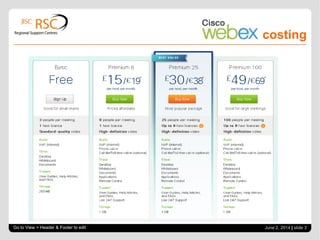
costing
Go to View > Header & Footer to edit June 2, 2014 | slide 3
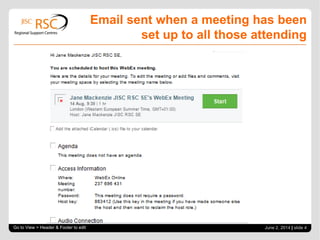
Email sent when a meeting has been
set up to all those attending
Go to View > Header & Footer to edit June 2, 2014 | slide 4
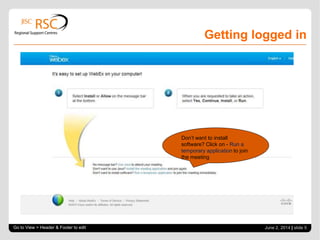
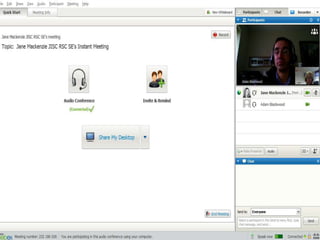
Getting logged in
Go to View > Header & Footer to edit June 2, 2014 | slide 5
Don’t want to install
software? Click on - Run a
temporary application to join
the meeting
Go to View > Header & Footer to edit June 2, 2014 | slide 6
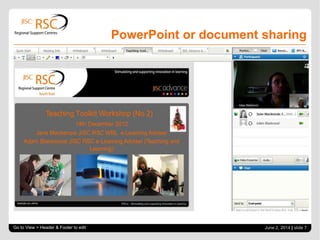
PowerPoint or document sharing
Go to View > Header & Footer to edit June 2, 2014 | slide 7
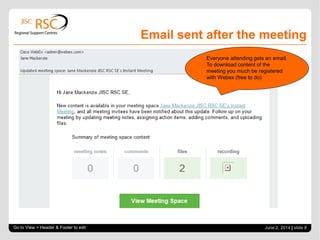
Email sent after the meeting
Go to View > Header & Footer to edit June 2, 2014 | slide 8
Everyone attending gets an email.
To download content of the
meeting you much be registered
with Webex (free to do)
Links and details
Go to View > Header & Footer to edit | slide 9
 Webex - http://www.webex.co.uk/
 Webex video tutorials (click on the relevant video
you want to watch. It takes a little bit of time to
open up, but it will. http://www.webex.com/how-
to/index.html
 Webex guide
http://www.wbximg.com/includes/documents/GSG
_MC_0111_final.pdf
Thank you for taking part
Any questions?
Jane Mackenzie E-learning Adviser Work Based Learning (WBL)
JISC Regional Support Centre South East
University of Kent, Canterbury, Kent, CT2 7NP
Skype Jane.Mackenzie11
Twitter JaneMackenzie2
Email j.mackenzie@kent.ac.uk
Mobile: 07714140570
JISC RSC SE at the University of Kent - www.jiscrsc.ac.uk/southeast
Go to View > Header & Footer to edit | slide 10

Jisc RSC SE Conferencing systems - Webex

  • 1.
    Go to View> Header & Footer to edit June 2, 2014 | slide 1RSCs – Stimulating and supporting innovation in learning Introduction to Conferencing Systems Webex Jane Mackenzie JISC RSC WBL e-Learning Adviser www.jisc.ac.uk/rsc
  • 2.
    Go to View> Header & Footer to edit June 2, 2014 | slide 2
  • 3.
    costing Go to View> Header & Footer to edit June 2, 2014 | slide 3
  • 4.
    Email sent whena meeting has been set up to all those attending Go to View > Header & Footer to edit June 2, 2014 | slide 4
  • 5.
    Getting logged in Goto View > Header & Footer to edit June 2, 2014 | slide 5 Don’t want to install software? Click on - Run a temporary application to join the meeting
  • 6.
    Go to View> Header & Footer to edit June 2, 2014 | slide 6
  • 7.
    PowerPoint or documentsharing Go to View > Header & Footer to edit June 2, 2014 | slide 7
  • 8.
    Email sent afterthe meeting Go to View > Header & Footer to edit June 2, 2014 | slide 8 Everyone attending gets an email. To download content of the meeting you much be registered with Webex (free to do)
  • 9.
    Links and details Goto View > Header & Footer to edit | slide 9  Webex - http://www.webex.co.uk/  Webex video tutorials (click on the relevant video you want to watch. It takes a little bit of time to open up, but it will. http://www.webex.com/how- to/index.html  Webex guide http://www.wbximg.com/includes/documents/GSG _MC_0111_final.pdf
  • 10.
    Thank you fortaking part Any questions? Jane Mackenzie E-learning Adviser Work Based Learning (WBL) JISC Regional Support Centre South East University of Kent, Canterbury, Kent, CT2 7NP Skype Jane.Mackenzie11 Twitter JaneMackenzie2 Email j.mackenzie@kent.ac.uk Mobile: 07714140570 JISC RSC SE at the University of Kent - www.jiscrsc.ac.uk/southeast Go to View > Header & Footer to edit | slide 10