
Java  Application Performance Management JENNIFER 4.5 JenniferSoft Inc. 2011.04.20
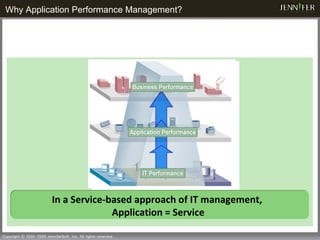
Why Application Performance Management?   In a Service-based approach of IT management,  Application = Service
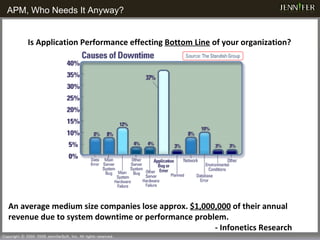
APM, Who Needs It Anyway?   Is Application Performance effecting  Bottom Line  of your organization? An average medium size companies lose approx.  $1,000,000  of their annual revenue due to system downtime or performance problem.   - Infonetics Research
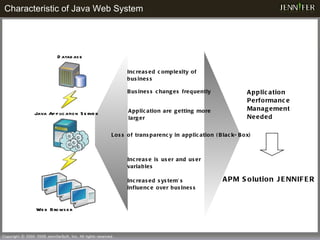
Characteristic of Java Web System Database Web Browser Java Application Server  Loss of transparency in application (Black-Box) Increased complexity of business Increase is user and user variables Increased system’s influence over business Application Performance Management Needed APM Solution JENNIFER  Business changes frequently Application are getting more larger
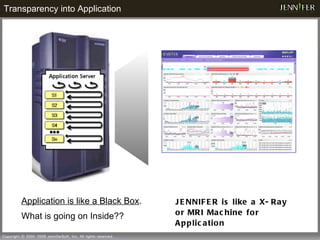
JENNIFER is like a X-Ray or MRI Machine for Application Application is like a Black Box . What is going on Inside?? Transparency into Application
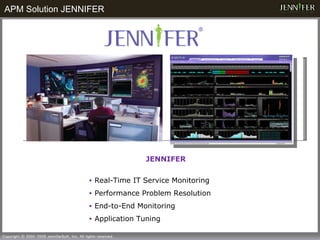
JENNIFER Real-Time IT Service Monitoring Performance Problem Resolution End-to-End Monitoring  Application Tuning APM Solution JENNIFER
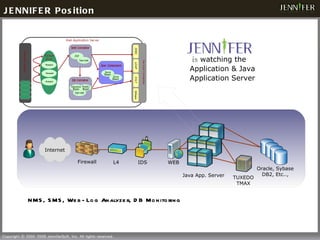
is  watching the Application & Java Application Server JENNIFER Position NMS, SMS, Web-Log Analyzer, DB Monitoring Java App. Server  L4 IDS WEB Firewall TUXEDO TMAX Oracle, Sybase DB2, Etc.., Internet
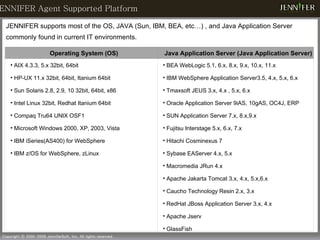
JENNIFER Agent Supported Platform  JENNIFER supports most of the OS, JAVA (Sun, IBM, BEA, etc…) , and Java Application Server commonly found in current IT environments. Operating System (OS) Java Application Server (Java Application Server) AIX 4.3.3, 5.x 32bit, 64bit  HP-UX 11.x 32bit, 64bit, Itanium 64bit Sun Solaris 2.8, 2.9, 10 32bit, 64bit,  x86 Intel Linux 32bit, Redhat Itanium 64bit Compaq Tru64 UNIX OSF1 Microsoft Windows 2000, XP, 2003, Vista  IBM iSeries(AS400) for WebSphere IBM z/OS for WebSphere, zLinux BEA WebLogic 5.1, 6.x, 8.x, 9.x, 10.x, 11.x  IBM WebSphere Application Server3.5, 4.x, 5.x, 6.x  Tmaxsoft JEUS 3.x, 4.x , 5.x, 6.x Oracle Application Server 9iAS, 10gAS, OC4J, ERP SUN Application Server 7.x, 8.x,9.x Fujitsu Interstage 5.x, 6.x, 7.x Hitachi Cosminexus 7  Sybase EAServer 4.x, 5.x Macromedia JRun 4.x  Apache Jakarta Tomcat 3.x, 4.x, 5.x,6.x Caucho Technology Resin 2.x, 3.x  RedHat JBoss Application Server 3.x, 4.x  Apache Jserv GlassFish
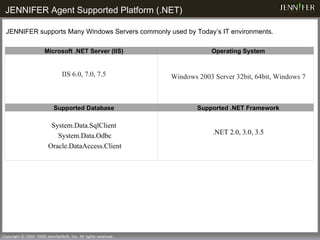
JENNIFER Agent Supported Platform (.NET)   JENNIFER supports Many Windows Servers commonly used by Today’s IT environments. Microsoft .NET Server (IIS) Operating System IIS 6.0, 7.0, 7.5 Windows 2003 Server 32bit, 64bit, Windows 7 Supported Database Supported .NET Framework System.Data.SqlClient System.Data.Odbc Oracle.DataAccess.Client .NET 2.0, 3.0, 3.5
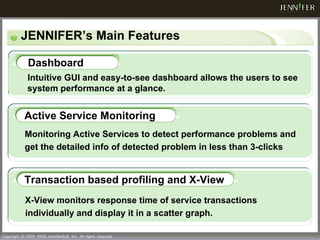
JENNIFER’s Main Features Dashboard Monitoring Active Services to detect performance problems and get the detailed info of detected problem in less than 3-clicks Active Service Monitoring Intuitive GUI and easy-to-see dashboard allows the users to see system performance at a glance. X-View monitors response time of service transactions individually and display it in a scatter graph. Transaction based profiling and X-View
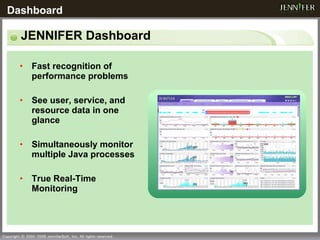
JENNIFER Dashboard Fast recognition of performance problems See user, service, and resource data in one glance Simultaneously monitor multiple Java processes True Real-Time Monitoring Dashboard
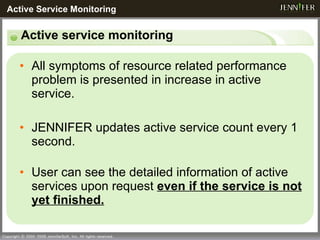
All symptoms of resource related performance problem is presented in increase in active service. JENNIFER updates active service count every 1 second.  User can see the detailed information of active services upon request  even if the service is not yet finished. Active service monitoring Active Service Monitoring
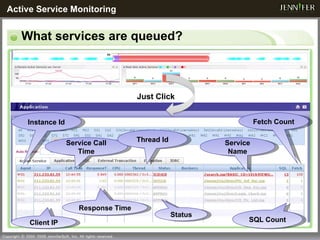
What services are queued? Just Click Active Service Monitoring Instance Id Service Call Time Thread Id Service Name Fetch Count Client IP Response Time Status SQL Count
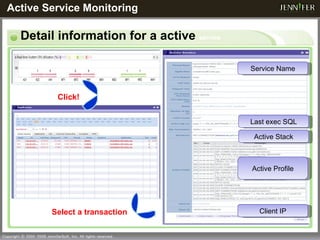
Detail information for a active  service Active Service Monitoring Select a transaction  Click! Service Name Active Profile Active Stack Client IP Last exec SQL
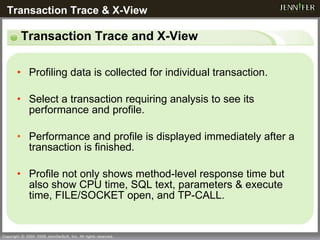
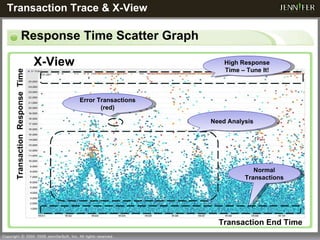
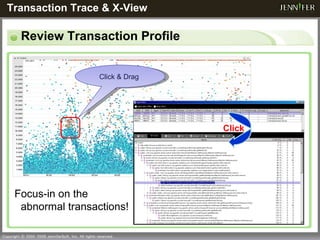
Transaction Trace and X-View Profiling data is collected for individual transaction. Select a transaction requiring analysis to see its performance and profile. Performance and profile is displayed immediately after a transaction is finished. Profile not only shows method-level response time but also show CPU time, SQL text, parameters & execute time, FILE/SOCKET open, and TP-CALL.  Transaction Trace & X-View
Response Time Scatter Graph Transaction End Time Transaction  Response  Time Error Transactions (red) Normal Transactions High Response Time – Tune It! X-View Transaction Trace & X-View  Need Analysis
Review Transaction Profile Transaction Trace & X-View  Focus-in on the abnormal transactions! Click & Drag  Click
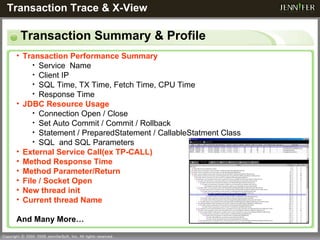
Transaction Summary & Profile Transaction Trace & X-View   Transaction Performance Summary Service  Name Client IP SQL Time, TX Time, Fetch Time, CPU Time Response Time JDBC Resource Usage Connection Open / Close Set Auto Commit / Commit / Rollback Statement / PreparedStatement / CallableStatment Class SQL  and SQL Parameters External Service Call(ex TP-CALL) Method Response Time Method Parameter/Return File / Socket Open New thread init Current thread Name And Many More…
Things to consider for production APM… Excess overhead which impacts performance?  Easy deployment? Easy to use? Fast Analysis of performance problem? Easy root-cause discovery? For JENNIFER, Yes!
What Can JENNIFER Do? JENNIFER’s Key Benefits Ensure that Application performance supports business goals   Minimize performance issues slipping into production , there by Minimize  Total System Downtime Isolate and Resolve performance issues in live applications before they impact end-users Reduce Mean-Time-To-Repair  of production application issues by 90%, to bring them back online quickly  Easily integrate external system data and generate reports Collects and store application performance and business data , for trend analysis & performance reporting Integrate data from external system easily , using JENNIFER’s API’s and Independent Agent Easy to deploy, Minimal overhead Easily install and configure JENNIFER  without advanced knowledge of application architecture Proactively monitor and gather profiling data with minimal overhead (3~5%),  Dynamically change profiling level without restarting app or server
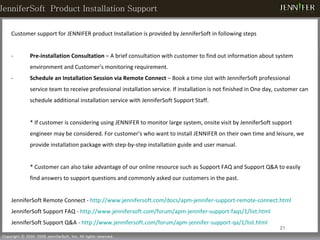
Customer support for JENNIFER product Installation is provided by JenniferSoft in following steps Pre-installation Consultation  – A brief consultation with customer to find out information about system environment and Customer’s monitoring requirement. Schedule an Installation Session via Remote Connect  – Book a time slot with JenniferSoft professional service team to receive professional installation service. If installation is not finished in One day, customer can schedule additional installation service with JenniferSoft Support Staff.  *  If customer is considering using JENNIFER to monitor large system, onsite visit by JenniferSoft support engineer may be considered.  For customer’s who want to install JENNIFER on their own time and leisure, we provide installation package with step-by-step installation guide and user manual.  * Customer can also take advantage of our online resource such as Support FAQ and Support Q&A to easily find answers to support questions and commonly asked our customers in the past.  JenniferSoft Remote Connect -  http://www.jennifersoft.com/docs/apm-jennifer-support-remote-connect.html JenniferSoft Support FAQ -  http://www.jennifersoft.com/forum/apm-jennifer-support-faqs/1/list.html JenniferSoft Support Q&A -  http://www.jennifersoft.com/forum/apm-jennifer-support-qa/1/list.html JenniferSoft  Product Installation Support
JenniferSoft′s Worldwide Customers
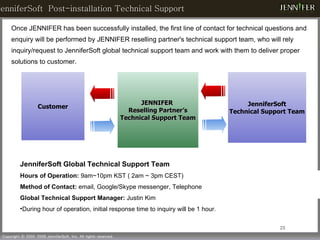
Once JENNIFER has been successfully installed, the first line of contact for technical questions and enquiry will be performed by JENNIFER reselling partner's technical support team, who will rely inquiry/request to JenniferSoft global technical support team and work with them to deliver proper solutions to customer.  JenniferSoft  Post-installation Technical Support JENNIFER  Reselling Partner’s Technical Support Team JenniferSoft Technical Support Team Customer JenniferSoft Global Technical Support Team Hours of Operation:  9am~10pm KST ( 2am ~ 3pm CEST) Method of Contact:  email, Google/Skype messenger, Telephone Global Technical Support Manager:  Justin Kim During hour of operation, initial response time to inquiry will be 1 hour.
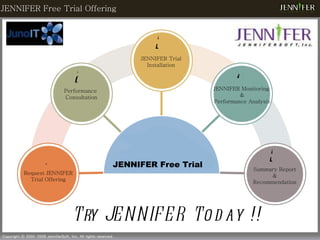
JENNIFER Free Trial Offering Try JENNIFER Today !! Request JENNIFER Trial Offering Performance  Consultation JENNIFER Trial Installation JENNIFER Monitoring  & Performance Analysis Summary Report & Recommendation 1 3 2 5 4 JENNIFER Free Trial
US Location : 360 Fairview Way  Milpitas CA, 95035 US Office Phone : +1-408-946-5508  Fax  :  +1-408-946-5509  Sales Inquiry:  [email_address]    Jason Hong, Business Development Manager [email_address] Partnership Inquiry:  [email_address]    Jason Hong: +1-408-464-8321 [email_address]    Andy Lee: +1-408-946=5508 [email_address] Contact Information
 
Back Up Side Back-Up Slide
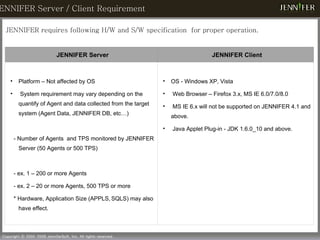
JENNIFER Server / Client Requirement  JENNIFER requires following H/W and S/W specification  for proper operation. JENNIFER Server JENNIFER Client Platform – Not affected by OS System requirement may vary depending on the quantify of Agent and data collected from the target system (Agent Data, JENNIFER DB, etc…) - Number of Agents  and TPS monitored by JENNIFER Server (50 Agents or 500 TPS) - ex. 1 – 200 or more Agents - ex. 2 – 20 or more Agents, 500 TPS or more * Hardware, Application Size (APPLS,   SQLS) may also have effect. OS - Windows XP, Vista Web Browser – Firefox 3.x, MS IE 6.0/7.0/8.0 MS IE 6.x will not be supported on JENNIFER 4.1 and above. Java Applet Plug-in - JDK 1.6.0_10 and above.
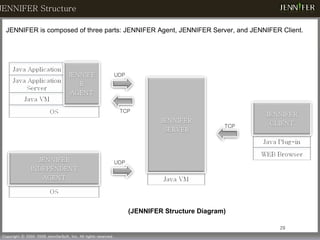
(JENNIFER Structure Diagram) JENNIFER is composed of three parts: JENNIFER Agent, JENNIFER Server, and JENNIFER Client. UDP TCP UDP TCP JENNIFER Structure
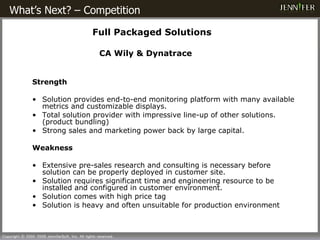
What’s Next? – Competition      Full Packaged Solutions   CA Wily & Dynatrace Strength Solution  provides end - to - end monitoring  platform with many available metrics and customizable displays.  T otal solution  provider with impressive  line - up  of other solutions. (product bundling) S t r ong sales and marketing power  back by large capital. Weakness Extensive pre-sales research and consulting  is  necessary   before  solution  can be properly  deplo yed in customer site . Solution  require s  significant time and engineering resource to  be installed  and configure d in customer environment . Solution comes with  high price  tag Solution is heavy and often unsuitable for production environment
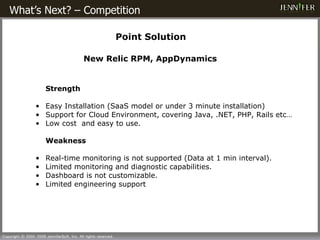
What’s Next? – Competition  Point Solution New Relic RPM, AppDynamics Strength Easy Installation (SaaS model or under 3 minute installation) Support for Cloud Environment, covering Java, .NET, PHP, Rails etc… Low cost  and easy to use. Weakness Real-time  monitoring is not supporte d (Data at 1 min interval). Limited monitoring and diagnostic capabilities. Dashboard is not customizable. Limited engineering support

Jenniffer

  • 1.
    Java ApplicationPerformance Management JENNIFER 4.5 JenniferSoft Inc. 2011.04.20
  • 2.
    Why Application PerformanceManagement? In a Service-based approach of IT management, Application = Service
  • 3.
    APM, Who NeedsIt Anyway? Is Application Performance effecting Bottom Line of your organization? An average medium size companies lose approx. $1,000,000  of their annual revenue due to system downtime or performance problem.  - Infonetics Research
  • 4.
    Characteristic of JavaWeb System Database Web Browser Java Application Server Loss of transparency in application (Black-Box) Increased complexity of business Increase is user and user variables Increased system’s influence over business Application Performance Management Needed APM Solution JENNIFER Business changes frequently Application are getting more larger
  • 5.
    JENNIFER is likea X-Ray or MRI Machine for Application Application is like a Black Box . What is going on Inside?? Transparency into Application
  • 6.
    JENNIFER Real-Time ITService Monitoring Performance Problem Resolution End-to-End Monitoring Application Tuning APM Solution JENNIFER
  • 7.
    is watchingthe Application & Java Application Server JENNIFER Position NMS, SMS, Web-Log Analyzer, DB Monitoring Java App. Server L4 IDS WEB Firewall TUXEDO TMAX Oracle, Sybase DB2, Etc.., Internet
  • 8.
    JENNIFER Agent SupportedPlatform JENNIFER supports most of the OS, JAVA (Sun, IBM, BEA, etc…) , and Java Application Server commonly found in current IT environments. Operating System (OS) Java Application Server (Java Application Server) AIX 4.3.3, 5.x 32bit, 64bit HP-UX 11.x 32bit, 64bit, Itanium 64bit Sun Solaris 2.8, 2.9, 10 32bit, 64bit, x86 Intel Linux 32bit, Redhat Itanium 64bit Compaq Tru64 UNIX OSF1 Microsoft Windows 2000, XP, 2003, Vista IBM iSeries(AS400) for WebSphere IBM z/OS for WebSphere, zLinux BEA WebLogic 5.1, 6.x, 8.x, 9.x, 10.x, 11.x IBM WebSphere Application Server3.5, 4.x, 5.x, 6.x Tmaxsoft JEUS 3.x, 4.x , 5.x, 6.x Oracle Application Server 9iAS, 10gAS, OC4J, ERP SUN Application Server 7.x, 8.x,9.x Fujitsu Interstage 5.x, 6.x, 7.x Hitachi Cosminexus 7 Sybase EAServer 4.x, 5.x Macromedia JRun 4.x Apache Jakarta Tomcat 3.x, 4.x, 5.x,6.x Caucho Technology Resin 2.x, 3.x RedHat JBoss Application Server 3.x, 4.x Apache Jserv GlassFish
  • 9.
    JENNIFER Agent SupportedPlatform (.NET) JENNIFER supports Many Windows Servers commonly used by Today’s IT environments. Microsoft .NET Server (IIS) Operating System IIS 6.0, 7.0, 7.5 Windows 2003 Server 32bit, 64bit, Windows 7 Supported Database Supported .NET Framework System.Data.SqlClient System.Data.Odbc Oracle.DataAccess.Client .NET 2.0, 3.0, 3.5
  • 10.
    JENNIFER’s Main FeaturesDashboard Monitoring Active Services to detect performance problems and get the detailed info of detected problem in less than 3-clicks Active Service Monitoring Intuitive GUI and easy-to-see dashboard allows the users to see system performance at a glance. X-View monitors response time of service transactions individually and display it in a scatter graph. Transaction based profiling and X-View
  • 11.
    JENNIFER Dashboard Fastrecognition of performance problems See user, service, and resource data in one glance Simultaneously monitor multiple Java processes True Real-Time Monitoring Dashboard
  • 12.
    All symptoms ofresource related performance problem is presented in increase in active service. JENNIFER updates active service count every 1 second. User can see the detailed information of active services upon request even if the service is not yet finished. Active service monitoring Active Service Monitoring
  • 13.
    What services arequeued? Just Click Active Service Monitoring Instance Id Service Call Time Thread Id Service Name Fetch Count Client IP Response Time Status SQL Count
  • 14.
    Detail information fora active service Active Service Monitoring Select a transaction Click! Service Name Active Profile Active Stack Client IP Last exec SQL
  • 15.
    Transaction Trace andX-View Profiling data is collected for individual transaction. Select a transaction requiring analysis to see its performance and profile. Performance and profile is displayed immediately after a transaction is finished. Profile not only shows method-level response time but also show CPU time, SQL text, parameters & execute time, FILE/SOCKET open, and TP-CALL. Transaction Trace & X-View
  • 16.
    Response Time ScatterGraph Transaction End Time Transaction Response Time Error Transactions (red) Normal Transactions High Response Time – Tune It! X-View Transaction Trace & X-View Need Analysis
  • 17.
    Review Transaction ProfileTransaction Trace & X-View Focus-in on the abnormal transactions! Click & Drag Click
  • 18.
    Transaction Summary &Profile Transaction Trace & X-View Transaction Performance Summary Service Name Client IP SQL Time, TX Time, Fetch Time, CPU Time Response Time JDBC Resource Usage Connection Open / Close Set Auto Commit / Commit / Rollback Statement / PreparedStatement / CallableStatment Class SQL and SQL Parameters External Service Call(ex TP-CALL) Method Response Time Method Parameter/Return File / Socket Open New thread init Current thread Name And Many More…
  • 19.
    Things to considerfor production APM… Excess overhead which impacts performance? Easy deployment? Easy to use? Fast Analysis of performance problem? Easy root-cause discovery? For JENNIFER, Yes!
  • 20.
    What Can JENNIFERDo? JENNIFER’s Key Benefits Ensure that Application performance supports business goals Minimize performance issues slipping into production , there by Minimize Total System Downtime Isolate and Resolve performance issues in live applications before they impact end-users Reduce Mean-Time-To-Repair  of production application issues by 90%, to bring them back online quickly Easily integrate external system data and generate reports Collects and store application performance and business data , for trend analysis & performance reporting Integrate data from external system easily , using JENNIFER’s API’s and Independent Agent Easy to deploy, Minimal overhead Easily install and configure JENNIFER without advanced knowledge of application architecture Proactively monitor and gather profiling data with minimal overhead (3~5%), Dynamically change profiling level without restarting app or server
  • 21.
    Customer support forJENNIFER product Installation is provided by JenniferSoft in following steps Pre-installation Consultation – A brief consultation with customer to find out information about system environment and Customer’s monitoring requirement. Schedule an Installation Session via Remote Connect – Book a time slot with JenniferSoft professional service team to receive professional installation service. If installation is not finished in One day, customer can schedule additional installation service with JenniferSoft Support Staff. * If customer is considering using JENNIFER to monitor large system, onsite visit by JenniferSoft support engineer may be considered. For customer’s who want to install JENNIFER on their own time and leisure, we provide installation package with step-by-step installation guide and user manual. * Customer can also take advantage of our online resource such as Support FAQ and Support Q&A to easily find answers to support questions and commonly asked our customers in the past. JenniferSoft Remote Connect - http://www.jennifersoft.com/docs/apm-jennifer-support-remote-connect.html JenniferSoft Support FAQ - http://www.jennifersoft.com/forum/apm-jennifer-support-faqs/1/list.html JenniferSoft Support Q&A - http://www.jennifersoft.com/forum/apm-jennifer-support-qa/1/list.html JenniferSoft Product Installation Support
  • 22.
  • 23.
    Once JENNIFER hasbeen successfully installed, the first line of contact for technical questions and enquiry will be performed by JENNIFER reselling partner's technical support team, who will rely inquiry/request to JenniferSoft global technical support team and work with them to deliver proper solutions to customer. JenniferSoft Post-installation Technical Support JENNIFER Reselling Partner’s Technical Support Team JenniferSoft Technical Support Team Customer JenniferSoft Global Technical Support Team Hours of Operation: 9am~10pm KST ( 2am ~ 3pm CEST) Method of Contact: email, Google/Skype messenger, Telephone Global Technical Support Manager: Justin Kim During hour of operation, initial response time to inquiry will be 1 hour.
  • 24.
    JENNIFER Free TrialOffering Try JENNIFER Today !! Request JENNIFER Trial Offering Performance Consultation JENNIFER Trial Installation JENNIFER Monitoring & Performance Analysis Summary Report & Recommendation 1 3 2 5 4 JENNIFER Free Trial
  • 25.
    US Location :360 Fairview Way Milpitas CA, 95035 US Office Phone : +1-408-946-5508 Fax : +1-408-946-5509 Sales Inquiry: [email_address]  Jason Hong, Business Development Manager [email_address] Partnership Inquiry: [email_address]  Jason Hong: +1-408-464-8321 [email_address]  Andy Lee: +1-408-946=5508 [email_address] Contact Information
  • 26.
  • 27.
    Back Up SideBack-Up Slide
  • 28.
    JENNIFER Server /Client Requirement JENNIFER requires following H/W and S/W specification for proper operation. JENNIFER Server JENNIFER Client Platform – Not affected by OS System requirement may vary depending on the quantify of Agent and data collected from the target system (Agent Data, JENNIFER DB, etc…) - Number of Agents and TPS monitored by JENNIFER Server (50 Agents or 500 TPS) - ex. 1 – 200 or more Agents - ex. 2 – 20 or more Agents, 500 TPS or more * Hardware, Application Size (APPLS, SQLS) may also have effect. OS - Windows XP, Vista Web Browser – Firefox 3.x, MS IE 6.0/7.0/8.0 MS IE 6.x will not be supported on JENNIFER 4.1 and above. Java Applet Plug-in - JDK 1.6.0_10 and above.
  • 29.
    (JENNIFER Structure Diagram)JENNIFER is composed of three parts: JENNIFER Agent, JENNIFER Server, and JENNIFER Client. UDP TCP UDP TCP JENNIFER Structure
  • 30.
    What’s Next? –Competition Full Packaged Solutions CA Wily & Dynatrace Strength Solution provides end - to - end monitoring platform with many available metrics and customizable displays. T otal solution provider with impressive line - up of other solutions. (product bundling) S t r ong sales and marketing power back by large capital. Weakness Extensive pre-sales research and consulting is necessary before solution can be properly deplo yed in customer site . Solution require s significant time and engineering resource to be installed and configure d in customer environment . Solution comes with high price tag Solution is heavy and often unsuitable for production environment
  • 31.
    What’s Next? –Competition Point Solution New Relic RPM, AppDynamics Strength Easy Installation (SaaS model or under 3 minute installation) Support for Cloud Environment, covering Java, .NET, PHP, Rails etc… Low cost and easy to use. Weakness Real-time monitoring is not supporte d (Data at 1 min interval). Limited monitoring and diagnostic capabilities. Dashboard is not customizable. Limited engineering support