Application Performance Management Olivier Gérardin, Sfeir Benelux
Agenda APM: an attempt to define History and challenges The tools More than just tools…
APM: A definition Application Enterprise-class, business-critical software Most often web-based/JEE Performance Fast response times Low resource usage Management Planning, organizing, coordinating, controlling… with a goal
Let’s put it all together A discipline in  Systems Management Goal: to ensure performance and availability of software applications What’s performance? Good question…
Performance Defined in terms of Response Time: How fast is my application?  Resource Usage: How much CPU/memory/network/etc. does my application need? Consistency: Does my application behave consistenly in time?
Acceptable performance Level of acceptable performance can be hard to define SLAs when they exist Arbitrary choice Trial and error No idea…
 
History APM has evolved since the early days of IT The « good old days » Client-server: Things get worse Distributed: Who is responsible?
The « good old days » Centralized computing Limited, well known number of points of failure / bottlenecks Resource usage monitoring usually sufficient Central monitoring
Things get worse Client server improves on many points (responsibility distribution, user interfaces, etc.) Performance begins to depend on more factors Server  Network health/capacity/usage Client horsepower/type/configuration Monitoring becomes complex
Today’s applications Distributed Heterogeneous Composite Multi-tiered Multi-technologies Multi-vendors Java or .Net centric You name it
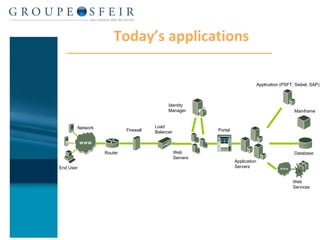
Today’s applications Identity Manager Firewall Network Application Servers Load Balancer Portal Application (PSFT, Siebel, SAP) Web Services End User Web  Servers Router Mainframe  Database
Scattered information Performance information comes from a number of places and systems: Backends  Databases Legacy systems … Servers  Application servers Web servers Identity servers … Systems / Networks
The challenges of APM (1) Number / heterogeneity / dispersion of systems Code complexity Libraries Frameworks Business code Connectors
The challenges of APM (2) Multiple sources Built-in monitoring tools Monitoring APIs JMX, PMI, … Log files  System tools Lack of global visibility
The challenges of APM (3) Multiple stakeholders Developpers, Architects Support Service owners Network/systems administrators Management
 
Basic monitoring tools System monitoring tools Ping, ps, tcpdump, truss, log analyzers,  … VM tools Memory dumps, thread dumps, verbosegc, … Resources monitors Thread pool, connection pool, memory usage Disparate, inconsistent tools, difficult to use efficiently
Code-oriented tools Source code analyzers Redundancy, complexity, coverage, … Profilers, test tools Quantitative usage information Unit testing Useful information, but  Source analyzers provide static information only Profilers cannot be used in production or  near-production environments (too much overhead) Ensuring that software  just works  is not enough
The need for new tools Keys to monitoring complex applications: Being able to gather performance information from all sources  in a consistent way Being able to collect data from  production environments  without significant overhead Being able to  reconcile and link  collected information Agent-based monitoring tools provide those features
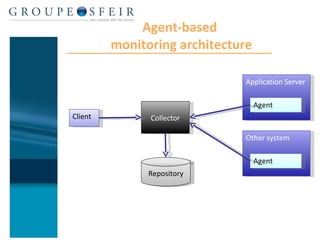
Agent-based tools Performance data is captured by « agents » as close as possible to the source Using bytecode instrumentation for virtual machines (Java, .Net) Using existing monitoring APIs Using custom monitors A repository  collects/stores data from agents  provides analysis tools for end-users
Agent-based  monitoring architecture Application Server Agent Other system Agent Collector Repository Client
Benefits of agent-based tools Provide maximum visibility Consistent interface For the collector and for the client Low overhead If correctly parameterized! Best of both worlds: an agent can be an agentless collector! E.g.: remote web server monitoring
The players CA Wily Introscope suite IBM Tivoli Composite Application Manager BMC Software Performance Manager suite Compuware, HP, dynaTrace, …
The Wily choice Sfeir has been working with Wily for several years Powerful agent-based architecture Virtually zero overhead Dynamic instrumentation Wily’s bytecode instrumentation technology adopted as industry-standard in Java 5.0 (JSR 174, 163) Any JEE server/any platform and now .Net too! Fully customizable dashboards, complete transaction capture, historical data access, etc. 100% functional out of the box
Sfeir expertise Sfeir has a high expertise in APM coupled with an unmatched knowledge of Introscope tools Some references: Effigie (MGEN), European Parliament, MAAF, CIBAMA (Groupama), … We have built a constructive partnership with CA Wily Sfeir provides regular Introscope training sessions on behalf of CA Wily And also coaching, consulting services, etc.
 
Tools are not enough! Tools without knowledge    failure to diagnose correctly Tools without process    failure to ensure consistent performance
The POV shift Initial concern was resource monitoring (CPU, memory usage, pool usage, etc.) Is it out of threads? Does it use too much memory? This approach has proven insufficient for modern applications APM now focuses on  user experience  through frontends performance
APM = tools + process Tools help Collecting data Analyzing data Processes help Ensuring consistent, appropriate and timely handling of issues Avoiding performance issues Managing relationships between stakeholders
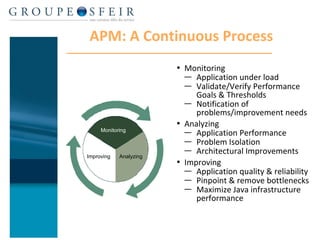
APM: A Continuous Process Monitoring Application under load  Validate/Verify Performance Goals & Thresholds Notification of problems/improvement needs Analyzing  Application Performance  Problem Isolation Architectural Improvements Improving Application quality & reliability Pinpoint & remove bottlenecks Maximize Java infrastructure performance Monitoring Analyzing Improving
Who has the knowledge? Many stakeholders    difficult to gather all knowledge required for problem analysis
Developers play a key role in APM Code ultimately responsible for many issues Memory leaks, improper backend usage, inefficient code, … Often most able to interpret output of APM tools But…
The chasm… Most developers have no idea how their code runs in production Or even what a production center is… Communication between support teams and dev teams often tense Insufficient doc provided, developers feel in accusation Lots of mutual distrust Dev teams should be involved early in APM process!
Involving developers During develoment Integrate performance issues through adequate training Implement best practises in architecture and code  After development Involve developers in solving code-related issues Encourage communication between support and dev teams
 
Summary APM as a discipline has been around for some time, but dramatically changed with modern composite applications Appropriate tooling is not an option for efficient APM, but is not sufficient A well-defined and followed APM process is the best insurance of consistent performance Involve developers, and involve them early!
Thank you Any questions?

Application Performance Monitoring

  • 1.
    Application Performance ManagementOlivier Gérardin, Sfeir Benelux
  • 2.
    Agenda APM: anattempt to define History and challenges The tools More than just tools…
  • 3.
    APM: A definitionApplication Enterprise-class, business-critical software Most often web-based/JEE Performance Fast response times Low resource usage Management Planning, organizing, coordinating, controlling… with a goal
  • 4.
    Let’s put itall together A discipline in Systems Management Goal: to ensure performance and availability of software applications What’s performance? Good question…
  • 5.
    Performance Defined interms of Response Time: How fast is my application? Resource Usage: How much CPU/memory/network/etc. does my application need? Consistency: Does my application behave consistenly in time?
  • 6.
    Acceptable performance Levelof acceptable performance can be hard to define SLAs when they exist Arbitrary choice Trial and error No idea…
  • 7.
  • 8.
    History APM hasevolved since the early days of IT The « good old days » Client-server: Things get worse Distributed: Who is responsible?
  • 9.
    The « good olddays » Centralized computing Limited, well known number of points of failure / bottlenecks Resource usage monitoring usually sufficient Central monitoring
  • 10.
    Things get worseClient server improves on many points (responsibility distribution, user interfaces, etc.) Performance begins to depend on more factors Server Network health/capacity/usage Client horsepower/type/configuration Monitoring becomes complex

  • 11.
    Today’s applications DistributedHeterogeneous Composite Multi-tiered Multi-technologies Multi-vendors Java or .Net centric You name it

  • 12.
    Today’s applications IdentityManager Firewall Network Application Servers Load Balancer Portal Application (PSFT, Siebel, SAP) Web Services End User Web Servers Router Mainframe Database
  • 13.
    Scattered information Performanceinformation comes from a number of places and systems: Backends Databases Legacy systems … Servers Application servers Web servers Identity servers … Systems / Networks
  • 14.
    The challenges ofAPM (1) Number / heterogeneity / dispersion of systems Code complexity Libraries Frameworks Business code Connectors
  • 15.
    The challenges ofAPM (2) Multiple sources Built-in monitoring tools Monitoring APIs JMX, PMI, … Log files System tools Lack of global visibility
  • 16.
    The challenges ofAPM (3) Multiple stakeholders Developpers, Architects Support Service owners Network/systems administrators Management
  • 17.
  • 18.
    Basic monitoring toolsSystem monitoring tools Ping, ps, tcpdump, truss, log analyzers, … VM tools Memory dumps, thread dumps, verbosegc, … Resources monitors Thread pool, connection pool, memory usage Disparate, inconsistent tools, difficult to use efficiently
  • 19.
    Code-oriented tools Sourcecode analyzers Redundancy, complexity, coverage, … Profilers, test tools Quantitative usage information Unit testing Useful information, but Source analyzers provide static information only Profilers cannot be used in production or near-production environments (too much overhead) Ensuring that software just works is not enough
  • 20.
    The need fornew tools Keys to monitoring complex applications: Being able to gather performance information from all sources in a consistent way Being able to collect data from production environments without significant overhead Being able to reconcile and link collected information Agent-based monitoring tools provide those features
  • 21.
    Agent-based tools Performancedata is captured by « agents » as close as possible to the source Using bytecode instrumentation for virtual machines (Java, .Net) Using existing monitoring APIs Using custom monitors A repository collects/stores data from agents provides analysis tools for end-users
  • 22.
    Agent-based monitoringarchitecture Application Server Agent Other system Agent Collector Repository Client
  • 23.
    Benefits of agent-basedtools Provide maximum visibility Consistent interface For the collector and for the client Low overhead If correctly parameterized! Best of both worlds: an agent can be an agentless collector! E.g.: remote web server monitoring
  • 24.
    The players CAWily Introscope suite IBM Tivoli Composite Application Manager BMC Software Performance Manager suite Compuware, HP, dynaTrace, …
  • 25.
    The Wily choiceSfeir has been working with Wily for several years Powerful agent-based architecture Virtually zero overhead Dynamic instrumentation Wily’s bytecode instrumentation technology adopted as industry-standard in Java 5.0 (JSR 174, 163) Any JEE server/any platform and now .Net too! Fully customizable dashboards, complete transaction capture, historical data access, etc. 100% functional out of the box
  • 26.
    Sfeir expertise Sfeirhas a high expertise in APM coupled with an unmatched knowledge of Introscope tools Some references: Effigie (MGEN), European Parliament, MAAF, CIBAMA (Groupama), … We have built a constructive partnership with CA Wily Sfeir provides regular Introscope training sessions on behalf of CA Wily And also coaching, consulting services, etc.
  • 27.
  • 28.
    Tools are notenough! Tools without knowledge  failure to diagnose correctly Tools without process  failure to ensure consistent performance
  • 29.
    The POV shiftInitial concern was resource monitoring (CPU, memory usage, pool usage, etc.) Is it out of threads? Does it use too much memory? This approach has proven insufficient for modern applications APM now focuses on user experience through frontends performance
  • 30.
    APM = tools+ process Tools help Collecting data Analyzing data Processes help Ensuring consistent, appropriate and timely handling of issues Avoiding performance issues Managing relationships between stakeholders
  • 31.
    APM: A ContinuousProcess Monitoring Application under load Validate/Verify Performance Goals & Thresholds Notification of problems/improvement needs Analyzing Application Performance Problem Isolation Architectural Improvements Improving Application quality & reliability Pinpoint & remove bottlenecks Maximize Java infrastructure performance Monitoring Analyzing Improving
  • 32.
    Who has theknowledge? Many stakeholders  difficult to gather all knowledge required for problem analysis
  • 33.
    Developers play akey role in APM Code ultimately responsible for many issues Memory leaks, improper backend usage, inefficient code, … Often most able to interpret output of APM tools But…
  • 34.
    The chasm… Mostdevelopers have no idea how their code runs in production Or even what a production center is… Communication between support teams and dev teams often tense Insufficient doc provided, developers feel in accusation Lots of mutual distrust Dev teams should be involved early in APM process!
  • 35.
    Involving developers Duringdeveloment Integrate performance issues through adequate training Implement best practises in architecture and code After development Involve developers in solving code-related issues Encourage communication between support and dev teams
  • 36.
  • 37.
    Summary APM asa discipline has been around for some time, but dramatically changed with modern composite applications Appropriate tooling is not an option for efficient APM, but is not sufficient A well-defined and followed APM process is the best insurance of consistent performance Involve developers, and involve them early!
  • 38.
    Thank you Anyquestions?