Advance Java Technology
[Java Database Connectivity]
Mali Nayan M
Assistant Professor
Department of Information Technology
Sigma Institute of Engineering
Advance Java Technology 1
ResultSet interface
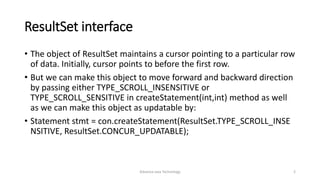
• The object of ResultSet maintains a cursor pointing to a particular row
of data. Initially, cursor points to before the first row.
• But we can make this object to move forward and backward direction
by passing either TYPE_SCROLL_INSENSITIVE or
TYPE_SCROLL_SENSITIVE in createStatement(int,int) method as well
as we can make this object as updatable by:
• Statement stmt = con.createStatement(ResultSet.TYPE_SCROLL_INSE
NSITIVE, ResultSet.CONCUR_UPDATABLE);
Advance Java Technology 2
1) public boolean next(): is used to move the cursor to the one
row next from the current position.
2) public boolean previous(): is used to move the cursor to the one
row previous from the current position.
3) public boolean first(): is used to move the cursor to the first
row in result set object.
4) public boolean last(): is used to move the cursor to the last
row in result set object.
5) public boolean absolute(int row): is used to move the cursor to the
specified row number in the ResultSet
object.
Advance Java Technology 3
6) public boolean relative(int row): is used to move the cursor to the
relative row number in the ResultSet
object, it may be positive or negative.
7) public int getInt(int
columnIndex):
is used to return the data of specified
column index of the current row as int.
8) public int getInt(String
columnName):
is used to return the data of specified
column name of the current row as int.
9) public String getString(int
columnIndex):
is used to return the data of specified
column index of the current row as
String.
10) public String getString(String
columnName):
is used to return the data of specified
column name of the current row as
String.
Advance Java Technology 4
try {
String url = "jdbc:msql://200.210.220.1:1114/Demo";
Connection conn = DriverManager.getConnection(url,"","");
Statement stmt = conn.createStatement();
ResultSet rs;
rs = stmt.executeQuery("SELECT Lname FROM Customers WHERE Snum = 2001");
while ( rs.next() ) {
String lastName = rs.getString("Lname");
System.out.println(lastName);
}
conn.close();
} catch (Exception e) {
System.err.println("Got an exception! ");
System.err.println(e.getMessage());
}
Advance Java Technology 5
Updateable Resultset
• You can update the table row using result set object. Below example
shows how to update table records.
Advance Java Technology 6
Connection con = null;
Statement st = null;
ResultSet rs = null;
Class.forName("oracle.jdbc.driver.OracleDriver");
con = DriverManager. getConnection(" jdbc:msql://200.210.220.1:1114/Demo " ,"user","password");
st = con.createStatement(ResultSet.TYPE_SCROLL_SENSITIVE, ResultSet.CONCUR_UPDATABLE);
rs = st.executeQuery("select accno, bal from bank");
while(rs.next()){
if(rs.getInt(1) == 100){
rs.updateDouble(2, 2000);
rs.updateRow();
System.out.println("Record updated!!!");
}
}
} catch (ClassNotFoundException e) {
e.printStackTrace();
} Advance Java Technology 7
ResultSetMetaData Interface
• The metadata means data about data
public int getColumnCount()throws
SQLException
it returns the total number of columns in
the ResultSet object.
public String getColumnName(int
index)throws SQLException
it returns the column name of the specified
column index.
public String getColumnTypeName(int
index)throws SQLException
it returns the column type name for the
specified index.
public String getTableName(int
index)throws SQLException
it returns the table name for the specified
column index.
Advance Java Technology 8
Class.forName("oracle.jdbc.driver.OracleDriver");
Connection con=DriverManager.getConnection("jdbc:oracle:thin:@localhost:1521:xe","system",
"oracle");
PreparedStatement ps=con.prepareStatement("select * from emp");
ResultSet rs=ps.executeQuery();
ResultSetMetaData rsmd=rs.getMetaData();
System.out.println("Total columns: "+rsmd.getColumnCount());
System.out.println("Column Name of 1st column: "+rsmd.getColumnName(1));
System.out.println("Column Type Name of 1st column: "+rsmd.getColumnTypeName(1));
con.close();
Advance Java Technology 9
Interface
• Statement
• Prepare Statement
• Callable Statement
Advance Java Technology 10
Statement
• Static sql Statement at runtime
• Can’t accept the parameter
• boolean execute (String SQL)
• Returns a boolean value of true if a ResultSet object can be retrieved
• int executeUpdate (String SQL):
• Returns the number of rows affected by the execution of the SQL statement.
• ResultSet executeQuery (String SQL):
• Returns a ResultSet object.
Advance Java Technology 11
Class.forName("com.mysql.jdbc.Driver");
conn = DriverManager.getConnection(DB_URL,USER,PASS);
stmt = conn.createStatement();
Boolean ret = stmt.execute(sql);
Advance Java Technology 12
Prepare Statement
• Used sql statement many times
• Accept input parameters
Advance Java Technology 13
Connection conn = null;
PreparedStatement stmt = null;
Class.forName("com.mysql.jdbc.Driver");
conn = DriverManager.getConnection(DB_URL,USER,PASS);
String sql = "UPDATE Employees set age=? WHERE id=?";
stmt = conn.prepareStatement(sql);
stmt.setInt(1, 35); // This would set age
stmt.setInt(2, 102); // This would set ID
int rows = stmt.executeUpdate();
Advance Java Technology 14
CallableStatement
• to access the database stored procedures
• can also accept runtime input parameters.
Advance Java Technology 15
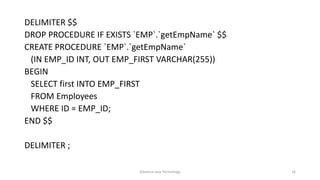
DELIMITER $$
DROP PROCEDURE IF EXISTS `EMP`.`getEmpName` $$
CREATE PROCEDURE `EMP`.`getEmpName`
(IN EMP_ID INT, OUT EMP_FIRST VARCHAR(255))
BEGIN
SELECT first INTO EMP_FIRST
FROM Employees
WHERE ID = EMP_ID;
END $$
DELIMITER ;
Advance Java Technology 16
Connection dbConnection = null;
CallableStatement callableStatement = null;
dbConnection = getDBConnection();
callableStatement =
dbConnection.prepareCall(getDBUSERByUserIdSql);
callableStatement.setInt(1, 10);
callableStatement.registerOutParameter(2, java.sql.Types.VARCHAR);
callableStatement.registerOutParameter(3, java.sql.Types.VARCHAR);
callableStatement.registerOutParameter(4, java.sql.Types.DATE);
callableStatement.executeUpdate();
Advance Java Technology 17
Transaction Management in JDBC
• Transaction represents a single unit of work.
• fast performance It makes the performance fast because database is hit at
the time of commit.
• The ACID properties describes the transaction management well. ACID
stands for Atomicity, Consistency, isolation and durability.
• Atomicity means either all successful or none.
• Consistency ensures bringing the database from one consistent state to
another consistent state.
• Isolation ensures that transaction is isolated from other transaction.
• Durability means once a transaction has been committed, it will remain so,
even in the event of errors, power loss etc.
Advance Java Technology 18
void setAutoCommit(boolean status) It is true bydefault means each transaction
is committed bydefault.
void commit() commits the transaction.
void rollback() cancels the transaction.
Advance Java Technology 19
Class.forName("oracle.jdbc.driver.OracleDriver");
Connection con=DriverManager.getConnection("jdbc:oracle:thin:@localhost:1521:xe","system","oracle");
con.setAutoCommit(false);
Statement stmt=con.createStatement();
stmt.executeUpdate("insert into user420 values(190,'abhi',40000)");
stmt.executeUpdate("insert into user420 values(191,'umesh',50000)");
con.commit();
con.close();
Advance Java Technology 20

Jdbc

  • 1.
    Advance Java Technology [JavaDatabase Connectivity] Mali Nayan M Assistant Professor Department of Information Technology Sigma Institute of Engineering Advance Java Technology 1
  • 2.
    ResultSet interface • Theobject of ResultSet maintains a cursor pointing to a particular row of data. Initially, cursor points to before the first row. • But we can make this object to move forward and backward direction by passing either TYPE_SCROLL_INSENSITIVE or TYPE_SCROLL_SENSITIVE in createStatement(int,int) method as well as we can make this object as updatable by: • Statement stmt = con.createStatement(ResultSet.TYPE_SCROLL_INSE NSITIVE, ResultSet.CONCUR_UPDATABLE); Advance Java Technology 2
  • 3.
    1) public booleannext(): is used to move the cursor to the one row next from the current position. 2) public boolean previous(): is used to move the cursor to the one row previous from the current position. 3) public boolean first(): is used to move the cursor to the first row in result set object. 4) public boolean last(): is used to move the cursor to the last row in result set object. 5) public boolean absolute(int row): is used to move the cursor to the specified row number in the ResultSet object. Advance Java Technology 3
  • 4.
    6) public booleanrelative(int row): is used to move the cursor to the relative row number in the ResultSet object, it may be positive or negative. 7) public int getInt(int columnIndex): is used to return the data of specified column index of the current row as int. 8) public int getInt(String columnName): is used to return the data of specified column name of the current row as int. 9) public String getString(int columnIndex): is used to return the data of specified column index of the current row as String. 10) public String getString(String columnName): is used to return the data of specified column name of the current row as String. Advance Java Technology 4
  • 5.
    try { String url= "jdbc:msql://200.210.220.1:1114/Demo"; Connection conn = DriverManager.getConnection(url,"",""); Statement stmt = conn.createStatement(); ResultSet rs; rs = stmt.executeQuery("SELECT Lname FROM Customers WHERE Snum = 2001"); while ( rs.next() ) { String lastName = rs.getString("Lname"); System.out.println(lastName); } conn.close(); } catch (Exception e) { System.err.println("Got an exception! "); System.err.println(e.getMessage()); } Advance Java Technology 5
  • 6.
    Updateable Resultset • Youcan update the table row using result set object. Below example shows how to update table records. Advance Java Technology 6
  • 7.
    Connection con =null; Statement st = null; ResultSet rs = null; Class.forName("oracle.jdbc.driver.OracleDriver"); con = DriverManager. getConnection(" jdbc:msql://200.210.220.1:1114/Demo " ,"user","password"); st = con.createStatement(ResultSet.TYPE_SCROLL_SENSITIVE, ResultSet.CONCUR_UPDATABLE); rs = st.executeQuery("select accno, bal from bank"); while(rs.next()){ if(rs.getInt(1) == 100){ rs.updateDouble(2, 2000); rs.updateRow(); System.out.println("Record updated!!!"); } } } catch (ClassNotFoundException e) { e.printStackTrace(); } Advance Java Technology 7
  • 8.
    ResultSetMetaData Interface • Themetadata means data about data public int getColumnCount()throws SQLException it returns the total number of columns in the ResultSet object. public String getColumnName(int index)throws SQLException it returns the column name of the specified column index. public String getColumnTypeName(int index)throws SQLException it returns the column type name for the specified index. public String getTableName(int index)throws SQLException it returns the table name for the specified column index. Advance Java Technology 8
  • 9.
    Class.forName("oracle.jdbc.driver.OracleDriver"); Connection con=DriverManager.getConnection("jdbc:oracle:thin:@localhost:1521:xe","system", "oracle"); PreparedStatement ps=con.prepareStatement("select* from emp"); ResultSet rs=ps.executeQuery(); ResultSetMetaData rsmd=rs.getMetaData(); System.out.println("Total columns: "+rsmd.getColumnCount()); System.out.println("Column Name of 1st column: "+rsmd.getColumnName(1)); System.out.println("Column Type Name of 1st column: "+rsmd.getColumnTypeName(1)); con.close(); Advance Java Technology 9
  • 10.
    Interface • Statement • PrepareStatement • Callable Statement Advance Java Technology 10
  • 11.
    Statement • Static sqlStatement at runtime • Can’t accept the parameter • boolean execute (String SQL) • Returns a boolean value of true if a ResultSet object can be retrieved • int executeUpdate (String SQL): • Returns the number of rows affected by the execution of the SQL statement. • ResultSet executeQuery (String SQL): • Returns a ResultSet object. Advance Java Technology 11
  • 12.
    Class.forName("com.mysql.jdbc.Driver"); conn = DriverManager.getConnection(DB_URL,USER,PASS); stmt= conn.createStatement(); Boolean ret = stmt.execute(sql); Advance Java Technology 12
  • 13.
    Prepare Statement • Usedsql statement many times • Accept input parameters Advance Java Technology 13
  • 14.
    Connection conn =null; PreparedStatement stmt = null; Class.forName("com.mysql.jdbc.Driver"); conn = DriverManager.getConnection(DB_URL,USER,PASS); String sql = "UPDATE Employees set age=? WHERE id=?"; stmt = conn.prepareStatement(sql); stmt.setInt(1, 35); // This would set age stmt.setInt(2, 102); // This would set ID int rows = stmt.executeUpdate(); Advance Java Technology 14
  • 15.
    CallableStatement • to accessthe database stored procedures • can also accept runtime input parameters. Advance Java Technology 15
  • 16.
    DELIMITER $$ DROP PROCEDUREIF EXISTS `EMP`.`getEmpName` $$ CREATE PROCEDURE `EMP`.`getEmpName` (IN EMP_ID INT, OUT EMP_FIRST VARCHAR(255)) BEGIN SELECT first INTO EMP_FIRST FROM Employees WHERE ID = EMP_ID; END $$ DELIMITER ; Advance Java Technology 16
  • 17.
    Connection dbConnection =null; CallableStatement callableStatement = null; dbConnection = getDBConnection(); callableStatement = dbConnection.prepareCall(getDBUSERByUserIdSql); callableStatement.setInt(1, 10); callableStatement.registerOutParameter(2, java.sql.Types.VARCHAR); callableStatement.registerOutParameter(3, java.sql.Types.VARCHAR); callableStatement.registerOutParameter(4, java.sql.Types.DATE); callableStatement.executeUpdate(); Advance Java Technology 17
  • 18.
    Transaction Management inJDBC • Transaction represents a single unit of work. • fast performance It makes the performance fast because database is hit at the time of commit. • The ACID properties describes the transaction management well. ACID stands for Atomicity, Consistency, isolation and durability. • Atomicity means either all successful or none. • Consistency ensures bringing the database from one consistent state to another consistent state. • Isolation ensures that transaction is isolated from other transaction. • Durability means once a transaction has been committed, it will remain so, even in the event of errors, power loss etc. Advance Java Technology 18
  • 19.
    void setAutoCommit(boolean status)It is true bydefault means each transaction is committed bydefault. void commit() commits the transaction. void rollback() cancels the transaction. Advance Java Technology 19
  • 20.
    Class.forName("oracle.jdbc.driver.OracleDriver"); Connection con=DriverManager.getConnection("jdbc:oracle:thin:@localhost:1521:xe","system","oracle"); con.setAutoCommit(false); Statement stmt=con.createStatement(); stmt.executeUpdate("insertinto user420 values(190,'abhi',40000)"); stmt.executeUpdate("insert into user420 values(191,'umesh',50000)"); con.commit(); con.close(); Advance Java Technology 20