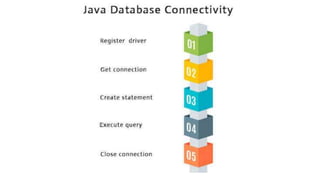
Java Database Connectivity
with 5 Steps
By,
R. Punithavel, AP/MCA
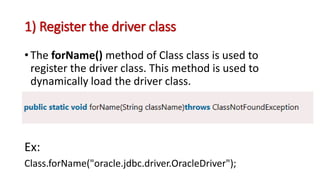
1) Register the driver class
• The forName() method of Class class is used to
register the driver class. This method is used to
dynamically load the driver class.
Ex:
Class.forName("oracle.jdbc.driver.OracleDriver");
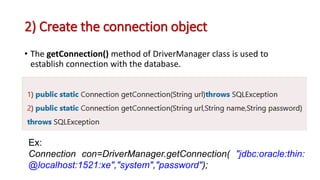
2) Create the connection object
• The getConnection() method of DriverManager class is used to
establish connection with the database.
Ex:
Connection con=DriverManager.getConnection( "jdbc:oracle:thin:
@localhost:1521:xe","system","password");
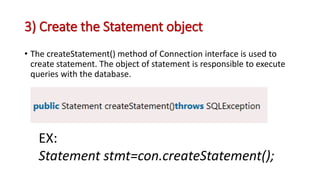
3) Create the Statement object
• The createStatement() method of Connection interface is used to
create statement. The object of statement is responsible to execute
queries with the database.
EX:
Statement stmt=con.createStatement();
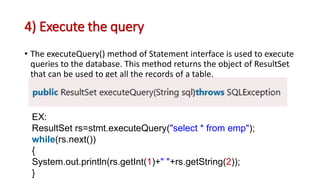
4) Execute the query
• The executeQuery() method of Statement interface is used to execute
queries to the database. This method returns the object of ResultSet
that can be used to get all the records of a table.
EX:
ResultSet rs=stmt.executeQuery("select * from emp");
while(rs.next())
{
System.out.println(rs.getInt(1)+" "+rs.getString(2));
}
5) Close the connection object
• By closing connection object statement and ResultSet
will be closed automatically. The close() method of
Connection interface is used to close the connection.
con.close();
• OWL 2 ontology can be used
to describe Database
Management Systems (DBMS)
in a machine-processable way.
• This description can help with
software engineering
processes and database
administration tasks, and can
help decide which DBMS is
best for a given set of
requirements.
EXAMPLE
import java.sql.*;
class OracleCon
{
public static void main(String args[])
{
Try
{
Class.forName("oracle.jdbc.driver.OracleDriver");
Connection con=DriverManager.getConnection("jdbc:oracle:thin:@localhost:1521:xe","system","oracle");
Statement stmt=con.createStatement();
ResultSet rs=stmt.executeQuery("select * from emp");
while(rs.next())
System.out.println(rs.getInt(1)+" "+rs.getString(2)+" "+rs.getString(3));
con.close();
}
catch(Exception e)
{ System.out.println(e);
}
}
}
My SQL Connection Example
import java.sql.*;
class MysqlCon{
public static void main(String args[]){
try{
Class.forName("com.mysql.jdbc.Driver");
Connection con=DriverManager.getConnection("jdbc:mysql://localhost:3306/
sonoo","root","root");
Statement stmt=con.createStatement();
ResultSet rs=stmt.executeQuery("select * from emp");
while(rs.next())
System.out.println(rs.getInt(1)+" "+rs.getString(2)+" "+rs.getString(3));
con.close();
}catch(Exception e){ System.out.println(e);}
}
}
Java Database Connectivity with 5 Steps.pptx

Java Database Connectivity with 5 Steps.pptx

  • 1.
    Java Database Connectivity with5 Steps By, R. Punithavel, AP/MCA
  • 3.
    1) Register thedriver class • The forName() method of Class class is used to register the driver class. This method is used to dynamically load the driver class. Ex: Class.forName("oracle.jdbc.driver.OracleDriver");
  • 4.
    2) Create theconnection object • The getConnection() method of DriverManager class is used to establish connection with the database. Ex: Connection con=DriverManager.getConnection( "jdbc:oracle:thin: @localhost:1521:xe","system","password");
  • 5.
    3) Create theStatement object • The createStatement() method of Connection interface is used to create statement. The object of statement is responsible to execute queries with the database. EX: Statement stmt=con.createStatement();
  • 6.
    4) Execute thequery • The executeQuery() method of Statement interface is used to execute queries to the database. This method returns the object of ResultSet that can be used to get all the records of a table. EX: ResultSet rs=stmt.executeQuery("select * from emp"); while(rs.next()) { System.out.println(rs.getInt(1)+" "+rs.getString(2)); }
  • 7.
    5) Close theconnection object • By closing connection object statement and ResultSet will be closed automatically. The close() method of Connection interface is used to close the connection. con.close();
  • 8.
    • OWL 2ontology can be used to describe Database Management Systems (DBMS) in a machine-processable way. • This description can help with software engineering processes and database administration tasks, and can help decide which DBMS is best for a given set of requirements.
  • 9.
    EXAMPLE import java.sql.*; class OracleCon { publicstatic void main(String args[]) { Try { Class.forName("oracle.jdbc.driver.OracleDriver"); Connection con=DriverManager.getConnection("jdbc:oracle:thin:@localhost:1521:xe","system","oracle"); Statement stmt=con.createStatement(); ResultSet rs=stmt.executeQuery("select * from emp"); while(rs.next()) System.out.println(rs.getInt(1)+" "+rs.getString(2)+" "+rs.getString(3)); con.close(); } catch(Exception e) { System.out.println(e); } } }
  • 10.
  • 11.
    import java.sql.*; class MysqlCon{ publicstatic void main(String args[]){ try{ Class.forName("com.mysql.jdbc.Driver"); Connection con=DriverManager.getConnection("jdbc:mysql://localhost:3306/ sonoo","root","root"); Statement stmt=con.createStatement(); ResultSet rs=stmt.executeQuery("select * from emp"); while(rs.next()) System.out.println(rs.getInt(1)+" "+rs.getString(2)+" "+rs.getString(3)); con.close(); }catch(Exception e){ System.out.println(e);} } }