WELCOME!
Jax, FL Admin Trailblazer Community
Spring 23 Release Notes
Wednesday, May 3, 2023
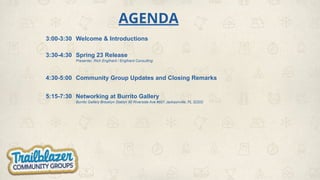
AGENDA
3:00-3:30 Welcome & Introductions
3:30-4:30 Spring 23 Release
Presenter, Rich Englhard / Englhard Consulting
4:30-5:00 Community Group Updates and Closing Remarks
5:15-7:30 Networking at Burrito Gallery
Burrito Gallery Brooklyn Station 90 Riverside Ave #601 Jacksonville, FL 32202
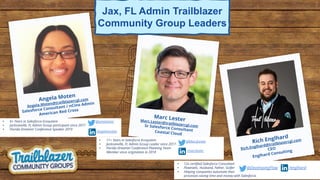
Marc Lester
Marc.Lester@trailblazercgl.com
Sr Salesforce Consultant
Coastal Cloud
• 11+ Years in Salesforce Ecosystem
• Jacksonville, FL Admin Group Leader since 2017
• Florida Dreamin’ Conference Planning Team
Member since origination in 2018 /marclester
@MarcJLester
Angela Moten
Angela.Moten@trailblazercgl.com
Salesforce Consultant / nCino Admin
American Red Cross
• 6+ Years in Salesforce Ecosystem
• Jacksonville, FL Admin Group participant since 2017
• Florida Dreamin’ Conference Speaker 2019
/angelamoten
@amoteninc
Rich Englhard
Rich.Englhard@trailblazercgl.com
CEO
Englhard Consulting
Jax, FL Admin Trailblazer
Community Group Leaders
• 12x certified Salesforce Consultant
• Flownatic, Husband, Father, Golfer
• Helping companies automate their
processes saving time and money with Salesforce.
/englhard
@DevelopingFlow
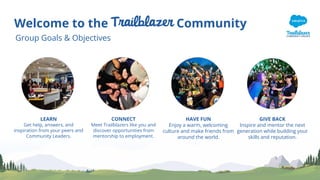
Welcome to the Community
Group Goals & Objectives
LEARN
Get help, answers, and
inspiration from your peers and
Community Leaders.
CONNECT
Meet Trailblazers like you and
discover opportunities from
mentorship to employment.
HAVE FUN
Enjoy a warm, welcoming
culture and make friends from
around the world.
GIVE BACK
Inspire and mentor the next
generation while building your
skills and reputation.
THANK YOU
to everyone that RSVP’ed today
Thank You to the CSX team for Hosting today’s event!!!
ACCOMPLISHMENTS!! CONGRATULATIONS!!
Career Connections?
New to the
Trailblazer Community?
WELCOME
to the Salesforce Ohana!!
Housekeeping
● Restrooms
● WiFi
● Networking after with drinks and appetizers at Burrito Gallery
Spring 23 Release Notes
Rich Englhard
CEO
Englhard Consulting
Jenn Lee’s Top Spring 23 Release Features for
Admins/Users
https://admin.salesforce.com/blog/2023/jens-top-spring-23-release-features-for-ad
mins-and-users
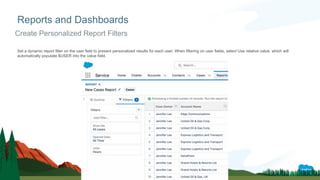
Set a dynamic report filter on the user field to present personalized results for each user. When filtering on user fields, select Use relative value, which will
automatically populate $USER into the value field.
Reports and Dashboards
Create Personalized Report Filters
Users of Unlimited Edition orgs can now subscribe to up to 15 reports and 15
dashboards from the previous limit of seven. For other Salesforce editions,
please contact Salesforce Support to increase your subscription limit.
Reports and Dashboards
Subscribe to even MOAR reports and dashboards
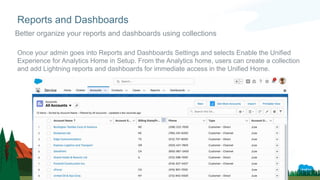
Once your admin goes into Reports and Dashboards Settings and selects Enable the Unified
Experience for Analytics Home in Setup. From the Analytics home, users can create a collection
and add Lightning reports and dashboards for immediate access in the Unified Home.
Reports and Dashboards
Better organize your reports and dashboards using collections
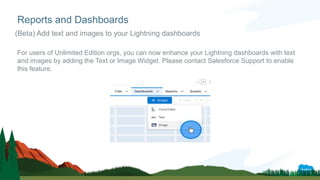
For users of Unlimited Edition orgs, you can now enhance your Lightning dashboards with text
and images by adding the Text or Image Widget. Please contact Salesforce Support to enable
this feature.
Reports and Dashboards
(Beta) Add text and images to your Lightning dashboards
Permissions enhancements
(Beta) Choose the permission sets display when setting field-level security
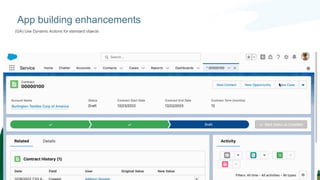
App building enhancements
(GA) Use Dynamic Actions for standard objects
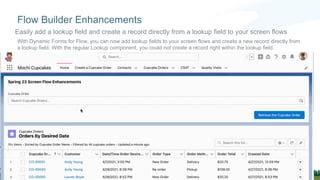
With Dynamic Forms for Flow, you can now add lookup fields to your screen flows and create a new record directly from
a lookup field. With the regular Lookup component, you could not create a record right within the lookup field.
Flow Builder Enhancements
Easily add a lookup field and create a record directly from a lookup field to your screen flows
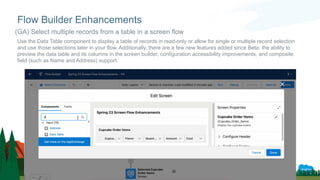
Use the Data Table component to display a table of records in read-only or allow for single or multiple record selection
and use those selections later in your flow. Additionally, there are a few new features added since Beta: the ability to
preview the data table and its columns in the screen builder, configuration accessibility improvements, and composite
field (such as Name and Address) support.
Flow Builder Enhancements
(GA) Select multiple records from a table in a screen flow
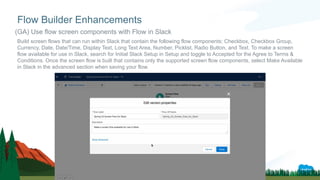
Build screen flows that can run within Slack that contain the following flow components: Checkbox, Checkbox Group,
Currency, Date, Date/Time, Display Text, Long Text Area, Number, Picklist, Radio Button, and Text. To make a screen
flow available for use in Slack, search for Initial Slack Setup in Setup and toggle to Accepted for the Agree to Terms &
Conditions. Once the screen flow is built that contains only the supported screen flow components, select Make Available
in Slack in the advanced section when saving your flow.
Flow Builder Enhancements
(GA) Use flow screen components with Flow in Slack
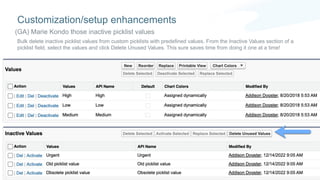
Bulk delete inactive picklist values from custom picklists with predefined values. From the Inactive Values section of a
picklist field, select the values and click Delete Unused Values. This sure saves time from doing it one at a time!
Customization/setup enhancements
(GA) Marie Kondo those inactive picklist values
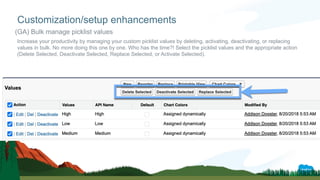
Increase your productivity by managing your custom picklist values by deleting, activating, deactivating, or replacing
values in bulk. No more doing this one by one. Who has the time?! Select the picklist values and the appropriate action
(Delete Selected, Deactivate Selected, Replace Selected, or Activate Selected).
Customization/setup enhancements
(GA) Bulk manage picklist values
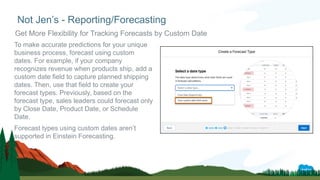
To make accurate predictions for your unique
business process, forecast using custom
dates. For example, if your company
recognizes revenue when products ship, add a
custom date field to capture planned shipping
dates. Then, use that field to create your
forecast types. Previously, based on the
forecast type, sales leaders could forecast only
by Close Date, Product Date, or Schedule
Date.
Forecast types using custom dates aren’t
supported in Einstein Forecasting.
Not Jen’s - Reporting/Forecasting
Get More Flexibility for Tracking Forecasts by Custom Date
Community Group Updates and Closing Remarks
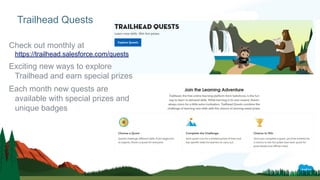
Check out monthly at
https://trailhead.salesforce.com/quests
Exciting new ways to explore
Trailhead and earn special prizes
Each month new quests are
available with special prizes and
unique badges
Trailhead Quests
JOIN THE MOVEMENT & START HAVING AN IMPACT
TODAY 🤗
CALL OUT!!!
for
Speakers at a Future Meeting
We would love to have a customer present
about how they are using Salesforce!
Please let Rich, Angela or I know
if you are interested.
Upcoming Administrator Group Events
❑ June - TBD
❑ Updates from any other group leaders (Salesforce Saturday, Architect, Nonprofit, Developer, WIT or Slack)?
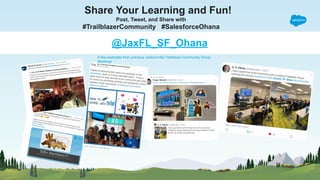
Share Your Learning and Fun!
Post, Tweet, and Share with
#TrailblazerCommunity #SalesforceOhana
@JaxFL_SF_Ohana
A few examples from previous Jacksonville Trailblazer Community Group
Meetings
Jax, FL Admin Community Group 05.03.2023 Deck.pdf

Jax, FL Admin Community Group 05.03.2023 Deck.pdf

  • 1.
    WELCOME! Jax, FL AdminTrailblazer Community Spring 23 Release Notes Wednesday, May 3, 2023
  • 2.
    AGENDA 3:00-3:30 Welcome &Introductions 3:30-4:30 Spring 23 Release Presenter, Rich Englhard / Englhard Consulting 4:30-5:00 Community Group Updates and Closing Remarks 5:15-7:30 Networking at Burrito Gallery Burrito Gallery Brooklyn Station 90 Riverside Ave #601 Jacksonville, FL 32202
  • 3.
    Marc Lester Marc.Lester@trailblazercgl.com Sr SalesforceConsultant Coastal Cloud • 11+ Years in Salesforce Ecosystem • Jacksonville, FL Admin Group Leader since 2017 • Florida Dreamin’ Conference Planning Team Member since origination in 2018 /marclester @MarcJLester Angela Moten Angela.Moten@trailblazercgl.com Salesforce Consultant / nCino Admin American Red Cross • 6+ Years in Salesforce Ecosystem • Jacksonville, FL Admin Group participant since 2017 • Florida Dreamin’ Conference Speaker 2019 /angelamoten @amoteninc Rich Englhard Rich.Englhard@trailblazercgl.com CEO Englhard Consulting Jax, FL Admin Trailblazer Community Group Leaders • 12x certified Salesforce Consultant • Flownatic, Husband, Father, Golfer • Helping companies automate their processes saving time and money with Salesforce. /englhard @DevelopingFlow
  • 4.
    Welcome to theCommunity Group Goals & Objectives LEARN Get help, answers, and inspiration from your peers and Community Leaders. CONNECT Meet Trailblazers like you and discover opportunities from mentorship to employment. HAVE FUN Enjoy a warm, welcoming culture and make friends from around the world. GIVE BACK Inspire and mentor the next generation while building your skills and reputation.
  • 5.
    THANK YOU to everyonethat RSVP’ed today
  • 6.
    Thank You tothe CSX team for Hosting today’s event!!!
  • 7.
  • 8.
  • 9.
    New to the TrailblazerCommunity? WELCOME to the Salesforce Ohana!!
  • 10.
    Housekeeping ● Restrooms ● WiFi ●Networking after with drinks and appetizers at Burrito Gallery
  • 11.
    Spring 23 ReleaseNotes Rich Englhard CEO Englhard Consulting
  • 27.
    Jenn Lee’s TopSpring 23 Release Features for Admins/Users https://admin.salesforce.com/blog/2023/jens-top-spring-23-release-features-for-ad mins-and-users
  • 28.
    Set a dynamicreport filter on the user field to present personalized results for each user. When filtering on user fields, select Use relative value, which will automatically populate $USER into the value field. Reports and Dashboards Create Personalized Report Filters
  • 29.
    Users of UnlimitedEdition orgs can now subscribe to up to 15 reports and 15 dashboards from the previous limit of seven. For other Salesforce editions, please contact Salesforce Support to increase your subscription limit. Reports and Dashboards Subscribe to even MOAR reports and dashboards
  • 30.
    Once your admingoes into Reports and Dashboards Settings and selects Enable the Unified Experience for Analytics Home in Setup. From the Analytics home, users can create a collection and add Lightning reports and dashboards for immediate access in the Unified Home. Reports and Dashboards Better organize your reports and dashboards using collections
  • 31.
    For users ofUnlimited Edition orgs, you can now enhance your Lightning dashboards with text and images by adding the Text or Image Widget. Please contact Salesforce Support to enable this feature. Reports and Dashboards (Beta) Add text and images to your Lightning dashboards
  • 32.
    Permissions enhancements (Beta) Choosethe permission sets display when setting field-level security
  • 33.
    App building enhancements (GA)Use Dynamic Actions for standard objects
  • 34.
    With Dynamic Formsfor Flow, you can now add lookup fields to your screen flows and create a new record directly from a lookup field. With the regular Lookup component, you could not create a record right within the lookup field. Flow Builder Enhancements Easily add a lookup field and create a record directly from a lookup field to your screen flows
  • 35.
    Use the DataTable component to display a table of records in read-only or allow for single or multiple record selection and use those selections later in your flow. Additionally, there are a few new features added since Beta: the ability to preview the data table and its columns in the screen builder, configuration accessibility improvements, and composite field (such as Name and Address) support. Flow Builder Enhancements (GA) Select multiple records from a table in a screen flow
  • 36.
    Build screen flowsthat can run within Slack that contain the following flow components: Checkbox, Checkbox Group, Currency, Date, Date/Time, Display Text, Long Text Area, Number, Picklist, Radio Button, and Text. To make a screen flow available for use in Slack, search for Initial Slack Setup in Setup and toggle to Accepted for the Agree to Terms & Conditions. Once the screen flow is built that contains only the supported screen flow components, select Make Available in Slack in the advanced section when saving your flow. Flow Builder Enhancements (GA) Use flow screen components with Flow in Slack
  • 37.
    Bulk delete inactivepicklist values from custom picklists with predefined values. From the Inactive Values section of a picklist field, select the values and click Delete Unused Values. This sure saves time from doing it one at a time! Customization/setup enhancements (GA) Marie Kondo those inactive picklist values
  • 38.
    Increase your productivityby managing your custom picklist values by deleting, activating, deactivating, or replacing values in bulk. No more doing this one by one. Who has the time?! Select the picklist values and the appropriate action (Delete Selected, Deactivate Selected, Replace Selected, or Activate Selected). Customization/setup enhancements (GA) Bulk manage picklist values
  • 39.
    To make accuratepredictions for your unique business process, forecast using custom dates. For example, if your company recognizes revenue when products ship, add a custom date field to capture planned shipping dates. Then, use that field to create your forecast types. Previously, based on the forecast type, sales leaders could forecast only by Close Date, Product Date, or Schedule Date. Forecast types using custom dates aren’t supported in Einstein Forecasting. Not Jen’s - Reporting/Forecasting Get More Flexibility for Tracking Forecasts by Custom Date
  • 42.
    Community Group Updatesand Closing Remarks
  • 43.
    Check out monthlyat https://trailhead.salesforce.com/quests Exciting new ways to explore Trailhead and earn special prizes Each month new quests are available with special prizes and unique badges Trailhead Quests
  • 44.
    JOIN THE MOVEMENT& START HAVING AN IMPACT TODAY 🤗
  • 45.
    CALL OUT!!! for Speakers ata Future Meeting We would love to have a customer present about how they are using Salesforce! Please let Rich, Angela or I know if you are interested.
  • 46.
    Upcoming Administrator GroupEvents ❑ June - TBD ❑ Updates from any other group leaders (Salesforce Saturday, Architect, Nonprofit, Developer, WIT or Slack)?
  • 47.
    Share Your Learningand Fun! Post, Tweet, and Share with #TrailblazerCommunity #SalesforceOhana @JaxFL_SF_Ohana A few examples from previous Jacksonville Trailblazer Community Group Meetings