Reading, UK Community Group
TrailheaDX Global Gathering
Antonina.romanova@trailblazer.com
Antonina Romanova, Salesforce Consultant
Agenda
1. Introduction
2. Get to know me - Bingo
3. TrailheaDX highlights video
4. Summer 19 release highlights
5. Breakout session highlights
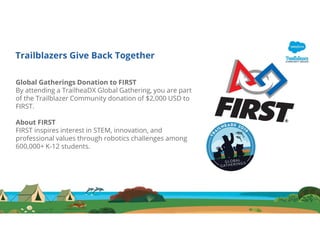
Trailblazers Give Back Together
Global Gatherings Donation to FIRST
By attending a TrailheaDX Global Gathering, you are part
of the Trailblazer Community donation of $2,000 USD to
FIRST.
About FIRST
FIRST inspires interest in STEM, innovation, and
professional values through robotics challenges among
600,000+ K-12 students.
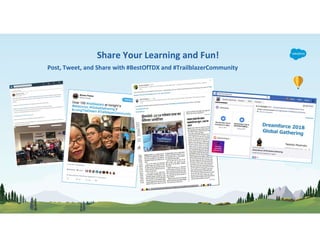
Tweet, post and share
with #BestOfTDX and
#TrailblazerCommunit
y
Share Your Learning and Fun!
Post, Tweet, and Share with #BestOfTDX and #TrailblazerCommunity
Instructions
Talk to as many people as possible and when a statement applies to someone you meet, have
them sign their name in the box. Each person can only sign your sheet once. Try to be the first to
get five boxes in a row (horizontally, vertically, or diagonally) and shout “BINGO!” to win.
In the end, we all win by learning more about our peers. Good luck and have fun!
TrailheaDX ‘19
Event Overview
TraiheaDX Highlights Video
https://youtu.be/nrPsSLYle-M
Summer 19 Release
Highlights
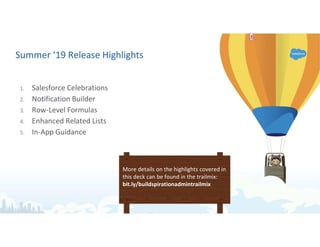
Summer ‘19 Release Highlights
1. Salesforce Celebrations
2. Notification Builder
3. Row-Level Formulas
4. Enhanced Related Lists
5. In-App Guidance
More details on the highlights covered in
this deck can be found in the trailmix:
bit.ly/buildspirationadmintrailmix
12213
Slide 11
1 +rsaar@salesforce.com I can probably do it. What's the recording entail? Is it like a recorded webinar? When do
we need it by?
Gillian Bruce, 06/06/2019
2 due tomorrow EOD +gbruce@salesforce.com yea it would be screencast + talk track
Rebecca Saar, 06/06/2019
2 Can it be short & sweet, like just 1-2 min per slide? If so, I can do it tomorrow after RRL. +rsaar@salesforce.com
Gillian Bruce, 06/06/2019
1 +jchiles@salesforce.com +gbruce@salesforce.com here's a very hastily put together deck for Global Gatherings.
I know we need a recording as well. G - would you be able to do it? I can do it, but I'm not as familiar with these
features at this point.
Rebecca Saar, 06/06/2019
3 Yes! It can!
Rebecca Saar, 06/06/2019
Salesforce Celebrations
Celebration is a fun, visual way to engage your
users and celebrate wins with them right on
their Salesforce screen.
In Setup, find the Path Setting (and enable).
Then, configure your path to add celebrations
in step three of your Path configuration wizard.
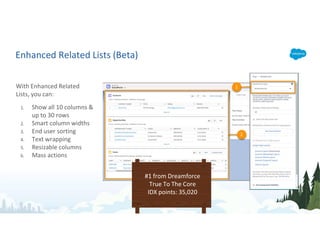
Enhanced Related Lists (Beta)
With Enhanced Related
Lists, you can:
1. Show all 10 columns &
up to 30 rows
2. Smart column widths
3. End user sorting
4. Text wrapping
5. Resizable columns
6. Mass actions
#1 from Dreamforce
True To The Core
IDX points: 35,020
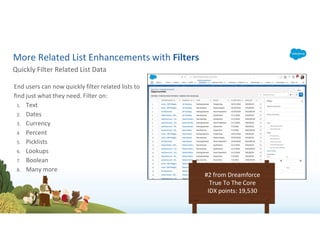
More Related List Enhancements with Filters
End users can now quickly filter related lists to
find just what they need. Filter on:
1. Text
2. Dates
3. Currency
4. Percent
5. Picklists
6. Lookups
7. Boolean
8. Many more
Quickly Filter Related List Data
#2 from Dreamforce
True To The Core
IDX points: 19,530
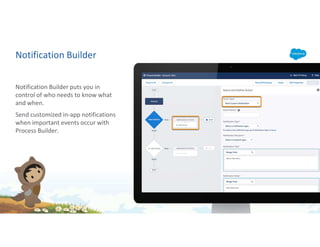
Notification Builder
Notification Builder puts you in
control of who needs to know what
and when.
Send customized in-app notifications
when important events occur with
Process Builder.
Row-Level Formulas
With row-level formulas,
you don't need to export
report data to a
spreadsheet or ask an
admin to create a one-off
custom formula field to get
important calculations for
your business.
Add formulas in Report
Builder.
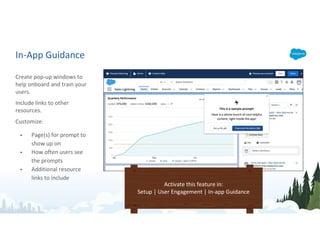
In-App Guidance
Create pop-up windows to
help onboard and train your
users.
Include links to other
resources.
Customize:
• Page(s) for prompt to
show up on
• How often users see
the prompts
• Additional resource
links to include
Activate this feature in:
Setup | User Engagement | In-app Guidance
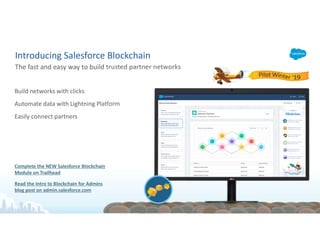
Build networks with clicks
Automate data with Lightning Pla orm
Easily connect partners
Complete the NEW Salesforce Blockchain
Module on Trailhead
Read the Intro to Blockchain for Admins
blog post on admin.salesforce.com
The fast and easy way to build trusted partner networks
Introducing Salesforce Blockchain
Integrate Any Data, App or Device
KEY ANNOUNCEMENT
NEW MuleSoft API Community Manager:
A tool that empowers everyone to share
integrations, and personalize experiences with clicks
Breakout Session
Highlights
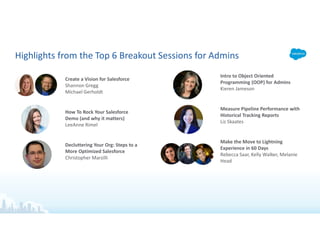
Highlights from the Top 6 Breakout Sessions for Admins
Create a Vision for Salesforce
Shannon Gregg
Michael Gerholdt
How To Rock Your Salesforce
Demo (and why it matters)
LeeAnne Rimel
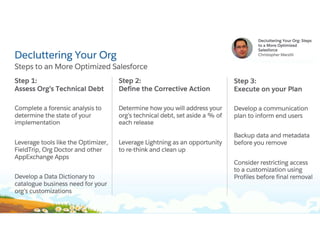
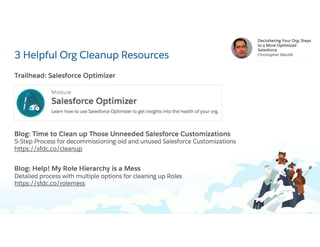
Decluttering Your Org: Steps to a
More Optimized Salesforce
Christopher Marzilli
Intro to Object Oriented
Programming (OOP) for Admins
Kieren Jameson
Measure Pipeline Performance with
Historical Tracking Reports
Liz Skaates
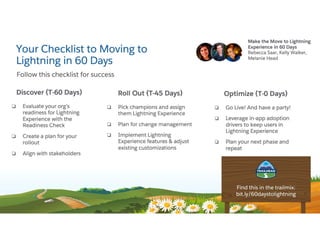
Make the Move to Lightning
Experience in 60 Days
Rebecca Saar, Kelly Walker, Melanie
Head
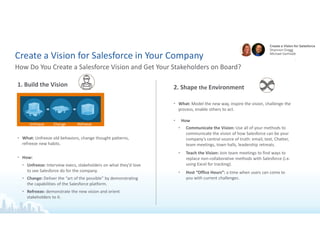
Create a Vision for Salesforce in Your Company
How Do You Create a Salesforce Vision and Get Your Stakeholders on Board?
1. Build the Vision
• What: Unfreeze old behaviors, change thought patterns,
refreeze new habits.
• How:
• Unfreeze: Interview execs, stakeholders on what they’d love
to see Salesforce do for the company.
• Change: Deliver the “art of the possible” by demonstrating
the capabilities of the Salesforce platform.
• Refreeze: demonstrate the new vision and orient
stakeholders to it.
2. Shape the Environment
• What: Model the new way, inspire the vision, challenge the
process, enable others to act.
• How
• Communicate the Vision: Use all of your methods to
communicate the vision of how Salesforce can be your
company’s central source of truth: email, text, Chatter,
team meetings, town halls, leadership retreats.
• Teach the Vision: Join team meetings to find ways to
replace non-collaborative methods with Salesforce (i.e.
using Excel for tracking).
• Host “Office Hours”: a time when users can come to
you with current challenges.
Unfreeze Change Refreeze
Create a Vision for Salesforce in Your Company
How Do You Create a Salesforce Vision and Get Your Stakeholders on Board?
3. Deliver the Results
• Determine the results and outcomes you’ll measure prior to
the start of your effort.
Take an Orientation of Power and Influence
• No one knows Salesforce better than you in your company.
You’re the expert!
• How: Benchmark the attitudes and adoption prior to launching
your vision project. This will help you to measure your delivery.
Deliver on a Behavioral Approach
• Can someone do their job outside of Salesforce? If so, the
vision isn’t yet complete; develop an end to end grand vision.
Resources
Salesforce Admins Website
admin.salesforce.com
Access to blogs, podcasts, webinars, and more
Salesforce Index Score
bit.ly/SFIndex
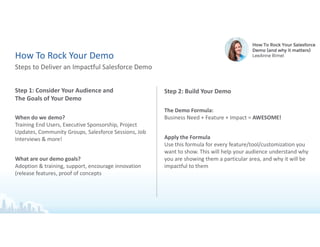
Step 1: Consider Your Audience and
The Goals of Your Demo
When do we demo?
Training End Users, Executive Sponsorship, Project
Updates, Community Groups, Salesforce Sessions, Job
Interviews & more!
What are our demo goals?
Adoption & training, support, encourage innovation
(release features, proof of concepts
Steps to Deliver an Impactful Salesforce Demo
How To Rock Your Demo
Step 2: Build Your Demo
The Demo Formula:
Business Need + Feature + Impact = AWESOME!
Apply the Formula
Use this formula for every feature/tool/customization you
want to show. This will help your audience understand why
you are showing them a particular area, and why it will be
impactful to them
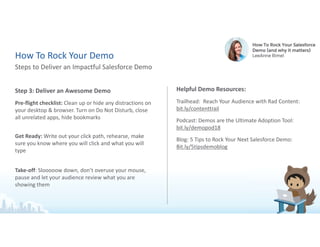
Step 3: Deliver an Awesome Demo
Pre-flight checklist: Clean up or hide any distractions on
your desktop & browser. Turn on Do Not Disturb, close
all unrelated apps, hide bookmarks
Get Ready: Write out your click path, rehearse, make
sure you know where you will click and what you will
type
Take-off: Slooooow down, don’t overuse your mouse,
pause and let your audience review what you are
showing them
Helpful Demo Resources:
Trailhead: Reach Your Audience with Rad Content:
bit.ly/contenttrail
Podcast: Demos are the Ultimate Adoption Tool:
bit.ly/demopod18
Blog: 5 Tips to Rock Your Next Salesforce Demo:
Bit.ly/5tipsdemoblog
Steps to Deliver an Impactful Salesforce Demo
How To Rock Your Demo
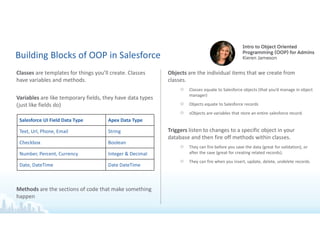
Building Blocks of OOP in Salesforce
Classes are templates for things you’ll create. Classes
have variables and methods.
Variables are like temporary fields, they have data types
(just like fields do)
Methods are the sections of code that make something
happen
Objects are the individual items that we create from
classes.
○ Classes equate to Salesforce objects (that you’d manage in object
manager)
○ Objects equate to Salesforce records
○ sObjects are variables that store an entire salesforce record.
Triggers listen to changes to a specific object in your
database and then fire off methods within classes.
○ They can fire before you save the data (great for validation), or
after the save (great for creating related records).
○ They can fire when you insert, update, delete, undelete records.
Salesforce UI Field Data Type Apex Data Type
Text, Url, Phone, Email String
Checkbox Boolean
Number, Percent, Currency Integer & Decimal
Date, DateTime Date DateTime
Building Blocks of OOP in Salesforce
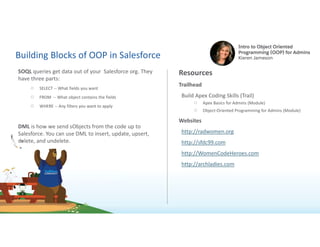
SOQL queries get data out of your Salesforce org. They
have three parts:
○ SELECT -- What fields you want
○ FROM -- What object contains the fields
○ WHERE -- Any filters you want to apply
DML is how we send sObjects from the code up to
Salesforce. You can use DML to insert, update, upsert,
delete, and undelete.
Resources
Trailhead
Build Apex Coding Skills (Trail)
○ Apex Basics for Admins (Module)
○ Object-Oriented Programming for Admins (Module)
Websites
http://radwomen.org
http://sfdc99.com
http://WomenCodeHeroes.com
http://archladies.com
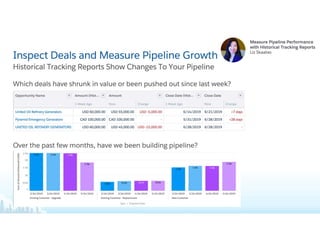
Inspect Deals and Measure Pipeline Growth
Which deals have shrunk in value or been pushed out since last week?
Historical Tracking Reports Show Changes To Your Pipeline
Over the past few months, have we been building pipeline?
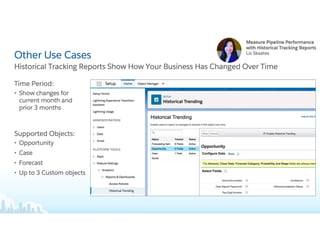
Other Use Cases
Time Period:
• Show changes for current
month and prior 3 months
Supported Objects:
• Opportunity
• Case
• Forecast
• Up to 3 Custom objects
Historical Tracking Reports Show How Your Business Has Changed Over Time
Reading UK Community group TrailheaDX presentation

Reading UK Community group TrailheaDX presentation

  • 1.
    Reading, UK CommunityGroup TrailheaDX Global Gathering Antonina.romanova@trailblazer.com Antonina Romanova, Salesforce Consultant
  • 2.
    Agenda 1. Introduction 2. Getto know me - Bingo 3. TrailheaDX highlights video 4. Summer 19 release highlights 5. Breakout session highlights
  • 4.
    Trailblazers Give BackTogether Global Gatherings Donation to FIRST By attending a TrailheaDX Global Gathering, you are part of the Trailblazer Community donation of $2,000 USD to FIRST. About FIRST FIRST inspires interest in STEM, innovation, and professional values through robotics challenges among 600,000+ K-12 students.
  • 5.
    Tweet, post andshare with #BestOfTDX and #TrailblazerCommunit y Share Your Learning and Fun! Post, Tweet, and Share with #BestOfTDX and #TrailblazerCommunity
  • 6.
    Instructions Talk to asmany people as possible and when a statement applies to someone you meet, have them sign their name in the box. Each person can only sign your sheet once. Try to be the first to get five boxes in a row (horizontally, vertically, or diagonally) and shout “BINGO!” to win. In the end, we all win by learning more about our peers. Good luck and have fun!
  • 7.
  • 9.
  • 10.
  • 11.
    Summer ‘19 ReleaseHighlights 1. Salesforce Celebrations 2. Notification Builder 3. Row-Level Formulas 4. Enhanced Related Lists 5. In-App Guidance More details on the highlights covered in this deck can be found in the trailmix: bit.ly/buildspirationadmintrailmix 12213
  • 12.
    Slide 11 1 +rsaar@salesforce.comI can probably do it. What's the recording entail? Is it like a recorded webinar? When do we need it by? Gillian Bruce, 06/06/2019 2 due tomorrow EOD +gbruce@salesforce.com yea it would be screencast + talk track Rebecca Saar, 06/06/2019 2 Can it be short & sweet, like just 1-2 min per slide? If so, I can do it tomorrow after RRL. +rsaar@salesforce.com Gillian Bruce, 06/06/2019 1 +jchiles@salesforce.com +gbruce@salesforce.com here's a very hastily put together deck for Global Gatherings. I know we need a recording as well. G - would you be able to do it? I can do it, but I'm not as familiar with these features at this point. Rebecca Saar, 06/06/2019 3 Yes! It can! Rebecca Saar, 06/06/2019
  • 13.
    Salesforce Celebrations Celebration isa fun, visual way to engage your users and celebrate wins with them right on their Salesforce screen. In Setup, find the Path Setting (and enable). Then, configure your path to add celebrations in step three of your Path configuration wizard.
  • 14.
    Enhanced Related Lists(Beta) With Enhanced Related Lists, you can: 1. Show all 10 columns & up to 30 rows 2. Smart column widths 3. End user sorting 4. Text wrapping 5. Resizable columns 6. Mass actions #1 from Dreamforce True To The Core IDX points: 35,020
  • 15.
    More Related ListEnhancements with Filters End users can now quickly filter related lists to find just what they need. Filter on: 1. Text 2. Dates 3. Currency 4. Percent 5. Picklists 6. Lookups 7. Boolean 8. Many more Quickly Filter Related List Data #2 from Dreamforce True To The Core IDX points: 19,530
  • 16.
    Notification Builder Notification Builderputs you in control of who needs to know what and when. Send customized in-app notifications when important events occur with Process Builder.
  • 17.
    Row-Level Formulas With row-levelformulas, you don't need to export report data to a spreadsheet or ask an admin to create a one-off custom formula field to get important calculations for your business. Add formulas in Report Builder.
  • 18.
    In-App Guidance Create pop-upwindows to help onboard and train your users. Include links to other resources. Customize: • Page(s) for prompt to show up on • How often users see the prompts • Additional resource links to include Activate this feature in: Setup | User Engagement | In-app Guidance
  • 19.
    Build networks withclicks Automate data with Lightning Pla orm Easily connect partners Complete the NEW Salesforce Blockchain Module on Trailhead Read the Intro to Blockchain for Admins blog post on admin.salesforce.com The fast and easy way to build trusted partner networks Introducing Salesforce Blockchain
  • 20.
    Integrate Any Data,App or Device KEY ANNOUNCEMENT NEW MuleSoft API Community Manager: A tool that empowers everyone to share integrations, and personalize experiences with clicks
  • 21.
  • 22.
    Highlights from theTop 6 Breakout Sessions for Admins Create a Vision for Salesforce Shannon Gregg Michael Gerholdt How To Rock Your Salesforce Demo (and why it matters) LeeAnne Rimel Decluttering Your Org: Steps to a More Optimized Salesforce Christopher Marzilli Intro to Object Oriented Programming (OOP) for Admins Kieren Jameson Measure Pipeline Performance with Historical Tracking Reports Liz Skaates Make the Move to Lightning Experience in 60 Days Rebecca Saar, Kelly Walker, Melanie Head
  • 23.
    Create a Visionfor Salesforce in Your Company How Do You Create a Salesforce Vision and Get Your Stakeholders on Board? 1. Build the Vision • What: Unfreeze old behaviors, change thought patterns, refreeze new habits. • How: • Unfreeze: Interview execs, stakeholders on what they’d love to see Salesforce do for the company. • Change: Deliver the “art of the possible” by demonstrating the capabilities of the Salesforce platform. • Refreeze: demonstrate the new vision and orient stakeholders to it. 2. Shape the Environment • What: Model the new way, inspire the vision, challenge the process, enable others to act. • How • Communicate the Vision: Use all of your methods to communicate the vision of how Salesforce can be your company’s central source of truth: email, text, Chatter, team meetings, town halls, leadership retreats. • Teach the Vision: Join team meetings to find ways to replace non-collaborative methods with Salesforce (i.e. using Excel for tracking). • Host “Office Hours”: a time when users can come to you with current challenges. Unfreeze Change Refreeze
  • 24.
    Create a Visionfor Salesforce in Your Company How Do You Create a Salesforce Vision and Get Your Stakeholders on Board? 3. Deliver the Results • Determine the results and outcomes you’ll measure prior to the start of your effort. Take an Orientation of Power and Influence • No one knows Salesforce better than you in your company. You’re the expert! • How: Benchmark the attitudes and adoption prior to launching your vision project. This will help you to measure your delivery. Deliver on a Behavioral Approach • Can someone do their job outside of Salesforce? If so, the vision isn’t yet complete; develop an end to end grand vision. Resources Salesforce Admins Website admin.salesforce.com Access to blogs, podcasts, webinars, and more Salesforce Index Score bit.ly/SFIndex
  • 25.
    Step 1: ConsiderYour Audience and The Goals of Your Demo When do we demo? Training End Users, Executive Sponsorship, Project Updates, Community Groups, Salesforce Sessions, Job Interviews & more! What are our demo goals? Adoption & training, support, encourage innovation (release features, proof of concepts Steps to Deliver an Impactful Salesforce Demo How To Rock Your Demo Step 2: Build Your Demo The Demo Formula: Business Need + Feature + Impact = AWESOME! Apply the Formula Use this formula for every feature/tool/customization you want to show. This will help your audience understand why you are showing them a particular area, and why it will be impactful to them
  • 26.
    Step 3: Deliveran Awesome Demo Pre-flight checklist: Clean up or hide any distractions on your desktop & browser. Turn on Do Not Disturb, close all unrelated apps, hide bookmarks Get Ready: Write out your click path, rehearse, make sure you know where you will click and what you will type Take-off: Slooooow down, don’t overuse your mouse, pause and let your audience review what you are showing them Helpful Demo Resources: Trailhead: Reach Your Audience with Rad Content: bit.ly/contenttrail Podcast: Demos are the Ultimate Adoption Tool: bit.ly/demopod18 Blog: 5 Tips to Rock Your Next Salesforce Demo: Bit.ly/5tipsdemoblog Steps to Deliver an Impactful Salesforce Demo How To Rock Your Demo
  • 29.
    Building Blocks ofOOP in Salesforce Classes are templates for things you’ll create. Classes have variables and methods. Variables are like temporary fields, they have data types (just like fields do) Methods are the sections of code that make something happen Objects are the individual items that we create from classes. ○ Classes equate to Salesforce objects (that you’d manage in object manager) ○ Objects equate to Salesforce records ○ sObjects are variables that store an entire salesforce record. Triggers listen to changes to a specific object in your database and then fire off methods within classes. ○ They can fire before you save the data (great for validation), or after the save (great for creating related records). ○ They can fire when you insert, update, delete, undelete records. Salesforce UI Field Data Type Apex Data Type Text, Url, Phone, Email String Checkbox Boolean Number, Percent, Currency Integer & Decimal Date, DateTime Date DateTime
  • 30.
    Building Blocks ofOOP in Salesforce SOQL queries get data out of your Salesforce org. They have three parts: ○ SELECT -- What fields you want ○ FROM -- What object contains the fields ○ WHERE -- Any filters you want to apply DML is how we send sObjects from the code up to Salesforce. You can use DML to insert, update, upsert, delete, and undelete. Resources Trailhead Build Apex Coding Skills (Trail) ○ Apex Basics for Admins (Module) ○ Object-Oriented Programming for Admins (Module) Websites http://radwomen.org http://sfdc99.com http://WomenCodeHeroes.com http://archladies.com
  • 31.
    Inspect Deals andMeasure Pipeline Growth Which deals have shrunk in value or been pushed out since last week? Historical Tracking Reports Show Changes To Your Pipeline Over the past few months, have we been building pipeline?
  • 32.
    Other Use Cases TimePeriod: • Show changes for current month and prior 3 months Supported Objects: • Opportunity • Case • Forecast • Up to 3 Custom objects Historical Tracking Reports Show How Your Business Has Changed Over Time