08/05/19
JavaScript SEO:
Testing and Debugging
(for non-developers)
@LeighHanney
#smssyd19
First, a bit of background…
#smssyd19
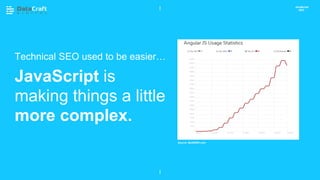
Technical SEO used to be easier…
JavaScript is
making things a little
more complex.
JavaScript
SEO
Source: BuiltWith.com
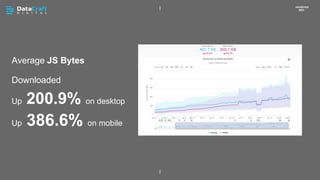
Average JS Bytes
Downloaded
Up 200.9% on desktop
Up 386.6% on mobile
JavaScript
SEO
ā€œā€¦ JS is not
going away.ā€
John Mueller
JavaScript SEO
JavaScript SEO
02 CHAPTER HEADING P XX
JavaScript,
Google &
SEO:
A Brief
Timeline
JavaScript SEO
02 CHAPTER HEADING
Raw HTML
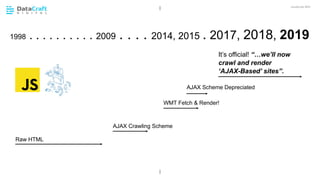
1998 . . . . . . . . . . 2009 . . . . 2014, 2015 . 2017, 2018, 2019
AJAX Crawling Scheme
WMT Fetch & Render!
It’s official! ā€œā€¦we’ll now
crawl and render
ā€˜AJAX-Based’ sitesā€.
AJAX Scheme Depreciated
Google is getting better at
understanding JavaScript. But…
1. When Should SEOs Worry About
JavaScript?
2. Crawl and Indexing Overview.
3. Some Tools for Testing.
4. What Should You be Looking For?
What We’ll
Cover Today
JavaScript SEO
When Should SEOs Worry About
JavaScript?
#smssyd19
JavaScript SEO
02 CHAPTER HEADING P XX
When should you worry about JavaScript?
You really need to pay attention if JS is
changing any critical content.
• When JavaScript is required to load all, or
some, of the main content.
• When JavaScript is performing any other
critical functions.
If JS is only used for non-essential interactions
and effects, it’s not really an SEO issue.
Check for
rendering
issues as part
of any
technical
audit.
Continue to:
1. Check URLs with JavaScript
disabled.
2. Review the text-based cache.
3. View the raw HTML (view source).
This can provide early indicators of how deep
you might have to go in the JS testing.
First Step…
Pretend it’s 2005.
Pre-JS SEO
JavaScript SEO
Does Your Site
Look Like This
With JS
Disabled?
JavaScript
SEO
GoogleBot and JavaScript Rendering
#smssyd19
JavaScript SEO
02 CHAPTER HEADING
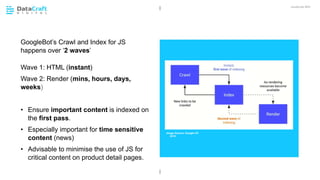
GoogleBot’s Crawl and Index for JS
happens over ā€˜2 waves’
Wave 1: HTML (instant)
Wave 2: Render (mins, hours, days,
weeks)
• Ensure important content is indexed on
the first pass.
• Especially important for time sensitive
content (news)
• Advisable to minimise the use of JS for
critical content on product detail pages.
Image Source: Google I/O
2018
• As of right now, Google officially
render based on Chrome 41 (2015).
• Good for your developers to know.
• Deepcrawl have recently discovered
that GoogleBot is rendering some JS
features not actually supported in 41.
• A sign that Google’s rendering
capabilities are catching up.
Download Chrome 41:
Google render
using Chrome
41 (circa 2015)
JavaScript SEO
GOOD TO KNOW:
https://www.deepcrawl.com/blog/news/what-version-of-chrome-is-google-actually-using-for-rendering/
https://commondatastorage.googleapis.com/chromium-browser-snapshots/index.html?prefix=Win/310958/
How does
GoogleBot
find links in
JS?…
JavaScript SEO
• GoogleBot looks for an anchor tag and
href element in the JavaScript.
• Without these, the links will not be
discoverable during rendering.
Google won’t
click on
buttons to find
links…
JavaScript SEO
…or click on
buttons for
paginated
results.
JavaScript SEO
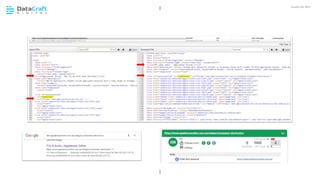
A brief note about the DOM
1. The Document Object Model defines
the structure of a page (based on
HTML and CSS).
2. JavaScript is used to update or modify the
DOM.
3. ā€˜View Source’ only gives you the HTML and
in-line CSS.
4. ā€˜Inspect Element’ shows you the DOM
Inspect
Element
JavaScript SEO
GOOD TO KNOW:
• Technically you can use a tag manager
(e.g. GTM) to modify the DOM and
update SEO elements. Cool.
• It works too! But remember that this
relies on ā€˜Wave 2’ of indexing.
• While it’s a great solution, as a last
resort, the same rules apply:
• Try not to rely on JS to inject critical
meta data or schema.
• If content or meta data is time
sensitive, best to get it indexed in
the ā€˜first wave’ e.g. Price Schema
It’s possible
update your
SEO meta
data via JS
too…
JavaScript SEO
https://moz.com/blog/seo-changes-using-google-tag-manager
GOOD TO KNOW:
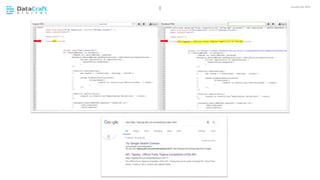
Way back in 2016…
• Working with a large ecommerce site
migrating over to an Angular powered
SPA.
• Gulp... Hugely complex.
• Injecting Canonicals was not working.
• HTTP Canonical was the only ā€˜reliable’
option we found for an SPA
implementation.
• Google I/O 2018 - Google actually
confirmed that they did not look for the
canonical in the rendered page.
• Others have since disagreed.
• Either way, I recommend avoiding if it’s
critical you get it right.
Avoid
injecting
Canonical
Tags via JS
JavaScript SEO
GOOD TO KNOW:
JavaScript Rendering in Action
#smssyd19
JavaScript SEO
02 CHAPTER HEADING
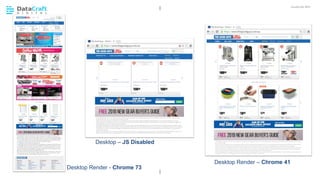
Desktop Render - Chrome 73
Desktop – JS Disabled
Desktop Render – Chrome 41
JavaScript SEO
02 CHAPTER HEADING
Mobile – Chrome (iOS) Mobile Friendly Test
Some Tools For Testing and
Debugging
#smssyd19
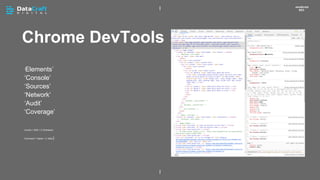
Chrome DevTools
JavaScript
SEO
ā€˜Elements’
ā€˜Console’
ā€˜Sources’
ā€˜Network’
ā€˜Audit’
ā€˜Coverage’
Control + Shift + C (Windows)
Command + Option + C (Mac)
URL Inspection
JavaScript
SEO
Test Live URL (AKA ā€˜Fetch and
Render’)
https://search.google.com/search-console
Mobile Friendly
Test
JavaScript
SEO
Rendered snapshot if you don’t
have access to GSC for the site.
https://search.google.com/test/mobile-friendly
Screaming Frog
SEO Spider
JavaScript
SEO
Crawl
Render
Snapshots
https://www.screamingfrog.co.uk/seo-spider/
Things You Should Be Testing For
#smssyd19
Don’t forget the basics: Ensure external
files (JS and CSS) needed for rendering
are not blocked.
Basics:
Blocked
Resources!
JavaScript SEO
Things to test for:
Render Responsibly…
• JS crawling is slower and it puts a
greater load on the servers (more
requests).
• Selectively render URLs by page type /
template.Raw HTML vs
Rendered
HTML
JavaScript SEO
Things to test for:
JavaScript SEO
02 CHAPTER HEADING
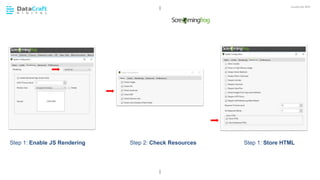
Step 1: Enable JS Rendering Step 1: Store HTMLStep 2: Check Resources
JavaScript SEO
02 CHAPTER HEADING
JavaScript SEO
02 CHAPTER HEADING
JavaScript SEO
02 CHAPTER HEADING
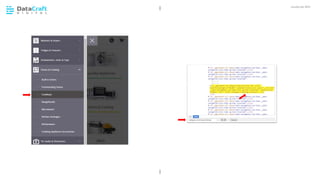
Confirm primary navigation links are in
the DOM.
1. Go to a URL.
2. Find some links to test.
3. Chrome DevTools (disable cache).
4. Reload page.
5. Search for the link in the ā€˜Elements’
tab.
Are Primary
Navigation
Links Visible?
JavaScript SEO
Things to test for:
JavaScript SEO
02 CHAPTER HEADING
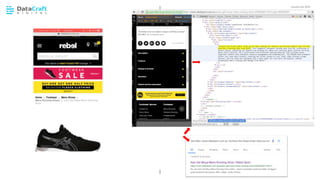
Is content that requires user
interaction to view, available in the
DOM?
1. Go to a URL.
2. Find some content to test.
3. Chrome DevTools (disable cache).
4. Reload page.
5. Search for the string of content in the
ā€˜Elements’ tab.
6. Perform a ā€˜site:domain.com ā€œstringā€ā€™
search in Google.
Check
content
behind tabs
and
accordions.
JavaScript SEO
Things to test for:
JavaScript SEO
02 CHAPTER HEADING
Check
Whether User
Generated
Content is
Indexed.
JavaScript SEO
Things to test for:
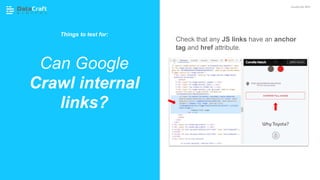
Check that any JS links have an anchor
tag and href attribute.
Can Google
Crawl internal
links?
JavaScript SEO
Things to test for:
Performance:
• JavaScript errors could result in
Google abandoning the render
process.
• Excessively large files or slow JS
execution time could also result in a
partial render of a page only.
Debugging:
• Screaming Frog’s default AJAX timeout
for the screenshot is 5 seconds. Good
indicator of potential Issues.
• Partial render in MFT, or ā€˜Other error’
in GSC, could also indicate JS
performance issues.
Look out for
JS errors in
the console
and Timeouts
when
rendering.
JavaScript SEO
Things to test for:
Developers, just don’t do this, please!
https://tipping.afl.com.au/landing/index.html#/landing
https://tipping.afl.com.au/help/index.html#/prizes
https://tipping.afl.com.au/help/index.html#/faqs
The Lone Hash
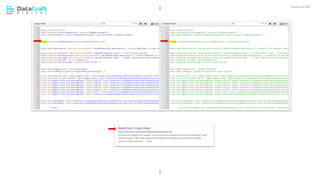
(#)
JavaScript SEO
Things to test for:
A Note About Other Crawlers &

JavaScript
#smssyd19
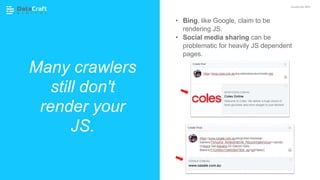
Many crawlers
still don't
render your
JS.
JavaScript SEO
• Bing, like Google, claim to be
rendering JS.
• Social media sharing can be
problematic for heavily JS dependent
pages.
JavaScript SEO
02 CHAPTER HEADING P XX
• JavaScript and rendering are just another part
of SEO now.
• If JS is used to inject critical content into the
DOM, then it’s a potential SEO issue.
Tools:
• Inspect URL (GSC)
• Mobile Friendly Test
• Chrome DevTools
• Crawl and Render (Screaming Frog)
Test:
• Don’t forget the fundamentals
• Raw vs Rendered HTML
• Internal Links
• Primary Navigation
• Content accessed via user interaction (tabs, etc)
• JavaScript Errors and Performance
Wrapping it
up!
Thanks
@LeighHanney
©2019

JavaScript SEO: Testing and Debugging for Non-Developers - Search Marketing Summit, Sydney 2019

  • 1.
  • 2.
    JavaScript SEO: Testing andDebugging (for non-developers) @LeighHanney #smssyd19
  • 3.
    First, a bitof background… #smssyd19
  • 4.
    Technical SEO usedto be easier… JavaScript is making things a little more complex. JavaScript SEO Source: BuiltWith.com
  • 5.
    Average JS Bytes Downloaded Up200.9% on desktop Up 386.6% on mobile JavaScript SEO
  • 6.
    ā€œā€¦ JS isnot going away.ā€ John Mueller JavaScript SEO
  • 7.
    JavaScript SEO 02 CHAPTERHEADING P XX JavaScript, Google & SEO: A Brief Timeline
  • 8.
    JavaScript SEO 02 CHAPTERHEADING Raw HTML 1998 . . . . . . . . . . 2009 . . . . 2014, 2015 . 2017, 2018, 2019 AJAX Crawling Scheme WMT Fetch & Render! It’s official! ā€œā€¦we’ll now crawl and render ā€˜AJAX-Based’ sitesā€. AJAX Scheme Depreciated
  • 9.
    Google is gettingbetter at understanding JavaScript. But… 1. When Should SEOs Worry About JavaScript? 2. Crawl and Indexing Overview. 3. Some Tools for Testing. 4. What Should You be Looking For? What We’ll Cover Today JavaScript SEO
  • 10.
    When Should SEOsWorry About JavaScript? #smssyd19
  • 11.
    JavaScript SEO 02 CHAPTERHEADING P XX When should you worry about JavaScript? You really need to pay attention if JS is changing any critical content. • When JavaScript is required to load all, or some, of the main content. • When JavaScript is performing any other critical functions. If JS is only used for non-essential interactions and effects, it’s not really an SEO issue. Check for rendering issues as part of any technical audit.
  • 12.
    Continue to: 1. CheckURLs with JavaScript disabled. 2. Review the text-based cache. 3. View the raw HTML (view source). This can provide early indicators of how deep you might have to go in the JS testing. First Step… Pretend it’s 2005. Pre-JS SEO JavaScript SEO
  • 13.
    Does Your Site LookLike This With JS Disabled? JavaScript SEO
  • 14.
    GoogleBot and JavaScriptRendering #smssyd19
  • 15.
    JavaScript SEO 02 CHAPTERHEADING GoogleBot’s Crawl and Index for JS happens over ā€˜2 waves’ Wave 1: HTML (instant) Wave 2: Render (mins, hours, days, weeks) • Ensure important content is indexed on the first pass. • Especially important for time sensitive content (news) • Advisable to minimise the use of JS for critical content on product detail pages. Image Source: Google I/O 2018
  • 16.
    • As ofright now, Google officially render based on Chrome 41 (2015). • Good for your developers to know. • Deepcrawl have recently discovered that GoogleBot is rendering some JS features not actually supported in 41. • A sign that Google’s rendering capabilities are catching up. Download Chrome 41: Google render using Chrome 41 (circa 2015) JavaScript SEO GOOD TO KNOW: https://www.deepcrawl.com/blog/news/what-version-of-chrome-is-google-actually-using-for-rendering/ https://commondatastorage.googleapis.com/chromium-browser-snapshots/index.html?prefix=Win/310958/
  • 17.
    How does GoogleBot find linksin JS?… JavaScript SEO • GoogleBot looks for an anchor tag and href element in the JavaScript. • Without these, the links will not be discoverable during rendering.
  • 18.
    Google won’t click on buttonsto find links… JavaScript SEO
  • 19.
    …or click on buttonsfor paginated results. JavaScript SEO
  • 20.
    A brief noteabout the DOM 1. The Document Object Model defines the structure of a page (based on HTML and CSS). 2. JavaScript is used to update or modify the DOM. 3. ā€˜View Source’ only gives you the HTML and in-line CSS. 4. ā€˜Inspect Element’ shows you the DOM Inspect Element JavaScript SEO GOOD TO KNOW:
  • 21.
    • Technically youcan use a tag manager (e.g. GTM) to modify the DOM and update SEO elements. Cool. • It works too! But remember that this relies on ā€˜Wave 2’ of indexing. • While it’s a great solution, as a last resort, the same rules apply: • Try not to rely on JS to inject critical meta data or schema. • If content or meta data is time sensitive, best to get it indexed in the ā€˜first wave’ e.g. Price Schema It’s possible update your SEO meta data via JS too… JavaScript SEO https://moz.com/blog/seo-changes-using-google-tag-manager GOOD TO KNOW:
  • 22.
    Way back in2016… • Working with a large ecommerce site migrating over to an Angular powered SPA. • Gulp... Hugely complex. • Injecting Canonicals was not working. • HTTP Canonical was the only ā€˜reliable’ option we found for an SPA implementation. • Google I/O 2018 - Google actually confirmed that they did not look for the canonical in the rendered page. • Others have since disagreed. • Either way, I recommend avoiding if it’s critical you get it right. Avoid injecting Canonical Tags via JS JavaScript SEO GOOD TO KNOW:
  • 23.
    JavaScript Rendering inAction #smssyd19
  • 24.
    JavaScript SEO 02 CHAPTERHEADING Desktop Render - Chrome 73 Desktop – JS Disabled Desktop Render – Chrome 41
  • 25.
    JavaScript SEO 02 CHAPTERHEADING Mobile – Chrome (iOS) Mobile Friendly Test
  • 26.
    Some Tools ForTesting and Debugging #smssyd19
  • 27.
  • 28.
    URL Inspection JavaScript SEO Test LiveURL (AKA ā€˜Fetch and Render’) https://search.google.com/search-console
  • 29.
    Mobile Friendly Test JavaScript SEO Rendered snapshotif you don’t have access to GSC for the site. https://search.google.com/test/mobile-friendly
  • 30.
  • 31.
    Things You ShouldBe Testing For #smssyd19
  • 32.
    Don’t forget thebasics: Ensure external files (JS and CSS) needed for rendering are not blocked. Basics: Blocked Resources! JavaScript SEO Things to test for:
  • 33.
    Render Responsibly… • JScrawling is slower and it puts a greater load on the servers (more requests). • Selectively render URLs by page type / template.Raw HTML vs Rendered HTML JavaScript SEO Things to test for:
  • 34.
    JavaScript SEO 02 CHAPTERHEADING Step 1: Enable JS Rendering Step 1: Store HTMLStep 2: Check Resources
  • 35.
  • 36.
  • 37.
  • 38.
    Confirm primary navigationlinks are in the DOM. 1. Go to a URL. 2. Find some links to test. 3. Chrome DevTools (disable cache). 4. Reload page. 5. Search for the link in the ā€˜Elements’ tab. Are Primary Navigation Links Visible? JavaScript SEO Things to test for:
  • 39.
  • 40.
    Is content thatrequires user interaction to view, available in the DOM? 1. Go to a URL. 2. Find some content to test. 3. Chrome DevTools (disable cache). 4. Reload page. 5. Search for the string of content in the ā€˜Elements’ tab. 6. Perform a ā€˜site:domain.com ā€œstringā€ā€™ search in Google. Check content behind tabs and accordions. JavaScript SEO Things to test for:
  • 41.
  • 42.
  • 43.
    Check that anyJS links have an anchor tag and href attribute. Can Google Crawl internal links? JavaScript SEO Things to test for:
  • 44.
    Performance: • JavaScript errorscould result in Google abandoning the render process. • Excessively large files or slow JS execution time could also result in a partial render of a page only. Debugging: • Screaming Frog’s default AJAX timeout for the screenshot is 5 seconds. Good indicator of potential Issues. • Partial render in MFT, or ā€˜Other error’ in GSC, could also indicate JS performance issues. Look out for JS errors in the console and Timeouts when rendering. JavaScript SEO Things to test for:
  • 45.
    Developers, just don’tdo this, please! https://tipping.afl.com.au/landing/index.html#/landing https://tipping.afl.com.au/help/index.html#/prizes https://tipping.afl.com.au/help/index.html#/faqs The Lone Hash (#) JavaScript SEO Things to test for:
  • 46.
    A Note AboutOther Crawlers & JavaScript #smssyd19
  • 47.
    Many crawlers still don't renderyour JS. JavaScript SEO • Bing, like Google, claim to be rendering JS. • Social media sharing can be problematic for heavily JS dependent pages.
  • 48.
    JavaScript SEO 02 CHAPTERHEADING P XX • JavaScript and rendering are just another part of SEO now. • If JS is used to inject critical content into the DOM, then it’s a potential SEO issue. Tools: • Inspect URL (GSC) • Mobile Friendly Test • Chrome DevTools • Crawl and Render (Screaming Frog) Test: • Don’t forget the fundamentals • Raw vs Rendered HTML • Internal Links • Primary Navigation • Content accessed via user interaction (tabs, etc) • JavaScript Errors and Performance Wrapping it up!
  • 49.