













The SEO Insider’s Guide to AngularJS
2
• Session 1: Bill Hunt
• What is AngularJS?
• What should SEOs care?
• How does it affect indexation and crawlability?
• Session 2: Catfish Comstock
• Case Studies
• Prep work
• Working with IT
• Session 3: Benj Arriola
• Technical implementation of AngularJS
3
What is your current role?
• SEO
• UX
• Developer
• Product Manager
• Merchandizing
• Other
4
Global Digital & Search Marketing Strategist
Back Azimuth
5
• AngularJS is a structural framework for dynamic web apps.
It lets you use HTML as your template language and lets you
extend HTML's syntax to express your application's
components clearly and succinctly. Angular's data binding
and dependency injection eliminate much of the code you
would otherwise have to write.
• Source: https://docs.angularjs.org/guide/introduction
6
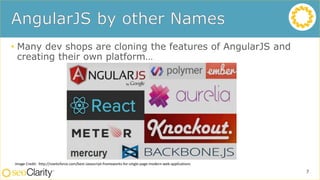
• Many dev shops are cloning the features of AngularJS and
creating their own platform…
7
Image Credit: http://noeticforce.com/best-Javascript-frameworks-for-single-page-modern-web-applications
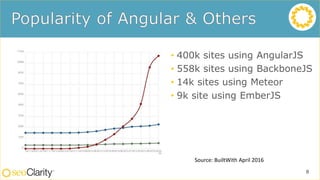
• 400k sites using AngularJS
• 558k sites using BackboneJS
• 14k sites using Meteor
• 9k site using EmberJS
8
Source: BuiltWith April 2016
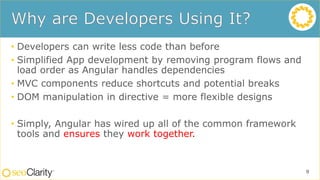
• Developers can write less code than before
• Simplified App development by removing program flows and
load order as Angular handles dependencies
• MVC components reduce shortcuts and potential breaks
• DOM manipulation in directive = more flexible designs
• Simply, Angular has wired up all of the common framework
tools and ensures they work together.
9
• Developed for “Single Page Apps”
• Pages may not have unique URL’s (no URL no links or indexing)
• Most of the text is “Rendered” in browser not in the page
• Search Engines can render the page but cannot understand context
and relevance of the content (no text no relevance and no rank)
• Links and Connections are Dynamically Created
• Deeps links are added during page load and not static (no links to
follow = no crawl = no index = no ranking)
10
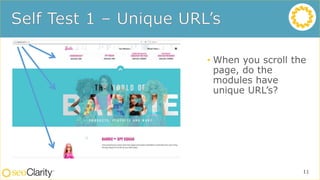
• When you scroll the
page, do the
modules have
unique URL’s?
11
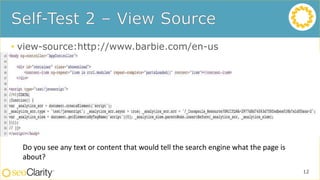
• view-source:http://www.barbie.com/en-us
12
Do you see any text or content that would tell the search engine what the page is
about?
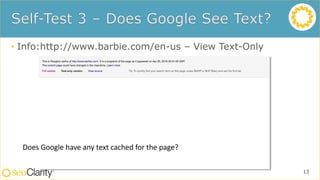
• Info:http://www.barbie.com/en-us – View Text-Only
13
Does Google have any text cached for the page?
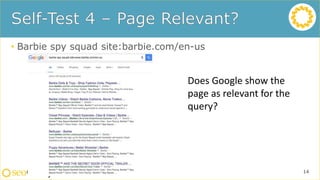
• Barbie spy squad site:barbie.com/en-us
14
Does Google show the
page as relevant for the
query?
• Determine the benefits of using AngularJS and the potential
impact on the business
• Collaborate with SEO and Dev and Creative teams to ensure
search friendly implementation
15
• Email:
• bill@back-azimuth.com
• Twitter
• @billhunt
• LinkedIn
• https://www.linkedin.com/in/billhunt3
• Bill Hunt’s Rant’s and Raves
• www.whunt.com
Sample Footer 16
Have you implemented AngularJS on your site?
• Yes
• No, but we plan on it
• No, we’re looking at a few options
• I don’t know
17
Director of SEO
BusinessOnLine
18
• A number of my clients have had
significant SEO issues using Angular
JavaScript
• Each of the three anonymous case
studies presented were coded in
Angular JS prior to SEO consultation
• These SEO issues include:
• Content not being indexed / Blank pages
indexed
• Links not being indexed / Navigation not
being indexed
• Pages not being indexed / Pages being
indexed under the wrong URL
• Each of these case studies is in a
different stage of resolution.
Sample Footer 19
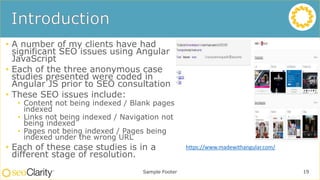
https://www.madewithangular.com/
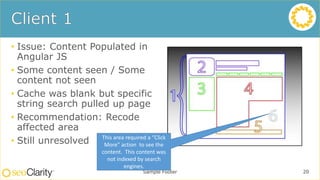
• Issue: Content Populated in
Angular JS
• Some content seen / Some
content not seen
• Cache was blank but specific
string search pulled up page
• Recommendation: Recode
affected area
• Still unresolved
Sample Footer 20
This area required a “Click
More” action to see the
content. This content was
not indexed by search
engines.
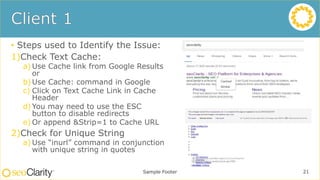
• Steps used to Identify the Issue:
1)Check Text Cache:
a) Use Cache link from Google Results
or
b) Use Cache: command in Google
c) Click on Text Cache Link in Cache
Header
d) You may need to use the ESC
button to disable redirects
e) Or append &Strip=1 to Cache URL
2)Check for Unique String
a) Use “inurl” command in conjunction
with unique string in quotes
Sample Footer 21
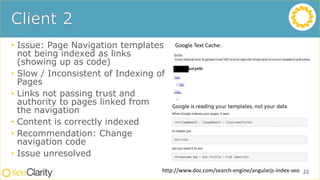
• Issue: Page Navigation templates
not being indexed as links
(showing up as code)
• Slow / Inconsistent of Indexing of
Pages
• Links not passing trust and
authority to pages linked from
the navigation
• Content is correctly indexed
• Recommendation: Change
navigation code
• Issue unresolved
22
Google Text Cache:
http://www.doz.com/search-engine/angularjs-index-seo
• Issue: Page content not indexed and
pages not being indexed
• Ecommerce site had only 10 pages
indexed and only two product pages
• Blank pages considered duplicates
• Text cache showed blank page / search
for specific text had no results
• Recommendation: Implement
Prerender.IO
• Results
• 5 pages to 13k+ Indexed
• Content Seen and Indexed
• Issue resolved / But there are additional
issues
23
• Additional Client Specific Issues with Prerender.IO Solution:
• *Issues not related to Prerender.io solution
• Canonical Tags
• Wrong Canonical Tags on
• Pagination (Single URL)
• Pagination doesn’t have unique URLs to build fragments from
• Make sure rel=next / rel=prev is implemented on both regular URLs and
fragments
24
• Two Potential Scenarios
• Already Have Angular JS
• Considering Angular JS
25
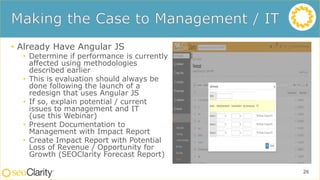
• Already Have Angular JS
• Determine if performance is currently
affected using methodologies
described earlier
• This is evaluation should always be
done following the launch of a
redesign that uses Angular JS
• If so, explain potential / current
issues to management and IT
(use this Webinar)
• Present Documentation to
Management with Impact Report
• Create Impact Report with Potential
Loss of Revenue / Opportunity for
Growth (SEOClarity Forecast Report)
26
• Considering Angular JS
• Explain Potential Issues to
management and IT
(use this Webinar)
• Determine if Functionality is
Needed
• Create Impact Report with
Potential Loss of Revenue /
Opportunity for Growth
• Evaluate Potential Solutions
• Launch Site with Optimization
Solution in Place
• Validate Solution is Working
27
• https://www.linkedin.com/in/
catfish
• @SEOCatfish
• catfish@businessol.com
• http://www.businessol.com
28
How is SEO aligned with your IT/Development priorities?
• We’re fully democratized
• SEO is a consideration before development commences
• SEO is a consideration after development
• We’re not aligned at all
• I don’t know
29
Technical SEO Director
The Control Group Media Company, Inc.
30
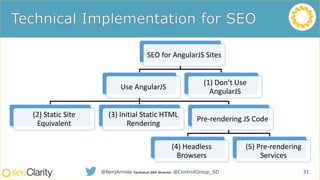
SEO for AngularJS Sites
Use AngularJS
(2) Static Site
Equivalent
(3) Initial Static HTML
Rendering
Pre-rendering JS Code
(4) Headless
Browsers
(5) Pre-rendering
Services
(1) Don’t Use
AngularJS
@BenjArriola Technical SEO Director @ControlGroup_SD 31
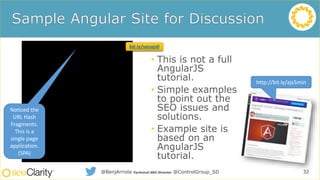
• This is not a full
AngularJS
tutorial.
• Simple examples
to point out the
SEO issues and
solutions.
• Example site is
based on an
AngularJS
tutorial.
32@BenjArriola Technical SEO Director @ControlGroup_SD
http://bit.ly/ajs5min
Noticed the
URL Hash
Fragments.
This is a
single page
application.
(SPA)
bit.ly/seoajs0
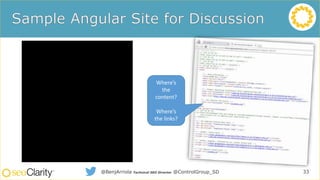
33@BenjArriola Technical SEO Director @ControlGroup_SD
Where’s
the
content?
Where’s
the links?
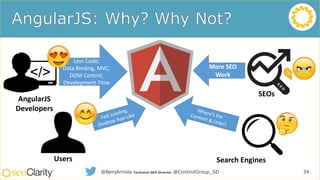
34
AngularJS
Developers
Users Search Engines
SEOs
Less Code,
Data Binding, MVC,
DOM Control,
Development Time
More SEO
Work
@BenjArriola Technical SEO Director @ControlGroup_SD
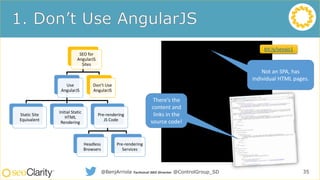
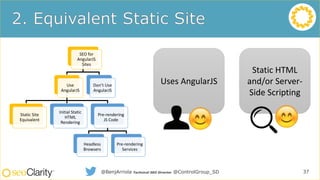
SEO for
AngularJS
Sites
Use
AngularJS
Static Site
Equivalent
Initial Static
HTML
Rendering
Pre-rendering
JS Code
Headless
Browsers
Pre-rendering
Services
Don’t Use
AngularJS
35@BenjArriola Technical SEO Director @ControlGroup_SD
Not an SPA, has
individual HTML pages.
There’s the
content and
links in the
source code!
bit.ly/seoajs1
SEO for
AngularJS
Sites
Use
AngularJS
Static Site
Equivalent
Initial Static
HTML
Rendering
Pre-rendering
JS Code
Headless
Browsers
Pre-rendering
Services
Don’t Use
AngularJS
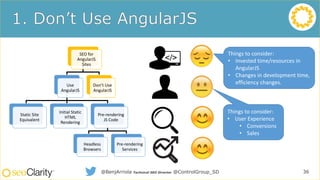
36@BenjArriola Technical SEO Director @ControlGroup_SD
Things to consider:
• User Experience
• Conversions
• Sales
Things to consider:
• Invested time/resources in
AngularJS
• Changes in development time,
efficiency changes.
SEO for
AngularJS
Sites
Use
AngularJS
Static Site
Equivalent
Initial Static
HTML
Rendering
Pre-rendering
JS Code
Headless
Browsers
Pre-rendering
Services
Don’t Use
AngularJS
37@BenjArriola Technical SEO Director @ControlGroup_SD
Uses AngularJS
Static HTML
and/or Server-
Side Scripting
SEO for
AngularJS
Sites
Use
AngularJS
Static Site
Equivalent
Initial Static
HTML
Rendering
Pre-rendering
JS Code
Headless
Browsers
Pre-rendering
Services
Don’t Use
AngularJS
38@BenjArriola Technical SEO Director @ControlGroup_SD
Uses AngularJS
Static HTML
and/or Server-
Side Scripting
Static HTML
and/or Server-
Side Scripting
Uses AngularJS
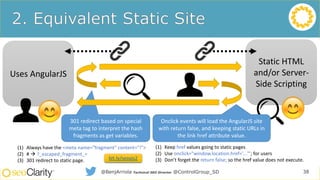
301 redirect based on special
meta tag to interpret the hash
fragments as get variables.
Onclick events will load the AngularJS site
with return false, and keeping static URLs in
the link href attribute value.
(1) Always have the <meta name="fragment" content="!">
(2) #  ?_escaped_fragment_=
(3) 301 redirect to static page.
(1) Keep href values going to static pages
(2) Use onclick="window.location.href='...'"; for users
(3) Don’t forget the return false; so the href value does not execute.bit.ly/seoajs2
Static HTML
and/or Server-
Side Scripting
SEO for
AngularJS
Sites
Use
AngularJS
Static Site
Equivalent
Initial Static
HTML
Rendering
Pre-rendering
JS Code
Headless
Browsers
Pre-rendering
Services
Don’t Use
AngularJS
39@BenjArriola Technical SEO Director @ControlGroup_SD
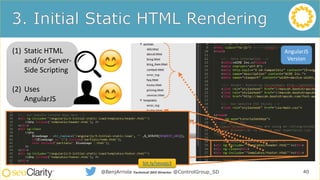
Uses AngularJS
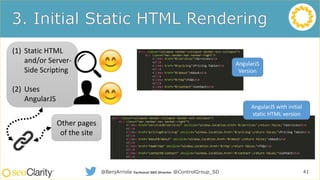
(1) Static HTML
and/or Server-
Side Scripting
(2) Uses
AngularJS
40@BenjArriola Technical SEO Director @ControlGroup_SD
AngularJS
Version
bit.ly/seoajs3
(1) Static HTML
and/or Server-
Side Scripting
(2) Uses
AngularJS
41@BenjArriola Technical SEO Director @ControlGroup_SD
Other pages
of the site
AngularJS
Version
AngularJS with initial
static HTML version
SEO for
AngularJS
Sites
Use
AngularJS
Static Site
Equivalent
Initial Static
HTML
Rendering
Pre-rendering
JS Code
Headless
Browsers
Pre-rendering
Services
Don’t Use
AngularJS
42@BenjArriola Technical SEO Director @ControlGroup_SD
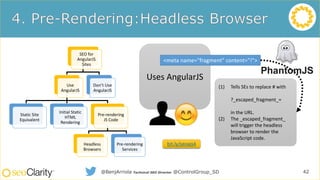
Uses AngularJS
<meta name="fragment" content="!">
(1) Tells SEs to replace # with
?_escaped_fragment_=
in the URL.
(2) The _escaped_fragment_
will trigger the headless
browser to render the
JavaScript code.
bit.ly/seoajs4
SEO for
AngularJS
Sites
Use
AngularJS
Static Site
Equivalent
Initial Static
HTML
Rendering
Pre-rendering
JS Code
Headless
Browsers
Pre-rendering
Services
Don’t Use
AngularJS
43@BenjArriola Technical SEO Director @ControlGroup_SD
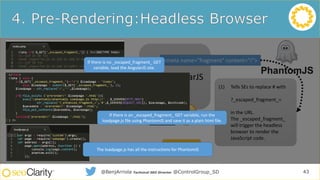
Uses AngularJS
<meta name="fragment" content="!">
(1) Tells SEs to replace # with
?_escaped_fragment_=
in the URL.
(2) The _escaped_fragment_
will trigger the headless
browser to render the
JavaScript code.
bit.ly/seoajs4
If there is no _escaped_fragment_ GET
variable, load the AngularJS site.
The loadpage.js has all the instructions for PhantomJS
If there is an _escaped_fragment_ GET variable, run the
loadpage.js file using PhantomJS and save it as a plain html file.
SEO for
AngularJS
Sites
Use
AngularJS
Static Site
Equivalent
Initial Static
HTML
Rendering
Pre-rendering
JS Code
Headless
Browsers
Pre-rendering
Services
Don’t Use
AngularJS
44@BenjArriola Technical SEO Director @ControlGroup_SD
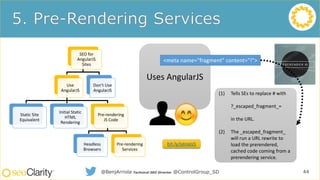
Uses AngularJS
<meta name="fragment" content="!">
(1) Tells SEs to replace # with
?_escaped_fragment_=
in the URL.
(2) The _escaped_fragment_
will run a URL rewrite to
load the prerendered,
cached code coming from a
prerendering service.
bit.ly/seoajs5
SEO for
AngularJS
Sites
Use
AngularJS
Static Site
Equivalent
Initial Static
HTML
Rendering
Pre-rendering
JS Code
Headless
Browsers
Pre-rendering
Services
Don’t Use
AngularJS
45@BenjArriola Technical SEO Director @ControlGroup_SD
Uses AngularJS
<meta name="fragment" content="!">
(1) Tells SEs to replace # with
?_escaped_fragment_=
in the URL.
(2) The _escaped_fragment_
will run a URL rewrite to
load the prerendered,
cached code coming from a
prerendering service.
bit.ly/seoajs5
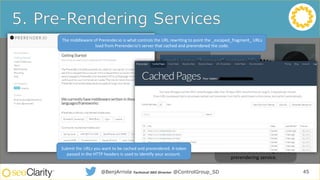
The middleware of Prerender.io is what controls the URL rewriting to point the _escaped_fragment_ URLs
load from Prerender.io’s server that cached and prerendered the code.
Submit the URLs you want to be cached and prerendered. A token
passed in the HTTP headers is used to identify your account.
@BenjArriola Technical SEO Director @ControlGroup_SD 46
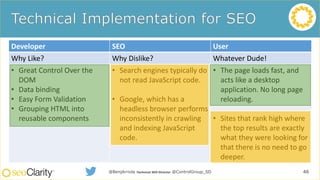
Developer SEO User
Why Like? Why Dislike? Whatever Dude!
• Great Control Over the
DOM
• Data binding
• Easy Form Validation
• Grouping HTML into
reusable components
• Search engines typically do
not read JavaScript code.
• Google, which has a
headless browser performs
inconsistently in crawling
and indexing JavaScript
code.
• The page loads fast, and
acts like a desktop
application. No long page
reloading.
• Sites that rank high where
the top results are exactly
what they were looking for
that there is no need to go
deeper.
Developer SEO User
Why Like? Why Dislike? Whatever Dude!
• Great Control Over the
DOM
• Data binding
• Easy Form Validation
• Grouping HTML into
reusable components
• Search engines typically do
not read JavaScript code.
• Google, which has a
headless browser performs
inconsistently in crawling
and indexing JavaScript
code.
• The page loads fast, and
acts like a desktop
application. No long page
reloading.
• Sites that rank high where
the top results are exactly
what they were looking for
that there is no need to go
deeper.
SEO for AngularJS
Sites
Use AngularJS
(2) Static Site
Equivalent
(3) Initial Static
HTML Rendering
Pre-renderingJS
Code
(4) Headless
Browsers
(5) Pre-rendering
Services
(1) Don’t Use
AngularJS
47@BenjArriola Technical SEO Director @ControlGroup_SD
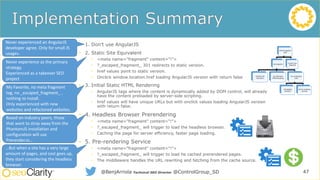
• 1. Don’t use AngularJS
• 2. Static Site Equivalent
• <meta name="fragment" content="!">
• ?_escaped_fragment_ 301 redirects to static version.
• href values point to static version.
• Onclick window.location.href loading AngularJS version with return false
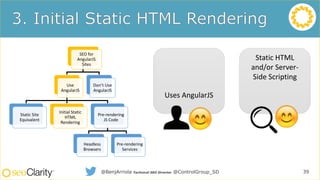
• 3. Initial Static HTML Rendering
• AngularJS tags where the content is dynamically added by DOM control, will already
have the content preloaded by server-side scripting.
• href values will have unique URLs but with onclick values loading AngularJS version
with return false.
• 4. Headless Browser Prerendering
• <meta name="fragment" content="!">
• ?_escaped_fragment_ will trigger to load the headless browser.
• Caching the page for server efficiency, faster page loading.
• 5. Pre-rendering Service
• <meta name="fragment" content="!">
• ?_escaped_fragment_ will trigger to load he cached prerendered pages.
• The middleware handles the URL rewriting and fetching from the cache source.
Never experienced an AngularJS
developer agree. Only for small JS
usages.
Never experience as the primary
strategy.
Experienced as a takeover SEO
project
My Favorite, no meta fragment
tag, no _escaped_fragment_ ,
nothing to install.
Only experienced with new
websites and refactored websites.
Based on industry peers, those
that want to stray away from the
PhantomJS installation and
configuration will use
Prerender.io…
…But when a site has a very large
amount of pages, and cost goes up,
they start considering the headless
browser.
• /in/benjarriola
• @benjarriola
• about.me/benjarriola
48@BenjArriola Technical SEO Director @ControlGroup_SD
What development process does your company use?
• Waterfall
• Agile
• Lean
• Other
• I don’t know
49
Q&A
50

Is AngularJS Right for Your Enterprise?

  • 1.
    The SEO Insider’sGuide to AngularJS
  • 2.
  • 3.
    • Session 1:Bill Hunt • What is AngularJS? • What should SEOs care? • How does it affect indexation and crawlability? • Session 2: Catfish Comstock • Case Studies • Prep work • Working with IT • Session 3: Benj Arriola • Technical implementation of AngularJS 3
  • 4.
    What is yourcurrent role? • SEO • UX • Developer • Product Manager • Merchandizing • Other 4
  • 5.
    Global Digital &Search Marketing Strategist Back Azimuth 5
  • 6.
    • AngularJS isa structural framework for dynamic web apps. It lets you use HTML as your template language and lets you extend HTML's syntax to express your application's components clearly and succinctly. Angular's data binding and dependency injection eliminate much of the code you would otherwise have to write. • Source: https://docs.angularjs.org/guide/introduction 6
  • 7.
    • Many devshops are cloning the features of AngularJS and creating their own platform… 7 Image Credit: http://noeticforce.com/best-Javascript-frameworks-for-single-page-modern-web-applications
  • 8.
    • 400k sitesusing AngularJS • 558k sites using BackboneJS • 14k sites using Meteor • 9k site using EmberJS 8 Source: BuiltWith April 2016
  • 9.
    • Developers canwrite less code than before • Simplified App development by removing program flows and load order as Angular handles dependencies • MVC components reduce shortcuts and potential breaks • DOM manipulation in directive = more flexible designs • Simply, Angular has wired up all of the common framework tools and ensures they work together. 9
  • 10.
    • Developed for“Single Page Apps” • Pages may not have unique URL’s (no URL no links or indexing) • Most of the text is “Rendered” in browser not in the page • Search Engines can render the page but cannot understand context and relevance of the content (no text no relevance and no rank) • Links and Connections are Dynamically Created • Deeps links are added during page load and not static (no links to follow = no crawl = no index = no ranking) 10
  • 11.
    • When youscroll the page, do the modules have unique URL’s? 11
  • 12.
    • view-source:http://www.barbie.com/en-us 12 Do yousee any text or content that would tell the search engine what the page is about?
  • 13.
    • Info:http://www.barbie.com/en-us –View Text-Only 13 Does Google have any text cached for the page?
  • 14.
    • Barbie spysquad site:barbie.com/en-us 14 Does Google show the page as relevant for the query?
  • 15.
    • Determine thebenefits of using AngularJS and the potential impact on the business • Collaborate with SEO and Dev and Creative teams to ensure search friendly implementation 15
  • 16.
    • Email: • bill@back-azimuth.com •Twitter • @billhunt • LinkedIn • https://www.linkedin.com/in/billhunt3 • Bill Hunt’s Rant’s and Raves • www.whunt.com Sample Footer 16
  • 17.
    Have you implementedAngularJS on your site? • Yes • No, but we plan on it • No, we’re looking at a few options • I don’t know 17
  • 18.
  • 19.
    • A numberof my clients have had significant SEO issues using Angular JavaScript • Each of the three anonymous case studies presented were coded in Angular JS prior to SEO consultation • These SEO issues include: • Content not being indexed / Blank pages indexed • Links not being indexed / Navigation not being indexed • Pages not being indexed / Pages being indexed under the wrong URL • Each of these case studies is in a different stage of resolution. Sample Footer 19 https://www.madewithangular.com/
  • 20.
    • Issue: ContentPopulated in Angular JS • Some content seen / Some content not seen • Cache was blank but specific string search pulled up page • Recommendation: Recode affected area • Still unresolved Sample Footer 20 This area required a “Click More” action to see the content. This content was not indexed by search engines.
  • 21.
    • Steps usedto Identify the Issue: 1)Check Text Cache: a) Use Cache link from Google Results or b) Use Cache: command in Google c) Click on Text Cache Link in Cache Header d) You may need to use the ESC button to disable redirects e) Or append &Strip=1 to Cache URL 2)Check for Unique String a) Use “inurl” command in conjunction with unique string in quotes Sample Footer 21
  • 22.
    • Issue: PageNavigation templates not being indexed as links (showing up as code) • Slow / Inconsistent of Indexing of Pages • Links not passing trust and authority to pages linked from the navigation • Content is correctly indexed • Recommendation: Change navigation code • Issue unresolved 22 Google Text Cache: http://www.doz.com/search-engine/angularjs-index-seo
  • 23.
    • Issue: Pagecontent not indexed and pages not being indexed • Ecommerce site had only 10 pages indexed and only two product pages • Blank pages considered duplicates • Text cache showed blank page / search for specific text had no results • Recommendation: Implement Prerender.IO • Results • 5 pages to 13k+ Indexed • Content Seen and Indexed • Issue resolved / But there are additional issues 23
  • 24.
    • Additional ClientSpecific Issues with Prerender.IO Solution: • *Issues not related to Prerender.io solution • Canonical Tags • Wrong Canonical Tags on • Pagination (Single URL) • Pagination doesn’t have unique URLs to build fragments from • Make sure rel=next / rel=prev is implemented on both regular URLs and fragments 24
  • 25.
    • Two PotentialScenarios • Already Have Angular JS • Considering Angular JS 25
  • 26.
    • Already HaveAngular JS • Determine if performance is currently affected using methodologies described earlier • This is evaluation should always be done following the launch of a redesign that uses Angular JS • If so, explain potential / current issues to management and IT (use this Webinar) • Present Documentation to Management with Impact Report • Create Impact Report with Potential Loss of Revenue / Opportunity for Growth (SEOClarity Forecast Report) 26
  • 27.
    • Considering AngularJS • Explain Potential Issues to management and IT (use this Webinar) • Determine if Functionality is Needed • Create Impact Report with Potential Loss of Revenue / Opportunity for Growth • Evaluate Potential Solutions • Launch Site with Optimization Solution in Place • Validate Solution is Working 27
  • 28.
    • https://www.linkedin.com/in/ catfish • @SEOCatfish •catfish@businessol.com • http://www.businessol.com 28
  • 29.
    How is SEOaligned with your IT/Development priorities? • We’re fully democratized • SEO is a consideration before development commences • SEO is a consideration after development • We’re not aligned at all • I don’t know 29
  • 30.
    Technical SEO Director TheControl Group Media Company, Inc. 30
  • 31.
    SEO for AngularJSSites Use AngularJS (2) Static Site Equivalent (3) Initial Static HTML Rendering Pre-rendering JS Code (4) Headless Browsers (5) Pre-rendering Services (1) Don’t Use AngularJS @BenjArriola Technical SEO Director @ControlGroup_SD 31
  • 32.
    • This isnot a full AngularJS tutorial. • Simple examples to point out the SEO issues and solutions. • Example site is based on an AngularJS tutorial. 32@BenjArriola Technical SEO Director @ControlGroup_SD http://bit.ly/ajs5min Noticed the URL Hash Fragments. This is a single page application. (SPA) bit.ly/seoajs0
  • 33.
    33@BenjArriola Technical SEODirector @ControlGroup_SD Where’s the content? Where’s the links?
  • 34.
    34 AngularJS Developers Users Search Engines SEOs LessCode, Data Binding, MVC, DOM Control, Development Time More SEO Work @BenjArriola Technical SEO Director @ControlGroup_SD
  • 35.
    SEO for AngularJS Sites Use AngularJS Static Site Equivalent InitialStatic HTML Rendering Pre-rendering JS Code Headless Browsers Pre-rendering Services Don’t Use AngularJS 35@BenjArriola Technical SEO Director @ControlGroup_SD Not an SPA, has individual HTML pages. There’s the content and links in the source code! bit.ly/seoajs1
  • 36.
    SEO for AngularJS Sites Use AngularJS Static Site Equivalent InitialStatic HTML Rendering Pre-rendering JS Code Headless Browsers Pre-rendering Services Don’t Use AngularJS 36@BenjArriola Technical SEO Director @ControlGroup_SD Things to consider: • User Experience • Conversions • Sales Things to consider: • Invested time/resources in AngularJS • Changes in development time, efficiency changes.
  • 37.
    SEO for AngularJS Sites Use AngularJS Static Site Equivalent InitialStatic HTML Rendering Pre-rendering JS Code Headless Browsers Pre-rendering Services Don’t Use AngularJS 37@BenjArriola Technical SEO Director @ControlGroup_SD Uses AngularJS Static HTML and/or Server- Side Scripting
  • 38.
    SEO for AngularJS Sites Use AngularJS Static Site Equivalent InitialStatic HTML Rendering Pre-rendering JS Code Headless Browsers Pre-rendering Services Don’t Use AngularJS 38@BenjArriola Technical SEO Director @ControlGroup_SD Uses AngularJS Static HTML and/or Server- Side Scripting Static HTML and/or Server- Side Scripting Uses AngularJS 301 redirect based on special meta tag to interpret the hash fragments as get variables. Onclick events will load the AngularJS site with return false, and keeping static URLs in the link href attribute value. (1) Always have the <meta name="fragment" content="!"> (2) #  ?_escaped_fragment_= (3) 301 redirect to static page. (1) Keep href values going to static pages (2) Use onclick="window.location.href='...'"; for users (3) Don’t forget the return false; so the href value does not execute.bit.ly/seoajs2
  • 39.
    Static HTML and/or Server- SideScripting SEO for AngularJS Sites Use AngularJS Static Site Equivalent Initial Static HTML Rendering Pre-rendering JS Code Headless Browsers Pre-rendering Services Don’t Use AngularJS 39@BenjArriola Technical SEO Director @ControlGroup_SD Uses AngularJS
  • 40.
    (1) Static HTML and/orServer- Side Scripting (2) Uses AngularJS 40@BenjArriola Technical SEO Director @ControlGroup_SD AngularJS Version bit.ly/seoajs3
  • 41.
    (1) Static HTML and/orServer- Side Scripting (2) Uses AngularJS 41@BenjArriola Technical SEO Director @ControlGroup_SD Other pages of the site AngularJS Version AngularJS with initial static HTML version
  • 42.
    SEO for AngularJS Sites Use AngularJS Static Site Equivalent InitialStatic HTML Rendering Pre-rendering JS Code Headless Browsers Pre-rendering Services Don’t Use AngularJS 42@BenjArriola Technical SEO Director @ControlGroup_SD Uses AngularJS <meta name="fragment" content="!"> (1) Tells SEs to replace # with ?_escaped_fragment_= in the URL. (2) The _escaped_fragment_ will trigger the headless browser to render the JavaScript code. bit.ly/seoajs4
  • 43.
    SEO for AngularJS Sites Use AngularJS Static Site Equivalent InitialStatic HTML Rendering Pre-rendering JS Code Headless Browsers Pre-rendering Services Don’t Use AngularJS 43@BenjArriola Technical SEO Director @ControlGroup_SD Uses AngularJS <meta name="fragment" content="!"> (1) Tells SEs to replace # with ?_escaped_fragment_= in the URL. (2) The _escaped_fragment_ will trigger the headless browser to render the JavaScript code. bit.ly/seoajs4 If there is no _escaped_fragment_ GET variable, load the AngularJS site. The loadpage.js has all the instructions for PhantomJS If there is an _escaped_fragment_ GET variable, run the loadpage.js file using PhantomJS and save it as a plain html file.
  • 44.
    SEO for AngularJS Sites Use AngularJS Static Site Equivalent InitialStatic HTML Rendering Pre-rendering JS Code Headless Browsers Pre-rendering Services Don’t Use AngularJS 44@BenjArriola Technical SEO Director @ControlGroup_SD Uses AngularJS <meta name="fragment" content="!"> (1) Tells SEs to replace # with ?_escaped_fragment_= in the URL. (2) The _escaped_fragment_ will run a URL rewrite to load the prerendered, cached code coming from a prerendering service. bit.ly/seoajs5
  • 45.
    SEO for AngularJS Sites Use AngularJS Static Site Equivalent InitialStatic HTML Rendering Pre-rendering JS Code Headless Browsers Pre-rendering Services Don’t Use AngularJS 45@BenjArriola Technical SEO Director @ControlGroup_SD Uses AngularJS <meta name="fragment" content="!"> (1) Tells SEs to replace # with ?_escaped_fragment_= in the URL. (2) The _escaped_fragment_ will run a URL rewrite to load the prerendered, cached code coming from a prerendering service. bit.ly/seoajs5 The middleware of Prerender.io is what controls the URL rewriting to point the _escaped_fragment_ URLs load from Prerender.io’s server that cached and prerendered the code. Submit the URLs you want to be cached and prerendered. A token passed in the HTTP headers is used to identify your account.
  • 46.
    @BenjArriola Technical SEODirector @ControlGroup_SD 46 Developer SEO User Why Like? Why Dislike? Whatever Dude! • Great Control Over the DOM • Data binding • Easy Form Validation • Grouping HTML into reusable components • Search engines typically do not read JavaScript code. • Google, which has a headless browser performs inconsistently in crawling and indexing JavaScript code. • The page loads fast, and acts like a desktop application. No long page reloading. • Sites that rank high where the top results are exactly what they were looking for that there is no need to go deeper. Developer SEO User Why Like? Why Dislike? Whatever Dude! • Great Control Over the DOM • Data binding • Easy Form Validation • Grouping HTML into reusable components • Search engines typically do not read JavaScript code. • Google, which has a headless browser performs inconsistently in crawling and indexing JavaScript code. • The page loads fast, and acts like a desktop application. No long page reloading. • Sites that rank high where the top results are exactly what they were looking for that there is no need to go deeper.
  • 47.
    SEO for AngularJS Sites UseAngularJS (2) Static Site Equivalent (3) Initial Static HTML Rendering Pre-renderingJS Code (4) Headless Browsers (5) Pre-rendering Services (1) Don’t Use AngularJS 47@BenjArriola Technical SEO Director @ControlGroup_SD • 1. Don’t use AngularJS • 2. Static Site Equivalent • <meta name="fragment" content="!"> • ?_escaped_fragment_ 301 redirects to static version. • href values point to static version. • Onclick window.location.href loading AngularJS version with return false • 3. Initial Static HTML Rendering • AngularJS tags where the content is dynamically added by DOM control, will already have the content preloaded by server-side scripting. • href values will have unique URLs but with onclick values loading AngularJS version with return false. • 4. Headless Browser Prerendering • <meta name="fragment" content="!"> • ?_escaped_fragment_ will trigger to load the headless browser. • Caching the page for server efficiency, faster page loading. • 5. Pre-rendering Service • <meta name="fragment" content="!"> • ?_escaped_fragment_ will trigger to load he cached prerendered pages. • The middleware handles the URL rewriting and fetching from the cache source. Never experienced an AngularJS developer agree. Only for small JS usages. Never experience as the primary strategy. Experienced as a takeover SEO project My Favorite, no meta fragment tag, no _escaped_fragment_ , nothing to install. Only experienced with new websites and refactored websites. Based on industry peers, those that want to stray away from the PhantomJS installation and configuration will use Prerender.io… …But when a site has a very large amount of pages, and cost goes up, they start considering the headless browser.
  • 48.
    • /in/benjarriola • @benjarriola •about.me/benjarriola 48@BenjArriola Technical SEO Director @ControlGroup_SD
  • 49.
    What development processdoes your company use? • Waterfall • Agile • Lean • Other • I don’t know 49
  • 50.