JAVA PROGRAMMING LAB
Prof. K. Adisesha 1
JAVA PROGRAMMING LABORATORY
MANUAL
FOR 5th
SEM BCA
BY
Prof. K. Adisesha
BCA DEPTATMENT
FOR ANY FEEDBACK CONTACT TO
EMAIL: adisesha1@rediffmail.com
JAVA PROGRAMMING LAB
Prof. K. Adisesha 2
PROGRAM 1
/* Write a Java Program to define a class, describe its constructor, overload the
Constructors and instantiate its object */
import java.lang.*;
class student
{
String name;
int regno; int
marks1,marks2,marks3;
// null constructor
student()
{
name="raju";
regno=12345; marks1=56;
marks2=47; marks3=78;
}
// parameterized constructor
student(String n,int r,int m1,int m2,int m3)
{
name=n;
regno=r;
marks1=m1;
marks2=m2;
marks3=m3;
}
// copy constructor
student(student s)
{
name=s.name;
regno=s.regno;
marks1=s.marks1;
marks2=s.marks2;
marks3=s.marks3;
}
void display()
{
System.out.println(name + "t" +regno+ "t" +marks1+ "t" +marks2+ "t" + marks3);
}
}
class studentdemo
{
public static void main(String arg[])
JAVA PROGRAMMING LAB
Prof. K. Adisesha 3
{
student s1=new student();
student s2=new student("john",34266,58,96,84);
student s3=new student(s1);
s1.display();
s2.display(); s3.display();
}
}
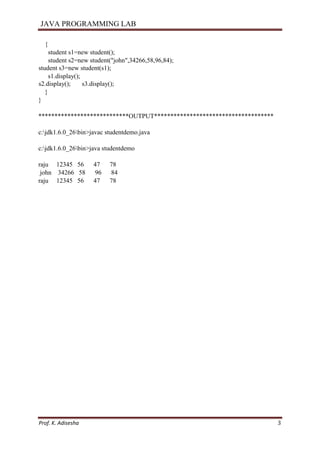
****************************OUTPUT*************************************
c:jdk1.6.0_26bin>javac studentdemo.java
c:jdk1.6.0_26bin>java studentdemo
raju 12345 56 47 78
john 34266 58 96 84
raju 12345 56 47 78
JAVA PROGRAMMING LAB
Prof. K. Adisesha 4
PROGRAM 2
/* Write a Java Program to define a class, define instance methods for setting and Retrieving
values of instance variables and instantiate its object.*/
import java.lang.*;
class emp
{
String name;
int id;
String address;
void getdata(String name,int id,String address)
{
this.name=name;
this.id=id;
this.address=address;
}
void putdata()
{
System.out.println("Employee details are :");
System.out.println("Name :" +name);
System.out.println("ID :" +id);
System.out.println("Address :" +address);
}
}
class empdemo
{
public static void main(String arg[])
{
emp e=new emp();
e.getdata("smith",76859,"gulbarga");
e.putdata();
}
}
**************************************OUTPUT*****************************
c:jdk1.6.0_26bin>javac empdemo.java
c:jdk1.6.0_26bin>java empdemo
Employee details are :
Name :smith
ID :76859
Address :Gulbarga
JAVA PROGRAMMING LAB
Prof. K. Adisesha 5
PROGRAM 3
/* Write a Java Program to define a class, define instance methods and overload them and use
them for dynamic method invocation.*/
import java.lang.*;
class add
{
void display(int a,int b)
{
int c=a+b;
System.out.println("The sum of " + a + " & " + b + " is " + c);
}
void display(double a,double b)
{ double c=a+b;
System.out.println("The sum of " + a + " & " + b + " is " + c);
}
}
class add_demo
{
public static void main(String arg[])
{
add obj=new add();
obj.display(10,20);
obj.display(10.2,20.2);
}
}
**************************************OUTPUT*****************************
c:jdk1.6.0_26bin>javac add_demo.java
c:jdk1.6.0_26bin>java add_demo
The sum of 10 & 20 is 30
The sum of 10.2 & 20.2 is 30.4
JAVA PROGRAMMING LAB
Prof. K. Adisesha 6
PROGRAM 4
/* Write a Java Program to demonstrate use of sub class */
import java.lang.*;
class parent
{
int m;
void get_m(int m)
{
this.m=m;
}
void display_m()
{
System.out.println("This is from parent : m = " +m);
}
}
class child extends parent
{
int n;
void get_n(int n)
{
this.n=n;
}
void display_n()
{
System.out.println("This is from child : n = " +n);
}
}
class childdemo
{
public static void main(String arg[])
{
child c=new child();
c.get_m(10);
c.get_n(20);
c.display_m();
c.display_n();
}
}
**************************OUTPUT*******************************
C:jdk1.6.0_26bin>javac childdemo.java
C:jdk1.6.0_26bin>java childdemo
This is from parent : m = 10
This is from child : n = 20
JAVA PROGRAMMING LAB
Prof. K. Adisesha 7
PROGRAM 5
/* Write a Java Program to demonstrate use of nested class.*/
import java.lang.*; class
outer
{ int
m=10;
class inner
{ int
n=20;
void display()
{
System.out.println("m = "+m);
System.out.println("n = "+n);
}
}
}
class nesteddemo
{
public static void main(String arg[])
{
outer outobj=new outer(); outer.inner
inobj=outobj.new inner();
inobj.display();
}
}
****************************OUTPUT*************************************
C:jdk1.6.0_26bin>javac nesteddemo.java
C:jdk1.6.0_26bin>java nesteddemo
m = 10
n = 20
JAVA PROGRAMMING LAB
Prof. K. Adisesha 8
PROGRAM 6
/* Write a Java Program to implement array of objects. */
import java.lang.*;
public class EmployeeTest
{
public static void main(String[] args)
{
Employee[] staff = new Employee[3];
staff[0] = new Employee("Harry Hacker", 3500);
staff[1] = new Employee("Carl Cracker", 7500);
staff[2] = new Employee("Tony Tester", 3800);
for (int i = 0; i < 3; i++)
staff[i].print();
}
}
class Employee
{
private String name;
private double salary;
public Employee(String n, double s)
{
name = n;
salary = s;
}
public void print()
{
System.out.println(name + " " + salary);
}
}
******************OUTPUT****************************
C:jdk1.6.0_26bin>javac EmployeeTest.java
C:jdk1.6.0_26bin>java EmployeeTest
Harry Hacker 3500.0
Carl Cracker 7500.0
Tony Tester 3800.0
JAVA PROGRAMMING LAB
Prof. K. Adisesha 9
PROGRAM 7 (A)
Write a Java program to practice using String class and its methods.
import java.lang.String; class
stringdemo
{
public static void main(String arg[])
{
String s1=new String("gpt gulbarga");
String s2="GPT GULBARGA";
System.out.println(" The string s1 is : " +s1);
System.out.println(" The string s1 is : " +s2);
System.out.println(" Length of the string s1 is : " +s1.length());
System.out.println(" The first accurence of r is at the position : " +s1.indexOf('r'));
System.out.println(" The String in Upper Case : " +s1.toUpperCase());
System.out.println(" The String in Lower Case : " +s1.toLowerCase());
System.out.println(" s1 equals to s2 : " +s1.equals(s2));
System.out.println(" s1 equals ignore case to s2 : " +s1.equalsIgnoreCase(s2));
int result=s1.compareTo(s2);
System.out.println("After compareTo()");
if(result==0)
System.out.println( s1 + " is equal to "+s2);
else if(result>0)
System.out.println( s1 + " is greather than to "+s2);
else
System.out.println( s1 + " is smaller than to "+s2);
System.out.println(" Character at an index of 6 is :" +s1.charAt(6));
String s3=s1.substring(4,12);
System.out.println(" Extracted substring is :"+s3);
System.out.println(" After Replacing g with a in s1 : " + s1.replace('g','a'));
String s4=" This is a book ";
System.out.println(" The string s4 is :"+s4);
System.out.println(" After trim() :"+s4.trim());
}
}
*************************OUTPUT************************************
c:jdk1.6.0_26bin>javac stringdemo.java
c:jdk1.6.0_26bin>java stringdemo
The string s1 is : gpt gulbarga
The string s1 is : GPT GULBARGA
Length of the string s1 is : 12
JAVA PROGRAMMING LAB
Prof. K. Adisesha 10
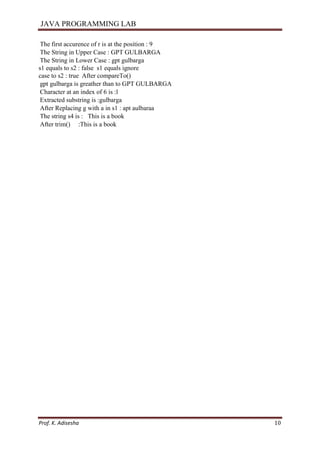
The first accurence of r is at the position : 9
The String in Upper Case : GPT GULBARGA
The String in Lower Case : gpt gulbarga
s1 equals to s2 : false s1 equals ignore
case to s2 : true After compareTo()
gpt gulbarga is greather than to GPT GULBARGA
Character at an index of 6 is :l
Extracted substring is :gulbarga
After Replacing g with a in s1 : apt aulbaraa
The string s4 is : This is a book
After trim() :This is a book
JAVA PROGRAMMING LAB
Prof. K. Adisesha 11
PROGRAM 7 (B)
Write a Java program to practice using String Buffer class and its methods.
import java.lang.String; class
stringbufferdemo
{
public static void main(String arg[])
{
StringBuffer sb=new StringBuffer("This is my college");
System.out.println("This string sb is : " +sb);
System.out.println("The length of the string sb is : " +sb.length());
System.out.println("The capacity of the string sb is : " +sb.capacity());
System.out.println("The character at an index of 6 is : " +sb.charAt(6));
sb.setCharAt(3,'x');
System.out.println("After setting char x at position 3 : " +sb);
System.out.println("After appending : " +sb.append(" in gulbarga "));
System.out.println("After inserting : " +sb.insert(19,"gpt "));
System.out.println("After deleting : " +sb.delete(19,22));
}
}
**********************************OUTPUT*********************************
c:jdk1.6.0_26bin>javac stringbufferdemo.java
c:jdk1.6.0_26bin>java stringbufferdemo
This string sb is : This is my college
The length of the string sb is : 18
The capacity of the string sb is : 34
The character at an index of 6 is : s
After setting char x at position 3 : Thix is my college
After appending : Thix is my college in gulbarga
After inserting : Thix is my college gpt in gulbarga
After deleting : Thix is my college in gulbarga
JAVA PROGRAMMING LAB
Prof. K. Adisesha 12
PROGRAM 8
Write a Java Program to implement Vector class and its methods.
import java.lang.*; import
java.util.Vector; import
java.util.Enumeration; class
vectordemo
{
public static void main(String arg[])
{
Vector v=new Vector();
v.addElement("one");
v.addElement("two");
v.addElement("three");
v.insertElementAt("zero",0);
v.insertElementAt("oops",3);
v.insertElementAt("four",5);
System.out.println("Vector Size :"+v.size());
System.out.println("Vector apacity :"+v.capacity());
System.out.println(" The elements of a vector are :");
Enumeration e=v.elements();
while(e.hasMoreElements())
System.out.println(e.nextElement() +" ");
System.out.println();
System.out.println("The first element is : " +v.firstElement());
System.out.println("The last element is : " +v.lastElement());
System.out.println("The object oops is found at position : "+v.indexOf("oops"));
v.removeElement("oops");
v.removeElementAt(1);
System.out.println("After removing 2 elements ");
System.out.println("Vector Size :"+v.size());
System.out.println("The elements of vector are :");
for(int i=0;i<v.size();i++)
System.out.println(v.elementAt(i)+" ");
}
}
**************************OUTPUT******************************
C:jdk1.6.0_26bin>javac vectordemo.java
C:jdk1.6.0_26bin>java vectordemo
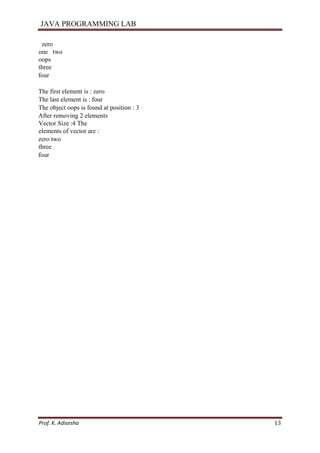
Vector Size :6
Vector apacity :10
The elements of a vector are :
JAVA PROGRAMMING LAB
Prof. K. Adisesha 13
zero
one two
oops
three
four
The first element is : zero
The last element is : four
The object oops is found at position : 3
After removing 2 elements
Vector Size :4 The
elements of vector are :
zero two
three
four
JAVA PROGRAMMING LAB
Prof. K. Adisesha 14
PROGRAM 9
Write a Java Program to implement Wrapper classes and their methods.
import java.io.*;
class wrapperdemo
{
public static void main(String args[])
{
Float P=new Float(0);
Float I=new Float(0);
int y=0;
try
{
DataInputStream ds=new DataInputStream(System.in);
System.out.println("ENTER THE PRINCIPAL AMOUNT");
System.out.flush();
String sp=ds.readLine();
P=Float.valueOf(sp);
System.out.println("ENTER THE INTEREST RATE");
System.out.flush();
String SI=ds.readLine();
I=Float.valueOf(SI);
System.out.println("ENTER THE NUMBER OF YEARS");
System.out.flush();
String sy=ds.readLine();
y=Integer.parseInt(sy);
}
catch(Exception e)
{
System.out.println("INPUT OUTPUT ERROR");
System.exit(1);
}
float value=loan(P.floatValue(),I.floatValue(),y);
System.out.println("FINAL VALUE IS:"+value);
}
static float loan(float P,float I,int y)
{ int
year=1; float
sum=P;
while(year<=y)
{
sum=sum+(P*I)/100;
year++;
}
JAVA PROGRAMMING LAB
Prof. K. Adisesha 15
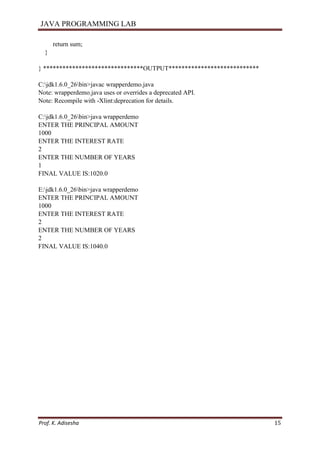
return sum;
}
} *******************************OUTPUT****************************
C:jdk1.6.0_26bin>javac wrapperdemo.java
Note: wrapperdemo.java uses or overrides a deprecated API.
Note: Recompile with -Xlint:deprecation for details.
C:jdk1.6.0_26bin>java wrapperdemo
ENTER THE PRINCIPAL AMOUNT
1000
ENTER THE INTEREST RATE
2
ENTER THE NUMBER OF YEARS
1
FINAL VALUE IS:1020.0
E:jdk1.6.0_26bin>java wrapperdemo
ENTER THE PRINCIPAL AMOUNT
1000
ENTER THE INTEREST RATE
2
ENTER THE NUMBER OF YEARS
2
FINAL VALUE IS:1040.0
JAVA PROGRAMMING LAB
Prof. K. Adisesha 16
PROGRAM 10
Write a Java Program to implement inheritance and demonstrate use of method overriding.
import java.lang.*;
class A {
void display()
{
System.out.println("This is from class A ");
} }
class B extends A
{
void display()
{
System.out.println("This is from class B ");
}
}
class AB {
public static void main(String arg[])
{
B obj=new B();
obj.display();
} }
**********************************OUTPUT*****************
C:jdk1.6.0_26bin>javac AB.java
C:jdk1.6.0_26bin>java AB
This is from class B
JAVA PROGRAMMING LAB
Prof. K. Adisesha 17
PROGRAM 11
/* Write a Java Program to implement multilevel inheritance by applying various access controls to
its data members and methods. */
import java.io.DataInputStream; class
Student
{
private int rollno;
private String name;
DataInputStream dis=new DataInputStream(System.in);
public void getrollno()
{
try
{
System.out.println("Enter rollno ");
rollno=Integer.parseInt(dis.readLine());
System.out.println("Enter name ");
name=dis.readLine();
}
catch(Exception e){ }
}
void putrollno()
{
System.out.println("Roll No ="+rollno);
System.out.println("Name ="+name);
}
}
class Marks extends Student
{
protected int m1,m2,m3;
void getmarks()
{
try
{
System.out.println("Enter marks :");
m1=Integer.parseInt(dis.readLine());
m2=Integer.parseInt(dis.readLine());
m3=Integer.parseInt(dis.readLine());
}
catch(Exception e) { }
}
void putmarks()
{
JAVA PROGRAMMING LAB
Prof. K. Adisesha 18
System.out.println("m1="+m1);
System.out.println("m2="+m2);
System.out.println("m3="+m3);
}
}
class Result extends Marks
{
private float total;
void compute_display()
{
total=m1+m2+m3;
System.out.println("Total marks :" +total);
} }
class MultilevelDemo
{
public static void main(String arg[])
{
Result r=new Result();
r.getrollno();
r.getmarks();
r.putrollno();
r.putmarks();
r.compute_display();
}
}
*********************OUTPUT*****************************
C:jdk1.6.0_26bin>javac MultilevelDemo.java
Note: MultilevelDemo.java uses or overrides a deprecated API.
Note: Recompile with -Xlint:deprecation for details.
C:jdk1.6.0_26bin>java MultilevelDemo
Enter rollno
12345
Enter name
Avinash Enter
marks :
54
78
46
Roll No =12345
Name =Avinash
m1=54 m2=78
m3=46
Total marks :178.0
JAVA PROGRAMMING LAB
Prof. K. Adisesha 19
PROGRAM 12 (A)
Write a program to demonstrate use of implementing interfaces.
import java.lang.*; interface
Area
{ final static float pi=3.14F;
float compute(float x,float y);
}
class rectangle implements Area
{
public float compute(float x,float y)
{
return(pi*x*y);
}
}
class circle implements Area
{
public float compute(float x,float x)
{
return(pi*x*x);
}
}
class interfacedemo
{
public static void main(String a[])
{
rectangle rect=new rectangle();
circle cir=new circle();
Area A;
A=rect;
System.out.println("Area of rectangle="+A.compute(10,20));
A=cir;
System.out.println("Area of circle="+A.compute(30,0));
}
}
************************OUTPUT*************************************
C:jdk1.6.0_26bin>javac interfacedemo.java
C:jdk1.6.0_26bin>java interfacedemo
Area of rectangle=628.0
Area of circle=2,827.43
JAVA PROGRAMMING LAB
Prof. K. Adisesha 20
PROGRAM 12 (B)
Write a program to demonstrate use of extending interfaces.
import java.lang.*; interface Area
{
final static float pi=3.14F;
double compute(double x,double y);
}
interface display extends Area
{
void display_result(double result);
}
class rectangle implements display
{
public double compute(double x,double y)
{
return(pi*x*y);
}
public void display_result(double result)
{
System.out.println("The Area is :" +result);
}
}
class InterfaceExtendsDemo
{
public static void main(String a[])
{
rectangle rect=new rectangle();
double result=rect.compute(10.2,12.3);
rect.display_result(result);
}
}
************************************OUTPUT************************
C:jdk1.6.0_26bin>javac InterfaceExtendsDemo.java
C:jdk1.6.0_26bin>java InterfaceExtendsDemo
The Area is : 393.9444131612778
JAVA PROGRAMMING LAB
Prof. K. Adisesha 21
PROGRAM 13
Write a Java program to implement the concept of importing classes from user defined
package and creating packages.
/*Source code of package p1 under the directory C:jdk1.6.0_26bin>p1edit Student.java */
package p1; public
class Student
{
int regno;
String name;
public void getdata(int r,String s)
{
regno=r;
name=s;
}
public void putdata()
{
System.out.println("regno = " +regno);
System.out.println("name = " + name);
}
}
/* Source code of the main function under C:jdk1.6.0_26bin>edit StudentTest.java */
import p1.*;
class StudentTest
{
public static void main(String arg[])
{
student s=new student();
s.getdata(123,"xyz");
s.putdata();
}
}
*********************************OUTPUT********************************
C:jdk1.6.0_26bin>javac p1Student.java
C:jdk1.6.0_26bin>javac StudentTest.java
C:jdk1.6.0_26bin>java StudentTest regno
= 123
name = xyz
JAVA PROGRAMMING LAB
Prof. K. Adisesha 22
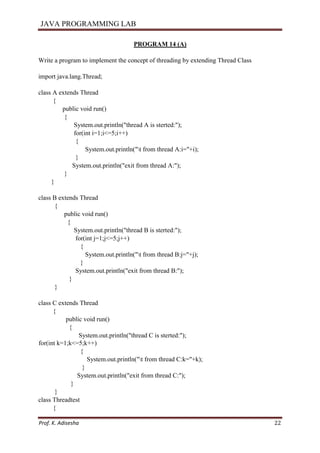
PROGRAM 14 (A)
Write a program to implement the concept of threading by extending Thread Class
import java.lang.Thread;
class A extends Thread
{
public void run()
{
System.out.println("thread A is sterted:");
for(int i=1;i<=5;i++)
{
System.out.println("t from thread A:i="+i);
}
System.out.println("exit from thread A:");
}
}
class B extends Thread
{
public void run()
{
System.out.println("thread B is sterted:");
for(int j=1;j<=5;j++)
{
System.out.println("t from thread B:j="+j);
}
System.out.println("exit from thread B:");
}
}
class C extends Thread
{
public void run()
{
System.out.println("thread C is sterted:");
for(int k=1;k<=5;k++)
{
System.out.println("t from thread C:k="+k);
}
System.out.println("exit from thread C:");
}
}
class Threadtest
{
JAVA PROGRAMMING LAB
Prof. K. Adisesha 23
public static void main(String arg[])
{
new A().start();
new B().start(); new
C().start();
}
}
*********************************OUTPUT**********************************
thread A is sterted: thread
B is sterted: thread C is
sterted:
from thread A:i=1
from thread B:j=1
from thread C:k=1
from thread A:i=2
from thread B:j=2
from thread C:k=2
from thread A:i=3
from thread B:j=3
from thread C:k=3
from thread A:i=4
from thread B:j=4
from thread C:k=4
from thread A:i=5
from thread B:j=5
from thread C:k=5 exit
from thread A: exit
from thread B: exit
from thread C:
JAVA PROGRAMMING LAB
Prof. K. Adisesha 24
PROGRAM 14 (B)
Write a program to implement the concept of threading by implementing Runnable Interface
import java.lang.Runnable;
class X implements Runnable
{
public void run()
{
for(int i=1;i<10;i++)
{
System.out.println("t Thread X:"+i);
}
System.out.println("End of Thread X");
}
}
class Runnabletest
{
public static void main(String arg[])
{
X R=new X();
Thread T=new Thread(R);
T.start();
}
}
*********************************OUTPUT**********************************
Thread X:1
Thread X:2
Thread X:3
Thread X:4
Thread X:5
Thread X:6
Thread X:7
Thread X:8
Thread X:9
End of Thread X
JAVA PROGRAMMING LAB
Prof. K. Adisesha 25
PROGRAM 15 (A)
Write a program to implement the concept of Exception Handling using predefined
exception.
import java.lang.*;
class Exception_handle
{
public static void main(String argv[])
{
int a=10,b=5,c=5,x,y;
try
{
x=a/(b-c);
}
catch(ArithmeticException e)
{
System.out.println("DIVISION BY ZERO");
}
y=a/(b+c);
System.out.println("y="+y);
}
}
********************************OUTPUT***********************************
DIVISION BY ZERO
y=1
JAVA PROGRAMMING LAB
Prof. K. Adisesha 26
PROGRAM 15 (B)
Write a program to implement the concept of Exception Handling by creating user defined
exceptions.
import java.lang.Exception;
import java.lang.*; import
java.lang.Exception;
import java.io.DataInputStream;
class MyException extends Exception
{
MyException(String message)
{
super(message);
}
}
class userdef
{
public static void main(String a[])
{
int age;
DataInputStream ds=new DataInputStream(System.in);
try
{
System.out.println("Enter the age (above 15 abd below 25) :");
age=Integer.parseInt(ds.readLine());
if(age<15 || age> 25)
{
throw new MyException("Number not in range");
}
System.out.println(" the number is :" +age);
}
catch(MyException e)
{
System.out.println("Caught MyException");
System.out.println(e.getMessage());
}
catch(Exception e){ System.out.println(e); }
}
}
JAVA PROGRAMMING LAB
Prof. K. Adisesha 27
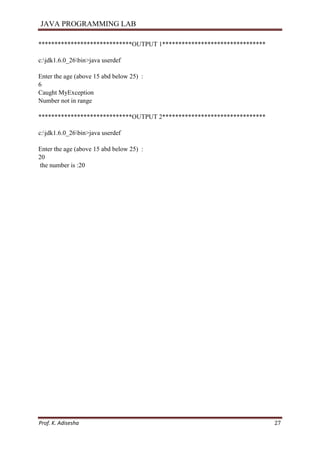
*****************************OUTPUT 1********************************
c:jdk1.6.0_26bin>java userdef
Enter the age (above 15 abd below 25) :
6
Caught MyException
Number not in range
*****************************OUTPUT 2********************************
c:jdk1.6.0_26bin>java userdef
Enter the age (above 15 abd below 25) :
20
the number is :20
JAVA PROGRAMMING LAB
Prof. K. Adisesha 28
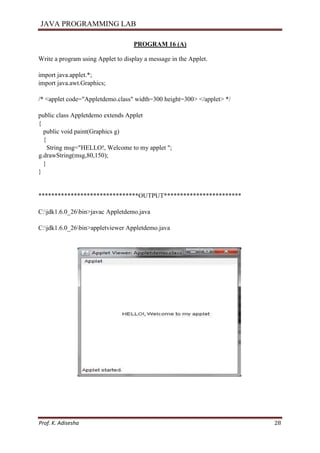
PROGRAM 16 (A)
Write a program using Applet to display a message in the Applet.
import java.applet.*;
import java.awt.Graphics;
/* <applet code="Appletdemo.class" width=300 height=300> </applet> */
public class Appletdemo extends Applet
{
public void paint(Graphics g)
{
String msg="HELLO!, Welcome to my applet ";
g.drawString(msg,80,150);
}
}
*******************************OUTPUT************************
C:jdk1.6.0_26bin>javac Appletdemo.java
C:jdk1.6.0_26bin>appletviewer Appletdemo.java
JAVA PROGRAMMING LAB
Prof. K. Adisesha 29
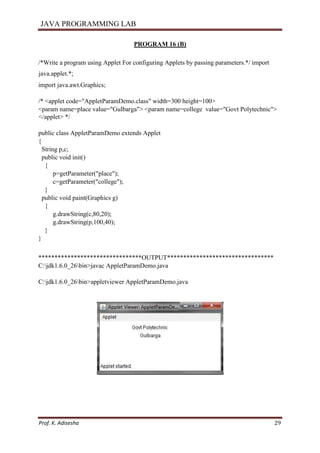
PROGRAM 16 (B)
/*Write a program using Applet For configuring Applets by passing parameters.*/ import
java.applet.*;
import java.awt.Graphics;
/* <applet code="AppletParamDemo.class" width=300 height=100>
<param name=place value="Gulbarga"> <param name=college value="Govt Polytechnic">
</applet> */
public class AppletParamDemo extends Applet
{
String p,c;
public void init()
{
p=getParameter("place");
c=getParameter("college");
}
public void paint(Graphics g)
{
g.drawString(c,80,20);
g.drawString(p,100,40);
}
}
********************************OUTPUT*********************************
C:jdk1.6.0_26bin>javac AppletParamDemo.java
C:jdk1.6.0_26bin>appletviewer AppletParamDemo.java
JAVA PROGRAMMING LAB
Prof. K. Adisesha 30
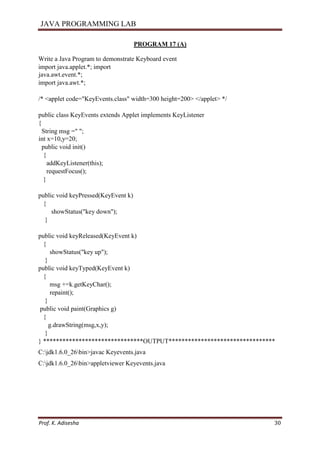
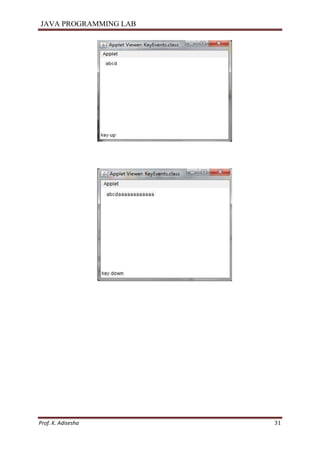
PROGRAM 17 (A)
Write a Java Program to demonstrate Keyboard event
import java.applet.*; import
java.awt.event.*;
import java.awt.*;
/* <applet code="KeyEvents.class" width=300 height=200> </applet> */
public class KeyEvents extends Applet implements KeyListener
{
String msg =" ";
int x=10,y=20;
public void init()
{
addKeyListener(this);
requestFocus();
}
public void keyPressed(KeyEvent k)
{
showStatus("key down");
}
public void keyReleased(KeyEvent k)
{
showStatus("key up");
}
public void keyTyped(KeyEvent k)
{
msg +=k.getKeyChar();
repaint();
}
public void paint(Graphics g)
{
g.drawString(msg,x,y);
}
} *******************************OUTPUT*********************************
C:jdk1.6.0_26bin>javac Keyevents.java
C:jdk1.6.0_26bin>appletviewer Keyevents.java
JAVA PROGRAMMING LAB
Prof. K. Adisesha 31
JAVA PROGRAMMING LAB
Prof. K. Adisesha 32
PROGRAM 17 (B)
Write a Java Program to demonstrate Mouse events
import java.applet.*; import java.awt.event.*;
import java.awt.*;
/* <applet code="MouseEvents.class" width=300 height=200> </applet> */
public class MouseEvents extends Applet implements MouseListener,MouseMotionListener
{
String msg =" ";
int x=0,y=0;
public void init()
{
addMouseListener(this);
addMouseMotionListener(this);
}
public void mouseClicked(MouseEvent m)
{
x=10;
y=10;
msg ="mouse clicked";
repaint();
}
public void mouseEntered(MouseEvent m)
{
x=10;
y=10;
msg ="mouse Entered";
repaint();
}
public void mouseExited(MouseEvent m)
{
x=10;
y=10;
msg ="mouse Exited";
repaint();
}
public void mousePressed(MouseEvent m)
{
x=m.getX();
y=m.getY();
JAVA PROGRAMMING LAB
Prof. K. Adisesha 33
msg ="Down";
repaint();
}
public void mouseReleased(MouseEvent m)
{
x=m.getX();
y=m.getY();
msg ="Up";
repaint();
}
public void mouseDragged(MouseEvent m)
{
x=m.getX();
y=m.getY();
msg ="*";
showStatus("Draggeg mouse at " +x+ " & "+y);
repaint();
}
public void mouseMoved(MouseEvent m)
{
showStatus("Moving mouse at " +m.getX()+ " & "+m.getY());
}
public void paint(Graphics g)
{
g.drawString(msg,x,y);
}
}
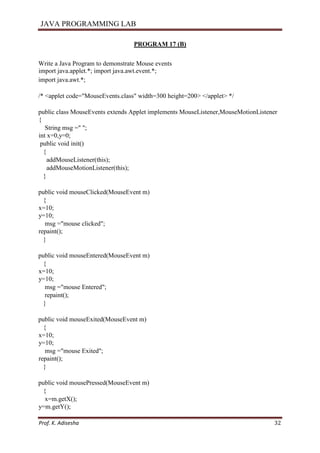
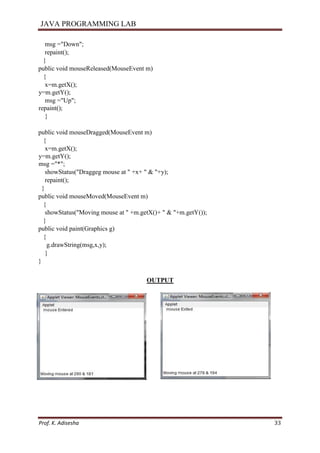
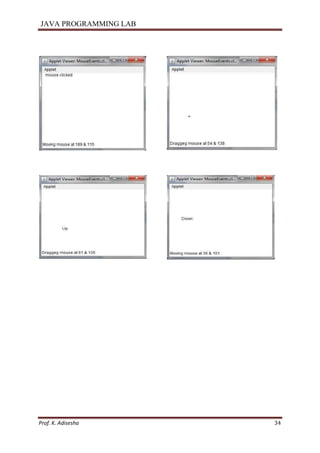
OUTPUT
JAVA PROGRAMMING LAB
Prof. K. Adisesha 34
JAVA PROGRAMMING LAB
Prof. K. Adisesha 35
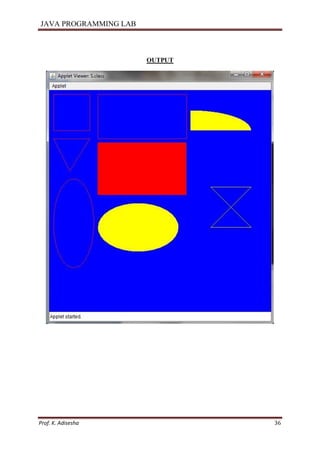
PROGRAM 18
Write programs for using Graphics class
- to display basic shapes and fill them
- draw different items using basic shapes - set background and
foreground colors.
import java.applet.*;
import java.awt.*;
/* <applet code=”Shapes.class” width=800 height-800> </applet>*/
public class Shapes extends Applet
{
public void paint(Graphics g)
{
setForefround(Color.red);
setBackGround(Color.blue);
//drawing squares
g.drawLine(10,10,100,10);
g.drawLine(10,10,10,10);
g.drawLine(10,100,100,100);
g.drawLine(100,100,100,10);
// Drawing triangle
g.drawLine(10,120,100,120);
g.drawLine(10,120,50,200);
g.drawLine(50,200,100,120);
//drawing Rectangle
g.drawRect(120,10,220,120);
g.fillRect(120,120,220,120);
//drawing ellipse and circle
g.drawOval(10,220,100,220);
g.setColor(Cplor.yellow);
g.fillOval(120,250,250,250);
//draw a filled arc
g.fillArc(350,50,400,100,0,90);
//draw a polygon int
x[]={400,500,400,500); int
y[]={240,240,340,340};
g.drawPolygon(x,y,4);
}
}
JAVA PROGRAMMING LAB
Prof. K. Adisesha 36
OUTPUT

java-programming.pdf

  • 1.
    JAVA PROGRAMMING LAB Prof.K. Adisesha 1 JAVA PROGRAMMING LABORATORY MANUAL FOR 5th SEM BCA BY Prof. K. Adisesha BCA DEPTATMENT FOR ANY FEEDBACK CONTACT TO EMAIL: adisesha1@rediffmail.com
  • 2.
    JAVA PROGRAMMING LAB Prof.K. Adisesha 2 PROGRAM 1 /* Write a Java Program to define a class, describe its constructor, overload the Constructors and instantiate its object */ import java.lang.*; class student { String name; int regno; int marks1,marks2,marks3; // null constructor student() { name="raju"; regno=12345; marks1=56; marks2=47; marks3=78; } // parameterized constructor student(String n,int r,int m1,int m2,int m3) { name=n; regno=r; marks1=m1; marks2=m2; marks3=m3; } // copy constructor student(student s) { name=s.name; regno=s.regno; marks1=s.marks1; marks2=s.marks2; marks3=s.marks3; } void display() { System.out.println(name + "t" +regno+ "t" +marks1+ "t" +marks2+ "t" + marks3); } } class studentdemo { public static void main(String arg[])
  • 3.
    JAVA PROGRAMMING LAB Prof.K. Adisesha 3 { student s1=new student(); student s2=new student("john",34266,58,96,84); student s3=new student(s1); s1.display(); s2.display(); s3.display(); } } ****************************OUTPUT************************************* c:jdk1.6.0_26bin>javac studentdemo.java c:jdk1.6.0_26bin>java studentdemo raju 12345 56 47 78 john 34266 58 96 84 raju 12345 56 47 78
  • 4.
    JAVA PROGRAMMING LAB Prof.K. Adisesha 4 PROGRAM 2 /* Write a Java Program to define a class, define instance methods for setting and Retrieving values of instance variables and instantiate its object.*/ import java.lang.*; class emp { String name; int id; String address; void getdata(String name,int id,String address) { this.name=name; this.id=id; this.address=address; } void putdata() { System.out.println("Employee details are :"); System.out.println("Name :" +name); System.out.println("ID :" +id); System.out.println("Address :" +address); } } class empdemo { public static void main(String arg[]) { emp e=new emp(); e.getdata("smith",76859,"gulbarga"); e.putdata(); } } **************************************OUTPUT***************************** c:jdk1.6.0_26bin>javac empdemo.java c:jdk1.6.0_26bin>java empdemo Employee details are : Name :smith ID :76859 Address :Gulbarga
  • 5.
    JAVA PROGRAMMING LAB Prof.K. Adisesha 5 PROGRAM 3 /* Write a Java Program to define a class, define instance methods and overload them and use them for dynamic method invocation.*/ import java.lang.*; class add { void display(int a,int b) { int c=a+b; System.out.println("The sum of " + a + " & " + b + " is " + c); } void display(double a,double b) { double c=a+b; System.out.println("The sum of " + a + " & " + b + " is " + c); } } class add_demo { public static void main(String arg[]) { add obj=new add(); obj.display(10,20); obj.display(10.2,20.2); } } **************************************OUTPUT***************************** c:jdk1.6.0_26bin>javac add_demo.java c:jdk1.6.0_26bin>java add_demo The sum of 10 & 20 is 30 The sum of 10.2 & 20.2 is 30.4
  • 6.
    JAVA PROGRAMMING LAB Prof.K. Adisesha 6 PROGRAM 4 /* Write a Java Program to demonstrate use of sub class */ import java.lang.*; class parent { int m; void get_m(int m) { this.m=m; } void display_m() { System.out.println("This is from parent : m = " +m); } } class child extends parent { int n; void get_n(int n) { this.n=n; } void display_n() { System.out.println("This is from child : n = " +n); } } class childdemo { public static void main(String arg[]) { child c=new child(); c.get_m(10); c.get_n(20); c.display_m(); c.display_n(); } } **************************OUTPUT******************************* C:jdk1.6.0_26bin>javac childdemo.java C:jdk1.6.0_26bin>java childdemo This is from parent : m = 10 This is from child : n = 20
  • 7.
    JAVA PROGRAMMING LAB Prof.K. Adisesha 7 PROGRAM 5 /* Write a Java Program to demonstrate use of nested class.*/ import java.lang.*; class outer { int m=10; class inner { int n=20; void display() { System.out.println("m = "+m); System.out.println("n = "+n); } } } class nesteddemo { public static void main(String arg[]) { outer outobj=new outer(); outer.inner inobj=outobj.new inner(); inobj.display(); } } ****************************OUTPUT************************************* C:jdk1.6.0_26bin>javac nesteddemo.java C:jdk1.6.0_26bin>java nesteddemo m = 10 n = 20
  • 8.
    JAVA PROGRAMMING LAB Prof.K. Adisesha 8 PROGRAM 6 /* Write a Java Program to implement array of objects. */ import java.lang.*; public class EmployeeTest { public static void main(String[] args) { Employee[] staff = new Employee[3]; staff[0] = new Employee("Harry Hacker", 3500); staff[1] = new Employee("Carl Cracker", 7500); staff[2] = new Employee("Tony Tester", 3800); for (int i = 0; i < 3; i++) staff[i].print(); } } class Employee { private String name; private double salary; public Employee(String n, double s) { name = n; salary = s; } public void print() { System.out.println(name + " " + salary); } } ******************OUTPUT**************************** C:jdk1.6.0_26bin>javac EmployeeTest.java C:jdk1.6.0_26bin>java EmployeeTest Harry Hacker 3500.0 Carl Cracker 7500.0 Tony Tester 3800.0
  • 9.
    JAVA PROGRAMMING LAB Prof.K. Adisesha 9 PROGRAM 7 (A) Write a Java program to practice using String class and its methods. import java.lang.String; class stringdemo { public static void main(String arg[]) { String s1=new String("gpt gulbarga"); String s2="GPT GULBARGA"; System.out.println(" The string s1 is : " +s1); System.out.println(" The string s1 is : " +s2); System.out.println(" Length of the string s1 is : " +s1.length()); System.out.println(" The first accurence of r is at the position : " +s1.indexOf('r')); System.out.println(" The String in Upper Case : " +s1.toUpperCase()); System.out.println(" The String in Lower Case : " +s1.toLowerCase()); System.out.println(" s1 equals to s2 : " +s1.equals(s2)); System.out.println(" s1 equals ignore case to s2 : " +s1.equalsIgnoreCase(s2)); int result=s1.compareTo(s2); System.out.println("After compareTo()"); if(result==0) System.out.println( s1 + " is equal to "+s2); else if(result>0) System.out.println( s1 + " is greather than to "+s2); else System.out.println( s1 + " is smaller than to "+s2); System.out.println(" Character at an index of 6 is :" +s1.charAt(6)); String s3=s1.substring(4,12); System.out.println(" Extracted substring is :"+s3); System.out.println(" After Replacing g with a in s1 : " + s1.replace('g','a')); String s4=" This is a book "; System.out.println(" The string s4 is :"+s4); System.out.println(" After trim() :"+s4.trim()); } } *************************OUTPUT************************************ c:jdk1.6.0_26bin>javac stringdemo.java c:jdk1.6.0_26bin>java stringdemo The string s1 is : gpt gulbarga The string s1 is : GPT GULBARGA Length of the string s1 is : 12
  • 10.
    JAVA PROGRAMMING LAB Prof.K. Adisesha 10 The first accurence of r is at the position : 9 The String in Upper Case : GPT GULBARGA The String in Lower Case : gpt gulbarga s1 equals to s2 : false s1 equals ignore case to s2 : true After compareTo() gpt gulbarga is greather than to GPT GULBARGA Character at an index of 6 is :l Extracted substring is :gulbarga After Replacing g with a in s1 : apt aulbaraa The string s4 is : This is a book After trim() :This is a book
  • 11.
    JAVA PROGRAMMING LAB Prof.K. Adisesha 11 PROGRAM 7 (B) Write a Java program to practice using String Buffer class and its methods. import java.lang.String; class stringbufferdemo { public static void main(String arg[]) { StringBuffer sb=new StringBuffer("This is my college"); System.out.println("This string sb is : " +sb); System.out.println("The length of the string sb is : " +sb.length()); System.out.println("The capacity of the string sb is : " +sb.capacity()); System.out.println("The character at an index of 6 is : " +sb.charAt(6)); sb.setCharAt(3,'x'); System.out.println("After setting char x at position 3 : " +sb); System.out.println("After appending : " +sb.append(" in gulbarga ")); System.out.println("After inserting : " +sb.insert(19,"gpt ")); System.out.println("After deleting : " +sb.delete(19,22)); } } **********************************OUTPUT********************************* c:jdk1.6.0_26bin>javac stringbufferdemo.java c:jdk1.6.0_26bin>java stringbufferdemo This string sb is : This is my college The length of the string sb is : 18 The capacity of the string sb is : 34 The character at an index of 6 is : s After setting char x at position 3 : Thix is my college After appending : Thix is my college in gulbarga After inserting : Thix is my college gpt in gulbarga After deleting : Thix is my college in gulbarga
  • 12.
    JAVA PROGRAMMING LAB Prof.K. Adisesha 12 PROGRAM 8 Write a Java Program to implement Vector class and its methods. import java.lang.*; import java.util.Vector; import java.util.Enumeration; class vectordemo { public static void main(String arg[]) { Vector v=new Vector(); v.addElement("one"); v.addElement("two"); v.addElement("three"); v.insertElementAt("zero",0); v.insertElementAt("oops",3); v.insertElementAt("four",5); System.out.println("Vector Size :"+v.size()); System.out.println("Vector apacity :"+v.capacity()); System.out.println(" The elements of a vector are :"); Enumeration e=v.elements(); while(e.hasMoreElements()) System.out.println(e.nextElement() +" "); System.out.println(); System.out.println("The first element is : " +v.firstElement()); System.out.println("The last element is : " +v.lastElement()); System.out.println("The object oops is found at position : "+v.indexOf("oops")); v.removeElement("oops"); v.removeElementAt(1); System.out.println("After removing 2 elements "); System.out.println("Vector Size :"+v.size()); System.out.println("The elements of vector are :"); for(int i=0;i<v.size();i++) System.out.println(v.elementAt(i)+" "); } } **************************OUTPUT****************************** C:jdk1.6.0_26bin>javac vectordemo.java C:jdk1.6.0_26bin>java vectordemo Vector Size :6 Vector apacity :10 The elements of a vector are :
  • 13.
    JAVA PROGRAMMING LAB Prof.K. Adisesha 13 zero one two oops three four The first element is : zero The last element is : four The object oops is found at position : 3 After removing 2 elements Vector Size :4 The elements of vector are : zero two three four
  • 14.
    JAVA PROGRAMMING LAB Prof.K. Adisesha 14 PROGRAM 9 Write a Java Program to implement Wrapper classes and their methods. import java.io.*; class wrapperdemo { public static void main(String args[]) { Float P=new Float(0); Float I=new Float(0); int y=0; try { DataInputStream ds=new DataInputStream(System.in); System.out.println("ENTER THE PRINCIPAL AMOUNT"); System.out.flush(); String sp=ds.readLine(); P=Float.valueOf(sp); System.out.println("ENTER THE INTEREST RATE"); System.out.flush(); String SI=ds.readLine(); I=Float.valueOf(SI); System.out.println("ENTER THE NUMBER OF YEARS"); System.out.flush(); String sy=ds.readLine(); y=Integer.parseInt(sy); } catch(Exception e) { System.out.println("INPUT OUTPUT ERROR"); System.exit(1); } float value=loan(P.floatValue(),I.floatValue(),y); System.out.println("FINAL VALUE IS:"+value); } static float loan(float P,float I,int y) { int year=1; float sum=P; while(year<=y) { sum=sum+(P*I)/100; year++; }
  • 15.
    JAVA PROGRAMMING LAB Prof.K. Adisesha 15 return sum; } } *******************************OUTPUT**************************** C:jdk1.6.0_26bin>javac wrapperdemo.java Note: wrapperdemo.java uses or overrides a deprecated API. Note: Recompile with -Xlint:deprecation for details. C:jdk1.6.0_26bin>java wrapperdemo ENTER THE PRINCIPAL AMOUNT 1000 ENTER THE INTEREST RATE 2 ENTER THE NUMBER OF YEARS 1 FINAL VALUE IS:1020.0 E:jdk1.6.0_26bin>java wrapperdemo ENTER THE PRINCIPAL AMOUNT 1000 ENTER THE INTEREST RATE 2 ENTER THE NUMBER OF YEARS 2 FINAL VALUE IS:1040.0
  • 16.
    JAVA PROGRAMMING LAB Prof.K. Adisesha 16 PROGRAM 10 Write a Java Program to implement inheritance and demonstrate use of method overriding. import java.lang.*; class A { void display() { System.out.println("This is from class A "); } } class B extends A { void display() { System.out.println("This is from class B "); } } class AB { public static void main(String arg[]) { B obj=new B(); obj.display(); } } **********************************OUTPUT***************** C:jdk1.6.0_26bin>javac AB.java C:jdk1.6.0_26bin>java AB This is from class B
  • 17.
    JAVA PROGRAMMING LAB Prof.K. Adisesha 17 PROGRAM 11 /* Write a Java Program to implement multilevel inheritance by applying various access controls to its data members and methods. */ import java.io.DataInputStream; class Student { private int rollno; private String name; DataInputStream dis=new DataInputStream(System.in); public void getrollno() { try { System.out.println("Enter rollno "); rollno=Integer.parseInt(dis.readLine()); System.out.println("Enter name "); name=dis.readLine(); } catch(Exception e){ } } void putrollno() { System.out.println("Roll No ="+rollno); System.out.println("Name ="+name); } } class Marks extends Student { protected int m1,m2,m3; void getmarks() { try { System.out.println("Enter marks :"); m1=Integer.parseInt(dis.readLine()); m2=Integer.parseInt(dis.readLine()); m3=Integer.parseInt(dis.readLine()); } catch(Exception e) { } } void putmarks() {
  • 18.
    JAVA PROGRAMMING LAB Prof.K. Adisesha 18 System.out.println("m1="+m1); System.out.println("m2="+m2); System.out.println("m3="+m3); } } class Result extends Marks { private float total; void compute_display() { total=m1+m2+m3; System.out.println("Total marks :" +total); } } class MultilevelDemo { public static void main(String arg[]) { Result r=new Result(); r.getrollno(); r.getmarks(); r.putrollno(); r.putmarks(); r.compute_display(); } } *********************OUTPUT***************************** C:jdk1.6.0_26bin>javac MultilevelDemo.java Note: MultilevelDemo.java uses or overrides a deprecated API. Note: Recompile with -Xlint:deprecation for details. C:jdk1.6.0_26bin>java MultilevelDemo Enter rollno 12345 Enter name Avinash Enter marks : 54 78 46 Roll No =12345 Name =Avinash m1=54 m2=78 m3=46 Total marks :178.0
  • 19.
    JAVA PROGRAMMING LAB Prof.K. Adisesha 19 PROGRAM 12 (A) Write a program to demonstrate use of implementing interfaces. import java.lang.*; interface Area { final static float pi=3.14F; float compute(float x,float y); } class rectangle implements Area { public float compute(float x,float y) { return(pi*x*y); } } class circle implements Area { public float compute(float x,float x) { return(pi*x*x); } } class interfacedemo { public static void main(String a[]) { rectangle rect=new rectangle(); circle cir=new circle(); Area A; A=rect; System.out.println("Area of rectangle="+A.compute(10,20)); A=cir; System.out.println("Area of circle="+A.compute(30,0)); } } ************************OUTPUT************************************* C:jdk1.6.0_26bin>javac interfacedemo.java C:jdk1.6.0_26bin>java interfacedemo Area of rectangle=628.0 Area of circle=2,827.43
  • 20.
    JAVA PROGRAMMING LAB Prof.K. Adisesha 20 PROGRAM 12 (B) Write a program to demonstrate use of extending interfaces. import java.lang.*; interface Area { final static float pi=3.14F; double compute(double x,double y); } interface display extends Area { void display_result(double result); } class rectangle implements display { public double compute(double x,double y) { return(pi*x*y); } public void display_result(double result) { System.out.println("The Area is :" +result); } } class InterfaceExtendsDemo { public static void main(String a[]) { rectangle rect=new rectangle(); double result=rect.compute(10.2,12.3); rect.display_result(result); } } ************************************OUTPUT************************ C:jdk1.6.0_26bin>javac InterfaceExtendsDemo.java C:jdk1.6.0_26bin>java InterfaceExtendsDemo The Area is : 393.9444131612778
  • 21.
    JAVA PROGRAMMING LAB Prof.K. Adisesha 21 PROGRAM 13 Write a Java program to implement the concept of importing classes from user defined package and creating packages. /*Source code of package p1 under the directory C:jdk1.6.0_26bin>p1edit Student.java */ package p1; public class Student { int regno; String name; public void getdata(int r,String s) { regno=r; name=s; } public void putdata() { System.out.println("regno = " +regno); System.out.println("name = " + name); } } /* Source code of the main function under C:jdk1.6.0_26bin>edit StudentTest.java */ import p1.*; class StudentTest { public static void main(String arg[]) { student s=new student(); s.getdata(123,"xyz"); s.putdata(); } } *********************************OUTPUT******************************** C:jdk1.6.0_26bin>javac p1Student.java C:jdk1.6.0_26bin>javac StudentTest.java C:jdk1.6.0_26bin>java StudentTest regno = 123 name = xyz
  • 22.
    JAVA PROGRAMMING LAB Prof.K. Adisesha 22 PROGRAM 14 (A) Write a program to implement the concept of threading by extending Thread Class import java.lang.Thread; class A extends Thread { public void run() { System.out.println("thread A is sterted:"); for(int i=1;i<=5;i++) { System.out.println("t from thread A:i="+i); } System.out.println("exit from thread A:"); } } class B extends Thread { public void run() { System.out.println("thread B is sterted:"); for(int j=1;j<=5;j++) { System.out.println("t from thread B:j="+j); } System.out.println("exit from thread B:"); } } class C extends Thread { public void run() { System.out.println("thread C is sterted:"); for(int k=1;k<=5;k++) { System.out.println("t from thread C:k="+k); } System.out.println("exit from thread C:"); } } class Threadtest {
  • 23.
    JAVA PROGRAMMING LAB Prof.K. Adisesha 23 public static void main(String arg[]) { new A().start(); new B().start(); new C().start(); } } *********************************OUTPUT********************************** thread A is sterted: thread B is sterted: thread C is sterted: from thread A:i=1 from thread B:j=1 from thread C:k=1 from thread A:i=2 from thread B:j=2 from thread C:k=2 from thread A:i=3 from thread B:j=3 from thread C:k=3 from thread A:i=4 from thread B:j=4 from thread C:k=4 from thread A:i=5 from thread B:j=5 from thread C:k=5 exit from thread A: exit from thread B: exit from thread C:
  • 24.
    JAVA PROGRAMMING LAB Prof.K. Adisesha 24 PROGRAM 14 (B) Write a program to implement the concept of threading by implementing Runnable Interface import java.lang.Runnable; class X implements Runnable { public void run() { for(int i=1;i<10;i++) { System.out.println("t Thread X:"+i); } System.out.println("End of Thread X"); } } class Runnabletest { public static void main(String arg[]) { X R=new X(); Thread T=new Thread(R); T.start(); } } *********************************OUTPUT********************************** Thread X:1 Thread X:2 Thread X:3 Thread X:4 Thread X:5 Thread X:6 Thread X:7 Thread X:8 Thread X:9 End of Thread X
  • 25.
    JAVA PROGRAMMING LAB Prof.K. Adisesha 25 PROGRAM 15 (A) Write a program to implement the concept of Exception Handling using predefined exception. import java.lang.*; class Exception_handle { public static void main(String argv[]) { int a=10,b=5,c=5,x,y; try { x=a/(b-c); } catch(ArithmeticException e) { System.out.println("DIVISION BY ZERO"); } y=a/(b+c); System.out.println("y="+y); } } ********************************OUTPUT*********************************** DIVISION BY ZERO y=1
  • 26.
    JAVA PROGRAMMING LAB Prof.K. Adisesha 26 PROGRAM 15 (B) Write a program to implement the concept of Exception Handling by creating user defined exceptions. import java.lang.Exception; import java.lang.*; import java.lang.Exception; import java.io.DataInputStream; class MyException extends Exception { MyException(String message) { super(message); } } class userdef { public static void main(String a[]) { int age; DataInputStream ds=new DataInputStream(System.in); try { System.out.println("Enter the age (above 15 abd below 25) :"); age=Integer.parseInt(ds.readLine()); if(age<15 || age> 25) { throw new MyException("Number not in range"); } System.out.println(" the number is :" +age); } catch(MyException e) { System.out.println("Caught MyException"); System.out.println(e.getMessage()); } catch(Exception e){ System.out.println(e); } } }
  • 27.
    JAVA PROGRAMMING LAB Prof.K. Adisesha 27 *****************************OUTPUT 1******************************** c:jdk1.6.0_26bin>java userdef Enter the age (above 15 abd below 25) : 6 Caught MyException Number not in range *****************************OUTPUT 2******************************** c:jdk1.6.0_26bin>java userdef Enter the age (above 15 abd below 25) : 20 the number is :20
  • 28.
    JAVA PROGRAMMING LAB Prof.K. Adisesha 28 PROGRAM 16 (A) Write a program using Applet to display a message in the Applet. import java.applet.*; import java.awt.Graphics; /* <applet code="Appletdemo.class" width=300 height=300> </applet> */ public class Appletdemo extends Applet { public void paint(Graphics g) { String msg="HELLO!, Welcome to my applet "; g.drawString(msg,80,150); } } *******************************OUTPUT************************ C:jdk1.6.0_26bin>javac Appletdemo.java C:jdk1.6.0_26bin>appletviewer Appletdemo.java
  • 29.
    JAVA PROGRAMMING LAB Prof.K. Adisesha 29 PROGRAM 16 (B) /*Write a program using Applet For configuring Applets by passing parameters.*/ import java.applet.*; import java.awt.Graphics; /* <applet code="AppletParamDemo.class" width=300 height=100> <param name=place value="Gulbarga"> <param name=college value="Govt Polytechnic"> </applet> */ public class AppletParamDemo extends Applet { String p,c; public void init() { p=getParameter("place"); c=getParameter("college"); } public void paint(Graphics g) { g.drawString(c,80,20); g.drawString(p,100,40); } } ********************************OUTPUT********************************* C:jdk1.6.0_26bin>javac AppletParamDemo.java C:jdk1.6.0_26bin>appletviewer AppletParamDemo.java
  • 30.
    JAVA PROGRAMMING LAB Prof.K. Adisesha 30 PROGRAM 17 (A) Write a Java Program to demonstrate Keyboard event import java.applet.*; import java.awt.event.*; import java.awt.*; /* <applet code="KeyEvents.class" width=300 height=200> </applet> */ public class KeyEvents extends Applet implements KeyListener { String msg =" "; int x=10,y=20; public void init() { addKeyListener(this); requestFocus(); } public void keyPressed(KeyEvent k) { showStatus("key down"); } public void keyReleased(KeyEvent k) { showStatus("key up"); } public void keyTyped(KeyEvent k) { msg +=k.getKeyChar(); repaint(); } public void paint(Graphics g) { g.drawString(msg,x,y); } } *******************************OUTPUT********************************* C:jdk1.6.0_26bin>javac Keyevents.java C:jdk1.6.0_26bin>appletviewer Keyevents.java
  • 31.
  • 32.
    JAVA PROGRAMMING LAB Prof.K. Adisesha 32 PROGRAM 17 (B) Write a Java Program to demonstrate Mouse events import java.applet.*; import java.awt.event.*; import java.awt.*; /* <applet code="MouseEvents.class" width=300 height=200> </applet> */ public class MouseEvents extends Applet implements MouseListener,MouseMotionListener { String msg =" "; int x=0,y=0; public void init() { addMouseListener(this); addMouseMotionListener(this); } public void mouseClicked(MouseEvent m) { x=10; y=10; msg ="mouse clicked"; repaint(); } public void mouseEntered(MouseEvent m) { x=10; y=10; msg ="mouse Entered"; repaint(); } public void mouseExited(MouseEvent m) { x=10; y=10; msg ="mouse Exited"; repaint(); } public void mousePressed(MouseEvent m) { x=m.getX(); y=m.getY();
  • 33.
    JAVA PROGRAMMING LAB Prof.K. Adisesha 33 msg ="Down"; repaint(); } public void mouseReleased(MouseEvent m) { x=m.getX(); y=m.getY(); msg ="Up"; repaint(); } public void mouseDragged(MouseEvent m) { x=m.getX(); y=m.getY(); msg ="*"; showStatus("Draggeg mouse at " +x+ " & "+y); repaint(); } public void mouseMoved(MouseEvent m) { showStatus("Moving mouse at " +m.getX()+ " & "+m.getY()); } public void paint(Graphics g) { g.drawString(msg,x,y); } } OUTPUT
  • 34.
  • 35.
    JAVA PROGRAMMING LAB Prof.K. Adisesha 35 PROGRAM 18 Write programs for using Graphics class - to display basic shapes and fill them - draw different items using basic shapes - set background and foreground colors. import java.applet.*; import java.awt.*; /* <applet code=”Shapes.class” width=800 height-800> </applet>*/ public class Shapes extends Applet { public void paint(Graphics g) { setForefround(Color.red); setBackGround(Color.blue); //drawing squares g.drawLine(10,10,100,10); g.drawLine(10,10,10,10); g.drawLine(10,100,100,100); g.drawLine(100,100,100,10); // Drawing triangle g.drawLine(10,120,100,120); g.drawLine(10,120,50,200); g.drawLine(50,200,100,120); //drawing Rectangle g.drawRect(120,10,220,120); g.fillRect(120,120,220,120); //drawing ellipse and circle g.drawOval(10,220,100,220); g.setColor(Cplor.yellow); g.fillOval(120,250,250,250); //draw a filled arc g.fillArc(350,50,400,100,0,90); //draw a polygon int x[]={400,500,400,500); int y[]={240,240,340,340}; g.drawPolygon(x,y,4); } }
  • 36.
    JAVA PROGRAMMING LAB Prof.K. Adisesha 36 OUTPUT