ARRAYS, STRINGS AND VECTORS
Arrays
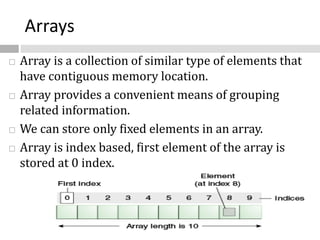
 Array is a collection of similar type of elements that
have contiguous memory location.
 Array provides a convenient means of grouping
related information.
 We can store only fixed elements in an array.
 Array is index based, first element of the array is
stored at 0 index.
Advantage of Array
•Code Optimization:
• It makes the code optimized, we can retrieve or
sort the data easily.
•Random access:
• We can get any data located at any index
position.
Disadvantage of Array
•Size Limit:
• We can store only fixed size of elements in the
array. It doesn't grow its size at runtime.
Types of Array
 There are two types of array.
 Single Dimensional Array
 Multidimensional Array
Single Dimensional Array
 A list of items are given in one variable name
using only one subscript.
 Syntax to Declare an Array in java
dataType[ ] arrayRefVar; (or)
dataType [ ]arrayRefVar; (or)
dataType arrayRefVar[ ];
 Instantiation of an Array in java
 arrayRefVar=new datatype[size];
Example of single dimensional java array
class B {
public static void main(String args[])
{
int a[]=new int[5]; //declaration and instantiation
a[0]=10; //initialization
a[1]=20;
a[2]=70;
a[3]=40;
a[4]=50;
//printing array
for(int i=0; i<a.length; i++) //length is the property of array
System.out.println(a[i]);
}}
Declaration, Instantiation and Initialization of Java Array
 We can declare, instantiate and initialize the java
array in single statement together by:
 int a[]={33,3,4,5}; //declaration, instantiation and initialization
class B{
public static void main(String args[])
{
//declaration, instantiation and initialization
int a[]={33,3,4,5};
//printing array
for(int i=0;i<a.length;i++)
System.out.println(a[i]);
}
}
Passing Java Array in the method
class B{
static void min(int arr[])
{
int min=arr[0];
for(int i=1;i<arr.length;i++)
if(min>arr[i])
min=arr[i];
System.out.println(min);
}
public static void main(String args[])
{
int a[]={33,3,4,5};
min(a); //passing array in the method
}}
Multidimensional array
 In such case, data is stored in row and column based
index (also known as matrix form).
 Syntax to Declare Multidimensional Array in java
dataType[ ][ ] arrayRefVar; (or)
dataType [ ][ ]arrayRefVar; (or)
dataType arrayRefVar[ ][ ]; (or)
dataType [ ]arrayRefVar[ ];
 Example to instantiate Multidimensional Array in java
int[ ][ ] arr=new int[3][3]; //3 row and 3 column
 Example to initialize Multidimensional Array in java
arr[0][0]=1;
arr[0][1]=2;
arr[0][2]=3;
arr[1][0]=4;
arr[1][1]=5;
arr[1][2]=6;
arr[2][0]=7;
arr[2][1]=8;
arr[2][2]=9;
Example of Multidimensional java array
class B
{
public static void main(String args[])
{
int arr[][]={{1,2,3},{2,4,5},{4,4,5}}; //declaring and initializing 2D array
for(int i=0;i<3;i++)
{
for(int j=0;j<3;j++)
{
System.out.print(arr[i][j]+" ");
}
System.out.println();
}
}
}
Variable Size Arrays
 Java treats multidimensional array as “arrays of array”
int x[ ][ ]=new int [3][ ];
x[0]=new int[2];
x[1]=new int[4];
x[2]=new int[3];
 These statements create a two dimensional array as
having different lengths for each array.
X[0]
X[1]
X[2]
X[0][2]
X[2][3]
X[1][4]
Strings
 The String class is commonly used for holding and
manipulating strings of text.
 In java, strings are class objects and implemented
using two classes namely, String and StringBuffer.
 A java string is an instantiated object of the String
class.
 A java string is not a character array and is not
NULL terminated.
Strings
 String objects are handled specially by the compiler.
String is the only class which has "implicit"
instantiation.
 The String class is defined in the java.lang package.
 Strings are immutable.
 The value of a String object can never be changed.
 For mutable Strings, use the StringBuffer class.
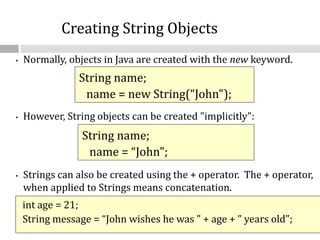
• Normally, objects in Java are created with the new keyword.
• However, String objects can be created "implicitly":
• Strings can also be created using the + operator. The + operator,
when applied to Strings means concatenation.
Creating String Objects
String name;
name = new String(“John");
String name;
name = “John";
int age = 21;
String message = “John wishes he was " + age + " years old";
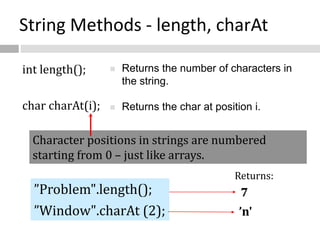
String Methods - length, charAt
int length();
char charAt(i);
 Returns the number of characters in
the string.
 Returns the char at position i.
7
’n'
”Problem".length();
”Window".charAt (2);
Returns:
Character positions in strings are numbered
starting from 0 – just like arrays.
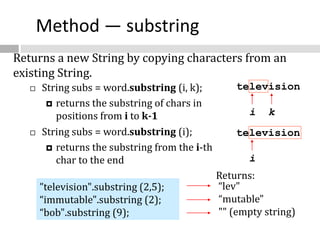
Method — substring
“lev"
“mutable"
"" (empty string)
”television".substring (2,5);
“immutable".substring (2);
“bob".substring (9);
Returns:
television
i k
television
i
 String subs = word.substring (i, k);
 returns the substring of chars in
positions from i to k-1
 String subs = word.substring (i);
 returns the substring from the i-th
char to the end
Returns a new String by copying characters from an
existing String.
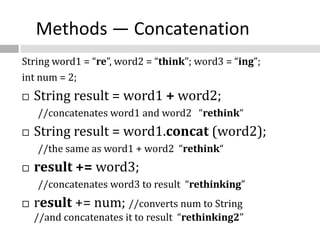
Methods — Concatenation
String word1 = “re”, word2 = “think”; word3 = “ing”;
int num = 2;
 String result = word1 + word2;
//concatenates word1 and word2 “rethink“
 String result = word1.concat (word2);
//the same as word1 + word2 “rethink“
 result += word3;
//concatenates word3 to result “rethinking”
 result += num; //converts num to String
//and concatenates it to result “rethinking2”
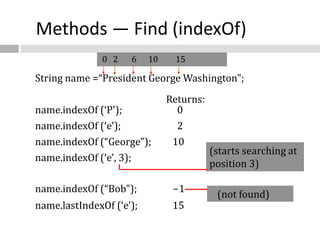
Methods — Find (indexOf)
String name =“President George Washington";
name.indexOf (‘P'); 0
name.indexOf (‘e'); 2
name.indexOf (“George"); 10
name.indexOf (‘e', 3); 6
name.indexOf (“Bob"); -1
name.lastIndexOf (‘e'); 15
Returns:
(not found)
(starts searching at
position 3)
0 2 6 10 15
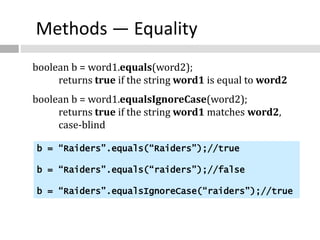
Methods — Equality
boolean b = word1.equals(word2);
returns true if the string word1 is equal to word2
boolean b = word1.equalsIgnoreCase(word2);
returns true if the string word1 matches word2,
case-blind
b = “Raiders”.equals(“Raiders”);//true
b = “Raiders”.equals(“raiders”);//false
b = “Raiders”.equalsIgnoreCase(“raiders”);//true
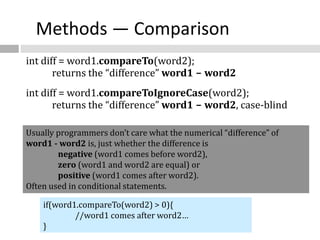
Methods — Comparison
int diff = word1.compareTo(word2);
returns the “difference” word1 - word2
int diff = word1.compareToIgnoreCase(word2);
returns the “difference” word1 - word2, case-blind
Usually programmers don’t care what the numerical “difference” of
word1 - word2 is, just whether the difference is
negative (word1 comes before word2),
zero (word1 and word2 are equal) or
positive (word1 comes after word2).
Often used in conditional statements.
if(word1.compareTo(word2) > 0){
//word1 comes after word2…
}
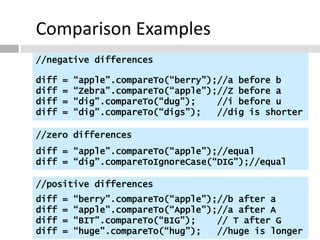
Comparison Examples
//negative differences
diff = “apple”.compareTo(“berry”);//a before b
diff = “Zebra”.compareTo(“apple”);//Z before a
diff = “dig”.compareTo(“dug”); //i before u
diff = “dig”.compareTo(“digs”); //dig is shorter
//zero differences
diff = “apple”.compareTo(“apple”);//equal
diff = “dig”.compareToIgnoreCase(“DIG”);//equal
//positive differences
diff = “berry”.compareTo(“apple”);//b after a
diff = “apple”.compareTo(“Apple”);//a after A
diff = “BIT”.compareTo(“BIG”); // T after G
diff = “huge”.compareTo(“hug”); //huge is longer
Methods — trim
String word2 = word1.trim ();
returns a new string formed from word1 by
removing white space at both ends
does not affect whites space in the middle
String word1 = “ Hi Bob “;
String word2 = word1.trim();
//word2 is “Hi Bob” – no spaces on either end
//word1 is still “ Hi Bob “ – with spaces
Methods — replace
String word2 = word1.replace(oldCh, newCh);
returns a new string formed from word1 by replacing all
occurrences of oldCh with newCh
String word1 = “rare“;
String word2 = “rare“.replace(‘r’, ‘d’);
//word2 is “dade”, but word1 is still “rare“
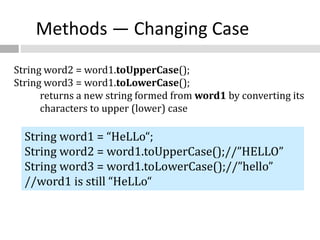
Methods — Changing Case
String word2 = word1.toUpperCase();
String word3 = word1.toLowerCase();
returns a new string formed from word1 by converting its
characters to upper (lower) case
String word1 = “HeLLo“;
String word2 = word1.toUpperCase();//”HELLO”
String word3 = word1.toLowerCase();//”hello”
//word1 is still “HeLLo“
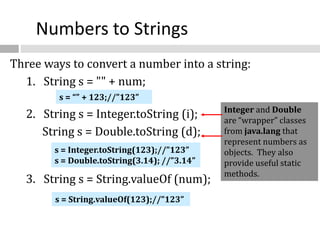
Numbers to Strings
Three ways to convert a number into a string:
1. String s = "" + num;
2. String s = Integer.toString (i);
String s = Double.toString (d);
3. String s = String.valueOf (num);
Integer and Double
are “wrapper” classes
from java.lang that
represent numbers as
objects. They also
provide useful static
methods.
s = String.valueOf(123);//”123”
s = “” + 123;//”123”
s = Integer.toString(123);//”123”
s = Double.toString(3.14); //”3.14”
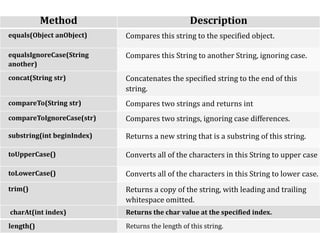
Method Description
equals(Object anObject) Compares this string to the specified object.
equalsIgnoreCase(String
another)
Compares this String to another String, ignoring case.
concat(String str) Concatenates the specified string to the end of this
string.
compareTo(String str) Compares two strings and returns int
compareToIgnoreCase(str) Compares two strings, ignoring case differences.
substring(int beginIndex) Returns a new string that is a substring of this string.
toUpperCase() Converts all of the characters in this String to upper case
toLowerCase() Converts all of the characters in this String to lower case.
trim() Returns a copy of the string, with leading and trailing
whitespace omitted.
charAt(int index) Returns the char value at the specified index.
length() Returns the length of this string.
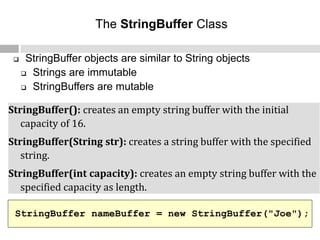
 StringBuffer objects are similar to String objects
 Strings are immutable
 StringBuffers are mutable
The StringBuffer Class
StringBuffer nameBuffer = new StringBuffer("Joe");
StringBuffer(): creates an empty string buffer with the initial
capacity of 16.
StringBuffer(String str): creates a string buffer with the specified
string.
StringBuffer(int capacity): creates an empty string buffer with the
specified capacity as length.
a
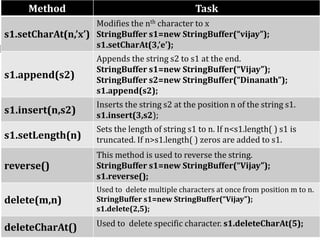
Method Task
s1.setCharAt(n,’x’)
Modifies the nth character to x
StringBuffer s1=new StringBuffer(“vijay”);
s1.setCharAt(3,’e’);
s1.append(s2)
Appends the string s2 to s1 at the end.
StringBuffer s1=new StringBuffer(“Vijay”);
StringBuffer s2=new StringBuffer(“Dinanath”);
s1.append(s2);
s1.insert(n,s2)
Inserts the string s2 at the position n of the string s1.
s1.insert(3,s2);
s1.setLength(n)
Sets the length of string s1 to n. If n<s1.length( ) s1 is
truncated. If n>s1.length( ) zeros are added to s1.
reverse()
This method is used to reverse the string.
StringBuffer s1=new StringBuffer(“Vijay”);
s1.reverse();
delete(m,n)
Used to delete multiple characters at once from position m to n.
StringBuffer s1=new StringBuffer(“Vijay”);
s1.delete(2,5);
deleteCharAt() Used to delete specific character. s1.deleteCharAt(5);

arrays.pptx

  • 1.
  • 2.
    Arrays  Array isa collection of similar type of elements that have contiguous memory location.  Array provides a convenient means of grouping related information.  We can store only fixed elements in an array.  Array is index based, first element of the array is stored at 0 index.
  • 3.
    Advantage of Array •CodeOptimization: • It makes the code optimized, we can retrieve or sort the data easily. •Random access: • We can get any data located at any index position. Disadvantage of Array •Size Limit: • We can store only fixed size of elements in the array. It doesn't grow its size at runtime.
  • 4.
    Types of Array There are two types of array.  Single Dimensional Array  Multidimensional Array
  • 5.
    Single Dimensional Array A list of items are given in one variable name using only one subscript.  Syntax to Declare an Array in java dataType[ ] arrayRefVar; (or) dataType [ ]arrayRefVar; (or) dataType arrayRefVar[ ];  Instantiation of an Array in java  arrayRefVar=new datatype[size];
  • 6.
    Example of singledimensional java array class B { public static void main(String args[]) { int a[]=new int[5]; //declaration and instantiation a[0]=10; //initialization a[1]=20; a[2]=70; a[3]=40; a[4]=50; //printing array for(int i=0; i<a.length; i++) //length is the property of array System.out.println(a[i]); }}
  • 7.
    Declaration, Instantiation andInitialization of Java Array  We can declare, instantiate and initialize the java array in single statement together by:  int a[]={33,3,4,5}; //declaration, instantiation and initialization class B{ public static void main(String args[]) { //declaration, instantiation and initialization int a[]={33,3,4,5}; //printing array for(int i=0;i<a.length;i++) System.out.println(a[i]); } }
  • 8.
    Passing Java Arrayin the method class B{ static void min(int arr[]) { int min=arr[0]; for(int i=1;i<arr.length;i++) if(min>arr[i]) min=arr[i]; System.out.println(min); } public static void main(String args[]) { int a[]={33,3,4,5}; min(a); //passing array in the method }}
  • 9.
    Multidimensional array  Insuch case, data is stored in row and column based index (also known as matrix form).  Syntax to Declare Multidimensional Array in java dataType[ ][ ] arrayRefVar; (or) dataType [ ][ ]arrayRefVar; (or) dataType arrayRefVar[ ][ ]; (or) dataType [ ]arrayRefVar[ ];
  • 10.
     Example toinstantiate Multidimensional Array in java int[ ][ ] arr=new int[3][3]; //3 row and 3 column  Example to initialize Multidimensional Array in java arr[0][0]=1; arr[0][1]=2; arr[0][2]=3; arr[1][0]=4; arr[1][1]=5; arr[1][2]=6; arr[2][0]=7; arr[2][1]=8; arr[2][2]=9;
  • 11.
    Example of Multidimensionaljava array class B { public static void main(String args[]) { int arr[][]={{1,2,3},{2,4,5},{4,4,5}}; //declaring and initializing 2D array for(int i=0;i<3;i++) { for(int j=0;j<3;j++) { System.out.print(arr[i][j]+" "); } System.out.println(); } } }
  • 12.
    Variable Size Arrays Java treats multidimensional array as “arrays of array” int x[ ][ ]=new int [3][ ]; x[0]=new int[2]; x[1]=new int[4]; x[2]=new int[3];  These statements create a two dimensional array as having different lengths for each array. X[0] X[1] X[2] X[0][2] X[2][3] X[1][4]
  • 13.
    Strings  The Stringclass is commonly used for holding and manipulating strings of text.  In java, strings are class objects and implemented using two classes namely, String and StringBuffer.  A java string is an instantiated object of the String class.  A java string is not a character array and is not NULL terminated.
  • 14.
    Strings  String objectsare handled specially by the compiler. String is the only class which has "implicit" instantiation.  The String class is defined in the java.lang package.  Strings are immutable.  The value of a String object can never be changed.  For mutable Strings, use the StringBuffer class.
  • 15.
    • Normally, objectsin Java are created with the new keyword. • However, String objects can be created "implicitly": • Strings can also be created using the + operator. The + operator, when applied to Strings means concatenation. Creating String Objects String name; name = new String(“John"); String name; name = “John"; int age = 21; String message = “John wishes he was " + age + " years old";
  • 16.
    String Methods -length, charAt int length(); char charAt(i);  Returns the number of characters in the string.  Returns the char at position i. 7 ’n' ”Problem".length(); ”Window".charAt (2); Returns: Character positions in strings are numbered starting from 0 – just like arrays.
  • 17.
    Method — substring “lev" “mutable" ""(empty string) ”television".substring (2,5); “immutable".substring (2); “bob".substring (9); Returns: television i k television i  String subs = word.substring (i, k);  returns the substring of chars in positions from i to k-1  String subs = word.substring (i);  returns the substring from the i-th char to the end Returns a new String by copying characters from an existing String.
  • 18.
    Methods — Concatenation Stringword1 = “re”, word2 = “think”; word3 = “ing”; int num = 2;  String result = word1 + word2; //concatenates word1 and word2 “rethink“  String result = word1.concat (word2); //the same as word1 + word2 “rethink“  result += word3; //concatenates word3 to result “rethinking”  result += num; //converts num to String //and concatenates it to result “rethinking2”
  • 19.
    Methods — Find(indexOf) String name =“President George Washington"; name.indexOf (‘P'); 0 name.indexOf (‘e'); 2 name.indexOf (“George"); 10 name.indexOf (‘e', 3); 6 name.indexOf (“Bob"); -1 name.lastIndexOf (‘e'); 15 Returns: (not found) (starts searching at position 3) 0 2 6 10 15
  • 20.
    Methods — Equality booleanb = word1.equals(word2); returns true if the string word1 is equal to word2 boolean b = word1.equalsIgnoreCase(word2); returns true if the string word1 matches word2, case-blind b = “Raiders”.equals(“Raiders”);//true b = “Raiders”.equals(“raiders”);//false b = “Raiders”.equalsIgnoreCase(“raiders”);//true
  • 21.
    Methods — Comparison intdiff = word1.compareTo(word2); returns the “difference” word1 - word2 int diff = word1.compareToIgnoreCase(word2); returns the “difference” word1 - word2, case-blind Usually programmers don’t care what the numerical “difference” of word1 - word2 is, just whether the difference is negative (word1 comes before word2), zero (word1 and word2 are equal) or positive (word1 comes after word2). Often used in conditional statements. if(word1.compareTo(word2) > 0){ //word1 comes after word2… }
  • 22.
    Comparison Examples //negative differences diff= “apple”.compareTo(“berry”);//a before b diff = “Zebra”.compareTo(“apple”);//Z before a diff = “dig”.compareTo(“dug”); //i before u diff = “dig”.compareTo(“digs”); //dig is shorter //zero differences diff = “apple”.compareTo(“apple”);//equal diff = “dig”.compareToIgnoreCase(“DIG”);//equal //positive differences diff = “berry”.compareTo(“apple”);//b after a diff = “apple”.compareTo(“Apple”);//a after A diff = “BIT”.compareTo(“BIG”); // T after G diff = “huge”.compareTo(“hug”); //huge is longer
  • 23.
    Methods — trim Stringword2 = word1.trim (); returns a new string formed from word1 by removing white space at both ends does not affect whites space in the middle String word1 = “ Hi Bob “; String word2 = word1.trim(); //word2 is “Hi Bob” – no spaces on either end //word1 is still “ Hi Bob “ – with spaces
  • 24.
    Methods — replace Stringword2 = word1.replace(oldCh, newCh); returns a new string formed from word1 by replacing all occurrences of oldCh with newCh String word1 = “rare“; String word2 = “rare“.replace(‘r’, ‘d’); //word2 is “dade”, but word1 is still “rare“
  • 25.
    Methods — ChangingCase String word2 = word1.toUpperCase(); String word3 = word1.toLowerCase(); returns a new string formed from word1 by converting its characters to upper (lower) case String word1 = “HeLLo“; String word2 = word1.toUpperCase();//”HELLO” String word3 = word1.toLowerCase();//”hello” //word1 is still “HeLLo“
  • 26.
    Numbers to Strings Threeways to convert a number into a string: 1. String s = "" + num; 2. String s = Integer.toString (i); String s = Double.toString (d); 3. String s = String.valueOf (num); Integer and Double are “wrapper” classes from java.lang that represent numbers as objects. They also provide useful static methods. s = String.valueOf(123);//”123” s = “” + 123;//”123” s = Integer.toString(123);//”123” s = Double.toString(3.14); //”3.14”
  • 27.
    Method Description equals(Object anObject)Compares this string to the specified object. equalsIgnoreCase(String another) Compares this String to another String, ignoring case. concat(String str) Concatenates the specified string to the end of this string. compareTo(String str) Compares two strings and returns int compareToIgnoreCase(str) Compares two strings, ignoring case differences. substring(int beginIndex) Returns a new string that is a substring of this string. toUpperCase() Converts all of the characters in this String to upper case toLowerCase() Converts all of the characters in this String to lower case. trim() Returns a copy of the string, with leading and trailing whitespace omitted. charAt(int index) Returns the char value at the specified index. length() Returns the length of this string.
  • 28.
     StringBuffer objectsare similar to String objects  Strings are immutable  StringBuffers are mutable The StringBuffer Class StringBuffer nameBuffer = new StringBuffer("Joe"); StringBuffer(): creates an empty string buffer with the initial capacity of 16. StringBuffer(String str): creates a string buffer with the specified string. StringBuffer(int capacity): creates an empty string buffer with the specified capacity as length.
  • 29.
    a Method Task s1.setCharAt(n,’x’) Modifies thenth character to x StringBuffer s1=new StringBuffer(“vijay”); s1.setCharAt(3,’e’); s1.append(s2) Appends the string s2 to s1 at the end. StringBuffer s1=new StringBuffer(“Vijay”); StringBuffer s2=new StringBuffer(“Dinanath”); s1.append(s2); s1.insert(n,s2) Inserts the string s2 at the position n of the string s1. s1.insert(3,s2); s1.setLength(n) Sets the length of string s1 to n. If n<s1.length( ) s1 is truncated. If n>s1.length( ) zeros are added to s1. reverse() This method is used to reverse the string. StringBuffer s1=new StringBuffer(“Vijay”); s1.reverse(); delete(m,n) Used to delete multiple characters at once from position m to n. StringBuffer s1=new StringBuffer(“Vijay”); s1.delete(2,5); deleteCharAt() Used to delete specific character. s1.deleteCharAt(5);