Servlets
Dr. Koyel Datta Gupta
Introduction
▪ Servlets and Java Server Pages (JSP)
▪ Request-response model
▪ Packages javax.servlet
javax.servlet.http
javax.servlet.jsp
Introduction (Cont.)
◼Servlets
▪ Thin clients
▪ Request/response mechanism
▪ redirection
◼Tomcat
▪ Jakarta project
▪ Official reference implementation of the JSP and
servlet standards
Servlet Overview and Architecture
◼Servlet container (servlet engine)
▪ Server that executes a servlet
◼Web servers
▪ Microsoft’s Internet Information Services (IIS)
▪ Apache HTTP Server
Interface Servlet and the Servlet
Life Cycle
◼ Interface Servlet
▪ All servlets must implement this interface
▪ All methods of interface Servlet are invoked by servlet
container
◼ Servlet life cycle
▪ Servlet container invokes the servlet’s init method
▪ Servlet’s service method handles requests
▪ Servlet’s destroy method releases servlet resources
when the servlet container terminates the servlet
◼ Servlet implementation(Types)
▪ GenericServlet
▪ HttpServlet
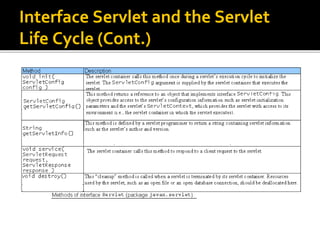
Interface Servlet and the Servlet
Life Cycle (Cont.)
Setting Up the Apache Tomcat
Server
◼Download Tomcat
◼Define environment variables
▪ JAVA_HOME
◼Start the Tomcat server
▪ startup.bat
◼Connect to the Tomcat server using a Web
browser
▪ http://localhost:8080/
Setting Up the Apache Tomcat
Server (Cont.).
Tomcat documentation home page. (Courtesy of The Apache Software Foundation.)
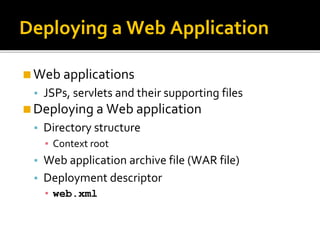
Deploying a Web Application
◼Web applications
▪ JSPs, servlets and their supporting files
◼Deploying a Web application
▪ Directory structure
▪ Context root
▪ Web application archive file (WAR file)
▪ Deployment descriptor
▪ web.xml
Deploying a Web Application (Cont.)
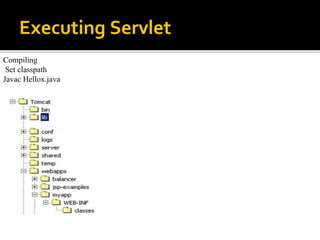
Executing Servlet
Compiling
Set classpath
Javac Hellox.java
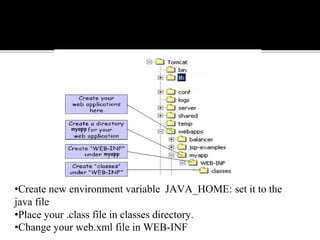
•Create new environment variable JAVA_HOME: set it to the
java file
•Place your .class file in classes directory.
•Change your web.xml file in WEB-INF
web.xml
<web-app>
<servlet>
<servlet-name>Helloworld</servlet-name>
<servlet-class>Helloworld</servlet-class>
</servlet>
<servlet-mapping>
<servlet-name>Helloworld</servlet-name>
<url-pattern>/welcome</url-pattern>
</servlet-mapping>
</web-app>
•Start Tomcat by starting start.bat in Tomacat5.0/bin
•Open a web browser type:
http:// localhost:8080/myapp/servlet/Hellox
doGet & do Post
# doGet() doPost()
1 In doGet() the parameters are
appended to the URL and sent along
with header information.
In doPost(), on the other hand will
(typically) send the information
through a socket back to the webserver
and it won't show up in the URL bar.
2 The amount of information you can
send back using a GET is restricted as
URLs can only be 1024 characters.
You can send much more information
to the server this way - and it's not
restricted to textual data either. It is
possible to send files and even binary
data such as serialized Java objects!
3 doGet() is a request for information;
it does not (or should not) change
anything on the server. (doGet()
should be idempotent)
doPost() provides information (such as
placing an order for merchandise) that
the server is expected to remember
4 Parameters are not encrypted Parameters are encrypted
5 doGet() is faster if we set the response
content length since the same
connection is used. Thus increasing the
performance
doPost() is generally used to update or
post some information to the
server.doPost is slower compared to
doGet since doPost does not write the
content length
6 doGet() should be idempotent. i.e.
doget should be able to be repeated
safely many times
This method does not need to be
idempotent. Operations requested
through POST can have side effects for
which the user can be held accountable.
7 It allows bookmarks. It disallows bookmarks.

Java Servlets

  • 1.
  • 2.
    Introduction ▪ Servlets andJava Server Pages (JSP) ▪ Request-response model ▪ Packages javax.servlet javax.servlet.http javax.servlet.jsp
  • 3.
    Introduction (Cont.) ◼Servlets ▪ Thinclients ▪ Request/response mechanism ▪ redirection ◼Tomcat ▪ Jakarta project ▪ Official reference implementation of the JSP and servlet standards
  • 4.
    Servlet Overview andArchitecture ◼Servlet container (servlet engine) ▪ Server that executes a servlet ◼Web servers ▪ Microsoft’s Internet Information Services (IIS) ▪ Apache HTTP Server
  • 5.
    Interface Servlet andthe Servlet Life Cycle ◼ Interface Servlet ▪ All servlets must implement this interface ▪ All methods of interface Servlet are invoked by servlet container ◼ Servlet life cycle ▪ Servlet container invokes the servlet’s init method ▪ Servlet’s service method handles requests ▪ Servlet’s destroy method releases servlet resources when the servlet container terminates the servlet ◼ Servlet implementation(Types) ▪ GenericServlet ▪ HttpServlet
  • 6.
    Interface Servlet andthe Servlet Life Cycle (Cont.)
  • 7.
    Setting Up theApache Tomcat Server ◼Download Tomcat ◼Define environment variables ▪ JAVA_HOME ◼Start the Tomcat server ▪ startup.bat ◼Connect to the Tomcat server using a Web browser ▪ http://localhost:8080/
  • 8.
    Setting Up theApache Tomcat Server (Cont.). Tomcat documentation home page. (Courtesy of The Apache Software Foundation.)
  • 9.
    Deploying a WebApplication ◼Web applications ▪ JSPs, servlets and their supporting files ◼Deploying a Web application ▪ Directory structure ▪ Context root ▪ Web application archive file (WAR file) ▪ Deployment descriptor ▪ web.xml
  • 10.
    Deploying a WebApplication (Cont.)
  • 11.
  • 12.
    •Create new environmentvariable JAVA_HOME: set it to the java file •Place your .class file in classes directory. •Change your web.xml file in WEB-INF
  • 13.
  • 14.
    doGet & doPost # doGet() doPost() 1 In doGet() the parameters are appended to the URL and sent along with header information. In doPost(), on the other hand will (typically) send the information through a socket back to the webserver and it won't show up in the URL bar. 2 The amount of information you can send back using a GET is restricted as URLs can only be 1024 characters. You can send much more information to the server this way - and it's not restricted to textual data either. It is possible to send files and even binary data such as serialized Java objects! 3 doGet() is a request for information; it does not (or should not) change anything on the server. (doGet() should be idempotent) doPost() provides information (such as placing an order for merchandise) that the server is expected to remember
  • 15.
    4 Parameters arenot encrypted Parameters are encrypted 5 doGet() is faster if we set the response content length since the same connection is used. Thus increasing the performance doPost() is generally used to update or post some information to the server.doPost is slower compared to doGet since doPost does not write the content length 6 doGet() should be idempotent. i.e. doget should be able to be repeated safely many times This method does not need to be idempotent. Operations requested through POST can have side effects for which the user can be held accountable. 7 It allows bookmarks. It disallows bookmarks.