21CS642 Module 4_1 Servlets PPT.pptx VI SEM CSE Students
1.
ADVANCED JAVA
MODULE 4 Servlets and JSP
VENKATESH BHAT
Senior Associate Professor
CSE Department
AIET, Moodbidri
2.
SYLLABUS – MODULE4 – Servlets and JSP
Servlets:
• Background; The life cycle of a servlet;
• A simple servlet;
• the servlet API;
• The javax.servlet package Reading servlet parameter;
• The javax.servlet.http package;
• Handling HTTP Requests and Responses;
• Using Cookies;
• Session Tracking,
Java Server Pages (JSP):
• JSP tags, Variables and Objects, Methods, Control statements, Loops, Request String,
Parsing other information, User sessions, Cookies, Session Objects
Textbook 1: Chapter 31 (Servlets)
Textbook 2: Chapter 11 (JSP)
3.
How web browsersand servers
cooperate to provide content to a user
•Request for a static web page
•Request for a dynamic web page
4.
Consider a requestfor a static web page
• A user enters a Uniform Resource Locator (URL) into a browser.
• The browser generates an HTTP request to the appropriate web server.
• The web server maps this request to a specific file.
• That file is returned in an HTTP response to the browser.
• The HTTP header in the response indicates the type of the content.
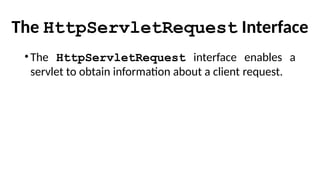
• The Multipurpose Internet Mail Extensions (MIME) are used for this purpose.
For example, ordinary ASCII text has a MIME type of text/plain. The Hypertext
Markup Language (HTML) source code of a web page has a MIME type of
text/html.
5.
Consider dynamic content
•Assumethat an online store uses a database to store
information about its business.
•This would include items for sale, prices, availability, orders,
and so forth.
•It wishes to make this information accessible to customers
via web pages.
•The contents of those web pages must be dynamically
generated to reflect the latest information in the database.
6.
Steps during EarlierDays
• A server construct a page dynamically by creating a separate process
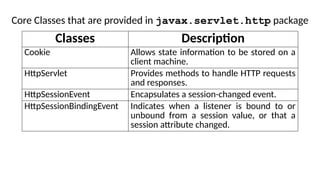
to handle each client request.
• The process would open connections to one or more databases in
order to obtain the necessary information.
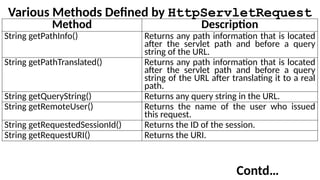
• It communicated with the web server via an interface known as the
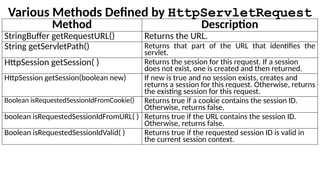
Common Gateway Interface (CGI).
• CGI allowed the separate process to read data from the HTTP
request and write data to the HTTP response.
7.
Disadvantages of CGI
•Itwas expensive in terms of processor and memory resources
to create a separate process for each client request.
•It was also expensive to open and close database connections
for each client request.
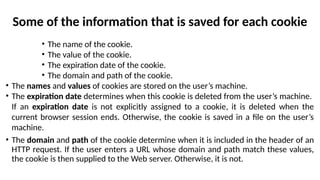
•CGI programs were not platform-independent.
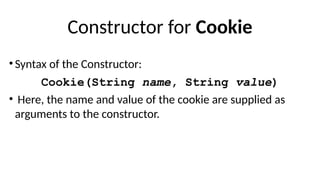
•So Servlets are Introduced.
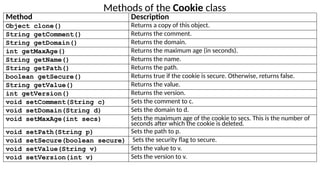
8.
Advantages of Servlets
•Servletsare better Performance
•Servlets are Platform Independent.
•Provides Secured Services
•Full Functionality of Java Class Library is available to Servlets.
9.
Performance is significantlybetter
• Servlets execute within the address space of a web server.
• It is not necessary to create a separate process to handle each client
request.
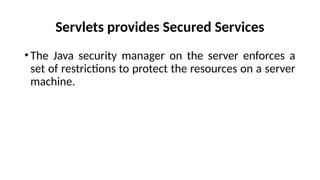
Servlets provides SecuredServices
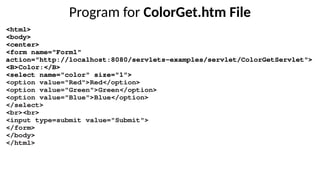
•The Java security manager on the server enforces a
set of restrictions to protect the resources on a server
machine.
12.
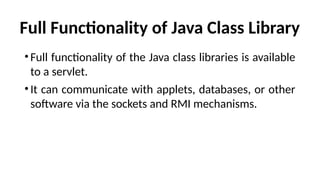
Full Functionality ofJava Class Library
•Full functionality of the Java class libraries is available
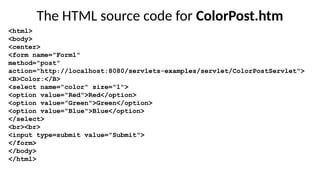
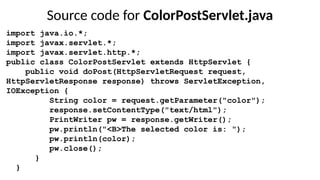
to a servlet.
•It can communicate with applets, databases, or other
software via the sockets and RMI mechanisms.
13.
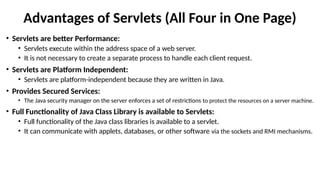
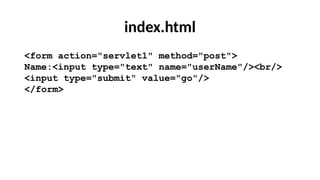
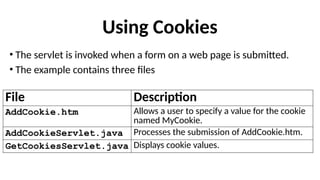
Advantages of Servlets(All Four in One Page)
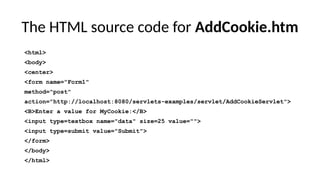
• Servlets are better Performance:
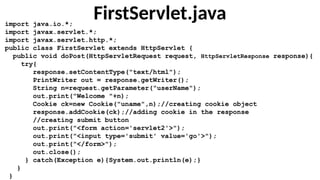
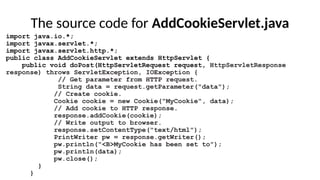
• Servlets execute within the address space of a web server.
• It is not necessary to create a separate process to handle each client request.
• Servlets are Platform Independent:
• Servlets are platform-independent because they are written in Java.
• Provides Secured Services:
• The Java security manager on the server enforces a set of restrictions to protect the resources on a server machine.
• Full Functionality of Java Class Library is available to Servlets:
• Full functionality of the Java class libraries is available to a servlet.
• It can communicate with applets, databases, or other software via the sockets and RMI mechanisms.
14.
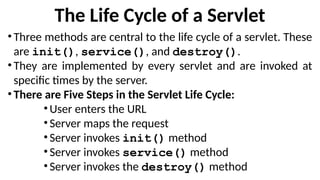
The Life Cycleof a Servlet
•Three methods are central to the life cycle of a servlet. These
are init(), service(), and destroy().
•They are implemented by every servlet and are invoked at
specific times by the server.
•There are Five Steps in the Servlet Life Cycle:
•User enters the URL
•Server maps the request
•Server invokes init() method
•Server invokes service() method
•Server invokes the destroy() method
15.
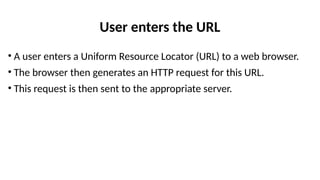
User enters theURL
• A user enters a Uniform Resource Locator (URL) to a web browser.
• The browser then generates an HTTP request for this URL.
• This request is then sent to the appropriate server.
16.
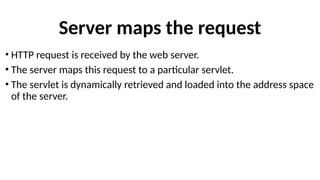
Server maps therequest
• HTTP request is received by the web server.
• The server maps this request to a particular servlet.
• The servlet is dynamically retrieved and loaded into the address space
of the server.
17.
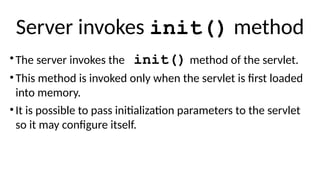
Server invokes init()method
•The server invokes the init() method of the servlet.
•This method is invoked only when the servlet is first loaded
into memory.
•It is possible to pass initialization parameters to the servlet
so it may configure itself.
18.
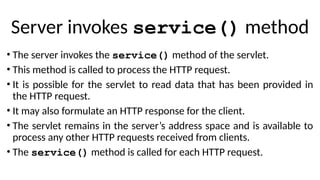
Server invokes service()method
• The server invokes the service() method of the servlet.
• This method is called to process the HTTP request.
• It is possible for the servlet to read data that has been provided in
the HTTP request.
• It may also formulate an HTTP response for the client.
• The servlet remains in the server’s address space and is available to
process any other HTTP requests received from clients.
• The service() method is called for each HTTP request.
19.
Server invokes thedestroy() method
• The server may decide to unload the servlet from its memory.
• The algorithms by which this determination is made are specific to
each server.
• The server calls the destroy() method to relinquish any resources
such as file handles that are allocated for the servlet.
• Important data may be saved to a persistent store.
• The memory allocated for the servlet and its objects can then be
garbage collected.
20.
Five Steps inthe Servlet Life Cycle (All Five in One Page)
• User enters the URL
• A user enters a Uniform Resource Locator (URL) to a web browser.
• The browser then generates an HTTP request for this URL.
• This request is then sent to the appropriate server.
• Server maps the request
• HTTP request is received by the web server.
• The server maps this request to a particular servlet.
• The servlet is dynamically retrieved and loaded into the address space of the server.
• Server invokes init() method
• The server invokes the init() method of the servlet.
• This method is invoked only when the servlet is first loaded into memory.
• It is possible to pass initialization parameters to the servlet so it may configure itself.
• Server invokes service() method
• The server invokes the service() method of the servlet.
• This method is called to process the HTTP request.
• It is possible for the servlet to read data that has been provided in the HTTP request.
• It may also formulate an HTTP response for the client.
• The servlet remains in the server’s address space and is available to process any other HTTP requests received from clients.
• The service() method is called for each HTTP request.
• Server invokes the destroy() method
• The server may decide to unload the servlet from its memory.
• The algorithms by which this determination is made are specific to each server.
• The server calls the destroy() method to relinquish any resources such as file handles that are allocated for the servlet.
• Important data may be saved to a persistent store.
• The memory allocated for the servlet and its objects can then be garbage collected.
21.
SYLLABUS – MODULE4 – Servlets and JSP
Servlets:
• Background; The life cycle of a servlet;
• A simple servlet;
• the servlet API;
• The javax.servlet package Reading servlet parameter;
• The javax.servlet.http package;
• Handling HTTP Requests and Responses;
• Using Cookies;
• Session Tracking,
Java Server Pages (JSP):
• JSP tags, Variables and Objects, Methods, Control statements, Loops, Request String,
Parsing other information, User sessions, Cookies, Session Objects
Textbook 1: Chapter 31 (Servlets)
Textbook 2: Chapter 11 (JSP)
22.
A Simple Servlet
BasicSteps in working with simple Servlets are:
•Create and compile the servlet source code. Then, copy the
servlet’s class file to the proper directory, and add the
servlet’s name and mappings to the proper web.xml file.
•Start Tomcat.
•Start a web browser and request the servlet.
23.
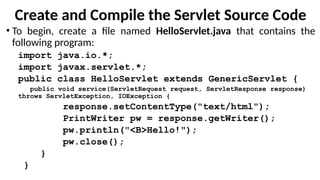
Create and Compilethe Servlet Source Code
• To begin, create a file named HelloServlet.java that contains the
following program:
import java.io.*;
import javax.servlet.*;
public class HelloServlet extends GenericServlet {
public void service(ServletRequest request, ServletResponse response)
throws ServletException, IOException {
response.setContentType("text/html");
PrintWriter pw = response.getWriter();
pw.println("<B>Hello!");
pw.close();
}
}
24.
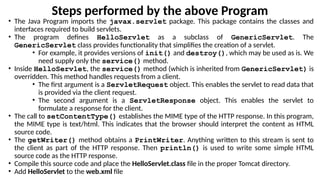
Steps performed bythe above Program
• The Java Program imports the javax.servlet package. This package contains the classes and
interfaces required to build servlets.
• The program defines HelloServlet as a subclass of GenericServlet. The
GenericServlet class provides functionality that simplifies the creation of a servlet.
• For example, it provides versions of init() and destroy(), which may be used as is. We
need supply only the service() method.
• Inside HelloServlet, the service() method (which is inherited from GenericServlet) is
overridden. This method handles requests from a client.
• The first argument is a ServletRequest object. This enables the servlet to read data that
is provided via the client request.
• The second argument is a ServletResponse object. This enables the servlet to
formulate a response for the client.
• The call to setContentType() establishes the MIME type of the HTTP response. In this program,
the MIME type is text/html. This indicates that the browser should interpret the content as HTML
source code.
• The getWriter() method obtains a PrintWriter. Anything written to this stream is sent to
the client as part of the HTTP response. Then println() is used to write some simple HTML
source code as the HTTP response.
• Compile this source code and place the HelloServlet.class file in the proper Tomcat directory.
• Add HelloServlet to the web.xml file
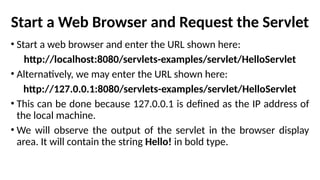
Start a WebBrowser and Request the Servlet
• Start a web browser and enter the URL shown here:
http://localhost:8080/servlets-examples/servlet/HelloServlet
• Alternatively, we may enter the URL shown here:
http://127.0.0.1:8080/servlets-examples/servlet/HelloServlet
• This can be done because 127.0.0.1 is defined as the IP address of
the local machine.
• We will observe the output of the servlet in the browser display
area. It will contain the string Hello! in bold type.
27.
SYLLABUS – MODULE4 – Servlets and JSP
Servlets:
• Background; The life cycle of a servlet;
• A simple servlet;
• the servlet API;
• The javax.servlet package Reading servlet parameter;
• The javax.servlet.http package;
• Handling HTTP Requests and Responses;
• Using Cookies;
• Session Tracking,
Java Server Pages (JSP):
• JSP tags, Variables and Objects, Methods, Control statements, Loops, Request String,
Parsing other information, User sessions, Cookies, Session Objects
Textbook 1: Chapter 31 (Servlets)
Textbook 2: Chapter 11 (JSP)
28.
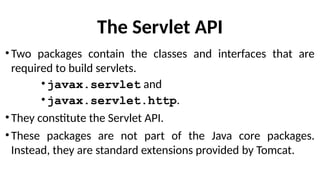
The Servlet API
•Twopackages contain the classes and interfaces that are
required to build servlets.
• javax.servlet and
• javax.servlet.http.
•They constitute the Servlet API.
•These packages are not part of the Java core packages.
Instead, they are standard extensions provided by Tomcat.
29.
The javax.servlet Package
•Thejavax.servlet package contains a number of
interfaces and classes that establish the framework in which
servlets operate.
30.
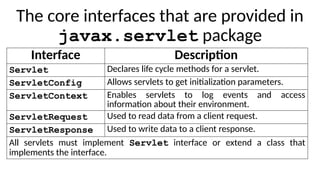
The core interfacesthat are provided in
javax.servlet package
Interface Description
Servlet Declares life cycle methods for a servlet.
ServletConfig Allows servlets to get initialization parameters.
ServletContext Enables servlets to log events and access
information about their environment.
ServletRequest Used to read data from a client request.
ServletResponse Used to write data to a client response.
All servlets must implement Servlet interface or extend a class that
implements the interface.
31.
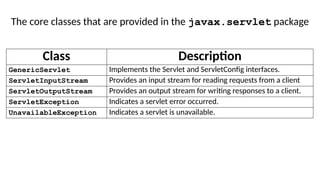
The core classesthat are provided in the javax.servlet package
Class Description
GenericServlet Implements the Servlet and ServletConfig interfaces.
ServletInputStream Provides an input stream for reading requests from a client
ServletOutputStream Provides an output stream for writing responses to a client.
ServletException Indicates a servlet error occurred.
UnavailableException Indicates a servlet is unavailable.
32.
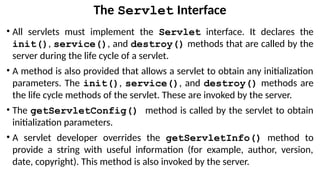
The Servlet Interface
•All servlets must implement the Servlet interface. It declares the
init(), service(), and destroy() methods that are called by the
server during the life cycle of a servlet.
• A method is also provided that allows a servlet to obtain any initialization
parameters. The init(), service(), and destroy() methods are
the life cycle methods of the servlet. These are invoked by the server.
• The getServletConfig() method is called by the servlet to obtain
initialization parameters.
• A servlet developer overrides the getServletInfo() method to
provide a string with useful information (for example, author, version,
date, copyright). This method is also invoked by the server.
33.
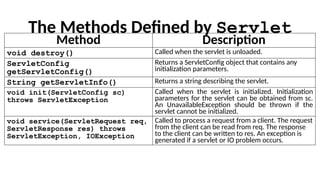
The Methods Definedby Servlet
Method Description
void destroy() Called when the servlet is unloaded.
ServletConfig
getServletConfig()
Returns a ServletConfig object that contains any
initialization parameters.
String getServletInfo() Returns a string describing the servlet.
void init(ServletConfig sc)
throws ServletException
Called when the servlet is initialized. Initialization
parameters for the servlet can be obtained from sc.
An UnavailableException should be thrown if the
servlet cannot be initialized.
void service(ServletRequest req,
ServletResponse res) throws
ServletException, IOException
Called to process a request from a client. The request
from the client can be read from req. The response
to the client can be written to res. An exception is
generated if a servlet or IO problem occurs.
34.
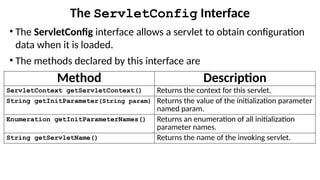
The ServletConfig Interface
•The ServletConfig interface allows a servlet to obtain configuration
data when it is loaded.
• The methods declared by this interface are
Method Description
ServletContext getServletContext() Returns the context for this servlet.
String getInitParameter(String param) Returns the value of the initialization parameter
named param.
Enumeration getInitParameterNames() Returns an enumeration of all initialization
parameter names.
String getServletName() Returns the name of the invoking servlet.
35.
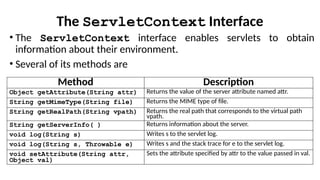
The ServletContext Interface
•The ServletContext interface enables servlets to obtain
information about their environment.
• Several of its methods are
Method Description
Object getAttribute(String attr) Returns the value of the server attribute named attr.
String getMimeType(String file) Returns the MIME type of file.
String getRealPath(String vpath) Returns the real path that corresponds to the virtual path
vpath.
String getServerInfo( ) Returns information about the server.
void log(String s) Writes s to the servlet log.
void log(String s, Throwable e) Writes s and the stack trace for e to the servlet log.
void setAttribute(String attr,
Object val)
Sets the attribute specified by attr to the value passed in val.
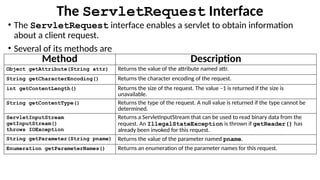
36.
The ServletRequest Interface
•The ServletRequest interface enables a servlet to obtain information
about a client request.
• Several of its methods are
Method Description
Object getAttribute(String attr) Returns the value of the attribute named attr.
String getCharacterEncoding() Returns the character encoding of the request.
int getContentLength() Returns the size of the request. The value –1 is returned if the size is
unavailable.
String getContentType() Returns the type of the request. A null value is returned if the type cannot be
determined.
ServletInputStream
getInputStream()
throws IOException
Returns a ServletInputStream that can be used to read binary data from the
request. An IllegalStateException is thrown if getReader() has
already been invoked for this request.
String getParameter(String pname) Returns the value of the parameter named pname.
Enumeration getParameterNames() Returns an enumeration of the parameter names for this request.
37.
The ServletRequest InterfaceContd …
Method Description
String[] getParameterValues(String name) Returns an array containing values associated with the
parameter
specified by name.
String getProtocol() Returns a description of the protocol.
BufferedReader getReader()
throws IOException
Returns a buffered reader that can be used to read text from
the request.
An IllegalStateException is thrown if
getInputStream() has already been invoked for this
request.
String getRemoteAddr( ) Returns the string equivalent of the client IP address.
String getRemoteHost( ) Returns the string equivalent of the client host name.
String getScheme( ) Returns the transmission scheme of the URL used for the
request (for example, “http”, “ftp”).
String getServerName() Returns the name of the server.
int getServerPort() Returns the port number.
38.
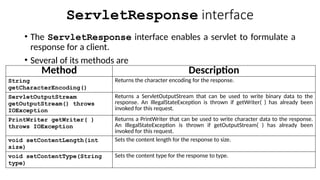
ServletResponse interface
• TheServletResponse interface enables a servlet to formulate a
response for a client.
• Several of its methods are
Method Description
String
getCharacterEncoding()
Returns the character encoding for the response.
ServletOutputStream
getOutputStream() throws
IOException
Returns a ServletOutputStream that can be used to write binary data to the
response. An IllegalStateException is thrown if getWriter( ) has already been
invoked for this request.
PrintWriter getWriter( )
throws IOException
Returns a PrintWriter that can be used to write character data to the response.
An IllegalStateException is thrown if getOutputStream( ) has already been
invoked for this request.
void setContentLength(int
size)
Sets the content length for the response to size.
void setContentType(String
type)
Sets the content type for the response to type.
39.
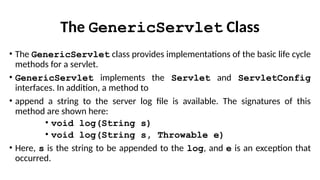
The GenericServlet Class
•The GenericServlet class provides implementations of the basic life cycle
methods for a servlet.
• GenericServlet implements the Servlet and ServletConfig
interfaces. In addition, a method to
• append a string to the server log file is available. The signatures of this
method are shown here:
• void log(String s)
• void log(String s, Throwable e)
• Here, s is the string to be appended to the log, and e is an exception that
occurred.
40.
The ServletInputStream Class
•The ServletInputStream class extends InputStream.
• It is implemented by the servlet container and provides an input stream that a
servlet developer can use to read the data from a client request.
• It defines the default constructor. In addition, a method is provided to read
bytes from the stream.
• Syntax of the method is:
int readLine(byte[] buffer, int offset, int size)
throws IOException
• Here, buffer is the array into which size bytes are placed starting at
offset. The method returns the actual number of bytes read or –1 if an end-
of-stream condition is encountered.
41.
The ServletOutputStream Class
•The ServletOutputStream class extends OutputStream.
• It is implemented by the servlet container and provides an output
stream that a servlet developer can use to write data to a client
response.
• A default constructor is defined. It also defines the print() and
println() methods, which output data to the stream.
42.
The Servlet ExceptionClasses
javax.servlet defines two exceptions.
• The first is ServletException, which indicates that a
servlet problem has occurred.
• The second is UnavailableException, which extends
ServletException. It indicates that a servlet is
unavailable.
43.
SYLLABUS – MODULE4 – Servlets and JSP
Servlets:
• Background; The life cycle of a servlet;
• A simple servlet;
• the servlet API;
• The javax.servlet package Reading servlet parameter;
• The javax.servlet.http package;
• Handling HTTP Requests and Responses;
• Using Cookies;
• Session Tracking,
Java Server Pages (JSP):
• JSP tags, Variables and Objects, Methods, Control statements, Loops, Request String,
Parsing other information, User sessions, Cookies, Session Objects
Textbook 1: Chapter 31 (Servlets)
Textbook 2: Chapter 11 (JSP)
44.
Reading Servlet Parameters
•TheServletRequest interface includes methods
that allow you to read the names and values of
parameters that are included in a client request.
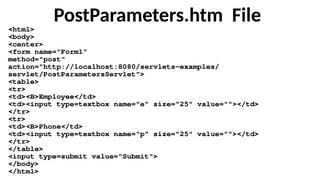
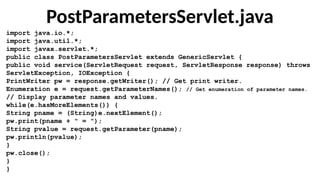
•A web page is defined in PostParameters.htm, and a
servlet is defined in PostParametersServlet.java.
Explanation of PostParameters.htm
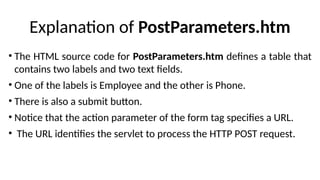
•The HTML source code for PostParameters.htm defines a table that
contains two labels and two text fields.
• One of the labels is Employee and the other is Phone.
• There is also a submit button.
• Notice that the action parameter of the form tag specifies a URL.
• The URL identifies the servlet to process the HTTP POST request.
47.
PostParametersServlet.java
import java.io.*;
import java.util.*;
importjavax.servlet.*;
public class PostParametersServlet extends GenericServlet {
public void service(ServletRequest request, ServletResponse response) throws
ServletException, IOException {
PrintWriter pw = response.getWriter(); // Get print writer.
Enumeration e = request.getParameterNames(); // Get enumeration of parameter names.
// Display parameter names and values.
while(e.hasMoreElements()) {
String pname = (String)e.nextElement();
pw.print(pname + " = ");
String pvalue = request.getParameter(pname);
pw.println(pvalue);
}
pw.close();
}
}
48.
In the sourcecode for PostParametersServlet.java
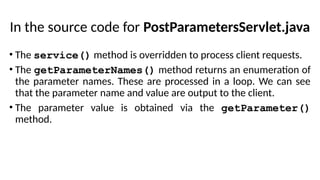
• The service() method is overridden to process client requests.
• The getParameterNames() method returns an enumeration of
the parameter names. These are processed in a loop. We can see
that the parameter name and value are output to the client.
• The parameter value is obtained via the getParameter()
method.
49.
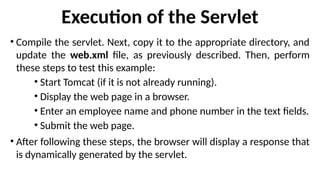
Execution of theServlet
• Compile the servlet. Next, copy it to the appropriate directory, and
update the web.xml file, as previously described. Then, perform
these steps to test this example:
• Start Tomcat (if it is not already running).
• Display the web page in a browser.
• Enter an employee name and phone number in the text fields.
• Submit the web page.
• After following these steps, the browser will display a response that
is dynamically generated by the servlet.
50.
SYLLABUS – MODULE4 – Servlets and JSP
Servlets:
• Background; The life cycle of a servlet;
• A simple servlet;
• the servlet API;
• The javax.servlet package Reading servlet parameter;
• The javax.servlet.http package;
• Handling HTTP Requests and Responses;
• Using Cookies;
• Session Tracking,
Java Server Pages (JSP):
• JSP tags, Variables and Objects, Methods, Control statements, Loops, Request String,
Parsing other information, User sessions, Cookies, Session Objects
Textbook 1: Chapter 31 (Servlets)
Textbook 2: Chapter 11 (JSP)
51.
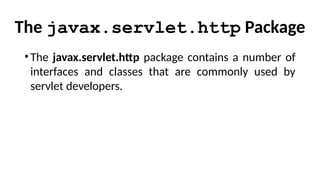
The javax.servlet.http Package
•Thejavax.servlet.http package contains a number of
interfaces and classes that are commonly used by
servlet developers.
52.
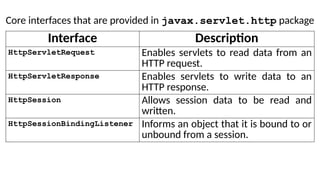
Core interfaces thatare provided in javax.servlet.http package
Interface Description
HttpServletRequest Enables servlets to read data from an
HTTP request.
HttpServletResponse Enables servlets to write data to an
HTTP response.
HttpSession Allows session data to be read and
written.
HttpSessionBindingListener Informs an object that it is bound to or
unbound from a session.
53.
Core Classes thatare provided in javax.servlet.http package
Classes Description
Cookie Allows state information to be stored on a
client machine.
HttpServlet Provides methods to handle HTTP requests
and responses.
HttpSessionEvent Encapsulates a session-changed event.
HttpSessionBindingEvent Indicates when a listener is bound to or
unbound from a session value, or that a
session attribute changed.
Various Methods Definedby HttpServletRequest
Method Description
String getAuthType() Returns authentication scheme.
Cookie[ ] getCookies() Returns an array of the cookies in this
request.
long getDateHeader(String field) Returns the value of the date header field
named field.
String getHeader(String field) Returns the value of the header field named
field.
Enumeration getHeaderNames() Returns an enumeration of the header
names.
int getIntHeader(String field) Returns the int equivalent of the header field
named field.
String getMethod() Returns the HTTP method for this request.
Contd…
56.
Various Methods Definedby HttpServletRequest
Method Description
String getPathInfo() Returns any path information that is located
after the servlet path and before a query
string of the URL.
String getPathTranslated() Returns any path information that is located
after the servlet path and before a query
string of the URL after translating it to a real
path.
String getQueryString() Returns any query string in the URL.
String getRemoteUser() Returns the name of the user who issued
this request.
String getRequestedSessionId() Returns the ID of the session.
String getRequestURI() Returns the URI.
Contd…
57.
Various Methods Definedby HttpServletRequest
Method Description
StringBuffer getRequestURL() Returns the URL.
String getServletPath() Returns that part of the URL that identifies the
servlet.
HttpSession getSession( ) Returns the session for this request. If a session
does not exist, one is created and then returned.
HttpSession getSession(boolean new) If new is true and no session exists, creates and
returns a session for this request. Otherwise, returns
the existing session for this request.
Boolean isRequestedSessionIdFromCookie() Returns true if a cookie contains the session ID.
Otherwise, returns false.
boolean isRequestedSessionIdFromURL( ) Returns true if the URL contains the session ID.
Otherwise, returns false.
Boolean isRequestedSessionIdValid( ) Returns true if the requested session ID is valid in
the current session context.
58.
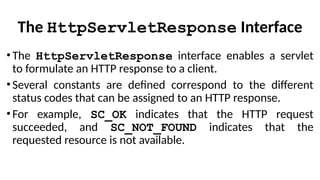
The HttpServletResponse Interface
•TheHttpServletResponse interface enables a servlet
to formulate an HTTP response to a client.
•Several constants are defined correspond to the different
status codes that can be assigned to an HTTP response.
•For example, SC_OK indicates that the HTTP request
succeeded, and SC_NOT_FOUND indicates that the
requested resource is not available.
59.
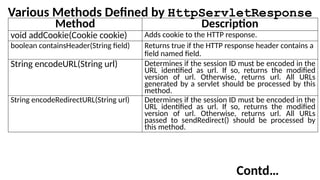
Various Methods Definedby HttpServletResponse
Method Description
void addCookie(Cookie cookie) Adds cookie to the HTTP response.
boolean containsHeader(String field) Returns true if the HTTP response header contains a
field named field.
String encodeURL(String url) Determines if the session ID must be encoded in the
URL identified as url. If so, returns the modified
version of url. Otherwise, returns url. All URLs
generated by a servlet should be processed by this
method.
String encodeRedirectURL(String url) Determines if the session ID must be encoded in the
URL identified as url. If so, returns the modified
version of url. Otherwise, returns url. All URLs
passed to sendRedirect() should be processed by
this method.
Contd…
60.
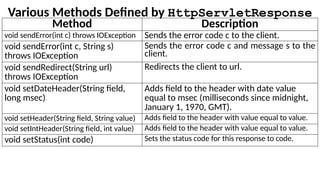
Various Methods Definedby HttpServletResponse
Method Description
void sendError(int c) throws IOException Sends the error code c to the client.
void sendError(int c, String s)
throws IOException
Sends the error code c and message s to the
client.
void sendRedirect(String url)
throws IOException
Redirects the client to url.
void setDateHeader(String field,
long msec)
Adds field to the header with date value
equal to msec (milliseconds since midnight,
January 1, 1970, GMT).
void setHeader(String field, String value) Adds field to the header with value equal to value.
void setIntHeader(String field, int value) Adds field to the header with value equal to value.
void setStatus(int code) Sets the status code for this response to code.
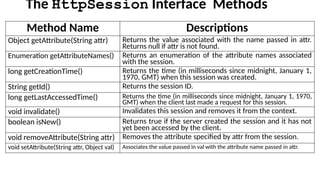
61.
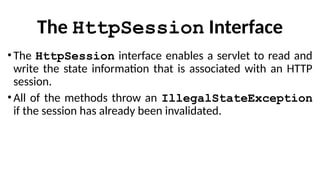
The HttpSession Interface
•The HttpSession interface enables a servlet to read and
write the state information that is associated with an HTTP
session.
• All of the methods throw an IllegalStateException
if the session has already been invalidated.
62.
The HttpSession InterfaceMethods
Method Name Descriptions
Object getAttribute(String attr) Returns the value associated with the name passed in attr.
Returns null if attr is not found.
Enumeration getAttributeNames() Returns an enumeration of the attribute names associated
with the session.
long getCreationTime() Returns the time (in milliseconds since midnight, January 1,
1970, GMT) when this session was created.
String getId() Returns the session ID.
long getLastAccessedTime() Returns the time (in milliseconds since midnight, January 1, 1970,
GMT) when the client last made a request for this session.
void invalidate() Invalidates this session and removes it from the context.
boolean isNew() Returns true if the server created the session and it has not
yet been accessed by the client.
void removeAttribute(String attr) Removes the attribute specified by attr from the session.
void setAttribute(String attr, Object val) Associates the value passed in val with the attribute name passed in attr.
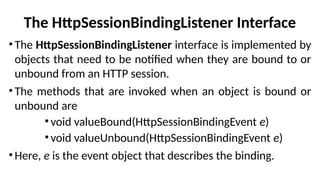
63.
The HttpSessionBindingListener Interface
•TheHttpSessionBindingListener interface is implemented by
objects that need to be notified when they are bound to or
unbound from an HTTP session.
•The methods that are invoked when an object is bound or
unbound are
•void valueBound(HttpSessionBindingEvent e)
•void valueUnbound(HttpSessionBindingEvent e)
•Here, e is the event object that describes the binding.
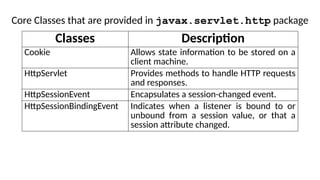
64.
Core Classes thatare provided in javax.servlet.http package
Classes Description
Cookie Allows state information to be stored on a
client machine.
HttpServlet Provides methods to handle HTTP requests
and responses.
HttpSessionEvent Encapsulates a session-changed event.
HttpSessionBindingEvent Indicates when a listener is bound to or
unbound from a session value, or that a
session attribute changed.
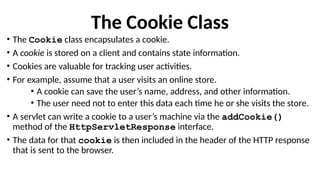
65.
The Cookie Class
•The Cookie class encapsulates a cookie.
• A cookie is stored on a client and contains state information.
• Cookies are valuable for tracking user activities.
• For example, assume that a user visits an online store.
• A cookie can save the user’s name, address, and other information.
• The user need not to enter this data each time he or she visits the store.
• A servlet can write a cookie to a user’s machine via the addCookie()
method of the HttpServletResponse interface.
• The data for that cookie is then included in the header of the HTTP response
that is sent to the browser.
66.
Some of theinformation that is saved for each cookie
• The name of the cookie.
• The value of the cookie.
• The expiration date of the cookie.
• The domain and path of the cookie.
• The names and values of cookies are stored on the user’s machine.
• The expiration date determines when this cookie is deleted from the user’s machine.
If an expiration date is not explicitly assigned to a cookie, it is deleted when the
current browser session ends. Otherwise, the cookie is saved in a file on the user’s
machine.
• The domain and path of the cookie determine when it is included in the header of an
HTTP request. If the user enters a URL whose domain and path match these values,
the cookie is then supplied to the Web server. Otherwise, it is not.
67.
Constructor for Cookie
•Syntax of the Constructor:
Cookie(String name, String value)
• Here, the name and value of the cookie are supplied as
arguments to the constructor.
68.
Methods of theCookie class
Method Description
Object clone() Returns a copy of this object.
String getComment() Returns the comment.
String getDomain() Returns the domain.
int getMaxAge() Returns the maximum age (in seconds).
String getName() Returns the name.
String getPath() Returns the path.
boolean getSecure() Returns true if the cookie is secure. Otherwise, returns false.
String getValue() Returns the value.
int getVersion() Returns the version.
void setComment(String c) Sets the comment to c.
void setDomain(String d) Sets the domain to d.
void setMaxAge(int secs) Sets the maximum age of the cookie to secs. This is the number of
seconds after which the cookie is deleted.
void setPath(String p) Sets the path to p.
void setSecure(boolean secure) Sets the security flag to secure.
void setValue(String v) Sets the value to v.
void setVersion(int v) Sets the version to v.
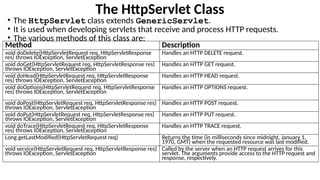
The HttpServlet Class
•The HttpServlet class extends GenericServlet.
• It is used when developing servlets that receive and process HTTP requests.
• The various methods of this class are:
Method Description
void doDelete(HttpServletRequest req, HttpServletResponse
res) throws IOException, ServletException
Handles an HTTP DELETE request.
void doGet(HttpServletRequest req, HttpServletResponse res)
throws IOException, ServletException
Handles an HTTP GET request.
void doHead(HttpServletRequest req, HttpServletResponse
res) throws IOException, ServletException
Handles an HTTP HEAD request.
void doOptions(HttpServletRequest req, HttpServletResponse
res) throws IOException, ServletException
Handles an HTTP OPTIONS request.
void doPost(HttpServletRequest req, HttpServletResponse res)
throws IOException, ServletException
Handles an HTTP POST request.
void doPut(HttpServletRequest req, HttpServletResponse res)
throws IOException, ServletException
Handles an HTTP PUT request.
void doTrace(HttpServletRequest req, HttpServletResponse
res) throws IOException, ServletException
Handles an HTTP TRACE request.
Long getLastModified(HttpServletRequest req) Returns the time (in milliseconds since midnight, January 1,
1970, GMT) when the requested resource was last modified.
void service(HttpServletRequest req, HttpServletResponse res)
throws IOException, ServletException
Called by the server when an HTTP request arrives for this
servlet. The arguments provide access to the HTTP request and
response, respectively.
75.
The HttpSessionBindingEvent Class
•The HttpSessionBindingEvent class extends HttpSessionEvent.
• It is generated when a listener is bound to or unbound from a value in an
HttpSession object.
• It is also generated when an attribute is bound or unbound.
• Constructors of HttpSessionBindingEvent class :
• HttpSessionBindingEvent(HttpSession session, String name)
• HttpSessionBindingEvent(HttpSession session, String name, Object val)
• Here, session is the source of the event, and name is the name associated
with the object that is being bound or unbound. If an attribute is being bound or
unbound, its value is passed in val.
76.
Various Methods inHttpSessionBindingEvent Class
• The getName() method obtains the name that is being bound or unbound.
• Syntax of getName() is: String getName()
• The getSession() method, shown next, obtains the session to which the
listener is being bound or unbound:
HttpSession getSession()
• The getValue() method obtains the value of the attribute that is being
bound or unbound.
• Syntax of getValue() is: Object getValue()
77.
SYLLABUS – MODULE4 – Servlets and JSP
Servlets:
• Background; The life cycle of a servlet;
• A simple servlet;
• the servlet API;
• The javax.servlet package Reading servlet parameter;
• The javax.servlet.http package;
• Handling HTTP Requests and Responses;
• Using Cookies;
• Session Tracking,
Java Server Pages (JSP):
• JSP tags, Variables and Objects, Methods, Control statements, Loops, Request String,
Parsing other information, User sessions, Cookies, Session Objects
Textbook 1: Chapter 31 (Servlets)
Textbook 2: Chapter 11 (JSP)
78.
Handling HTTP Requestsand Responses
• The HttpServlet class provides specialized methods that handle
the various types of HTTP requests.
• A servlet developer typically overrides one of these methods.
• These methods are doDelete(), doGet(), doHead(),
doOptions(), doPost(), doPut(), and doTrace().
• The GET and POST requests are commonly used when handling
form input.
79.
Handling HTTP GETRequests
• The servlet is invoked when a form on a web page is submitted.
• The example contains two files.
• A web page is defined in ColorGet.htm
• A servlet is defined in ColorGetServlet.java.
80.
ColorGet.htm File
• ColorGet.htmdefines a form that contains a select element and a
submit button.
• The action parameter of the form tag specifies a URL.
• The URL identifies a servlet to process the HTTP GET request.
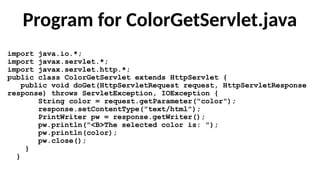
ColorGetServlet.java
•The doGet() methodis overridden to process any HTTP GET
requests that are sent to this servlet.
•It uses the getParameter() method of HttpServletRequest to
obtain the selection that was made by the user.
•A response is then formulated.
83.
Program for ColorGetServlet.java
importjava.io.*;
import javax.servlet.*;
import javax.servlet.http.*;
public class ColorGetServlet extends HttpServlet {
public void doGet(HttpServletRequest request, HttpServletResponse
response) throws ServletException, IOException {
String color = request.getParameter("color");
response.setContentType("text/html");
PrintWriter pw = response.getWriter();
pw.println("<B>The selected color is: ");
pw.println(color);
pw.close();
}
}
84.
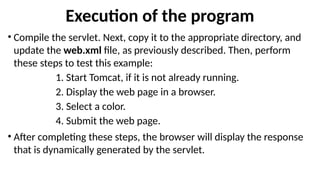
Execution of theprogram
• Compile the servlet. Next, copy it to the appropriate directory, and
update the web.xml file, as previously described. Then, perform
these steps to test this example:
1. Start Tomcat, if it is not already running.
2. Display the web page in a browser.
3. Select a color.
4. Submit the web page.
• After completing these steps, the browser will display the response
that is dynamically generated by the servlet.
85.
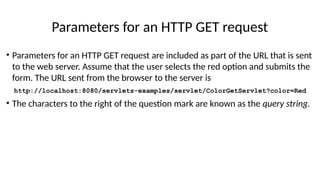
Parameters for anHTTP GET request
• Parameters for an HTTP GET request are included as part of the URL that is sent
to the web server. Assume that the user selects the red option and submits the
form. The URL sent from the browser to the server is
http://localhost:8080/servlets-examples/servlet/ColorGetServlet?color=Red
• The characters to the right of the question mark are known as the query string.
86.
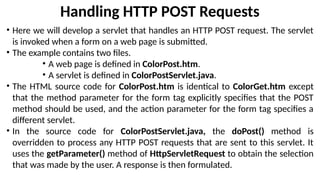
Handling HTTP POSTRequests
• Here we will develop a servlet that handles an HTTP POST request. The servlet
is invoked when a form on a web page is submitted.
• The example contains two files.
• A web page is defined in ColorPost.htm.
• A servlet is defined in ColorPostServlet.java.
• The HTML source code for ColorPost.htm is identical to ColorGet.htm except
that the method parameter for the form tag explicitly specifies that the POST
method should be used, and the action parameter for the form tag specifies a
different servlet.
• In the source code for ColorPostServlet.java, the doPost() method is
overridden to process any HTTP POST requests that are sent to this servlet. It
uses the getParameter() method of HttpServletRequest to obtain the selection
that was made by the user. A response is then formulated.
87.
The HTML sourcecode for ColorPost.htm
<html>
<body>
<center>
<form name="Form1"
method="post"
action="http://localhost:8080/servlets-examples/servlet/ColorPostServlet">
<B>Color:</B>
<select name="color" size="1">
<option value="Red">Red</option>
<option value="Green">Green</option>
<option value="Blue">Blue</option>
</select>
<br><br>
<input type=submit value="Submit">
</form>
</body>
</html>
88.
Source code forColorPostServlet.java
import java.io.*;
import javax.servlet.*;
import javax.servlet.http.*;
public class ColorPostServlet extends HttpServlet {
public void doPost(HttpServletRequest request,
HttpServletResponse response) throws ServletException,
IOException {
String color = request.getParameter("color");
response.setContentType("text/html");
PrintWriter pw = response.getWriter();
pw.println("<B>The selected color is: ");
pw.println(color);
pw.close();
}
}
89.
SYLLABUS – MODULE4 – Servlets and JSP
Servlets:
• Background; The life cycle of a servlet;
• A simple servlet;
• the servlet API;
• The javax.servlet package Reading servlet parameter;
• The javax.servlet.http package;
• Handling HTTP Requests and Responses;
• Using Cookies;
• Session Tracking,
Java Server Pages (JSP):
• JSP tags, Variables and Objects, Methods, Control statements, Loops, Request String,
Parsing other information, User sessions, Cookies, Session Objects
Textbook 1: Chapter 31 (Servlets)
Textbook 2: Chapter 11 (JSP)
90.
Using Cookies
• Theservlet is invoked when a form on a web page is submitted.
• The example contains three files
File Description
AddCookie.htm Allows a user to specify a value for the cookie
named MyCookie.
AddCookieServlet.java Processes the submission of AddCookie.htm.
GetCookiesServlet.java Displays cookie values.
91.
The HTML sourcecode for AddCookie.htm
<html>
<body>
<center>
<form name="Form1"
method="post"
action="http://localhost:8080/servlets-examples/servlet/AddCookieServlet">
<B>Enter a value for MyCookie:</B>
<input type=textbox name="data" size=25 value="">
<input type=submit value="Submit">
</form>
</body>
</html>
92.
The source codefor AddCookieServlet.java
import java.io.*;
import javax.servlet.*;
import javax.servlet.http.*;
public class AddCookieServlet extends HttpServlet {
public void doPost(HttpServletRequest request, HttpServletResponse
response) throws ServletException, IOException {
// Get parameter from HTTP request.
String data = request.getParameter("data");
// Create cookie.
Cookie cookie = new Cookie("MyCookie", data);
// Add cookie to HTTP response.
response.addCookie(cookie);
// Write output to browser.
response.setContentType("text/html");
PrintWriter pw = response.getWriter();
pw.println("<B>MyCookie has been set to");
pw.println(data);
pw.close();
}
}
93.
The source codefor GetCookiesServlet.java
import java.io.*;
import javax.servlet.*;
import javax.servlet.http.*;
public class GetCookiesServlet extends HttpServlet {
public void doGet(HttpServletRequest request, HttpServletResponse response)
throws ServletException, IOException {
// Get cookies from header of HTTP request.
Cookie[] cookies = request.getCookies();
// Display these cookies.
response.setContentType("text/html");
PrintWriter pw = response.getWriter();
pw.println("<B>");
for(int i = 0; i < cookies.length; i++) {
String name = cookies[i].getName();
String value = cookies[i].getValue();
pw.println("name = " + name + "; value = " + value);
}
pw.close();
}
}
94.
• GetCookiesServlet.java programinvokes the getCookies( ) method to read any
cookies that are included in the HTTP GET request.
• The names and values of these cookies are then written to the HTTP response.
• The getName( ) and getValue( ) methods are called to obtain this information.
95.
Execution of theprogram
• Compile the servlets. Next, copy them to the appropriate directory, and update the web.xml
file, as previously described. Then, perform these steps to test this example:
1. Start Tomcat, if it is not already running.
2. Display AddCookie.htm in a browser.
3. Enter a value for MyCookie.
4. Submit the web page.
• After completing these steps, you will observe that a feedback message is displayed by the
browser. Next, request the following URL via the browser:
http://localhost:8080/servlets-examples/servlet/GetCookiesServlet
• The name and value of the cookie are displayed in the browser.
• In this example, an expiration date is not explicitly assigned to the cookie via the setMaxAge()
method of Cookie. Therefore, the cookie expires when the browser session ends.
96.
SYLLABUS – MODULE4 – Servlets and JSP
Servlets:
• Background; The life cycle of a servlet;
• A simple servlet;
• the servlet API;
• The javax.servlet package Reading servlet parameter;
• The javax.servlet.http package;
• Handling HTTP Requests and Responses;
• Using Cookies;
• Session Tracking,
Java Server Pages (JSP):
• JSP tags, Variables and Objects, Methods, Control statements, Loops, Request String,
Parsing other information, User sessions, Cookies, Session Objects
Textbook 1: Chapter 31 (Servlets)
Textbook 2: Chapter 11 (JSP)
97.
Session Tracking
• HTTPis a stateless protocol. Each request is independent of the
previous one.
• In some applications, it is necessary to save state information so
that information can be collected from several interactions
between a browser and a server. Sessions provide such a
mechanism.
• A session can be created via the getSession() method of
HttpServletRequest. An HttpSession object is returned. This object
can store a set of bindings that associate names with objects.
• The setAttribute(), getAttribute(), getAttributeNames(), and
removeAttribute() methods of HttpSession manage these bindings.
• Session state is shared among all the servlets that are associated
with a particular client.
98.
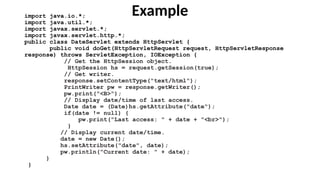
Example
import java.io.*;
import java.util.*;
importjavax.servlet.*;
import javax.servlet.http.*;
public class DateServlet extends HttpServlet {
public void doGet(HttpServletRequest request, HttpServletResponse
response) throws ServletException, IOException {
// Get the HttpSession object.
HttpSession hs = request.getSession(true);
// Get writer.
response.setContentType("text/html");
PrintWriter pw = response.getWriter();
pw.print("<B>");
// Display date/time of last access.
Date date = (Date)hs.getAttribute("date");
if(date != null) {
pw.print("Last access: " + date + "<br>");
}
// Display current date/time.
date = new Date();
hs.setAttribute("date", date);
pw.println("Current date: " + date);
}
}
99.
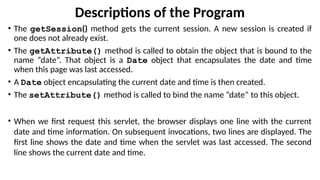
Descriptions of theProgram
• The getSession() method gets the current session. A new session is created if
one does not already exist.
• The getAttribute() method is called to obtain the object that is bound to the
name “date”. That object is a Date object that encapsulates the date and time
when this page was last accessed.
• A Date object encapsulating the current date and time is then created.
• The setAttribute() method is called to bind the name “date” to this object.
• When we first request this servlet, the browser displays one line with the current
date and time information. On subsequent invocations, two lines are displayed. The
first line shows the date and time when the servlet was last accessed. The second
line shows the current date and time.

![The ServletRequest Interface Contd …
Method Description
String[] getParameterValues(String name) Returns an array containing values associated with the
parameter
specified by name.
String getProtocol() Returns a description of the protocol.
BufferedReader getReader()
throws IOException
Returns a buffered reader that can be used to read text from
the request.
An IllegalStateException is thrown if
getInputStream() has already been invoked for this
request.
String getRemoteAddr( ) Returns the string equivalent of the client IP address.
String getRemoteHost( ) Returns the string equivalent of the client host name.
String getScheme( ) Returns the transmission scheme of the URL used for the
request (for example, “http”, “ftp”).
String getServerName() Returns the name of the server.
int getServerPort() Returns the port number.](https://image.slidesharecdn.com/21cs642module41servletsppt-250413165349-e27ca128/85/21CS642-Module-4_1-Servlets-PPT-pptx-VI-SEM-CSE-Students-37-320.jpg)
![The ServletInputStream Class
• The ServletInputStream class extends InputStream.
• It is implemented by the servlet container and provides an input stream that a
servlet developer can use to read the data from a client request.
• It defines the default constructor. In addition, a method is provided to read
bytes from the stream.
• Syntax of the method is:
int readLine(byte[] buffer, int offset, int size)
throws IOException
• Here, buffer is the array into which size bytes are placed starting at
offset. The method returns the actual number of bytes read or –1 if an end-
of-stream condition is encountered.](https://image.slidesharecdn.com/21cs642module41servletsppt-250413165349-e27ca128/85/21CS642-Module-4_1-Servlets-PPT-pptx-VI-SEM-CSE-Students-40-320.jpg)
![Various Methods Defined by HttpServletRequest
Method Description
String getAuthType() Returns authentication scheme.
Cookie[ ] getCookies() Returns an array of the cookies in this
request.
long getDateHeader(String field) Returns the value of the date header field
named field.
String getHeader(String field) Returns the value of the header field named
field.
Enumeration getHeaderNames() Returns an enumeration of the header
names.
int getIntHeader(String field) Returns the int equivalent of the header field
named field.
String getMethod() Returns the HTTP method for this request.
Contd…](https://image.slidesharecdn.com/21cs642module41servletsppt-250413165349-e27ca128/85/21CS642-Module-4_1-Servlets-PPT-pptx-VI-SEM-CSE-Students-55-320.jpg)
![SecondServlet.java
import java.io.*;
import javax.servlet.*;
import javax.servlet.http.*;
public class SecondServlet extends HttpServlet {
public void doPost(HttpServletRequest request, HttpServletRe
sponse response){
try{
response.setContentType("text/html");
PrintWriter out = response.getWriter();
Cookie ck[]=request.getCookies();
out.print("Hello "+ck[0].getValue());
out.close();
} catch(Exception e){System.out.println(e);}
}
}](https://image.slidesharecdn.com/21cs642module41servletsppt-250413165349-e27ca128/85/21CS642-Module-4_1-Servlets-PPT-pptx-VI-SEM-CSE-Students-72-320.jpg)
![The source code for GetCookiesServlet.java
import java.io.*;
import javax.servlet.*;
import javax.servlet.http.*;
public class GetCookiesServlet extends HttpServlet {
public void doGet(HttpServletRequest request, HttpServletResponse response)
throws ServletException, IOException {
// Get cookies from header of HTTP request.
Cookie[] cookies = request.getCookies();
// Display these cookies.
response.setContentType("text/html");
PrintWriter pw = response.getWriter();
pw.println("<B>");
for(int i = 0; i < cookies.length; i++) {
String name = cookies[i].getName();
String value = cookies[i].getValue();
pw.println("name = " + name + "; value = " + value);
}
pw.close();
}
}](https://image.slidesharecdn.com/21cs642module41servletsppt-250413165349-e27ca128/85/21CS642-Module-4_1-Servlets-PPT-pptx-VI-SEM-CSE-Students-93-320.jpg)