Submitted To:
Mr. Deepak Khare
Mr. Ankur Mishra
Submitted by :
Ashutosh Kumar (0158CS111019)
Md. Nausad Ahamed (0158CS111051)
Neha Upadhyay (0158CS111057)
Project onProject on JAVA Media PlayerJAVA Media Player
 Introduction
 Project Overview
 System Analysis
 Design Overview
 System Requirements
 Software Used
 System Functionality
 User Functionality
 Installation Guide
 Future Scope
 Media Player is a Software program or hardware device
capable of playing back multimedia file.
 E.g. VLC, KM Player, Winamp etc……
 There are 2 Types of Media Players
 Audio Player => Only play Audio files
 Video Player=> Only play Video Files
 JAVA Media Player is capable of Playing Both AUDIO &
VIDEO Files.
Project Overview
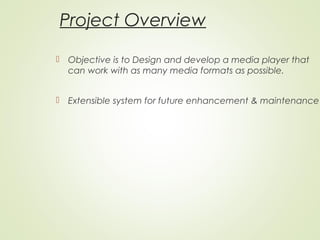
 Objective is to Design and develop a media player that
can work with as many media formats as possible.
 Extensible system for future enhancement & maintenance
System Analysis
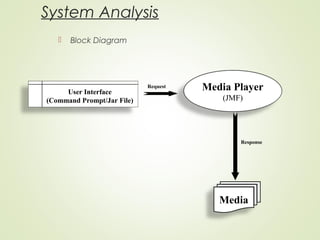
 Block Diagram
User Interface
(Command Prompt/Jar File)
Media Player
(JMF)
Media
Request
Response
Design Overview
 System Functionality
 User Functionality
System Requirements
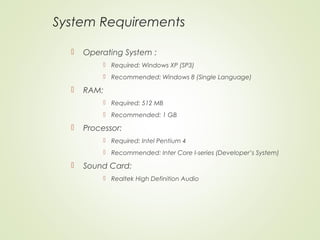
 Operating System :
 Required: Windows XP (SP3)
 Recommended: Windows 8 (Single Language)
 RAM:
 Required: 512 MB
 Recommended: 1 GB
 Processor:
 Required: Intel Pentium 4
 Recommended: Inter Core I-series (Developer’s System)
 Sound Card:
 Realtek High Definition Audio
System Requirements Conti…
 Video Card:
 Required: Intel(R) HD Graphics 3000
 Recommended: 2GB AMD Radeon HD 8730M Graphic Card
 Disk Requirement:
 Required: 350 MB
 Recommended: 600 MB
 Sound Output Devices:
 Required: Speaker or Headphone
 Recommended: 5.1 Multichannel Speakers
Softwares Used
 Language: Java SE-7,
 Framework: JAVA Media Frame Work 2.1.1
 User Interface: JMF, Command Prompt
 Platform: Windows, Sun Solaris, Linux
 Running Environment: Java Runtime Environment comes
with JDK
System Functionality
 File
 Open
 Repeat
 Information
 About
 Exit
User Functionality
 Play/Pause
 Scroll To Playing State.
 Play Rate Control
 Mute/Unmute
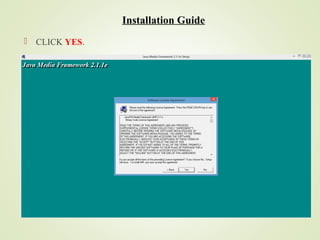
Installation Guide
 CLICK YES.
05/20/14
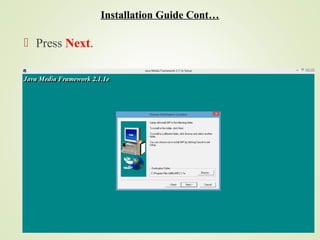
 Press Next.
Installation Guide Cont…
05/20/14
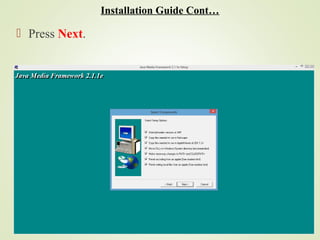
 Press Next.
Installation Guide Cont…
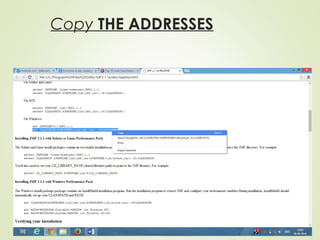
Copy THE ADDRESSES
05/20/14
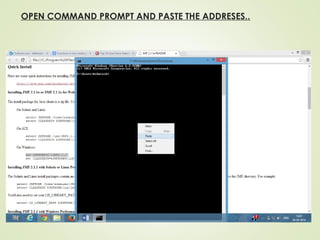
OPEN COMMAND PROMPT AND PASTE THE ADDRESES..
05/20/14
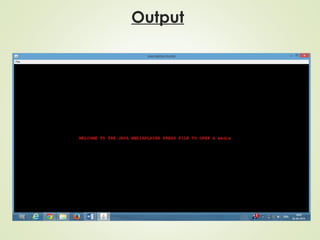
Output
Future Scope
 More Format’s support.
 More interactive user interface.
Thank You!

JAVA Media Player

  • 1.
    Submitted To: Mr. DeepakKhare Mr. Ankur Mishra Submitted by : Ashutosh Kumar (0158CS111019) Md. Nausad Ahamed (0158CS111051) Neha Upadhyay (0158CS111057)
  • 2.
    Project onProject onJAVA Media PlayerJAVA Media Player  Introduction  Project Overview  System Analysis  Design Overview  System Requirements  Software Used  System Functionality  User Functionality  Installation Guide  Future Scope
  • 3.
     Media Playeris a Software program or hardware device capable of playing back multimedia file.  E.g. VLC, KM Player, Winamp etc……  There are 2 Types of Media Players  Audio Player => Only play Audio files  Video Player=> Only play Video Files  JAVA Media Player is capable of Playing Both AUDIO & VIDEO Files.
  • 4.
    Project Overview  Objectiveis to Design and develop a media player that can work with as many media formats as possible.  Extensible system for future enhancement & maintenance
  • 5.
    System Analysis  BlockDiagram User Interface (Command Prompt/Jar File) Media Player (JMF) Media Request Response
  • 6.
    Design Overview  SystemFunctionality  User Functionality
  • 7.
    System Requirements  OperatingSystem :  Required: Windows XP (SP3)  Recommended: Windows 8 (Single Language)  RAM:  Required: 512 MB  Recommended: 1 GB  Processor:  Required: Intel Pentium 4  Recommended: Inter Core I-series (Developer’s System)  Sound Card:  Realtek High Definition Audio
  • 8.
    System Requirements Conti… Video Card:  Required: Intel(R) HD Graphics 3000  Recommended: 2GB AMD Radeon HD 8730M Graphic Card  Disk Requirement:  Required: 350 MB  Recommended: 600 MB  Sound Output Devices:  Required: Speaker or Headphone  Recommended: 5.1 Multichannel Speakers
  • 9.
    Softwares Used  Language:Java SE-7,  Framework: JAVA Media Frame Work 2.1.1  User Interface: JMF, Command Prompt  Platform: Windows, Sun Solaris, Linux  Running Environment: Java Runtime Environment comes with JDK
  • 10.
    System Functionality  File Open  Repeat  Information  About  Exit
  • 11.
    User Functionality  Play/Pause Scroll To Playing State.  Play Rate Control  Mute/Unmute
  • 12.
  • 13.
  • 14.
  • 15.
  • 16.
    OPEN COMMAND PROMPTAND PASTE THE ADDRESES.. 05/20/14
  • 17.
  • 18.
    Future Scope  MoreFormat’s support.  More interactive user interface.
  • 19.