Chapter 4 Defining Your Own Classes Part 1
Objectives After you have read and studied this chapter, you should be able to  Define a class with multiple methods and data members Differentiate the local and instance variables Define and use value-returning methods Distinguish private and public methods Distinguish private and public data members Pass both primitive data and objects to a method
Why Programmer-Defined Classes Using just the  String,   GregorianCalendar ,  JFrame  and other standard classes will not meet all of our needs. We need to be able to define our own classes customized for our applications.  Learning how to define our own classes is the first step toward mastering the skills necessary in building large programs.  Classes we define ourselves are called  programmer-defined classes .
First Example: Using the Bicycle Class class  BicycleRegistration  { public static void  main ( String []  args ) {  Bicycle bike1, bike2; String  owner1, owner2; bike1 =  new  Bicycle ( ) ;  //Create and assign values to bike1 bike1.setOwnerName ( "Adam Smith" ) ; bike2 =  new  Bicycle ( ) ;  //Create and assign values to bike2 bike2.setOwnerName ( "Ben Jones" ) ; owner1 = bike1.getOwnerName ( ) ;  //Output the information owner2 = bike2.getOwnerName ( ) ; System.out.println ( owner1 +  " owns a bicycle." ) ;  System.out.println ( owner2 +  " also owns a bicycle." ) ;  } }
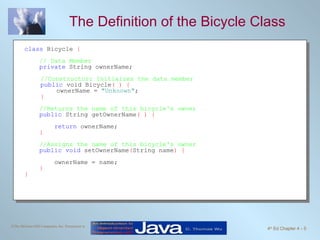
The Definition of the Bicycle Class class  Bicycle  { // Data Member   private  String ownerName; //Constructor: Initialzes the data member public  void Bicycle ( ) { ownerName =  "Unknown" ; } //Returns the name of this bicycle's owner public  String getOwnerName ( ) { return  ownerName; } //Assigns the name of this bicycle's owner public void  setOwnerName ( String name ) { ownerName = name; }  }
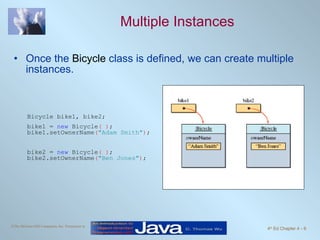
Multiple Instances Once the  Bicycle  class is defined, we can create multiple instances. Bicycle bike1, bike2; bike1 =  new  Bicycle ( ) ; bike1.setOwnerName ( "Adam Smith" ) ; bike2 =  new  Bicycle ( ) ; bike2.setOwnerName ( "Ben Jones" ) ;
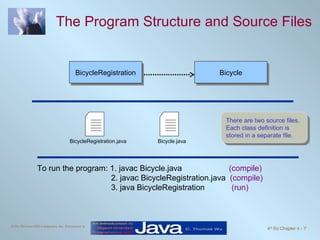
The Program Structure and Source Files There are two source files. Each class definition is stored in a separate file. To run the program: 1. javac Bicycle.java  (compile) 2. javac BicycleRegistration.java  (compile) 3. java BicycleRegistration  (run) BicycleRegistration Bicycle BicycleRegistration.java Bicycle.java
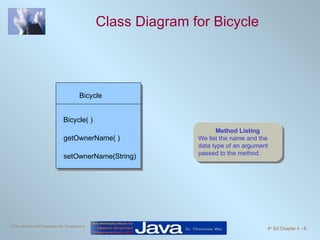
Class Diagram for Bicycle Method Listing We list the name and the data type of an argument passed to the method. Bicycle setOwnerName(String) Bicycle( ) getOwnerName( )
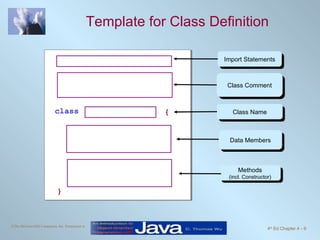
Template for Class Definition class { } Import Statements Class Comment Class Name Data Members Methods (incl. Constructor)
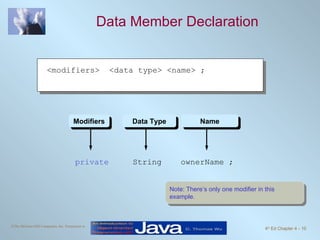
Data Member Declaration private  String  ownerName ; Modifiers Data Type Name Note: There’s only one modifier in this example.  <modifiers>  <data type> <name> ;
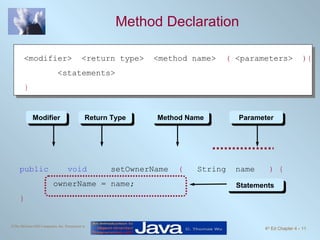
Method Declaration public  void   setOwnerName  (  String  name  )   { ownerName = name; } Statements Modifier Return Type Method Name Parameter <modifier>  <return type>  <method name>  (  <parameters>  ){ <statements> }
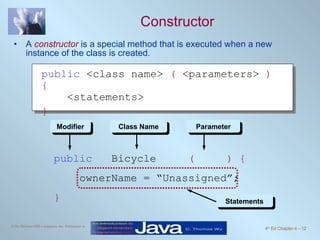
Constructor A  constructor  is a special method that is executed when a new instance of the class is created. public   Bicycle  (  ) { ownerName = “Unassigned”;  } Statements Modifier Class Name Parameter public  <class name>  (  <parameters>  ){   <statements>  }
Second Example: Using Bicycle and Account class  SecondMain  { //This sample program uses both the Bicycle and Account classes public static void  main ( String []  args ) { Bicycle bike; Account acct; String  myName =  &quot;Jon Java&quot; ; bike =  new  Bicycle ( ) ;  bike.setOwnerName ( myName ) ; acct =  new  Account ( ) ; acct.setOwnerName ( myName ) ; acct.setInitialBalance ( 250.00 ) ; acct.add ( 25.00 ) ; acct.deduct ( 50 ) ; //Output some information   System.out.println ( bike.getOwnerName ()  +  &quot; owns a bicycle and&quot; ) ;  System.out.println ( &quot;has $ &quot;  + acct.getCurrentBalance ()  +  &quot; left in the bank&quot; ) ;  } }
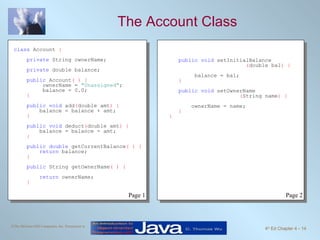
The Account Class class  Account  { private  String ownerName; private  double balance; public  Account ( ) {   ownerName =  &quot;Unassigned&quot; ;   balance = 0.0; } public void  add ( double amt ) { balance = balance + amt; } public void  deduct ( double amt ) { balance = balance - amt; } public double  getCurrentBalance ( ) { return  balance; } public  String getOwnerName ( ) { return  ownerName; } public void  setInitialBalance ( double bal ) { balance = bal; } public void  setOwnerName ( String name )   { ownerName = name; }   } Page 1 Page 2
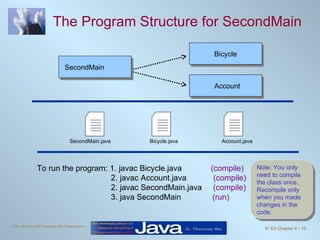
The Program Structure for SecondMain To run the program: 1. javac Bicycle.java  (compile) 2. javac Account.java  (compile) 2. javac SecondMain.java  (compile) 3. java SecondMain  (run) Note: You only need to compile the class once. Recompile only when you made changes in the code. SecondMain Bicycle SecondMain.java Bicycle.java Account.java Account
Arguments and Parameters An argument is a value we pass to a method. A parameter is a placeholder in the called method to hold the value of the passed argument. class  Account  { . . . public void  add ( double amt ) { balance = balance + amt; } . . . } class  Sample  { public static void   main ( String[] arg ) { Account acct = new Account(); . . . acct.add(400); . . . } . . . } argument parameter
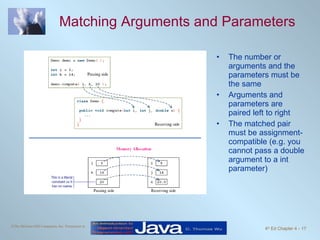
Matching Arguments and Parameters The number or arguments and the parameters must be the same Arguments and parameters are paired left to right  The matched pair must be assignment-compatible (e.g. you cannot pass a double argument to a int parameter)
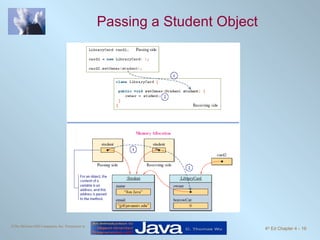
Passing Objects to a Method As we can pass int and double values, we can also pass an object to a method. When we pass an object, we are actually passing the reference (name) of an object it means a duplicate of an object is NOT created in the called method
Passing a Student Object
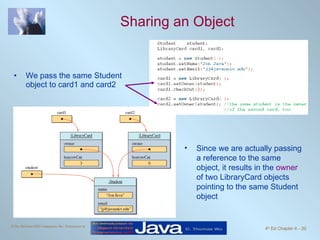
Sharing an Object We pass the same Student object to card1 and card2 Since we are actually passing a reference to the same object, it results in the  owner  of two LibraryCard objects pointing to the same Student object
Information Hiding and Visibility Modifiers The modifiers public and private designate the accessibility of data members and methods. If a class component (data member or method) is declared private, client classes cannot access it. If a class component is declared public, client classes can access it. Internal details of a class are declared private and hidden from the clients. This is information hiding.
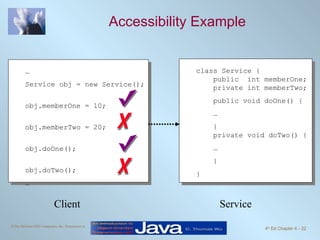
Accessibility Example Client Service class Service {   public  int memberOne;   private int memberTwo; public void doOne() { … }   private void doTwo() { … } } … Service obj = new Service(); obj.memberOne = 10; obj.memberTwo = 20; obj.doOne(); obj.doTwo(); …
Data Members Should Be private Data members are the implementation details of the class, so they should be invisible to the clients. Declare them  private  . Exception: Constants can (should) be declared public if they are meant to be used directly by the outside methods.
Guideline for Visibility Modifiers Guidelines in determining the visibility of data members and methods:  Declare the class and instance variables private. Declare the class and instance methods private if they are used only by the other methods in the same class.  Declare the class constants public if you want to make their values directly readable by the client programs. If the class constants are used for internal purposes only, then declare them private.
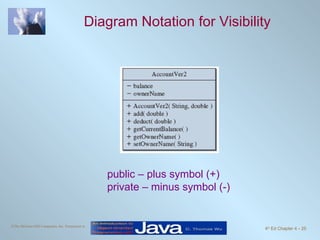
Diagram Notation for Visibility public – plus symbol (+) private – minus symbol (-)
Class Constants In Chapter 3, we introduced the use of constants.  We illustrate the use of constants in programmer-defined service classes here. Remember, the use of constants provides a meaningful description of what the values stand for. number = UNDEFINED; is more meaningful than number = -1; provides easier program maintenance. We only need to change the value in the constant declaration instead of locating all occurrences of the same value in the program code
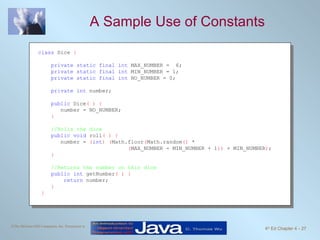
A Sample Use of Constants class  Dice  { private static final int  MAX_NUMBER =  6; private static final int  MIN_NUMBER = 1; private static final int  NO_NUMBER = 0; private int  number; public  Dice ( ) { number = NO_NUMBER; } //Rolls the dice public void  roll ( ) { number =  ( int )   ( Math.floor ( Math.random ()  *  ( MAX_NUMBER - MIN_NUMBER + 1 ))  + MIN_NUMBER ) ; } //Returns the number on this dice public int  getNumber ( ) { return  number; }   }
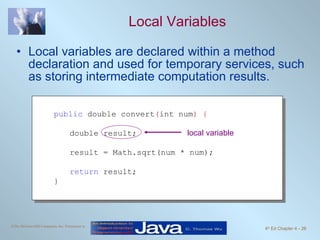
Local Variables Local variables are declared within a method declaration and used for temporary services, such as storing intermediate computation results. public  double convert ( int num ) { double result; result = Math.sqrt(num * num); return  result;  } local variable
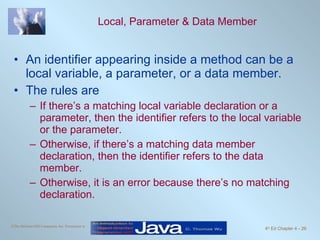
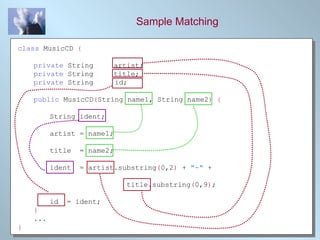
Local, Parameter & Data Member An identifier appearing inside a method can be a local variable, a parameter, or a data member. The rules are If there’s a matching local variable declaration or a parameter, then the identifier refers to the local variable or the parameter. Otherwise, if there’s a matching data member declaration, then the identifier refers to the data member. Otherwise, it is an error because there’s no matching declaration.
Sample Matching class  MusicCD  { private  String  artist; private  String  title; private  String  id; public  MusicCD ( String name1, String name2 ) { String ident; artist = name1; title  = name2; ident  = artist.substring ( 0,2 )  +  &quot;-&quot;  +    title.substring ( 0,9 ) ; id  = ident; } ... }
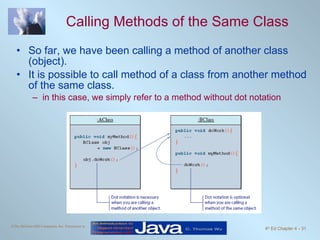
Calling Methods of the Same Class So far, we have been calling a method of another class (object). It is possible to call method of a class from another method of the same class. in this case, we simply refer to a method without dot notation
Changing Any Class to a Main Class Any class can be set to be a main class. All you have to do is to include the main method. class  Bicycle  { //definition of the class as shown before comes here //The main method that shows a sample //use of the Bicycle class public static void  main ( String []  args ) { Bicycle myBike;   myBike =  new  Bicycle ( ) ;  myBike.setOwnerName ( &quot;Jon Java&quot; ) ; System.out.println ( myBike.getOwnerName ()  +  &quot;owns a bicycle&quot; ) ;  } }
Problem Statement Problem statement: Write a loan calculator program that computes both monthly and total payments for a given loan amount, annual interest rate, and loan period.
Overall Plan Tasks: Get three input values:  loanAmount ,  interestRate , and  loanPeriod . Compute the monthly and total payments. Output the results.
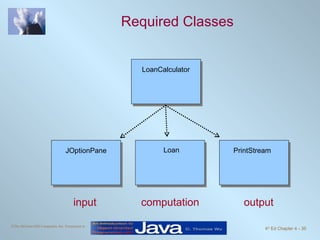
Required Classes input computation output LoanCalculator Loan JOptionPane PrintStream
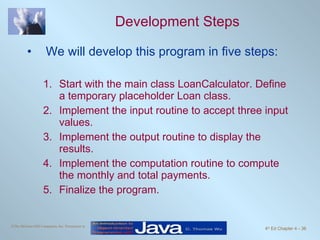
Development Steps We will develop this program in five steps: Start with the main class LoanCalculator. Define a temporary placeholder Loan class. Implement the input routine to accept three input values. Implement the output routine to display the results. Implement the computation routine to compute the monthly and total payments. Finalize the program.
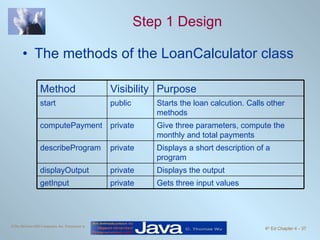
Step 1 Design The methods of the LoanCalculator class Gets three input values private getInput Displays the output private displayOutput Displays a short description of a program private describeProgram Give three parameters, compute the monthly and total payments private computePayment Starts the loan calcution. Calls other methods public start Purpose Visibility Method
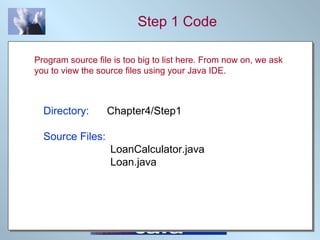
Step 1 Code Directory:   Chapter4/Step1 Source Files:   LoanCalculator.java   Loan.java Program source file is too big to list here. From now on, we ask you to view the source files using your Java IDE.
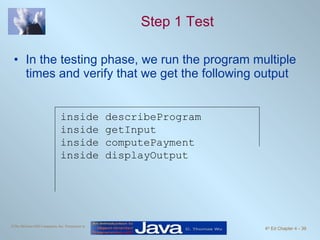
Step 1 Test In the testing phase, we run the program multiple times and verify that we get the following output inside describeProgram inside getInput inside computePayment inside displayOutput
Step 2 Design Design the input routines LoanCalculator will handle the user interaction of prompting and getting three input values LoanCalculator calls the setAmount, setRate and setPeriod of a Loan object.
Step 2 Code Directory:   Chapter4/Step2 Source Files:   LoanCalculator.java   Loan.java
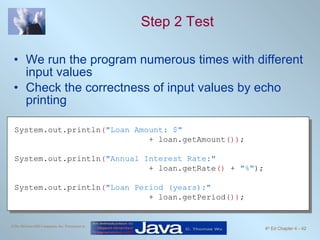
Step 2 Test We run the program numerous times with different input values Check the correctness of input values by echo printing System.out.println ( &quot;Loan Amount: $&quot;   + loan.getAmount ()) ; System.out.println ( &quot;Annual Interest Rate:&quot;   + loan.getRate ()  +  &quot;%&quot; ); System.out.println ( &quot;Loan Period (years):&quot;   + loan.getPeriod ()) ;
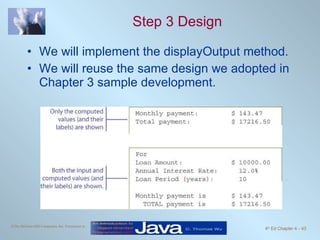
Step 3 Design We will implement the displayOutput method. We will reuse the same design we adopted in Chapter 3 sample development.
Step 3 Code Directory:   Chapter4/Step3 Source Files:   LoanCalculator.java   Loan.java
Step 3 Test We run the program numerous times with different input values and check the output display format. Adjust the formatting as appropriate
Step 4 Design Two methods getMonthlyPayment and getTotalPayment are defined for the Loan class We will implement them so that they work independent of each other. It is considered a poor design if the clients must call getMonthlyPayment before calling getTotalPayment.
Step 4 Code Directory:   Chapter4/Step4 Source Files:   LoanCalculator.java   Loan.java
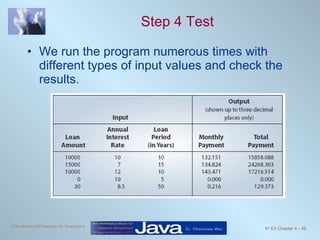
Step 4 Test We run the program numerous times with different types of input values and check the results.
Step 5: Finalize We will implement the describeProgram method We will format the monthly and total payments to two decimal places using DecimalFormat. Directory:   Chapter4/Step5 Source Files (final version):   LoanCalculator.java   Loan.java

Java căn bản - Chapter4

  • 1.
    Chapter 4 DefiningYour Own Classes Part 1
  • 2.
    Objectives After youhave read and studied this chapter, you should be able to Define a class with multiple methods and data members Differentiate the local and instance variables Define and use value-returning methods Distinguish private and public methods Distinguish private and public data members Pass both primitive data and objects to a method
  • 3.
    Why Programmer-Defined ClassesUsing just the String, GregorianCalendar , JFrame and other standard classes will not meet all of our needs. We need to be able to define our own classes customized for our applications. Learning how to define our own classes is the first step toward mastering the skills necessary in building large programs. Classes we define ourselves are called programmer-defined classes .
  • 4.
    First Example: Usingthe Bicycle Class class BicycleRegistration { public static void main ( String [] args ) { Bicycle bike1, bike2; String owner1, owner2; bike1 = new Bicycle ( ) ; //Create and assign values to bike1 bike1.setOwnerName ( &quot;Adam Smith&quot; ) ; bike2 = new Bicycle ( ) ; //Create and assign values to bike2 bike2.setOwnerName ( &quot;Ben Jones&quot; ) ; owner1 = bike1.getOwnerName ( ) ; //Output the information owner2 = bike2.getOwnerName ( ) ; System.out.println ( owner1 + &quot; owns a bicycle.&quot; ) ; System.out.println ( owner2 + &quot; also owns a bicycle.&quot; ) ; } }
  • 5.
    The Definition ofthe Bicycle Class class Bicycle { // Data Member private String ownerName; //Constructor: Initialzes the data member public void Bicycle ( ) { ownerName = &quot;Unknown&quot; ; } //Returns the name of this bicycle's owner public String getOwnerName ( ) { return ownerName; } //Assigns the name of this bicycle's owner public void setOwnerName ( String name ) { ownerName = name; } }
  • 6.
    Multiple Instances Oncethe Bicycle class is defined, we can create multiple instances. Bicycle bike1, bike2; bike1 = new Bicycle ( ) ; bike1.setOwnerName ( &quot;Adam Smith&quot; ) ; bike2 = new Bicycle ( ) ; bike2.setOwnerName ( &quot;Ben Jones&quot; ) ;
  • 7.
    The Program Structureand Source Files There are two source files. Each class definition is stored in a separate file. To run the program: 1. javac Bicycle.java (compile) 2. javac BicycleRegistration.java (compile) 3. java BicycleRegistration (run) BicycleRegistration Bicycle BicycleRegistration.java Bicycle.java
  • 8.
    Class Diagram forBicycle Method Listing We list the name and the data type of an argument passed to the method. Bicycle setOwnerName(String) Bicycle( ) getOwnerName( )
  • 9.
    Template for ClassDefinition class { } Import Statements Class Comment Class Name Data Members Methods (incl. Constructor)
  • 10.
    Data Member Declarationprivate String ownerName ; Modifiers Data Type Name Note: There’s only one modifier in this example. <modifiers> <data type> <name> ;
  • 11.
    Method Declaration public void setOwnerName ( String name ) { ownerName = name; } Statements Modifier Return Type Method Name Parameter <modifier> <return type> <method name> ( <parameters> ){ <statements> }
  • 12.
    Constructor A constructor is a special method that is executed when a new instance of the class is created. public Bicycle ( ) { ownerName = “Unassigned”; } Statements Modifier Class Name Parameter public <class name> ( <parameters> ){ <statements> }
  • 13.
    Second Example: UsingBicycle and Account class SecondMain { //This sample program uses both the Bicycle and Account classes public static void main ( String [] args ) { Bicycle bike; Account acct; String myName = &quot;Jon Java&quot; ; bike = new Bicycle ( ) ; bike.setOwnerName ( myName ) ; acct = new Account ( ) ; acct.setOwnerName ( myName ) ; acct.setInitialBalance ( 250.00 ) ; acct.add ( 25.00 ) ; acct.deduct ( 50 ) ; //Output some information System.out.println ( bike.getOwnerName () + &quot; owns a bicycle and&quot; ) ; System.out.println ( &quot;has $ &quot; + acct.getCurrentBalance () + &quot; left in the bank&quot; ) ; } }
  • 14.
    The Account Classclass Account { private String ownerName; private double balance; public Account ( ) { ownerName = &quot;Unassigned&quot; ; balance = 0.0; } public void add ( double amt ) { balance = balance + amt; } public void deduct ( double amt ) { balance = balance - amt; } public double getCurrentBalance ( ) { return balance; } public String getOwnerName ( ) { return ownerName; } public void setInitialBalance ( double bal ) { balance = bal; } public void setOwnerName ( String name ) { ownerName = name; } } Page 1 Page 2
  • 15.
    The Program Structurefor SecondMain To run the program: 1. javac Bicycle.java (compile) 2. javac Account.java (compile) 2. javac SecondMain.java (compile) 3. java SecondMain (run) Note: You only need to compile the class once. Recompile only when you made changes in the code. SecondMain Bicycle SecondMain.java Bicycle.java Account.java Account
  • 16.
    Arguments and ParametersAn argument is a value we pass to a method. A parameter is a placeholder in the called method to hold the value of the passed argument. class Account { . . . public void add ( double amt ) { balance = balance + amt; } . . . } class Sample { public static void main ( String[] arg ) { Account acct = new Account(); . . . acct.add(400); . . . } . . . } argument parameter
  • 17.
    Matching Arguments andParameters The number or arguments and the parameters must be the same Arguments and parameters are paired left to right The matched pair must be assignment-compatible (e.g. you cannot pass a double argument to a int parameter)
  • 18.
    Passing Objects toa Method As we can pass int and double values, we can also pass an object to a method. When we pass an object, we are actually passing the reference (name) of an object it means a duplicate of an object is NOT created in the called method
  • 19.
  • 20.
    Sharing an ObjectWe pass the same Student object to card1 and card2 Since we are actually passing a reference to the same object, it results in the owner of two LibraryCard objects pointing to the same Student object
  • 21.
    Information Hiding andVisibility Modifiers The modifiers public and private designate the accessibility of data members and methods. If a class component (data member or method) is declared private, client classes cannot access it. If a class component is declared public, client classes can access it. Internal details of a class are declared private and hidden from the clients. This is information hiding.
  • 22.
    Accessibility Example ClientService class Service { public int memberOne; private int memberTwo; public void doOne() { … } private void doTwo() { … } } … Service obj = new Service(); obj.memberOne = 10; obj.memberTwo = 20; obj.doOne(); obj.doTwo(); …
  • 23.
    Data Members ShouldBe private Data members are the implementation details of the class, so they should be invisible to the clients. Declare them private . Exception: Constants can (should) be declared public if they are meant to be used directly by the outside methods.
  • 24.
    Guideline for VisibilityModifiers Guidelines in determining the visibility of data members and methods: Declare the class and instance variables private. Declare the class and instance methods private if they are used only by the other methods in the same class. Declare the class constants public if you want to make their values directly readable by the client programs. If the class constants are used for internal purposes only, then declare them private.
  • 25.
    Diagram Notation forVisibility public – plus symbol (+) private – minus symbol (-)
  • 26.
    Class Constants InChapter 3, we introduced the use of constants. We illustrate the use of constants in programmer-defined service classes here. Remember, the use of constants provides a meaningful description of what the values stand for. number = UNDEFINED; is more meaningful than number = -1; provides easier program maintenance. We only need to change the value in the constant declaration instead of locating all occurrences of the same value in the program code
  • 27.
    A Sample Useof Constants class Dice { private static final int MAX_NUMBER = 6; private static final int MIN_NUMBER = 1; private static final int NO_NUMBER = 0; private int number; public Dice ( ) { number = NO_NUMBER; } //Rolls the dice public void roll ( ) { number = ( int ) ( Math.floor ( Math.random () * ( MAX_NUMBER - MIN_NUMBER + 1 )) + MIN_NUMBER ) ; } //Returns the number on this dice public int getNumber ( ) { return number; } }
  • 28.
    Local Variables Localvariables are declared within a method declaration and used for temporary services, such as storing intermediate computation results. public double convert ( int num ) { double result; result = Math.sqrt(num * num); return result; } local variable
  • 29.
    Local, Parameter &Data Member An identifier appearing inside a method can be a local variable, a parameter, or a data member. The rules are If there’s a matching local variable declaration or a parameter, then the identifier refers to the local variable or the parameter. Otherwise, if there’s a matching data member declaration, then the identifier refers to the data member. Otherwise, it is an error because there’s no matching declaration.
  • 30.
    Sample Matching class MusicCD { private String artist; private String title; private String id; public MusicCD ( String name1, String name2 ) { String ident; artist = name1; title = name2; ident = artist.substring ( 0,2 ) + &quot;-&quot; + title.substring ( 0,9 ) ; id = ident; } ... }
  • 31.
    Calling Methods ofthe Same Class So far, we have been calling a method of another class (object). It is possible to call method of a class from another method of the same class. in this case, we simply refer to a method without dot notation
  • 32.
    Changing Any Classto a Main Class Any class can be set to be a main class. All you have to do is to include the main method. class Bicycle { //definition of the class as shown before comes here //The main method that shows a sample //use of the Bicycle class public static void main ( String [] args ) { Bicycle myBike; myBike = new Bicycle ( ) ; myBike.setOwnerName ( &quot;Jon Java&quot; ) ; System.out.println ( myBike.getOwnerName () + &quot;owns a bicycle&quot; ) ; } }
  • 33.
    Problem Statement Problemstatement: Write a loan calculator program that computes both monthly and total payments for a given loan amount, annual interest rate, and loan period.
  • 34.
    Overall Plan Tasks:Get three input values: loanAmount , interestRate , and loanPeriod . Compute the monthly and total payments. Output the results.
  • 35.
    Required Classes inputcomputation output LoanCalculator Loan JOptionPane PrintStream
  • 36.
    Development Steps Wewill develop this program in five steps: Start with the main class LoanCalculator. Define a temporary placeholder Loan class. Implement the input routine to accept three input values. Implement the output routine to display the results. Implement the computation routine to compute the monthly and total payments. Finalize the program.
  • 37.
    Step 1 DesignThe methods of the LoanCalculator class Gets three input values private getInput Displays the output private displayOutput Displays a short description of a program private describeProgram Give three parameters, compute the monthly and total payments private computePayment Starts the loan calcution. Calls other methods public start Purpose Visibility Method
  • 38.
    Step 1 CodeDirectory: Chapter4/Step1 Source Files: LoanCalculator.java Loan.java Program source file is too big to list here. From now on, we ask you to view the source files using your Java IDE.
  • 39.
    Step 1 TestIn the testing phase, we run the program multiple times and verify that we get the following output inside describeProgram inside getInput inside computePayment inside displayOutput
  • 40.
    Step 2 DesignDesign the input routines LoanCalculator will handle the user interaction of prompting and getting three input values LoanCalculator calls the setAmount, setRate and setPeriod of a Loan object.
  • 41.
    Step 2 CodeDirectory: Chapter4/Step2 Source Files: LoanCalculator.java Loan.java
  • 42.
    Step 2 TestWe run the program numerous times with different input values Check the correctness of input values by echo printing System.out.println ( &quot;Loan Amount: $&quot; + loan.getAmount ()) ; System.out.println ( &quot;Annual Interest Rate:&quot; + loan.getRate () + &quot;%&quot; ); System.out.println ( &quot;Loan Period (years):&quot; + loan.getPeriod ()) ;
  • 43.
    Step 3 DesignWe will implement the displayOutput method. We will reuse the same design we adopted in Chapter 3 sample development.
  • 44.
    Step 3 CodeDirectory: Chapter4/Step3 Source Files: LoanCalculator.java Loan.java
  • 45.
    Step 3 TestWe run the program numerous times with different input values and check the output display format. Adjust the formatting as appropriate
  • 46.
    Step 4 DesignTwo methods getMonthlyPayment and getTotalPayment are defined for the Loan class We will implement them so that they work independent of each other. It is considered a poor design if the clients must call getMonthlyPayment before calling getTotalPayment.
  • 47.
    Step 4 CodeDirectory: Chapter4/Step4 Source Files: LoanCalculator.java Loan.java
  • 48.
    Step 4 TestWe run the program numerous times with different types of input values and check the results.
  • 49.
    Step 5: FinalizeWe will implement the describeProgram method We will format the monthly and total payments to two decimal places using DecimalFormat. Directory: Chapter4/Step5 Source Files (final version): LoanCalculator.java Loan.java