Taking Google Analytics to the next level
Johann de Boer, digital analytics consultant and trainer
Johann de Boer
● Digital Analytics consultant and trainer
● Loves Data
● Master of Analytics (Marketing)
● Bachelor of Engineering (Computer Systems)
● From user experience and accessibility
● To analytics implementation and insights
Purpose of this talk
Encourage web data analysts to move to R and away from Excel!
Help those wanting to learn R to get started.
What is R?
● open-source programming language
● purpose built for data analysis
● World domination!
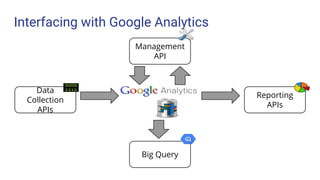
Interfacing with Google Analytics
Data
Collection
APIs
Management
API
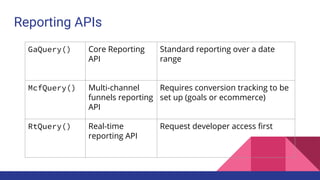
Reporting
APIs
Big Query
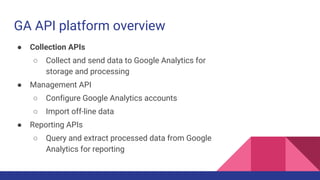
GA API platform overview
● Collection APIs
○ Collect and send data to Google Analytics for
storage and processing
● Management API
○ Configure Google Analytics accounts
○ Import off-line data
● Reporting APIs
○ Query and extract processed data from Google
Analytics for reporting
Why use the Reporting APIs?
● Surpass the limits of the GA user interface
● Automate repetitive tasks
● Perform more powerful data analysis
● Easily reproduce and reuse analyses
● Combine with other data sources
● Develop innovative tools
● Feed into other tools and applications
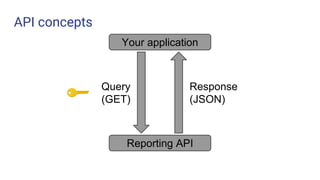
API concepts
Your application
Reporting API
Query
(GET)
Response
(JSON)
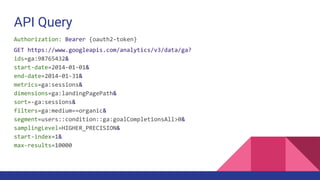
API Query
Authorization: Bearer {oauth2-token}
GET https://www.googleapis.com/analytics/v3/data/ga?
ids=ga:98765432&
start-date=2014-01-01&
end-date=2014-01-31&
metrics=ga:sessions&
dimensions=ga:landingPagePath&
sort=-ga:sessions&
filters=ga:medium==organic&
segment=users::condition::ga:goalCompletionsAll>0&
samplingLevel=HIGHER_PRECISION&
start-index=1&
max-results=10000
API Response
{
"kind": "analytics#gaData",
"id": string,
"selfLink": string,
"containsSampledData": boolean,
"query": {
...
},
"itemsPerPage": integer,
"totalResults": integer,
"previousLink": string,
"nextLink": string,
"profileInfo": {
...
},
"columnHeaders": [
{
"name": string,
"columnType": string,
"dataType": string
}, ...
],
"rows": [
[string, ...], ...
],
"sampleSize": string,
"sampleSpace": string,
"totalsForAllResults": [{
metricName: string,
...
}]
}
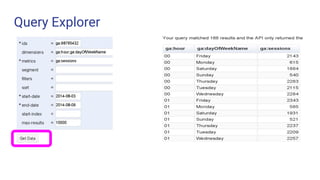
Query Explorer
Expressing yourself with GA
Explaining the steps you followed to put together a data analysis report:
● precisely and accurately
● using natural language but without ambiguity
● so that others can reproduce that report without error, and
● can reuse your steps to save time in pursuing other analysis ideas
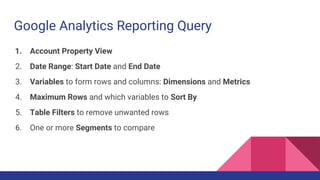
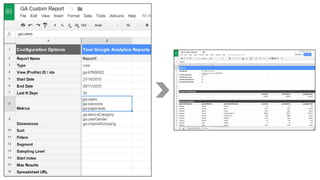
Google Analytics Reporting Query
1. Account Property View
2. Date Range: Start Date and End Date
3. Variables to form rows and columns: Dimensions and Metrics
4. Maximum Rows and which variables to Sort By
5. Table Filters to remove unwanted rows
6. One or more Segments to compare
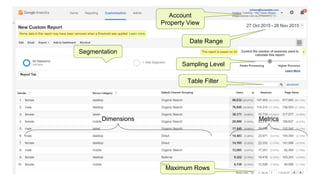
Account
Property View
Date Range
Table Filter
Segmentation
Sampling Level
Dimensions Metrics
Maximum Rows
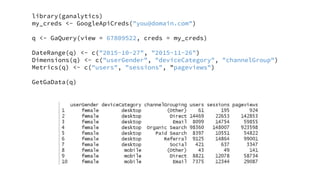
library(ganalytics)
my_creds <- GoogleApiCreds("you@domain.com")
q <- GaQuery(view = 67809522, creds = my_creds)
DateRange(q) <- c("2015-10-27", "2015-11-26")
Dimensions(q) <- c("userGender", "deviceCategory", "channelGroup")
Metrics(q) <- c("users", "sessions", "pageviews")
GetGaData(q)
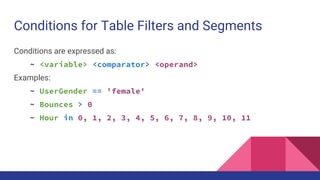
Conditions for Table Filters and Segments
Conditions are expressed as:
~ <variable> <comparator> <operand>
Examples:
~ UserGender == 'female'
~ Bounces > 0
~ Hour in 0, 1, 2, 3, 4, 5, 6, 7, 8, 9, 10, 11
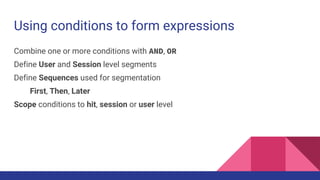
Using conditions to form expressions
Combine one or more conditions with AND, OR
Define User and Session level segments
Define Sequences used for segmentation
First, Then, Later
Scope conditions to hit, session or user level
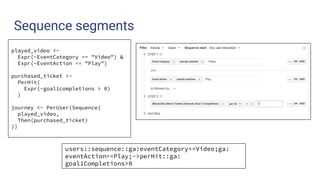
Sequence segments
users::sequence::ga:eventCategory==Video;ga:
eventAction==Play;->perHit::ga:
goal1Completions>0
played_video <-
Expr(~EventCategory == "Video") &
Expr(~EventAction == "Play")
purchased_ticket <-
PerHit(
Expr(~goal1completions > 0)
)
journey <- PerUser(Sequence(
played_video,
Then(purchased_ticket)
))
Google Analytics User Conference 2014 #GAUC2014
ganalytics for R
Goals of the ‘ganalytics’ R package
● Access to all Google Analytics features
● Easy to use, familiar to R users and in GA lingo
● Abstract away from API technicalities
● Interactively build and manipulate queries
● Detect and correct query definition errors
● Integrate with R classes, functions and other packages
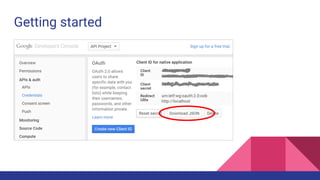
Getting started
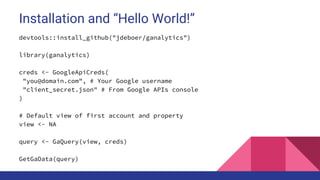
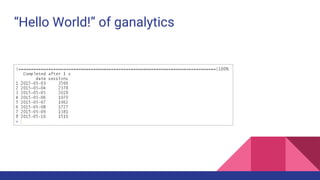
Installation and “Hello World!”
devtools::install_github("jdeboer/ganalytics")
library(ganalytics)
creds <- GoogleApiCreds(
"you@domain.com", # Your Google username
"client_secret.json" # From Google APIs console
)
# Default view of first account and property
view <- NA
query <- GaQuery(view, creds)
GetGaData(query)
“Hello World!” of ganalytics
Google Analytics User Conference 2014 #GAUC2014
Defining your query and
getting data into R with
ganalytics
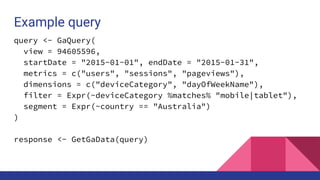
Example query
query <- GaQuery(
view = 94605596,
startDate = "2015-01-01", endDate = "2015-01-31",
metrics = c("users", "sessions", "pageviews"),
dimensions = c("deviceCategory", "dayOfWeekName"),
filter = Expr(~deviceCategory %matches% "mobile|tablet"),
segment = Expr(~country == "Australia")
)
response <- GetGaData(query)
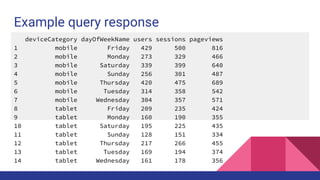
Example query response
deviceCategory dayOfWeekName users sessions pageviews
1 mobile Friday 429 500 816
2 mobile Monday 273 329 466
3 mobile Saturday 339 399 640
4 mobile Sunday 256 301 487
5 mobile Thursday 420 475 689
6 mobile Tuesday 314 358 542
7 mobile Wednesday 304 357 571
8 tablet Friday 209 235 424
9 tablet Monday 160 190 355
10 tablet Saturday 195 225 435
11 tablet Sunday 128 151 334
12 tablet Thursday 217 266 455
13 tablet Tuesday 169 194 374
14 tablet Wednesday 161 178 356
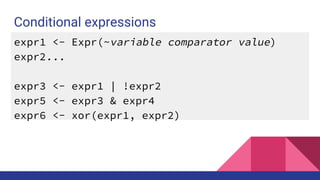
Conditional expressions
expr1 <- Expr(~variable comparator value)
expr2...
expr3 <- expr1 | !expr2
expr5 <- expr3 & expr4
expr6 <- xor(expr1, expr2)
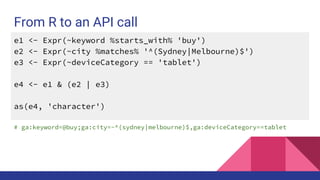
From R to an API call
e1 <- Expr(~keyword %starts_with% 'buy')
e2 <- Expr(~city %matches% '^(Sydney|Melbourne)$')
e3 <- Expr(~deviceCategory == 'tablet')
e4 <- e1 & (e2 | e3)
as(e4, 'character')
# ga:keyword=@buy;ga:city=~^(sydney|melbourne)$,ga:deviceCategory==tablet
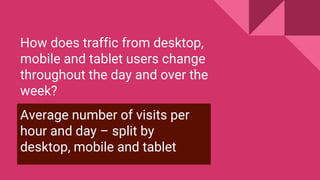
How does traffic from desktop,
mobile and tablet users change
throughout the day and over the
week?
Average number of visits per
hour and day – split by
desktop, mobile and tablet
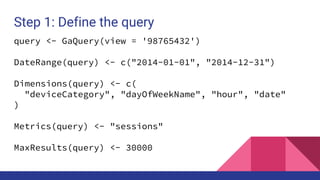
Step 1: Define the query
query <- GaQuery(view = '98765432')
DateRange(query) <- c("2014-01-01", "2014-12-31")
Dimensions(query) <- c(
"deviceCategory", "dayOfWeekName", "hour", "date"
)
Metrics(query) <- "sessions"
MaxResults(query) <- 30000
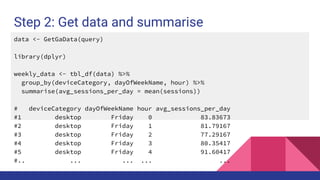
Step 2: Get data and summarise
data <- GetGaData(query)
library(dplyr)
weekly_data <- tbl_df(data) %>%
group_by(deviceCategory, dayOfWeekName, hour) %>%
summarise(avg_sessions_per_day = mean(sessions))
# deviceCategory dayOfWeekName hour avg_sessions_per_day
#1 desktop Friday 0 83.83673
#2 desktop Friday 1 81.79167
#3 desktop Friday 2 77.29167
#4 desktop Friday 3 80.35417
#5 desktop Friday 4 91.60417
#.. ... ... ... ...
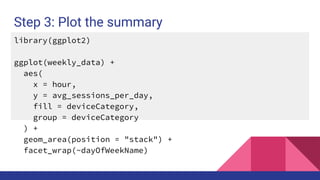
Step 3: Plot the summary
library(ggplot2)
ggplot(weekly_data) +
aes(
x = hour,
y = avg_sessions_per_day,
fill = deviceCategory,
group = deviceCategory
) +
geom_area(position = "stack") +
facet_wrap(~dayOfWeekName)
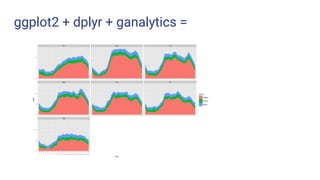
ggplot2 + dplyr + ganalytics =
Which permutation of two different
device types are signed-in users most
likely to transition between?
Define sequences to segment users by
permutations of device type and compare
against total users of each type of device.
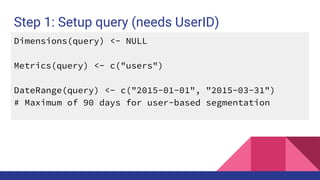
Step 1: Setup query (needs UserID)
Dimensions(query) <- NULL
Metrics(query) <- c("users")
DateRange(query) <- c("2015-01-01", "2015-03-31")
# Maximum of 90 days for user-based segmentation
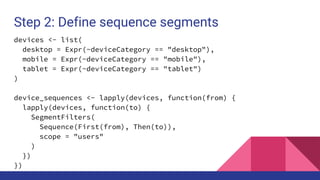
Step 2: Define sequence segments
devices <- list(
desktop = Expr(~deviceCategory == "desktop"),
mobile = Expr(~deviceCategory == "mobile"),
tablet = Expr(~deviceCategory == "tablet")
)
device_sequences <- lapply(devices, function(from) {
lapply(devices, function(to) {
SegmentFilters(
Sequence(First(from), Then(to)),
scope = "users"
)
})
})
Step 3: Get data for each segment
data <- lapply(seq_along(device_sequences), function(from_index){
from_name <- names(device_sequences)[from_index]
from_seq <- device_sequences[[from_index]]
lapply(seq_along(from_seq), function(to_index){
to_name <- names(from_seq)[to_index]
Segment(query) <- from_seq[[to_index]]
df <- GetGaData(query)
df <- cbind(from = from_name, to = to_name, df)
})
})
data <- unlist(data, recursive = FALSE)
data <- do.call(rbind, data)
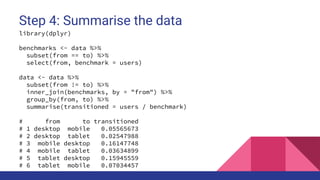
Step 4: Summarise the data
library(dplyr)
benchmarks <- data %>%
subset(from == to) %>%
select(from, benchmark = users)
data <- data %>%
subset(from != to) %>%
inner_join(benchmarks, by = "from") %>%
group_by(from, to) %>%
summarise(transitioned = users / benchmark)
# from to transitioned
# 1 desktop mobile 0.05565673
# 2 desktop tablet 0.02547988
# 3 mobile desktop 0.16147748
# 4 mobile tablet 0.03634899
# 5 tablet desktop 0.15945559
# 6 tablet mobile 0.07034457
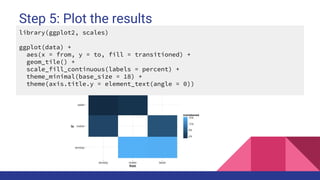
Step 5: Plot the results
library(ggplot2, scales)
ggplot(data) +
aes(x = from, y = to, fill = transitioned) +
geom_tile() +
scale_fill_continuous(labels = percent) +
theme_minimal(base_size = 18) +
theme(axis.title.y = element_text(angle = 0))
Google Analytics User Conference 2014 #GAUC2014
Custom Funnels
Where are shoppers likely to drop out of your ecommerce website?
Custom Funnels: GA Premium
● A linear sequence of stages like a goal funnel:
○ Restricted to only five stages
● Apply retrospectively
● Beyond just pageviews, e.g. campaigns, events
● Session-based like goals or user-based
● Like the enhanced ecommerce funnel reports:
○ Create segments on-the-go
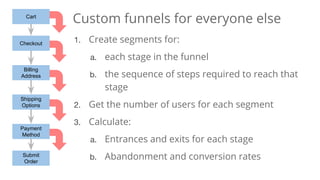
Cart
Checkout
Billing
Address
Shipping
Options
Payment
Method
Submit
Order
Custom funnels for everyone else
1. Create segments for:
a. each stage in the funnel
b. the sequence of steps required to reach that
stage
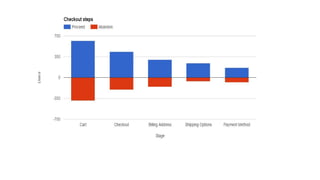
2. Get the number of users for each segment
3. Calculate:
a. Entrances and exits for each stage
b. Abandonment and conversion rates
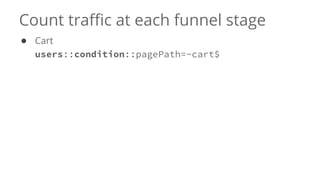
Count traffic at each funnel stage
● Cart
users::condition::pagePath=~cart$
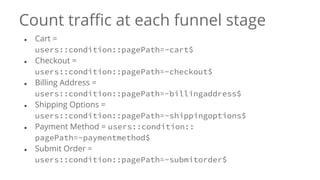
Count traffic at each funnel stage
● Cart =
users::condition::pagePath=~cart$
● Checkout =
users::condition::pagePath=~checkout$
● Billing Address =
users::condition::pagePath=~billingaddress$
● Shipping Options =
users::condition::pagePath=~shippingoptions$
● Payment Method = users::condition::
pagePath=~paymentmethod$
● Submit Order =
users::condition::pagePath=~submitorder$
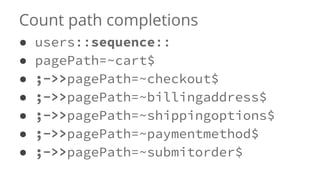
Count path completions
● users::sequence::
● pagePath=~cart$
● ;->>pagePath=~checkout$
● ;->>pagePath=~billingaddress$
● ;->>pagePath=~shippingoptions$
● ;->>pagePath=~paymentmethod$
● ;->>pagePath=~submitorder$
Google Analytics User Conference 2014 #GAUC2014
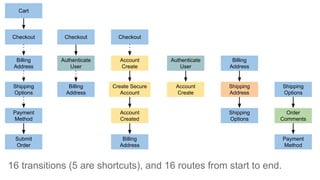
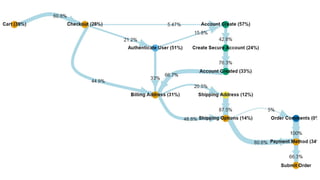
Conversion funnel
analysis with R
Cart Checkout
Billing
Address
Shipping
Options
Payment
Method
Submit
Order
Authenticate
User
Account
Create
Create Secure
Account
Account
Created
Shipping
Address
Order
Comments
Cart
Checkout
Billing
Address
Shipping
Options
Payment
Method
Submit
Order
Authenticate
User
Checkout
Billing
Address
Account
Create
Create Secure
Account
Account
Created
Checkout
Billing
Address
Account
Create
Authenticate
User
Shipping
Address
Billing
Address
Shipping
Options
Order
Comments
Shipping
Options
Payment
Method
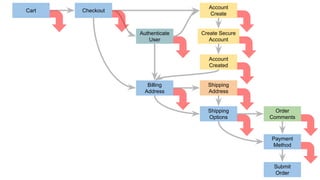
16 transitions (5 are shortcuts), and 16 routes from start to end.
#2015AC
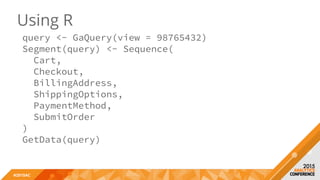
Using R
query <- GaQuery(view = 98765432)
Segment(query) <- Sequence(
Cart,
Checkout,
BillingAddress,
ShippingOptions,
PaymentMethod,
SubmitOrder
)
GetData(query)
Google Analytics User Conference 2014 #GAUC2014
Using ganalytics
with other
Google Analytics APIs
Reporting APIs
GaQuery() Core Reporting
API
Standard reporting over a date
range
McfQuery() Multi-channel
funnels reporting
API
Requires conversion tracking to be
set up (goals or ecommerce)
RtQuery() Real-time
reporting API
Request developer access first
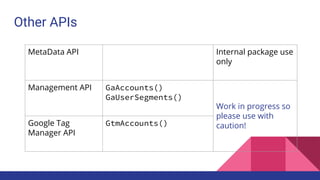
Other APIs
MetaData API Internal package use
only
Management API GaAccounts()
GaUserSegments()
Work in progress so
please use with
caution!Google Tag
Manager API
GtmAccounts()
Get involved!
Open source R package development is fun!
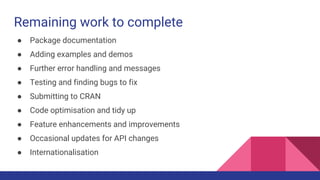
Remaining work to complete
● Package documentation
● Adding examples and demos
● Further error handling and messages
● Testing and finding bugs to fix
● Submitting to CRAN
● Code optimisation and tidy up
● Feature enhancements and improvements
● Occasional updates for API changes
● Internationalisation
GA Dashboard - Shiny R demo
https://mark.shinyapps.io/GA-dashboard-demo/
by Mark Edmondson
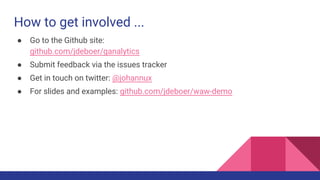
How to get involved ...
● Go to the Github site:
github.com/jdeboer/ganalytics
● Submit feedback via the issues tracker
● Get in touch on twitter: @johannux
● For slides and examples: github.com/jdeboer/waw-demo

Interactively querying Google Analytics reports from R using ganalytics

  • 1.
    Taking Google Analyticsto the next level Johann de Boer, digital analytics consultant and trainer
  • 2.
    Johann de Boer ●Digital Analytics consultant and trainer ● Loves Data ● Master of Analytics (Marketing) ● Bachelor of Engineering (Computer Systems) ● From user experience and accessibility ● To analytics implementation and insights
  • 3.
    Purpose of thistalk Encourage web data analysts to move to R and away from Excel! Help those wanting to learn R to get started.
  • 4.
    What is R? ●open-source programming language ● purpose built for data analysis ● World domination!
  • 5.
    Interfacing with GoogleAnalytics Data Collection APIs Management API Reporting APIs Big Query
  • 6.
    GA API platformoverview ● Collection APIs ○ Collect and send data to Google Analytics for storage and processing ● Management API ○ Configure Google Analytics accounts ○ Import off-line data ● Reporting APIs ○ Query and extract processed data from Google Analytics for reporting
  • 7.
    Why use theReporting APIs? ● Surpass the limits of the GA user interface ● Automate repetitive tasks ● Perform more powerful data analysis ● Easily reproduce and reuse analyses ● Combine with other data sources ● Develop innovative tools ● Feed into other tools and applications
  • 8.
    API concepts Your application ReportingAPI Query (GET) Response (JSON)
  • 9.
    API Query Authorization: Bearer{oauth2-token} GET https://www.googleapis.com/analytics/v3/data/ga? ids=ga:98765432& start-date=2014-01-01& end-date=2014-01-31& metrics=ga:sessions& dimensions=ga:landingPagePath& sort=-ga:sessions& filters=ga:medium==organic& segment=users::condition::ga:goalCompletionsAll>0& samplingLevel=HIGHER_PRECISION& start-index=1& max-results=10000
  • 10.
    API Response { "kind": "analytics#gaData", "id":string, "selfLink": string, "containsSampledData": boolean, "query": { ... }, "itemsPerPage": integer, "totalResults": integer, "previousLink": string, "nextLink": string, "profileInfo": { ... }, "columnHeaders": [ { "name": string, "columnType": string, "dataType": string }, ... ], "rows": [ [string, ...], ... ], "sampleSize": string, "sampleSpace": string, "totalsForAllResults": [{ metricName: string, ... }] }
  • 11.
  • 12.
    Expressing yourself withGA Explaining the steps you followed to put together a data analysis report: ● precisely and accurately ● using natural language but without ambiguity ● so that others can reproduce that report without error, and ● can reuse your steps to save time in pursuing other analysis ideas
  • 13.
    Google Analytics ReportingQuery 1. Account Property View 2. Date Range: Start Date and End Date 3. Variables to form rows and columns: Dimensions and Metrics 4. Maximum Rows and which variables to Sort By 5. Table Filters to remove unwanted rows 6. One or more Segments to compare
  • 14.
    Account Property View Date Range TableFilter Segmentation Sampling Level Dimensions Metrics Maximum Rows
  • 16.
    library(ganalytics) my_creds <- GoogleApiCreds("you@domain.com") q<- GaQuery(view = 67809522, creds = my_creds) DateRange(q) <- c("2015-10-27", "2015-11-26") Dimensions(q) <- c("userGender", "deviceCategory", "channelGroup") Metrics(q) <- c("users", "sessions", "pageviews") GetGaData(q)
  • 17.
    Conditions for TableFilters and Segments Conditions are expressed as: ~ <variable> <comparator> <operand> Examples: ~ UserGender == 'female' ~ Bounces > 0 ~ Hour in 0, 1, 2, 3, 4, 5, 6, 7, 8, 9, 10, 11
  • 18.
    Using conditions toform expressions Combine one or more conditions with AND, OR Define User and Session level segments Define Sequences used for segmentation First, Then, Later Scope conditions to hit, session or user level
  • 19.
    Sequence segments users::sequence::ga:eventCategory==Video;ga: eventAction==Play;->perHit::ga: goal1Completions>0 played_video <- Expr(~EventCategory== "Video") & Expr(~EventAction == "Play") purchased_ticket <- PerHit( Expr(~goal1completions > 0) ) journey <- PerUser(Sequence( played_video, Then(purchased_ticket) ))
  • 20.
    Google Analytics UserConference 2014 #GAUC2014 ganalytics for R
  • 21.
    Goals of the‘ganalytics’ R package ● Access to all Google Analytics features ● Easy to use, familiar to R users and in GA lingo ● Abstract away from API technicalities ● Interactively build and manipulate queries ● Detect and correct query definition errors ● Integrate with R classes, functions and other packages
  • 22.
  • 23.
    Installation and “HelloWorld!” devtools::install_github("jdeboer/ganalytics") library(ganalytics) creds <- GoogleApiCreds( "you@domain.com", # Your Google username "client_secret.json" # From Google APIs console ) # Default view of first account and property view <- NA query <- GaQuery(view, creds) GetGaData(query)
  • 24.
  • 25.
    Google Analytics UserConference 2014 #GAUC2014 Defining your query and getting data into R with ganalytics
  • 26.
    Example query query <-GaQuery( view = 94605596, startDate = "2015-01-01", endDate = "2015-01-31", metrics = c("users", "sessions", "pageviews"), dimensions = c("deviceCategory", "dayOfWeekName"), filter = Expr(~deviceCategory %matches% "mobile|tablet"), segment = Expr(~country == "Australia") ) response <- GetGaData(query)
  • 27.
    Example query response deviceCategorydayOfWeekName users sessions pageviews 1 mobile Friday 429 500 816 2 mobile Monday 273 329 466 3 mobile Saturday 339 399 640 4 mobile Sunday 256 301 487 5 mobile Thursday 420 475 689 6 mobile Tuesday 314 358 542 7 mobile Wednesday 304 357 571 8 tablet Friday 209 235 424 9 tablet Monday 160 190 355 10 tablet Saturday 195 225 435 11 tablet Sunday 128 151 334 12 tablet Thursday 217 266 455 13 tablet Tuesday 169 194 374 14 tablet Wednesday 161 178 356
  • 28.
    Conditional expressions expr1 <-Expr(~variable comparator value) expr2... expr3 <- expr1 | !expr2 expr5 <- expr3 & expr4 expr6 <- xor(expr1, expr2)
  • 29.
    From R toan API call e1 <- Expr(~keyword %starts_with% 'buy') e2 <- Expr(~city %matches% '^(Sydney|Melbourne)$') e3 <- Expr(~deviceCategory == 'tablet') e4 <- e1 & (e2 | e3) as(e4, 'character') # ga:keyword=@buy;ga:city=~^(sydney|melbourne)$,ga:deviceCategory==tablet
  • 30.
    How does trafficfrom desktop, mobile and tablet users change throughout the day and over the week? Average number of visits per hour and day – split by desktop, mobile and tablet
  • 31.
    Step 1: Definethe query query <- GaQuery(view = '98765432') DateRange(query) <- c("2014-01-01", "2014-12-31") Dimensions(query) <- c( "deviceCategory", "dayOfWeekName", "hour", "date" ) Metrics(query) <- "sessions" MaxResults(query) <- 30000
  • 32.
    Step 2: Getdata and summarise data <- GetGaData(query) library(dplyr) weekly_data <- tbl_df(data) %>% group_by(deviceCategory, dayOfWeekName, hour) %>% summarise(avg_sessions_per_day = mean(sessions)) # deviceCategory dayOfWeekName hour avg_sessions_per_day #1 desktop Friday 0 83.83673 #2 desktop Friday 1 81.79167 #3 desktop Friday 2 77.29167 #4 desktop Friday 3 80.35417 #5 desktop Friday 4 91.60417 #.. ... ... ... ...
  • 33.
    Step 3: Plotthe summary library(ggplot2) ggplot(weekly_data) + aes( x = hour, y = avg_sessions_per_day, fill = deviceCategory, group = deviceCategory ) + geom_area(position = "stack") + facet_wrap(~dayOfWeekName)
  • 34.
    ggplot2 + dplyr+ ganalytics =
  • 35.
    Which permutation oftwo different device types are signed-in users most likely to transition between? Define sequences to segment users by permutations of device type and compare against total users of each type of device.
  • 36.
    Step 1: Setupquery (needs UserID) Dimensions(query) <- NULL Metrics(query) <- c("users") DateRange(query) <- c("2015-01-01", "2015-03-31") # Maximum of 90 days for user-based segmentation
  • 37.
    Step 2: Definesequence segments devices <- list( desktop = Expr(~deviceCategory == "desktop"), mobile = Expr(~deviceCategory == "mobile"), tablet = Expr(~deviceCategory == "tablet") ) device_sequences <- lapply(devices, function(from) { lapply(devices, function(to) { SegmentFilters( Sequence(First(from), Then(to)), scope = "users" ) }) })
  • 38.
    Step 3: Getdata for each segment data <- lapply(seq_along(device_sequences), function(from_index){ from_name <- names(device_sequences)[from_index] from_seq <- device_sequences[[from_index]] lapply(seq_along(from_seq), function(to_index){ to_name <- names(from_seq)[to_index] Segment(query) <- from_seq[[to_index]] df <- GetGaData(query) df <- cbind(from = from_name, to = to_name, df) }) }) data <- unlist(data, recursive = FALSE) data <- do.call(rbind, data)
  • 39.
    Step 4: Summarisethe data library(dplyr) benchmarks <- data %>% subset(from == to) %>% select(from, benchmark = users) data <- data %>% subset(from != to) %>% inner_join(benchmarks, by = "from") %>% group_by(from, to) %>% summarise(transitioned = users / benchmark) # from to transitioned # 1 desktop mobile 0.05565673 # 2 desktop tablet 0.02547988 # 3 mobile desktop 0.16147748 # 4 mobile tablet 0.03634899 # 5 tablet desktop 0.15945559 # 6 tablet mobile 0.07034457
  • 40.
    Step 5: Plotthe results library(ggplot2, scales) ggplot(data) + aes(x = from, y = to, fill = transitioned) + geom_tile() + scale_fill_continuous(labels = percent) + theme_minimal(base_size = 18) + theme(axis.title.y = element_text(angle = 0))
  • 41.
    Google Analytics UserConference 2014 #GAUC2014 Custom Funnels Where are shoppers likely to drop out of your ecommerce website?
  • 42.
    Custom Funnels: GAPremium ● A linear sequence of stages like a goal funnel: ○ Restricted to only five stages ● Apply retrospectively ● Beyond just pageviews, e.g. campaigns, events ● Session-based like goals or user-based ● Like the enhanced ecommerce funnel reports: ○ Create segments on-the-go
  • 43.
    Cart Checkout Billing Address Shipping Options Payment Method Submit Order Custom funnels foreveryone else 1. Create segments for: a. each stage in the funnel b. the sequence of steps required to reach that stage 2. Get the number of users for each segment 3. Calculate: a. Entrances and exits for each stage b. Abandonment and conversion rates
  • 44.
    Count traffic ateach funnel stage ● Cart users::condition::pagePath=~cart$
  • 45.
    Count traffic ateach funnel stage ● Cart = users::condition::pagePath=~cart$ ● Checkout = users::condition::pagePath=~checkout$ ● Billing Address = users::condition::pagePath=~billingaddress$ ● Shipping Options = users::condition::pagePath=~shippingoptions$ ● Payment Method = users::condition:: pagePath=~paymentmethod$ ● Submit Order = users::condition::pagePath=~submitorder$
  • 46.
    Count path completions ●users::sequence:: ● pagePath=~cart$ ● ;->>pagePath=~checkout$ ● ;->>pagePath=~billingaddress$ ● ;->>pagePath=~shippingoptions$ ● ;->>pagePath=~paymentmethod$ ● ;->>pagePath=~submitorder$
  • 48.
    Google Analytics UserConference 2014 #GAUC2014 Conversion funnel analysis with R
  • 49.
  • 50.
  • 52.
    #2015AC Using R query <-GaQuery(view = 98765432) Segment(query) <- Sequence( Cart, Checkout, BillingAddress, ShippingOptions, PaymentMethod, SubmitOrder ) GetData(query)
  • 53.
    Google Analytics UserConference 2014 #GAUC2014 Using ganalytics with other Google Analytics APIs
  • 54.
    Reporting APIs GaQuery() CoreReporting API Standard reporting over a date range McfQuery() Multi-channel funnels reporting API Requires conversion tracking to be set up (goals or ecommerce) RtQuery() Real-time reporting API Request developer access first
  • 55.
    Other APIs MetaData APIInternal package use only Management API GaAccounts() GaUserSegments() Work in progress so please use with caution!Google Tag Manager API GtmAccounts()
  • 56.
    Get involved! Open sourceR package development is fun!
  • 57.
    Remaining work tocomplete ● Package documentation ● Adding examples and demos ● Further error handling and messages ● Testing and finding bugs to fix ● Submitting to CRAN ● Code optimisation and tidy up ● Feature enhancements and improvements ● Occasional updates for API changes ● Internationalisation
  • 58.
    GA Dashboard -Shiny R demo https://mark.shinyapps.io/GA-dashboard-demo/ by Mark Edmondson
  • 59.
    How to getinvolved ... ● Go to the Github site: github.com/jdeboer/ganalytics ● Submit feedback via the issues tracker ● Get in touch on twitter: @johannux ● For slides and examples: github.com/jdeboer/waw-demo