www.intothebox.org
ME
In a nutshell
BUILDING NOSQL APPS
with MongoDB

(the “tech tasting” super high-level mix)
WHENTO USE NOSQL
(and when NOT to)
“When the only tool you have is a hammer,

everything looks like a nail.”

- Maslow’s Law of the Instrument
NoSQL Strengths
• Consistent data data representation throughout logic
• Fast and flexible for rapid development
• Simplicity of serialization and storage makes clustering easy
• Object-based query syntax
• Native Javascript support (Mongo)
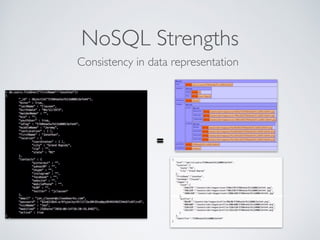
NoSQL Strengths
=
Consistency in data representation
SQL RDBMS Strengths
• Relationship management
• Schema enforcement
• Wide usage and understanding of SQL
• Highly configurable roles and permissions, evolved for
enterprise use
• Built-in functions, stored procedures, views, etc.
NoSQL Use Cases
• Networking applications
• CMS/Document/Entity-driven applications
• Feedback-driven applications
• Data collection & analytics
• 3rd party aggregation applications
RDBMS Use Cases
• Accounting/Finance/Mathematical Applications
• Applications with relationships which enforce other
relationships (e.g. - e-commerce, travel, quality control)
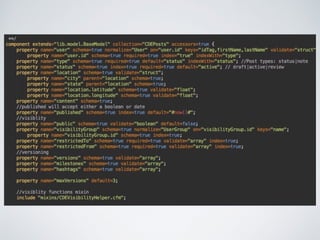
SCHEMA ENFORCEMENT
in a schema-less environment
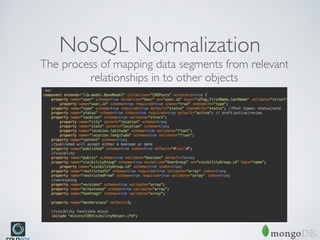
NoSQL Normalization
The process of mapping data segments from relevant
relationships in to other objects
CLUSTERING & SHARDING
distributed scaling with MongoDB
SHARDING
Distribution of collection segments (and GridFS binary objects)
across a number of servers
hosts= [
{
serverName='ds012345.mongolab.com',
serverPort='12345',
username="myUsername",
password="my53cUr3P455",
authenticationDB="myremotedb"
},
//note that we only needed the credentials and the authenticationDB value for the first
host entry.
//All other hosts must use the same values.
{
serverName='ds023456.mongolab.com',
serverPort='23456',
},
{
serverName='ds034567.mongolab.com',
serverPort='34567',
}
]
GRIDFS
low-overhead solution for storing, streaming and serving files in
MongoDB
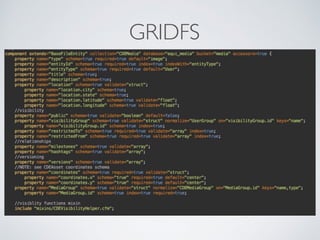
GRIDFS
GRIDFS
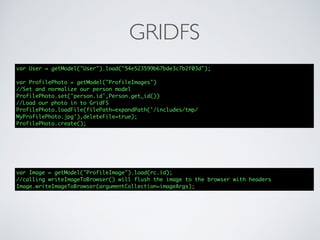
var User = getModel("User").load("54e523599b67bde3c7b2f03d");
var ProfilePhoto = getModel("ProfileImages")
//Set and normalize our person model
ProfilePhoto.set('person.id',Person.get_id())
//Load our photo in to GridFS
ProfilePhoto.loadFile(filePath=expandPath('/includes/tmp/
MyProfilePhoto.jpg'),deleteFile=true);
ProfilePhoto.create();
var Image = getModel("ProfileImage").load(rc.id);
//calling writeImageToBrowser() will flush the image to the browser with headers
Image.writeImageToBrowser(argumentCollection=imageArgs);
CBMongoDB
MongoDB’s ORM for Coldbox
box install cbmongodb
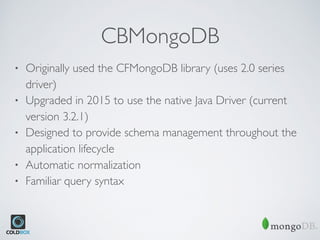
CBMongoDB
• Originally used the CFMongoDB library (uses 2.0 series
driver)
• Upgraded in 2015 to use the native Java Driver (current
version 3.2.1)
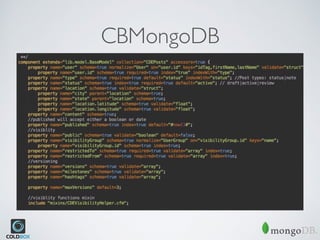
• Designed to provide schema management throughout the
application lifecycle
• Automatic normalization
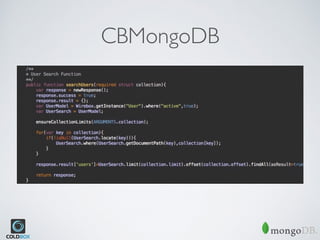
• Familiar query syntax
CBMongoDB
CBMongoDB
Q&A
Next Session Begins @ 5:00PM

ITB2016 - NoSQL with mongodb and ColdFusion (CFML)

  • 1.
  • 2.
  • 3.
    BUILDING NOSQL APPS withMongoDB
 (the “tech tasting” super high-level mix)
  • 4.
    WHENTO USE NOSQL (andwhen NOT to) “When the only tool you have is a hammer,
 everything looks like a nail.”
 - Maslow’s Law of the Instrument
  • 5.
    NoSQL Strengths • Consistentdata data representation throughout logic • Fast and flexible for rapid development • Simplicity of serialization and storage makes clustering easy • Object-based query syntax • Native Javascript support (Mongo)
  • 6.
  • 7.
    SQL RDBMS Strengths •Relationship management • Schema enforcement • Wide usage and understanding of SQL • Highly configurable roles and permissions, evolved for enterprise use • Built-in functions, stored procedures, views, etc.
  • 8.
    NoSQL Use Cases •Networking applications • CMS/Document/Entity-driven applications • Feedback-driven applications • Data collection & analytics • 3rd party aggregation applications
  • 9.
    RDBMS Use Cases •Accounting/Finance/Mathematical Applications • Applications with relationships which enforce other relationships (e.g. - e-commerce, travel, quality control)
  • 10.
    SCHEMA ENFORCEMENT in aschema-less environment
  • 11.
    NoSQL Normalization The processof mapping data segments from relevant relationships in to other objects
  • 13.
  • 14.
    SHARDING Distribution of collectionsegments (and GridFS binary objects) across a number of servers hosts= [ { serverName='ds012345.mongolab.com', serverPort='12345', username="myUsername", password="my53cUr3P455", authenticationDB="myremotedb" }, //note that we only needed the credentials and the authenticationDB value for the first host entry. //All other hosts must use the same values. { serverName='ds023456.mongolab.com', serverPort='23456', }, { serverName='ds034567.mongolab.com', serverPort='34567', } ]
  • 15.
    GRIDFS low-overhead solution forstoring, streaming and serving files in MongoDB
  • 16.
  • 17.
    GRIDFS var User =getModel("User").load("54e523599b67bde3c7b2f03d"); var ProfilePhoto = getModel("ProfileImages") //Set and normalize our person model ProfilePhoto.set('person.id',Person.get_id()) //Load our photo in to GridFS ProfilePhoto.loadFile(filePath=expandPath('/includes/tmp/ MyProfilePhoto.jpg'),deleteFile=true); ProfilePhoto.create(); var Image = getModel("ProfileImage").load(rc.id); //calling writeImageToBrowser() will flush the image to the browser with headers Image.writeImageToBrowser(argumentCollection=imageArgs);
  • 18.
    CBMongoDB MongoDB’s ORM forColdbox box install cbmongodb
  • 19.
    CBMongoDB • Originally usedthe CFMongoDB library (uses 2.0 series driver) • Upgraded in 2015 to use the native Java Driver (current version 3.2.1) • Designed to provide schema management throughout the application lifecycle • Automatic normalization • Familiar query syntax
  • 20.
  • 21.
  • 22.
  • 23.