Len Chang
08.18 2019
1
▪ Me
▪ The introduction of knex.js
▪ What’s the problem that schema change ?
▪ Create seed data and migration files
▪ How to solve the problem ?
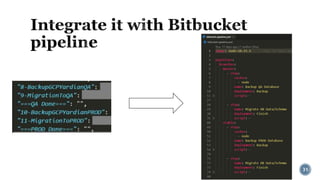
▪ Integrate it with Bitbucket pipeline
▪ Q & A
2
▪ Len Chang
▪ Engineer
▪ Like..
▪ Baseball / Beer / Finance
▪ Coding
▪ JavaScript / Typescript
▪ DB
▪ PostgreSQL / Elasticsearch
▪ Volunteer
▪ Nantou Code Geek
▪ You can find me..
▪ LinkedIn
▪ Facebook
▪ PPT Online
3
Library Docs (Link)
4
▪ Knex.js is a "batteries included" SQL query builder
for Postgres, MSSQL, MySQL, MariaDB, SQLite3, Oracle, and Amazon
Redshift designed to be flexible, portable, and fun to use.
▪ Basically it’s the major choice when you use nodejs and RDBMS to do the backend
server.
▪ Features
▪ Query Builder
▪ Pooling
▪ Transactions
▪ Migrations
▪ Seed files
5
▪ Query Builder
▪ The heart of the library, the knex query builder is the interface used for building and
executing standard SQL queries, such as select, insert, update, delete.
▪ Example
knex({ a: 'table', b: 'table' })
.select({
aTitle: 'a.title',
bTitle: 'b.title'
})
.whereRaw('?? = ??', ['a.column_1', 'b.column_2’])
// select "a"."title" as "aTitle", "b"."title" as "bTitle" from "table" as "a", "table" as "b" where "a"."column_1" = "b"."column_2"
6
Application
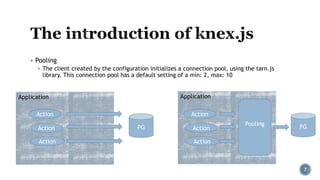
▪ Pooling
▪ The client created by the configuration initializes a connection pool, using the tarn.js
library. This connection pool has a default setting of a min: 2, max: 10
7
Pooling
Action
Action
Action
PG
Application
Action
Action
Action
PG
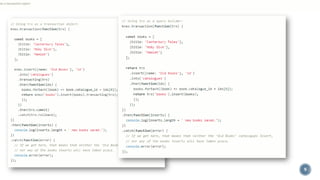
▪ Transactions
▪ All queries within a transaction are executed on the same database connection, and run
the entire set of queries as a single unit of work. Any failure will mean the database will
rollback any queries executed on that connection to the pre-transaction state.
▪ Methods
1. As a transaction object
2. As a query builder
8
as a transaction object
▪ Transactions
▪ Methods
1. As a transaction object
2. As a query builder
9
as a transaction object
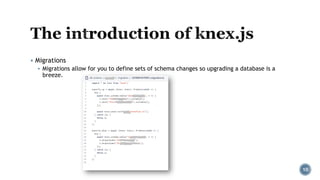
▪ Migrations
▪ Migrations allow for you to define sets of schema changes so upgrading a database is a
breeze.
10
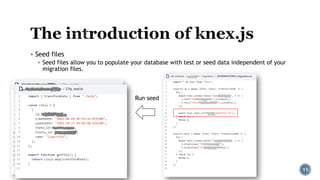
▪ Seed files
▪ Seed files allow you to populate your database with test or seed data independent of your
migration files.
11
Run seed
12
Testing
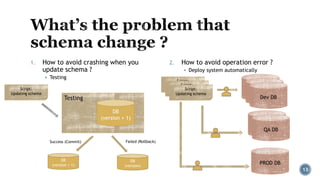
1. How to avoid crashing when you
update schema ?
▪ Testing
2. How to avoid operation error ?
▪ Deploy system automatically
13
DB
(version + 1)
Script:
Updating schema
Success (Commit) Failed (Rollback)
DB
(version + 1)
DB
(version)
Dev DB
Script:
Updating schema
QA DB
PROD DB
Dev DB
Dev DB
QA DB
Script:
Updating schemaScript:
Updating schema
3. Doesn’t need to use another tool or code language to do it.
▪ Just JavaScript
14
▪ Summary
▪ How to avoid crashing when you updated schema ?
▪ Testing
▪ How to avoid operation error ?
▪ Deploying system automatically
▪ Doesn’t need to use another tool or code language to do it
▪ Just JavaScript
15
16
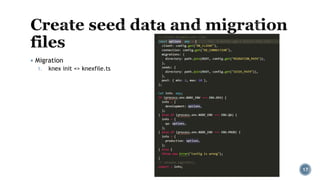
▪ Migration
1. knex init => knexfile.ts
17
▪ Migration
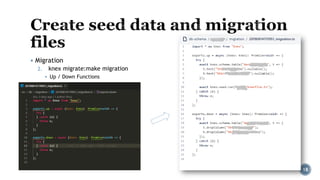
2. knex migrate:make migration
▪ Up / Down Functions
18
▪ Migration
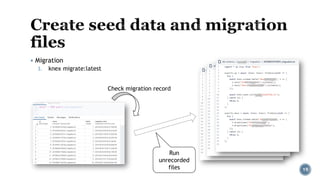
3. knex migrate:latest
19
Check migration record
Run
unrecorded
files
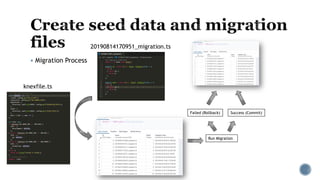
▪ Migration Process
20
knexfile.ts
20190814170951_migration.ts
Success (Commit)Failed (Rollback)
Run Migration
▪ Seed data
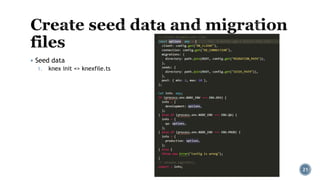
1. knex init => knexfile.ts
21
▪ Seed data
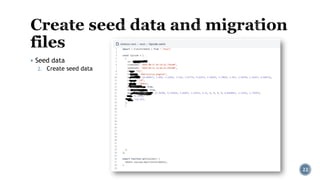
2. Create seed data
22
▪ Seed data
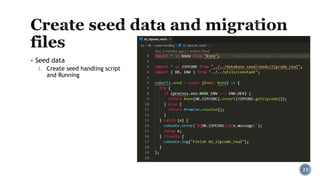
3. Create seed handling script
and Running
23
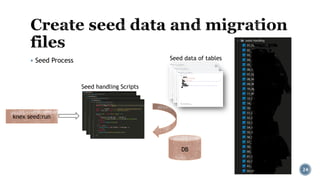
▪ Seed Process
24
Seed data of tables
Seed handling Scripts
knex seed:run
DB
Testing, deploying system automatically and just javascript !
25
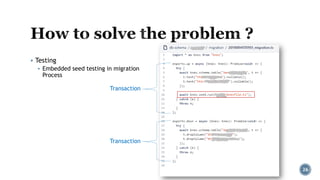
▪ Testing
▪ Embedded seed testing in migration
Process
26
Transaction
Transaction
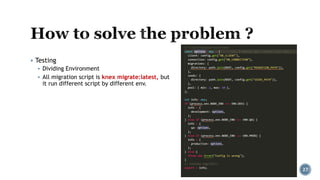
▪ Testing
▪ Dividing Environment
▪ All migration script is knex migrate:latest, but
it run different script by different env.
27
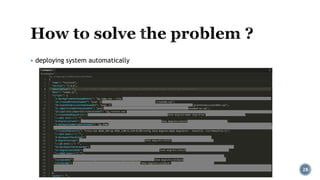
▪ deploying system automatically
28
▪ Just javascript
▪ …well…. Just you said that….only javascript.
29
30
31
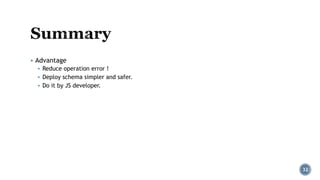
▪ Advantage
▪ Reduce operation error !
▪ Deploy schema simpler and safer.
▪ Do it by JS developer.
32
LinkedIn
Facebook
PPT Online
33

COSCUP 2019 - The discussion between Knex.js and PostgreSQL

  • 1.
  • 2.
    ▪ Me ▪ Theintroduction of knex.js ▪ What’s the problem that schema change ? ▪ Create seed data and migration files ▪ How to solve the problem ? ▪ Integrate it with Bitbucket pipeline ▪ Q & A 2
  • 3.
    ▪ Len Chang ▪Engineer ▪ Like.. ▪ Baseball / Beer / Finance ▪ Coding ▪ JavaScript / Typescript ▪ DB ▪ PostgreSQL / Elasticsearch ▪ Volunteer ▪ Nantou Code Geek ▪ You can find me.. ▪ LinkedIn ▪ Facebook ▪ PPT Online 3
  • 4.
  • 5.
    ▪ Knex.js isa "batteries included" SQL query builder for Postgres, MSSQL, MySQL, MariaDB, SQLite3, Oracle, and Amazon Redshift designed to be flexible, portable, and fun to use. ▪ Basically it’s the major choice when you use nodejs and RDBMS to do the backend server. ▪ Features ▪ Query Builder ▪ Pooling ▪ Transactions ▪ Migrations ▪ Seed files 5
  • 6.
    ▪ Query Builder ▪The heart of the library, the knex query builder is the interface used for building and executing standard SQL queries, such as select, insert, update, delete. ▪ Example knex({ a: 'table', b: 'table' }) .select({ aTitle: 'a.title', bTitle: 'b.title' }) .whereRaw('?? = ??', ['a.column_1', 'b.column_2’]) // select "a"."title" as "aTitle", "b"."title" as "bTitle" from "table" as "a", "table" as "b" where "a"."column_1" = "b"."column_2" 6
  • 7.
    Application ▪ Pooling ▪ Theclient created by the configuration initializes a connection pool, using the tarn.js library. This connection pool has a default setting of a min: 2, max: 10 7 Pooling Action Action Action PG Application Action Action Action PG
  • 8.
    ▪ Transactions ▪ Allqueries within a transaction are executed on the same database connection, and run the entire set of queries as a single unit of work. Any failure will mean the database will rollback any queries executed on that connection to the pre-transaction state. ▪ Methods 1. As a transaction object 2. As a query builder 8 as a transaction object
  • 9.
    ▪ Transactions ▪ Methods 1.As a transaction object 2. As a query builder 9 as a transaction object
  • 10.
    ▪ Migrations ▪ Migrationsallow for you to define sets of schema changes so upgrading a database is a breeze. 10
  • 11.
    ▪ Seed files ▪Seed files allow you to populate your database with test or seed data independent of your migration files. 11 Run seed
  • 12.
  • 13.
    Testing 1. How toavoid crashing when you update schema ? ▪ Testing 2. How to avoid operation error ? ▪ Deploy system automatically 13 DB (version + 1) Script: Updating schema Success (Commit) Failed (Rollback) DB (version + 1) DB (version) Dev DB Script: Updating schema QA DB PROD DB Dev DB Dev DB QA DB Script: Updating schemaScript: Updating schema
  • 14.
    3. Doesn’t needto use another tool or code language to do it. ▪ Just JavaScript 14
  • 15.
    ▪ Summary ▪ Howto avoid crashing when you updated schema ? ▪ Testing ▪ How to avoid operation error ? ▪ Deploying system automatically ▪ Doesn’t need to use another tool or code language to do it ▪ Just JavaScript 15
  • 16.
  • 17.
    ▪ Migration 1. knexinit => knexfile.ts 17
  • 18.
    ▪ Migration 2. knexmigrate:make migration ▪ Up / Down Functions 18
  • 19.
    ▪ Migration 3. knexmigrate:latest 19 Check migration record Run unrecorded files
  • 20.
  • 21.
    ▪ Seed data 1.knex init => knexfile.ts 21
  • 22.
    ▪ Seed data 2.Create seed data 22
  • 23.
    ▪ Seed data 3.Create seed handling script and Running 23
  • 24.
    ▪ Seed Process 24 Seeddata of tables Seed handling Scripts knex seed:run DB
  • 25.
    Testing, deploying systemautomatically and just javascript ! 25
  • 26.
    ▪ Testing ▪ Embeddedseed testing in migration Process 26 Transaction Transaction
  • 27.
    ▪ Testing ▪ DividingEnvironment ▪ All migration script is knex migrate:latest, but it run different script by different env. 27
  • 28.
    ▪ deploying systemautomatically 28
  • 29.
    ▪ Just javascript ▪…well…. Just you said that….only javascript. 29
  • 30.
  • 31.
  • 32.
    ▪ Advantage ▪ Reduceoperation error ! ▪ Deploy schema simpler and safer. ▪ Do it by JS developer. 32
  • 33.