Title: Unit II:NoSQL Data Management
CCS334 Big Data Analytics
- K H HARI PRIYA
2.
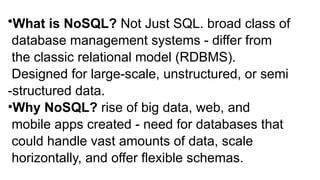
•What is NoSQL?Not Just SQL. broad class of
database management systems - differ from
the classic relational model (RDBMS).
Designed for large-scale, unstructured, or semi
-structured data.
•Why NoSQL? rise of big data, web, and
mobile apps created - need for databases that
could handle vast amounts of data, scale
horizontally, and offer flexible schemas.
3.
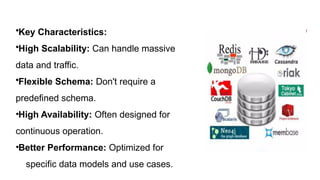
•Key Characteristics:
•High Scalability:Can handle massive amounts of
data and traffic.
•Flexible Schema: Don't require a
predefined schema.
•High Availability: Often designed for
continuous operation.
•Better Performance: Optimized for
specific data models and use cases.
5.
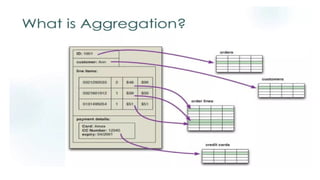
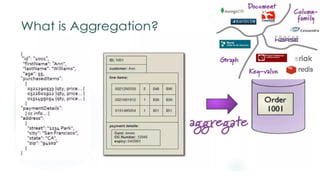
• Aggregate DataModels
• Concept: An aggregate is a collection of related data that is
treated as a single unit. Think of it as a cluster of data that
is frequently accessed together.
• Examples: A user profile with all their contact information, a
product with all its reviews.
• Significance: NoSQL databases are often optimized for
handling and retrieving these aggregates, which makes
data retrieval very fast for specific use cases.
• Types: This slide will briefly introduce the two main types
we'll cover: Key-Value and Document.
7.
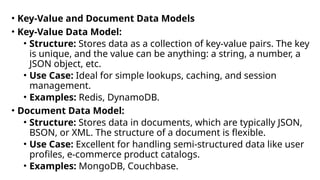
• Key-Value andDocument Data Models
• Key-Value Data Model:
• Structure: Stores data as a collection of key-value pairs. The key
is unique, and the value can be anything: a string, a number, a
JSON object, etc.
• Use Case: Ideal for simple lookups, caching, and session
management.
• Examples: Redis, DynamoDB.
• Document Data Model:
• Structure: Stores data in documents, which are typically JSON,
BSON, or XML. The structure of a document is flexible.
• Use Case: Excellent for handling semi-structured data like user
profiles, e-commerce product catalogs.
• Examples: MongoDB, Couchbase.
8.
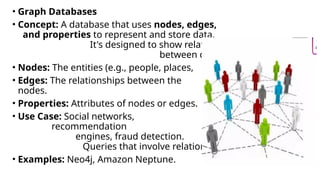
• Graph Databases
•Concept: A database that uses nodes, edges,
and properties to represent and store data.
It's designed to show relationships
between data points.
• Nodes: The entities (e.g., people, places, events).
• Edges: The relationships between the
nodes.
• Properties: Attributes of nodes or edges.
• Use Case: Social networks,
recommendation
engines, fraud detection.
Queries that involve relationships are very fast.
• Examples: Neo4j, Amazon Neptune.
9.
Schema-less Databases
• Definition:
Schema-lessdatabases are a type of NoSQL database
that do not require a predefined schema or structure for
data.
• Key Idea:
• Data can be inserted and retrieved without a fixed
structure.
• Databases can adapt to changes in data over time
without schema migrations.
• Comparison:
Unlike RDBMS, there is no enforcement of schema.
10.
Working of Schema-lessDatabases
•Data stored in JSON-style documents.
•Each document can have different fields and different
data types.
•Example Collection:
•{ name: "Joo", age: 30, interests: "football" }
•{ name: "Kate", age: 25 }
•Collections may be created implicitly or explicitly.
•Indexes must be explicitly declared.
11.
Benefits of Schema-lessDatabases
•Flexibility over data types Store, retrieve,
→
and query any type of data.
•No predefined schema Accepts any data
→
type without schema restrictions.
•No data truncation Partial schemas can
→
exist, and new fields can be added anytime.
•Adaptability Easy to evolve with application
→
requirements.
12.
Types of Schema-lessDatabases
• 1. NoSQL Databases
• Document Stores: Data in JSON, BSON, XML.
• Example: MongoDB, CouchDB
• Key-Value Stores: Data as key-value pairs, flexible values.
• Example: Redis, Riak
• Wide Column Stores: Data stored in columns (rows can
have different columns).
• Example: Cassandra, HBase
• 2. Object-Oriented Databases
• Store objects directly without requiring schema definition.
13.
• Schemaless Databases
•Concept: The ability to store data without a predefined, fixed
schema. Each record can have a different structure.
• How it Works: The schema is determined by the data itself. You
can add new fields to documents or records without altering the
entire database structure.
• Advantages:
• Flexibility: Easier to evolve applications.
• Agility: Faster development cycles.
• Disadvantages:
• Requires more care in application logic to handle potential data
inconsistencies.
• Relevance: Most NoSQL databases (Document, Key-Value) are
schemaless.
14.
•Materialized Views
•Concept: Aprecomputed, stored result of a query. It's
a snapshot of data that is refreshed periodically.
•Why use them? To improve read performance.
Instead of running a complex query on demand, the
results are already computed and ready to be served.
•Example: A view that precomputes the total sales per
region every hour.
•Note: This is a feature available in some NoSQL
databases and is crucial for speeding up analytical
queries.
15.
What is aMaterialized View?
•Definition: A precomputed, stored
representation of data that is optimized for fast
querying
•How it Works: Materialized views store query
results in a physical form, allowing faster read
access by
•avoiding recalculation of results for each query
•Benefits: Improves performance for complex
queries (e.g., aggregations, joins)
16.
Key Characteristics ofMaterialized
Views
•Precomputed Results: Stores results of complex
queries, improving aggregation/join performance
•Refresh Mechanism: Views can be updated
periodically or automatically when base data changes
•Storage Overhead: Consumes additional storage since
they hold data
•Efficiency: Speeds up read-heavy operations but
introduces challenges in maintaining up-to-date data
17.
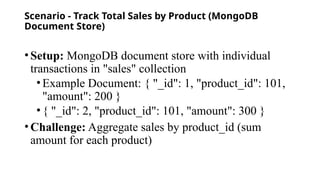
Scenario - TrackTotal Sales by Product (MongoDB
Document Store)
•Setup: MongoDB document store with individual
transactions in "sales" collection
•Example Document: { "_id": 1, "product_id": 101,
"amount": 200 }
•{ "_id": 2, "product_id": 101, "amount": 300 }
•Challenge: Aggregate sales by product_id (sum
amount for each product)
18.
Aggregation Query inMongoDB
•Query (JavaScript):
text
db.sales.aggregate([ { $group: { _id: "$product_id",
total_sales: { $sum: "$amount" } } }, { $out:
"sales_summary" } ]);
•Result: Creates "sales_summary" collection
storing precomputed totals
•Example: { "_id": 101, "total_sales": 500 }
•Advantage: Future queries on sales summary
are faster for each product
19.
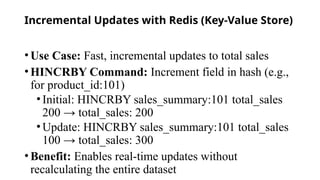
Incremental Updates withRedis (Key-Value Store)
•Use Case: Fast, incremental updates to total sales
•HINCRBY Command: Increment field in hash (e.g.,
for product_id:101)
•Initial: HINCRBY sales_summary:101 total_sales
200 → total_sales: 200
•Update: HINCRBY sales_summary:101 total_sales
100 → total_sales: 300
•Benefit: Enables real-time updates without
recalculating the entire dataset
20.
Graph Database forSales
Relationships
•Graph Structure:
•Product Node: (p:Product { product_id: 101 })
•Sale Node: (s:Sale { amount: 200 })
•Relationship: (p)-[:SOLD_IN]->(s)
•Query to Aggregate Sales: Find total sales for a
product using Cypher
•text
•MATCH (p:Product)-[:SOLD_IN]->(s:Sale)
•WHERE p.product_id = 101
•RETURN SUM(s.amount) AS total_sales
21.
Storing Materialized Viewin Graph Database
• Cypher Query:
• text
• MATCH (p:Product)-[:SOLD_IN]->(s:Sale)
• WHERE p.product_id = 101
• RETURN SUM(s.amount) AS total_sales
• Store in Database (Using MERGE):
• text
• MERGE (t:TotalSales { product_id: 101 })
• SET t.total_sales = 500
• Benefits: Ensures a total sales node exists for aggregates; updates
total_sales value to reflect changes
22.
• Social Networkwith Followers (Graph)
• Original Graph Data:
• Users: (uA:User), (uB:User), (uC:User)
• Relationships: (uA)-[:FOLLOWS]->(uB), (uA)-[:FOLLOWS]->(uC)
• Materialized View: Store the number of followers for each
user
23.
Creating and QueryingMaterialized View (Social
Network)
• Cypher to Create:
• text
• MATCH (u:User)
• SET u.follower_count = size((u)<-[:FOLLOWS]-())
• Query Quickly Retrieve Follower Count:
• text
• MATCH (u:User { name: "Alice" })
• RETURN u.follower_count
• Advantage: Quickly resolve follower count for any user
24.
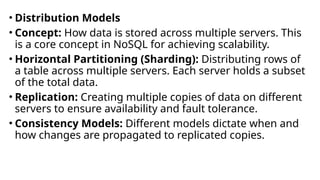
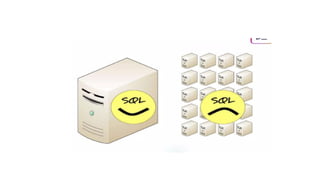
• Distribution Models
•Concept: How data is stored across multiple servers. This
is a core concept in NoSQL for achieving scalability.
• Horizontal Partitioning (Sharding): Distributing rows of
a table across multiple servers. Each server holds a subset
of the total data.
• Replication: Creating multiple copies of data on different
servers to ensure availability and fault tolerance.
• Consistency Models: Different models dictate when and
how changes are propagated to replicated copies.
26.
•Master-Slave Replication
•Concept: Acommon replication model where one
server (Master) handles all write operations, and
other servers (Slaves) replicate the data from the
master.
•Master: Writes are first sent here.
•Slaves: Read-only copies of the master's data. They
can handle read requests, offloading the master.
•Advantages: Simple to manage, good for read-heavy
applications.
•Disadvantages: Single point of failure (if the master
fails), potential for replication lag.
27.
• Consistency
• Concept:Refers to the state of the data in a distributed
system. Do all servers have the same data at the same
time?
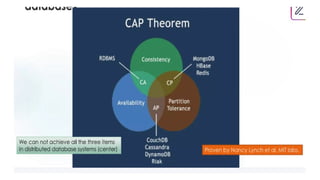
• CAP Theorem: A fundamental concept. A distributed
system can only guarantee two of the three:
• Consistency: All clients see the same data at the same
time.
• Availability: The system is always responsive.
• Partition Tolerance: The system continues to operate
even if there are network failures between nodes.
• NoSQL and Consistency: Most NoSQL databases prioritize
Availability and Partition Tolerance over strong consistency.
29.
• Introduction toCassandra
• Key Points:
• What is Cassandra? A highly scalable, distributed NoSQL database
developed by Apache. It's designed to handle massive amounts of
data with high availability and no single point of failure.
• Key Features:
• Peer-to-Peer Architecture: No master-slave relationship. All
nodes are equal.
• Highly Scalable: Linear scalability. Add more nodes to increase
capacity.
• Fault-Tolerant: Data is replicated across multiple nodes.
• Use Case: Ideal for time-series data, operational data, and any
application requiring high write throughput.
30.
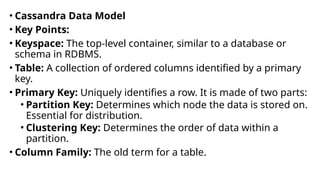
• Cassandra DataModel
• Key Points:
• Keyspace: The top-level container, similar to a database or
schema in RDBMS.
• Table: A collection of ordered columns identified by a primary
key.
• Primary Key: Uniquely identifies a row. It is made of two parts:
• Partition Key: Determines which node the data is stored on.
Essential for distribution.
• Clustering Key: Determines the order of data within a
partition.
• Column Family: The old term for a table.
31.
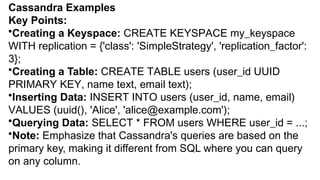
Cassandra Examples
Key Points:
•Creatinga Keyspace: CREATE KEYSPACE my_keyspace
WITH replication = {'class': 'SimpleStrategy', 'replication_factor':
3};
•Creating a Table: CREATE TABLE users (user_id UUID
PRIMARY KEY, name text, email text);
•Inserting Data: INSERT INTO users (user_id, name, email)
VALUES (uuid(), 'Alice', 'alice@example.com');
•Querying Data: SELECT * FROM users WHERE user_id = ...;
•Note: Emphasize that Cassandra's queries are based on the
primary key, making it different from SQL where you can query
on any column.
32.
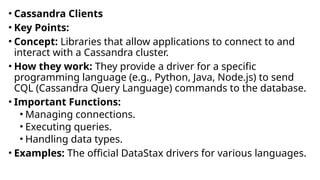
• Cassandra Clients
•Key Points:
• Concept: Libraries that allow applications to connect to and
interact with a Cassandra cluster.
• How they work: They provide a driver for a specific
programming language (e.g., Python, Java, Node.js) to send
CQL (Cassandra Query Language) commands to the database.
• Important Functions:
• Managing connections.
• Executing queries.
• Handling data types.
• Examples: The official DataStax drivers for various languages.
![Aggregation Query in MongoDB
•Query (JavaScript):
text
db.sales.aggregate([ { $group: { _id: "$product_id",
total_sales: { $sum: "$amount" } } }, { $out:
"sales_summary" } ]);
•Result: Creates "sales_summary" collection
storing precomputed totals
•Example: { "_id": 101, "total_sales": 500 }
•Advantage: Future queries on sales summary
are faster for each product](https://image.slidesharecdn.com/bdaunit2-260119145049-3a0c1fa2/85/BDA-UNIT2-cassandra-clients-concept-simple-18-320.jpg)
![Graph Database for Sales
Relationships
•Graph Structure:
•Product Node: (p:Product { product_id: 101 })
•Sale Node: (s:Sale { amount: 200 })
•Relationship: (p)-[:SOLD_IN]->(s)
•Query to Aggregate Sales: Find total sales for a
product using Cypher
•text
•MATCH (p:Product)-[:SOLD_IN]->(s:Sale)
•WHERE p.product_id = 101
•RETURN SUM(s.amount) AS total_sales](https://image.slidesharecdn.com/bdaunit2-260119145049-3a0c1fa2/85/BDA-UNIT2-cassandra-clients-concept-simple-20-320.jpg)
![Storing Materialized View in Graph Database
• Cypher Query:
• text
• MATCH (p:Product)-[:SOLD_IN]->(s:Sale)
• WHERE p.product_id = 101
• RETURN SUM(s.amount) AS total_sales
• Store in Database (Using MERGE):
• text
• MERGE (t:TotalSales { product_id: 101 })
• SET t.total_sales = 500
• Benefits: Ensures a total sales node exists for aggregates; updates
total_sales value to reflect changes](https://image.slidesharecdn.com/bdaunit2-260119145049-3a0c1fa2/85/BDA-UNIT2-cassandra-clients-concept-simple-21-320.jpg)
![• Social Network with Followers (Graph)
• Original Graph Data:
• Users: (uA:User), (uB:User), (uC:User)
• Relationships: (uA)-[:FOLLOWS]->(uB), (uA)-[:FOLLOWS]->(uC)
• Materialized View: Store the number of followers for each
user](https://image.slidesharecdn.com/bdaunit2-260119145049-3a0c1fa2/85/BDA-UNIT2-cassandra-clients-concept-simple-22-320.jpg)
![Creating and Querying Materialized View (Social
Network)
• Cypher to Create:
• text
• MATCH (u:User)
• SET u.follower_count = size((u)<-[:FOLLOWS]-())
• Query Quickly Retrieve Follower Count:
• text
• MATCH (u:User { name: "Alice" })
• RETURN u.follower_count
• Advantage: Quickly resolve follower count for any user](https://image.slidesharecdn.com/bdaunit2-260119145049-3a0c1fa2/85/BDA-UNIT2-cassandra-clients-concept-simple-23-320.jpg)


![[DSC Europe 25] Gordana Milutinovic Dumbelovic - From Insight to Oversight: A...](https://cdn.slidesharecdn.com/ss_thumbnails/t7dkjsfxqwwzceropjv4-gordana-milutinovicdumbelovic-from-insight-to-oversight-ai-driven-power-bi-moni-260119121559-9e0bf11b-thumbnail.jpg?width=640&height=640&fit=bounds)
![[DSC Europe 25] Mikhail Rozhkov - AI Product Canvas: From Business Goals to T...](https://cdn.slidesharecdn.com/ss_thumbnails/d53doddtpgfqivmzqel6-mikhail-rozhkov-ai-product-canvas-v1-260121115910-9dd517a7-thumbnail.jpg?width=640&height=640&fit=bounds)


![[DSC Europe 25] Tali Fulman - Guild Meetings, Then What? Building Data Commun...](https://cdn.slidesharecdn.com/ss_thumbnails/fgohhi33rwmhqdowdj5k-tali-fulman-guild-meetings-then-what-building-data-communities-that-actually-ch-260120105855-528492c3-thumbnail.jpg?width=640&height=640&fit=bounds)


![[DSC Europe 25] Marcos Heidemann - Beyond the Hype: Making AI Coding Assistan...](https://cdn.slidesharecdn.com/ss_thumbnails/eexkhvldrjsopspdjbur-marcos-heidemann-beyond-the-hype-getting-real-value-out-of-ai-assisted-coding-260121115910-7e9d41ec-thumbnail.jpg?width=640&height=640&fit=bounds)


![[DSC Europe 25] Laila Kakar - Leveraging AI for Strategic Excellence: Enhanci...](https://cdn.slidesharecdn.com/ss_thumbnails/eykmhrtsqmaaftwkexh7-dsc-lailakakar-1-260119101520-5f3b5616-thumbnail.jpg?width=640&height=640&fit=bounds)


![[DSC Europe 25] Dubravko Culibrk - Deep Learning for Mammography.pptx](https://cdn.slidesharecdn.com/ss_thumbnails/yiscimuktacgqoiu4dkp-deep-learning-for-mammography-260119121559-aad59182-thumbnail.jpg?width=640&height=640&fit=bounds)

![[DSC Europe 25] Bojan Banjac - AI is always right when it comes to the matter...](https://cdn.slidesharecdn.com/ss_thumbnails/syoxtqierpydwxm5srcb-4-bojan-banjac-ai-is-always-right-when-it-comes-to-the-matters-of-taste-260119101519-694ee7d7-thumbnail.jpg?width=640&height=640&fit=bounds)


![[DSC Europe 25] Bojan Djuricic - Predictive Design Process.pdf](https://cdn.slidesharecdn.com/ss_thumbnails/5awdrbedqdek3gqu2ezy-4-the-predictive-design-bojan-djuricic-260120105856-6c399e9b-thumbnail.jpg?width=640&height=640&fit=bounds)