Getting Started
www.boxlang.io
LUIS F. MAJANO
Your Host
• CEO Ortus Solutions
• Computer Engineer
• Creator of MANY things box!
• Documentation Weirdo!
Agenda
• What
• Features
• How
BoxLang is a modular dynamic language for the JVM, aiming
to make your development more productive, expressive,
functional, and available everywhere.
DYNAMIC : MODULAR : PRODUCTIVE
What is Boxlang?
• New language and runtime for the JVM
• Lightweight (7MB!) dynamic, loosely typed language
• Multi-Runtime
• Multi-Parser
• Modular + Extensible
• Can replace ColdFusion/Lucee installs
• Open Source + FREE 🎉
BoxLang +/++
• BoxLang +/++ Subscriptions
• Premium Modules + Features
• Support + SLAs
• CommandBox PRO
• Cache Connectors
• WebServer Connectors
• Server Sync
• Much more.
•https://www.boxlang.io/plans
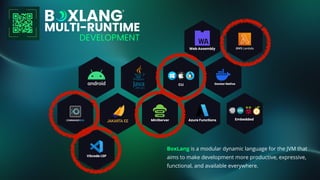
BoxLang is a modular dynamic language for the JVM that
aims to make development more productive, expressive,
functional, and available everywhere.
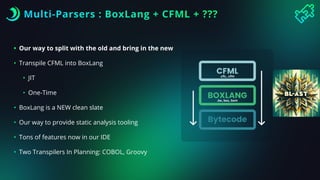
Multi-Parsers : BoxLang + CFML + ???
• Our way to split with the old and bring in the new
• Transpile CFML into BoxLang
• JIT
• One-Time
• BoxLang is a NEW clean slate
• Our way to provide static analysis tooling
• Tons of features now in our IDE
• Two Transpilers In Planning: COBOL, Groovy
.cfc, .cfm
.bx, bxs, bxm
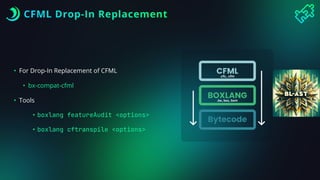
CFML Drop-In Replacement
• For Drop-In Replacement of CFML
• bx-compat-cfml
• Tools
• boxlang featureAudit <options>
• boxlang cftranspile <options>
.cfc, .cfm
.bx, bxs, bxm
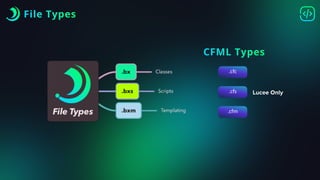
File Types
.cfc
.cfs
.cfm
CFML Types
Lucee Only
Coming from CFML
https://boxlang.ortusbooks.com/getting-started/overview/syntax-style-guide/cfml
Key Features
• 100% Java interop
• Auto Casting, type promotions, type contagion
• Extend Java, Implement Java, Import Java
• Classes (full OO, interfaces, abstract, static, etc)
• Closures and Pure Functions
• Unmodi
fi
able Types (Query, Array, Struct)
• Event-Driven Language
• Caching Engine + API
• Task Scheduling
Key Features
• Member functions
• Tag Islands
• Extend via Modules
• Meta programming
• Array/Struct Change Listeners
• All File operations use NIO
• Async Framework
• Much More…
How
• Install the JDK (21+ minimum)
• Install the binaries
• Install the IDE
Runtime Installers
• Each runtime can be di
ff
erent
• Installation
• Con
fi
guration
• Modules
• Please know this before hand
• Each runtime doc speci
fi
es it
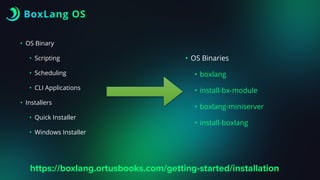
BoxLang OS
• OS Binary
• Scripting
• Scheduling
• CLI Applications
• Installers
• Quick Installer
• Windows Installer
• OS Binaries
• boxlang
• install-bx-module
• boxlang-miniserver
• install-boxlang
https://boxlang.ortusbooks.com/getting-started/installation
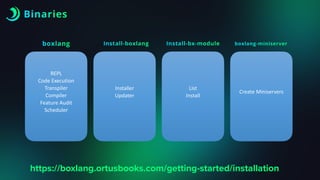
Binaries
https://boxlang.ortusbooks.com/getting-started/installation
REPL
Code Execution
Transpiler
Compiler
Feature Audit
Scheduler
boxlang
Installer
Updater
Install-boxlang
List
Install
Install-bx-module
Create Miniservers
boxlang-miniserver
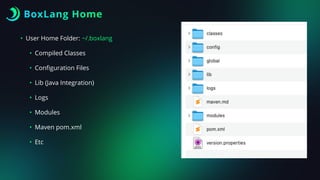
BoxLang Home
• User Home Folder: ~/.boxlang
• Compiled Classes
• Con
fi
guration Files
• Lib (Java Integration)
• Logs
• Modules
• Maven pom.xml
• Etc
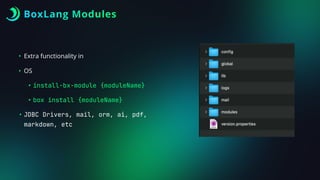
BoxLang Modules
• Extra functionality in
• OS
• install-bx-module {moduleName}
• box install {moduleName}
• JDBC Drivers, mail, orm, ai, pdf,
markdown, etc
Demo
BoxLang CLI Apps
CLI Apps
• Execute
• *.bxs
• *.bxm
• *.bx -> main( args = [] )
• BIFS
• CLIGetArgs()
• CLIClear()
• CLIExit()
• CLIRead()
https://boxlang.ortusbooks.com/getting-started/running-boxlang/cli-scripting
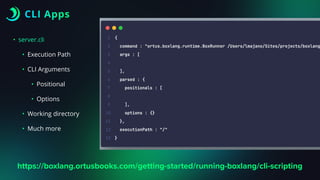
CLI Apps
• server.cli
• Execution Path
• CLI Arguments
• Positional
• Options
• Working directory
• Much more
https://boxlang.ortusbooks.com/getting-started/running-boxlang/cli-scripting
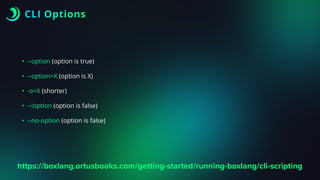
CLI Options
• --option (option is true)
• --option=X (option is X)
• -o=X (shorter)
• --!option (option is false)
• --no-option (option is false)
https://boxlang.ortusbooks.com/getting-started/running-boxlang/cli-scripting
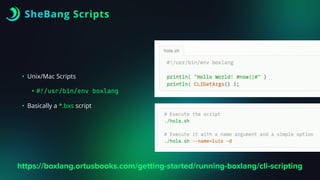
SheBang Scripts
• Unix/Mac Scripts
•
#
!
/usr/bin/env boxlang
• Basically a *.bxs script
https://boxlang.ortusbooks.com/getting-started/running-boxlang/cli-scripting
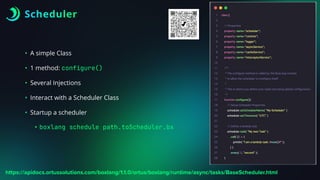
Scheduler
• A simple Class
• 1 method: configure()
• Several Injections
• Interact with a Scheduler Class
• Startup a scheduler
• boxlang schedule path.toScheduler.bx
https://apidocs.ortussolutions.com/boxlang/1.1.0/ortus/boxlang/runtime/async/tasks/BaseScheduler.html
BoxLang IDE
BoxLang IDE
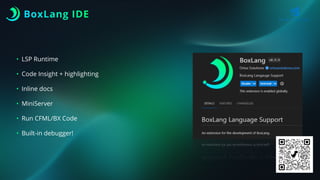
• LSP Runtime
• Code Insight + highlighting
• Inline docs
• MiniServer
• Run CFML/BX Code
• Built-in debugger!
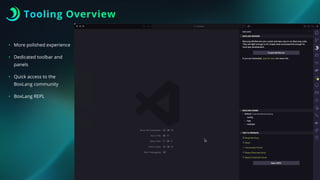
Tooling Overview
• More polished experience
• Dedicated toolbar and
panels
• Quick access to the
BoxLang community
• BoxLang REPL
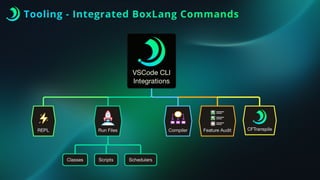
Tooling - Integrated BoxLang Commands
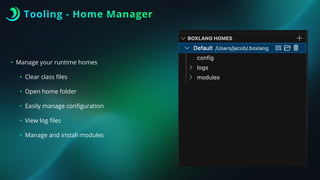
Tooling - Home Manager
• Manage your runtime homes
• Clear class
fi
les
• Open home folder
• Easily manage con
fi
guration
• View log
fi
les
• Manage and install modules
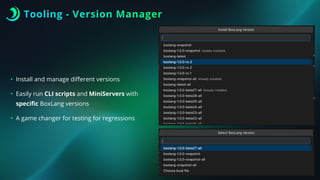
Tooling - Version Manager
• Install and manage di
ff
erent versions
• Easily run CLI scripts and MiniServers with
speci
fi
c BoxLang versions
• A game changer for testing for regressions
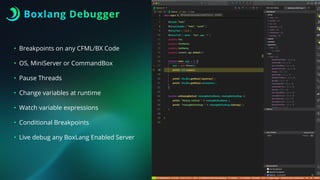
Boxlang Debugger
• Breakpoints on any CFML/BX Code
• OS, MiniServer or CommandBox
• Pause Threads
• Change variables at runtime
• Watch variable expressions
• Conditional Breakpoints
• Live debug any BoxLang Enabled Server
Demo
BoxLang WebApps
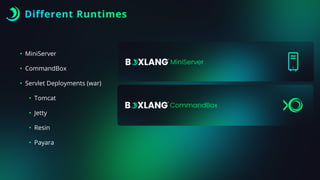
Different Runtimes
• MiniServer
• CommandBox
• Servlet Deployments (war)
• Tomcat
• Jetty
• Resin
• Payara
MiniServer
• Lightweight Pure Java Web Server
• NOT a servlet engine
• Extremely fast
• Rewrites Enabled
• WebSockets
• Custom Home
• Custom Con
fi
gs
• ENV Support
MiniServer Can’t….
• SSL Port
• Multi-Site
• Server Rules
• WAF
• Security Rules
• CFCon
fi
g Support
CommandBox
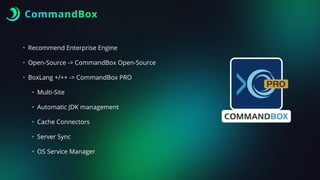
• Recommend Enterprise Engine
• Open-Source -> CommandBox Open-Source
• BoxLang +/++ -> CommandBox PRO
• Multi-Site
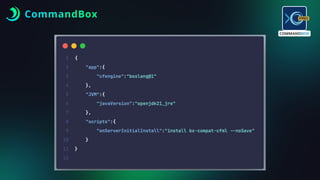
• Automatic JDK management
• Cache Connectors
• Server Sync
• OS Service Manager
CommandBox
Demo
Further Study
• AWS Lambdas (Session Tomorrow)
• Schedulers
• Async Framework
• Modules
• Read the docs!
https://boxlang.ortusbooks.com/
Q&A
The Future of Modern Development
Starts Here, with you! 🚀
www.boxlang.io

Getting Started with BoxLang - CFCamp 2025.pdf

  • 1.
  • 2.
    LUIS F. MAJANO YourHost • CEO Ortus Solutions • Computer Engineer • Creator of MANY things box! • Documentation Weirdo!
  • 3.
  • 4.
    BoxLang is amodular dynamic language for the JVM, aiming to make your development more productive, expressive, functional, and available everywhere. DYNAMIC : MODULAR : PRODUCTIVE
  • 5.
    What is Boxlang? •New language and runtime for the JVM • Lightweight (7MB!) dynamic, loosely typed language • Multi-Runtime • Multi-Parser • Modular + Extensible • Can replace ColdFusion/Lucee installs • Open Source + FREE 🎉
  • 6.
    BoxLang +/++ • BoxLang+/++ Subscriptions • Premium Modules + Features • Support + SLAs • CommandBox PRO • Cache Connectors • WebServer Connectors • Server Sync • Much more. •https://www.boxlang.io/plans
  • 7.
    BoxLang is amodular dynamic language for the JVM that aims to make development more productive, expressive, functional, and available everywhere.
  • 8.
    Multi-Parsers : BoxLang+ CFML + ??? • Our way to split with the old and bring in the new • Transpile CFML into BoxLang • JIT • One-Time • BoxLang is a NEW clean slate • Our way to provide static analysis tooling • Tons of features now in our IDE • Two Transpilers In Planning: COBOL, Groovy .cfc, .cfm .bx, bxs, bxm
  • 9.
    CFML Drop-In Replacement •For Drop-In Replacement of CFML • bx-compat-cfml • Tools • boxlang featureAudit <options> • boxlang cftranspile <options> .cfc, .cfm .bx, bxs, bxm
  • 10.
  • 11.
  • 12.
    Key Features • 100%Java interop • Auto Casting, type promotions, type contagion • Extend Java, Implement Java, Import Java • Classes (full OO, interfaces, abstract, static, etc) • Closures and Pure Functions • Unmodi fi able Types (Query, Array, Struct) • Event-Driven Language • Caching Engine + API • Task Scheduling
  • 13.
    Key Features • Memberfunctions • Tag Islands • Extend via Modules • Meta programming • Array/Struct Change Listeners • All File operations use NIO • Async Framework • Much More…
  • 14.
    How • Install theJDK (21+ minimum) • Install the binaries • Install the IDE
  • 15.
    Runtime Installers • Eachruntime can be di ff erent • Installation • Con fi guration • Modules • Please know this before hand • Each runtime doc speci fi es it
  • 17.
    BoxLang OS • OSBinary • Scripting • Scheduling • CLI Applications • Installers • Quick Installer • Windows Installer • OS Binaries • boxlang • install-bx-module • boxlang-miniserver • install-boxlang https://boxlang.ortusbooks.com/getting-started/installation
  • 18.
  • 19.
    BoxLang Home • UserHome Folder: ~/.boxlang • Compiled Classes • Con fi guration Files • Lib (Java Integration) • Logs • Modules • Maven pom.xml • Etc
  • 20.
    BoxLang Modules • Extrafunctionality in • OS • install-bx-module {moduleName} • box install {moduleName} • JDBC Drivers, mail, orm, ai, pdf, markdown, etc
  • 21.
  • 22.
  • 23.
    CLI Apps • Execute •*.bxs • *.bxm • *.bx -> main( args = [] ) • BIFS • CLIGetArgs() • CLIClear() • CLIExit() • CLIRead() https://boxlang.ortusbooks.com/getting-started/running-boxlang/cli-scripting
  • 24.
    CLI Apps • server.cli •Execution Path • CLI Arguments • Positional • Options • Working directory • Much more https://boxlang.ortusbooks.com/getting-started/running-boxlang/cli-scripting
  • 25.
    CLI Options • --option(option is true) • --option=X (option is X) • -o=X (shorter) • --!option (option is false) • --no-option (option is false) https://boxlang.ortusbooks.com/getting-started/running-boxlang/cli-scripting
  • 26.
    SheBang Scripts • Unix/MacScripts • # ! /usr/bin/env boxlang • Basically a *.bxs script https://boxlang.ortusbooks.com/getting-started/running-boxlang/cli-scripting
  • 27.
    Scheduler • A simpleClass • 1 method: configure() • Several Injections • Interact with a Scheduler Class • Startup a scheduler • boxlang schedule path.toScheduler.bx https://apidocs.ortussolutions.com/boxlang/1.1.0/ortus/boxlang/runtime/async/tasks/BaseScheduler.html
  • 28.
  • 29.
    BoxLang IDE • LSPRuntime • Code Insight + highlighting • Inline docs • MiniServer • Run CFML/BX Code • Built-in debugger!
  • 30.
    Tooling Overview • Morepolished experience • Dedicated toolbar and panels • Quick access to the BoxLang community • BoxLang REPL
  • 31.
    Tooling - IntegratedBoxLang Commands
  • 32.
    Tooling - HomeManager • Manage your runtime homes • Clear class fi les • Open home folder • Easily manage con fi guration • View log fi les • Manage and install modules
  • 33.
    Tooling - VersionManager • Install and manage di ff erent versions • Easily run CLI scripts and MiniServers with speci fi c BoxLang versions • A game changer for testing for regressions
  • 34.
    Boxlang Debugger • Breakpointson any CFML/BX Code • OS, MiniServer or CommandBox • Pause Threads • Change variables at runtime • Watch variable expressions • Conditional Breakpoints • Live debug any BoxLang Enabled Server
  • 35.
  • 36.
  • 37.
    Different Runtimes • MiniServer •CommandBox • Servlet Deployments (war) • Tomcat • Jetty • Resin • Payara
  • 38.
    MiniServer • Lightweight PureJava Web Server • NOT a servlet engine • Extremely fast • Rewrites Enabled • WebSockets • Custom Home • Custom Con fi gs • ENV Support
  • 39.
    MiniServer Can’t…. • SSLPort • Multi-Site • Server Rules • WAF • Security Rules • CFCon fi g Support
  • 40.
    CommandBox • Recommend EnterpriseEngine • Open-Source -> CommandBox Open-Source • BoxLang +/++ -> CommandBox PRO • Multi-Site • Automatic JDK management • Cache Connectors • Server Sync • OS Service Manager
  • 41.
  • 42.
  • 43.
    Further Study • AWSLambdas (Session Tomorrow) • Schedulers • Async Framework • Modules • Read the docs! https://boxlang.ortusbooks.com/
  • 44.
    Q&A The Future ofModern Development Starts Here, with you! 🚀 www.boxlang.io