Introduction to Networks v5.1
Chapter 6:
Network Layer
Jupriyadi
Juli 2020
© 2013 Cisco and/or its affiliates. All rights reserved. Cisco Public 2
6.0 Introduction
6.1 Network Layer Protocols
6.2 Routing
6.3 Routers
6.4 Configure a Cisco Router
6.5 Summary
© 2013 Cisco and/or its affiliates. All rights reserved. Cisco Public 3
Upon completion of this section, you should be able to:
• Describe the purpose of the network layer in data communication.
• Explain why the IPv4 protocol requires other layers to provide reliability. (To
include: media independent, unreliable, and connectionless.)
• Explain the role of the major header fields in the IPv4 packet.
• Explain the role of the major header fields in the IPv6 packet.
Cisco Public© 2013 Cisco and/or its affiliates. All rights reserved. 4
© 2013 Cisco and/or its affiliates. All rights reserved. Cisco Public 5
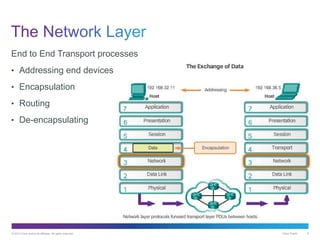
End to End Transport processes
• Addressing end devices
• Encapsulation
• Routing
• De-encapsulating
© 2013 Cisco and/or its affiliates. All rights reserved. Cisco Public 6
Cisco Public© 2013 Cisco and/or its affiliates. All rights reserved. 7
© 2013 Cisco and/or its affiliates. All rights reserved. Cisco Public 8
© 2013 Cisco and/or its affiliates. All rights reserved. Cisco Public 9
© 2013 Cisco and/or its affiliates. All rights reserved. Cisco Public 10
© 2013 Cisco and/or its affiliates. All rights reserved. Cisco Public 11
© 2013 Cisco and/or its affiliates. All rights reserved. Cisco Public 12
© 2013 Cisco and/or its affiliates. All rights reserved. Cisco Public 13
© 2013 Cisco and/or its affiliates. All rights reserved. Cisco Public 14
Cisco Public© 2013 Cisco and/or its affiliates. All rights reserved. 15
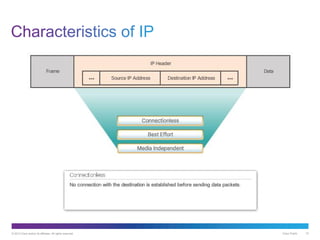
© 2013 Cisco and/or its affiliates. All rights reserved. Cisco Public 16
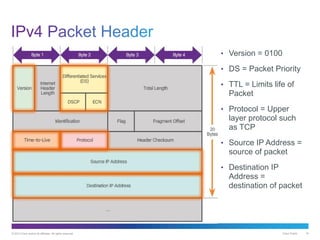
• Version = 0100
• DS = Packet Priority
• TTL = Limits life of
Packet
• Protocol = Upper
layer protocol such
as TCP
• Source IP Address =
source of packet
• Destination IP
Address =
destination of packet
Cisco Public© 2013 Cisco and/or its affiliates. All rights reserved. 17
© 2013 Cisco and/or its affiliates. All rights reserved. Cisco Public 18
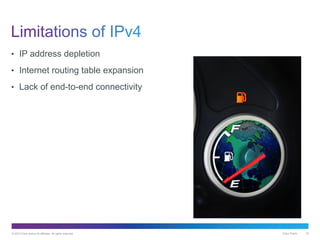
• IP address depletion
• Internet routing table expansion
• Lack of end-to-end connectivity
© 2013 Cisco and/or its affiliates. All rights reserved. Cisco Public 19
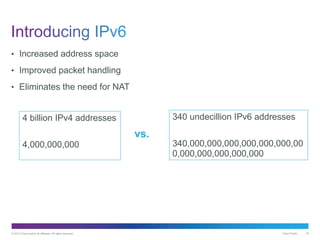
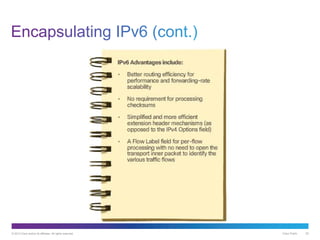
• Increased address space
• Improved packet handling
• Eliminates the need for NAT
4 billion IPv4 addresses
4,000,000,000
340 undecillion IPv6 addresses
340,000,000,000,000,000,000,00
0,000,000,000,000,000
vs.
© 2013 Cisco and/or its affiliates. All rights reserved. Cisco Public 20
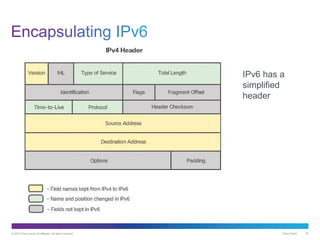
IPv6 has a
simplified
header
© 2013 Cisco and/or its affiliates. All rights reserved. Cisco Public 21
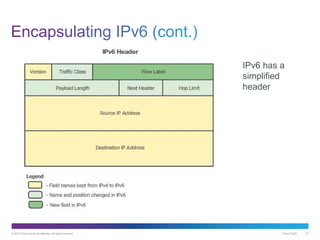
IPv6 has a
simplified
header
© 2013 Cisco and/or its affiliates. All rights reserved. Cisco Public 22
© 2013 Cisco and/or its affiliates. All rights reserved. Cisco Public 23
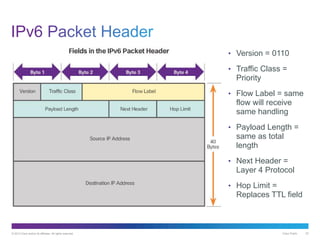
• Version = 0110
• Traffic Class =
Priority
• Flow Label = same
flow will receive
same handling
• Payload Length =
same as total
length
• Next Header =
Layer 4 Protocol
• Hop Limit =
Replaces TTL field
© 2013 Cisco and/or its affiliates. All rights reserved. Cisco Public 24
Upon completion of this section, you should be able to:
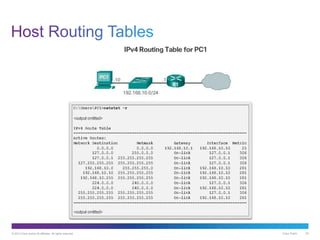
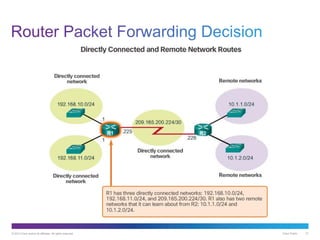
• Explain how a host device uses routing tables to direct packets to itself, a local
destination, or a default gateway.
• Compare a host routing table to a routing table in a router.
Cisco Public© 2013 Cisco and/or its affiliates. All rights reserved. 25
© 2013 Cisco and/or its affiliates. All rights reserved. Cisco Public 26
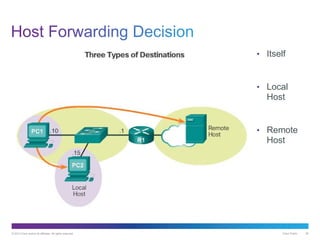
• Itself
• Local
Host
• Remote
Host
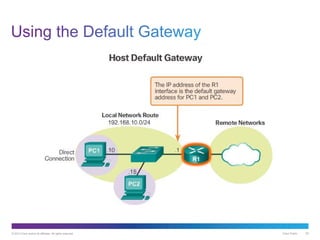
© 2013 Cisco and/or its affiliates. All rights reserved. Cisco Public 27
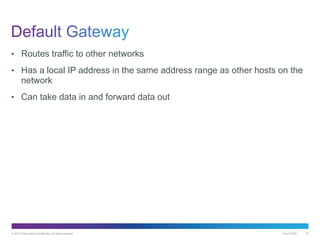
• Routes traffic to other networks
• Has a local IP address in the same address range as other hosts on the
network
• Can take data in and forward data out
© 2013 Cisco and/or its affiliates. All rights reserved. Cisco Public 28
© 2013 Cisco and/or its affiliates. All rights reserved. Cisco Public 29
Cisco Public© 2013 Cisco and/or its affiliates. All rights reserved. 30
© 2013 Cisco and/or its affiliates. All rights reserved. Cisco Public 31
© 2013 Cisco and/or its affiliates. All rights reserved. Cisco Public 32
© 2013 Cisco and/or its affiliates. All rights reserved. Cisco Public 33
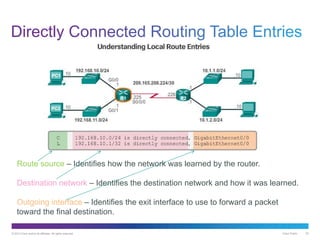
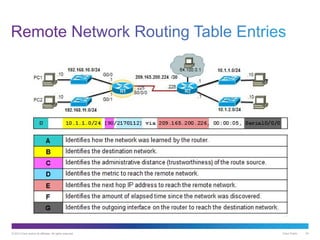
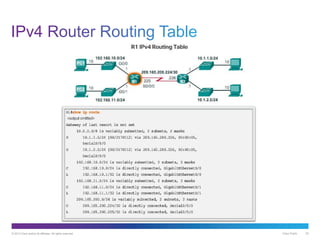
Route source – Identifies how the network was learned by the router.
Destination network – Identifies the destination network and how it was learned.
Outgoing interface – Identifies the exit interface to use to forward a packet
toward the final destination.
© 2013 Cisco and/or its affiliates. All rights reserved. Cisco Public 34
© 2013 Cisco and/or its affiliates. All rights reserved. Cisco Public 35
© 2013 Cisco and/or its affiliates. All rights reserved. Cisco Public 36
Upon completion of this section, you should be able to:
• Describe the common components and interfaces of a router.
• Describe the boot-up process of a Cisco IOS router.
Cisco Public© 2013 Cisco and/or its affiliates. All rights reserved. 37
© 2013 Cisco and/or its affiliates. All rights reserved. Cisco Public 38
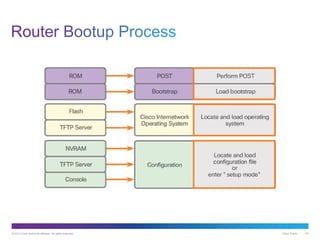
Routers require:
• Central processing units (CPUs)
• Operating systems (OSs)
Memory consisting of:
• Random-access memory (RAM)
• Read-only memory (ROM)
• Nonvolatile random-access memory (NVRAM)
• Flash
• The Cisco Internetwork Operating System (IOS) is the system software
used for most Cisco devices regardless of the size and type of the
device.
© 2013 Cisco and/or its affiliates. All rights reserved. Cisco Public 39
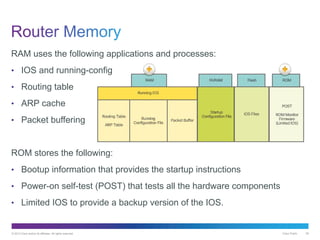
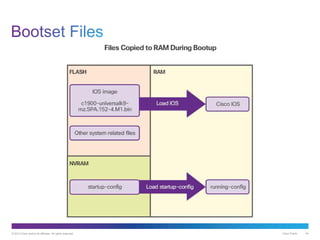
RAM uses the following applications and processes:
• IOS and running-config
• Routing table
• ARP cache
• Packet buffering
ROM stores the following:
• Bootup information that provides the startup instructions
• Power-on self-test (POST) that tests all the hardware components
• Limited IOS to provide a backup version of the IOS.
© 2013 Cisco and/or its affiliates. All rights reserved. Cisco Public 40
© 2013 Cisco and/or its affiliates. All rights reserved. Cisco Public 41
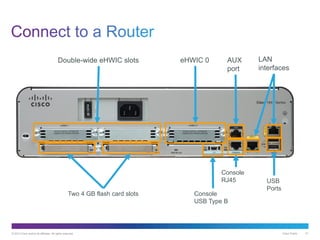
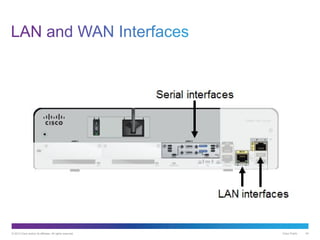
Two 4 GB flash card slots
Double-wide eHWIC slots eHWIC 0 AUX
port
LAN
interfaces
USB
Ports
Console
USB Type B
Console
RJ45
© 2013 Cisco and/or its affiliates. All rights reserved. Cisco Public 42
Cisco Public© 2013 Cisco and/or its affiliates. All rights reserved. 43
© 2013 Cisco and/or its affiliates. All rights reserved. Cisco Public 44
© 2013 Cisco and/or its affiliates. All rights reserved. Cisco Public 45
© 2013 Cisco and/or its affiliates. All rights reserved. Cisco Public 46
© 2013 Cisco and/or its affiliates. All rights reserved. Cisco Public 47
© 2013 Cisco and/or its affiliates. All rights reserved. Cisco Public 48
Upon completion of this section, you should be able to:
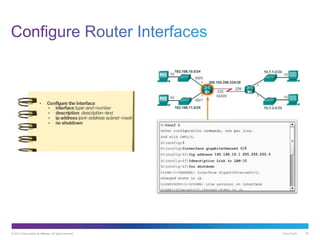
• Configure initial settings on a Cisco IOS router.
• Configure two active interfaces on a Cisco IOS router.
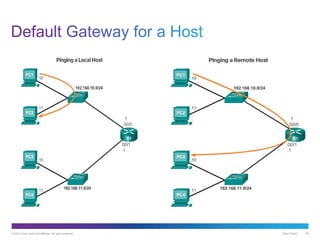
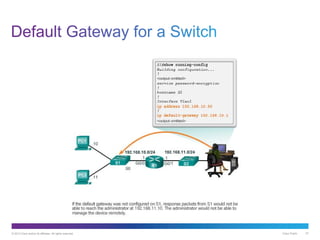
• Configure devices to use the default gateway.
Cisco Public© 2013 Cisco and/or its affiliates. All rights reserved. 49
© 2013 Cisco and/or its affiliates. All rights reserved. Cisco Public 50
© 2013 Cisco and/or its affiliates. All rights reserved. Cisco Public 51
Cisco Public© 2013 Cisco and/or its affiliates. All rights reserved. 52
© 2013 Cisco and/or its affiliates. All rights reserved. Cisco Public 53
© 2013 Cisco and/or its affiliates. All rights reserved. Cisco Public 54
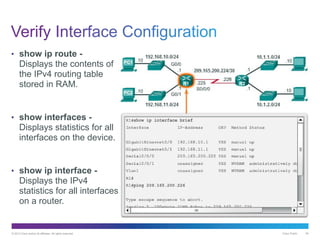
• show ip route -
Displays the contents of
the IPv4 routing table
stored in RAM.
• show interfaces -
Displays statistics for all
interfaces on the device.
• show ip interface -
Displays the IPv4
statistics for all interfaces
on a router.
Cisco Public© 2013 Cisco and/or its affiliates. All rights reserved. 55
© 2013 Cisco and/or its affiliates. All rights reserved. Cisco Public 56
© 2013 Cisco and/or its affiliates. All rights reserved. Cisco Public 57
© 2013 Cisco and/or its affiliates. All rights reserved. Cisco Public 58
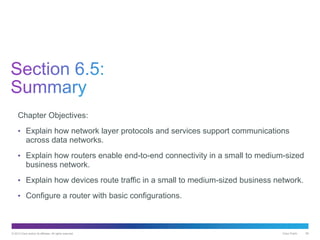
Chapter Objectives:
• Explain how network layer protocols and services support communications
across data networks.
• Explain how routers enable end-to-end connectivity in a small to medium-sized
business network.
• Explain how devices route traffic in a small to medium-sized business network.
• Configure a router with basic configurations.
Thank you.

It nv51 instructor_ppt_ch6

  • 1.
    Introduction to Networksv5.1 Chapter 6: Network Layer Jupriyadi Juli 2020
  • 2.
    © 2013 Ciscoand/or its affiliates. All rights reserved. Cisco Public 2 6.0 Introduction 6.1 Network Layer Protocols 6.2 Routing 6.3 Routers 6.4 Configure a Cisco Router 6.5 Summary
  • 3.
    © 2013 Ciscoand/or its affiliates. All rights reserved. Cisco Public 3 Upon completion of this section, you should be able to: • Describe the purpose of the network layer in data communication. • Explain why the IPv4 protocol requires other layers to provide reliability. (To include: media independent, unreliable, and connectionless.) • Explain the role of the major header fields in the IPv4 packet. • Explain the role of the major header fields in the IPv6 packet.
  • 4.
    Cisco Public© 2013Cisco and/or its affiliates. All rights reserved. 4
  • 5.
    © 2013 Ciscoand/or its affiliates. All rights reserved. Cisco Public 5 End to End Transport processes • Addressing end devices • Encapsulation • Routing • De-encapsulating
  • 6.
    © 2013 Ciscoand/or its affiliates. All rights reserved. Cisco Public 6
  • 7.
    Cisco Public© 2013Cisco and/or its affiliates. All rights reserved. 7
  • 8.
    © 2013 Ciscoand/or its affiliates. All rights reserved. Cisco Public 8
  • 9.
    © 2013 Ciscoand/or its affiliates. All rights reserved. Cisco Public 9
  • 10.
    © 2013 Ciscoand/or its affiliates. All rights reserved. Cisco Public 10
  • 11.
    © 2013 Ciscoand/or its affiliates. All rights reserved. Cisco Public 11
  • 12.
    © 2013 Ciscoand/or its affiliates. All rights reserved. Cisco Public 12
  • 13.
    © 2013 Ciscoand/or its affiliates. All rights reserved. Cisco Public 13
  • 14.
    © 2013 Ciscoand/or its affiliates. All rights reserved. Cisco Public 14
  • 15.
    Cisco Public© 2013Cisco and/or its affiliates. All rights reserved. 15
  • 16.
    © 2013 Ciscoand/or its affiliates. All rights reserved. Cisco Public 16 • Version = 0100 • DS = Packet Priority • TTL = Limits life of Packet • Protocol = Upper layer protocol such as TCP • Source IP Address = source of packet • Destination IP Address = destination of packet
  • 17.
    Cisco Public© 2013Cisco and/or its affiliates. All rights reserved. 17
  • 18.
    © 2013 Ciscoand/or its affiliates. All rights reserved. Cisco Public 18 • IP address depletion • Internet routing table expansion • Lack of end-to-end connectivity
  • 19.
    © 2013 Ciscoand/or its affiliates. All rights reserved. Cisco Public 19 • Increased address space • Improved packet handling • Eliminates the need for NAT 4 billion IPv4 addresses 4,000,000,000 340 undecillion IPv6 addresses 340,000,000,000,000,000,000,00 0,000,000,000,000,000 vs.
  • 20.
    © 2013 Ciscoand/or its affiliates. All rights reserved. Cisco Public 20 IPv6 has a simplified header
  • 21.
    © 2013 Ciscoand/or its affiliates. All rights reserved. Cisco Public 21 IPv6 has a simplified header
  • 22.
    © 2013 Ciscoand/or its affiliates. All rights reserved. Cisco Public 22
  • 23.
    © 2013 Ciscoand/or its affiliates. All rights reserved. Cisco Public 23 • Version = 0110 • Traffic Class = Priority • Flow Label = same flow will receive same handling • Payload Length = same as total length • Next Header = Layer 4 Protocol • Hop Limit = Replaces TTL field
  • 24.
    © 2013 Ciscoand/or its affiliates. All rights reserved. Cisco Public 24 Upon completion of this section, you should be able to: • Explain how a host device uses routing tables to direct packets to itself, a local destination, or a default gateway. • Compare a host routing table to a routing table in a router.
  • 25.
    Cisco Public© 2013Cisco and/or its affiliates. All rights reserved. 25
  • 26.
    © 2013 Ciscoand/or its affiliates. All rights reserved. Cisco Public 26 • Itself • Local Host • Remote Host
  • 27.
    © 2013 Ciscoand/or its affiliates. All rights reserved. Cisco Public 27 • Routes traffic to other networks • Has a local IP address in the same address range as other hosts on the network • Can take data in and forward data out
  • 28.
    © 2013 Ciscoand/or its affiliates. All rights reserved. Cisco Public 28
  • 29.
    © 2013 Ciscoand/or its affiliates. All rights reserved. Cisco Public 29
  • 30.
    Cisco Public© 2013Cisco and/or its affiliates. All rights reserved. 30
  • 31.
    © 2013 Ciscoand/or its affiliates. All rights reserved. Cisco Public 31
  • 32.
    © 2013 Ciscoand/or its affiliates. All rights reserved. Cisco Public 32
  • 33.
    © 2013 Ciscoand/or its affiliates. All rights reserved. Cisco Public 33 Route source – Identifies how the network was learned by the router. Destination network – Identifies the destination network and how it was learned. Outgoing interface – Identifies the exit interface to use to forward a packet toward the final destination.
  • 34.
    © 2013 Ciscoand/or its affiliates. All rights reserved. Cisco Public 34
  • 35.
    © 2013 Ciscoand/or its affiliates. All rights reserved. Cisco Public 35
  • 36.
    © 2013 Ciscoand/or its affiliates. All rights reserved. Cisco Public 36 Upon completion of this section, you should be able to: • Describe the common components and interfaces of a router. • Describe the boot-up process of a Cisco IOS router.
  • 37.
    Cisco Public© 2013Cisco and/or its affiliates. All rights reserved. 37
  • 38.
    © 2013 Ciscoand/or its affiliates. All rights reserved. Cisco Public 38 Routers require: • Central processing units (CPUs) • Operating systems (OSs) Memory consisting of: • Random-access memory (RAM) • Read-only memory (ROM) • Nonvolatile random-access memory (NVRAM) • Flash • The Cisco Internetwork Operating System (IOS) is the system software used for most Cisco devices regardless of the size and type of the device.
  • 39.
    © 2013 Ciscoand/or its affiliates. All rights reserved. Cisco Public 39 RAM uses the following applications and processes: • IOS and running-config • Routing table • ARP cache • Packet buffering ROM stores the following: • Bootup information that provides the startup instructions • Power-on self-test (POST) that tests all the hardware components • Limited IOS to provide a backup version of the IOS.
  • 40.
    © 2013 Ciscoand/or its affiliates. All rights reserved. Cisco Public 40
  • 41.
    © 2013 Ciscoand/or its affiliates. All rights reserved. Cisco Public 41 Two 4 GB flash card slots Double-wide eHWIC slots eHWIC 0 AUX port LAN interfaces USB Ports Console USB Type B Console RJ45
  • 42.
    © 2013 Ciscoand/or its affiliates. All rights reserved. Cisco Public 42
  • 43.
    Cisco Public© 2013Cisco and/or its affiliates. All rights reserved. 43
  • 44.
    © 2013 Ciscoand/or its affiliates. All rights reserved. Cisco Public 44
  • 45.
    © 2013 Ciscoand/or its affiliates. All rights reserved. Cisco Public 45
  • 46.
    © 2013 Ciscoand/or its affiliates. All rights reserved. Cisco Public 46
  • 47.
    © 2013 Ciscoand/or its affiliates. All rights reserved. Cisco Public 47
  • 48.
    © 2013 Ciscoand/or its affiliates. All rights reserved. Cisco Public 48 Upon completion of this section, you should be able to: • Configure initial settings on a Cisco IOS router. • Configure two active interfaces on a Cisco IOS router. • Configure devices to use the default gateway.
  • 49.
    Cisco Public© 2013Cisco and/or its affiliates. All rights reserved. 49
  • 50.
    © 2013 Ciscoand/or its affiliates. All rights reserved. Cisco Public 50
  • 51.
    © 2013 Ciscoand/or its affiliates. All rights reserved. Cisco Public 51
  • 52.
    Cisco Public© 2013Cisco and/or its affiliates. All rights reserved. 52
  • 53.
    © 2013 Ciscoand/or its affiliates. All rights reserved. Cisco Public 53
  • 54.
    © 2013 Ciscoand/or its affiliates. All rights reserved. Cisco Public 54 • show ip route - Displays the contents of the IPv4 routing table stored in RAM. • show interfaces - Displays statistics for all interfaces on the device. • show ip interface - Displays the IPv4 statistics for all interfaces on a router.
  • 55.
    Cisco Public© 2013Cisco and/or its affiliates. All rights reserved. 55
  • 56.
    © 2013 Ciscoand/or its affiliates. All rights reserved. Cisco Public 56
  • 57.
    © 2013 Ciscoand/or its affiliates. All rights reserved. Cisco Public 57
  • 58.
    © 2013 Ciscoand/or its affiliates. All rights reserved. Cisco Public 58 Chapter Objectives: • Explain how network layer protocols and services support communications across data networks. • Explain how routers enable end-to-end connectivity in a small to medium-sized business network. • Explain how devices route traffic in a small to medium-sized business network. • Configure a router with basic configurations.
  • 59.