Justin Ison
Sr. Software Engineer
justin.ison@applitools.com
@isonic1
Appium Native App Crawler
Appium Conference 2019
Bangalore, India
!1
Topics
• Todays quick development landscape
• The mobile test matrix and the near impossible combinations that
need validating
• Showing how to leverage machines to do some of the work
humans otherwise would spend hours doing
• How a crawler can help uncover more bugs, localization issues,
performance problems, etc…
2
The Agile World Moves Fast
It’s up to us to keep up!
• In today’s software world with CI/CD, especially on mobile, the time
to market is becoming increasingly shorter!
3
The Goal
Crawling Native Applications!
• Putting the machines to work!
• Automate the automation
• Create something that could collect as much metadata
about an application as possible and report back its
findings for review.
4
What is an app crawler?
• An app crawler is much like a web crawler (spider, robot). It’s a
program that is designed to emulate user interactions. A self-
automating program that interacts with UI components like a
user would.
5
But before we begin, what led me here?
• I worked for a company that was very big on dog-fooding our own
apps
• We had a very small QA team and could not support the amount
of testing needed for all platforms applications
• Our applications were constantly changing to keep pace with
competitors, push bug fixes and add new features.
6
• Constantly fixing or revising tests due to code or design
changes…
• So about three years ago I had this crazy idea…
• What if I could automate the automation!?
And…
7
The Mobile Test Matrix
Hint: We need a little more help from the machines!
8
Orientations
9
• What happens when you rotate your screen?
10
Resolutions
11
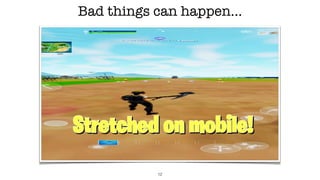
Bad things can happen…
12
OS Versions
13
Languages
14
• How do you know your app will work correctly for all combinations if your release
cycle is shortened and limited resources?
• You could possibly do this all with UI test automation tests
• You’d need an army of engineers to code all the different logic variables
• Or perhaps hire an army of zombie testers
• Automating every possible combination would be next to impossible to
maintain
• Then again UI automation only test what it’s programmed to test
Test Overload!
So much to do & so little time…
15
It can’t be that hard!
(Famous last words)
• I’ll just grab all the screen elements and then loop through them…
• That was the easy part… But also the core to any crawling.
• Let’s look at some examples…
16
Full Hierarchy View
17
Let’s look for the Elements
18
Compressed Hierarchy View!
19
Ignore Unimportant Views!
20
Parse the Page Source!
21
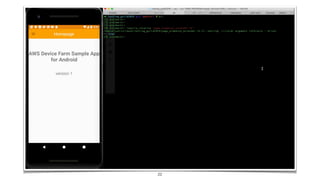
22
The Hard Part
• The hard part was handling all the conditionals or unknown edge-cases that
can occur, especially when adapting to different apps and UI flows
• How do I rescue the app when it gets stuck?
• What to do when a crash occurs?
• Hybrid web views that will never end
• Exiting the app by mistake
• Excluding certain elements from being tapped
•
23
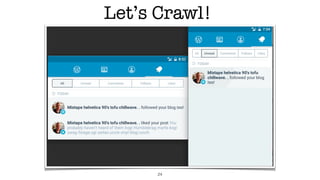
Let’s Crawl!
24
Captured Screenshots!
25
Detected Accessibility Labels
26
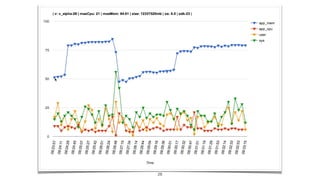
Application Performance
The Forgotten Test
27
28
Language Detection
• As you’ve seen, there are a lot of screenshots generated.
• Scanning every image for abnormalities is time consuming and prone
to human mistake
• So, I thought there had to be a better way of automating this!
29
30
Log Monitoring
• When performing exploratory testing, it’s very important to monitor the
logs at the same time.
• Tip (catch exceptions): adb logcat *:E -v long
• Same applies when crawling!
31
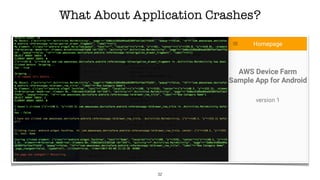
What About Application Crashes?
32
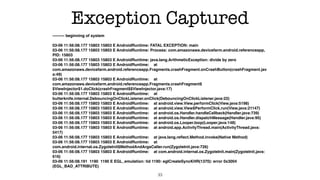
Exception Captured
--------- beginning of system


03-06 11:56:08.177 15803 15803 E AndroidRuntime: FATAL EXCEPTION: main

03-06 11:56:08.177 15803 15803 E AndroidRuntime: Process: com.amazonaws.devicefarm.android.referenceapp,
PID: 15803

03-06 11:56:08.177 15803 15803 E AndroidRuntime: java.lang.ArithmeticException: divide by zero

03-06 11:56:08.177 15803 15803 E AndroidRuntime: at
com.amazonaws.devicefarm.android.referenceapp.Fragments.crashFragment.onCrashButton(crashFragment.jav
a:49)

03-06 11:56:08.177 15803 15803 E AndroidRuntime: at
com.amazonaws.devicefarm.android.referenceapp.Fragments.crashFragment$
$ViewInjector$1.doClick(crashFragment$$ViewInjector.java:17)

03-06 11:56:08.177 15803 15803 E AndroidRuntime: at
butterknife.internal.DebouncingOnClickListener.onClick(DebouncingOnClickListener.java:22)

03-06 11:56:08.177 15803 15803 E AndroidRuntime: at android.view.View.performClick(View.java:5198)

03-06 11:56:08.177 15803 15803 E AndroidRuntime: at android.view.View$PerformClick.run(View.java:21147)

03-06 11:56:08.177 15803 15803 E AndroidRuntime: at android.os.Handler.handleCallback(Handler.java:739)

03-06 11:56:08.177 15803 15803 E AndroidRuntime: at android.os.Handler.dispatchMessage(Handler.java:95)

03-06 11:56:08.177 15803 15803 E AndroidRuntime: at android.os.Looper.loop(Looper.java:148)

03-06 11:56:08.177 15803 15803 E AndroidRuntime: at android.app.ActivityThread.main(ActivityThread.java:
5417)

03-06 11:56:08.177 15803 15803 E AndroidRuntime: at java.lang.reflect.Method.invoke(Native Method)

03-06 11:56:08.177 15803 15803 E AndroidRuntime: at
com.android.internal.os.ZygoteInit$MethodAndArgsCaller.run(ZygoteInit.java:726)

03-06 11:56:08.177 15803 15803 E AndroidRuntime: at com.android.internal.os.ZygoteInit.main(ZygoteInit.java:
616)

03-06 11:56:08.191 1190 1190 E EGL_emulation: tid 1190: eglCreateSyncKHR(1370): error 0x3004
(EGL_BAD_ATTRIBUTE)
33
Replaying a Crawl!
34
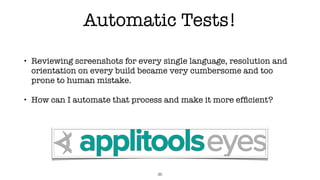
Automatic Tests!
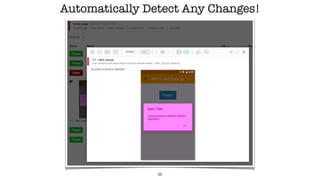
• Reviewing screenshots for every single language, resolution and
orientation on every build became very cumbersome and too
prone to human mistake.
• How can I automate that process and make it more efficient?
35
Applitools Test Example
36
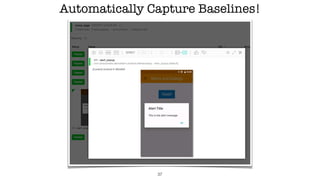
Automatically Capture Baselines!
37
Automatically Detect Any Changes!
38
But something was still missing…
• I want this to be mostly still self efficient crawler.
• And writing tests was originally what I wanted to get away from…
• So I needed to know more about the application I was crawling in order to
be more deterministic!
• There happens to be a useful open source tool called apktool!
• With apktool I can then decompile the apk/application and extract the
view layouts!
39
Android View Layouts
40
42
Automatically Test all Unique Views!
43
Chaos Monkey Testing
Now the fun begins!
44
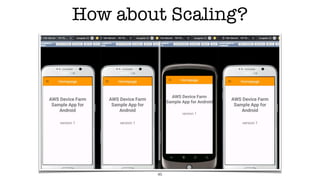
How about Scaling?
45
Some Funny Moments
• Randomly tweeting a police department.
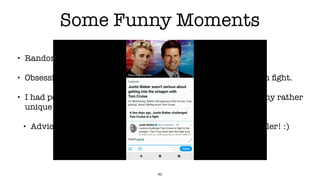
• Obsessively retweeting Justin Bieber and Tom Cruise octagon fight.
• I had people leave comments on my Wordpress posts due to my rather
unique blog hipster language.
• Advice: Don’t use your personal account when using a crawler! :)
46
Conclusion
• Hopefully I’ve demonstrated the benefits of adding a crawler to your
development/testing process and why we need to leverage machines
to help us more.
• The whole purpose of this is to not replace humans or UI Automation
but finding more ways to test our apps efficiently. Adding another
tool to our tool-belt.
• I built this because I wanted this to exist and believed it should
exist. Hopefully I’ve inspired some of you to create your own!
47
Helpful Resources
48
• Page Source Parser Example: https://github.com/isonic1/Appium-Lib-Element-
Attribute-Extender
• APKTOOL: https://ibotpeaches.github.io/Apktool/
• Docker Android: https://github.com/budtmo/docker-android
• Appium Crawler: https://github.com/isonic1/Appium-Native-Crawler
• Looking for help and volunteers!
Justin Ison
Sr. Software Engineer
justin.ison@gmail.com
@isonic1
Thank You!
Q&A
!49

Appium Native Application Crawler

  • 1.
    Justin Ison Sr. SoftwareEngineer justin.ison@applitools.com @isonic1 Appium Native App Crawler Appium Conference 2019 Bangalore, India !1
  • 2.
    Topics • Todays quickdevelopment landscape • The mobile test matrix and the near impossible combinations that need validating • Showing how to leverage machines to do some of the work humans otherwise would spend hours doing • How a crawler can help uncover more bugs, localization issues, performance problems, etc… 2
  • 3.
    The Agile WorldMoves Fast It’s up to us to keep up! • In today’s software world with CI/CD, especially on mobile, the time to market is becoming increasingly shorter! 3
  • 4.
    The Goal Crawling NativeApplications! • Putting the machines to work! • Automate the automation • Create something that could collect as much metadata about an application as possible and report back its findings for review. 4
  • 5.
    What is anapp crawler? • An app crawler is much like a web crawler (spider, robot). It’s a program that is designed to emulate user interactions. A self- automating program that interacts with UI components like a user would. 5
  • 6.
    But before webegin, what led me here? • I worked for a company that was very big on dog-fooding our own apps • We had a very small QA team and could not support the amount of testing needed for all platforms applications • Our applications were constantly changing to keep pace with competitors, push bug fixes and add new features. 6
  • 7.
    • Constantly fixingor revising tests due to code or design changes… • So about three years ago I had this crazy idea… • What if I could automate the automation!? And… 7
  • 8.
    The Mobile TestMatrix Hint: We need a little more help from the machines! 8
  • 9.
  • 10.
    • What happenswhen you rotate your screen? 10
  • 11.
  • 12.
    Bad things canhappen… 12
  • 13.
  • 14.
  • 15.
    • How doyou know your app will work correctly for all combinations if your release cycle is shortened and limited resources? • You could possibly do this all with UI test automation tests • You’d need an army of engineers to code all the different logic variables • Or perhaps hire an army of zombie testers • Automating every possible combination would be next to impossible to maintain • Then again UI automation only test what it’s programmed to test Test Overload! So much to do & so little time… 15
  • 16.
    It can’t bethat hard! (Famous last words) • I’ll just grab all the screen elements and then loop through them… • That was the easy part… But also the core to any crawling. • Let’s look at some examples… 16
  • 17.
  • 18.
    Let’s look forthe Elements 18
  • 19.
  • 20.
  • 21.
    Parse the PageSource! 21
  • 22.
  • 23.
    The Hard Part •The hard part was handling all the conditionals or unknown edge-cases that can occur, especially when adapting to different apps and UI flows • How do I rescue the app when it gets stuck? • What to do when a crash occurs? • Hybrid web views that will never end • Exiting the app by mistake • Excluding certain elements from being tapped • 23
  • 24.
  • 25.
  • 26.
  • 27.
  • 28.
  • 29.
    Language Detection • Asyou’ve seen, there are a lot of screenshots generated. • Scanning every image for abnormalities is time consuming and prone to human mistake • So, I thought there had to be a better way of automating this! 29
  • 30.
  • 31.
    Log Monitoring • Whenperforming exploratory testing, it’s very important to monitor the logs at the same time. • Tip (catch exceptions): adb logcat *:E -v long • Same applies when crawling! 31
  • 32.
  • 33.
    Exception Captured --------- beginningof system
 
 03-06 11:56:08.177 15803 15803 E AndroidRuntime: FATAL EXCEPTION: main
 03-06 11:56:08.177 15803 15803 E AndroidRuntime: Process: com.amazonaws.devicefarm.android.referenceapp, PID: 15803
 03-06 11:56:08.177 15803 15803 E AndroidRuntime: java.lang.ArithmeticException: divide by zero
 03-06 11:56:08.177 15803 15803 E AndroidRuntime: at com.amazonaws.devicefarm.android.referenceapp.Fragments.crashFragment.onCrashButton(crashFragment.jav a:49)
 03-06 11:56:08.177 15803 15803 E AndroidRuntime: at com.amazonaws.devicefarm.android.referenceapp.Fragments.crashFragment$ $ViewInjector$1.doClick(crashFragment$$ViewInjector.java:17)
 03-06 11:56:08.177 15803 15803 E AndroidRuntime: at butterknife.internal.DebouncingOnClickListener.onClick(DebouncingOnClickListener.java:22)
 03-06 11:56:08.177 15803 15803 E AndroidRuntime: at android.view.View.performClick(View.java:5198)
 03-06 11:56:08.177 15803 15803 E AndroidRuntime: at android.view.View$PerformClick.run(View.java:21147)
 03-06 11:56:08.177 15803 15803 E AndroidRuntime: at android.os.Handler.handleCallback(Handler.java:739)
 03-06 11:56:08.177 15803 15803 E AndroidRuntime: at android.os.Handler.dispatchMessage(Handler.java:95)
 03-06 11:56:08.177 15803 15803 E AndroidRuntime: at android.os.Looper.loop(Looper.java:148)
 03-06 11:56:08.177 15803 15803 E AndroidRuntime: at android.app.ActivityThread.main(ActivityThread.java: 5417)
 03-06 11:56:08.177 15803 15803 E AndroidRuntime: at java.lang.reflect.Method.invoke(Native Method)
 03-06 11:56:08.177 15803 15803 E AndroidRuntime: at com.android.internal.os.ZygoteInit$MethodAndArgsCaller.run(ZygoteInit.java:726)
 03-06 11:56:08.177 15803 15803 E AndroidRuntime: at com.android.internal.os.ZygoteInit.main(ZygoteInit.java: 616)
 03-06 11:56:08.191 1190 1190 E EGL_emulation: tid 1190: eglCreateSyncKHR(1370): error 0x3004 (EGL_BAD_ATTRIBUTE) 33
  • 34.
  • 35.
    Automatic Tests! • Reviewingscreenshots for every single language, resolution and orientation on every build became very cumbersome and too prone to human mistake. • How can I automate that process and make it more efficient? 35
  • 36.
  • 37.
  • 38.
  • 39.
    But something wasstill missing… • I want this to be mostly still self efficient crawler. • And writing tests was originally what I wanted to get away from… • So I needed to know more about the application I was crawling in order to be more deterministic! • There happens to be a useful open source tool called apktool! • With apktool I can then decompile the apk/application and extract the view layouts! 39
  • 40.
  • 42.
  • 43.
    Automatically Test allUnique Views! 43
  • 44.
    Chaos Monkey Testing Nowthe fun begins! 44
  • 45.
  • 46.
    Some Funny Moments •Randomly tweeting a police department. • Obsessively retweeting Justin Bieber and Tom Cruise octagon fight. • I had people leave comments on my Wordpress posts due to my rather unique blog hipster language. • Advice: Don’t use your personal account when using a crawler! :) 46
  • 47.
    Conclusion • Hopefully I’vedemonstrated the benefits of adding a crawler to your development/testing process and why we need to leverage machines to help us more. • The whole purpose of this is to not replace humans or UI Automation but finding more ways to test our apps efficiently. Adding another tool to our tool-belt. • I built this because I wanted this to exist and believed it should exist. Hopefully I’ve inspired some of you to create your own! 47
  • 48.
    Helpful Resources 48 • PageSource Parser Example: https://github.com/isonic1/Appium-Lib-Element- Attribute-Extender • APKTOOL: https://ibotpeaches.github.io/Apktool/ • Docker Android: https://github.com/budtmo/docker-android • Appium Crawler: https://github.com/isonic1/Appium-Native-Crawler • Looking for help and volunteers!
  • 49.
    Justin Ison Sr. SoftwareEngineer justin.ison@gmail.com @isonic1 Thank You! Q&A !49