VOIce Client
    PRONTO
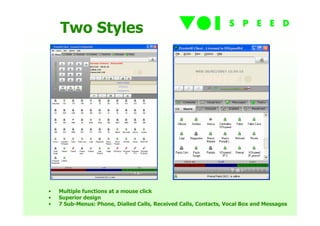
Two Styles


•   Multiple functions at a mouse click
•   Superior design
•   7 Sub-Menus: Phone, Dialled Calls, Received Calls, Contacts, Vocal Box and Messages
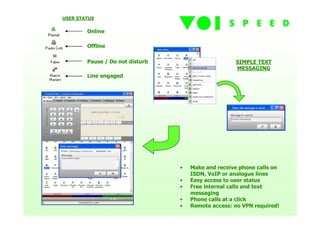
USER STATUS

        Online

        Offline

        Pause / Do not disturb                      SIMPLE TEXT
                                                    MESSAGING
        Line engaged


                                 •   Make and receive phone calls on
                                     ISDN, VoIP or analogue lines
                                 •   Easy access to user status
                                 •   Free internal calls and text
                                     messaging
                                 •   Phone calls at a click
                                 •   Remote access: no VPN required!
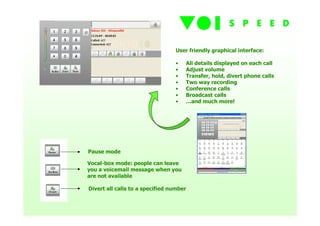
User friendly graphical interface:

                                 •   All details displayed on each call
                                 •   Adjust volume
                                 •   Transfer, hold, divert phone calls
                                 •   Two way recording
                                 •   Conference calls
                                 •   Broadcast calls
                                 •   …and much more!


Pause mode

Vocal-box mode: people can leave
you a voicemail message when you
are not available

Divert all calls to a specified number
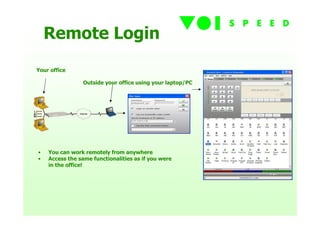
Remote Login
Your office

                Outside your office using your laptop/PC


•   You can work remotely from anywhere
•   Access the same functionalities as if you were
    in the office!
Integration
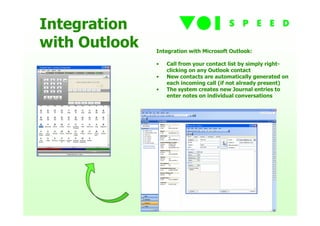
with Outlook   Integration with Microsoft Outlook:

               •   Call from your contact list by simply right-
                   clicking on any Outlook contact
               •   New contacts are automatically generated on
                   each incoming call (if not already present)
               •   The system creates new Journal entries to
                   enter notes on individual conversations
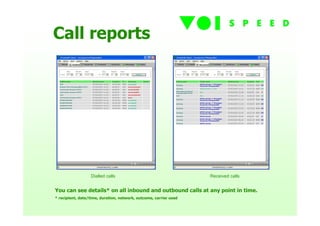
Call reports


                  Dialled calls                                    Received calls


You can see details* on all inbound and outbound calls at any point in time.
* recipient, date/time, duration, network, outcome, carrier used
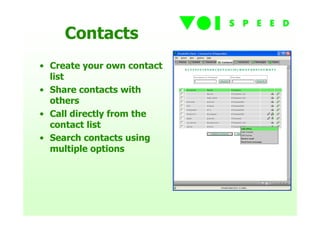
Contacts
• Create your own contact
  list
• Share contacts with
  others
• Call directly from the
  contact list
• Search contacts using
  multiple options
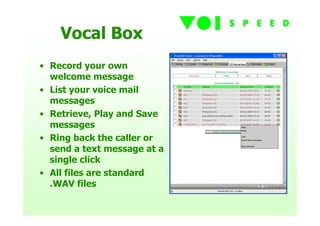
Vocal Box
• Record your own
  welcome message
• List your voice mail
  messages
• Retrieve, Play and Save
  messages
• Ring back the caller or
  send a text message at a
  single click
• All files are standard
  .WAV files
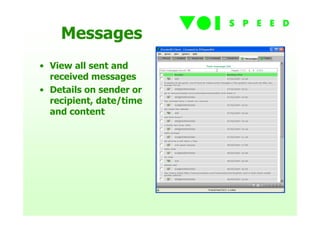
Messages
• View all sent and
  received messages
• Details on sender or
  recipient, date/time
  and content
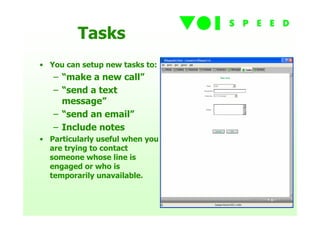
Tasks
• You can setup new tasks to:
   – “make a new call”
   – “send a text
     message”
   – “send an email”
   – Include notes
• Particularly useful when you
  are trying to contact
  someone whose line is
  engaged or who is
  temporarily unavailable.
Interested?

     Download
the FREE demo NOW
    www.prontopbx.com

VOIspeed Soft-Client

  • 1.
  • 2.
    Two Styles • Multiple functions at a mouse click • Superior design • 7 Sub-Menus: Phone, Dialled Calls, Received Calls, Contacts, Vocal Box and Messages
  • 3.
    USER STATUS Online Offline Pause / Do not disturb SIMPLE TEXT MESSAGING Line engaged • Make and receive phone calls on ISDN, VoIP or analogue lines • Easy access to user status • Free internal calls and text messaging • Phone calls at a click • Remote access: no VPN required!
  • 4.
    User friendly graphicalinterface: • All details displayed on each call • Adjust volume • Transfer, hold, divert phone calls • Two way recording • Conference calls • Broadcast calls • …and much more! Pause mode Vocal-box mode: people can leave you a voicemail message when you are not available Divert all calls to a specified number
  • 5.
    Remote Login Your office Outside your office using your laptop/PC • You can work remotely from anywhere • Access the same functionalities as if you were in the office!
  • 6.
    Integration with Outlook Integration with Microsoft Outlook: • Call from your contact list by simply right- clicking on any Outlook contact • New contacts are automatically generated on each incoming call (if not already present) • The system creates new Journal entries to enter notes on individual conversations
  • 7.
    Call reports Dialled calls Received calls You can see details* on all inbound and outbound calls at any point in time. * recipient, date/time, duration, network, outcome, carrier used
  • 8.
    Contacts • Create yourown contact list • Share contacts with others • Call directly from the contact list • Search contacts using multiple options
  • 9.
    Vocal Box • Recordyour own welcome message • List your voice mail messages • Retrieve, Play and Save messages • Ring back the caller or send a text message at a single click • All files are standard .WAV files
  • 10.
    Messages • View allsent and received messages • Details on sender or recipient, date/time and content
  • 11.
    Tasks • You cansetup new tasks to: – “make a new call” – “send a text message” – “send an email” – Include notes • Particularly useful when you are trying to contact someone whose line is engaged or who is temporarily unavailable.
  • 12.
    Interested? Download the FREE demo NOW www.prontopbx.com