GameSalad
Young-min Kang	

Tongmyong University
GameSalad
• http://gamesalad.com	

• Advertised as	

• The world’s fastest game creation engine.	

• Design games for free - no coding required
Requirements
• Mac OS X 10.6 Snow Leopard+	

• GameSalad Creator with registered
account	

• registered Apple developer account	

• internet	

• image editor for creating sprites
Download and Install
• Go GameSalad website	

• http://gamesalad.com	

• Sign in	

• Download GameSalad Creator	

• Install it on your Mac machine
Interface
• GameSalad Creator dialog upon launch
select your
project type
Project info
user interface
• back/forward buttons	

• previous or next task window	

• web preview	

• launches your game on web browser	

• home	

• project main window	

• publish	

• publishes your game to web, iPhone, iPad, Mac,Android	

• scene	

• drop down menu to jump to a specific scenes	

• feedback	

• sends your opinion to GameSalad developer	

• preview	

• plays your game within the GameSalad Creator
Scene editor
• click “initial scene” in the “scene” drop down menu	

• you will see a scene editor like this
What you see in scene editor
• Game Inspector	

• actors: every object in the game	

• attributes: attributes of the objects	

• devices: configuration for mouse, touch screen, accelerometer, display, and audio 	

• Scene Inspector	

• attributes: attributes of the current level	

• layers: creates layers and specifies whether they are scrollable or not	

• Behavior library	

• standard: standard behaviors provided by GameSalad	

• custom: behaviors created by users	

• Images library	

• project: images loaded for project	

• purchased: images purchased at marketplace
What you see in scene editor
• Images library	

• project: images loaded for project	

• purchased: images purchased at marketplace	

• Sounds library	

• music and sound effects loaded for project	

• Actor mode	

• general mouse mode to select actors	

• Camera mode	

• camera control mode	

• Reset Scene	

• stops your level preview and goes back to initial state	

• Play	

• preview the current level of your game project
Actor
• Game inspector	

• click “+” button at actor mode	

• double click your new actor to invoke the actor editor	

• In actor editor	

• change the actor size to 32 x 32	

• click back button to get back to scene editor	

• move your actor to your scene	

• click “play” button	

• nothing happens	

• Scene inspector	

• in attribute mode, set the gravity to be (x=0, y=300)	

• click “play” button, and watch the actor falls
Static platform
• Game inspector	

• click “+” button at actor mode	

• you can change the name of your actors	

• ex:Actor 1: player,Actor 2: platform	

• double click the actor “platform” to launch actor editor 	

• change the size to (width=350, height=10)	

• you can also change its color	

• physics	

• set bounciness as 0 (non-elastic bounce)	

• uncheck “movable” option to make it static	

• get back to level editor	

• drag your platform to your level
Collision behavior
• double click “player” actor	

• set its bounciness to 0	

• in library, find “collide” and drag it to the window where “drag your behaviors here” is written	

• let the player bounce when colliding with “platform”
Adding more behaviors
• in actor editor, create a group and name the group as “Controls”	

• click “create rule” and name it as “Move Left”	

• drag the rule “Move Left” into the group “Controls”	

• make the actor receives “key” event and click “keyboard” to
select a key to invoke this rule	

• drag “Move” from behavior library into the rule “Move Left”	

• set some parameters	

• direction 180, speed 100	

• The behavior setting will look like the figure in the next slide
Adding more behaviors
• add another behavior	

• create another rule
“Move Right”	

• make the rule work
when right arrow
pressed	

• include a Move
behavior	

• test the game	

• efficient method	

• copy the rule, then
paste it inside the
group, and edit the rule
Goal specification
• add another actor “Door”	

• drag the door into the scene	

• double click the door in inspector	

• create a rule named “Level Win”	

• make the actor receive “overlaps or collides” event	

• find “Display Text” behavior in library, and drag it into the rule, and
fill the text edit box with “You Win!”	

• add “Timer” behavior into the rule, and make the timer work after
1 second	

• drag “Reset Scene” behavior into the timer
Goal specification
Let the player fail
• add kill zone	

• in level editor, add an actor named “kill zone”	

• set the width of the zone to be 480	

• place it beneath the platform actor	

• double click the player actor and add a new rule named “Fail”	

• make the rule accept “overlaps or collides” with “kill zone”
event	

• drag “Reset Scene” behavior into the rule	

• make the kill zone invisible	

• attribute - graphics - uncheck “visible”
Screen shots
You made the first salad of your own
GameSalad - Lec. 02
Sprites and Particles
Young-Min Kang
Tongmyong University
Sprites
• create a sprite with any image tool you want
• just drag the sprite file to an actor
• the sprite will be mapped on the actor!
Add more actors
• create a door actor and a platform actors and place them in the scene
Enlarge your scene
• inspector > scene > size
• set the width to be 1500
• place some more platform actors, and link them.
Camera
• click camera mode
• adjust camera hot spot
• when a camera controlling actor goes out of this spot, the camera is adjusted
• controlling actor = player
• double click the player actor
• drag “control camera” from library into the behavior area
• add some keyboard control to move the player
• preview
Sound
• prepare audio files
• library > sound > press +
• import audio files as music or sound type
• double click your player actor
• drag “play music” behavior to the actor
• background music will be played when the actor appears
Add some physics
• refer to the previous lecture
• to add some physics properties to player and platform
• make the door static
• move the player along the platform and enjoy the bg
music
• how to invoke the sound effect…
• let’s add an obstacle with particle effects
Particle effects
• create an actor and name it “torch”
• double click the torch and drag “particle” behavior into its behavior area
• set particle effect parameters and place it in the scene
Particle effects
• test the particle effect
• satisfied?
• change the parameters
Play sound
• create a new rule
• when the player touches the torch
• play “ouch” sound effect
More levels
• games consist of multiple scenes
• let’s add more scenes
• main menu scene
• another game level
• game over scene
Add scenes
• click “home” and click “+” to add a new scene
• name the new scene “menu scene”
• rename the original scene “first level”
• arrange the scenes
• double click the new scene
• add a new actor named button
• make the button transparent
• add “display text” behavior to the button
• text: Start Game
• create a new rule to change scene
GameSalad - Lec. 03
Testing your game on
your IOS device
Young-Min Kang
Tongmyong University
iOS developer program
• enrol to the program
!
• generate your app for iPhone
• click “publish”
• select iPhone
Provisioning profile
• once you generate your app
• you can download the app
• it will ask you to select your provisioning profile
• select your provisioning profile and press “next”
• the app will be ready
App installation
• Select your device
• add your app to the device
GameSalad - Lec. 04
Scenes and Touches
Young-Min Kang
Tongmyong University
Game scenes
• Logo
• Menu
• Game1
• Game2
• Game3
• Fail
• Win
Logo
• Actor: StartGame
• make it invisible
• add behaviors
Menu scene
• create ONE actor
• levelBtn
• drag the actor to the scene three times
• click the actor instances in the scene editor
• you can edit the behavior of the actor instance
• each button displays its own message
• each button invokes its own level scene
Game scene
• add gravity to the scene
• add a falling box actor
• add a platform to hit the box
• physics - uncheck
• move in accordance with user’s touch (described in the next slide)
• add invisible “win zone” and “failure zone”
• if the box collides with the “win zone”, move to win scene
• if the box collides with the “failure zone”, move to fail scne
Touch
• hitting platform
• create a rule for touch event
• behaviors
• constrain attribute “self.Position.X/Y”
• to “game.Touches.Touch 1.X/Y”
• selection: Devices-Touches-Touch 1-X
Win/fail scenes
• display a message
• when clicked, move to the menu scene
More levels
GameSalad - Lec. 05
Game data and actor
spawning
Young-Min Kang
Tongmyong University
Start button
• prepare some actors and place them in the scene
Add a new attribute
• inspector - game - attribute
• add a new attribute by clicking “+”
• boolean Start
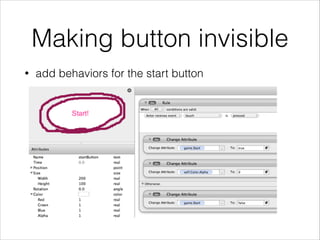
Making button invisible
• add behaviors for the start button
Click the button
• The button will disappear
• However,
• The ball should not fall until the button is pressed
• How can you do that?
Constrain your actor
• add some rules for your ball actor
Preview
• ball is not moving unless you start
Spawning an actor
• prepare an actor to be spawned
a new actor
Spawn it
• add behavior rule to ball
Reset scene
• add a new rule for the game over message actor
GameSalad - Lec. 06
Making a real game
Young-Min Kang
Tongmyong University
Prepare some images
Create a project
• name the project “Shoot”
• create a main menu
• change the name of the initial scene to “Main Menu”
• double click it and open scene editor
• drag the initial logo into the scene
• create a button actor named “Start Game Button”
• create a rule for the button
• actor receives event > touch > is > pressed
• go to scene: next scene
• make it display “Play Game”
Create a new scene
• create a new scene and name it “Instruction”
• drag an instruction image into the inspector
• make a rule for the “instruction” image actor to change the scene
when touched
Game scene
• create a new scene named “Level 1”
• resize the scene to be as large as 1200x1200
• drag the level image “map.png” into the scene
• the size of the image will be adjusted
• set the size of the actor to fit in the scene
• add new actors
• player
• enemy
Player control
• add a behavior group named “keyboard movement”
• insert a new rule named “accelerate” that is activated when Actor receives event > key UP > is > down
• drag “move” behavior into the rule
• direction: 90
• speed: 100
• relative to actor
• move type: additive
• copy the rule and rename it as “reverse”
• drag “move” into the rule
• direction should be set “270”
Player control
• Rotation
Control camera
• make the camera follow your character
• click “camera mode” and resize the camera region
• add “camera control” bahavior to your character
Add some NPCs
• place some enemy characters in the scene
Adding some intelligence
• NPCs are chasing your character when they detect your approach
• create an actor named “detector”
• size: 200x200
• add “Spawn Actor” behavior to your “enemy actor”
• make them spawn “detector”
• make your detector invisible by setting 0 to alpha
Shooting
• add an actor named “bullet”
• drag an image for the bullet (black background)
• set “additive” for blending mode
• add “Move” behavior for this actor
• direction: 90
• relative to actor
• speed: 1000
Shooting control
• edit your character actor
• add a rule into the “keyboard movement” group (actor recives event > key > space > is > down)
• add timer in the rule: every 2.0 seconds
• spawn actor: bullet
• direction: self.Rotation / position: 0, 50
• layer order: in back of actor / direction relative to: scene
Firing flash
• prepare an image for flash
• add an actor named “flash”
• drag the image onto this actor
• add timer behavior
• destroy self after 0.1 seconds
• edit your character actor again
• spawn the flash actor when you shoot
Bullet collision
• Edit the enemy actor
• add an attribute named
“Health” of integer type
• set 4 for the attribute
• Create a rule named “Shot” for the
actor
• condition: overlaps or
collides with bullet
• behavior: change attribute
“self.Health” to “self.Health-1”
• Create another rule “Die” for the
actor
• condition: attribute “self.Heal”
= 0
• behavior: Destroy
Play it
Let them move
• edit “enemy” actor
Accelerometer
• character control with accelerometer
Rotate your character in
accordance with accelerometer
game.Accelerometer.y * 600
Touch shooting
• add a new attribute for
game
• boolean “bFiring”
initialized as
false
• when the map
touched, the flag is
turned to be true
• change the shooting rule of your character
effects
• explosion effect when shot
Win
• add a new game attribute “nShotEnemy”
• increase the nShotEnemy when an enemy is shot
• if the nShotEnemy value is larger than a specific value, move to winning scene
make “Win Scene” go to “Main Mene” when touched
UI Scene
• Create a UI Image
• make an actor named “uiDesign” with “additive”
blending mode
• add a layer to “Level 1” scene
• name the layer “UI”
• move the layer on the default layer above
• uncheck “scrollable”
• drag the uiDesign into the scene and make
it located in the UI layer
• add some game attribute and let the UI display it
Play, and improve it
• Add more effects such as explosion…
GameSalad - Lec. 07
Table
Young-Min Kang
Tongmyong University
Basics
• table
• matrix shaped 2D data
• can be accessed with row and column indices
• all items in a column should be of an identical type
• you can create as many tables as you want
• tables are treated as attributes of game
Table creation
• Home > Tables
• click “+” to create as many table as you want
• rename them
Edit your tables
• determine the # of rows and columns
• determine the type of each column
• you can easily increase the number of columns or rows
• you can rearrange the order of the columns and rows
Prepare for table access
• create an actor and place it in the scene
Display table items
• make the actor display an item in the table
Test it
• press preview button and reset the scene
• every time you reset the scene, randomly chosen item
will be displayed
Table modification
• Change Table Value behavior
Table application
table visualization and manipulation
Create a table
• Prepare a table to be displayed and manipulated
Actor to show items
• create an actor named “item viewer”
• double click and add behaviors as follows
nothing specified here
common behavior
• make the actor display table item (common)
• the item is accessed by attributes of the actor (different attributes for each actor instance)
Instancing
• place the actor instances in the scene
add behaviors
• double-click the actor instances to edit their
behaviors differently
specify different values to instances
Background
• add background and test it
Table items are displayed on the actor instances
Table manipulation
• Table items should be accessed with structured
looping method
• loop behavior
• only in ‘pro’ version which costs $299!
• alternative
• inventing your loop with available behaviors
Single for loop
• for(int i=1;i<=4;i++) {
• TB_State[i][1] = TB_State[i][1]+1;
• }
!
• add attributes
• idxI
• idxJ
• use those indices for our for loop
• here, a single for loop is presented
• idxI is used
Test
• press right key to increase all items in the first column

Game Salad Study

  • 1.
  • 2.
    GameSalad • http://gamesalad.com • Advertisedas • The world’s fastest game creation engine. • Design games for free - no coding required
  • 3.
    Requirements • Mac OSX 10.6 Snow Leopard+ • GameSalad Creator with registered account • registered Apple developer account • internet • image editor for creating sprites
  • 4.
    Download and Install •Go GameSalad website • http://gamesalad.com • Sign in • Download GameSalad Creator • Install it on your Mac machine
  • 5.
    Interface • GameSalad Creatordialog upon launch select your project type
  • 6.
  • 7.
    user interface • back/forwardbuttons • previous or next task window • web preview • launches your game on web browser • home • project main window • publish • publishes your game to web, iPhone, iPad, Mac,Android • scene • drop down menu to jump to a specific scenes • feedback • sends your opinion to GameSalad developer • preview • plays your game within the GameSalad Creator
  • 8.
    Scene editor • click“initial scene” in the “scene” drop down menu • you will see a scene editor like this
  • 9.
    What you seein scene editor • Game Inspector • actors: every object in the game • attributes: attributes of the objects • devices: configuration for mouse, touch screen, accelerometer, display, and audio • Scene Inspector • attributes: attributes of the current level • layers: creates layers and specifies whether they are scrollable or not • Behavior library • standard: standard behaviors provided by GameSalad • custom: behaviors created by users • Images library • project: images loaded for project • purchased: images purchased at marketplace
  • 10.
    What you seein scene editor • Images library • project: images loaded for project • purchased: images purchased at marketplace • Sounds library • music and sound effects loaded for project • Actor mode • general mouse mode to select actors • Camera mode • camera control mode • Reset Scene • stops your level preview and goes back to initial state • Play • preview the current level of your game project
  • 11.
    Actor • Game inspector •click “+” button at actor mode • double click your new actor to invoke the actor editor • In actor editor • change the actor size to 32 x 32 • click back button to get back to scene editor • move your actor to your scene • click “play” button • nothing happens • Scene inspector • in attribute mode, set the gravity to be (x=0, y=300) • click “play” button, and watch the actor falls
  • 12.
    Static platform • Gameinspector • click “+” button at actor mode • you can change the name of your actors • ex:Actor 1: player,Actor 2: platform • double click the actor “platform” to launch actor editor • change the size to (width=350, height=10) • you can also change its color • physics • set bounciness as 0 (non-elastic bounce) • uncheck “movable” option to make it static • get back to level editor • drag your platform to your level
  • 13.
    Collision behavior • doubleclick “player” actor • set its bounciness to 0 • in library, find “collide” and drag it to the window where “drag your behaviors here” is written • let the player bounce when colliding with “platform”
  • 14.
    Adding more behaviors •in actor editor, create a group and name the group as “Controls” • click “create rule” and name it as “Move Left” • drag the rule “Move Left” into the group “Controls” • make the actor receives “key” event and click “keyboard” to select a key to invoke this rule • drag “Move” from behavior library into the rule “Move Left” • set some parameters • direction 180, speed 100 • The behavior setting will look like the figure in the next slide
  • 15.
  • 16.
    Adding more behaviors •add another behavior • create another rule “Move Right” • make the rule work when right arrow pressed • include a Move behavior • test the game • efficient method • copy the rule, then paste it inside the group, and edit the rule
  • 17.
    Goal specification • addanother actor “Door” • drag the door into the scene • double click the door in inspector • create a rule named “Level Win” • make the actor receive “overlaps or collides” event • find “Display Text” behavior in library, and drag it into the rule, and fill the text edit box with “You Win!” • add “Timer” behavior into the rule, and make the timer work after 1 second • drag “Reset Scene” behavior into the timer
  • 18.
  • 19.
    Let the playerfail • add kill zone • in level editor, add an actor named “kill zone” • set the width of the zone to be 480 • place it beneath the platform actor • double click the player actor and add a new rule named “Fail” • make the rule accept “overlaps or collides” with “kill zone” event • drag “Reset Scene” behavior into the rule • make the kill zone invisible • attribute - graphics - uncheck “visible”
  • 20.
    Screen shots You madethe first salad of your own
  • 21.
    GameSalad - Lec.02 Sprites and Particles Young-Min Kang Tongmyong University
  • 22.
    Sprites • create asprite with any image tool you want • just drag the sprite file to an actor • the sprite will be mapped on the actor!
  • 23.
    Add more actors •create a door actor and a platform actors and place them in the scene
  • 24.
    Enlarge your scene •inspector > scene > size • set the width to be 1500 • place some more platform actors, and link them.
  • 25.
    Camera • click cameramode • adjust camera hot spot • when a camera controlling actor goes out of this spot, the camera is adjusted • controlling actor = player • double click the player actor • drag “control camera” from library into the behavior area • add some keyboard control to move the player • preview
  • 26.
    Sound • prepare audiofiles • library > sound > press + • import audio files as music or sound type • double click your player actor • drag “play music” behavior to the actor • background music will be played when the actor appears
  • 27.
    Add some physics •refer to the previous lecture • to add some physics properties to player and platform • make the door static • move the player along the platform and enjoy the bg music • how to invoke the sound effect… • let’s add an obstacle with particle effects
  • 28.
    Particle effects • createan actor and name it “torch” • double click the torch and drag “particle” behavior into its behavior area • set particle effect parameters and place it in the scene
  • 29.
    Particle effects • testthe particle effect • satisfied? • change the parameters
  • 30.
    Play sound • createa new rule • when the player touches the torch • play “ouch” sound effect
  • 31.
    More levels • gamesconsist of multiple scenes • let’s add more scenes • main menu scene • another game level • game over scene
  • 32.
    Add scenes • click“home” and click “+” to add a new scene • name the new scene “menu scene” • rename the original scene “first level” • arrange the scenes • double click the new scene • add a new actor named button • make the button transparent • add “display text” behavior to the button • text: Start Game • create a new rule to change scene
  • 33.
    GameSalad - Lec.03 Testing your game on your IOS device Young-Min Kang Tongmyong University
  • 34.
    iOS developer program •enrol to the program ! • generate your app for iPhone • click “publish” • select iPhone
  • 35.
    Provisioning profile • onceyou generate your app • you can download the app • it will ask you to select your provisioning profile • select your provisioning profile and press “next” • the app will be ready
  • 36.
    App installation • Selectyour device • add your app to the device
  • 37.
    GameSalad - Lec.04 Scenes and Touches Young-Min Kang Tongmyong University
  • 38.
    Game scenes • Logo •Menu • Game1 • Game2 • Game3 • Fail • Win
  • 39.
    Logo • Actor: StartGame •make it invisible • add behaviors
  • 40.
    Menu scene • createONE actor • levelBtn • drag the actor to the scene three times • click the actor instances in the scene editor • you can edit the behavior of the actor instance • each button displays its own message • each button invokes its own level scene
  • 41.
    Game scene • addgravity to the scene • add a falling box actor • add a platform to hit the box • physics - uncheck • move in accordance with user’s touch (described in the next slide) • add invisible “win zone” and “failure zone” • if the box collides with the “win zone”, move to win scene • if the box collides with the “failure zone”, move to fail scne
  • 42.
    Touch • hitting platform •create a rule for touch event • behaviors • constrain attribute “self.Position.X/Y” • to “game.Touches.Touch 1.X/Y” • selection: Devices-Touches-Touch 1-X
  • 43.
    Win/fail scenes • displaya message • when clicked, move to the menu scene
  • 44.
  • 45.
    GameSalad - Lec.05 Game data and actor spawning Young-Min Kang Tongmyong University
  • 46.
    Start button • preparesome actors and place them in the scene
  • 47.
    Add a newattribute • inspector - game - attribute • add a new attribute by clicking “+” • boolean Start
  • 48.
    Making button invisible •add behaviors for the start button
  • 49.
    Click the button •The button will disappear • However, • The ball should not fall until the button is pressed • How can you do that?
  • 50.
    Constrain your actor •add some rules for your ball actor
  • 51.
    Preview • ball isnot moving unless you start
  • 52.
    Spawning an actor •prepare an actor to be spawned a new actor
  • 53.
    Spawn it • addbehavior rule to ball
  • 54.
    Reset scene • adda new rule for the game over message actor
  • 55.
    GameSalad - Lec.06 Making a real game Young-Min Kang Tongmyong University
  • 56.
  • 57.
    Create a project •name the project “Shoot” • create a main menu • change the name of the initial scene to “Main Menu” • double click it and open scene editor • drag the initial logo into the scene • create a button actor named “Start Game Button” • create a rule for the button • actor receives event > touch > is > pressed • go to scene: next scene • make it display “Play Game”
  • 58.
    Create a newscene • create a new scene and name it “Instruction” • drag an instruction image into the inspector • make a rule for the “instruction” image actor to change the scene when touched
  • 59.
    Game scene • createa new scene named “Level 1” • resize the scene to be as large as 1200x1200 • drag the level image “map.png” into the scene • the size of the image will be adjusted • set the size of the actor to fit in the scene • add new actors • player • enemy
  • 60.
    Player control • adda behavior group named “keyboard movement” • insert a new rule named “accelerate” that is activated when Actor receives event > key UP > is > down • drag “move” behavior into the rule • direction: 90 • speed: 100 • relative to actor • move type: additive • copy the rule and rename it as “reverse” • drag “move” into the rule • direction should be set “270”
  • 61.
  • 62.
    Control camera • makethe camera follow your character • click “camera mode” and resize the camera region • add “camera control” bahavior to your character
  • 63.
    Add some NPCs •place some enemy characters in the scene
  • 64.
    Adding some intelligence •NPCs are chasing your character when they detect your approach • create an actor named “detector” • size: 200x200 • add “Spawn Actor” behavior to your “enemy actor” • make them spawn “detector” • make your detector invisible by setting 0 to alpha
  • 65.
    Shooting • add anactor named “bullet” • drag an image for the bullet (black background) • set “additive” for blending mode • add “Move” behavior for this actor • direction: 90 • relative to actor • speed: 1000
  • 66.
    Shooting control • edityour character actor • add a rule into the “keyboard movement” group (actor recives event > key > space > is > down) • add timer in the rule: every 2.0 seconds • spawn actor: bullet • direction: self.Rotation / position: 0, 50 • layer order: in back of actor / direction relative to: scene
  • 67.
    Firing flash • preparean image for flash • add an actor named “flash” • drag the image onto this actor • add timer behavior • destroy self after 0.1 seconds • edit your character actor again • spawn the flash actor when you shoot
  • 68.
    Bullet collision • Editthe enemy actor • add an attribute named “Health” of integer type • set 4 for the attribute • Create a rule named “Shot” for the actor • condition: overlaps or collides with bullet • behavior: change attribute “self.Health” to “self.Health-1” • Create another rule “Die” for the actor • condition: attribute “self.Heal” = 0 • behavior: Destroy
  • 69.
  • 70.
    Let them move •edit “enemy” actor
  • 71.
    Accelerometer • character controlwith accelerometer Rotate your character in accordance with accelerometer game.Accelerometer.y * 600
  • 72.
    Touch shooting • adda new attribute for game • boolean “bFiring” initialized as false • when the map touched, the flag is turned to be true • change the shooting rule of your character
  • 73.
  • 74.
    Win • add anew game attribute “nShotEnemy” • increase the nShotEnemy when an enemy is shot • if the nShotEnemy value is larger than a specific value, move to winning scene make “Win Scene” go to “Main Mene” when touched
  • 75.
    UI Scene • Createa UI Image • make an actor named “uiDesign” with “additive” blending mode • add a layer to “Level 1” scene • name the layer “UI” • move the layer on the default layer above • uncheck “scrollable” • drag the uiDesign into the scene and make it located in the UI layer • add some game attribute and let the UI display it
  • 76.
    Play, and improveit • Add more effects such as explosion…
  • 77.
    GameSalad - Lec.07 Table Young-Min Kang Tongmyong University
  • 78.
    Basics • table • matrixshaped 2D data • can be accessed with row and column indices • all items in a column should be of an identical type • you can create as many tables as you want • tables are treated as attributes of game
  • 79.
    Table creation • Home> Tables • click “+” to create as many table as you want • rename them
  • 80.
    Edit your tables •determine the # of rows and columns • determine the type of each column • you can easily increase the number of columns or rows • you can rearrange the order of the columns and rows
  • 81.
    Prepare for tableaccess • create an actor and place it in the scene
  • 82.
    Display table items •make the actor display an item in the table
  • 83.
    Test it • presspreview button and reset the scene • every time you reset the scene, randomly chosen item will be displayed
  • 84.
    Table modification • ChangeTable Value behavior
  • 85.
  • 86.
    Create a table •Prepare a table to be displayed and manipulated
  • 87.
    Actor to showitems • create an actor named “item viewer” • double click and add behaviors as follows nothing specified here
  • 88.
    common behavior • makethe actor display table item (common) • the item is accessed by attributes of the actor (different attributes for each actor instance)
  • 89.
    Instancing • place theactor instances in the scene
  • 90.
    add behaviors • double-clickthe actor instances to edit their behaviors differently specify different values to instances
  • 91.
    Background • add backgroundand test it Table items are displayed on the actor instances
  • 92.
    Table manipulation • Tableitems should be accessed with structured looping method • loop behavior • only in ‘pro’ version which costs $299! • alternative • inventing your loop with available behaviors
  • 93.
    Single for loop •for(int i=1;i<=4;i++) { • TB_State[i][1] = TB_State[i][1]+1; • } ! • add attributes • idxI • idxJ • use those indices for our for loop • here, a single for loop is presented • idxI is used
  • 94.
    Test • press rightkey to increase all items in the first column