Chaper 2 Struts2 Course Installing and configuring Struts2 & Struts2 Architecture
Struts2 course topics Chapter 1: Evolution of web applications Chapter 2: Struts2 Installation and configuration Chapter 3: Actions and results Chapter 4: OGNL - Object-Graph Navigation Language Chapter 5: Form Tags Chapter 6: Generic Tags Chapter 7: type conversion Chapter 8: Input validation Chapter 9: Message Handling and Internationalization Chapter 10: Model Driven and Prepare Interceptors Chapter 11: The Persistence Layer Chapter 12: File upload and File download Chapter 13: Securing Struts2 applications in Tomcat Chapter 14: Custom Interceptors Chapter 15: Custom Result Types Chapter 16: Preventing Double Submits Chapter 17: The Execute and Wait Interceptor Chapter 18: Decorating Struts2 with Tiles Chapter 19: Decorating Struts2 with SiteMesh Chapter 20: Zero Configuration Chapter 21: AJAX
Installing and configuring Struts2 Agenda Downloading Struts2 Installing in a web project Creating the first struts2 application Struts2 Architecture
Downloading Struts2
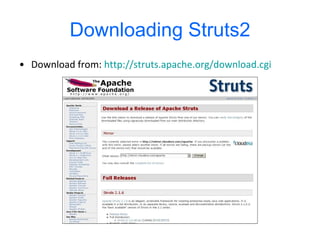
Downloading   Struts2 Download from:  http://struts.apache.org/download.cgi
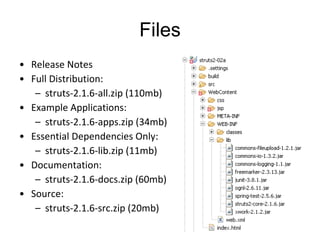
Files Release Notes  Full Distribution:  struts-2.1.6-all.zip (110mb)  Example Applications:  struts-2.1.6-apps.zip (34mb)  Essential Dependencies Only:  struts-2.1.6-lib.zip (11mb)  Documentation:  struts-2.1.6-docs.zip (60mb)  Source:  struts-2.1.6-src.zip (20mb)
Installing Struts2
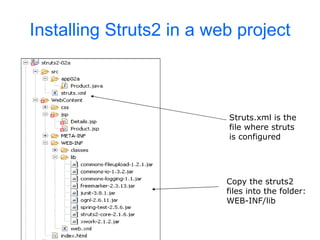
Installing Struts2 in a web project Struts.xml is the file where struts is configured Copy the struts2 files into the folder: WEB-INF/lib
Creating the first  struts2 application
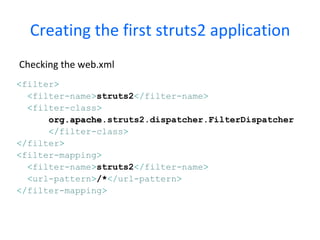
Creating the first struts2 application Checking the web.xml < filter > < filter-name > struts2 </ filter-name > < filter-class > org.apache .struts2.dispatcher.FilterDispatcher </ filter-class > </ filter > < filter-mapping > < filter-name > struts2 </ filter-name > < url-pattern > /* </ url-pattern > </ filter-mapping >
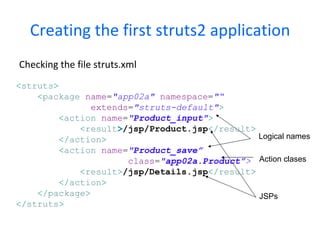
Creating the first struts2 application Checking the file struts.xml Logical names Action clases JSPs < struts > < package   name = &quot;app02a&quot;   namespace = &quot;“   extends = &quot;struts-default&quot; > < action   name = &quot; Product_input &quot; > < result > /jsp/Product.jsp </ result > </ action > < action   name = &quot; Product_save”   class = &quot; app02a.Product” >   < result > /jsp/Details.jsp </ result > </ action > </ package > </ struts >
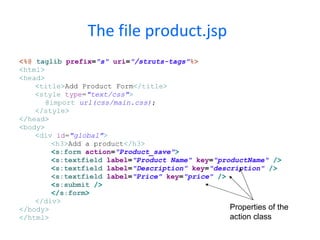
The file product.jsp   <%@   taglib   prefix = &quot;s&quot;   uri = &quot;/struts-tags&quot; %> < html > < head > < title > Add Product Form </ title > < style   type = &quot;text/css&quot; > @import   url(css/main.css) ; </ style > </ head > < body > < div   id = &quot;global&quot; > < h3 > Add a product </ h3 > < s:form   action = &quot;Product_save&quot; > < s:textfield   label = &quot;Product Name&quot;   key = &quot;productName&quot;   /> < s:textfield   label = &quot;Description&quot;   key = &quot;description&quot;   /> <s:textfield   label = &quot;Price&quot;   key = &quot;price&quot;   /> < s:submit   /> </ s:form > </ div > </ body > </ html > Properties of the action class
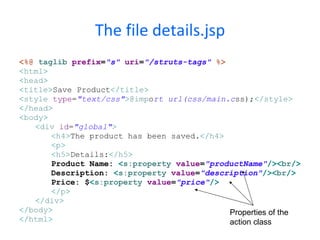
The file details.jsp <%@   taglib   prefix = &quot;s&quot;   uri = &quot;/struts-tags&quot;   %> < html > < head > < title > Save Product </ title > < style   type = &quot;text/css&quot; > @imp o rt url(css/main.c s s); </ style > </ head > < body > < div   id = &quot;global&quot; > < h4 > The product has been saved. </ h4 > < p > < h5 > Details: </ h5 > Product Name:  < s:property   value = &quot;productName&quot; />< br /> Description:  < s:property   value = &quot;description&quot; />< br /> Price: $ < s:property   value = &quot;price&quot; /> </ p > </ div > </ body > </ html > Properties of the action class
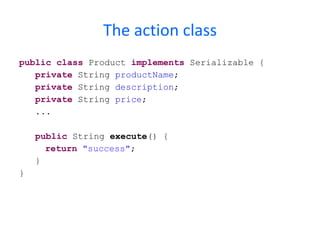
The action class public   class  Product  implements  Serializable { private  String  productName ; private  String  description ; private  String  price ; ... public  String  execute () { return   &quot;success&quot; ; } }
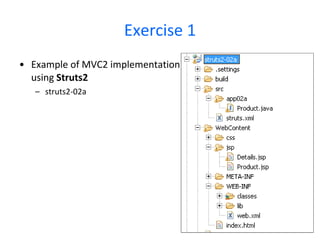
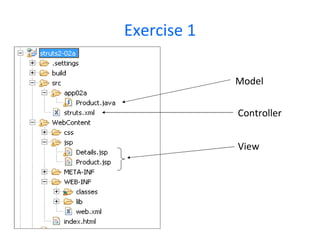
Exercise 1 Example of MVC2 implementation  using  Struts2 struts2-02a
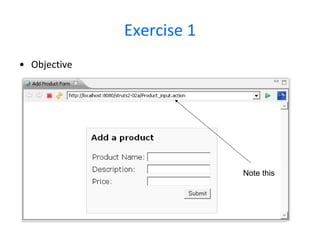
Exercise 1 Objective Note this
Exercise 1 Model View Controller

Struts2 course chapter 2: installation and configuration

  • 1.
    Chaper 2 Struts2Course Installing and configuring Struts2 & Struts2 Architecture
  • 2.
    Struts2 course topicsChapter 1: Evolution of web applications Chapter 2: Struts2 Installation and configuration Chapter 3: Actions and results Chapter 4: OGNL - Object-Graph Navigation Language Chapter 5: Form Tags Chapter 6: Generic Tags Chapter 7: type conversion Chapter 8: Input validation Chapter 9: Message Handling and Internationalization Chapter 10: Model Driven and Prepare Interceptors Chapter 11: The Persistence Layer Chapter 12: File upload and File download Chapter 13: Securing Struts2 applications in Tomcat Chapter 14: Custom Interceptors Chapter 15: Custom Result Types Chapter 16: Preventing Double Submits Chapter 17: The Execute and Wait Interceptor Chapter 18: Decorating Struts2 with Tiles Chapter 19: Decorating Struts2 with SiteMesh Chapter 20: Zero Configuration Chapter 21: AJAX
  • 3.
    Installing and configuringStruts2 Agenda Downloading Struts2 Installing in a web project Creating the first struts2 application Struts2 Architecture
  • 4.
  • 5.
    Downloading Struts2 Download from: http://struts.apache.org/download.cgi
  • 6.
    Files Release Notes Full Distribution: struts-2.1.6-all.zip (110mb) Example Applications: struts-2.1.6-apps.zip (34mb) Essential Dependencies Only: struts-2.1.6-lib.zip (11mb) Documentation: struts-2.1.6-docs.zip (60mb) Source: struts-2.1.6-src.zip (20mb)
  • 7.
  • 8.
    Installing Struts2 ina web project Struts.xml is the file where struts is configured Copy the struts2 files into the folder: WEB-INF/lib
  • 9.
    Creating the first struts2 application
  • 10.
    Creating the firststruts2 application Checking the web.xml < filter > < filter-name > struts2 </ filter-name > < filter-class > org.apache .struts2.dispatcher.FilterDispatcher </ filter-class > </ filter > < filter-mapping > < filter-name > struts2 </ filter-name > < url-pattern > /* </ url-pattern > </ filter-mapping >
  • 11.
    Creating the firststruts2 application Checking the file struts.xml Logical names Action clases JSPs < struts > < package name = &quot;app02a&quot; namespace = &quot;“ extends = &quot;struts-default&quot; > < action name = &quot; Product_input &quot; > < result > /jsp/Product.jsp </ result > </ action > < action name = &quot; Product_save” class = &quot; app02a.Product” > < result > /jsp/Details.jsp </ result > </ action > </ package > </ struts >
  • 12.
    The file product.jsp <%@ taglib prefix = &quot;s&quot; uri = &quot;/struts-tags&quot; %> < html > < head > < title > Add Product Form </ title > < style type = &quot;text/css&quot; > @import url(css/main.css) ; </ style > </ head > < body > < div id = &quot;global&quot; > < h3 > Add a product </ h3 > < s:form action = &quot;Product_save&quot; > < s:textfield label = &quot;Product Name&quot; key = &quot;productName&quot; /> < s:textfield label = &quot;Description&quot; key = &quot;description&quot; /> <s:textfield label = &quot;Price&quot; key = &quot;price&quot; /> < s:submit /> </ s:form > </ div > </ body > </ html > Properties of the action class
  • 13.
    The file details.jsp<%@ taglib prefix = &quot;s&quot; uri = &quot;/struts-tags&quot; %> < html > < head > < title > Save Product </ title > < style type = &quot;text/css&quot; > @imp o rt url(css/main.c s s); </ style > </ head > < body > < div id = &quot;global&quot; > < h4 > The product has been saved. </ h4 > < p > < h5 > Details: </ h5 > Product Name: < s:property value = &quot;productName&quot; />< br /> Description: < s:property value = &quot;description&quot; />< br /> Price: $ < s:property value = &quot;price&quot; /> </ p > </ div > </ body > </ html > Properties of the action class
  • 14.
    The action classpublic class Product implements Serializable { private String productName ; private String description ; private String price ; ... public String execute () { return &quot;success&quot; ; } }
  • 15.
    Exercise 1 Exampleof MVC2 implementation using Struts2 struts2-02a
  • 16.
  • 17.
    Exercise 1 ModelView Controller