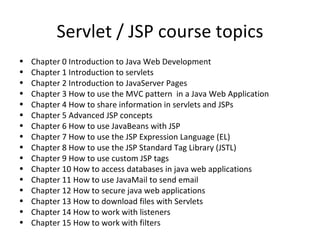
Servlet / JSP course topics
•   Chapter 0 Introduction to Java Web Development
•   Chapter 1 Introduction to servlets
•   Chapter 2 Introduction to JavaServer Pages
•   Chapter 3 How to use the MVC pattern in a Java Web Application
•   Chapter 4 How to share information in servlets and JSPs
•   Chapter 5 Advanced JSP concepts
•   Chapter 6 How to use JavaBeans with JSP
•   Chapter 7 How to use the JSP Expression Language (EL)
•   Chapter 8 How to use the JSP Standard Tag Library (JSTL)
•   Chapter 9 How to use custom JSP tags
•   Chapter 10 How to access databases in java web applications
•   Chapter 11 How to use JavaMail to send email
•   Chapter 12 How to secure java web applications
•   Chapter 13 How to download files with Servlets
•   Chapter 14 How to work with listeners
•   Chapter 15 How to work with filters
Introduction to
Java Web Development
Introduction to Java Web
                Development
•   Java Enterprise Edition
•   Java Web Development
•   Structure of a web project
•   Introduction to Web Applications
•   The first project
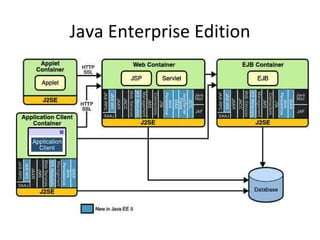
Java Enterprise Edition
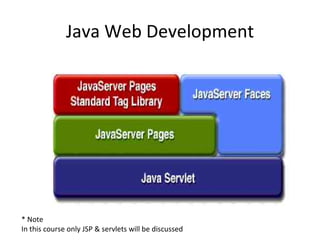
Java Web Development


* Note
In this course only JSP & servlets will be discussed
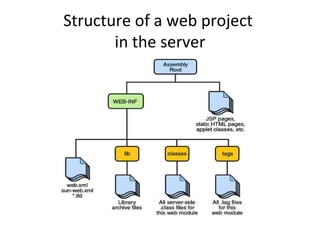
Structure of a web project
• There are two kind of structures
   – The structure of the web application in a server
   – The structure of the IDE

• A web project have three main elements
   – The JSPs files
   – The java classes
   – The Configuration file web.xml
Structure of a web project
       in the server
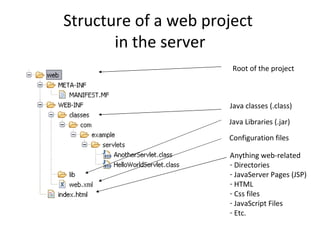
Structure of a web project
       in the server
                       Root of the project


                      Java classes (.class)

                      Java Libraries (.jar)

                      Configuration files

                      Anything web-related
                      - Directories
                      - JavaServer Pages (JSP)
                      - HTML
                      - Css files
                      - JavaScript Files
                      - Etc.
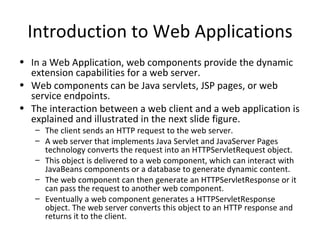
Introduction to Web Applications
• In a Web Application, web components provide the dynamic
  extension capabilities for a web server.
• Web components can be Java servlets, JSP pages, or web
  service endpoints.
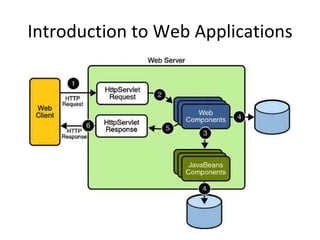
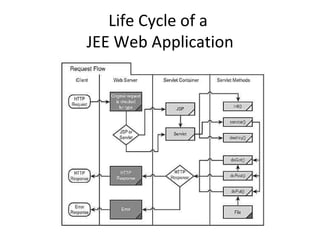
• The interaction between a web client and a web application is
  explained and illustrated in the next slide figure.
   – The client sends an HTTP request to the web server.
   – A web server that implements Java Servlet and JavaServer Pages
     technology converts the request into an HTTPServletRequest object.
   – This object is delivered to a web component, which can interact with
     JavaBeans components or a database to generate dynamic content.
   – The web component can then generate an HTTPServletResponse or it
     can pass the request to another web component.
   – Eventually a web component generates a HTTPServletResponse
     object. The web server converts this object to an HTTP response and
     returns it to the client.
Introduction to Web Applications
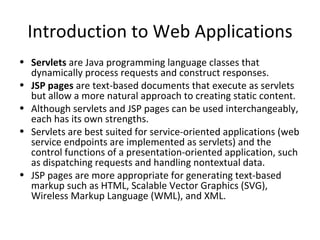
• Servlets are Java programming language classes that
  dynamically process requests and construct responses. 
• JSP pages are text-based documents that execute as servlets
  but allow a more natural approach to creating static content.
• Although servlets and JSP pages can be used interchangeably,
  each has its own strengths.
• Servlets are best suited for service-oriented applications (web
  service endpoints are implemented as servlets) and the
  control functions of a presentation-oriented application, such
  as dispatching requests and handling nontextual data.
• JSP pages are more appropriate for generating text-based
  markup such as HTML, Scalable Vector Graphics (SVG),
  Wireless Markup Language (WML), and XML.
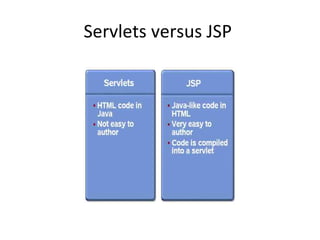
Servlets versus JSP
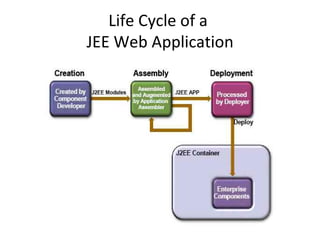
Life Cycle of a
JEE Web Application
Life Cycle of a
JEE Web Application
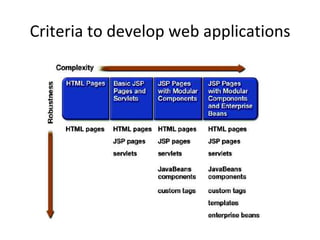
Criteria to develop web applications
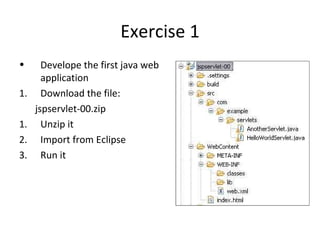
Exercise 1
•      Develope the first java web
       application
1.     Download the file:
     jspservlet-00.zip
1.     Unzip it
2.     Import from Eclipse
3.     Run it
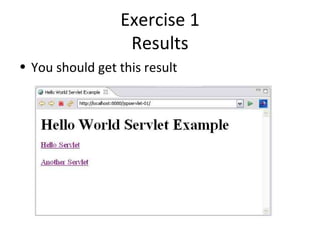
Exercise 1
                  Results
• You should get this result
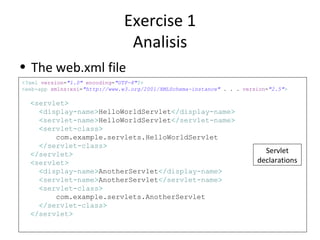
Exercise 1
                                Analisis
• The web.xml file
<?xml version="1.0" encoding="UTF-8"?>
<web-app xmlns:xsi="http://www.w3.org/2001/XMLSchema-instance" . . . version="2.5">

  <servlet>
    <display-name>HelloWorldServlet</display-name>
    <servlet-name>HelloWorldServlet</servlet-name>
    <servlet-class>
        com.example.servlets.HelloWorldServlet
    </servlet-class>
  </servlet>                                                               Servlet
  <servlet>                                                              declarations
    <display-name>AnotherServlet</display-name>
    <servlet-name>AnotherServlet</servlet-name>
    <servlet-class>
        com.example.servlets.AnotherServlet
    </servlet-class>
  </servlet>
Exercise 1
                      Analisis
• The web.xml file
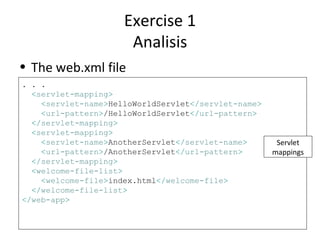
. . .
  <servlet-mapping>
    <servlet-name>HelloWorldServlet</servlet-name>
    <url-pattern>/HelloWorldServlet</url-pattern>
  </servlet-mapping>
  <servlet-mapping>
    <servlet-name>AnotherServlet</servlet-name>       Servlet
    <url-pattern>/AnotherServlet</url-pattern>       mappings
  </servlet-mapping>
  <welcome-file-list>
    <welcome-file>index.html</welcome-file>
  </welcome-file-list>
</web-app>
Exercise 1
 Analisis

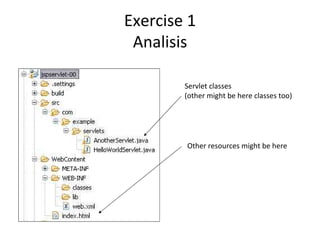
        Servlet classes
        (other might be here classes too)


        Other resources might be here

Coursejspservlets00

  • 2.
    Servlet / JSPcourse topics • Chapter 0 Introduction to Java Web Development • Chapter 1 Introduction to servlets • Chapter 2 Introduction to JavaServer Pages • Chapter 3 How to use the MVC pattern in a Java Web Application • Chapter 4 How to share information in servlets and JSPs • Chapter 5 Advanced JSP concepts • Chapter 6 How to use JavaBeans with JSP • Chapter 7 How to use the JSP Expression Language (EL) • Chapter 8 How to use the JSP Standard Tag Library (JSTL) • Chapter 9 How to use custom JSP tags • Chapter 10 How to access databases in java web applications • Chapter 11 How to use JavaMail to send email • Chapter 12 How to secure java web applications • Chapter 13 How to download files with Servlets • Chapter 14 How to work with listeners • Chapter 15 How to work with filters
  • 3.
  • 4.
    Introduction to JavaWeb Development • Java Enterprise Edition • Java Web Development • Structure of a web project • Introduction to Web Applications • The first project
  • 5.
  • 6.
    Java Web Development *Note In this course only JSP & servlets will be discussed
  • 7.
    Structure of aweb project • There are two kind of structures – The structure of the web application in a server – The structure of the IDE • A web project have three main elements – The JSPs files – The java classes – The Configuration file web.xml
  • 8.
    Structure of aweb project in the server
  • 9.
    Structure of aweb project in the server Root of the project Java classes (.class) Java Libraries (.jar) Configuration files Anything web-related - Directories - JavaServer Pages (JSP) - HTML - Css files - JavaScript Files - Etc.
  • 10.
    Introduction to WebApplications • In a Web Application, web components provide the dynamic extension capabilities for a web server. • Web components can be Java servlets, JSP pages, or web service endpoints. • The interaction between a web client and a web application is explained and illustrated in the next slide figure. – The client sends an HTTP request to the web server. – A web server that implements Java Servlet and JavaServer Pages technology converts the request into an HTTPServletRequest object. – This object is delivered to a web component, which can interact with JavaBeans components or a database to generate dynamic content. – The web component can then generate an HTTPServletResponse or it can pass the request to another web component. – Eventually a web component generates a HTTPServletResponse object. The web server converts this object to an HTTP response and returns it to the client.
  • 11.
    Introduction to WebApplications
  • 12.
    Introduction to WebApplications • Servlets are Java programming language classes that dynamically process requests and construct responses.  • JSP pages are text-based documents that execute as servlets but allow a more natural approach to creating static content. • Although servlets and JSP pages can be used interchangeably, each has its own strengths. • Servlets are best suited for service-oriented applications (web service endpoints are implemented as servlets) and the control functions of a presentation-oriented application, such as dispatching requests and handling nontextual data. • JSP pages are more appropriate for generating text-based markup such as HTML, Scalable Vector Graphics (SVG), Wireless Markup Language (WML), and XML.
  • 13.
  • 14.
    Life Cycle ofa JEE Web Application
  • 15.
    Life Cycle ofa JEE Web Application
  • 16.
    Criteria to developweb applications
  • 17.
    Exercise 1 • Develope the first java web application 1. Download the file: jspservlet-00.zip 1. Unzip it 2. Import from Eclipse 3. Run it
  • 18.
    Exercise 1 Results • You should get this result
  • 19.
    Exercise 1 Analisis • The web.xml file <?xml version="1.0" encoding="UTF-8"?> <web-app xmlns:xsi="http://www.w3.org/2001/XMLSchema-instance" . . . version="2.5"> <servlet> <display-name>HelloWorldServlet</display-name> <servlet-name>HelloWorldServlet</servlet-name> <servlet-class> com.example.servlets.HelloWorldServlet </servlet-class> </servlet> Servlet <servlet> declarations <display-name>AnotherServlet</display-name> <servlet-name>AnotherServlet</servlet-name> <servlet-class> com.example.servlets.AnotherServlet </servlet-class> </servlet>
  • 20.
    Exercise 1 Analisis • The web.xml file . . . <servlet-mapping> <servlet-name>HelloWorldServlet</servlet-name> <url-pattern>/HelloWorldServlet</url-pattern> </servlet-mapping> <servlet-mapping> <servlet-name>AnotherServlet</servlet-name> Servlet <url-pattern>/AnotherServlet</url-pattern> mappings </servlet-mapping> <welcome-file-list> <welcome-file>index.html</welcome-file> </welcome-file-list> </web-app>
  • 21.
    Exercise 1 Analisis Servlet classes (other might be here classes too) Other resources might be here