Types of Testing
1.Unit testing
2.Integration Testing
Introduction to Testing Mule
Unit Testing
 Unit testing is a software development process in which
the smallest testable parts of an application, called units,
are individually and independently scrutinized for proper
operation. Unit testing is often automated but it can also
be done manually.
 The concept of unit testing is to validate the correctness of
an individual unit of source code.
 The code you test may interact with other units of code or
components, and you should take this possibility into
account when designing your unit test. A good unit test
should ensure the isolation of the unit of code being tested,
to avoid mistaking failure in other components for failure in
the unit of code being tested.
 To isolate your target unit of code, use tools such as
the mock message processor provided by Munit.
Integration Testing
 Integration testing (sometimes
called integration and testing, abbreviated I&T) is
the phase in software testing in which individual
software modules are combined and tested as a
group. It occurs after unit testing and before
validation testing.
 Units of code collaborate between them to create an
actual application. You test individual units of code
with unit tests, and you test how units of code
collaborate between them with integration tests.
 Ideally, integration tests should aggregate units of
code modules that have already been successfully
unit-tested. For this reason, you should run your
integration tests after your unit tests.
MUnit
 Munit is a Mule testing framework that lets you
easily automate testing Mule applications, using
both unit and integration tests. MUnit also
provides a set of tools, such as a message
processor mocking framework that lets you test
units of code in actual isolation.
 Mule ESB provides a Test Compatibility Kit (TCK)
of unit tests that you can use to test your simple
extensions as well as your custom modules and
transports.
Testing Mule Custom Components - Legacy
Tools for Testing
 Mule provides legacy tools for testing your
custom Mule applications using Java code. These
tools provide the testing functionality but lack
some features provided by MUnit, such
as mocking.
 Functional Testing
 AbstractMuleTestCase
 Mule also offers tools like the Profiler Pack
designed to assist in identifying memory leaks in
your custom Mule extensions.
FunctionalTestCase
 FunctionalTestCase is a base test case for Mule
functional tests. Your test cases can extend
FunctionalTestCase to use its functionality.
 FunctionalTestCase fires up a Mule server using
a configuration you specify by overriding the
getConfigResources():
 Mule provides an abstract Junit test case
called org.mule.tck.junit4.FunctionalTestCase that
runs Mule inside a test case and manages the
lifecycle of the server.
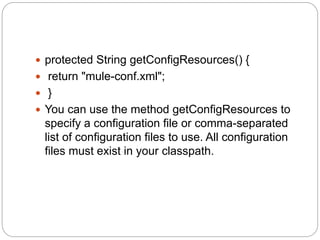
 protected String getConfigResources() {
 return "mule-conf.xml";
 }
 You can use the method getConfigResources to
specify a configuration file or comma-separated
list of configuration files to use. All configuration
files must exist in your classpath.
 FunctionalTestCase extends
junit.framework.TestCase, so JUnit is the framework
for creating and running your test cases. For example,
this simple test would send a message to a vm
endpoint
 public void testSend() throws Exception
{
MuleClient client = new MuleClient(muleContext);
String payload = "foo";
Map<String, Object> properties = null;
MuleMessage result = client.send("vm://test", payload,
properties);
assertEquals("foo Received",
result.getPayloadAsString()); }
 The use of MuleClient to interact with the running
Mule server. MuleClient is used to send
messages to and receive messages from
endpoints you specify in your Mule configuration
file (mule-conf.xml in this case).
FunctionalTestComponent
 The previous example of FunctionalTestCase covers
many common (synchronous) test scenarios, where
the service responds directly to the
caller. FunctionalTestComponent can help support
richer tests, such as:
 Simulating asynchronous communication
 Returning mock data to the caller
 Common scenarios such as forced exceptions,
storing message history, appending text to responses,
and delayed responses.
 The component includes two methods:
the onCall method and the onReceive method that
basically do the same thing.
 onCall: receives a MuleEventContext as input and
returns an Object.
 onReceive: receives an Object as input and returns
an Object.
Functional Mule Testing
 When it comes to testing the interaction of
components between each other in sub flows or
“simple” flows functional tests are the
recommended way of testing . Because Mule
ESB is light weight and easily embeddable in
tests the use of the
org.mule.tck.junit4.FunctionalTestCase class from
the TCK is recommended to test parts or whole
flows.
 This is done by creating a unit test which is
derived from this class which will provide an
embeddable Mule instance with a Mule context to
perform functional tests of these Mule flows.

Introduction to testing mule

  • 1.
    Types of Testing 1.Unittesting 2.Integration Testing Introduction to Testing Mule
  • 2.
    Unit Testing  Unittesting is a software development process in which the smallest testable parts of an application, called units, are individually and independently scrutinized for proper operation. Unit testing is often automated but it can also be done manually.  The concept of unit testing is to validate the correctness of an individual unit of source code.  The code you test may interact with other units of code or components, and you should take this possibility into account when designing your unit test. A good unit test should ensure the isolation of the unit of code being tested, to avoid mistaking failure in other components for failure in the unit of code being tested.  To isolate your target unit of code, use tools such as the mock message processor provided by Munit.
  • 3.
    Integration Testing  Integrationtesting (sometimes called integration and testing, abbreviated I&T) is the phase in software testing in which individual software modules are combined and tested as a group. It occurs after unit testing and before validation testing.  Units of code collaborate between them to create an actual application. You test individual units of code with unit tests, and you test how units of code collaborate between them with integration tests.  Ideally, integration tests should aggregate units of code modules that have already been successfully unit-tested. For this reason, you should run your integration tests after your unit tests.
  • 4.
    MUnit  Munit isa Mule testing framework that lets you easily automate testing Mule applications, using both unit and integration tests. MUnit also provides a set of tools, such as a message processor mocking framework that lets you test units of code in actual isolation.  Mule ESB provides a Test Compatibility Kit (TCK) of unit tests that you can use to test your simple extensions as well as your custom modules and transports.
  • 5.
    Testing Mule CustomComponents - Legacy Tools for Testing  Mule provides legacy tools for testing your custom Mule applications using Java code. These tools provide the testing functionality but lack some features provided by MUnit, such as mocking.  Functional Testing  AbstractMuleTestCase  Mule also offers tools like the Profiler Pack designed to assist in identifying memory leaks in your custom Mule extensions.
  • 6.
    FunctionalTestCase  FunctionalTestCase isa base test case for Mule functional tests. Your test cases can extend FunctionalTestCase to use its functionality.  FunctionalTestCase fires up a Mule server using a configuration you specify by overriding the getConfigResources():  Mule provides an abstract Junit test case called org.mule.tck.junit4.FunctionalTestCase that runs Mule inside a test case and manages the lifecycle of the server.
  • 7.
     protected StringgetConfigResources() {  return "mule-conf.xml";  }  You can use the method getConfigResources to specify a configuration file or comma-separated list of configuration files to use. All configuration files must exist in your classpath.
  • 8.
     FunctionalTestCase extends junit.framework.TestCase,so JUnit is the framework for creating and running your test cases. For example, this simple test would send a message to a vm endpoint  public void testSend() throws Exception { MuleClient client = new MuleClient(muleContext); String payload = "foo"; Map<String, Object> properties = null; MuleMessage result = client.send("vm://test", payload, properties); assertEquals("foo Received", result.getPayloadAsString()); }
  • 9.
     The useof MuleClient to interact with the running Mule server. MuleClient is used to send messages to and receive messages from endpoints you specify in your Mule configuration file (mule-conf.xml in this case).
  • 10.
    FunctionalTestComponent  The previousexample of FunctionalTestCase covers many common (synchronous) test scenarios, where the service responds directly to the caller. FunctionalTestComponent can help support richer tests, such as:  Simulating asynchronous communication  Returning mock data to the caller  Common scenarios such as forced exceptions, storing message history, appending text to responses, and delayed responses.  The component includes two methods: the onCall method and the onReceive method that basically do the same thing.  onCall: receives a MuleEventContext as input and returns an Object.  onReceive: receives an Object as input and returns an Object.
  • 11.
    Functional Mule Testing When it comes to testing the interaction of components between each other in sub flows or “simple” flows functional tests are the recommended way of testing . Because Mule ESB is light weight and easily embeddable in tests the use of the org.mule.tck.junit4.FunctionalTestCase class from the TCK is recommended to test parts or whole flows.  This is done by creating a unit test which is derived from this class which will provide an embeddable Mule instance with a Mule context to perform functional tests of these Mule flows.