Introduction to Switched-Mode Converter Modeling
using MATLAB/Simulink
• MATLAB: programming and scripting environment
• Simulink: block-diagram modeling environment inside MATLAB
Simulink: block diagram modeling environment inside MATLAB
• Motivation:
• Powerful environment for system modeling and simulation
• More sophisticated controller models, analysis and design tools
• But*:
• Block-diagram based Simulink models unidirectional signals
• Block-diagram based Simulink models, unidirectional signals
• Not a traditional circuit simulator; specialized physics-based Spice
device models or component libraries are not readily available
*Various add-ons to Simulink are available to allow traditional circuit diagram
entry and circuit simulations (e.g. SimPowerSystems, PLECS), or to embed
Spice within MATLAB/Simulink environment These add-ons are not required
ECEN5807 1
Spice within MATLAB/Simulink environment. These add-ons are not required
and will not be used in ECEN5807.
Introduction through an example
iLoad
ig
L R
Ron1
+
_
vL
i
Synchronous buck converter
+
–
vout
vg
+
_
Resr
C
+
_
v
L RL
Ron2 iC
i
Bode Diagram
40
-20
0
20
40
From: vc To: SyncBuck/vout
agnitude
(dB)
PWM
vc
dTs
Ts
VM
c
10
1
10
2
10
3
10
4
10
5
10
6
-180
-135
-90
-45
0
Phase
(deg)
-80
-60
-40
Ma
c
5
Vg
v g
v
i
v
• Switching model
• Averaged model
Frequency (Hz)
10 10 10 10 10 10
0
0.36
Vc
v c
iLoad
i
v out
ig
i
v out
• Small-signal linearization and
frequency responses
See MATLAB/Simulink page on the course
ECEN5807 2
iLoad
ig
SyncBuck
Scope
ig
Simulink model: syncbuck_OL.mdl
See MATLAB/Simulink page on the course
website (“Materials” page) for complete step-by-
step details, and to download the example files
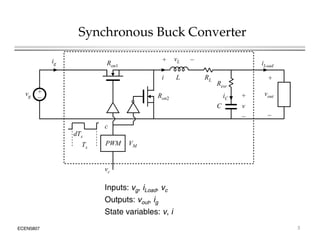
Synchronous Buck Converter
iLoad
ig
+
L R
Ron1
+ _
vL
i
+
–
vout
vg
+
Resr
C
+
v
L RL
Ron2 iC
i
dTs
_
C
_
v
c
PWM
v
Ts
VM
vc
Inputs: vg, iLoad, vc
Outputs: vo t ig
ECEN5807 3
Outputs: vout, ig
State variables: v, i
Converter state equations
iLoad
ig
+
R
L RL
Ron1
+ _
vL
i
+
–
vout
vg
_
Resr
C
+
_
v
Ron2 iC
PWM
dTs
Ts
VM
c
vc
State equations Output equations
 
  )
0
(
)
1
(
2
1













c
c
v
i
R
R
v
i
R
R
v
dt
di
L
v
out
L
on
out
L
on
g
L
d
)
0
(
)
1
(
0 





c
c
i
ig
ECEN5807 4
Load
C i
i
dt
dv
C
i 

  
Load
esr
out i
i
R
v
v 


Simulink
model 5
Vg
v g
v
v
SyncBuck subsystem block
0
0.36
Vc
v c
iL d
i
v out
i
v out
0
iLoad
iLoad
ig
SyncBuck
Scope
ig
1
v
1
s
capacitor integrator
v c c
2
1
vg
dv /dt v
c
SyncBuck
subsystem
block
internals
3
2
i
1
s
inductor integrator
PWM
u y
CCMbuck
CCM buck
3
iLoad
vc
i
di/dt
v out
y
u
c
4
ig
vout
v out
ig
ECEN5807 5
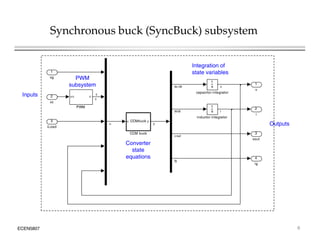
Synchronous buck (SyncBuck) subsystem
1
vg
Integration of
state variables
PWM
2
1
v
1
1
s
capacitor integrator
v c c
PWM
2
vc
vg
dv /dt v
c
c
Inputs
PWM
subsystem
3
vout
2
i
s
inductor integrator
PWM
u y
CCMbuck
CCM buck
3
iLoad
i
di/dt
v out
y
u Outputs
4
ig
vout
ig
Converter
state
equations
ECEN5807 6
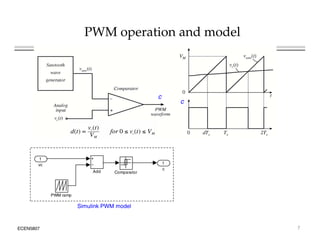
PWM operation and model
c
c
1
c
Add
1
vc
c
PWM ramp
Comparator
Add
ECEN5807 7
Simulink PWM model
Converter state equations: embedded MATLAB script
1
3
vout
2
i
1
v
1
s
inductor integrator
1
s
capacitor integrator
v c c
PWM
u y
CCMbuck
CCM buck
3
iLoad
2
vc
1
vg
dv /dt v
i
di/dt
v out
y
u
c
c
u = inputs = [vg c iLoad v i]
y = outputs = [ic/C vL/L vout ig]
u y
4
ig
ig
Converter
state
equations
 
i
i
R
v
v 
)
0
(
)
1
(
0 





c
c
i
ig
 
Load
esr
out i
i
R
v
v 


  )
1
(
1 

 

 c
v
i
R
R
v
di
L out
L
on
g
Load
C i
i
dt
dv
C
i 


ECEN5807 8
 
  )
0
(
)
(
2
1








c
v
i
R
R
dt
L
v
out
L
on
out
L
on
g
L
Numerical example
iLoad
ig
+
Resr
L RL
Ron1
+
_
vL
i
• Switching frequency:
fs = 1MHz
+
–
dT
vout
vg
_
esr
C
+
_
v
Ron2 iC
c
• Iout = 0
• Vg = 5 V
PWM
vc
dTs
Ts
VM • L = 1 H
• RL = 10 m
• Ron1 = Ron2 = 20 m
• C = 200 F
5
Vg
v g
v
i
v
• Resr = 0.8 m
• PWM ramp amplitude
VM = 1 V
0
0.36
Vc
v c
iLoad
i
v out
i
v out
ECEN5807 9
M
• Vc = 0.36, D = 0.36
0
iLoad
iLoad
ig
SyncBuck
Scope
ig
Simulink model: syncbuck_OL.mdl
Numerical example: synchronous buck converter model
5
Vg
v g
v
v
0
0.36
Vc
v c
iL d
i
v out
i
v out
0
iLoad
iLoad
ig
SyncBuck
Scope
ig
• “Masking” a Simulink subsystem
allows parameterization
• Same subsystem model can be
re-used
• Models and MATLAB scripts can
ECEN5807 10
p
be collected in a library
Switching simulation: open-loop start-up transient
v
i
vout
ig
Zoom in 1 s/div
20 s/div
ECEN5807 11
Zoom in, 1 s/div
20 s/div
Averaged model
 
  )
0
(
)
1
(
2
1













c
c
v
i
R
R
v
i
R
R
v
dt
di
L
v
out
L
on
out
L
on
g
L
dv
Switching model
Load
C i
i
dt
dv
C
i 


)
0
(
)
1
(
0 





c
c
i
ig
)
0
(
0 
 c
 
Load
esr
out i
i
R
v
v 


State-space averaging (review Textbook Sections 7.1-7.3)
v
d
 
     
 
s
s
s
s
s
s
s T
out
T
L
on
T
out
T
L
on
T
g
T
T
L v
i
R
R
d
v
i
R
R
v
d
dt
i
d
L
v 








 2
1 1
p g g ( )
s
s
s
s T
Load
T
T
T
C i
i
dt
v
d
C
i 


s
s
T
T
g i
d
i 
Large-signal
averaged model
ECEN5807 12
 
s
s
s
s T
Load
T
esr
T
T
out i
i
R
v
v 


Converter averaged state equations: MATLAB
The MATLAB function stays exactly the same, except d (duty-cycle) replaces c (switch control)
ECEN5807 13
Synchronous buck (SyncBuck) subsystem:
switching or averaged model
1
Integration of
state
variables
Inputs
2
1
v
1
sw
constant
1
s
capacitor integrator
1/VM
v c c
PWM
2
vc
vg
dv /dt v
d
c
3
vout
2
i
s
inductor integrator
Switch
1/VM
PWM Gain
u
y
CCMbuck
CCM buck
3
iLoad
i
di/dt
v out
y
u
d
Converter
4
ig
ig
Converter
state
equations
Outputs
Averaged
model of the
PWM
Outputs
ECEN5807 14
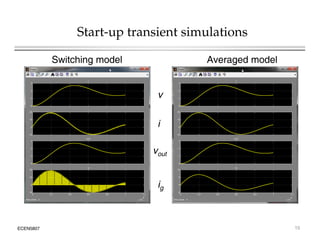
Start-up transient simulations
Switching model Averaged model
v
i
vout
ig
ECEN5807 15
Linearization of the large-signal averaged model
Large-signal (nonlinear) averaged model
Linearization at an operating point
L
Vg d
iL
RL
Linearization at an operating point
+
–
R
+
v
vg
+
–
D vg
D iL
Resr Small-signal
averaged
C
–
g
Io d
g
model
The small-signal model can be solved for all important converter transfer functions:
d
v
s
Gvd
ˆ
ˆ
)
(  vg
v
v
s
G
ˆ
ˆ
)
( 
l d
out
i
v
s
Z
ˆ
ˆ
)
( 
ECEN5807 16
d g
v load
i
Control-to-output Line-to-output Output impedance
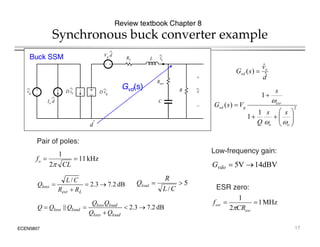
Synchronous buck converter example
Review textbook Chapter 8
L
+
Vg d
iL
RL
d
v
s
G o
vd
ˆ
ˆ
)
( 
Buck SSM
+
–
C
R
+
v
–
vg
+
–
D vg
Io d
D iL
Resr
2
1
)
(



 esr
g
vd
s
V
s
G

d
Gvd(s)
2
1
1
)
(










o
o
g
vd
s
s
Q 

P i f l
dˆ
kHz
11
2
1


CL
fo
 dBV
14
V
5 

vdo
G
Pair of poles:
Low-frequency gain:
MHz
1
1
f
dB
2
.
7
3
.
2
/




L
esr
loss
R
R
C
L
Q 5
/


C
L
R
Qload
Q
Q
ESR zero:
ECEN5807
MHz
1
2


esr
esr
CR
f

dB
2
.
7
3
.
2
|| 




load
loss
load
loss
load
loss
Q
Q
Q
Q
Q
Q
Q
17
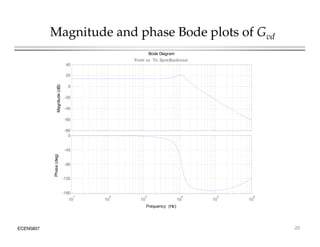
Magnitude and phase Bode plots of Gvd
60dB
80dB
(1/VM)Gvd(s)
20dB
40dB
dB
14
5
)
/
1
( 

M
vdo V
G dB
2
.
7
3
.
2 

Q
0dB
-20dB
Q
2
/
1
kHz
11

o
f
dB/dec
40

0o
o
Q
f
2
/
1
10
-90o
MHz
1

esr
f
f
10
/
1
Q
f
2
/
1
10
dB/dec
20

ECEN5807
100 KHz
10 KHz
1 KHz
100 Hz
10 Hz 1 MHz
-180o
esr
f
10
/
1
o
Q
f
10
18
Linearization and frequency responses in
MATLAB/Simulink
5
Vg
vg
v
vg
v
0.36
Vc
vc
i
vout
vc
i
vout
1. Set transfer
function input
and output
points
0
iLoad
iLoad
ig
SyncBuck
Scope
iLoad
ig
2. MATLAB script (BodePlotter_script.m) computes DC operating point, linearizes the
p ( _ p ) p p g p ,
model, computes and plots the transfer function magnitude and phase responses
ECEN5807 19
Magnitude and phase Bode plots of Gvd
Bode Diagram
20
40
From: vc To: SyncBuck/vout
40
-20
0
20
agnitude
(dB)
0
-80
-60
-40
Ma
-90
-45
ase
(deg)
10
1
10
2
10
3
10
4
10
5
10
6
-180
-135
Pha
ECEN5807 20
Frequency (Hz)
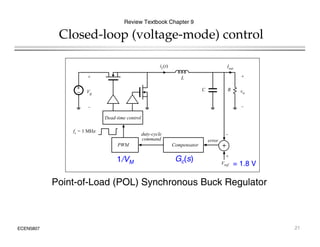
Closed-loop (voltage-mode) control
Review Textbook Chapter 9
L
iL(t)
+ +
Iout
+
–
L
+
Vg
_
+
vo
_
C R
Dead-time control
_
fs = 1 MHz
duty-cycle
command
Vref
+
+
PWM Compensator
error
command
Gc(s)
1/VM = 1.8 V
Point-of-Load (POL) Synchronous Buck Regulator
ECEN5807 21
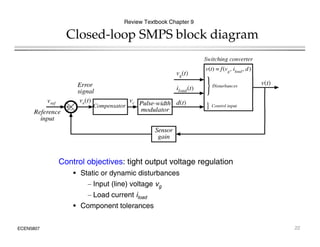
Closed-loop SMPS block diagram
Review Textbook Chapter 9
Control objectives: tight output voltage regulation
S i d i di b
• Static or dynamic disturbances
– Input (line) voltage vg
– Load current iload
ECEN5807
• Component tolerances
22
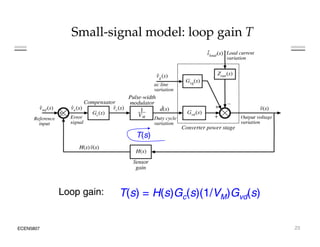
Small-signal model: loop gain T
T(s)
( )
Loop gain: T(s) = H(s)Gc(s)(1/VM)Gvd(s)
ECEN5807 23
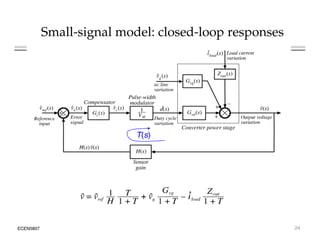
Small-signal model: closed-loop responses
T(s)
( )
ECEN5807 24
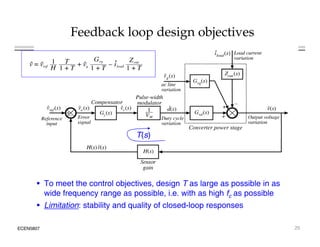
Feedback loop design objectives
T(s)
( )
• To meet the control objectives, design T as large as possible in as
wide frequency range as possible, i.e. with as high fc as possible
ECEN5807
• Limitation: stability and quality of closed-loop responses
25
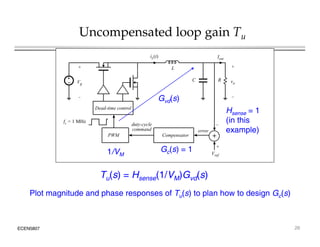
Uncompensated loop gain Tu
L
iL(t)
+ +
Iout
+
– Vg
_
vo
_
C
Dead time control
R
H 1
Gvd(s)
Dead-time control
_
+
PWM Compensator
fs = 1 MHz
error
duty-cycle
command
Hsense = 1
(in this
example)
Vref
+
Gc(s) = 1
1/VM
Tu(s) = Hsense(1/VM)Gvd(s)
Plot magnitude and phase responses of Tu(s) to plan how to design Gc(s)
ECEN5807 26
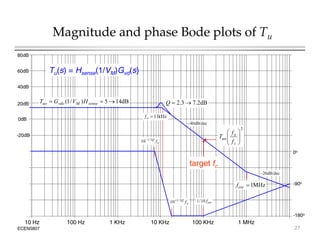
Magnitude and phase Bode plots of Tu
60dB
80dB
Tu(s) = Hsense(1/VM)Gvd(s)
20dB
40dB
dB
14
5
)
/
1
( 

 sense
M
vdo
uo H
V
G
T dB
2
.
7
3
.
2 

Q
0dB
-20dB
Q
2
/
1
kHz
11

o
f
dB/dec
40

2





 o
uo
f
f
T
0o
o
Q
f
2
/
1
10
target fc



 c
uo
f
-90o
MHz
1

esr
f
f
10
/
1
Q
f
2
/
1
10
dB/dec
20

ECEN5807
100 KHz
10 KHz
1 KHz
100 Hz
10 Hz 1 MHz
-180o
esr
f
10
/
1
o
Q
f
10
27
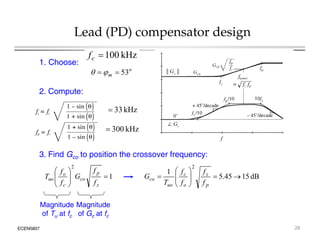
Lead (PD) compensator design
o
m 53

 

kHz
100

c
f
1. Choose:
kH
3
3
2. Compute:
kHz
3
3

kHz
00
3

2

 f
f 1
2

 f
f
3. Find Gco to position the crossover frequency:
1









z
p
co
c
o
uo
f
f
G
f
f
T dB
15
45
.
5
1











p
z
o
c
uo
co
f
f
f
f
T
G
ECEN5807
Magnitude
of Tu at fc
Magnitude
of Gc at fc
28
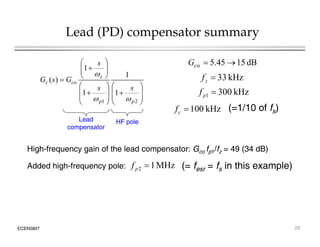
Lead (PD) compensator summary









1
1
)
(
z
s

dB
15
45
.
5 

co
G
kHz
33
f





















2
1
1
1
1
)
(
p
p
z
co
c
s
s
G
s
G


kHz
33

z
f
kHz
300
1 
p
f
kHz
100
f (=1/10 of f )
kHz
100

c
f (=1/10 of fs)
Lead
compensator
HF pole
MHz
1
2 
p
f (= fesr = fs in this example)
Added high-frequency pole:
High-frequency gain of the lead compensator: Gco fp1/fz = 49 (34 dB)
2
p ( esr s p )
g q y p
ECEN5807 29
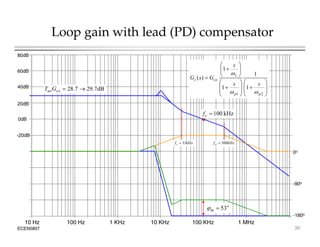
Loop gain with lead (PD) compensator
60dB
80dB









1
1
)
( z
s
G
G

20dB
40dB dB
7
.
29
7
.
28 

co
uoG
T 




















2
1
1
1
)
(
p
p
co
c
s
s
G
s
G


0dB
-20dB
kHz
100

c
f
kHz
10

z
f
0o
kHz
300

p
f
kHz
33

z
f
-90o
ECEN5807
100 KHz
10 KHz
1 KHz
100 Hz
10 Hz 1 MHz
-180o
o
m 53


30
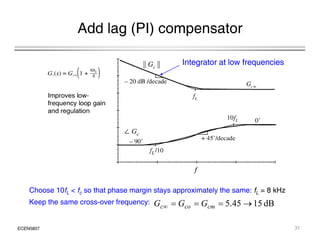
Add lag (PI) compensator
Integrator at low frequencies
Choose 10fL < fc so that phase margin stays approximately the same: fL = 8 kHz
Keep the same cross over frequency: dB
15
45
5
G
G
G
ECEN5807
Keep the same cross-over frequency: dB
15
45
.
5 



 cm
co
c G
G
G
31
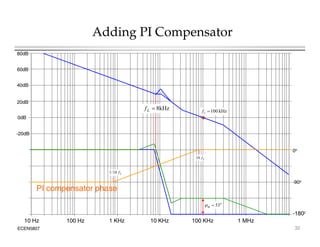
Adding PI Compensator
60dB
80dB
20dB
40dB
kHz
8
f
0dB
-20dB
kHz
8

L
f kHz
100

c
f
0o
L
f
10
-90o
L
f
10
/
1
PI compensator phase
ECEN5807
100 KHz
10 KHz
1 KHz
100 Hz
10 Hz 1 MHz
-180o
o
m 53


32
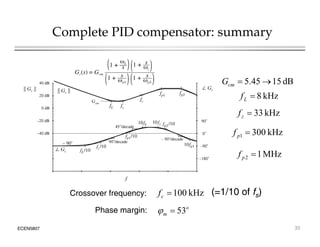
Complete PID compensator: summary
dB
15
45
.
5 

cm
G
kHz
8

L
f
kHz
33

z
f
kHz
300
1 
p
f
MHz
1
2 
p
f
kHz
100

c
f (=1/10 of fs)
Crossover frequency:
ECEN5807
53o
m 

Phase margin:
33
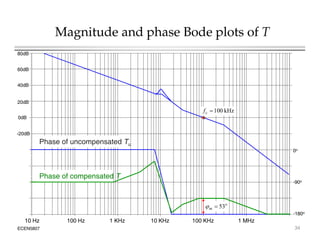
Magnitude and phase Bode plots of T
60dB
80dB
20dB
40dB
0dB
-20dB
kHz
100

c
f
Ph f d T
0o
Phase of uncompensated Tu
-90o
Phase of compensated T
ECEN5807
100 KHz
10 KHz
1 KHz
100 Hz
10 Hz 1 MHz
-180o
o
m 53


34
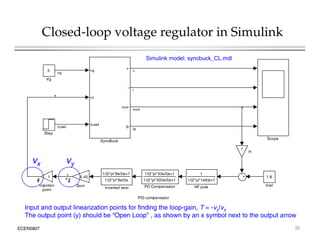
Closed-loop voltage regulator in Simulink
5 vg
v
vg
v
Simulink model: syncbuck_CL.mdl
Vg
vc
i
vout
i
x
iLoad
vout
ig
Step
Scope
iLoad
vout
ig
SyncBuck
Scope
1
H
vy
vx
PID compensator
1.8
Vref
1/(2*pi*33e3)s+1
1/(2*pi*300e3)s+1
PD Compensator
1
Injection
point
1
1/(2*pi*1e6)s+1
HF pole
5.45
Gcm
1/(2*pi*8e3)s+1
1/(2*pi*8e3)s
Inverted zero
y
ECEN5807 35
Input and output linearization points for finding the loop-gain, T = -vy/vx
The output point (y) should be “Open Loop” , as shown by an x symbol next to the output arrow
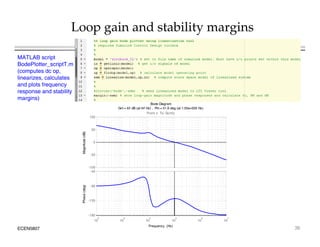
Loop gain and stability margins
MATLAB script
BodePlotter_scriptT.m
(computes dc op,
linearizes calculates
linearizes, calculates
and plots frequency
response and stability
margins)
Bode Diagram
Gm Inf dB (at Inf Hz) Pm 51 6 deg (at 1 05e+005 Hz)
50
100
From: x To: Gcm/y
e
(dB)
Gm = Inf dB (at Inf Hz) , Pm = 51.6 deg (at 1.05e+005 Hz)
-100
-50
0
Magnitude
4
-135
-90
-45
Phase
(deg)
ECEN5807 36
10
2
10
3
10
4
10
5
10
6
10
7
-180
135
P
Frequency (Hz)
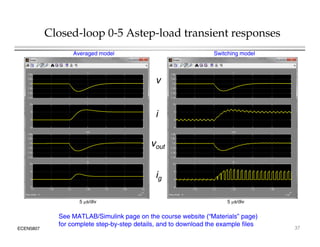
Closed-loop 0-5 Astep-load transient responses
Averaged model Switching model
v
i
vout
ig
5 s/div
5 s/div
ECEN5807 37
5 s/div
5 s/div
See MATLAB/Simulink page on the course website (“Materials” page)
for complete step-by-step details, and to download the example files

Introduction to Switched-Mode Converter Modeling using MATLAB-Simulink.pdf

  • 1.
    Introduction to Switched-ModeConverter Modeling using MATLAB/Simulink • MATLAB: programming and scripting environment • Simulink: block-diagram modeling environment inside MATLAB Simulink: block diagram modeling environment inside MATLAB • Motivation: • Powerful environment for system modeling and simulation • More sophisticated controller models, analysis and design tools • But*: • Block-diagram based Simulink models unidirectional signals • Block-diagram based Simulink models, unidirectional signals • Not a traditional circuit simulator; specialized physics-based Spice device models or component libraries are not readily available *Various add-ons to Simulink are available to allow traditional circuit diagram entry and circuit simulations (e.g. SimPowerSystems, PLECS), or to embed Spice within MATLAB/Simulink environment These add-ons are not required ECEN5807 1 Spice within MATLAB/Simulink environment. These add-ons are not required and will not be used in ECEN5807.
  • 2.
    Introduction through anexample iLoad ig L R Ron1 + _ vL i Synchronous buck converter + – vout vg + _ Resr C + _ v L RL Ron2 iC i Bode Diagram 40 -20 0 20 40 From: vc To: SyncBuck/vout agnitude (dB) PWM vc dTs Ts VM c 10 1 10 2 10 3 10 4 10 5 10 6 -180 -135 -90 -45 0 Phase (deg) -80 -60 -40 Ma c 5 Vg v g v i v • Switching model • Averaged model Frequency (Hz) 10 10 10 10 10 10 0 0.36 Vc v c iLoad i v out ig i v out • Small-signal linearization and frequency responses See MATLAB/Simulink page on the course ECEN5807 2 iLoad ig SyncBuck Scope ig Simulink model: syncbuck_OL.mdl See MATLAB/Simulink page on the course website (“Materials” page) for complete step-by- step details, and to download the example files
  • 3.
    Synchronous Buck Converter iLoad ig + LR Ron1 + _ vL i + – vout vg + Resr C + v L RL Ron2 iC i dTs _ C _ v c PWM v Ts VM vc Inputs: vg, iLoad, vc Outputs: vo t ig ECEN5807 3 Outputs: vout, ig State variables: v, i
  • 4.
    Converter state equations iLoad ig + R LRL Ron1 + _ vL i + – vout vg _ Resr C + _ v Ron2 iC PWM dTs Ts VM c vc State equations Output equations     ) 0 ( ) 1 ( 2 1              c c v i R R v i R R v dt di L v out L on out L on g L d ) 0 ( ) 1 ( 0       c c i ig ECEN5807 4 Load C i i dt dv C i      Load esr out i i R v v   
  • 5.
    Simulink model 5 Vg v g v v SyncBucksubsystem block 0 0.36 Vc v c iL d i v out i v out 0 iLoad iLoad ig SyncBuck Scope ig 1 v 1 s capacitor integrator v c c 2 1 vg dv /dt v c SyncBuck subsystem block internals 3 2 i 1 s inductor integrator PWM u y CCMbuck CCM buck 3 iLoad vc i di/dt v out y u c 4 ig vout v out ig ECEN5807 5
  • 6.
    Synchronous buck (SyncBuck)subsystem 1 vg Integration of state variables PWM 2 1 v 1 1 s capacitor integrator v c c PWM 2 vc vg dv /dt v c c Inputs PWM subsystem 3 vout 2 i s inductor integrator PWM u y CCMbuck CCM buck 3 iLoad i di/dt v out y u Outputs 4 ig vout ig Converter state equations ECEN5807 6
  • 7.
    PWM operation andmodel c c 1 c Add 1 vc c PWM ramp Comparator Add ECEN5807 7 Simulink PWM model
  • 8.
    Converter state equations:embedded MATLAB script 1 3 vout 2 i 1 v 1 s inductor integrator 1 s capacitor integrator v c c PWM u y CCMbuck CCM buck 3 iLoad 2 vc 1 vg dv /dt v i di/dt v out y u c c u = inputs = [vg c iLoad v i] y = outputs = [ic/C vL/L vout ig] u y 4 ig ig Converter state equations   i i R v v  ) 0 ( ) 1 ( 0       c c i ig   Load esr out i i R v v      ) 1 ( 1       c v i R R v di L out L on g Load C i i dt dv C i    ECEN5807 8     ) 0 ( ) ( 2 1         c v i R R dt L v out L on out L on g L
  • 9.
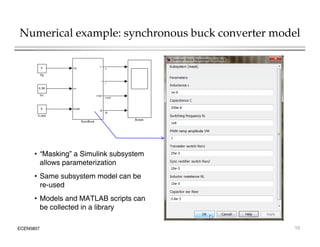
    Numerical example iLoad ig + Resr L RL Ron1 + _ vL i •Switching frequency: fs = 1MHz + – dT vout vg _ esr C + _ v Ron2 iC c • Iout = 0 • Vg = 5 V PWM vc dTs Ts VM • L = 1 H • RL = 10 m • Ron1 = Ron2 = 20 m • C = 200 F 5 Vg v g v i v • Resr = 0.8 m • PWM ramp amplitude VM = 1 V 0 0.36 Vc v c iLoad i v out i v out ECEN5807 9 M • Vc = 0.36, D = 0.36 0 iLoad iLoad ig SyncBuck Scope ig Simulink model: syncbuck_OL.mdl
  • 10.
    Numerical example: synchronousbuck converter model 5 Vg v g v v 0 0.36 Vc v c iL d i v out i v out 0 iLoad iLoad ig SyncBuck Scope ig • “Masking” a Simulink subsystem allows parameterization • Same subsystem model can be re-used • Models and MATLAB scripts can ECEN5807 10 p be collected in a library
  • 11.
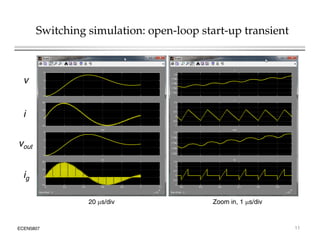
    Switching simulation: open-loopstart-up transient v i vout ig Zoom in 1 s/div 20 s/div ECEN5807 11 Zoom in, 1 s/div 20 s/div
  • 12.
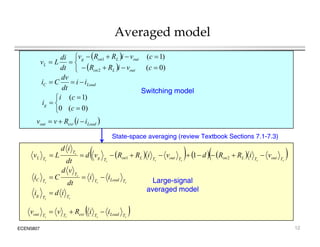
    Averaged model    ) 0 ( ) 1 ( 2 1              c c v i R R v i R R v dt di L v out L on out L on g L dv Switching model Load C i i dt dv C i    ) 0 ( ) 1 ( 0       c c i ig ) 0 ( 0   c   Load esr out i i R v v    State-space averaging (review Textbook Sections 7.1-7.3) v d           s s s s s s s T out T L on T out T L on T g T T L v i R R d v i R R v d dt i d L v           2 1 1 p g g ( ) s s s s T Load T T T C i i dt v d C i    s s T T g i d i  Large-signal averaged model ECEN5807 12   s s s s T Load T esr T T out i i R v v   
  • 13.
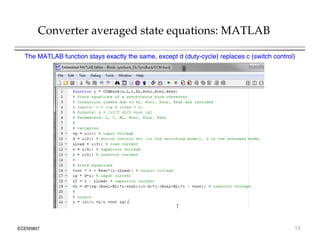
    Converter averaged stateequations: MATLAB The MATLAB function stays exactly the same, except d (duty-cycle) replaces c (switch control) ECEN5807 13
  • 14.
    Synchronous buck (SyncBuck)subsystem: switching or averaged model 1 Integration of state variables Inputs 2 1 v 1 sw constant 1 s capacitor integrator 1/VM v c c PWM 2 vc vg dv /dt v d c 3 vout 2 i s inductor integrator Switch 1/VM PWM Gain u y CCMbuck CCM buck 3 iLoad i di/dt v out y u d Converter 4 ig ig Converter state equations Outputs Averaged model of the PWM Outputs ECEN5807 14
  • 15.
    Start-up transient simulations Switchingmodel Averaged model v i vout ig ECEN5807 15
  • 16.
    Linearization of thelarge-signal averaged model Large-signal (nonlinear) averaged model Linearization at an operating point L Vg d iL RL Linearization at an operating point + – R + v vg + – D vg D iL Resr Small-signal averaged C – g Io d g model The small-signal model can be solved for all important converter transfer functions: d v s Gvd ˆ ˆ ) (  vg v v s G ˆ ˆ ) (  l d out i v s Z ˆ ˆ ) (  ECEN5807 16 d g v load i Control-to-output Line-to-output Output impedance
  • 17.
    Synchronous buck converterexample Review textbook Chapter 8 L + Vg d iL RL d v s G o vd ˆ ˆ ) (  Buck SSM + – C R + v – vg + – D vg Io d D iL Resr 2 1 ) (     esr g vd s V s G  d Gvd(s) 2 1 1 ) (           o o g vd s s Q   P i f l dˆ kHz 11 2 1   CL fo  dBV 14 V 5   vdo G Pair of poles: Low-frequency gain: MHz 1 1 f dB 2 . 7 3 . 2 /     L esr loss R R C L Q 5 /   C L R Qload Q Q ESR zero: ECEN5807 MHz 1 2   esr esr CR f  dB 2 . 7 3 . 2 ||      load loss load loss load loss Q Q Q Q Q Q Q 17
  • 18.
    Magnitude and phaseBode plots of Gvd 60dB 80dB (1/VM)Gvd(s) 20dB 40dB dB 14 5 ) / 1 (   M vdo V G dB 2 . 7 3 . 2   Q 0dB -20dB Q 2 / 1 kHz 11  o f dB/dec 40  0o o Q f 2 / 1 10 -90o MHz 1  esr f f 10 / 1 Q f 2 / 1 10 dB/dec 20  ECEN5807 100 KHz 10 KHz 1 KHz 100 Hz 10 Hz 1 MHz -180o esr f 10 / 1 o Q f 10 18
  • 19.
    Linearization and frequencyresponses in MATLAB/Simulink 5 Vg vg v vg v 0.36 Vc vc i vout vc i vout 1. Set transfer function input and output points 0 iLoad iLoad ig SyncBuck Scope iLoad ig 2. MATLAB script (BodePlotter_script.m) computes DC operating point, linearizes the p ( _ p ) p p g p , model, computes and plots the transfer function magnitude and phase responses ECEN5807 19
  • 20.
    Magnitude and phaseBode plots of Gvd Bode Diagram 20 40 From: vc To: SyncBuck/vout 40 -20 0 20 agnitude (dB) 0 -80 -60 -40 Ma -90 -45 ase (deg) 10 1 10 2 10 3 10 4 10 5 10 6 -180 -135 Pha ECEN5807 20 Frequency (Hz)
  • 21.
    Closed-loop (voltage-mode) control ReviewTextbook Chapter 9 L iL(t) + + Iout + – L + Vg _ + vo _ C R Dead-time control _ fs = 1 MHz duty-cycle command Vref + + PWM Compensator error command Gc(s) 1/VM = 1.8 V Point-of-Load (POL) Synchronous Buck Regulator ECEN5807 21
  • 22.
    Closed-loop SMPS blockdiagram Review Textbook Chapter 9 Control objectives: tight output voltage regulation S i d i di b • Static or dynamic disturbances – Input (line) voltage vg – Load current iload ECEN5807 • Component tolerances 22
  • 23.
    Small-signal model: loopgain T T(s) ( ) Loop gain: T(s) = H(s)Gc(s)(1/VM)Gvd(s) ECEN5807 23
  • 24.
    Small-signal model: closed-loopresponses T(s) ( ) ECEN5807 24
  • 25.
    Feedback loop designobjectives T(s) ( ) • To meet the control objectives, design T as large as possible in as wide frequency range as possible, i.e. with as high fc as possible ECEN5807 • Limitation: stability and quality of closed-loop responses 25
  • 26.
    Uncompensated loop gainTu L iL(t) + + Iout + – Vg _ vo _ C Dead time control R H 1 Gvd(s) Dead-time control _ + PWM Compensator fs = 1 MHz error duty-cycle command Hsense = 1 (in this example) Vref + Gc(s) = 1 1/VM Tu(s) = Hsense(1/VM)Gvd(s) Plot magnitude and phase responses of Tu(s) to plan how to design Gc(s) ECEN5807 26
  • 27.
    Magnitude and phaseBode plots of Tu 60dB 80dB Tu(s) = Hsense(1/VM)Gvd(s) 20dB 40dB dB 14 5 ) / 1 (    sense M vdo uo H V G T dB 2 . 7 3 . 2   Q 0dB -20dB Q 2 / 1 kHz 11  o f dB/dec 40  2       o uo f f T 0o o Q f 2 / 1 10 target fc     c uo f -90o MHz 1  esr f f 10 / 1 Q f 2 / 1 10 dB/dec 20  ECEN5807 100 KHz 10 KHz 1 KHz 100 Hz 10 Hz 1 MHz -180o esr f 10 / 1 o Q f 10 27
  • 28.
    Lead (PD) compensatordesign o m 53     kHz 100  c f 1. Choose: kH 3 3 2. Compute: kHz 3 3  kHz 00 3  2   f f 1 2   f f 3. Find Gco to position the crossover frequency: 1          z p co c o uo f f G f f T dB 15 45 . 5 1            p z o c uo co f f f f T G ECEN5807 Magnitude of Tu at fc Magnitude of Gc at fc 28
  • 29.
    Lead (PD) compensatorsummary          1 1 ) ( z s  dB 15 45 . 5   co G kHz 33 f                      2 1 1 1 1 ) ( p p z co c s s G s G   kHz 33  z f kHz 300 1  p f kHz 100 f (=1/10 of f ) kHz 100  c f (=1/10 of fs) Lead compensator HF pole MHz 1 2  p f (= fesr = fs in this example) Added high-frequency pole: High-frequency gain of the lead compensator: Gco fp1/fz = 49 (34 dB) 2 p ( esr s p ) g q y p ECEN5807 29
  • 30.
    Loop gain withlead (PD) compensator 60dB 80dB          1 1 ) ( z s G G  20dB 40dB dB 7 . 29 7 . 28   co uoG T                      2 1 1 1 ) ( p p co c s s G s G   0dB -20dB kHz 100  c f kHz 10  z f 0o kHz 300  p f kHz 33  z f -90o ECEN5807 100 KHz 10 KHz 1 KHz 100 Hz 10 Hz 1 MHz -180o o m 53   30
  • 31.
    Add lag (PI)compensator Integrator at low frequencies Choose 10fL < fc so that phase margin stays approximately the same: fL = 8 kHz Keep the same cross over frequency: dB 15 45 5 G G G ECEN5807 Keep the same cross-over frequency: dB 15 45 . 5      cm co c G G G 31
  • 32.
    Adding PI Compensator 60dB 80dB 20dB 40dB kHz 8 f 0dB -20dB kHz 8  L fkHz 100  c f 0o L f 10 -90o L f 10 / 1 PI compensator phase ECEN5807 100 KHz 10 KHz 1 KHz 100 Hz 10 Hz 1 MHz -180o o m 53   32
  • 33.
    Complete PID compensator:summary dB 15 45 . 5   cm G kHz 8  L f kHz 33  z f kHz 300 1  p f MHz 1 2  p f kHz 100  c f (=1/10 of fs) Crossover frequency: ECEN5807 53o m   Phase margin: 33
  • 34.
    Magnitude and phaseBode plots of T 60dB 80dB 20dB 40dB 0dB -20dB kHz 100  c f Ph f d T 0o Phase of uncompensated Tu -90o Phase of compensated T ECEN5807 100 KHz 10 KHz 1 KHz 100 Hz 10 Hz 1 MHz -180o o m 53   34
  • 35.
    Closed-loop voltage regulatorin Simulink 5 vg v vg v Simulink model: syncbuck_CL.mdl Vg vc i vout i x iLoad vout ig Step Scope iLoad vout ig SyncBuck Scope 1 H vy vx PID compensator 1.8 Vref 1/(2*pi*33e3)s+1 1/(2*pi*300e3)s+1 PD Compensator 1 Injection point 1 1/(2*pi*1e6)s+1 HF pole 5.45 Gcm 1/(2*pi*8e3)s+1 1/(2*pi*8e3)s Inverted zero y ECEN5807 35 Input and output linearization points for finding the loop-gain, T = -vy/vx The output point (y) should be “Open Loop” , as shown by an x symbol next to the output arrow
  • 36.
    Loop gain andstability margins MATLAB script BodePlotter_scriptT.m (computes dc op, linearizes calculates linearizes, calculates and plots frequency response and stability margins) Bode Diagram Gm Inf dB (at Inf Hz) Pm 51 6 deg (at 1 05e+005 Hz) 50 100 From: x To: Gcm/y e (dB) Gm = Inf dB (at Inf Hz) , Pm = 51.6 deg (at 1.05e+005 Hz) -100 -50 0 Magnitude 4 -135 -90 -45 Phase (deg) ECEN5807 36 10 2 10 3 10 4 10 5 10 6 10 7 -180 135 P Frequency (Hz)
  • 37.
    Closed-loop 0-5 Astep-loadtransient responses Averaged model Switching model v i vout ig 5 s/div 5 s/div ECEN5807 37 5 s/div 5 s/div See MATLAB/Simulink page on the course website (“Materials” page) for complete step-by-step details, and to download the example files