Seeking Life Beyond Relational:
RavenDB
Sasha Goldshtein
CTO, Sela Group
Level: Intermediate
NoSQL
•

The Zen-like answer: No one can tell you
what NoSQL is, they can only tell you what
it isn’t

•

It doesn’t use SQL
It usually is less consistent than RDBMS
It doesn’t put an emphasis on relations
It emphasizes size and scale over
structure

•

•
•
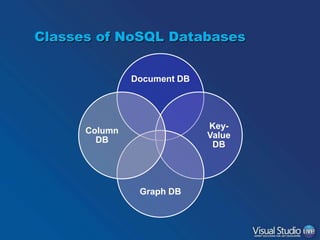
Classes of NoSQL Databases
Document DB

KeyValue
DB

Column
DB

Graph DB
RavenDB
•
•

•
•

•
•
•
•

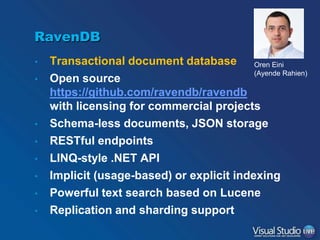
Transactional document database Oren Eini
(Ayende Rahien)
Open source
https://github.com/ravendb/ravendb
with licensing for commercial projects
Schema-less documents, JSON storage
RESTful endpoints
LINQ-style .NET API
Implicit (usage-based) or explicit indexing
Powerful text search based on Lucene
Replication and sharding support
Hosting RavenDB
•
•
•
•
•

Raven.Server.exe
Windows Service
Integrated in IIS
Embedded client for stand-alone apps
Cloud-hosted (e.g. RavenHQ)
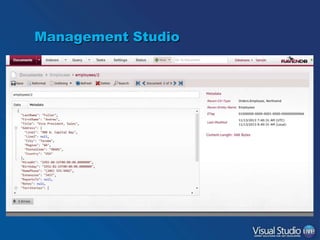
Management Studio
RavenDB Management Studio

DEMO
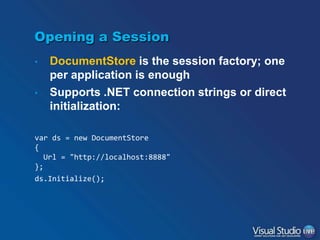
Opening a Session
•
•

DocumentStore is the session factory; one
per application is enough
Supports .NET connection strings or direct
initialization:

var ds = new DocumentStore
{
Url = "http://localhost:8888"
};
ds.Initialize();
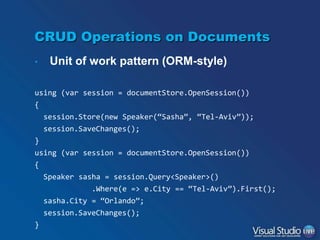
CRUD Operations on Documents
•

Unit of work pattern (ORM-style)

using (var session = documentStore.OpenSession())

{
session.Store(new Speaker(“Sasha”, “Tel-Aviv”));
session.SaveChanges();
}
using (var session = documentStore.OpenSession())
{
Speaker sasha = session.Query<Speaker>()
.Where(e => e.City == “Tel-Aviv”).First();
sasha.City = “Orlando”;

session.SaveChanges();
}
Collections and IDs
•
•
•
•

Documents are stored in JSON format
Documents have metadata that includes
the entity type
A collection is a set of documents with the
same entity type
Documents have unique ids, often a
combination of collection name + id
– speakers/1
– conferences/7
Basic Operations

DEMO
Modeling Data as Documents
•

Don’t be tempted to use a document store
like a relational database
– Documents should be aggregate roots

– References to other documents are OK but (some)
data duplication (denormalization) is also OK
“conference/11” : {

tracks: [
{ title: “Web”, days: { 1, 2 }, sessions: [ ... ] },
...
]
Should the tracks be
}

references?
…But Don’t Go Too Far
•

Is this a reasonable document?

“blogs/1” : {

tags : [ “Windows”, “Visual Studio”, “VSLive” ],
posts : [
My blog has 500 posts
{ title: “Migrating to RavenDB”,
content: “When planning a migration to Raven…”,
author: “Sasha Goldshtein”,
comments: [ ... ]
...
},
...
]
}
One More Example
“orders/1783”: {
customer: { name: “James Bond”, id: “customers/007” },
items: [
{ product: “Disintegrator”, cost: 78.3, qty: 1 },

{ product: “Laser shark”,

cost: 99.0, qty: 3 }

]
}

What if we always need
to know whether the
product is in stock?

What if we always need
the customer’s address?

What if the customer’s
address changes often?
Include
•

Load the referenced document when the
referencing document is retrieved
– Also supports arrays of referenced documents

Order order = session.Include<Order>(o => o.Customer.Id)
.Load(“orders/1783”);
Customer customer = session.Load<Customer>(

order.Customer.Id);
Order[] orders = session.Query<Order>()
.Customize(q => q.Include<Order>(o => o.Customer.Id))
.Where(o => o.Items.Length > 5)
.ToArray();
Include and Load

DEMO
Indexes
•

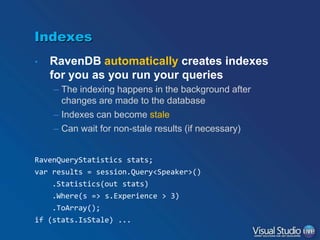
RavenDB automatically creates indexes
for you as you run your queries
– The indexing happens in the background after
changes are made to the database
– Indexes can become stale
– Can wait for non-stale results (if necessary)

RavenQueryStatistics stats;
var results = session.Query<Speaker>()
.Statistics(out stats)
.Where(s => s.Experience > 3)
.ToArray();
if (stats.IsStale) ...
ACID?
•

If indexes can become stale, does it mean
RavenDB is not ACID?

•

The document store is ACID
The index store is not

•

•

You can insert lots of data very quickly
and load it quickly, but indexes take a
while to catch up
Indexing Fundamentals
•
•

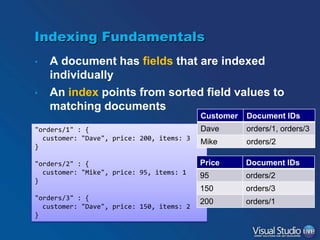
A document has fields that are indexed
individually
An index points from sorted field values to
matching documents
Customer

Document IDs

"orders/1" : {
customer: "Dave", price: 200, items: 3
}

Dave

orders/1, orders/3

Mike

orders/2

"orders/2" : {
customer: "Mike", price: 95, items: 1
}

Price

Document IDs

95

orders/2

150

orders/3

200

orders/1

"orders/3" : {
customer: "Dave", price: 150, items: 2
}
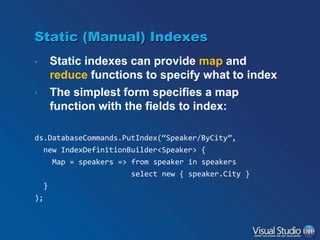
Static (Manual) Indexes
•
•

Static indexes can provide map and
reduce functions to specify what to index
The simplest form specifies a map
function with the fields to index:

ds.DatabaseCommands.PutIndex(“Speaker/ByCity”,
new IndexDefinitionBuilder<Speaker> {
Map = speakers => from speaker in speakers
select new { speaker.City }
}
);
Hierarchical Data
•

How to index the following hierarchy of
comments by author and text?

public class Post
{
public string Title { get; set; }
public Comment[] Comments { get; set; }

}
public class Comment
{
public string Author { get; set; }
public string Text { get; set; }
public Comment[] Comments { get; set; }
}
Hierarchical Index with Recurse
public class CommentsIndex : AbstractIndexCreationTask<Post>
{
public CommentsIndex()
{

Map = posts => from post in posts
from comment in Recurse(post, c=>c.Comments)
select new
{
Author = comment.Author,
Text = comment.Text
}
}
}

This is an index over Post
objects but the output
produces Comment objects!
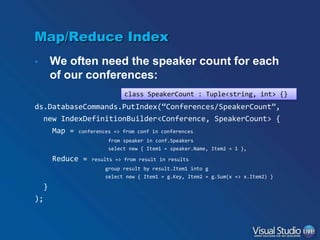
Map/Reduce Index
•

We often need the speaker count for each
of our conferences:
class SpeakerCount : Tuple<string, int> {}

ds.DatabaseCommands.PutIndex(“Conferences/SpeakerCount”,
new IndexDefinitionBuilder<Conference, SpeakerCount> {
Map = conferences => from conf in conferences
from speaker in conf.Speakers
select new { Item1 = speaker.Name, Item2 = 1 },

Reduce =

results => from result in results
group result by result.Item1 into g
select new { Item1 = g.Key, Item2 = g.Sum(x => x.Item2) }

}
);
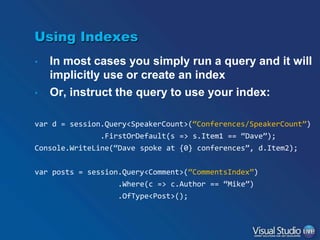
Using Indexes
•
•

In most cases you simply run a query and it will
implicitly use or create an index
Or, instruct the query to use your index:

var d = session.Query<SpeakerCount>(“Conferences/SpeakerCount”)
.FirstOrDefault(s => s.Item1 == “Dave”);
Console.WriteLine(“Dave spoke at {0} conferences”, d.Item2);
var posts = session.Query<Comment>(“CommentsIndex”)
.Where(c => c.Author == “Mike”)
.OfType<Post>();
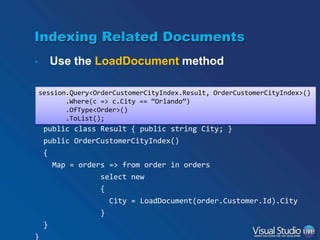
Indexing Related Documents
Use the LoadDocument method

•

session.Query<OrderCustomerCityIndex.Result, OrderCustomerCityIndex>()
public class OrderCustomerCityIndex :
.Where(c => c.City == “Orlando”)
AbstractIndexCreationTask<Order, OrderCustomerCityIndex.Result>
.OfType<Order>()
.ToList();

{

public class Result { public string City; }
public OrderCustomerCityIndex()
{
Map = orders => from order in orders
select new
{
City = LoadDocument(order.Customer.Id).City

}
}
}
Using Indexes

DEMO
Full-Text Search Indexes
Made possible by the underlying Lucene.NET
engine

•

public class SpeakerIndex : AbstractIndexCreationTask<Speaker>
{
public SpeakerIndex()
{

Map = speakers => from speaker in speakers
select new { speaker.Name };
Index("Name", FieldIndexing.Analyzed);
}
}
Using Full-Text Search and Query
Suggestions
var query = session.Query<Speaker, SpeakerIndex>()
.Where(s => s.Name == name);
var speaker = query.FirstOrDefault();

Will find “Dave Smith” when
searching for “dave” or “smith”
if (speaker == null)

{

Will suggest “dave” when
searching for “david”

string[] suggestions = query.Suggest().Suggestions;
}
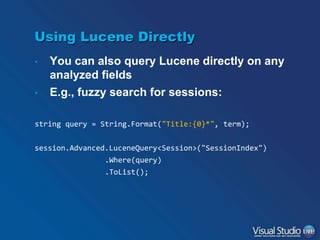
Using Lucene Directly
•
•

You can also query Lucene directly on any
analyzed fields
E.g., fuzzy search for sessions:

string query = String.Format("Title:{0}*", term);
session.Advanced.LuceneQuery<Session>("SessionIndex")

.Where(query)
.ToList();
Full-Text Search and Suggestions

DEMO
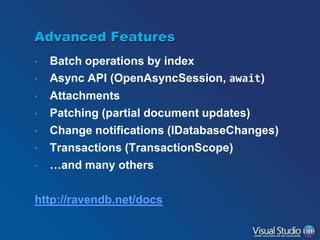
Advanced Features
•
•
•
•
•
•
•

Batch operations by index
Async API (OpenAsyncSession, await)
Attachments
Patching (partial document updates)
Change notifications (IDatabaseChanges)
Transactions (TransactionScope)
…and many others

http://ravendb.net/docs
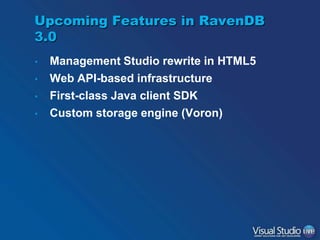
Upcoming Features in RavenDB
3.0
•
•
•
•

Management Studio rewrite in HTML5
Web API-based infrastructure
First-class Java client SDK
Custom storage engine (Voron)
Thank You!
Sasha Goldshtein
@goldshtn
blog.sashag.net

Introduction to RavenDB

  • 1.
    Seeking Life BeyondRelational: RavenDB Sasha Goldshtein CTO, Sela Group Level: Intermediate
  • 2.
    NoSQL • The Zen-like answer:No one can tell you what NoSQL is, they can only tell you what it isn’t • It doesn’t use SQL It usually is less consistent than RDBMS It doesn’t put an emphasis on relations It emphasizes size and scale over structure • • •
  • 3.
    Classes of NoSQLDatabases Document DB KeyValue DB Column DB Graph DB
  • 4.
    RavenDB • • • • • • • • Transactional document databaseOren Eini (Ayende Rahien) Open source https://github.com/ravendb/ravendb with licensing for commercial projects Schema-less documents, JSON storage RESTful endpoints LINQ-style .NET API Implicit (usage-based) or explicit indexing Powerful text search based on Lucene Replication and sharding support
  • 5.
    Hosting RavenDB • • • • • Raven.Server.exe Windows Service Integratedin IIS Embedded client for stand-alone apps Cloud-hosted (e.g. RavenHQ)
  • 6.
  • 7.
  • 8.
    Opening a Session • • DocumentStoreis the session factory; one per application is enough Supports .NET connection strings or direct initialization: var ds = new DocumentStore { Url = "http://localhost:8888" }; ds.Initialize();
  • 9.
    CRUD Operations onDocuments • Unit of work pattern (ORM-style) using (var session = documentStore.OpenSession()) { session.Store(new Speaker(“Sasha”, “Tel-Aviv”)); session.SaveChanges(); } using (var session = documentStore.OpenSession()) { Speaker sasha = session.Query<Speaker>() .Where(e => e.City == “Tel-Aviv”).First(); sasha.City = “Orlando”; session.SaveChanges(); }
  • 10.
    Collections and IDs • • • • Documentsare stored in JSON format Documents have metadata that includes the entity type A collection is a set of documents with the same entity type Documents have unique ids, often a combination of collection name + id – speakers/1 – conferences/7
  • 11.
  • 12.
    Modeling Data asDocuments • Don’t be tempted to use a document store like a relational database – Documents should be aggregate roots – References to other documents are OK but (some) data duplication (denormalization) is also OK “conference/11” : { tracks: [ { title: “Web”, days: { 1, 2 }, sessions: [ ... ] }, ... ] Should the tracks be } references?
  • 13.
    …But Don’t GoToo Far • Is this a reasonable document? “blogs/1” : { tags : [ “Windows”, “Visual Studio”, “VSLive” ], posts : [ My blog has 500 posts { title: “Migrating to RavenDB”, content: “When planning a migration to Raven…”, author: “Sasha Goldshtein”, comments: [ ... ] ... }, ... ] }
  • 14.
    One More Example “orders/1783”:{ customer: { name: “James Bond”, id: “customers/007” }, items: [ { product: “Disintegrator”, cost: 78.3, qty: 1 }, { product: “Laser shark”, cost: 99.0, qty: 3 } ] } What if we always need to know whether the product is in stock? What if we always need the customer’s address? What if the customer’s address changes often?
  • 15.
    Include • Load the referenceddocument when the referencing document is retrieved – Also supports arrays of referenced documents Order order = session.Include<Order>(o => o.Customer.Id) .Load(“orders/1783”); Customer customer = session.Load<Customer>( order.Customer.Id); Order[] orders = session.Query<Order>() .Customize(q => q.Include<Order>(o => o.Customer.Id)) .Where(o => o.Items.Length > 5) .ToArray();
  • 16.
  • 17.
    Indexes • RavenDB automatically createsindexes for you as you run your queries – The indexing happens in the background after changes are made to the database – Indexes can become stale – Can wait for non-stale results (if necessary) RavenQueryStatistics stats; var results = session.Query<Speaker>() .Statistics(out stats) .Where(s => s.Experience > 3) .ToArray(); if (stats.IsStale) ...
  • 18.
    ACID? • If indexes canbecome stale, does it mean RavenDB is not ACID? • The document store is ACID The index store is not • • You can insert lots of data very quickly and load it quickly, but indexes take a while to catch up
  • 19.
    Indexing Fundamentals • • A documenthas fields that are indexed individually An index points from sorted field values to matching documents Customer Document IDs "orders/1" : { customer: "Dave", price: 200, items: 3 } Dave orders/1, orders/3 Mike orders/2 "orders/2" : { customer: "Mike", price: 95, items: 1 } Price Document IDs 95 orders/2 150 orders/3 200 orders/1 "orders/3" : { customer: "Dave", price: 150, items: 2 }
  • 20.
    Static (Manual) Indexes • • Staticindexes can provide map and reduce functions to specify what to index The simplest form specifies a map function with the fields to index: ds.DatabaseCommands.PutIndex(“Speaker/ByCity”, new IndexDefinitionBuilder<Speaker> { Map = speakers => from speaker in speakers select new { speaker.City } } );
  • 21.
    Hierarchical Data • How toindex the following hierarchy of comments by author and text? public class Post { public string Title { get; set; } public Comment[] Comments { get; set; } } public class Comment { public string Author { get; set; } public string Text { get; set; } public Comment[] Comments { get; set; } }
  • 22.
    Hierarchical Index withRecurse public class CommentsIndex : AbstractIndexCreationTask<Post> { public CommentsIndex() { Map = posts => from post in posts from comment in Recurse(post, c=>c.Comments) select new { Author = comment.Author, Text = comment.Text } } } This is an index over Post objects but the output produces Comment objects!
  • 23.
    Map/Reduce Index • We oftenneed the speaker count for each of our conferences: class SpeakerCount : Tuple<string, int> {} ds.DatabaseCommands.PutIndex(“Conferences/SpeakerCount”, new IndexDefinitionBuilder<Conference, SpeakerCount> { Map = conferences => from conf in conferences from speaker in conf.Speakers select new { Item1 = speaker.Name, Item2 = 1 }, Reduce = results => from result in results group result by result.Item1 into g select new { Item1 = g.Key, Item2 = g.Sum(x => x.Item2) } } );
  • 24.
    Using Indexes • • In mostcases you simply run a query and it will implicitly use or create an index Or, instruct the query to use your index: var d = session.Query<SpeakerCount>(“Conferences/SpeakerCount”) .FirstOrDefault(s => s.Item1 == “Dave”); Console.WriteLine(“Dave spoke at {0} conferences”, d.Item2); var posts = session.Query<Comment>(“CommentsIndex”) .Where(c => c.Author == “Mike”) .OfType<Post>();
  • 25.
    Indexing Related Documents Usethe LoadDocument method • session.Query<OrderCustomerCityIndex.Result, OrderCustomerCityIndex>() public class OrderCustomerCityIndex : .Where(c => c.City == “Orlando”) AbstractIndexCreationTask<Order, OrderCustomerCityIndex.Result> .OfType<Order>() .ToList(); { public class Result { public string City; } public OrderCustomerCityIndex() { Map = orders => from order in orders select new { City = LoadDocument(order.Customer.Id).City } } }
  • 26.
  • 27.
    Full-Text Search Indexes Madepossible by the underlying Lucene.NET engine • public class SpeakerIndex : AbstractIndexCreationTask<Speaker> { public SpeakerIndex() { Map = speakers => from speaker in speakers select new { speaker.Name }; Index("Name", FieldIndexing.Analyzed); } }
  • 28.
    Using Full-Text Searchand Query Suggestions var query = session.Query<Speaker, SpeakerIndex>() .Where(s => s.Name == name); var speaker = query.FirstOrDefault(); Will find “Dave Smith” when searching for “dave” or “smith” if (speaker == null) { Will suggest “dave” when searching for “david” string[] suggestions = query.Suggest().Suggestions; }
  • 29.
    Using Lucene Directly • • Youcan also query Lucene directly on any analyzed fields E.g., fuzzy search for sessions: string query = String.Format("Title:{0}*", term); session.Advanced.LuceneQuery<Session>("SessionIndex") .Where(query) .ToList();
  • 30.
    Full-Text Search andSuggestions DEMO
  • 31.
    Advanced Features • • • • • • • Batch operationsby index Async API (OpenAsyncSession, await) Attachments Patching (partial document updates) Change notifications (IDatabaseChanges) Transactions (TransactionScope) …and many others http://ravendb.net/docs
  • 32.
    Upcoming Features inRavenDB 3.0 • • • • Management Studio rewrite in HTML5 Web API-based infrastructure First-class Java client SDK Custom storage engine (Voron)
  • 33.