Lecture 4
Introduction of PM Tools, PMI‘s Knowledge Areas, Technical Fundamentals in
SPM, Lifecycle Relationships, Classic Mistakes Product-Process-Peoples-
Technology Mistakes PMI Framework, PMI Process Groups: Process Initiating
Process Group, Planning Process Process Group, Executing Process, Process
Monitoring and controlling, Closing Process Group, Project Charter, Statement of
Work
PM Tools: Software
Low-end
– Basic features, tasks management, charting
– MS Excel
Mid-market
– Handle larger projects, multiple projects, analysis tools
– MS Project (approx. 50% of market)
High-end
– Very large projects, specialized needs, enterprise
– AMS Realtime (Adv Mngt Solution)
Project Management Institute
• PMI stands for the Project Management Institute, and is a not-for-
profit professional membership association for project managers and
program managers. PMI was started in 1969, and now has a
membership of more than 2.9 million professionals around the globe.
• .The Project Management Institute is the organization that gives out
the PMP (Project Management Professional) credential, a globally
recognized certificate that assures employers that a person is trained
and qualified to manage projects.
PMI’s 9 Knowledge Areas
• Project integration management
• Scope
• Time
• Cost
• Quality
• Human resource
• Communications
• Risk
• Procurement
Four Project Dimensions
People
Process
Product
Technology
Classic Mistakes
– People-Related
– Process-Related
– Product-Related
– Technology-Related
People-Related Mistakes Part 1
• Undermined motivation
• Weak personnel
• Uncontrolled problem employees
• Adding people to a late project
• Noisy, crowded offices
• Customer-Developer friction
• (Customer friction is anything that impedes your customer from moving
through the marketing and sales funnels to buy your goods or services, or
pushes them away from wanting to buy from you again.)
• Unrealistic expectations
• Politics over substance (a particular kind of matter)
• Wishful thinking
• Lack of effective project sponsorship
• Lack of stakeholder buy-in(agreement to do something, even
though the person agreeing didn't have anything to do with the
project beforehand.)
Process-Related Mistakes Part 1
• Optimistic schedules
• Insufficient risk management
• Contractor failure
• Insufficient planning
• Abandonment of plan under pressure
• Wasted time during fuzzy front end
• Shortchanged upstream activities
• Inadequate design
• Shortchanged quality assurance
• Insufficient management controls
• Omitting necessary tasks from estimates
• Planning to catch-up later
• Code-like-hell programming
Product-Related Mistakes
• Requirements gold-plating (Gold plating refers to adding the extra features that were not
part of the product scope)
• Gilding the lily (to attempt to improve something that is already fine the way it is)
• Feature creep (is a tendency for product or project requirements to increase during
development beyond those originally foreseen.)
• Developer gold-plating (after having met the requirements, the project manager or
the developer works on further enhancing the product)
• Push-me, pull-me negotiation (Some managers approve a schedule slip on a project that
is progressing more slowly than expected and then add in additional new tasks after the
schedule change to make the schedule wrong again
• Research-oriented development
Technology-Related Mistakes
• Silver-bullet syndrome (is the belief that the next big change in
tools, resources or procedures will miraculously or magically solve
all of an organization's problems)
• Overestimated savings from new tools and methods
• Switching tools in mid-project
• Lack of automated source-code control
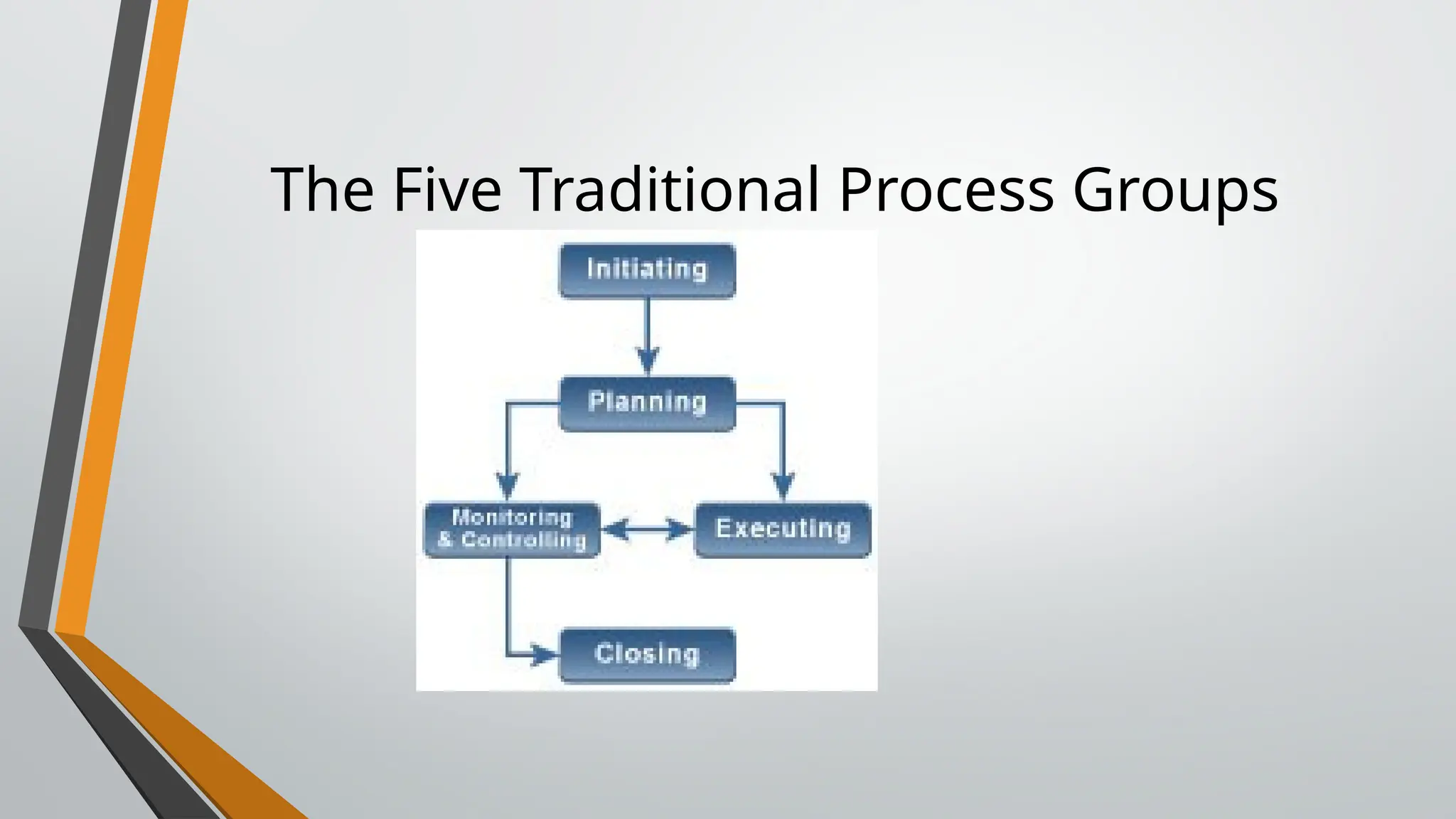
The Five Traditional Process Groups
Project Pre-initiation
• It is good practice to lay the groundwork for a project before it
officially starts
• Senior managers often perform several pre-initiation tasks,
including the following:
• Determine the scope, time, and cost constraints for the project
• Identify the project sponsor
• Select the project manager
• Develop a business case for a project (see Table 3-2 for an example)
• Meet with the project manager to review the process and expectations
for managing the project
• Determine if the project should be divided into two or more smaller
projects
Information Technology Project
Management, Eighth Edition
16
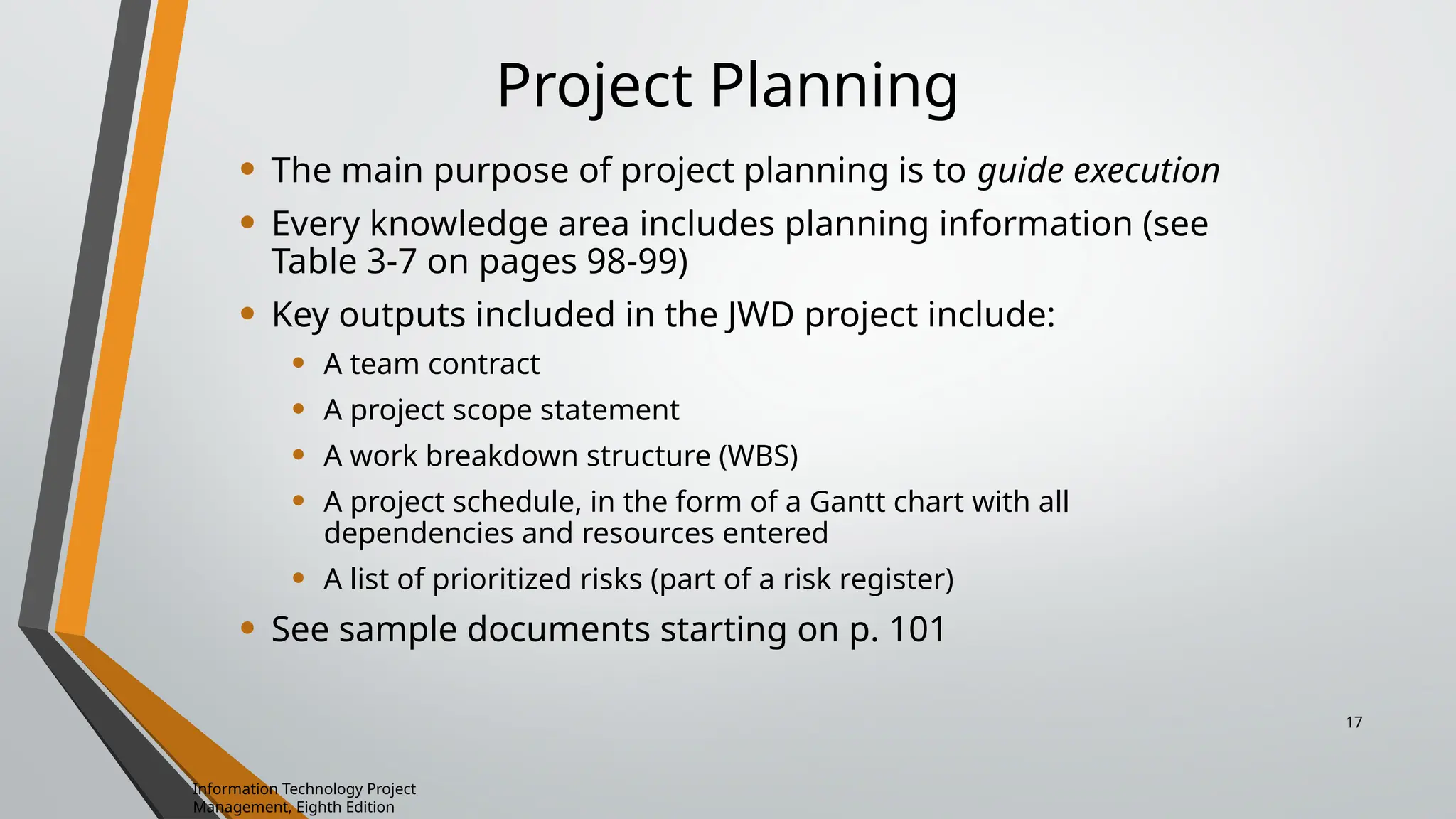
Project Planning
• The main purpose of project planning is to guide execution
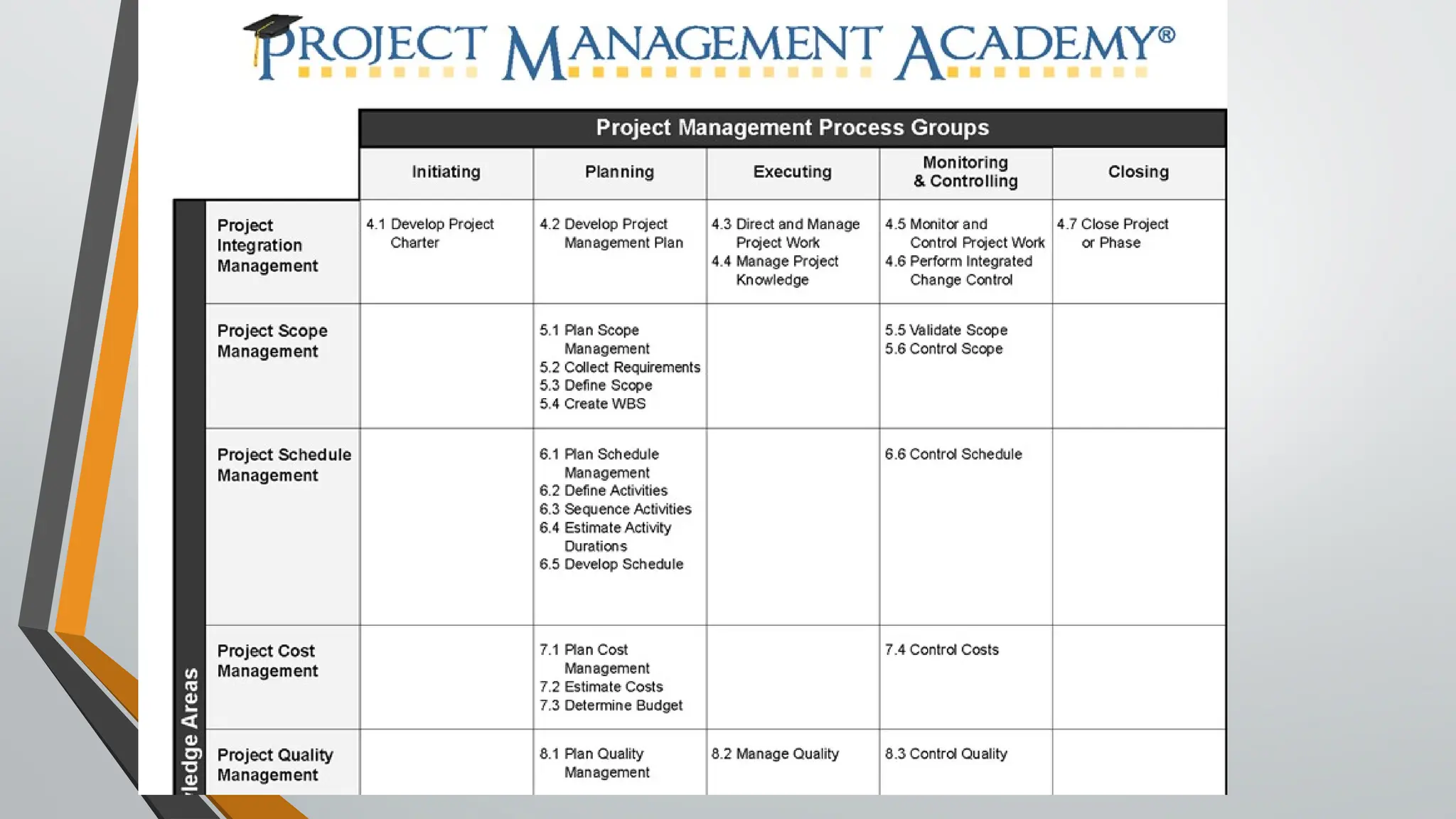
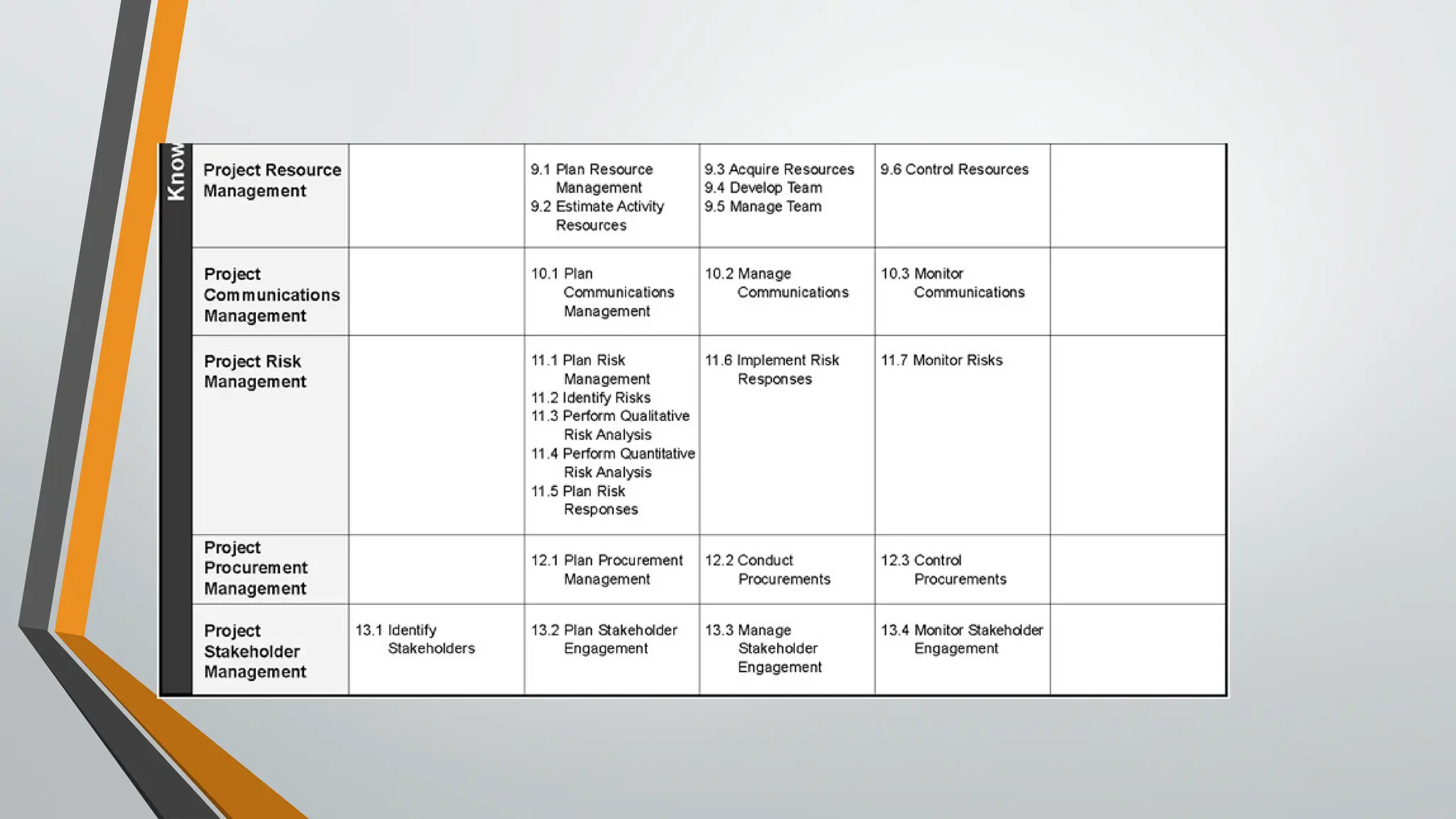
• Every knowledge area includes planning information (see
Table 3-7 on pages 98-99)
• Key outputs included in the JWD project include:
• A team contract
• A project scope statement
• A work breakdown structure (WBS)
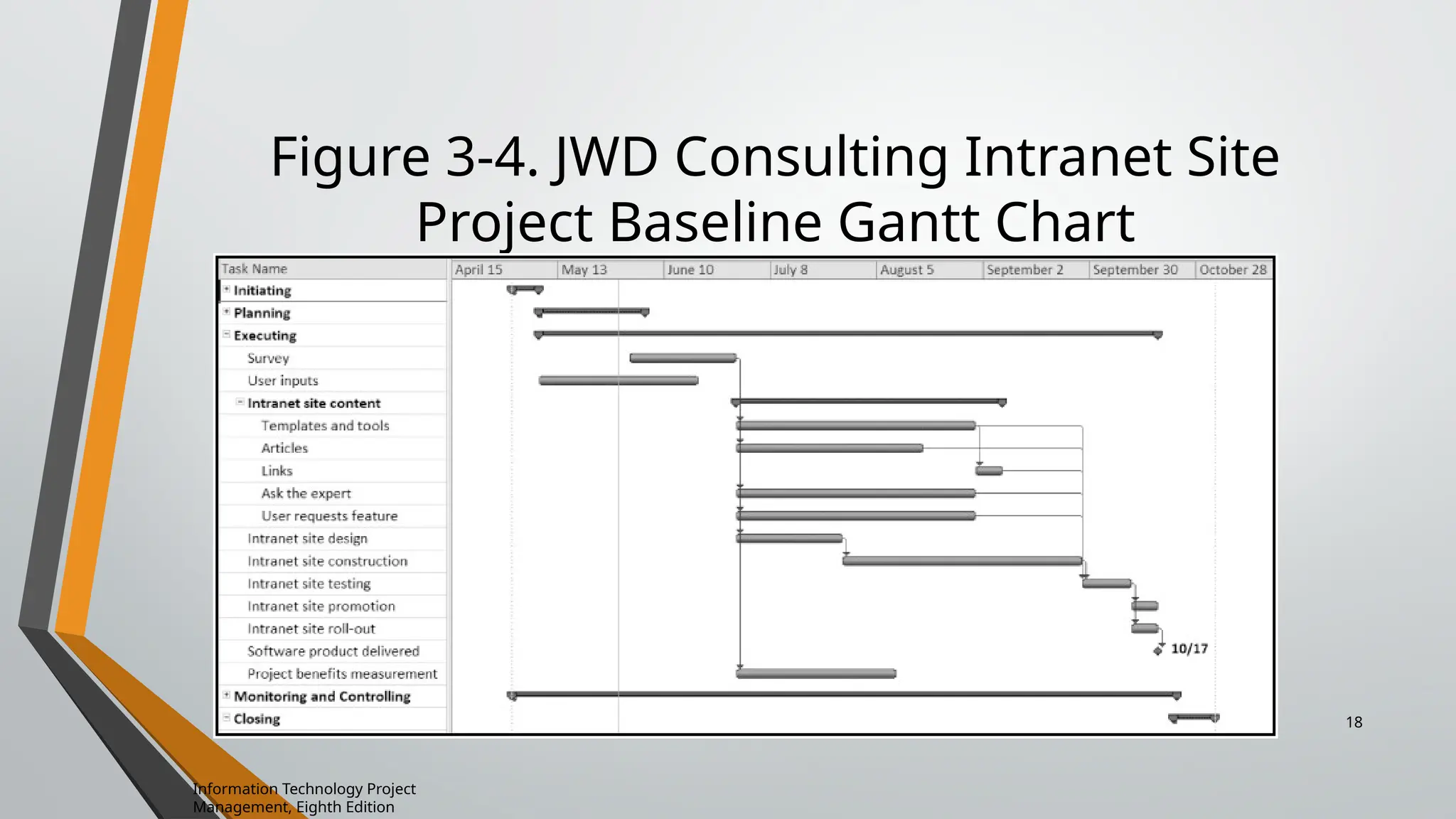
• A project schedule, in the form of a Gantt chart with all
dependencies and resources entered
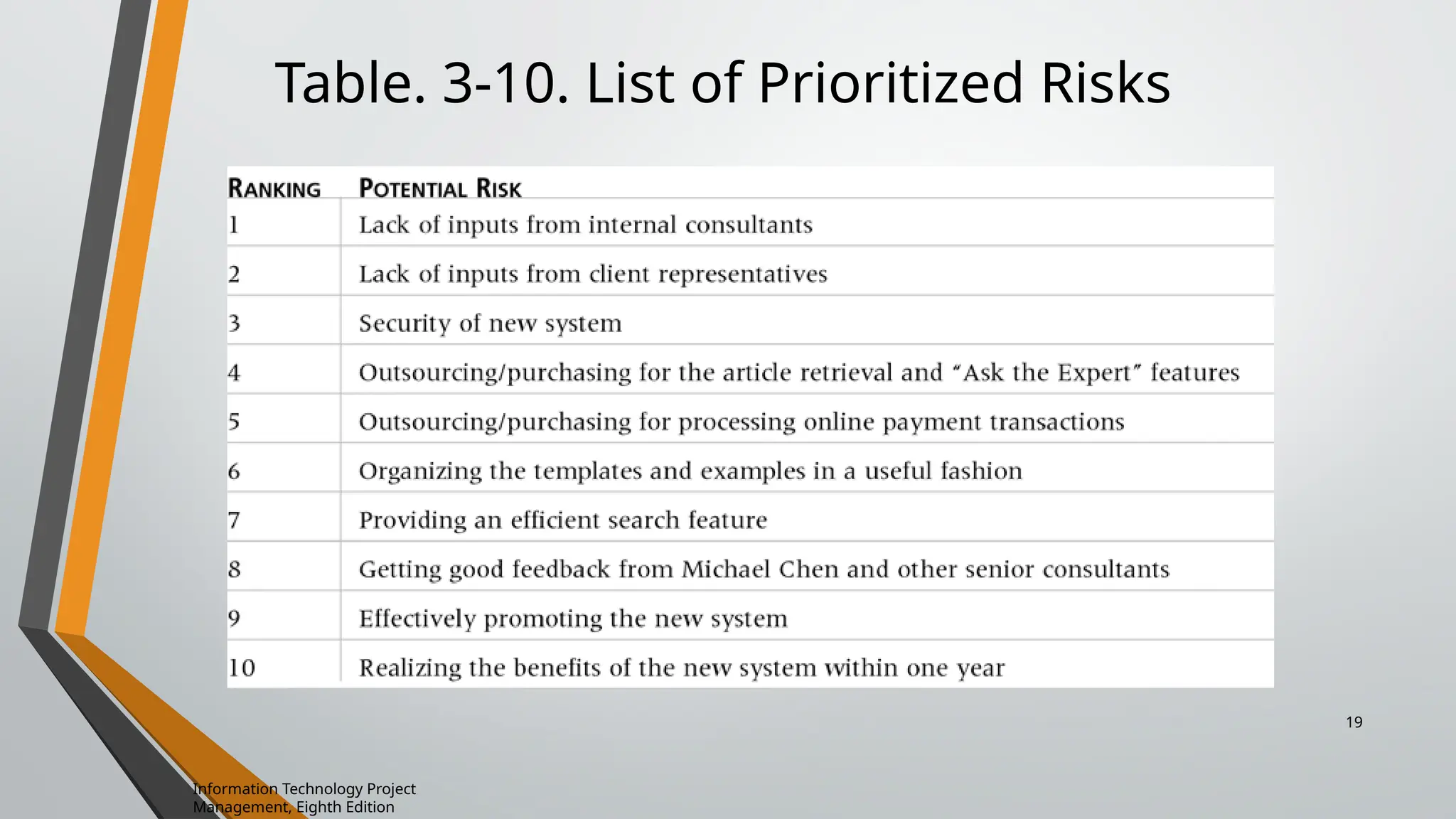
• A list of prioritized risks (part of a risk register)
• See sample documents starting on p. 101
Information Technology Project
Management, Eighth Edition
17
Figure 3-4. JWD Consulting Intranet Site
Project Baseline Gantt Chart
Information Technology Project
Management, Eighth Edition
18
Table. 3-10. List of Prioritized Risks
Information Technology Project
Management, Eighth Edition
19
Project Executing
• Usually takes the most time and resources to perform project
execution
• Project managers must use their leadership skills to handle the
many challenges that occur during project execution
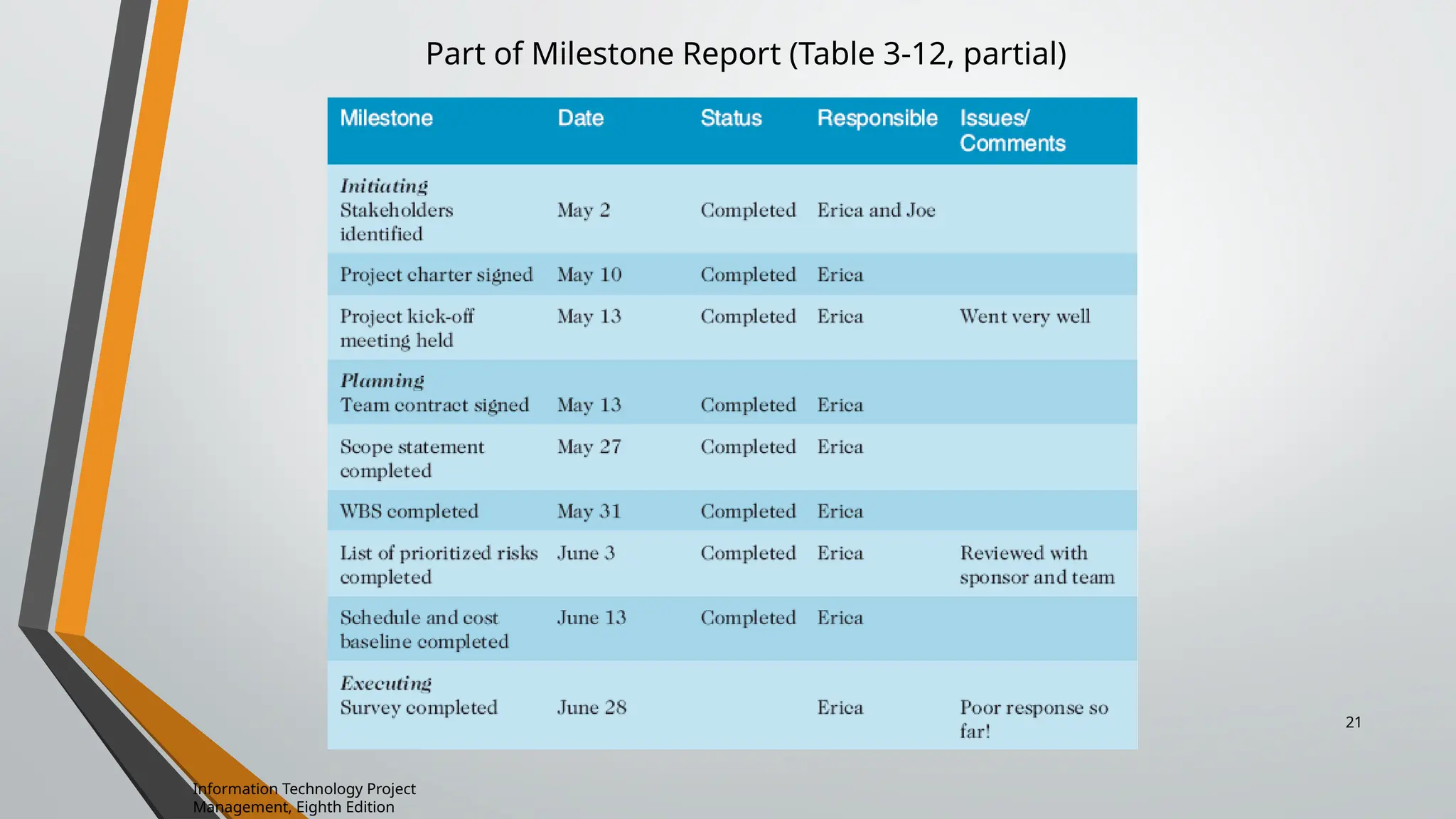
• Table 3-11 lists the executing processes and outputs. Many project
sponsors and customers focus on deliverables related to providing
the products, services, or results desired from the project
• A milestone report can help focus on completing major milestones
Information Technology Project
Management, Eighth Edition
20
Part of Milestone Report (Table 3-12, partial)
Information Technology Project
Management, Eighth Edition
21
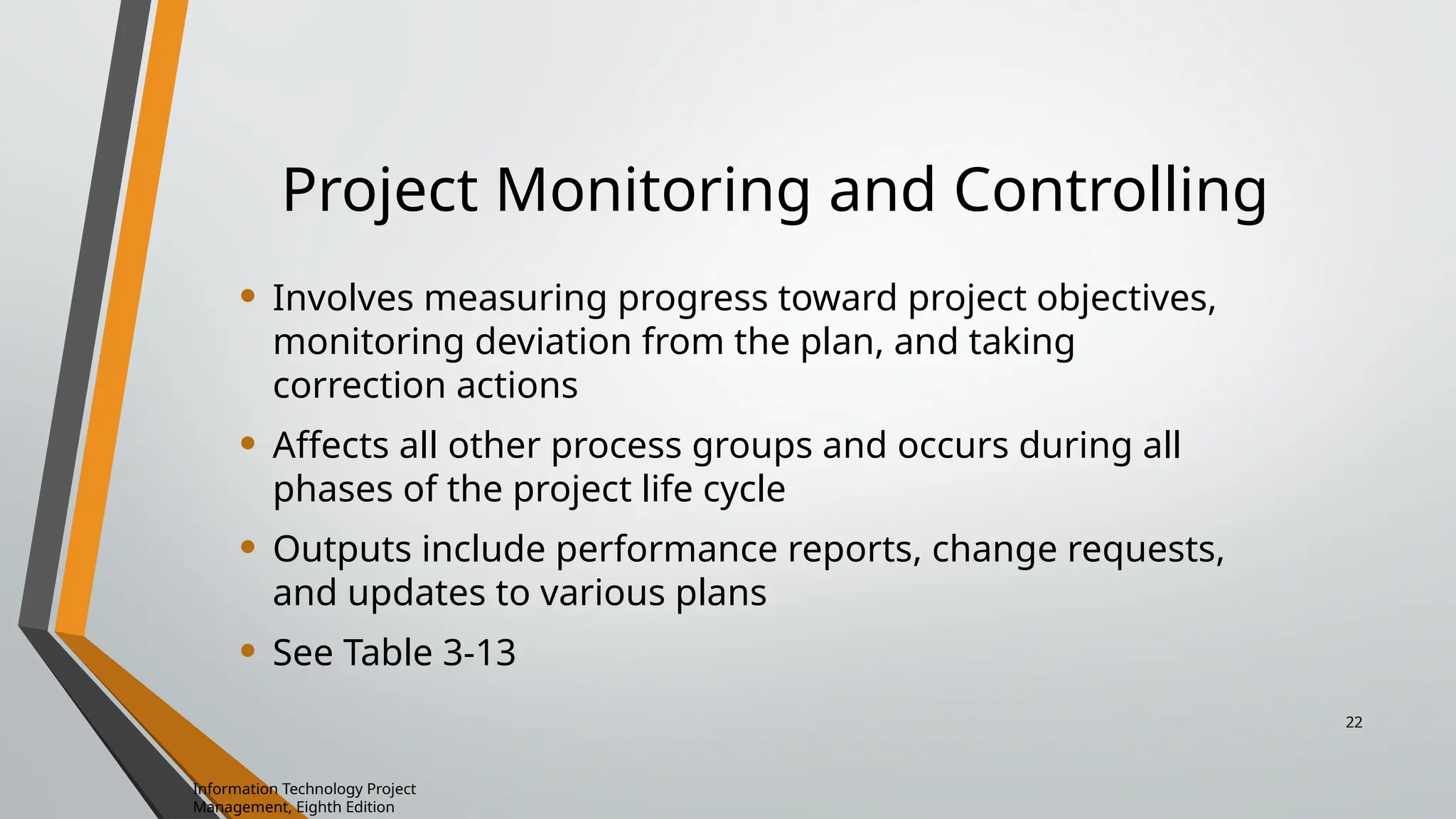
Project Monitoring and Controlling
• Involves measuring progress toward project objectives,
monitoring deviation from the plan, and taking
correction actions
• Affects all other process groups and occurs during all
phases of the project life cycle
• Outputs include performance reports, change requests,
and updates to various plans
• See Table 3-13
Information Technology Project
Management, Eighth Edition
22
Project Closing
• Involves gaining stakeholder and customer acceptance
of the final products and services
• Even if projects are not completed, they should be
closed out to learn from the past
• Outputs include project files and lessons-learned
reports, part of organizational process assets
• Most projects also include a final report and
presentation to the sponsor/senior management
23
What is a Project Charter in Project
Management?
What is a project charter in project management?
A project charter is a formal, typically short document that describes
your project in its entirety — including what the objectives are, how
it will be carried out, and who the stakeholders are. It is a crucial
ingredient in planning out the project because it is used throughout
the project lifecycle.
The project charter typically documents:
• Reasons for the project
• Objectives and constraints of the project
• Who the main stakeholders are
• Risks identified
• Benefits of the project
• General overview of the budget
How to Create a Project Charter
• Understand project goals and objectives. Identify the project vision and
determine the scope of the project
• Define project organization. List all of the essential roles for the project,
including customers, stakeholders, and day-to-day project team.
• Create an implementation plan. Outline major milestones,
dependencies and timeline for the entire team and stakeholders.
• List potential problem areas. No one wants to be a downer, but adding
potential risks and issues to the project charter helps everyone think
ahead should the worst happen.
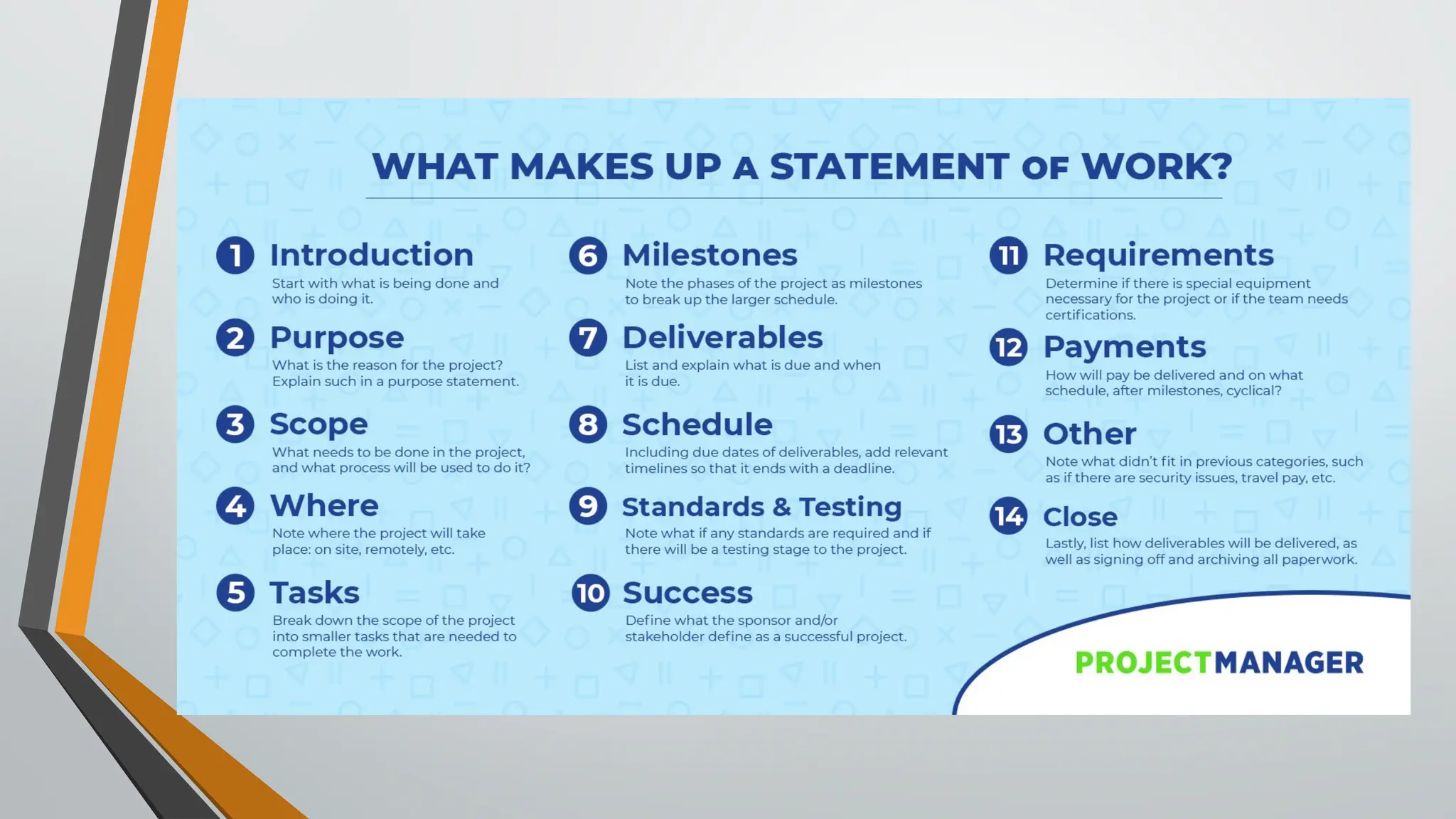
Statement of Work:
The SoW is the document that captures and defines all aspects of
your project. You’ll note the activities, deliverables and the timetable
for the project. It’s an extremely detailed document as it will lay the
groundwork for the project plan.
Introduction to Program Management  Tools

Introduction to Program Management Tools

  • 1.
    Lecture 4 Introduction ofPM Tools, PMI‘s Knowledge Areas, Technical Fundamentals in SPM, Lifecycle Relationships, Classic Mistakes Product-Process-Peoples- Technology Mistakes PMI Framework, PMI Process Groups: Process Initiating Process Group, Planning Process Process Group, Executing Process, Process Monitoring and controlling, Closing Process Group, Project Charter, Statement of Work
  • 2.
    PM Tools: Software Low-end –Basic features, tasks management, charting – MS Excel Mid-market – Handle larger projects, multiple projects, analysis tools – MS Project (approx. 50% of market) High-end – Very large projects, specialized needs, enterprise – AMS Realtime (Adv Mngt Solution)
  • 3.
    Project Management Institute •PMI stands for the Project Management Institute, and is a not-for- profit professional membership association for project managers and program managers. PMI was started in 1969, and now has a membership of more than 2.9 million professionals around the globe. • .The Project Management Institute is the organization that gives out the PMP (Project Management Professional) credential, a globally recognized certificate that assures employers that a person is trained and qualified to manage projects.
  • 4.
    PMI’s 9 KnowledgeAreas • Project integration management • Scope • Time • Cost • Quality • Human resource • Communications • Risk • Procurement
  • 5.
  • 6.
    Classic Mistakes – People-Related –Process-Related – Product-Related – Technology-Related
  • 7.
    People-Related Mistakes Part1 • Undermined motivation • Weak personnel • Uncontrolled problem employees • Adding people to a late project
  • 8.
    • Noisy, crowdedoffices • Customer-Developer friction • (Customer friction is anything that impedes your customer from moving through the marketing and sales funnels to buy your goods or services, or pushes them away from wanting to buy from you again.) • Unrealistic expectations • Politics over substance (a particular kind of matter) • Wishful thinking • Lack of effective project sponsorship • Lack of stakeholder buy-in(agreement to do something, even though the person agreeing didn't have anything to do with the project beforehand.)
  • 9.
    Process-Related Mistakes Part1 • Optimistic schedules • Insufficient risk management • Contractor failure • Insufficient planning • Abandonment of plan under pressure • Wasted time during fuzzy front end • Shortchanged upstream activities • Inadequate design • Shortchanged quality assurance
  • 10.
    • Insufficient managementcontrols • Omitting necessary tasks from estimates • Planning to catch-up later • Code-like-hell programming
  • 11.
    Product-Related Mistakes • Requirementsgold-plating (Gold plating refers to adding the extra features that were not part of the product scope) • Gilding the lily (to attempt to improve something that is already fine the way it is) • Feature creep (is a tendency for product or project requirements to increase during development beyond those originally foreseen.) • Developer gold-plating (after having met the requirements, the project manager or the developer works on further enhancing the product) • Push-me, pull-me negotiation (Some managers approve a schedule slip on a project that is progressing more slowly than expected and then add in additional new tasks after the schedule change to make the schedule wrong again • Research-oriented development
  • 12.
    Technology-Related Mistakes • Silver-bulletsyndrome (is the belief that the next big change in tools, resources or procedures will miraculously or magically solve all of an organization's problems) • Overestimated savings from new tools and methods • Switching tools in mid-project • Lack of automated source-code control
  • 13.
    The Five TraditionalProcess Groups
  • 16.
    Project Pre-initiation • Itis good practice to lay the groundwork for a project before it officially starts • Senior managers often perform several pre-initiation tasks, including the following: • Determine the scope, time, and cost constraints for the project • Identify the project sponsor • Select the project manager • Develop a business case for a project (see Table 3-2 for an example) • Meet with the project manager to review the process and expectations for managing the project • Determine if the project should be divided into two or more smaller projects Information Technology Project Management, Eighth Edition 16
  • 17.
    Project Planning • Themain purpose of project planning is to guide execution • Every knowledge area includes planning information (see Table 3-7 on pages 98-99) • Key outputs included in the JWD project include: • A team contract • A project scope statement • A work breakdown structure (WBS) • A project schedule, in the form of a Gantt chart with all dependencies and resources entered • A list of prioritized risks (part of a risk register) • See sample documents starting on p. 101 Information Technology Project Management, Eighth Edition 17
  • 18.
    Figure 3-4. JWDConsulting Intranet Site Project Baseline Gantt Chart Information Technology Project Management, Eighth Edition 18
  • 19.
    Table. 3-10. Listof Prioritized Risks Information Technology Project Management, Eighth Edition 19
  • 20.
    Project Executing • Usuallytakes the most time and resources to perform project execution • Project managers must use their leadership skills to handle the many challenges that occur during project execution • Table 3-11 lists the executing processes and outputs. Many project sponsors and customers focus on deliverables related to providing the products, services, or results desired from the project • A milestone report can help focus on completing major milestones Information Technology Project Management, Eighth Edition 20
  • 21.
    Part of MilestoneReport (Table 3-12, partial) Information Technology Project Management, Eighth Edition 21
  • 22.
    Project Monitoring andControlling • Involves measuring progress toward project objectives, monitoring deviation from the plan, and taking correction actions • Affects all other process groups and occurs during all phases of the project life cycle • Outputs include performance reports, change requests, and updates to various plans • See Table 3-13 Information Technology Project Management, Eighth Edition 22
  • 23.
    Project Closing • Involvesgaining stakeholder and customer acceptance of the final products and services • Even if projects are not completed, they should be closed out to learn from the past • Outputs include project files and lessons-learned reports, part of organizational process assets • Most projects also include a final report and presentation to the sponsor/senior management 23
  • 24.
    What is aProject Charter in Project Management? What is a project charter in project management? A project charter is a formal, typically short document that describes your project in its entirety — including what the objectives are, how it will be carried out, and who the stakeholders are. It is a crucial ingredient in planning out the project because it is used throughout the project lifecycle.
  • 25.
    The project chartertypically documents: • Reasons for the project • Objectives and constraints of the project • Who the main stakeholders are • Risks identified • Benefits of the project • General overview of the budget
  • 26.
    How to Createa Project Charter • Understand project goals and objectives. Identify the project vision and determine the scope of the project • Define project organization. List all of the essential roles for the project, including customers, stakeholders, and day-to-day project team. • Create an implementation plan. Outline major milestones, dependencies and timeline for the entire team and stakeholders. • List potential problem areas. No one wants to be a downer, but adding potential risks and issues to the project charter helps everyone think ahead should the worst happen.
  • 27.
    Statement of Work: TheSoW is the document that captures and defines all aspects of your project. You’ll note the activities, deliverables and the timetable for the project. It’s an extremely detailed document as it will lay the groundwork for the project plan.