Introduction
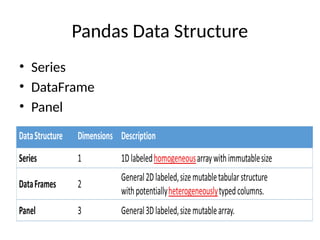
• Pandas isa Python library used for working
with data sets.
• It has functions for analyzing, cleaning,
exploring, and manipulating data.
• The name "Pandas" has a reference to both
"Panel Data", and "Python Data Analysis" and
was created by Wes McKinney in 2008.
3.
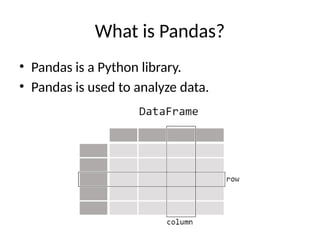
What is Pandas?
•Pandas is a Python library.
• Pandas is used to analyze data.
Series
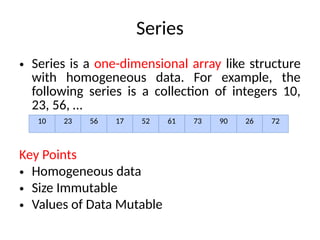
• Series isa one-dimensional array like structure
with homogeneous data. For example, the
following series is a collection of integers 10,
23, 56, …
Key Points
• Homogeneous data
• Size Immutable
• Values of Data Mutable
10 23 56 17 52 61 73 90 26 72
6.
DataFrame
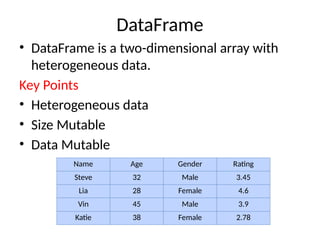
• DataFrame isa two-dimensional array with
heterogeneous data.
Key Points
• Heterogeneous data
• Size Mutable
• Data Mutable
Name Age Gender Rating
Steve 32 Male 3.45
Lia 28 Female 4.6
Vin 45 Male 3.9
Katie 38 Female 2.78
7.
Panel
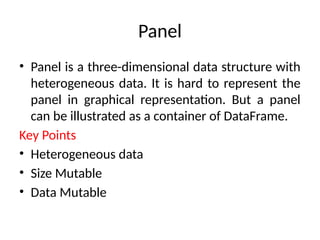
• Panel isa three-dimensional data structure with
heterogeneous data. It is hard to represent the
panel in graphical representation. But a panel
can be illustrated as a container of DataFrame.
Key Points
• Heterogeneous data
• Size Mutable
• Data Mutable
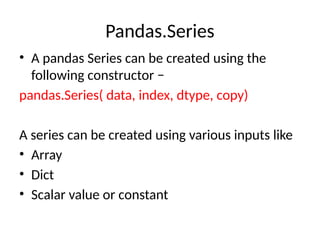
Pandas.Series
• A pandasSeries can be created using the
following constructor −
pandas.Series( data, index, dtype, copy)
A series can be created using various inputs like
• Array
• Dict
• Scalar value or constant
10.
Create a Seriesfrom ndarray
import pandas as pd
import numpy as np
data = np.array(['a','b','c','d'])
s = pd.Series(data)
print s
import pandas as pd
import numpy as np
data = np.array(['a','b','c','d'])
s = pd.Series(data,index=[100,101,102,103])
print s
11.
Create a Seriesfrom dict
import pandas as pd
import numpy as np
data = {'a' : 0., 'b' : 1., 'c' : 2.}
s = pd.Series(data)
print s
import pandas as pd
import numpy as np
data = {'a' : 0., 'b' : 1., 'c' : 2.}
s = pd.Series(data,index=['b','c','d','a'])
print s
12.
Create a Seriesfrom Scalar
import pandas as pd
import numpy as np
s = pd.Series(5, index=[0, 1, 2, 3])
print s
13.
Accessing Data fromSeries with Position
import pandas as pd
s = pd.Series([1,2,3,4,5],index = ['a','b','c','d','e'])
#retrieve the first element
print s[0]
import pandas as pd
s = pd.Series([1,2,3,4,5],index = ['a','b','c','d','e'])
#retrieve the first three element
print s[:3]
14.
Retrieve Data UsingLabel (Index)
import pandas as pd
s = pd.Series([1,2,3,4,5],index = ['a','b','c','d','e'])
#retrieve a single element
print s['a']
import pandas as pd
s = pd.Series([1,2,3,4,5],index = ['a','b','c','d','e'])
#retrieve multiple elements
print s[['a','c','d']]
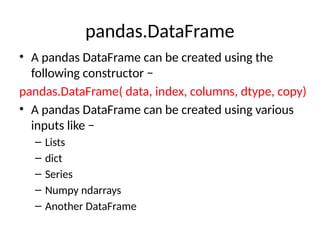
pandas.DataFrame
• A pandasDataFrame can be created using the
following constructor −
pandas.DataFrame( data, index, columns, dtype, copy)
• A pandas DataFrame can be created using various
inputs like −
– Lists
– dict
– Series
– Numpy ndarrays
– Another DataFrame
17.
Create a DataFramefrom Lists
import pandas as pd
data = [1,2,3,4,5]
df = pd.DataFrame(data)
Print(df)
import pandas as pd
data = [['Alex',10],['Bob',12],['Clarke',13]]
df = pd.DataFrame(data,columns=['Name','Age'])
Print(df)
import pandas as pd
data = [['Alex',10],['Bob',12],['Clarke',13]]
df =
pd.DataFrame(data,columns=['Name','Age'],dtype=float)
print(df)
18.
Create a DataFramefrom Dict of ndarrays / Lists
import pandas as pd
data = {'Name':['Tom', 'Jack', 'Steve', 'Ricky'],'Age':[28,34,29,42]}
df = pd.DataFrame(data)
print(df)
import pandas as pd
data = {'Name':['Tom', 'Jack', 'Steve', 'Ricky'],'Age':[28,34,29,42]}
df = pd.DataFrame(data, index=['rank1','rank2','rank3','rank4'])
Print(df)
Create a DataFramefrom Dict of Series
import pandas as pd
d = {'one' : pd.Series([1, 2, 3], index=['a', 'b', 'c']),
'two' : pd.Series([1, 2, 3, 4], index=['a', 'b', 'c', 'd'])}
df = pd.DataFrame(d)
Print(df)
import pandas as pd
d = {'one' : pd.Series([1, 2, 3], index=['a', 'b', 'c']),
'two' : pd.Series([1, 2, 3, 4], index=['a', 'b', 'c', 'd'])}
df = pd.DataFrame(d)
df['three']=df['one']+df['two']
print (df ['three'])
Print(df[one])
21.
Column Deletion
d ={'one' : pd.Series([1, 2, 3], index=['a', 'b', 'c']),
'two' : pd.Series([1, 2, 3, 4], index=['a', 'b', 'c', 'd']),
'three' : pd.Series([10,20,30], index=['a','b','c'])}
df = pd.DataFrame(d)
print ("Our dataframe is:")
print df
# using del function
print ("Deleting the first column using DEL function:")
del df['one']
print df
# using pop function
print ("Deleting another column using POP function:")
df.pop('two')
print df
Slice
import pandas aspd
d = {'one' : pd.Series([1, 2, 3], index=['a', 'b', 'c']),
'two' : pd.Series([1, 2, 3, 4], index=['a', 'b', 'c', 'd'])}
df = pd.DataFrame(d)
print(df[2:4])
one two
c 3.0 3
d NaN 4
24.
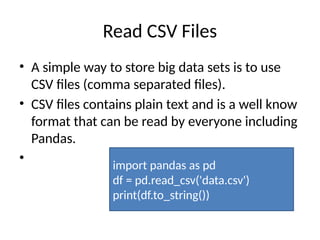
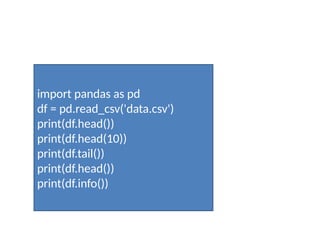
Read CSV Files
•A simple way to store big data sets is to use
CSV files (comma separated files).
• CSV files contains plain text and is a well know
format that can be read by everyone including
Pandas.
• import pandas as pd
df = pd.read_csv('data.csv')
print(df.to_string())



![Create a Series from ndarray
import pandas as pd
import numpy as np
data = np.array(['a','b','c','d'])
s = pd.Series(data)
print s
import pandas as pd
import numpy as np
data = np.array(['a','b','c','d'])
s = pd.Series(data,index=[100,101,102,103])
print s](https://image.slidesharecdn.com/introductiontopandas-250415064010-c017f442/85/Introduction-To-Pandas-Basics-with-syntax-and-examples-pptx-10-320.jpg)
![Create a Series from dict
import pandas as pd
import numpy as np
data = {'a' : 0., 'b' : 1., 'c' : 2.}
s = pd.Series(data)
print s
import pandas as pd
import numpy as np
data = {'a' : 0., 'b' : 1., 'c' : 2.}
s = pd.Series(data,index=['b','c','d','a'])
print s](https://image.slidesharecdn.com/introductiontopandas-250415064010-c017f442/85/Introduction-To-Pandas-Basics-with-syntax-and-examples-pptx-11-320.jpg)
![Create a Series from Scalar
import pandas as pd
import numpy as np
s = pd.Series(5, index=[0, 1, 2, 3])
print s](https://image.slidesharecdn.com/introductiontopandas-250415064010-c017f442/85/Introduction-To-Pandas-Basics-with-syntax-and-examples-pptx-12-320.jpg)
![Accessing Data from Series with Position
import pandas as pd
s = pd.Series([1,2,3,4,5],index = ['a','b','c','d','e'])
#retrieve the first element
print s[0]
import pandas as pd
s = pd.Series([1,2,3,4,5],index = ['a','b','c','d','e'])
#retrieve the first three element
print s[:3]](https://image.slidesharecdn.com/introductiontopandas-250415064010-c017f442/85/Introduction-To-Pandas-Basics-with-syntax-and-examples-pptx-13-320.jpg)
![Retrieve Data Using Label (Index)
import pandas as pd
s = pd.Series([1,2,3,4,5],index = ['a','b','c','d','e'])
#retrieve a single element
print s['a']
import pandas as pd
s = pd.Series([1,2,3,4,5],index = ['a','b','c','d','e'])
#retrieve multiple elements
print s[['a','c','d']]](https://image.slidesharecdn.com/introductiontopandas-250415064010-c017f442/85/Introduction-To-Pandas-Basics-with-syntax-and-examples-pptx-14-320.jpg)
![Create a DataFrame from Lists
import pandas as pd
data = [1,2,3,4,5]
df = pd.DataFrame(data)
Print(df)
import pandas as pd
data = [['Alex',10],['Bob',12],['Clarke',13]]
df = pd.DataFrame(data,columns=['Name','Age'])
Print(df)
import pandas as pd
data = [['Alex',10],['Bob',12],['Clarke',13]]
df =
pd.DataFrame(data,columns=['Name','Age'],dtype=float)
print(df)](https://image.slidesharecdn.com/introductiontopandas-250415064010-c017f442/85/Introduction-To-Pandas-Basics-with-syntax-and-examples-pptx-17-320.jpg)
![Create a DataFrame from Dict of ndarrays / Lists
import pandas as pd
data = {'Name':['Tom', 'Jack', 'Steve', 'Ricky'],'Age':[28,34,29,42]}
df = pd.DataFrame(data)
print(df)
import pandas as pd
data = {'Name':['Tom', 'Jack', 'Steve', 'Ricky'],'Age':[28,34,29,42]}
df = pd.DataFrame(data, index=['rank1','rank2','rank3','rank4'])
Print(df)](https://image.slidesharecdn.com/introductiontopandas-250415064010-c017f442/85/Introduction-To-Pandas-Basics-with-syntax-and-examples-pptx-18-320.jpg)
![import pandas as pd
data = [{'a': 1, 'b': 2},{'a': 5, 'b': 10, 'c': 20}]
df = pd.DataFrame(data, index=['first', 'second'])
print(df)](https://image.slidesharecdn.com/introductiontopandas-250415064010-c017f442/85/Introduction-To-Pandas-Basics-with-syntax-and-examples-pptx-19-320.jpg)
![Create a DataFrame from Dict of Series
import pandas as pd
d = {'one' : pd.Series([1, 2, 3], index=['a', 'b', 'c']),
'two' : pd.Series([1, 2, 3, 4], index=['a', 'b', 'c', 'd'])}
df = pd.DataFrame(d)
Print(df)
import pandas as pd
d = {'one' : pd.Series([1, 2, 3], index=['a', 'b', 'c']),
'two' : pd.Series([1, 2, 3, 4], index=['a', 'b', 'c', 'd'])}
df = pd.DataFrame(d)
df['three']=df['one']+df['two']
print (df ['three'])
Print(df[one])](https://image.slidesharecdn.com/introductiontopandas-250415064010-c017f442/85/Introduction-To-Pandas-Basics-with-syntax-and-examples-pptx-20-320.jpg)
![Column Deletion
d = {'one' : pd.Series([1, 2, 3], index=['a', 'b', 'c']),
'two' : pd.Series([1, 2, 3, 4], index=['a', 'b', 'c', 'd']),
'three' : pd.Series([10,20,30], index=['a','b','c'])}
df = pd.DataFrame(d)
print ("Our dataframe is:")
print df
# using del function
print ("Deleting the first column using DEL function:")
del df['one']
print df
# using pop function
print ("Deleting another column using POP function:")
df.pop('two')
print df](https://image.slidesharecdn.com/introductiontopandas-250415064010-c017f442/85/Introduction-To-Pandas-Basics-with-syntax-and-examples-pptx-21-320.jpg)
![Row Selection, Addition, and Deletion
import pandas as pd
d = {'one' : pd.Series([1, 2, 3], index=['a', 'b', 'c']),
'two' : pd.Series([1, 2, 3, 4], index=['a', 'b', 'c', 'd'])}
df = pd.DataFrame(d)
print df.loc['b']
Output:
one 2.0
two 2.0
Name: b, dtype: float64](https://image.slidesharecdn.com/introductiontopandas-250415064010-c017f442/85/Introduction-To-Pandas-Basics-with-syntax-and-examples-pptx-22-320.jpg)
![Slice
import pandas as pd
d = {'one' : pd.Series([1, 2, 3], index=['a', 'b', 'c']),
'two' : pd.Series([1, 2, 3, 4], index=['a', 'b', 'c', 'd'])}
df = pd.DataFrame(d)
print(df[2:4])
one two
c 3.0 3
d NaN 4](https://image.slidesharecdn.com/introductiontopandas-250415064010-c017f442/85/Introduction-To-Pandas-Basics-with-syntax-and-examples-pptx-23-320.jpg)