R12.2 Oracle Projects
Cost Break Down Structure
Overview Oct-2013
Updated Jan-2016
 Introduction
 Cost Break Down Structure Overview
 CBS Configuration
 Considerations
 About the author
 The Cost Break Down Structure is a new feature of the Project Management
module of Oracle EBS R12.2
 The Cost Break Down Structure (CBS) provides an additional element to the
existing project structures - Work Break Down Structure (WBS) and Resource
Break Down Structure (RBS)
 The CBS is defined once and used across multiple projects to track cost
elements
 It is now possible to plan by cost code, enter actuals against a cost code and
generate forecast by cost code
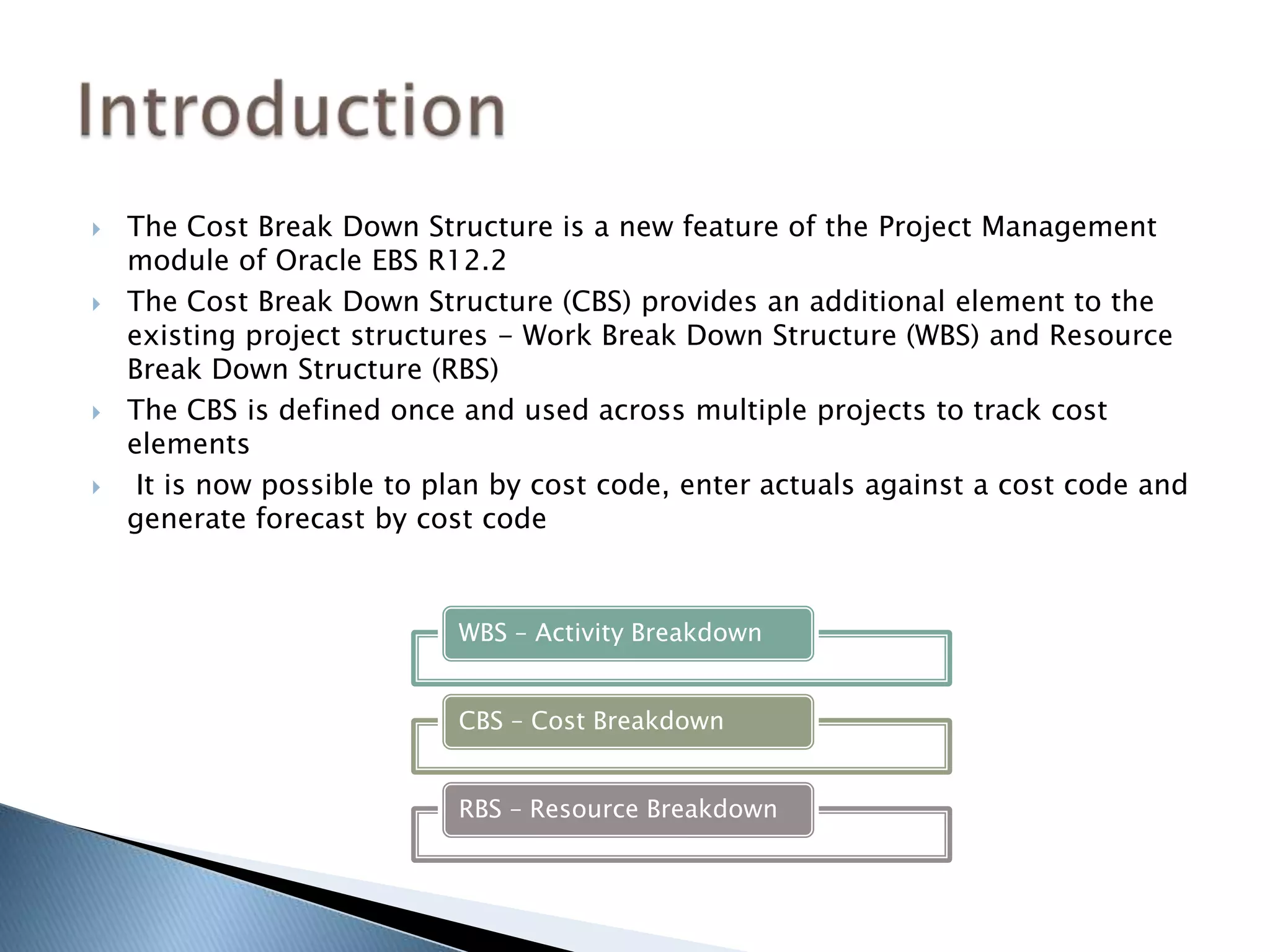
WBS – Activity Breakdown
CBS – Cost Breakdown
RBS – Resource Breakdown
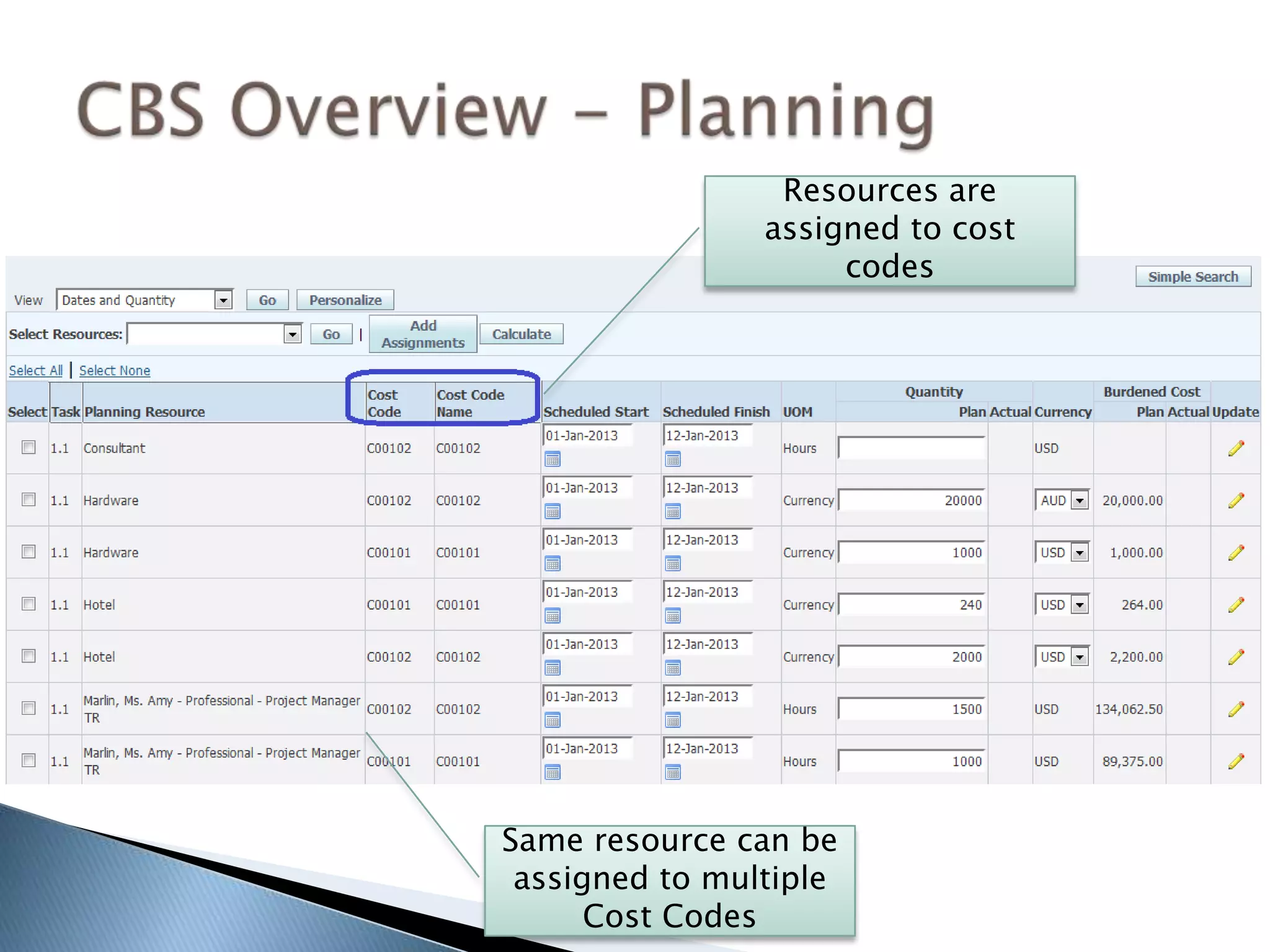
Resources are
assigned to cost
codes
Same resource can be
assigned to multiple
Cost Codes
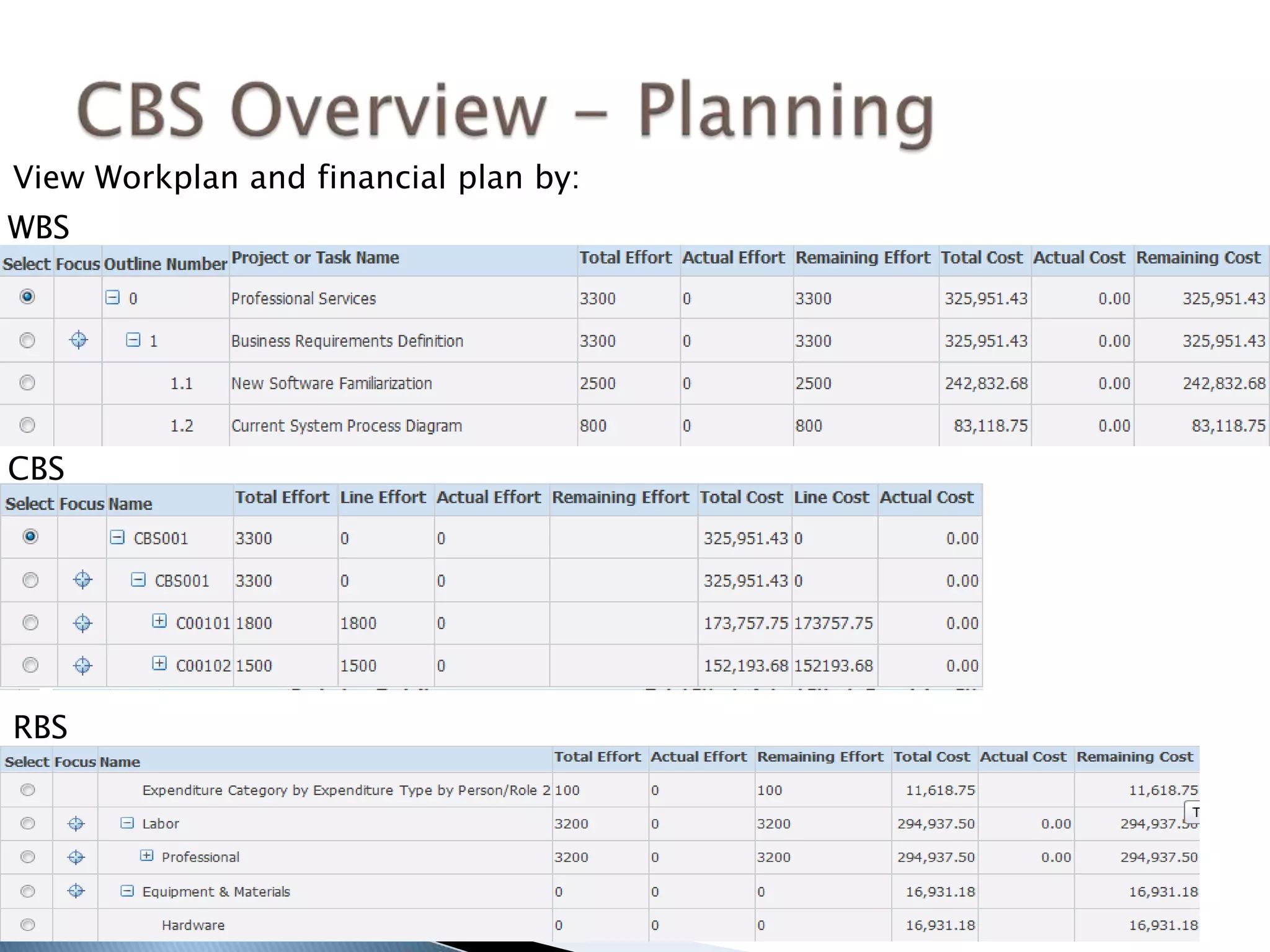
View Workplan and financial plan by:
WBS
CBS
RBS
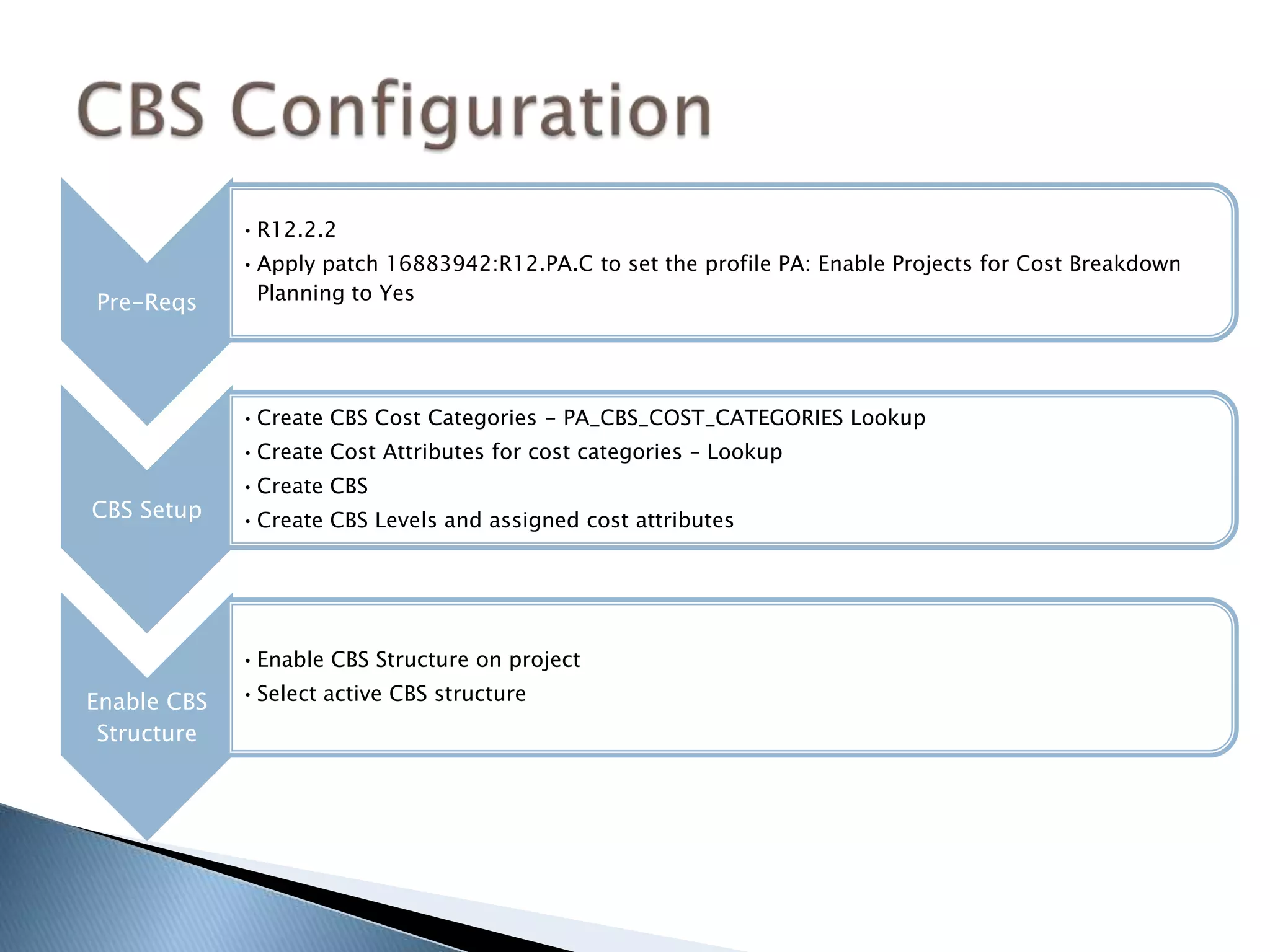
Pre-Reqs
•R12.2.2
•Apply patch 16883942:R12.PA.C to set the profile PA: Enable Projects for Cost Breakdown
Planning to Yes
CBS Setup
•Create CBS Cost Categories - PA_CBS_COST_CATEGORIES Lookup
•Create Cost Attributes for cost categories – Lookup
•Create CBS
•Create CBS Levels and assigned cost attributes
Enable CBS
Structure
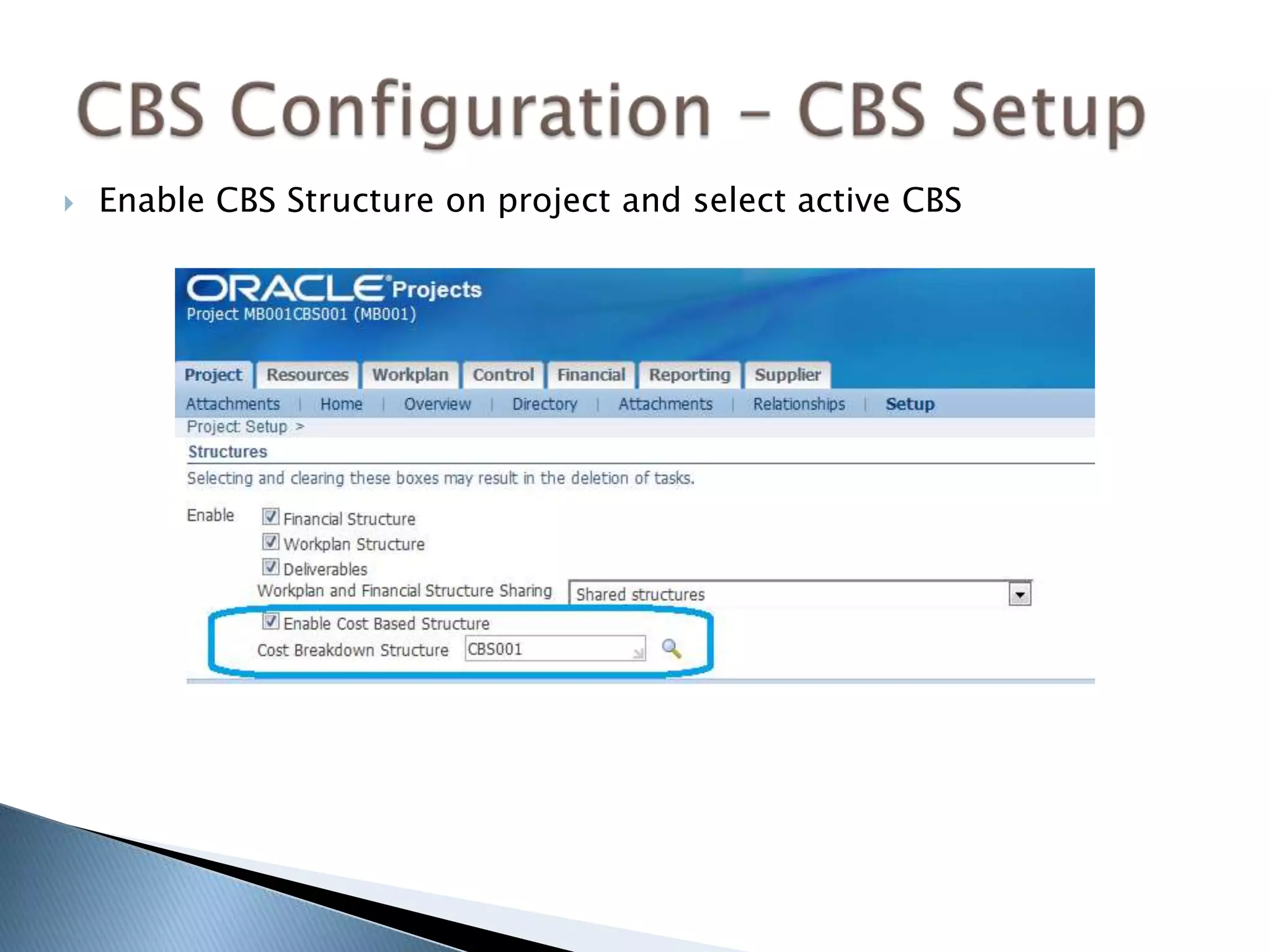
•Enable CBS Structure on project
•Select active CBS structure
 CBS functionality is available from R12.2.2
 Apply patch 16883942:R12.PA.C to set the profile PA: Enable
Projects for Cost Breakdown Planning to Yes
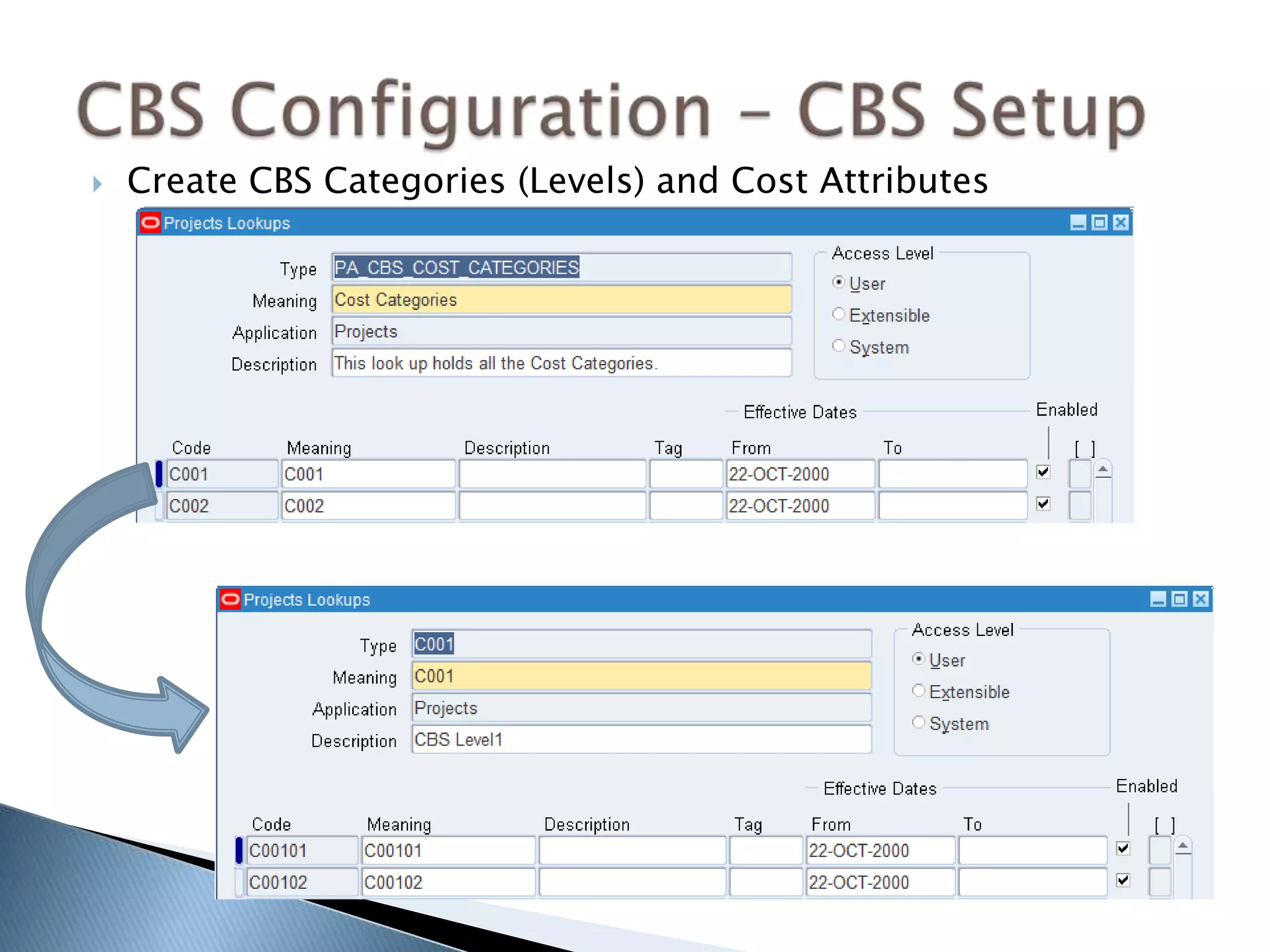
 Create CBS Categories (Levels) and Cost Attributes
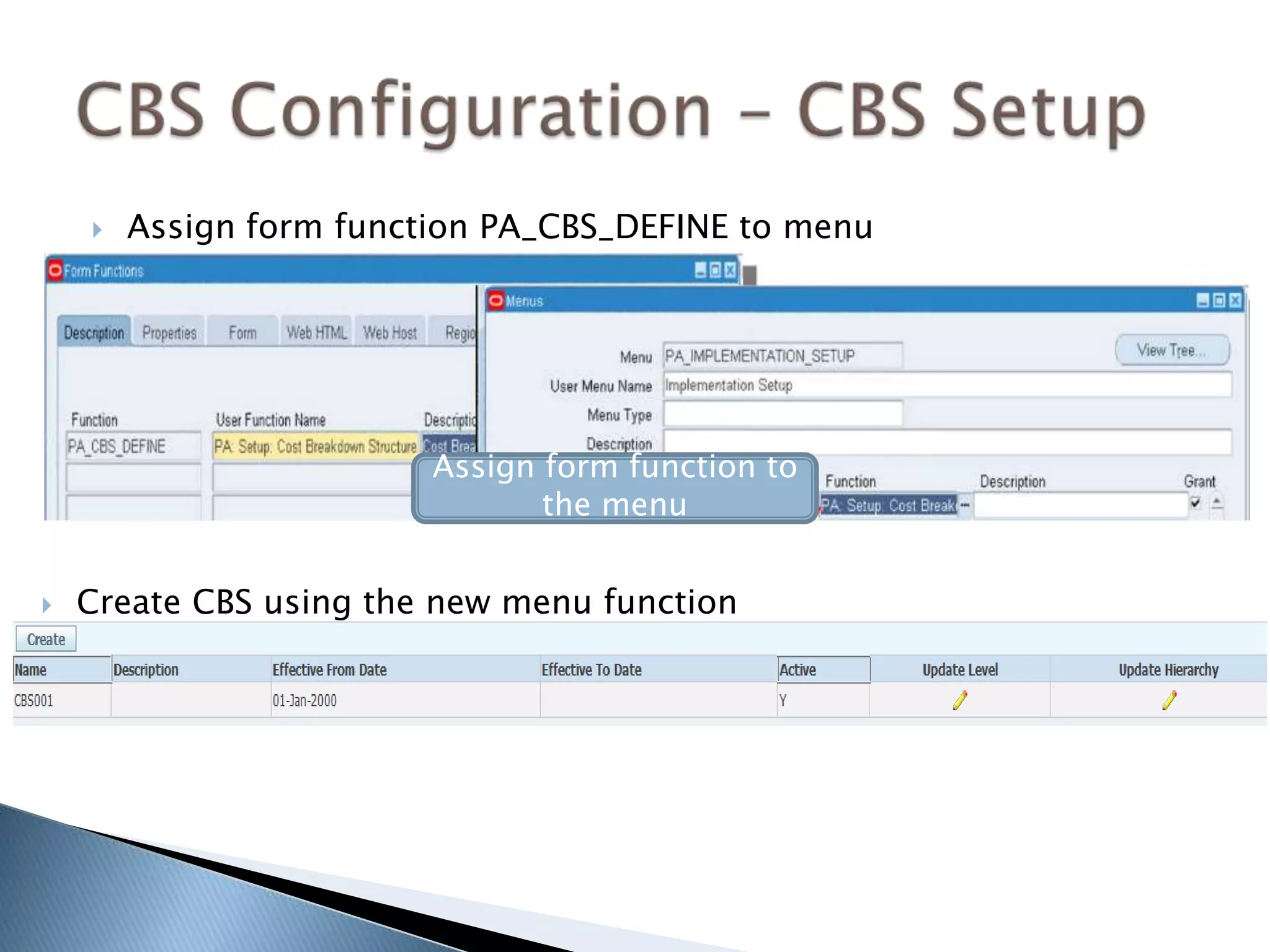
 Assign form function PA_CBS_DEFINE to menu
Assign form function to
the menu
 Create CBS using the new menu function
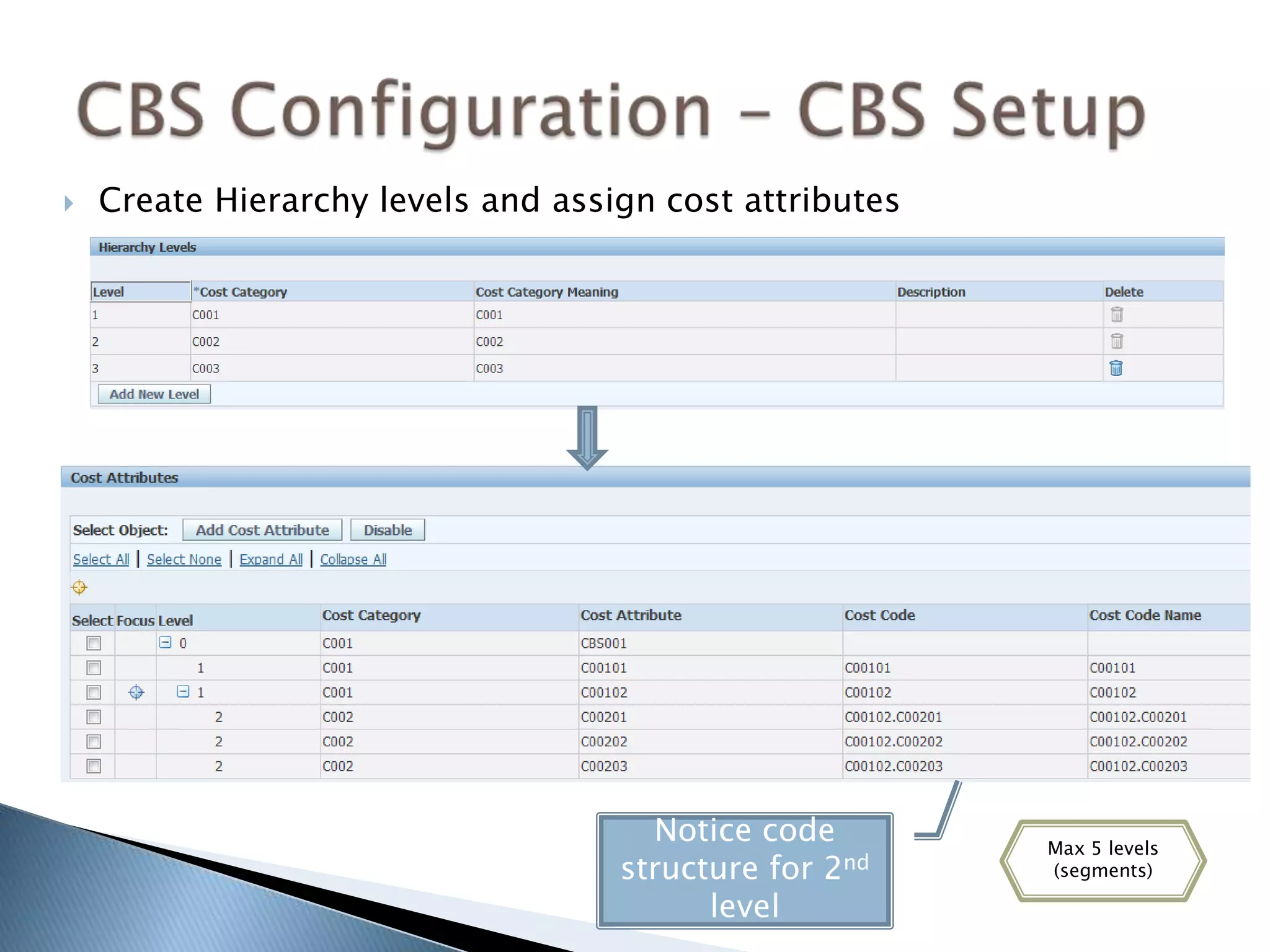
 Create Hierarchy levels and assign cost attributes
Notice code
structure for 2nd
level
Max 5 levels
(segments)
 Enable CBS Structure on project and select active CBS
 User will select combination of Task and Cost Code and not
only task when entering project transactions in Payables,
Purchasing, Oracle Time and Labour and iExpenses.
 Users can assign higher level CBS cost codes to resource
assignments and later select lower levels of CBS
 Cost Codes need to be added to a task to be available for
selection for the task using the task setup page
 Cost Codes can not be assigned to events, billing or revenue
 Projects can not be upgraded to use CBS functionality only
newly created projects can use the CBS functionality
 CBS can not be changed on a project with resource
assignments or actuals
 A CBS can not be assigned to a Program
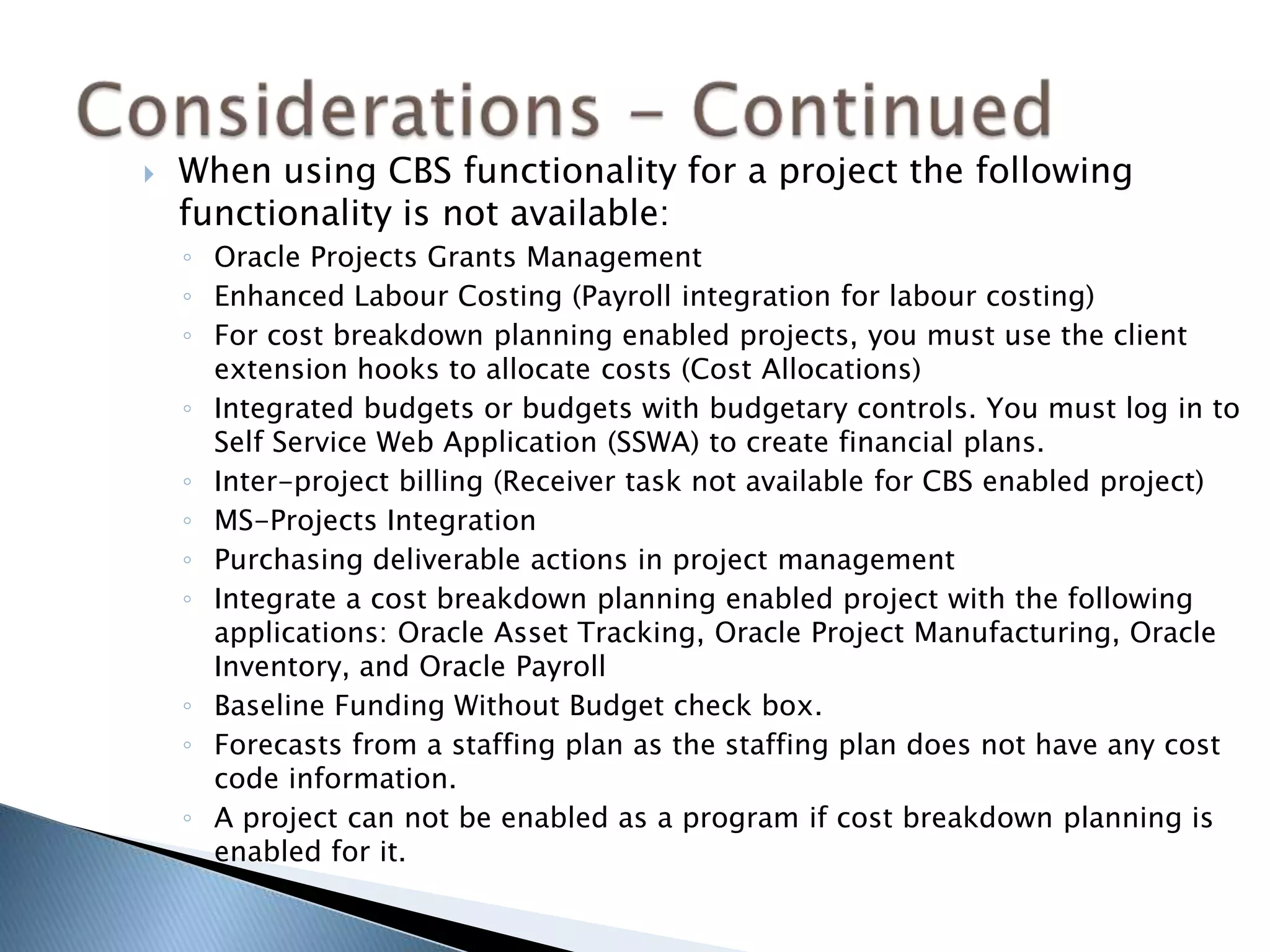
 When using CBS functionality for a project the following
functionality is not available:
◦ Oracle Projects Grants Management
◦ Enhanced Labour Costing (Payroll integration for labour costing)
◦ For cost breakdown planning enabled projects, you must use the client
extension hooks to allocate costs (Cost Allocations)
◦ Integrated budgets or budgets with budgetary controls. You must log in to
Self Service Web Application (SSWA) to create financial plans.
◦ Inter-project billing (Receiver task not available for CBS enabled project)
(Available from R12.2.5)
◦ MS-Projects Integration
◦ Purchasing deliverable actions in project management
◦ Integrate a cost breakdown planning enabled project with the following
applications: Oracle Asset Tracking, Oracle Project Manufacturing, Oracle
Inventory, and Oracle Payroll
◦ Baseline Funding Without Budget check box.
◦ Forecasts from a staffing plan as the staffing plan does not have any cost
code information.
◦ A project can not be enabled as a program if cost breakdown planning is
enabled for it.
◦ Technical Overview
 Relevant Tables:
 PA_TASKS – This table holds the Project Task Information
 PA_ALTERNATE_TASKS – This table holds the combination of Task and CBS
 PA_RBS_ELEMENTS – This table holds the CBS Structure (Also used for Resource Breakdown
Structure)
 SQL Statement to get the Task CBS combination
select a.alt_task_id task_id, t.task_id pa_task_id, e.rbs_element_id cbs_element_id, t.task_number,
e.level_code cost_code, e.cost_code_name, t.task_number||' - '||e.level_code task_CBS
from pa_tasks t, pa_alternate_tasks a, pa_rbs_elements e
where t.task_id = a.proj_element_id
and a.cbs_element_id = e.rbs_element_id
 If a project is CBS enabled the sub modules will use a.alt_task_id as task_id
 In PA_EXPENDITURE_ITEMS_ALL - task_id is the task_id from PA_TASKS and cbs_element_id is
the cbs_element_id in PA_ALTERNATE_TASKS
 Matthew Bezuidenhout is a Chartered Accountant
with 16+ years experience implementing and
supporting Oracle’s E-Business Suite specializing in
Oracle Projects
 Contact e-mail address:
 matthew@epct.net
 www.epct.net

R12.2.2 oracle projects cost break down structure overview

  • 1.
    R12.2 Oracle Projects CostBreak Down Structure Overview Oct-2013 Updated Jan-2016
  • 2.
     Introduction  CostBreak Down Structure Overview  CBS Configuration  Considerations  About the author
  • 3.
     The CostBreak Down Structure is a new feature of the Project Management module of Oracle EBS R12.2  The Cost Break Down Structure (CBS) provides an additional element to the existing project structures - Work Break Down Structure (WBS) and Resource Break Down Structure (RBS)  The CBS is defined once and used across multiple projects to track cost elements  It is now possible to plan by cost code, enter actuals against a cost code and generate forecast by cost code WBS – Activity Breakdown CBS – Cost Breakdown RBS – Resource Breakdown
  • 4.
    Resources are assigned tocost codes Same resource can be assigned to multiple Cost Codes
  • 5.
    View Workplan andfinancial plan by: WBS CBS RBS
  • 6.
    Pre-Reqs •R12.2.2 •Apply patch 16883942:R12.PA.Cto set the profile PA: Enable Projects for Cost Breakdown Planning to Yes CBS Setup •Create CBS Cost Categories - PA_CBS_COST_CATEGORIES Lookup •Create Cost Attributes for cost categories – Lookup •Create CBS •Create CBS Levels and assigned cost attributes Enable CBS Structure •Enable CBS Structure on project •Select active CBS structure
  • 7.
     CBS functionalityis available from R12.2.2  Apply patch 16883942:R12.PA.C to set the profile PA: Enable Projects for Cost Breakdown Planning to Yes
  • 8.
     Create CBSCategories (Levels) and Cost Attributes
  • 9.
     Assign formfunction PA_CBS_DEFINE to menu Assign form function to the menu  Create CBS using the new menu function
  • 10.
     Create Hierarchylevels and assign cost attributes Notice code structure for 2nd level Max 5 levels (segments)
  • 11.
     Enable CBSStructure on project and select active CBS
  • 12.
     User willselect combination of Task and Cost Code and not only task when entering project transactions in Payables, Purchasing, Oracle Time and Labour and iExpenses.  Users can assign higher level CBS cost codes to resource assignments and later select lower levels of CBS  Cost Codes need to be added to a task to be available for selection for the task using the task setup page  Cost Codes can not be assigned to events, billing or revenue  Projects can not be upgraded to use CBS functionality only newly created projects can use the CBS functionality  CBS can not be changed on a project with resource assignments or actuals  A CBS can not be assigned to a Program
  • 13.
     When usingCBS functionality for a project the following functionality is not available: ◦ Oracle Projects Grants Management ◦ Enhanced Labour Costing (Payroll integration for labour costing) ◦ For cost breakdown planning enabled projects, you must use the client extension hooks to allocate costs (Cost Allocations) ◦ Integrated budgets or budgets with budgetary controls. You must log in to Self Service Web Application (SSWA) to create financial plans. ◦ Inter-project billing (Receiver task not available for CBS enabled project) (Available from R12.2.5) ◦ MS-Projects Integration ◦ Purchasing deliverable actions in project management ◦ Integrate a cost breakdown planning enabled project with the following applications: Oracle Asset Tracking, Oracle Project Manufacturing, Oracle Inventory, and Oracle Payroll ◦ Baseline Funding Without Budget check box. ◦ Forecasts from a staffing plan as the staffing plan does not have any cost code information. ◦ A project can not be enabled as a program if cost breakdown planning is enabled for it.
  • 14.
    ◦ Technical Overview Relevant Tables:  PA_TASKS – This table holds the Project Task Information  PA_ALTERNATE_TASKS – This table holds the combination of Task and CBS  PA_RBS_ELEMENTS – This table holds the CBS Structure (Also used for Resource Breakdown Structure)  SQL Statement to get the Task CBS combination select a.alt_task_id task_id, t.task_id pa_task_id, e.rbs_element_id cbs_element_id, t.task_number, e.level_code cost_code, e.cost_code_name, t.task_number||' - '||e.level_code task_CBS from pa_tasks t, pa_alternate_tasks a, pa_rbs_elements e where t.task_id = a.proj_element_id and a.cbs_element_id = e.rbs_element_id  If a project is CBS enabled the sub modules will use a.alt_task_id as task_id  In PA_EXPENDITURE_ITEMS_ALL - task_id is the task_id from PA_TASKS and cbs_element_id is the cbs_element_id in PA_ALTERNATE_TASKS
  • 15.
     Matthew Bezuidenhoutis a Chartered Accountant with 16+ years experience implementing and supporting Oracle’s E-Business Suite specializing in Oracle Projects  Contact e-mail address:  matthew@epct.net  www.epct.net