Copyright © 2018 Oracle and/or its affiliates. All rights reserved. | Oracle Confidential: Internal Use Only
Modernizing
Oracle Forms
using Oracle APEX
February 2019
Copyright © 2019, Oracle and/or its affiliates. All rights reserved. 3
Oracle Forms
Review
Copyright © 2019, Oracle and/or its affiliates. All rights reserved. 4
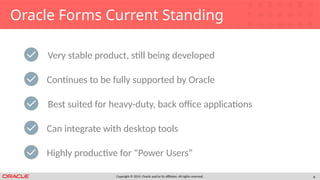
Oracle Forms Current Standing
Very stable product, still being developed
Best suited for heavy-duty, back office applications
Can integrate with desktop tools
Continues to be fully supported by Oracle
Highly productive for “Power Users”
Copyright © 2019, Oracle and/or its affiliates. All rights reserved. 5
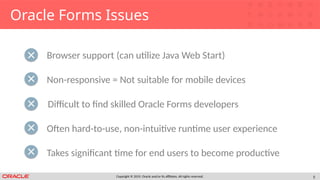
Oracle Forms Issues
Browser support (can utilize Java Web Start)
Difficult to find skilled Oracle Forms developers
Often hard-to-use, non-intuitive runtime user experience
Non-responsive = Not suitable for mobile devices
Takes significant time for end users to become productive
Copyright © 2019, Oracle and/or its affiliates. All rights reserved.
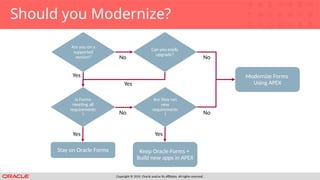
Should you Modernize?
Are you on a
supported
version?
Is Forms
meeting all
requirements
?
Stay on Oracle Forms
Yes
Yes
No
No
Can you easily
upgrade?
Yes
Are they net
new
requirements
?
Keep Oracle Forms +
Build new apps in APEX
Yes
Modernize Forms
Using APEX
No
No
Copyright © 2019, Oracle and/or its affiliates. All rights reserved.
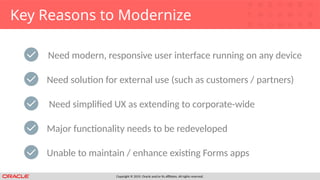
Key Reasons to Modernize
Need modern, responsive user interface running on any device
Need simplified UX as extending to corporate-wide
Major functionality needs to be redeveloped
Need solution for external use (such as customers / partners)
Unable to maintain / enhance existing Forms apps
Copyright © 2019, Oracle and/or its affiliates. All rights reserved. 8
Oracle APEX
The Best “Proven” Alternative
Copyright © 2019, Oracle and/or its affiliates. All rights reserved. 9
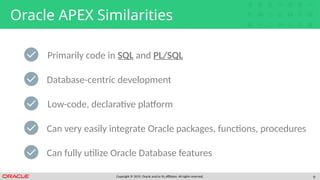
Oracle APEX Similarities
Primarily code in SQL and PL/SQL
Low-code, declarative platform
Can very easily integrate Oracle packages, functions, procedures
Database-centric development
Can fully utilize Oracle Database features
Copyright © 2019, Oracle and/or its affiliates. All rights reserved. 10
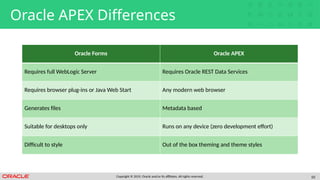
Oracle APEX Differences
Oracle Forms Oracle APEX
Requires full WebLogic Server Requires Oracle REST Data Services
Requires browser plug-ins or Java Web Start Any modern web browser
Generates files Metadata based
Suitable for desktops only Runs on any device (zero development effort)
Difficult to style Out of the box theming and theme styles
Copyright © 2019, Oracle and/or its affiliates. All rights reserved. 11
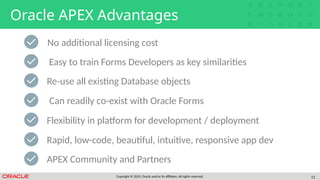
Oracle APEX Advantages
Easy to train Forms Developers as key similarities
Can readily co-exist with Oracle Forms
Flexibility in platform for development / deployment
Re-use all existing Database objects
Rapid, low-code, beautiful, intuitive, responsive app dev
No additional licensing cost
APEX Community and Partners
Copyright © 2019, Oracle and/or its affiliates. All rights reserved. 12
Considerations
Upfront Planning
Copyright © 2019, Oracle and/or its affiliates. All rights reserved. 13
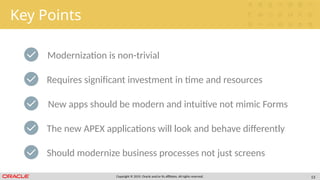
Key Points
Modernization is non-trivial
New apps should be modern and intuitive not mimic Forms
The new APEX applications will look and behave differently
Requires significant investment in time and resources
Should modernize business processes not just screens
Copyright © 2019, Oracle and/or its affiliates. All rights reserved. 14
Before you Start
Push as much business logic into the Database as possible
Review how APEX Consulting Companies may add value
Train developers in APEX
Identify a suitable functional area as Proof-of-Concept
Secure SMEs for functional input and reviews
Copyright © 2019, Oracle and/or its affiliates. All rights reserved. 15
Challenges
Availability of Forms developers who know the functionality
Managing scope creep
Ensuring new apps implement appropriate business rules
Getting buy-in from existing “Power Users”
Agreeing on new application look and feel
Copyright © 2019, Oracle and/or its affiliates. All rights reserved. 16
Modernization Steps
How to move to Oracle APEX
Copyright © 2019, Oracle and/or its affiliates. All rights reserved. 17
Overall Strategy
Install APEX into Oracle Database
Load XML into APEX Migration Project
Annotate important business logic
Convert Forms executables (FMBs, MMBs, etc) into XML
Create APEX application(s)
Copyright © 2019, Oracle and/or its affiliates. All rights reserved. 18
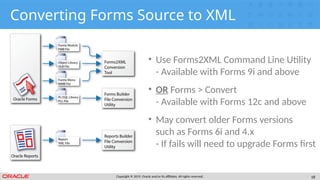
Converting Forms Source to XML
• Use Forms2XML Command Line Utility
- Available with Forms 9i and above
• OR Forms > Convert
- Available with Forms 12c and above
• May convert older Forms versions
such as Forms 6i and 4.x
- If fails will need to upgrade Forms first
Copyright © 2019, Oracle and/or its affiliates. All rights reserved. 19
1
2
3
4
5
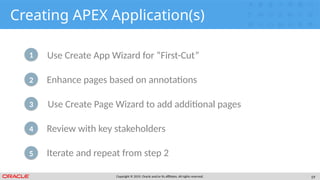
Creating APEX Application(s)
Use Create App Wizard for “First-Cut”
Use Create Page Wizard to add additional pages
Review with key stakeholders
Enhance pages based on annotations
Iterate and repeat from step 2
Copyright © 2019, Oracle and/or its affiliates. All rights reserved. 20
Practicing a Migration
In order to play with the Oracle APEX Migration Project
using a few Oracle Forms you can download the sample
files below. Using the XML files you can upload them into a
project and then review the trigger logic and annotate as
necessary. After running the DDL script and inserting the
data you can readily generate a simple application.
https://www.oracle.com/technetwork/developer-tools/ape
x/application-express/apex-forms-conversion-sample-files-5
654921.zip
Copyright © 2019, Oracle and/or its affiliates. All rights reserved. 21
Useful Links
• Primary Site https://apex.oracle.com
• APEX Forms Modernization
https://apex.oracle.com/en/solutions/oracle-forms/
• APEX Shortcuts
https://apex.oracle.com/shortcuts
• APEX Community
https://apex.oracle.com/community
• Database Cloud Services
https://cloud.oracle.com/database
Copyright © 2019, Oracle and/or its affiliates. All rights reserved. 22
Oracle Application Express  forms migration

Oracle Application Express forms migration

  • 2.
    Copyright © 2018Oracle and/or its affiliates. All rights reserved. | Oracle Confidential: Internal Use Only Modernizing Oracle Forms using Oracle APEX February 2019
  • 3.
    Copyright © 2019,Oracle and/or its affiliates. All rights reserved. 3 Oracle Forms Review
  • 4.
    Copyright © 2019,Oracle and/or its affiliates. All rights reserved. 4 Oracle Forms Current Standing Very stable product, still being developed Best suited for heavy-duty, back office applications Can integrate with desktop tools Continues to be fully supported by Oracle Highly productive for “Power Users”
  • 5.
    Copyright © 2019,Oracle and/or its affiliates. All rights reserved. 5 Oracle Forms Issues Browser support (can utilize Java Web Start) Difficult to find skilled Oracle Forms developers Often hard-to-use, non-intuitive runtime user experience Non-responsive = Not suitable for mobile devices Takes significant time for end users to become productive
  • 6.
    Copyright © 2019,Oracle and/or its affiliates. All rights reserved. Should you Modernize? Are you on a supported version? Is Forms meeting all requirements ? Stay on Oracle Forms Yes Yes No No Can you easily upgrade? Yes Are they net new requirements ? Keep Oracle Forms + Build new apps in APEX Yes Modernize Forms Using APEX No No
  • 7.
    Copyright © 2019,Oracle and/or its affiliates. All rights reserved. Key Reasons to Modernize Need modern, responsive user interface running on any device Need simplified UX as extending to corporate-wide Major functionality needs to be redeveloped Need solution for external use (such as customers / partners) Unable to maintain / enhance existing Forms apps
  • 8.
    Copyright © 2019,Oracle and/or its affiliates. All rights reserved. 8 Oracle APEX The Best “Proven” Alternative
  • 9.
    Copyright © 2019,Oracle and/or its affiliates. All rights reserved. 9 Oracle APEX Similarities Primarily code in SQL and PL/SQL Low-code, declarative platform Can very easily integrate Oracle packages, functions, procedures Database-centric development Can fully utilize Oracle Database features
  • 10.
    Copyright © 2019,Oracle and/or its affiliates. All rights reserved. 10 Oracle APEX Differences Oracle Forms Oracle APEX Requires full WebLogic Server Requires Oracle REST Data Services Requires browser plug-ins or Java Web Start Any modern web browser Generates files Metadata based Suitable for desktops only Runs on any device (zero development effort) Difficult to style Out of the box theming and theme styles
  • 11.
    Copyright © 2019,Oracle and/or its affiliates. All rights reserved. 11 Oracle APEX Advantages Easy to train Forms Developers as key similarities Can readily co-exist with Oracle Forms Flexibility in platform for development / deployment Re-use all existing Database objects Rapid, low-code, beautiful, intuitive, responsive app dev No additional licensing cost APEX Community and Partners
  • 12.
    Copyright © 2019,Oracle and/or its affiliates. All rights reserved. 12 Considerations Upfront Planning
  • 13.
    Copyright © 2019,Oracle and/or its affiliates. All rights reserved. 13 Key Points Modernization is non-trivial New apps should be modern and intuitive not mimic Forms The new APEX applications will look and behave differently Requires significant investment in time and resources Should modernize business processes not just screens
  • 14.
    Copyright © 2019,Oracle and/or its affiliates. All rights reserved. 14 Before you Start Push as much business logic into the Database as possible Review how APEX Consulting Companies may add value Train developers in APEX Identify a suitable functional area as Proof-of-Concept Secure SMEs for functional input and reviews
  • 15.
    Copyright © 2019,Oracle and/or its affiliates. All rights reserved. 15 Challenges Availability of Forms developers who know the functionality Managing scope creep Ensuring new apps implement appropriate business rules Getting buy-in from existing “Power Users” Agreeing on new application look and feel
  • 16.
    Copyright © 2019,Oracle and/or its affiliates. All rights reserved. 16 Modernization Steps How to move to Oracle APEX
  • 17.
    Copyright © 2019,Oracle and/or its affiliates. All rights reserved. 17 Overall Strategy Install APEX into Oracle Database Load XML into APEX Migration Project Annotate important business logic Convert Forms executables (FMBs, MMBs, etc) into XML Create APEX application(s)
  • 18.
    Copyright © 2019,Oracle and/or its affiliates. All rights reserved. 18 Converting Forms Source to XML • Use Forms2XML Command Line Utility - Available with Forms 9i and above • OR Forms > Convert - Available with Forms 12c and above • May convert older Forms versions such as Forms 6i and 4.x - If fails will need to upgrade Forms first
  • 19.
    Copyright © 2019,Oracle and/or its affiliates. All rights reserved. 19 1 2 3 4 5 Creating APEX Application(s) Use Create App Wizard for “First-Cut” Use Create Page Wizard to add additional pages Review with key stakeholders Enhance pages based on annotations Iterate and repeat from step 2
  • 20.
    Copyright © 2019,Oracle and/or its affiliates. All rights reserved. 20 Practicing a Migration In order to play with the Oracle APEX Migration Project using a few Oracle Forms you can download the sample files below. Using the XML files you can upload them into a project and then review the trigger logic and annotate as necessary. After running the DDL script and inserting the data you can readily generate a simple application. https://www.oracle.com/technetwork/developer-tools/ape x/application-express/apex-forms-conversion-sample-files-5 654921.zip
  • 21.
    Copyright © 2019,Oracle and/or its affiliates. All rights reserved. 21 Useful Links • Primary Site https://apex.oracle.com • APEX Forms Modernization https://apex.oracle.com/en/solutions/oracle-forms/ • APEX Shortcuts https://apex.oracle.com/shortcuts • APEX Community https://apex.oracle.com/community • Database Cloud Services https://cloud.oracle.com/database
  • 22.
    Copyright © 2019,Oracle and/or its affiliates. All rights reserved. 22

Editor's Notes

  • #3 Lets start by reviewing Oracle Forms
  • #4 Oracle Forms has been one of the most widely used application development technologies for more than thirty years This proven technology has evolved over the years and still remains the technology of choice for thousands of developers worldwide. Extended support for Forms 12c currently out to 2025 Forms still one of the best tools for data entry operations Forms provides the ability to integrate directly with desktop Takes time, but once users familiar with Forms – One of the most productive tools for them to use
  • #5 Forms difficult to install and run enterprise wide Forms uses fixed coordinate-system positioning = non-responsive New developers don’t want to learn Forms, and old timers retiring Complex pages such as Query / results / edit in one page hard to use; Not like a normal Web app Use of function keys, etc; Need training in how to navigate use app
  • #6 If Forms on supported release and meeting all of the business requirements – Stay on Forms Otherwise, keep Forms and just do new development in Forms Alternatively modernize all into APEX
  • #7 Want apps to work on tablets, smartphones Forms very hard to deploy to external partners; Need modern apps for customers Need simple Web apps everyone can easily use Business requirements changed and old functionality in Forms apps Hard to get skilled Forms developers
  • #8 Oracle APEX is arguably the best alternative for modernizing Oracle Forms apps
  • #9 Same core languages is huge! Both build from tables up, not from UI down Both are designed to quickly build apps based on table definitions Business logic implemented in the DB can be called from either Both built on top of Oracle DB and can take advantage of DB features like RAC, HA, Security, etc
  • #10 Forms is heavy, costly, and hard to install & maintain / APEX simple and light Limited browser support / full support with no plug-ins Generates files must be shipped / deployed to web server or desktop / APEX simple SQL script and URL Generally won’t run on smartphones without issues / Fully responsive out-of-the-box Pixel-perfect but hard to consistently style / Universal Theme + them styles + Theme Roller = great flexibility and consistency
  • #11 Already have a DB License = Any # devs, any # apps, any # end users with no additional cost; Includes full support Can be fully productive APEX devs in weeks not 6 months ++ No need to rewrite business logic already in the DB as call directly from APEX Have both running on same DB, same DB objects, no problems Runs on any Oracle DB -- on-premises or (any DB) cloud Build modern Web apps your end users will love to use! Access to a very enthusiastic / helpful community and experienced partners
  • #12 So now you know why you should modernize using Oracle APEX, lets look at what you need to think about upfront
  • #13 Forms apps generally very complex with lots of business rules There is no silver bullet – plan accordingly You want to design a modern Web app and not bend to be like the old apps DO NOT try and replicate the look and feel of the old Forms apps!!! Review how business SHOULD be done now, not how done when Forms developed
  • #14 more re-use and better co-existence Start small and get comfortable with APEX and the effort required Experts help start you on the right footing More comfortable = less resistance + common objectives Include SMEs in the project from the start and have them review regularly = buy-in and business support
  • #15 Their knowledge invaluable Show them the benefits such as reports Easy to keep adding *new* functionality slows project Make sure no regressions “NO you can not have it look the same”
  • #16 Although the following sounds very simple, given the complexity of Forms apps this will take time
  • #17 Download the latest version of APEX Should be a simple step Needed to identify the hidden logic in triggers Know the logic needed in new app One Form app may = several APEX apps
  • #19 Generate based on tables (not Forms) Add business logic / improve UI Add new pages as necessary Involve SMEs regularly Continually enhance