HTML5 & CSS3
AN INTRODUCTION
1
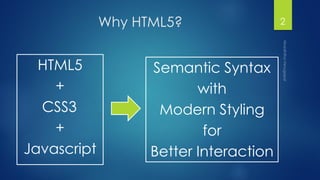
Why HTML5?
HTML5
+
CSS3
+
Javascript
2
Semantic Syntax
with
Modern Styling
for
Better Interaction
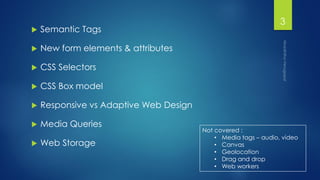
 Semantic Tags
 New form elements & attributes
 CSS Selectors
 CSS Box model
 Responsive vs Adaptive Web Design
 Media Queries
 Web Storage
3
Not covered :
• Media tags – audio, video
• Canvas
• Geolocation
• Drag and drop
• Web workers
Semantic Tags
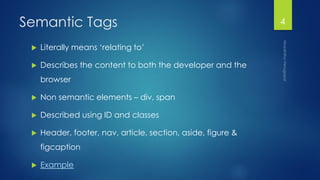
 Literally means ‘relating to’
 Describes the content to both the developer and the
browser
 Non semantic elements – div, span
 Described using ID and classes
 Header, footer, nav, article, section, aside, figure &
figcaption
 Example
4
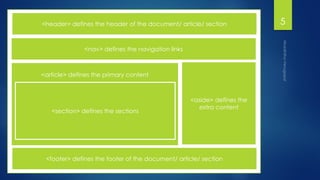
5<header> defines the header of the document/ article/ section
<nav> defines the navigation links
<article> defines the primary content
<section> defines the sections
<aside> defines the
extra content
<footer> defines the footer of the document/ article/ section
Form elements
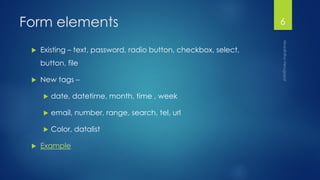
 Existing – text, password, radio button, checkbox, select,
button, file
 New tags –
 date, datetime, month, time , week
 email, number, range, search, tel, url
 Color, datalist
 Example
6
Cascading Style Sheets 7
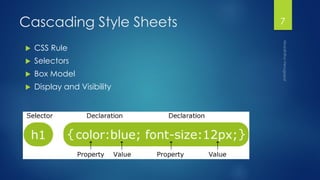
 CSS Rule
 Selectors
 Box Model
 Display and Visibility
CSS Selectors
 Element selector – div, p
 Class selector - .className
 ID selector – #id
 Attribute selectors – input[type=“text”]
 Pseudo-selectors - :valid, :checked
 Quiz!
8
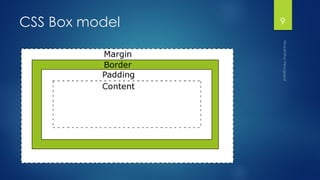
CSS Box model 9
Display and visibility
div {
display: inline; /* default, takes content width, no line breaks*/
display: inline-block; /* Characteristics of block, but sits on a line */
display: block; /* full width, line break before and after*/
display: none; /* Hide */ [visibility: hidden]
}
Others : Run-in, table, flex
10
Responsive vs Adaptive Web
Design
11
 RWD
 relies on flexible and fluid grids
 Changes with browser
 Content breaks apart & realigns
 AWD
 relies on predefined screen sizes.
 predefined sizes called breakpoints when different layouts are triggered
 Controlled by media queries
Responsive VS Adaptive
Media Query
@media not|only mediatype and (media feature) {
CSS-Code;
}
 Media Type
 Screen, print, handheld, all, etc.
 Media feature
 Width, height
 mi/n/max-device-width/height
 Aspect ratio
 Orientation, etc.
12
Media Query implementation
<!-- CSS media query on a link element -->
<link rel="stylesheet" media="(max-width: 800px)" href="example.css" />
<!-- CSS media query within a stylesheet -->
<style>
@media (max-width: 600px) {
selector{
display: none;
}
}
</style>
Example
13
Web Storage
 Store data in browser
 Client side key-value pairing
 Localstorage
 Persistent across sessions
 localStorage.setItem("localKey", "localValue");
 localStorage.getItem("localKey ");
 Session storage
 Lost at the end of session
 When browser is closed, data stored is lost
 sessionStorage.sessionKey="sessionValue"
 sessionStorage.sessionKey
14

Introduction to HTML5 and CSS3

  • 1.
    HTML5 & CSS3 ANINTRODUCTION 1
  • 2.
  • 3.
     Semantic Tags New form elements & attributes  CSS Selectors  CSS Box model  Responsive vs Adaptive Web Design  Media Queries  Web Storage 3 Not covered : • Media tags – audio, video • Canvas • Geolocation • Drag and drop • Web workers
  • 4.
    Semantic Tags  Literallymeans ‘relating to’  Describes the content to both the developer and the browser  Non semantic elements – div, span  Described using ID and classes  Header, footer, nav, article, section, aside, figure & figcaption  Example 4
  • 5.
    5<header> defines theheader of the document/ article/ section <nav> defines the navigation links <article> defines the primary content <section> defines the sections <aside> defines the extra content <footer> defines the footer of the document/ article/ section
  • 6.
    Form elements  Existing– text, password, radio button, checkbox, select, button, file  New tags –  date, datetime, month, time , week  email, number, range, search, tel, url  Color, datalist  Example 6
  • 7.
    Cascading Style Sheets7  CSS Rule  Selectors  Box Model  Display and Visibility
  • 8.
    CSS Selectors  Elementselector – div, p  Class selector - .className  ID selector – #id  Attribute selectors – input[type=“text”]  Pseudo-selectors - :valid, :checked  Quiz! 8
  • 9.
  • 10.
    Display and visibility div{ display: inline; /* default, takes content width, no line breaks*/ display: inline-block; /* Characteristics of block, but sits on a line */ display: block; /* full width, line break before and after*/ display: none; /* Hide */ [visibility: hidden] } Others : Run-in, table, flex 10
  • 11.
    Responsive vs AdaptiveWeb Design 11  RWD  relies on flexible and fluid grids  Changes with browser  Content breaks apart & realigns  AWD  relies on predefined screen sizes.  predefined sizes called breakpoints when different layouts are triggered  Controlled by media queries Responsive VS Adaptive
  • 12.
    Media Query @media not|onlymediatype and (media feature) { CSS-Code; }  Media Type  Screen, print, handheld, all, etc.  Media feature  Width, height  mi/n/max-device-width/height  Aspect ratio  Orientation, etc. 12
  • 13.
    Media Query implementation <!--CSS media query on a link element --> <link rel="stylesheet" media="(max-width: 800px)" href="example.css" /> <!-- CSS media query within a stylesheet --> <style> @media (max-width: 600px) { selector{ display: none; } } </style> Example 13
  • 14.
    Web Storage  Storedata in browser  Client side key-value pairing  Localstorage  Persistent across sessions  localStorage.setItem("localKey", "localValue");  localStorage.getItem("localKey ");  Session storage  Lost at the end of session  When browser is closed, data stored is lost  sessionStorage.sessionKey="sessionValue"  sessionStorage.sessionKey 14