
Features : what you need to know

-The latest revision of the HTML Language, currently still in development, first draft stage in 2012.

-One of its core aims is to support latest multimedia whilst keeping the code both machine and
human readable

- Introduces new elements such as the <video> and <audio> tag

-Introduces offline storage for web applications

-Supports other technologies such as Geolocation


Whats new:

• Doctype has changed – now simply <!DOCTYPE HTML>
•Block structure - <article> <section> <aside> <header> <footer> <nav>
• Interactive elements - <video> <audio> <canvas> <source>
• Inline semantics - <mark> <time> <meter> <progress>
Features : block structure

Block structure :

<article> <section> <aside> <header> <footer> <nav>

<article>
Represents a component of a page that consists of a self-contained composition in a document,
page, application, or site and that is intended to be independently distributable or reusable. This
could be a forum post, blog post, newspaper article, a user comment, or any other independent
item of content.

<section>
Is a generic document or application section. However, this isn’t a replacement for the div element.
A section is only appropriate if the element’s contents would be listed explicitly in the document’s
outline.

<aside>
Is used to represent a section of content that is related to the content around the aside element, eg
a pull quote or a sidebar.
Features : block structure cont

Block structure :

<article> <section> <aside> <header> <footer> <nav>

<header>
Represents a group of navigational aids, and is used to construct the document outline. You are also
not restricted to using header only once; you could use this to mark up the author’s name and the
time of a comment placed on a blog post, for example.

<footer>
Is the footer to a section. This is not restricted to one use at the bottom of the page. You can also
use the footer to mark up the footer of a blog post in addition to the footer of the entire document.

<nav>
Is used to wrap major navigation blocks, such as table of contents, pagination links and
breadcrumbs. Note that the nav element should be used for links that navigate around site, i.e.
inappropriate for a list of sponsor links.
Features : interactive elements

INTERACTIVE ELEMENTS:

<video> <audio> <canvas> <source>

<video> and <audio>
Are types of media elements. They enable you to embed audio and video directly into the browser
without any need for plug-ins. No longer having to rely on Flash. You can either let the browser
render the chrome for the element, or take control via JavaScript to create a bespoke interface.

<source>
Is a child element to audio and video. It enables you to specify multiple alternative sources for the
media element.

<canvas>
is a 2D drawing element that can be accessed using JavaScript to render graphics on the fly – for
example, for games, graphs or animations.
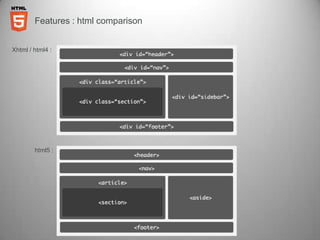
Features : html comparison


Xhtml / html4 :


        html5 :
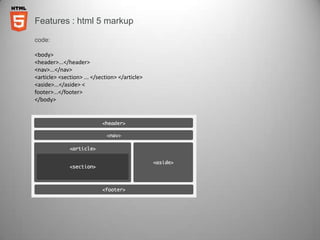
Features : html 5 markup

code:

<body>
<header>...</header>
<nav>...</nav>
<article> <section> ... </section> </article>
<aside>...</aside> <
footer>...</footer>
</body>
Features : associated technologies

ASSOCIATED TECHNOLOGIES:

Geolocation API
The geolocation API lets you share your location - The latitude and longitude are available allowing
you to do location aware search‘s like finding local businesses or showing your location on a map.

Web storage – Offline Cache
Using a manifest file, a list of URLs such as HTML, CSS, Javascript, and images are downloaded,
cached locally, and automatically keep the local copies up to date as they change. Great for when a
web application is offline.

CSS3 & CSS3 Transitions
-Allows background styling and gradients without the use of images.
-Allows for transitions and effects that don’t rely on Flash or Javascript.
-Provides us with the flexibility in designing for different resolutions and screen sizes.

Enhanced Typography using @fontface
@font-face is a css rule which allows you to download a particular font from your server to render a
textual area on your site even if the user hasn't got that font installed.
Features : html 5 outline algorithm

THE OUTLINE ALGORITHM:

- Can be thought of as a table of contents for your website.

- List the most important sections as individual items then list interior nested sections within them.
  Section and heading content is used to define the outline

-Body is established as the outline root

- Items are added to the outline as sectioning content is found

- Initial heading content is used to name these sections

- Sectioning content contained within these sections is shown as being nested in the outline

sectioning elements:

<article>
<aside>
<section>
<nav>
<h1 to h6>

Will all generate a new section in the outline algorithm
Features : algorithm example

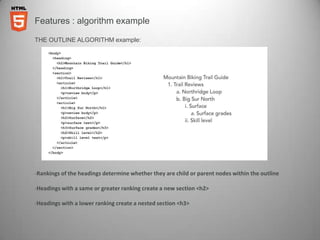
THE OUTLINE ALGORITHM example:


-Rankings of the headings determine whether they are child or parent nodes within the outline

-Headings with a same or greater ranking create a new section <h2>

-Headings with a lower ranking create a nested section <h3>
Features : coding hinting in dw cs5

html5 and dreamweaver:

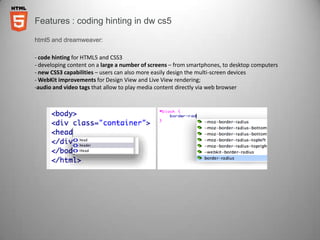
- code hinting for HTML5 and CSS3
- developing content on a large a number of screens – from smartphones, to desktop computers
- new CSS3 capabilities – users can also more easily design the multi-screen devices
- WebKit improvements for Design View and Live View rendering;
-audio and video tags that allow to play media content directly via web browser
Features : css3 – border radius

Css3 and dreamweaver:

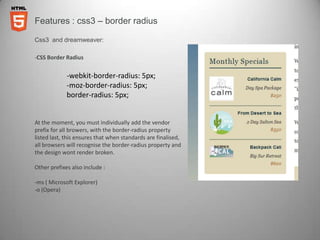
-CSS Border Radius


             -webkit-border-radius: 5px;
             -moz-border-radius: 5px;
             border-radius: 5px;


At the moment, you must individually add the vendor
prefix for all browers, with the border-radius property
listed last, this ensures that when standards are finalised,
all browsers will recognise the border-radius property and
the design wont render broken.

Other prefixes also include :

-ms ( Microsoft Explorer)
-o (Opera)
Features : css3 – rounded corners

Css3 and dreamweaver:

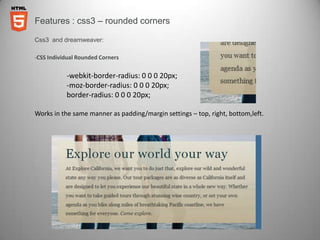
-CSS Individual Rounded Corners


           -webkit-border-radius: 0 0 0 20px;
           -moz-border-radius: 0 0 0 20px;
           border-radius: 0 0 0 20px;

Works in the same manner as padding/margin settings – top, right, bottom,left.
Features : css3 - gradients

Css3 and dreamweaver:

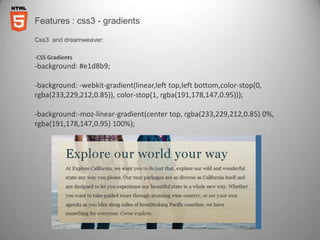
-CSS Gradients
-background: #e1d8b9;

-background: -webkit-gradient(linear,left top,left bottom,color-stop(0,
rgba(233,229,212,0.85)), color-stop(1, rgba(191,178,147,0.95)));

-background:-moz-linear-gradient(center top, rgba(233,229,212,0.85) 0%,
rgba(191,178,147,0.95) 100%);
Features : media queries

Css3 and dreamweaver:

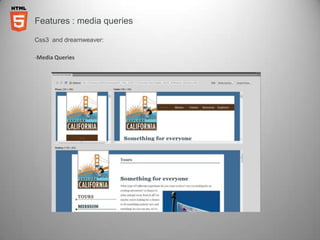
-Media Queries
Features : further css3 enhancements

Css3 and dreamweaver:

Other CSS3 Features:

-@fontface – custom fonts in web design without end user needing to have font installed on system

-2d tranforms – rotate(skew) and translate elements

-3d tranforms – rotate along the Z-axis – also includes perpespective –limited to Safari

-CSS transitions – Smoothly animate changes to an element property over a specific time (no
javascript required)

-Box Shadows, Textual Shadows and Multiple Backgrounds
Features : fuRTHER READING

ONLINE RESOURCES - HTML
W3C Schools
Dive into HTML 5
HTML5 Rocks
HTML5 Gallery

ONLINE RESOURCES – CSS3

W3C Schools
css3.com
css3.info

Html5

  • 2.
    Features : whatyou need to know -The latest revision of the HTML Language, currently still in development, first draft stage in 2012. -One of its core aims is to support latest multimedia whilst keeping the code both machine and human readable - Introduces new elements such as the <video> and <audio> tag -Introduces offline storage for web applications -Supports other technologies such as Geolocation Whats new: • Doctype has changed – now simply <!DOCTYPE HTML> •Block structure - <article> <section> <aside> <header> <footer> <nav> • Interactive elements - <video> <audio> <canvas> <source> • Inline semantics - <mark> <time> <meter> <progress>
  • 3.
    Features : blockstructure Block structure : <article> <section> <aside> <header> <footer> <nav> <article> Represents a component of a page that consists of a self-contained composition in a document, page, application, or site and that is intended to be independently distributable or reusable. This could be a forum post, blog post, newspaper article, a user comment, or any other independent item of content. <section> Is a generic document or application section. However, this isn’t a replacement for the div element. A section is only appropriate if the element’s contents would be listed explicitly in the document’s outline. <aside> Is used to represent a section of content that is related to the content around the aside element, eg a pull quote or a sidebar.
  • 4.
    Features : blockstructure cont Block structure : <article> <section> <aside> <header> <footer> <nav> <header> Represents a group of navigational aids, and is used to construct the document outline. You are also not restricted to using header only once; you could use this to mark up the author’s name and the time of a comment placed on a blog post, for example. <footer> Is the footer to a section. This is not restricted to one use at the bottom of the page. You can also use the footer to mark up the footer of a blog post in addition to the footer of the entire document. <nav> Is used to wrap major navigation blocks, such as table of contents, pagination links and breadcrumbs. Note that the nav element should be used for links that navigate around site, i.e. inappropriate for a list of sponsor links.
  • 5.
    Features : interactiveelements INTERACTIVE ELEMENTS: <video> <audio> <canvas> <source> <video> and <audio> Are types of media elements. They enable you to embed audio and video directly into the browser without any need for plug-ins. No longer having to rely on Flash. You can either let the browser render the chrome for the element, or take control via JavaScript to create a bespoke interface. <source> Is a child element to audio and video. It enables you to specify multiple alternative sources for the media element. <canvas> is a 2D drawing element that can be accessed using JavaScript to render graphics on the fly – for example, for games, graphs or animations.
  • 6.
    Features : htmlcomparison Xhtml / html4 : html5 :
  • 7.
    Features : html5 markup code: <body> <header>...</header> <nav>...</nav> <article> <section> ... </section> </article> <aside>...</aside> < footer>...</footer> </body>
  • 8.
    Features : associatedtechnologies ASSOCIATED TECHNOLOGIES: Geolocation API The geolocation API lets you share your location - The latitude and longitude are available allowing you to do location aware search‘s like finding local businesses or showing your location on a map. Web storage – Offline Cache Using a manifest file, a list of URLs such as HTML, CSS, Javascript, and images are downloaded, cached locally, and automatically keep the local copies up to date as they change. Great for when a web application is offline. CSS3 & CSS3 Transitions -Allows background styling and gradients without the use of images. -Allows for transitions and effects that don’t rely on Flash or Javascript. -Provides us with the flexibility in designing for different resolutions and screen sizes. Enhanced Typography using @fontface @font-face is a css rule which allows you to download a particular font from your server to render a textual area on your site even if the user hasn't got that font installed.
  • 9.
    Features : html5 outline algorithm THE OUTLINE ALGORITHM: - Can be thought of as a table of contents for your website. - List the most important sections as individual items then list interior nested sections within them. Section and heading content is used to define the outline -Body is established as the outline root - Items are added to the outline as sectioning content is found - Initial heading content is used to name these sections - Sectioning content contained within these sections is shown as being nested in the outline sectioning elements: <article> <aside> <section> <nav> <h1 to h6> Will all generate a new section in the outline algorithm
  • 10.
    Features : algorithmexample THE OUTLINE ALGORITHM example: -Rankings of the headings determine whether they are child or parent nodes within the outline -Headings with a same or greater ranking create a new section <h2> -Headings with a lower ranking create a nested section <h3>
  • 11.
    Features : codinghinting in dw cs5 html5 and dreamweaver: - code hinting for HTML5 and CSS3 - developing content on a large a number of screens – from smartphones, to desktop computers - new CSS3 capabilities – users can also more easily design the multi-screen devices - WebKit improvements for Design View and Live View rendering; -audio and video tags that allow to play media content directly via web browser
  • 12.
    Features : css3– border radius Css3 and dreamweaver: -CSS Border Radius -webkit-border-radius: 5px; -moz-border-radius: 5px; border-radius: 5px; At the moment, you must individually add the vendor prefix for all browers, with the border-radius property listed last, this ensures that when standards are finalised, all browsers will recognise the border-radius property and the design wont render broken. Other prefixes also include : -ms ( Microsoft Explorer) -o (Opera)
  • 13.
    Features : css3– rounded corners Css3 and dreamweaver: -CSS Individual Rounded Corners -webkit-border-radius: 0 0 0 20px; -moz-border-radius: 0 0 0 20px; border-radius: 0 0 0 20px; Works in the same manner as padding/margin settings – top, right, bottom,left.
  • 14.
    Features : css3- gradients Css3 and dreamweaver: -CSS Gradients -background: #e1d8b9; -background: -webkit-gradient(linear,left top,left bottom,color-stop(0, rgba(233,229,212,0.85)), color-stop(1, rgba(191,178,147,0.95))); -background:-moz-linear-gradient(center top, rgba(233,229,212,0.85) 0%, rgba(191,178,147,0.95) 100%);
  • 15.
    Features : mediaqueries Css3 and dreamweaver: -Media Queries
  • 16.
    Features : furthercss3 enhancements Css3 and dreamweaver: Other CSS3 Features: -@fontface – custom fonts in web design without end user needing to have font installed on system -2d tranforms – rotate(skew) and translate elements -3d tranforms – rotate along the Z-axis – also includes perpespective –limited to Safari -CSS transitions – Smoothly animate changes to an element property over a specific time (no javascript required) -Box Shadows, Textual Shadows and Multiple Backgrounds
  • 17.
    Features : fuRTHERREADING ONLINE RESOURCES - HTML W3C Schools Dive into HTML 5 HTML5 Rocks HTML5 Gallery ONLINE RESOURCES – CSS3 W3C Schools css3.com css3.info