Introduction to Backbone js
Presenter: Debasish Mohanty, Mindfire Solutions
Date: 12/05/2013
Presenter: Debasish Mohanty, Mindfire Solutions
Agenda
What, Why and who
Dependencies of Backbone
Getting started(Backbone setup and Hello World exp)
Backbone MVC(Models, Views , Collections)
Models and Collections
Views
Routers
Events
Presenter: Debasish Mohanty, Mindfire Solutions
What
- Backbone js is a Model, view, collection framework.
- Javascript for building richer client side application.
- Data driven.
Presenter: Debasish Mohanty, Mindfire Solutions
Why
- Structure
- Reuse
- Separation of roles of concerns
Presenter: Debasish Mohanty, Mindfire Solutions
Who
Presenter: Debasish Mohanty, Mindfire Solutions
Controller
Model
View
MVC
Presenter: Debasish Mohanty, Mindfire Solutions
Adding Backbone
//Jquery
<script src="/jquery.min.js" type="text/javascript"></script>
//Underscore
<script src="underscore.js/1.3.3/underscore-min.js"
type="text/javascript"></script>
//backbone
<script src="backbone-min.js" type="text/javascript"></script>
Presenter: Debasish Mohanty, Mindfire Solutions
Model
- Data behind the application
- object or entity.
- provides a basic set of functionality for managing changes.
Presenter: Debasish Mohanty, Mindfire Solutions
Define
Person = Backbone.Model.extend();
First Person = new Person({
Name: 'Lincoln'
})
Collections
-Ordered set of Models
- Model: Student, Collection: ClassStudents
- Model: Todo Item, Collection: Todo List
- Model: Animal, Collection: Zoo
Presenter: Debasish Mohanty, Mindfire Solutions
Define
Person = Backbone.Model.extend();
Persons = Backbone.Collection.extend({
Model: Person,
url: '#'
})
Presenter: Debasish Mohanty, Mindfire Solutions
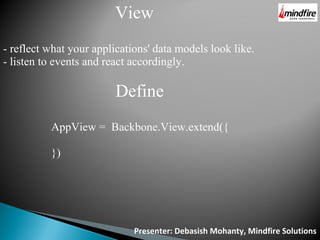
View
- reflect what your applications' data models look like.
- listen to events and react accordingly.
Define
AppView = Backbone.View.extend({
})
Presenter: Debasish Mohanty, Mindfire Solutions
render
AppView = backbone.View.extend({
render: function() {
this.$el.append('Hello World');
return this;
}
});
Presenter: Debasish Mohanty, Mindfire Solutions
Router
- way of maintaining state of the application
- routes interpret anything after "#" tag in the URL
define
var AppRouter = Backbone.Router.extend({
routes: {
"": "defaultRoute"
}
});
var app_router = new AppRouter;
app_router.on('route:defaultRoute', function(actions) {
alert(actions);
})
// Start Backbone history a necessary step for bookmarkable URL's
Backbone.history.start();
Presenter: Debasish Mohanty, Mindfire Solutions
events
AppView = Backbone.View.extend({
Events {
“click #addBtn”: “add”
...
},
add: function(e) {
Alert('added');
}
})
Presenter: Debasish Mohanty, Mindfire Solutions
Question and
Answer
Presenter: Debasish Mohanty, Mindfire Solutions
Thank you

Introduction to backbone js

  • 1.
    Introduction to Backbonejs Presenter: Debasish Mohanty, Mindfire Solutions Date: 12/05/2013
  • 2.
    Presenter: Debasish Mohanty,Mindfire Solutions Agenda What, Why and who Dependencies of Backbone Getting started(Backbone setup and Hello World exp) Backbone MVC(Models, Views , Collections) Models and Collections Views Routers Events
  • 3.
    Presenter: Debasish Mohanty,Mindfire Solutions
  • 4.
    Presenter: Debasish Mohanty,Mindfire Solutions What - Backbone js is a Model, view, collection framework. - Javascript for building richer client side application. - Data driven.
  • 5.
    Presenter: Debasish Mohanty,Mindfire Solutions Why - Structure - Reuse - Separation of roles of concerns
  • 6.
    Presenter: Debasish Mohanty,Mindfire Solutions Who
  • 7.
    Presenter: Debasish Mohanty,Mindfire Solutions Controller Model View MVC
  • 8.
    Presenter: Debasish Mohanty,Mindfire Solutions Adding Backbone //Jquery <script src="/jquery.min.js" type="text/javascript"></script> //Underscore <script src="underscore.js/1.3.3/underscore-min.js" type="text/javascript"></script> //backbone <script src="backbone-min.js" type="text/javascript"></script>
  • 9.
    Presenter: Debasish Mohanty,Mindfire Solutions Model - Data behind the application - object or entity. - provides a basic set of functionality for managing changes.
  • 10.
    Presenter: Debasish Mohanty,Mindfire Solutions Define Person = Backbone.Model.extend(); First Person = new Person({ Name: 'Lincoln' })
  • 11.
    Collections -Ordered set ofModels - Model: Student, Collection: ClassStudents - Model: Todo Item, Collection: Todo List - Model: Animal, Collection: Zoo Presenter: Debasish Mohanty, Mindfire Solutions
  • 12.
    Define Person = Backbone.Model.extend(); Persons= Backbone.Collection.extend({ Model: Person, url: '#' }) Presenter: Debasish Mohanty, Mindfire Solutions
  • 13.
    Presenter: Debasish Mohanty,Mindfire Solutions View - reflect what your applications' data models look like. - listen to events and react accordingly. Define AppView = Backbone.View.extend({ })
  • 14.
    Presenter: Debasish Mohanty,Mindfire Solutions render AppView = backbone.View.extend({ render: function() { this.$el.append('Hello World'); return this; } });
  • 15.
    Presenter: Debasish Mohanty,Mindfire Solutions Router - way of maintaining state of the application - routes interpret anything after "#" tag in the URL define var AppRouter = Backbone.Router.extend({ routes: { "": "defaultRoute" } }); var app_router = new AppRouter; app_router.on('route:defaultRoute', function(actions) { alert(actions); }) // Start Backbone history a necessary step for bookmarkable URL's Backbone.history.start();
  • 16.
    Presenter: Debasish Mohanty,Mindfire Solutions events AppView = Backbone.View.extend({ Events { “click #addBtn”: “add” ... }, add: function(e) { Alert('added'); } })
  • 17.
    Presenter: Debasish Mohanty,Mindfire Solutions Question and Answer
  • 18.
    Presenter: Debasish Mohanty,Mindfire Solutions Thank you