Structuring	web	applications
with	Backbone.js
		
Diego	Cardozo
github.com/diegocard/backbone-presentation
Goals
This	presentation	isn't	only	a	Backbone	tutorial
We'll	focus	on	complex	client	design
Using	Backbone	as	the	main	tool
Most	concepts	won't	be	tool-specific
Can	be	applied	to	other	tools	like	Angular	or	Knockout
We'll	learn	Backbone	through	examples
What	do	I	want	you	to	learn?
Useful	concepts	for	complex	web	client	design
Basic	Backbone	knowledge
Motivation	to	keep	learning
For	those	who	already	know	Backbone
Good	practices
Combination	with	other	tools
Agenda
1.	 Introduction
2.	 Architecture
3.	 Example
4.	 Backbone	components
5.	 Structuring	a	web	application
Introduction	(1)
Web	clients	have	better	resources	every	day
We	can	now	build	smart	clients
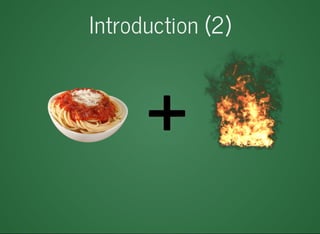
But	complex	applications	with	jQuery...	
Are	hard	to	build
Lack	structure
Do	not	favor	reutilization
Creating	your	own	structure	is	reinventing	the	wheel
Introduction	(2)
Introduction	(3)
Backbone	gives	us	
Structure	for	our	client-side	JavaScript	code
Several	utilities
Basically,	it	is	a	MV*	framework
We	organize	code	in	different	components
Models
Collections
Views
Templates
Routers
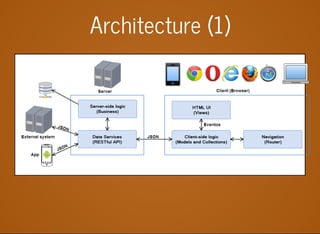
Architecture	(1)
Architecture	(2)
Advantages
Maintainability
Load	distribution	
Quicker	start	to	the	development	process
UI	is	only	another	client
Great	for	testing
Perfect	for	combining	with	mobile	apps
Examplegithub.com/diegocard/backbone-presentation/demo
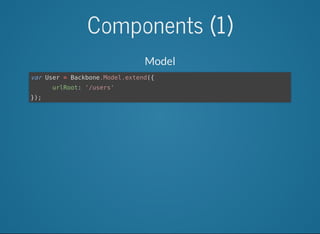
Components	(1)
Model
var	User	=	Backbone.Model.extend({
						urlRoot:	'/users'
});
Components	(2)
Collection
var	Users	=	Backbone.Collection.extend({
								url:	'/users'
});
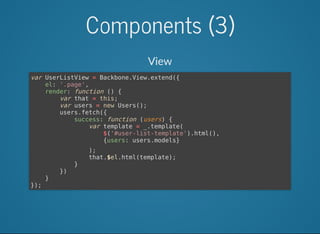
Components	(3)
View
var	UserListView	=	Backbone.View.extend({
				el:	'.page',
				render:	function	()	{
								var	that	=	this;
								var	users	=	new	Users();
								users.fetch({
												success:	function	(users)	{
																var	template	=	_.template(
																				$('#user-list-template').html(),
																				{users:	users.models}
																);
																that.$el.html(template);
												}
								})
				}
});
Components	(4)
Event	handling
var	UserEditView	=	Backbone.View.extend({
				el:	'.page',
				events:	{
								'submit	.edit-user-form':	'saveUser',
								'click	.delete':	'deleteUser'
				},
				saveUser:	function	(ev)	{
								var	userDetails	=	$(ev.currentTarget).serializeObject();
								var	user	=	new	User();
								user.save(userDetails,	{
												success:	function	(user)	{
																router.navigate('',	{trigger:true});
												}
								});
				}
});
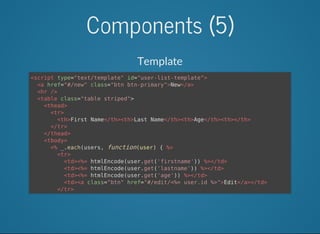
Components	(5)
Template
<script	type="text/template"	id="user-list-template">
		<a	href="#/new"	class="btn	btn-primary">New</a>
		<hr	/>
		<table	class="table	striped">
				<thead>
						<tr>
								<th>First	Name</th><th>Last	Name</th><th>Age</th><th></th>
						</tr>
				</thead>
				<tbody>
						<%	_.each(users,	function(user)	{	%>
								<tr>
										<td><%=	htmlEncode(user.get('firstname'))	%></td>
										<td><%=	htmlEncode(user.get('lastname'))	%></td>
										<td><%=	htmlEncode(user.get('age'))	%></td>
										<td><a	class="btn"	href="#/edit/<%=	user.id	%>">Edit</a></td>
								</tr>
						<%	});	%>
				</tbody>
		</table>
</script>
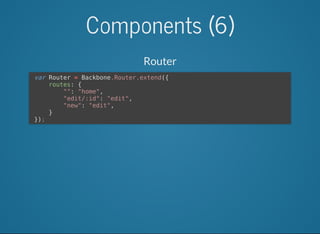
Components	(6)
Router
	var	Router	=	Backbone.Router.extend({
					routes:	{
									"":	"home",	
									"edit/:id":	"edit",
									"new":	"edit",
					}
	});
Structure	(1)
Using	backbone	doesn't	guarantee	good	practices
We	need	to	organize	and	modularize	our	application
We	can	use	Require.js	to	achieve	this
I	found	a	great	example	at:
backbonetutorials.com/organizing-backbone-using-modules
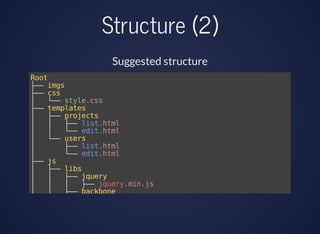
Structure	(2)
Suggested	structure
Root
├──	imgs
├──	css
│			└──	style.css
├──	templates
│			├──	projects
│			│			├──	list.html
│			│			└──	edit.html
│			└──	users
│							├──	list.html
│							└──	edit.html
├──	js
│			├──	libs
│			│			├──	jquery
│			│			│			├──	jquery.min.js
│			│			├──	backbone
│			│			│			├──	backbone.min.js
│			│			└──	underscore
│			│			│			├──	underscore.min.js
│			├──	models
│			│			├──	users.js
Structure	(3)
Example:	Proyect	list	
define([
		'jquery',
		'underscore',
		'backbone',
		//	Using	the	text!	plugin	for	Require.js,	
		//	we	can	load	templates	as	plain	text
		'text!templates/project/list.html'
],	function($,	_,	Backbone,	projectListTemplate){
		var	ProjectListView	=	Backbone.View.extend({
				el:	$('#container'),
				render:	function(){
						//	Compile	the	template	with	underscore
						//	and	add	the	template	to	the	view	element
						var	data	=	{};
						var	compiledTemplate	=	_.template(projectListTemplate,	data);
						this.$el.append(compiledTemplate);
				}
		});
		return	ProjectListView;	//	Return	the	view
});
Resources


backbonejs.org
backbonetutorials.com
addyosmani.github.io/backbone-fundamentals
github.com/diegocard/backbone-presentation
¿Questions?

Structuring web applications with Backbone.js