FestiveTechCalendar 2021
https://festivetechcalendar.com
Event Sourcing
with Azure Cosmos DB
Change Feed and
Azure Functions
Callon Campbell
Microsoft MVP | Azure
@flying_maverick
About me
• 4x Microsoft MVP in Azure
• +20 years enterprise development with Microsoft technologies – .NET (C#),
Azure, ASP.NET, Desktop, SQL, and Mobile
• Passionate about serverless and cloud-native application development
• Speaker at community events and meetups
• Blogging at https://TheFlyingMaverick.com
• Organizer of “Canada’s Technology Triangle .NET User Group” in Kitchener,
Ontario
Callon Campbell
Solution Architect | Developer
Microsoft MVP in Azure
Agenda
• What is event sourcing?
• Introduction to Azure Cosmos DB Change Feed
• Using Azure Cosmos DB Change Feed as an event source with Azure
Functions
• Demos
• Wrap-up
What is event sourcing?
Event Sourcing is a data pattern that ensures that all changes to
application state are stored as a sequence of events. Not just can we
query these events, we can also use the event log to reconstruct past
states.
- Martin Fowler (2005)
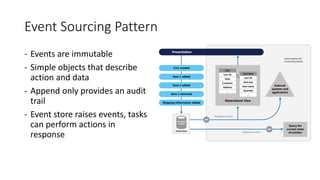
Event Sourcing Pattern
- Events are immutable
- Simple objects that describe
action and data
- Append only provides an audit
trail
- Event store raises events, tasks
can perform actions in
response
Using Cosmos DB as an Event Source
• Cosmos DB is a great choice as a central store where all “events” are
modeled as a writes in the event sourcing pattern because of its
strengths in horizontal scalability and high availability
• You can have multiple change feed consumers subscribed to the same
container’s change feed
• Change Feed Processor Library ensures you won't miss any events
with the “at least once” guarantee
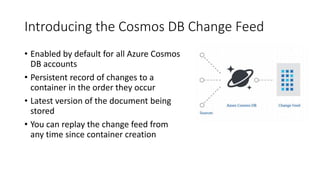
Introducing the Cosmos DB Change Feed
• Enabled by default for all Azure Cosmos
DB accounts
• Persistent record of changes to a
container in the order they occur
• Latest version of the document being
stored
• You can replay the change feed from
any time since container creation
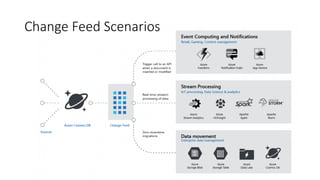
Change Feed Scenarios
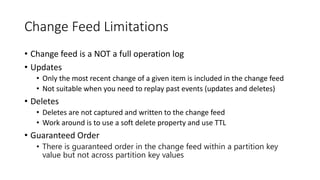
Change Feed Limitations
• Change feed is a NOT a full operation log
• Updates
• Only the most recent change of a given item is included in the change feed
• Not suitable when you need to replay past events (updates and deletes)
• Deletes
• Deletes are not captured and written to the change feed
• Work around is to use a soft delete property and use TTL
• Guaranteed Order
• There is guaranteed order in the change feed within a partition key
value but not across partition key values
Consuming the Change Feed
• Directly
• Low-level direct access, per partition
• Pull Model
• Scalable, manual polling, single partition key option
• Change Feed Processor (CFP) Library
• Stateful and scalable
• Azure Functions
• Serverless wrapper around the CFP Library
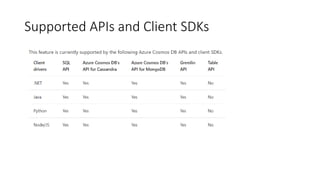
Supported APIs and Client SDKs
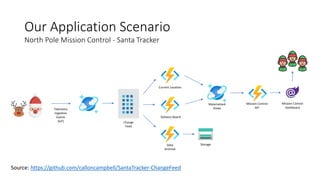
Our Application Scenario
Telemetry
Ingestion
Events
(IoT) Change
Feed
Mission Control
Dashboard
Data
Archival
Materialized
Views
Current Location
Delivery Board
North Pole Mission Control - Santa Tracker
Storage
Source: https://github.com/calloncampbell/SantaTracker-ChangeFeed
Mission Control
API
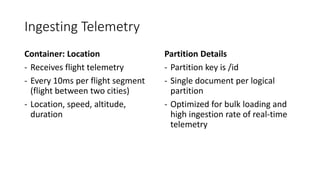
Ingesting Telemetry
Container: Location
- Receives flight telemetry
- Every 10ms per flight segment
(flight between two cities)
- Location, speed, altitude,
duration
Partition Details
- Partition key is /id
- Single document per logical
partition
- Optimized for bulk loading and
high ingestion rate of real-time
telemetry
Demo
Telemetry Ingestion into Cosmos DB
Consuming the Change Feed
• Azure Function microservice
• Each microservice is scoped to the change feed
• Code in Function App must be thread safe
Lease Container
• Required when you consume the change feed through the Change
Feed Processor Library or an Azure Function Cosmos DB Trigger
• In the lease container, an item is created for each physical partition to
bookmark the latest item that was processed
• Partition key should be /id
• In general, 400 RUs should be enough. For very large workloads, you
may want to increase to a few thousand RUs or switch to Autoscale
Lease Container (cont.)
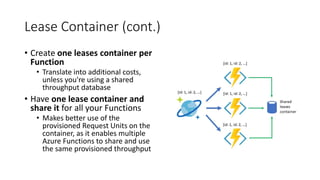
• Create one leases container per
Function
• Translate into additional costs,
unless you're using a shared
throughput database
• Have one lease container and
share it for all your Functions
• Makes better use of the
provisioned Request Units on the
container, as it enables multiple
Azure Functions to share and use
the same provisioned throughput
Configuring a Shared Lease Container
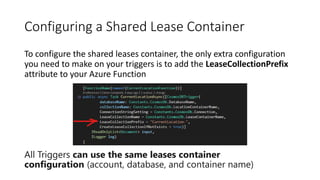
To configure the shared leases container, the only extra configuration
you need to make on your triggers is to add the LeaseCollectionPrefix
attribute to your Azure Function
All Triggers can use the same leases container
configuration (account, database, and container name)
Demo
Consuming the Azure Cosmos DB
change feed with Azure Functions
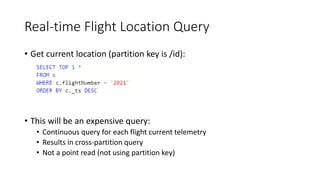
Real-time Flight Location Query
• Get current location (partition key is /id):
• This will be an expensive query:
• Continuous query for each flight current telemetry
• Results in cross-partition query
• Not a point read (not using partition key)
Introducing Materialized View Pattern
• Use Cosmos DB Change Feed for the Materialized View Pattern
• Used to generate pre-populated views of data in environments where the
source data format is not well suited to the applications requirements
• This is a tiny view, only one document per flight
• All documents are in the same logical partition
• A materialized view that has a partition key on /type and the /id is
the flightNumber or the routeNumber
• Really cheap, uses a point read which means its always 1 RU for a 1 kb
document
Demo
Materialized Views – Getting
Current Location Microservice
Demo
Materialized Views – Delivery Board
Microservice
Demo
Replicate Data – Data Archival
Microservice
Summary
• Cosmos DB is a great choice as a central store where all “events” are
modeled as a writes in the event sourcing pattern because of its
strengths in horizontal scalability and high availability
• Consume the Change Feed using either the Change Feed Processor
Library or from an Azure Function Cosmos DB Trigger
• Consumers can be stopped and restarted as needed and even replay
from an earlier point in time
• Use the Materialized View pattern to generate prepopulated views
over the data in one or more data stores when the data isn't ideally
formatted for required query operations
References
• Martin Fowler - Event Sourcing
• Event Sourcing Pattern
• Cosmos DB
• Cosmos DB Change Feed
• Materialized View pattern
• Azure Functions
https://LinkedIn.com/in/CallonCampbell
@Flying_Maverick
Callon@CloudMavericks.ca
https://GitHub.com/CallonCampbell
Let’s connect
Let’s connect
Thank you
https://festivetechcalendar.com
Festive Tech Calendar 2021

Festive Tech Calendar 2021

  • 1.
  • 2.
    Event Sourcing with AzureCosmos DB Change Feed and Azure Functions Callon Campbell Microsoft MVP | Azure @flying_maverick
  • 3.
    About me • 4xMicrosoft MVP in Azure • +20 years enterprise development with Microsoft technologies – .NET (C#), Azure, ASP.NET, Desktop, SQL, and Mobile • Passionate about serverless and cloud-native application development • Speaker at community events and meetups • Blogging at https://TheFlyingMaverick.com • Organizer of “Canada’s Technology Triangle .NET User Group” in Kitchener, Ontario Callon Campbell Solution Architect | Developer Microsoft MVP in Azure
  • 4.
    Agenda • What isevent sourcing? • Introduction to Azure Cosmos DB Change Feed • Using Azure Cosmos DB Change Feed as an event source with Azure Functions • Demos • Wrap-up
  • 5.
    What is eventsourcing? Event Sourcing is a data pattern that ensures that all changes to application state are stored as a sequence of events. Not just can we query these events, we can also use the event log to reconstruct past states. - Martin Fowler (2005)
  • 6.
    Event Sourcing Pattern -Events are immutable - Simple objects that describe action and data - Append only provides an audit trail - Event store raises events, tasks can perform actions in response
  • 7.
    Using Cosmos DBas an Event Source • Cosmos DB is a great choice as a central store where all “events” are modeled as a writes in the event sourcing pattern because of its strengths in horizontal scalability and high availability • You can have multiple change feed consumers subscribed to the same container’s change feed • Change Feed Processor Library ensures you won't miss any events with the “at least once” guarantee
  • 8.
    Introducing the CosmosDB Change Feed • Enabled by default for all Azure Cosmos DB accounts • Persistent record of changes to a container in the order they occur • Latest version of the document being stored • You can replay the change feed from any time since container creation
  • 9.
  • 10.
    Change Feed Limitations •Change feed is a NOT a full operation log • Updates • Only the most recent change of a given item is included in the change feed • Not suitable when you need to replay past events (updates and deletes) • Deletes • Deletes are not captured and written to the change feed • Work around is to use a soft delete property and use TTL • Guaranteed Order • There is guaranteed order in the change feed within a partition key value but not across partition key values
  • 11.
    Consuming the ChangeFeed • Directly • Low-level direct access, per partition • Pull Model • Scalable, manual polling, single partition key option • Change Feed Processor (CFP) Library • Stateful and scalable • Azure Functions • Serverless wrapper around the CFP Library
  • 12.
    Supported APIs andClient SDKs
  • 13.
    Our Application Scenario Telemetry Ingestion Events (IoT)Change Feed Mission Control Dashboard Data Archival Materialized Views Current Location Delivery Board North Pole Mission Control - Santa Tracker Storage Source: https://github.com/calloncampbell/SantaTracker-ChangeFeed Mission Control API
  • 14.
    Ingesting Telemetry Container: Location -Receives flight telemetry - Every 10ms per flight segment (flight between two cities) - Location, speed, altitude, duration Partition Details - Partition key is /id - Single document per logical partition - Optimized for bulk loading and high ingestion rate of real-time telemetry
  • 15.
  • 16.
    Consuming the ChangeFeed • Azure Function microservice • Each microservice is scoped to the change feed • Code in Function App must be thread safe
  • 17.
    Lease Container • Requiredwhen you consume the change feed through the Change Feed Processor Library or an Azure Function Cosmos DB Trigger • In the lease container, an item is created for each physical partition to bookmark the latest item that was processed • Partition key should be /id • In general, 400 RUs should be enough. For very large workloads, you may want to increase to a few thousand RUs or switch to Autoscale
  • 18.
    Lease Container (cont.) •Create one leases container per Function • Translate into additional costs, unless you're using a shared throughput database • Have one lease container and share it for all your Functions • Makes better use of the provisioned Request Units on the container, as it enables multiple Azure Functions to share and use the same provisioned throughput
  • 19.
    Configuring a SharedLease Container To configure the shared leases container, the only extra configuration you need to make on your triggers is to add the LeaseCollectionPrefix attribute to your Azure Function All Triggers can use the same leases container configuration (account, database, and container name)
  • 20.
    Demo Consuming the AzureCosmos DB change feed with Azure Functions
  • 21.
    Real-time Flight LocationQuery • Get current location (partition key is /id): • This will be an expensive query: • Continuous query for each flight current telemetry • Results in cross-partition query • Not a point read (not using partition key)
  • 22.
    Introducing Materialized ViewPattern • Use Cosmos DB Change Feed for the Materialized View Pattern • Used to generate pre-populated views of data in environments where the source data format is not well suited to the applications requirements • This is a tiny view, only one document per flight • All documents are in the same logical partition • A materialized view that has a partition key on /type and the /id is the flightNumber or the routeNumber • Really cheap, uses a point read which means its always 1 RU for a 1 kb document
  • 23.
    Demo Materialized Views –Getting Current Location Microservice
  • 24.
    Demo Materialized Views –Delivery Board Microservice
  • 25.
    Demo Replicate Data –Data Archival Microservice
  • 26.
    Summary • Cosmos DBis a great choice as a central store where all “events” are modeled as a writes in the event sourcing pattern because of its strengths in horizontal scalability and high availability • Consume the Change Feed using either the Change Feed Processor Library or from an Azure Function Cosmos DB Trigger • Consumers can be stopped and restarted as needed and even replay from an earlier point in time • Use the Materialized View pattern to generate prepopulated views over the data in one or more data stores when the data isn't ideally formatted for required query operations
  • 27.
    References • Martin Fowler- Event Sourcing • Event Sourcing Pattern • Cosmos DB • Cosmos DB Change Feed • Materialized View pattern • Azure Functions
  • 28.
  • 29.

Editor's Notes

  • #3 Hello and welcome to my Festive Tech Calendar 2021 talk on Event Sourcing with Azure Cosmos DB Change Feed and Azure Functions. Today we’ll take a look at how we can help the elves track every event that happens this holiday season.
  • #4 My name is Callon Campbell, I'm a 4x Microsoft MVP in Azure and have 20+ years in enterprise development with C#, Azure, ASP.NET, SQL and once upon a time with mobile. I'm passionate about serverless and cloud-native application development and bringing those benefits to the enterprise. I'm a speaker at local community events, meetups and Global Azure Bootcamp.
  • #6 Instead of storing just the current state of the data in a domain, use an append-only store to record the full series of actions taken on that data.
  • #7 If we take an overview of the pattern, some of the options for using the event stream are creating a materialized view, integrating events with external applications and systems, and replaying events to create projections of the current state of specific entities. Events are immutable and can be stored using an append-only operation. Events are simple objects that describe some action that occurred + any associated data required to describe the action represented by the event. The append-only storage of events provides an audit trail that can be used to monitor actions taken against a data store, regenerate the current state as materialized views or projections by replaying the events at any time. The event store raises events, and tasks perform operations in response to those events. This decoupling of the tasks from the events provides flexibility and extensibility. 
  • #8 The change feed in Azure Cosmos DB is one of the most overlooked features of Microsoft’s globally distributed, massively scalable, multi-model database service. Similar to the transaction log of a relational database, the change feed is a persistent record of changes to a container in the order they occurred. It therefore serves as an excellent event source for a wide range of cloud-based microservices targeting ecommerce, IoT, and other large-scale scenarios. In addition Cosmos DB is a great choice as a central store where all “events” are modeled as a writes In this scenario you will have a full record of past events in the change feed …{read points}
  • #10  In my demos later we’ll take a look at the Event Computing and Data Movement.
  • #11 So what are some of the limitations of the Change Feed?
  • #14 Requirements: Real-time flight info for Santa’s location Up-to-date arrival details on which cities Santa has visited Dashboard to show current status in near-real-time with materialized views Data archival (moved to cold storage as its not needed in Cosmos DB for long term)
  • #16 Take a look at Cosmos DB portal Data Explorer and review each container (remember to reset the data) IsComplete (don’t want to miss this event when throttling) TTL
  • #22 The problem with this query is that I’m not using the id / partition key. This will result in a cross-partition query which is costly compared to a point read. So the more data and partitions you have the higher the RU cost will be for this type of query. There is a better way.