Callon Campbell
Solutions Architect | Developer | Microsoft MVP
Cloud Mavericks Inc.
Building Scalable Applications
Using Serverless on the Cloud
Microsoft Azure
Callon Campbell
Solution Architect | Developer
Microsoft MVP in Azure
He/him/his
Speaker introduction
• 20 years enterprise development with Microsoft technologies – .NET (C#), Azure, Web
(ASP.NET, Angular, JavaScript), Desktop, SQL, and Mobile
• Passionate about serverless and cloud-native application development
• Blogging at https://TheFlyingMaverick.com
• Speaker at community events and meetups
• Co-creator of ReflectInsight, a live .NET log viewer
• Organizer of “Canada’s Technology Triangle .NET User Group” in Kitchener, Ontario
Microsoft Azure
Agenda
•Goals of serverless
•Adopting serverless and cloud native for your
application architecture
•Building for scale, high availability and resiliency
•Real world example – code and demos
•Q&A
4
Microsoft Azure
In today’s talk…
• Serverless using Microsoft Azure technologies
Create your Azure free account today:
https://azure.microsoft.com/en-us/free/
• .NET Core (C#) in my demos
Cross-platform development
However, the core serverless principals apply to other
cloud providers
5
Microsoft Azure
The “evolution” of hosting platforms
6
Microsoft Azure
The goals of “serverless”
Microsoft Azure
Serverless
Full abstraction of servers
Instant scale
Pay-per-use
Microsoft Azure
Adopting serverless and cloud
native
Microsoft Azure
Azure serverless ecosystem
Event driven serverless offerings…
Microsoft Azure
Azure serverless ecosystem
Microsoft Azure
Azure Functions
Microsoft Azure
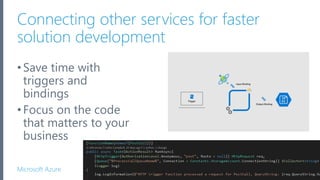
Connecting other services for faster
solution development
•Save time with
triggers and
bindings
•Focus on the code
that matters to your
business
13
Microsoft Azure
PlatformApplicationdeliveryOperatingsystem
●●● ●●●
●●●
+
https://github.com/azure/azure-functions-host
(+other repos)
Azure Functions
host runtime
Azure Functions
Core Tools
Azure Functions
base Docker image
Azure Functions
.NET Docker image
Azure Functions
Node Docker image
●●●
Functions everywhere
Microsoft Azure
Use your favorite language
16
Demos
Start coding
Microsoft Azure
Scale and latency
Microsoft Azure
Cold-starts
• When choosing the ‘Consumption’ plan, you will have elastic
scale but at the cost of cold starts.
• A cold-start is a small amount of time needed to warm up the
resources and execute your functions. Consumption plan runs
on a shared environment and resources need to be allocated.
• Cold-start could take 1-3 seconds.
19
Microsoft Azure
Premium Functions
• More powerful hardware (increased CPU and memory options)
• Elastic scale with control (burst scaling)
• Avoid cold-start with perpetually warm instances
• Consistent performance
• Network isolation, VNET connectivity
• Long running execution (60min guaranteed)
• Better predictable pricing
20
Microsoft Azure
Running healthy apps in the
cloud
Microsoft Azure
Running healthy apps in the cloud
•Use production hardware
•Use multiple instances
•Deploy to multiple regions
•Leverage deployment slots
•Geo-replication for your data
•Use redundant storage
•Monitoring and profiling
22
Microsoft Azure
Use production
hardware
• Use recommended
“production” pricing tiers and
select the appropriate plan
• Allocate minimum instances
and set number of pre-
warmed instances
• Don’t run non-production
code with your production app
23
Microsoft Azure
Use multiple
instances
• Azure Functions provides the
means to automatically scale
when needed
• Allocate minimum instances in
the Scale out (App Service
Plan) blade
• Set number of pre-warmed
instances to avoid cold-starts
24
Microsoft Azure
Deploy to multiple
regions
• Leverage Azure Front Door or
Traffic Manager to intercept
traffic before it hits your site
• Helps with routing and
distribution between your
instances and regions
• Route incoming requests based
on the customer’s geography
25
Microsoft Azure
Leverage deployment slots
26
Why use slots?
• Different environments for different
purposes – test your changes
• Prewarming
• Easy fallbacks
• Reduce costs
How are functions affected by swapping slots?
• Traffic redirection is seamless; no requests
are dropped because of a swap.
• If a function is running during a swap,
execution continues, and the next triggers
are routed to the swapped app instance.
https://docs.microsoft.com/en-us/azure/azure-functions/functions-deployment-slots
Microsoft Azure
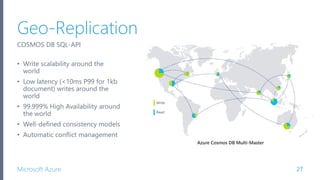
Geo-Replication
27
COSMOS DB SQL-API
• Write scalability around the
world
• Low latency (<10ms P99 for 1kb
document) writes around the
world
• 99.999% High Availability around
the world
• Well-defined consistency models
• Automatic conflict management
Microsoft Azure
Cosmos DB: Optimize for preferred
region
28
Microsoft Azure
Redundant storage (RS-GRS)
29
READ-ACCESS GEO-REDUNDANT STORAGE
Redundancy in the primary region
• Locally redundant storage (LRS) copies your data synchronously three times within a single
physical location in the primary region.
• Zone-redundant storage (ZRS) copies your data synchronously across three Azure availability
zones in the primary region.
Redundancy in a secondary region
• Geo-redundant storage (with GRS or GZRS) replicates your data to another physical location
in the secondary region to protect against regional outages.
• Design your applications for read access to the secondary region.
Microsoft Azure
Leverage geo redundant URL
30
Microsoft Azure
Monitoring and profiling
31
Enable Application Insights
• Application map
• Live metrics stream
• Search
• Failures
• Performance profiling
• Track dependencies
Microsoft Azure
Demo scenario – Twilio Call
Integration Application
Microsoft Azure
Azure On-prem
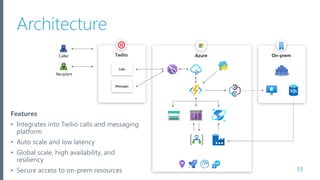
Architecture
33
Twilio
Calls
Messages
Caller
Recipient
Features
• Integrates into Twilio calls and messaging
platform
• Auto scale and low latency
• Global scale, high availability, and
resiliency
• Secure access to on-prem resources
Microsoft Azure
On-prem
34
AzureTwilio
Calls
Messages
Caller
Recipient
Hybrid
Connection
Manager
SQL Server
Traffic
Manager
Data Factory
(ETL pipeline)
Cosmos DB
SQL API
Logic App
App Configuration
MediaFile
StartCall
PostCall
Blob
Storage
Queue
Storage
Hybrid Connection
ProcessCall
PostCall
Orchestrator
API
Management
Call Details
• Traffic Manager for DNS-based load
balancing across multiple regions
• Azure Function App - Premium plan
• Cosmos DB with geo-replication and
multi-master writes
• Queue Storage
• Blob Storage with Read-access geo-
redundant storage (RA-GRS)
• Hybrid Connections for integration with
on-premises endpoints
• Azure Data Factory for running ETL tasks
for synchronizing data from on-
premises into Cosmos DB
• Application Insights
• Azure Pipelines for CI/CD
Microsoft Azure
Multiple regions with Traffic Manager
Azure - West US 2
Azure - Global
Managed Service
Azure - East US 2
http://tm-enterpriseserverless-01.trafficmanager.net/api/startcall
35
DNS-BASED LOAD BALANCING
• Flexible routing options
• Priority, performance, geographic,
weighted round-robin, subnet, and
multi-value
• Reduce application downtime
• Improve app performance and
content delivery
• Distribute user traffic over multiple
locations
• Use with your on-premises
datacenter
• Geographic fencing of your
application users
Demos
Start coding
Microsoft Azure
Demo notes
• Twilio test call and SMS
• Premium Function
• Warmed instances
• Deployment slots
• Cosmos DB geo replication + multi-master + Autoscale
• Storage (RS-GRS)
• Configure for secondary URL
• Traffic Manager
• App Configuration
37
Microsoft Azure
Developer productivity
Microsoft Azure
Tooling
Develop and test locally and disconnected from Azure using:
• Visual Studio and/or Visual Studio Code
• Cosmos DB Emulator
• Microsoft Azure Storage Emulator
• Microsoft Azure Storage Explorer
• .NET Core 3.1, Function runtime v3, Cosmos DB SQL API
• CI/CD – Azure Pipelines or GitHub Actions
39
Microsoft Azure
Inner and outer loop development
Inner Loop
Source
Control
Build and
Test (CI)
Deploy
(CD)
Run
(Prod)
Monitoring
&
Diagnostics
Code,
Run,
Debug
Outer Loop
Microsoft Azure
Getting code to the cloud
Direct publish App Service SCM (Kudu) CI/CD tools
“right click publish”
CD CD
CI
Check-in Check-in
Microsoft Azure
Wrapping it up
Microsoft Azure
Your applications could
benefit from serverless
today.
Microsoft Azure
Wrap-up
• Serverless is the next big thing for enterprise. Pick what
works for you
• Serverless is more than just compute, functions, and app
development
• Serverless brings a lot of benefits, but you still need to
design for global scale, availability and resiliency
Microsoft Azure
Resources
Session Materials on GitHub
Session Resources
https://github.com/calloncampbell/Enterprise-Serverless-Demo/
All in one resource:
https://github.com/calloncampbell/Enterprise-Serverless-Demo/blob/master/RESOURCES.md
Presentation: https://www.slideshare.net/CallonCampbell/
Get Certified
Microsoft Azure
https://LinkedIn.com/in/CallonCampbell
@flying_maverick
Callon@CloudMavericks.ca
https://GitHub.com/CallonCampbell
Let’s connectLet’s connect
Microsoft Azure
Thank You

Building scalable applications using serverless on the cloud

  • 1.
    Callon Campbell Solutions Architect| Developer | Microsoft MVP Cloud Mavericks Inc. Building Scalable Applications Using Serverless on the Cloud
  • 2.
    Microsoft Azure Callon Campbell SolutionArchitect | Developer Microsoft MVP in Azure He/him/his Speaker introduction • 20 years enterprise development with Microsoft technologies – .NET (C#), Azure, Web (ASP.NET, Angular, JavaScript), Desktop, SQL, and Mobile • Passionate about serverless and cloud-native application development • Blogging at https://TheFlyingMaverick.com • Speaker at community events and meetups • Co-creator of ReflectInsight, a live .NET log viewer • Organizer of “Canada’s Technology Triangle .NET User Group” in Kitchener, Ontario
  • 3.
    Microsoft Azure Agenda •Goals ofserverless •Adopting serverless and cloud native for your application architecture •Building for scale, high availability and resiliency •Real world example – code and demos •Q&A 4
  • 4.
    Microsoft Azure In today’stalk… • Serverless using Microsoft Azure technologies Create your Azure free account today: https://azure.microsoft.com/en-us/free/ • .NET Core (C#) in my demos Cross-platform development However, the core serverless principals apply to other cloud providers 5
  • 5.
  • 6.
    Microsoft Azure The goalsof “serverless”
  • 7.
    Microsoft Azure Serverless Full abstractionof servers Instant scale Pay-per-use
  • 8.
  • 9.
    Microsoft Azure Azure serverlessecosystem Event driven serverless offerings…
  • 10.
  • 11.
  • 12.
    Microsoft Azure Connecting otherservices for faster solution development •Save time with triggers and bindings •Focus on the code that matters to your business 13
  • 13.
    Microsoft Azure PlatformApplicationdeliveryOperatingsystem ●●● ●●● ●●● + https://github.com/azure/azure-functions-host (+otherrepos) Azure Functions host runtime Azure Functions Core Tools Azure Functions base Docker image Azure Functions .NET Docker image Azure Functions Node Docker image ●●● Functions everywhere
  • 14.
    Microsoft Azure Use yourfavorite language 16
  • 15.
  • 16.
  • 17.
    Microsoft Azure Cold-starts • Whenchoosing the ‘Consumption’ plan, you will have elastic scale but at the cost of cold starts. • A cold-start is a small amount of time needed to warm up the resources and execute your functions. Consumption plan runs on a shared environment and resources need to be allocated. • Cold-start could take 1-3 seconds. 19
  • 18.
    Microsoft Azure Premium Functions •More powerful hardware (increased CPU and memory options) • Elastic scale with control (burst scaling) • Avoid cold-start with perpetually warm instances • Consistent performance • Network isolation, VNET connectivity • Long running execution (60min guaranteed) • Better predictable pricing 20
  • 19.
  • 20.
    Microsoft Azure Running healthyapps in the cloud •Use production hardware •Use multiple instances •Deploy to multiple regions •Leverage deployment slots •Geo-replication for your data •Use redundant storage •Monitoring and profiling 22
  • 21.
    Microsoft Azure Use production hardware •Use recommended “production” pricing tiers and select the appropriate plan • Allocate minimum instances and set number of pre- warmed instances • Don’t run non-production code with your production app 23
  • 22.
    Microsoft Azure Use multiple instances •Azure Functions provides the means to automatically scale when needed • Allocate minimum instances in the Scale out (App Service Plan) blade • Set number of pre-warmed instances to avoid cold-starts 24
  • 23.
    Microsoft Azure Deploy tomultiple regions • Leverage Azure Front Door or Traffic Manager to intercept traffic before it hits your site • Helps with routing and distribution between your instances and regions • Route incoming requests based on the customer’s geography 25
  • 24.
    Microsoft Azure Leverage deploymentslots 26 Why use slots? • Different environments for different purposes – test your changes • Prewarming • Easy fallbacks • Reduce costs How are functions affected by swapping slots? • Traffic redirection is seamless; no requests are dropped because of a swap. • If a function is running during a swap, execution continues, and the next triggers are routed to the swapped app instance. https://docs.microsoft.com/en-us/azure/azure-functions/functions-deployment-slots
  • 25.
    Microsoft Azure Geo-Replication 27 COSMOS DBSQL-API • Write scalability around the world • Low latency (<10ms P99 for 1kb document) writes around the world • 99.999% High Availability around the world • Well-defined consistency models • Automatic conflict management
  • 26.
    Microsoft Azure Cosmos DB:Optimize for preferred region 28
  • 27.
    Microsoft Azure Redundant storage(RS-GRS) 29 READ-ACCESS GEO-REDUNDANT STORAGE Redundancy in the primary region • Locally redundant storage (LRS) copies your data synchronously three times within a single physical location in the primary region. • Zone-redundant storage (ZRS) copies your data synchronously across three Azure availability zones in the primary region. Redundancy in a secondary region • Geo-redundant storage (with GRS or GZRS) replicates your data to another physical location in the secondary region to protect against regional outages. • Design your applications for read access to the secondary region.
  • 28.
  • 29.
    Microsoft Azure Monitoring andprofiling 31 Enable Application Insights • Application map • Live metrics stream • Search • Failures • Performance profiling • Track dependencies
  • 30.
    Microsoft Azure Demo scenario– Twilio Call Integration Application
  • 31.
    Microsoft Azure Azure On-prem Architecture 33 Twilio Calls Messages Caller Recipient Features •Integrates into Twilio calls and messaging platform • Auto scale and low latency • Global scale, high availability, and resiliency • Secure access to on-prem resources
  • 32.
    Microsoft Azure On-prem 34 AzureTwilio Calls Messages Caller Recipient Hybrid Connection Manager SQL Server Traffic Manager DataFactory (ETL pipeline) Cosmos DB SQL API Logic App App Configuration MediaFile StartCall PostCall Blob Storage Queue Storage Hybrid Connection ProcessCall PostCall Orchestrator API Management Call Details • Traffic Manager for DNS-based load balancing across multiple regions • Azure Function App - Premium plan • Cosmos DB with geo-replication and multi-master writes • Queue Storage • Blob Storage with Read-access geo- redundant storage (RA-GRS) • Hybrid Connections for integration with on-premises endpoints • Azure Data Factory for running ETL tasks for synchronizing data from on- premises into Cosmos DB • Application Insights • Azure Pipelines for CI/CD
  • 33.
    Microsoft Azure Multiple regionswith Traffic Manager Azure - West US 2 Azure - Global Managed Service Azure - East US 2 http://tm-enterpriseserverless-01.trafficmanager.net/api/startcall 35 DNS-BASED LOAD BALANCING • Flexible routing options • Priority, performance, geographic, weighted round-robin, subnet, and multi-value • Reduce application downtime • Improve app performance and content delivery • Distribute user traffic over multiple locations • Use with your on-premises datacenter • Geographic fencing of your application users
  • 34.
  • 35.
    Microsoft Azure Demo notes •Twilio test call and SMS • Premium Function • Warmed instances • Deployment slots • Cosmos DB geo replication + multi-master + Autoscale • Storage (RS-GRS) • Configure for secondary URL • Traffic Manager • App Configuration 37
  • 36.
  • 37.
    Microsoft Azure Tooling Develop andtest locally and disconnected from Azure using: • Visual Studio and/or Visual Studio Code • Cosmos DB Emulator • Microsoft Azure Storage Emulator • Microsoft Azure Storage Explorer • .NET Core 3.1, Function runtime v3, Cosmos DB SQL API • CI/CD – Azure Pipelines or GitHub Actions 39
  • 38.
    Microsoft Azure Inner andouter loop development Inner Loop Source Control Build and Test (CI) Deploy (CD) Run (Prod) Monitoring & Diagnostics Code, Run, Debug Outer Loop
  • 39.
    Microsoft Azure Getting codeto the cloud Direct publish App Service SCM (Kudu) CI/CD tools “right click publish” CD CD CI Check-in Check-in
  • 40.
  • 41.
    Microsoft Azure Your applicationscould benefit from serverless today.
  • 42.
    Microsoft Azure Wrap-up • Serverlessis the next big thing for enterprise. Pick what works for you • Serverless is more than just compute, functions, and app development • Serverless brings a lot of benefits, but you still need to design for global scale, availability and resiliency
  • 43.
    Microsoft Azure Resources Session Materialson GitHub Session Resources https://github.com/calloncampbell/Enterprise-Serverless-Demo/ All in one resource: https://github.com/calloncampbell/Enterprise-Serverless-Demo/blob/master/RESOURCES.md Presentation: https://www.slideshare.net/CallonCampbell/ Get Certified
  • 44.
  • 45.