Getting started with
Development in Azure
Jasjit Chopra
Cloud Architect
Penthara Technologies
Thank you Sponsors !
Agenda
• Cloud App Scenarios
• Web App
• Mobile App Back end
• Internet of Things
• Azure Platform Services
• App Service
• Azure Service Fabric
• Cloud Services
• Azure Functions
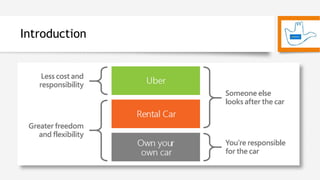
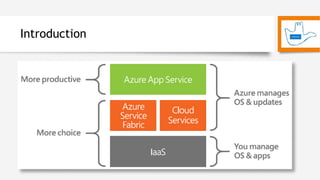
Introduction
Introduction
Web App
• Hosting an application yourself imposes very real, but somewhat hidden,
costs
• Manually deploying updates
• Patching operating systems
• Performance monitoring and scalability
• The cost is not overwhelming and is likely hidden in the overall budgets and
current assigned workloads
• With Azure you can deploy updates earlier and more often using continuous
deployment with on-premises and online version control systems like TFS,
GitHub, BitBucket, and Visual Studio Team Services
• In Azure, the machines that sit under Azure Web Apps are automatically
patched and managed for you
Demo
• Creating a WordPress Web App
• Hosted on managed IIS
• Ability to select advanced functions and php versions
• Database is hosted within InApp MySQL – Preview only
Pro Tips
• Implement staged deployment to swap staging and production
slots of your web apps with zero downtime, and run A/B testing in
production with a configurable fraction of your live traffic
• Learn how the viral site “How-Old.NET” was created and scaled
with Traffic Manager in this Azure Friday session
• You can use site-to-site, point-to-site, VNet-to-VNet, multi-site,
and ExpressRoute connections cross-premises. Check out this link
for the differences between them.
Mobile App Backend
• Building mobile client apps that target multiple platforms can be
time consuming
• Developers need to become familiar with various languages,
platforms and IDEs , such as Xcode and Eclipse
• You can use Xamarin to create mobile client apps in C# and share
your client business logic across iOS, Android, and Windows Phone
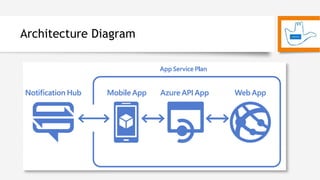
Architecture Diagram
Internet of Things
• Lot of useful data that is going to waste within organizations
• The task of processing a lot of data, especially IoT data, sounds
daunting
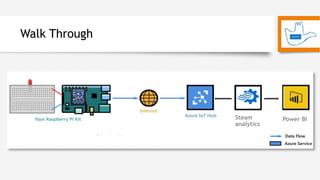
• You can connect various Azure technologies together to ingest,
predict, and output data to a dashboard
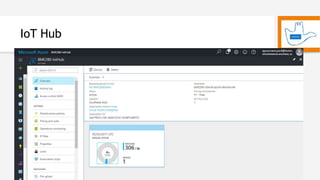
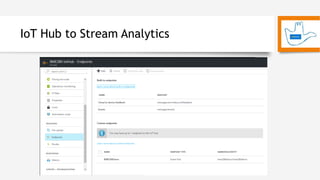
• Use IoT Hub to log millions of events per second from connected
devices
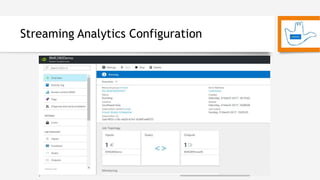
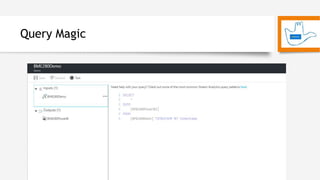
• You can create Power BI output to your Stream Analytics job and
create powerful and live dashboards
• The IoT Hub speaks multiple protocols, including HTTP, MQTT, and
AMPQ
Walk Through
Steam
analytics
Power BI
IoT Hub
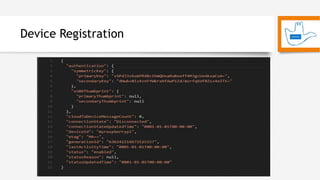
Device Registration
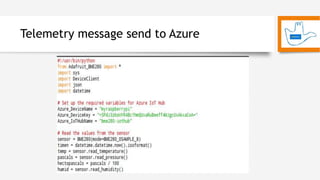
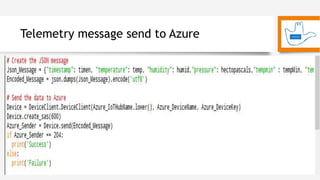
Telemetry message send to Azure
IoT Hub to Stream Analytics
Streaming Analytics Configuration
Query Magic
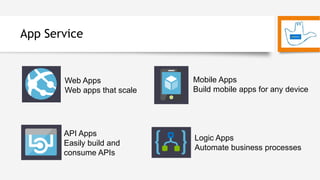
App Service
Web Apps
Web apps that scale
Mobile Apps
Build mobile apps for any device
API Apps
Easily build and
consume APIs
Logic Apps
Automate business processes
App Service
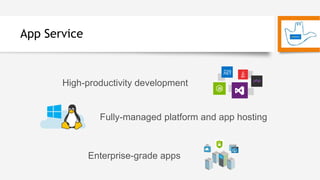
High-productivity development
Fully-managed platform and app hosting
Enterprise-grade apps
Azure Service Fabric
Why Service Fabric?
• Simplify building microservice-based applications and lifecycle
management
• Deliver low-latency performance and efficiency at massive scale
• Proven platform used by Azure and other Microsoft services
Service Fabric powers many Microsoft services today, including Azure SQL Database, Azure DocumentDB,
Cortana, Microsoft Power BI, Microsoft Intune, Azure Event Hubs, Azure IoT Hub, Skype for Business, and
many core Azure services
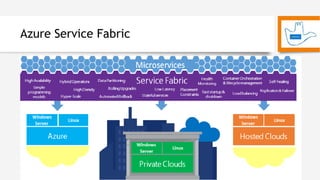
Applications composed of microservices
Azure Service Fabric
Cloud Services
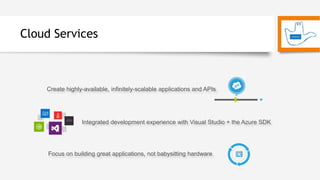
Create highly-available, infinitely-scalable applications and APIs
Integrated development experience with Visual Studio + the Azure SDK
Focus on building great applications, not babysitting hardware
Cloud Services
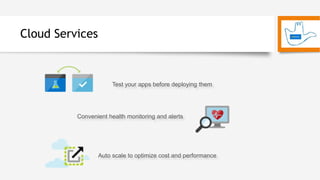
Test your apps before deploying them
Convenient health monitoring and alerts
Auto scale to optimize cost and performance
The Confusion
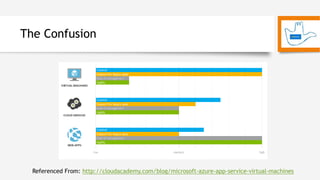
Azure App Service (which, until this past April, was called Azure Websites) is a managed platform. This
means that Azure takes care of application deployment and management, while the developer only needs to
concentrate on app development. Azure App Service supports applications defined by Azure as “Web Apps”,
“Mobile Apps”, “API Apps”, and “Logic Apps”.
Azure Cloud Services is a platform that allows developers access to the underlying virtual machines and
still manages the application container and deployment automatically. This offers a much more flexible
solution than Azure App Service.
Virtual Machines give you full control over application management and deployment. For projects that may
require substantial modifications to the technology stack in the future, or for people worried about being
locked into a single vendor, the extra work required to launch and maintain Virtual Machines might be worth
it.
Referenced From: http://cloudacademy.com/blog/microsoft-azure-app-service-virtual-machines
The Confusion
Referenced From: http://cloudacademy.com/blog/microsoft-azure-app-service-virtual-machines
Azure Functions
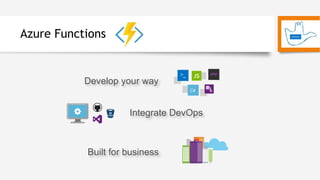
Develop your way
Integrate DevOps
Built for business
Common scenarios for Azure Functions
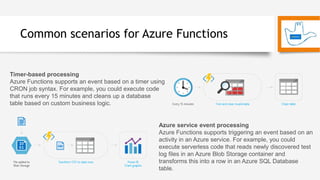
Timer-based processing
Azure Functions supports an event based on a timer using
CRON job syntax. For example, you could execute code
that runs every 15 minutes and cleans up a database
table based on custom business logic.
Azure service event processing
Azure Functions supports triggering an event based on an
activity in an Azure service. For example, you could
execute serverless code that reads newly discovered test
log files in an Azure Blob Storage container and
transforms this into a row in an Azure SQL Database
table.
Common scenarios for Azure Functions
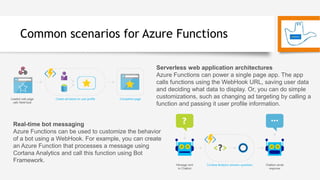
Serverless web application architectures
Azure Functions can power a single page app. The app
calls functions using the WebHook URL, saving user data
and deciding what data to display. Or, you can do simple
customizations, such as changing ad targeting by calling a
function and passing it user profile information.
Real-time bot messaging
Azure Functions can be used to customize the behavior
of a bot using a WebHook. For example, you can create
an Azure Function that processes a message using
Cortana Analytics and call this function using Bot
Framework.
Azure Functions Code Challenge
Thank you !
• Twitter: @jasjitchopra
• LinkedIn: https://www.linkedin.com/in/jasjitchopra
• Facebook: https://www.facebook.com/groups/MSUserGroup
• Meetup: https://www.meetup.com/Microsoft-User-Group-Chandigarh

Getting started with development in azure

  • 1.
    Getting started with Developmentin Azure Jasjit Chopra Cloud Architect Penthara Technologies
  • 2.
  • 3.
    Agenda • Cloud AppScenarios • Web App • Mobile App Back end • Internet of Things • Azure Platform Services • App Service • Azure Service Fabric • Cloud Services • Azure Functions
  • 4.
  • 5.
  • 6.
    Web App • Hostingan application yourself imposes very real, but somewhat hidden, costs • Manually deploying updates • Patching operating systems • Performance monitoring and scalability • The cost is not overwhelming and is likely hidden in the overall budgets and current assigned workloads • With Azure you can deploy updates earlier and more often using continuous deployment with on-premises and online version control systems like TFS, GitHub, BitBucket, and Visual Studio Team Services • In Azure, the machines that sit under Azure Web Apps are automatically patched and managed for you
  • 7.
    Demo • Creating aWordPress Web App • Hosted on managed IIS • Ability to select advanced functions and php versions • Database is hosted within InApp MySQL – Preview only
  • 8.
    Pro Tips • Implementstaged deployment to swap staging and production slots of your web apps with zero downtime, and run A/B testing in production with a configurable fraction of your live traffic • Learn how the viral site “How-Old.NET” was created and scaled with Traffic Manager in this Azure Friday session • You can use site-to-site, point-to-site, VNet-to-VNet, multi-site, and ExpressRoute connections cross-premises. Check out this link for the differences between them.
  • 9.
    Mobile App Backend •Building mobile client apps that target multiple platforms can be time consuming • Developers need to become familiar with various languages, platforms and IDEs , such as Xcode and Eclipse • You can use Xamarin to create mobile client apps in C# and share your client business logic across iOS, Android, and Windows Phone
  • 10.
  • 11.
    Internet of Things •Lot of useful data that is going to waste within organizations • The task of processing a lot of data, especially IoT data, sounds daunting • You can connect various Azure technologies together to ingest, predict, and output data to a dashboard • Use IoT Hub to log millions of events per second from connected devices • You can create Power BI output to your Stream Analytics job and create powerful and live dashboards • The IoT Hub speaks multiple protocols, including HTTP, MQTT, and AMPQ
  • 12.
  • 13.
  • 14.
  • 15.
  • 16.
  • 17.
    IoT Hub toStream Analytics
  • 18.
  • 19.
  • 20.
    App Service Web Apps Webapps that scale Mobile Apps Build mobile apps for any device API Apps Easily build and consume APIs Logic Apps Automate business processes
  • 21.
    App Service High-productivity development Fully-managedplatform and app hosting Enterprise-grade apps
  • 22.
    Azure Service Fabric WhyService Fabric? • Simplify building microservice-based applications and lifecycle management • Deliver low-latency performance and efficiency at massive scale • Proven platform used by Azure and other Microsoft services Service Fabric powers many Microsoft services today, including Azure SQL Database, Azure DocumentDB, Cortana, Microsoft Power BI, Microsoft Intune, Azure Event Hubs, Azure IoT Hub, Skype for Business, and many core Azure services Applications composed of microservices
  • 23.
  • 24.
    Cloud Services Create highly-available,infinitely-scalable applications and APIs Integrated development experience with Visual Studio + the Azure SDK Focus on building great applications, not babysitting hardware
  • 25.
    Cloud Services Test yourapps before deploying them Convenient health monitoring and alerts Auto scale to optimize cost and performance
  • 26.
    The Confusion Azure AppService (which, until this past April, was called Azure Websites) is a managed platform. This means that Azure takes care of application deployment and management, while the developer only needs to concentrate on app development. Azure App Service supports applications defined by Azure as “Web Apps”, “Mobile Apps”, “API Apps”, and “Logic Apps”. Azure Cloud Services is a platform that allows developers access to the underlying virtual machines and still manages the application container and deployment automatically. This offers a much more flexible solution than Azure App Service. Virtual Machines give you full control over application management and deployment. For projects that may require substantial modifications to the technology stack in the future, or for people worried about being locked into a single vendor, the extra work required to launch and maintain Virtual Machines might be worth it. Referenced From: http://cloudacademy.com/blog/microsoft-azure-app-service-virtual-machines
  • 27.
    The Confusion Referenced From:http://cloudacademy.com/blog/microsoft-azure-app-service-virtual-machines
  • 28.
    Azure Functions Develop yourway Integrate DevOps Built for business
  • 29.
    Common scenarios forAzure Functions Timer-based processing Azure Functions supports an event based on a timer using CRON job syntax. For example, you could execute code that runs every 15 minutes and cleans up a database table based on custom business logic. Azure service event processing Azure Functions supports triggering an event based on an activity in an Azure service. For example, you could execute serverless code that reads newly discovered test log files in an Azure Blob Storage container and transforms this into a row in an Azure SQL Database table.
  • 30.
    Common scenarios forAzure Functions Serverless web application architectures Azure Functions can power a single page app. The app calls functions using the WebHook URL, saving user data and deciding what data to display. Or, you can do simple customizations, such as changing ad targeting by calling a function and passing it user profile information. Real-time bot messaging Azure Functions can be used to customize the behavior of a bot using a WebHook. For example, you can create an Azure Function that processes a message using Cortana Analytics and call this function using Bot Framework.
  • 31.
  • 32.
    Thank you ! •Twitter: @jasjitchopra • LinkedIn: https://www.linkedin.com/in/jasjitchopra • Facebook: https://www.facebook.com/groups/MSUserGroup • Meetup: https://www.meetup.com/Microsoft-User-Group-Chandigarh

Editor's Notes

  • #5 Changing expectations Facebook, Uber Driving business growth Flexible cloud for advantage
  • #15 https://docs.microsoft.com/en-us/azure/iot-hub/iot-hub-raspberry-pi-kit-c-lesson2-prepare-azure-iot-hub
  • #22 High-productivity development Integrate App Service into your existing frameworks, languages and tooling to accelerate your development. Rapidly build, deploy and manage powerful web, mobile and API apps for employees or customers using a single back-end. Build standards-based web apps and APIs using .NET, Java, Node.js, PHP and Python. Fully-managed platform and app hosting DevOps teams can configure App Service from the Azure portal or command line interface to meet the operational needs of the app. Unified development and management experiences eliminate the confusion of disparate services and providers, resulting in less navigation and lower overhead. Experience unparalleled developer productivity with cutting-edge capabilities such as continuous integration, live-site debugging and the industry-leading Visual Studio IDE. Both Windows- and Linux-based platform options are available. Enterprise-grade apps The enterprise-grade global data center network, security and compliance level of the Azure platform mean you can build and host your apps with confidence. Create apps and automate business processes faster with a wealth of pre-built apps, API services and recipes in the Azure Marketplace. Easily find and use what you need to get the job done with access to a broad range of components and services delivered by Microsoft, certified vendors and the broader open-source developer community.
  • #23 https://docs.microsoft.com/en-us/azure/service-fabric/service-fabric-overview
  • #25 Create highly-available, infinitely-scalable applications and APIs Develop, package and deploy powerful applications and services to the cloud with Azure Cloud Services and the click of a button. Scale from 1 to 1000 in minutes. Once your application is deployed, that’s it: from provisioning, to load-balancing, to health monitoring, Azure handles the rest. Your application is backed by an industry-leading 99.95% monthly SLA. Integrated development experience with Visual Studio + the Azure SDK Get your hands on a world-class development experience using the Azure SDK, integrated seamlessly with Visual Studio. Deploy applications using any language you like, including .NET, Java, Node.js, PHP, Python or Ruby. Test your application before deploying it to the cloud by using Azure Emulator, which brings the platform’s key functionality right to your development computer. Focus on building great applications, not babysitting hardware Never worry about patching, faulty hardware or network issues again. Cloud Services is designed to deploy your application and keep it continuously available during crashes and failures, redirecting traffic from troubled instances to ones running smoothly. Automatic OS updates mean your application is always secure, without maintenance windows or downtime.
  • #26 Test your apps before deploying them Cloud Services provides a staging environment for testing a new release without impacting the existing one, reducing the chances of unwelcome customer downtime. When you are ready to deploy the new release to production, just swap the staging environment into production. Convenient health monitoring and alerts Azure helps you keep tabs on the health and availability of your applications. The health metrics dashboard shows key statistics at-a-glance. Set up real-time alerts to warn you when service availability—or some other metric of interest—degrades. Autoscale to optimize cost and performance Your application suddenly trending on Twitter? Azure and its free Autoscale feature can help you stay cool during unexpected traffic spikes by automatically scaling up or down to meet demand, while simultaneously minimizing costs. Autoscale lets you set scaling limits and scheduling goals to ensure that customers are always getting optimal performance. https://docs.microsoft.com/en-in/azure/cloud-services
  • #29 Develop your way Create Functions in a variety of languages, including JavaScript, C#, F#, as well as scripting options such as Python, PHP, Bash, Batch, and PowerShell. And do it all in an easy-to-use web-based interface. Or upload and trigger pre-compiled code built with your favorite development tool. Integrate DevOps Quickly and easily iterate on Azure Functions with continuous deployment using Visual Studio Team Services, GitHub, or BitBucket. Plus, use the embedded logging environment to monitor and troubleshoot. Built for business Use Azure Functions when events occur in internal APIs or business systems and deliver results directly to your on-premises databases or business solutions.
  • #32 https://functionschallenge.azure.com/