


Microsoft Azure
Azure Functions: Building apps faster
with a serverless architecture
Callon Campbell - @flying_maverick
Systems Architect
Microsoft Azure
About me
Callon Campbell
Systems Architect / Developer with 20 years of
experience developing desktop, mobile and
web enterprise applications using .NET, SQL
Server, Mobile and Azure technologies.
Co-creator of ReflectInsight, a .NET logging
framework and a real-time Live Log Viewer.
2
Email: CallonCampbell@Outlook.com Twitter: @Flying_Maverick
Blog: http://TheFlyingMaverick.com LinkedIn: LinkedIn.com/in/calloncampbell
Website: http://ReflectInsight.com Slideshare: https://www.slideshare.net/calloncampbell
Microsoft Azure
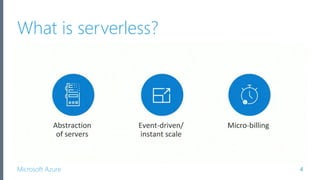
What is serverless?
4
Microsoft Azure
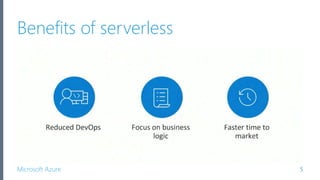
Benefits of serverless
5
Microsoft Azure
Realizing serverless benefits
6
Microsoft Azure
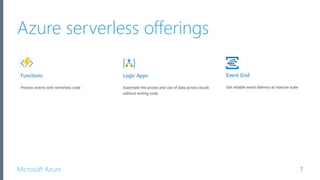
Azure serverless offerings
There are three components to Azure serverless:
7
Microsoft Azure
What are Logic Apps?
• Fully managed iPaaS (integration Platform as a Service)
• Provide serverless workflows that allow developers to
easily integrate data with their apps instead of writing
complex glue code between disparate systems
• Orchestrate and connect the serverless functions and
APIs of your applications
Microsoft Azure
Advantages of Logic Apps
•Save time by designing complex processes using
easy to understand design tools (focus on business)
•Orchestration engine built for the cloud (cloud scale,
massive compute, high availability built into the
platform)
•Reduced DevOps
•Reduced costs
•Reduced time to market
9
Microsoft Azure
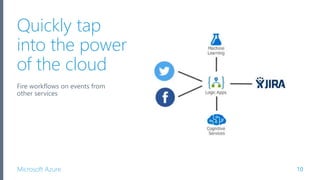
Quickly tap
into the power
of the cloud
Fire workflows on events from
other services
10
Microsoft Azure
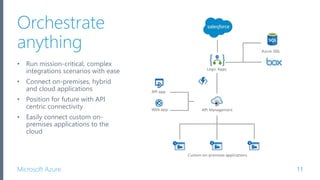
Orchestrate
anything
• Run mission-critical, complex
integrations scenarios with ease
• Connect on-premises, hybrid
and cloud applications
• Position for future with API
centric connectivity
• Easily connect custom on-
premises applications to the
cloud
11
Microsoft Azure
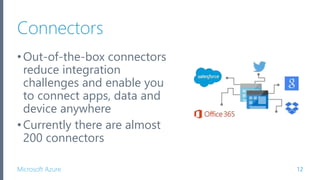
Connectors
•Out-of-the-box connectors
reduce integration
challenges and enable you
to connect apps, data and
device anywhere
•Currently there are almost
200 connectors
12
Microsoft Azure
What is Event Grid?
• Messaging service to support event-based architectures
manages the routing and delivery of events from a
number of sources and subscribers
• Built-in support for events coming from other Azure
services, like resource groups, subscriptions, storage
blobs, and event hubs
• Is agnostic to any language or platform
13
Microsoft Azure
Differences from other message queue
services
•Event Grid are centered around speed, scale,
breadth, and low cost
•Rather than being a general / generic messaging
service, Event Grid is built specifically for Serverless
architectures
14
Microsoft Azure
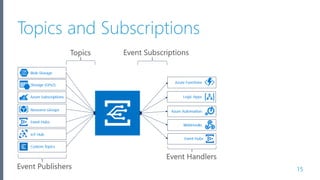
Topics and Subscriptions
15
Microsoft Azure
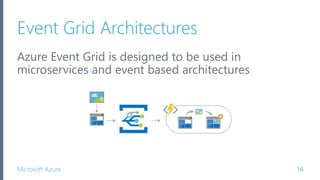
Event Grid Architectures
Azure Event Grid is designed to be used in
microservices and event based architectures
16
Microsoft Azure
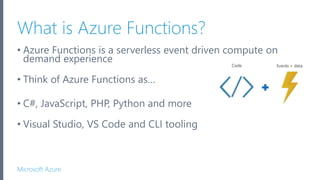
What is Azure Functions?
• Azure Functions is a serverless event driven compute on
demand experience
• Think of Azure Functions as…
• C#, JavaScript, PHP, Python and more
• Visual Studio, VS Code and CLI tooling
Microsoft Azure
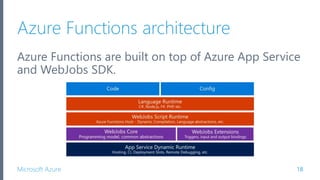
Azure Functions architecture
Azure Functions are built on top of Azure App Service
and WebJobs SDK.
18
Microsoft Azure
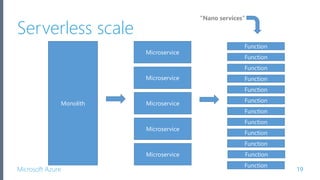
Serverless scale
19
Monolith
Microservice
Function
Function
Function
FunctionMicroservice
Function
Microservice
Microservice
Microservice
Function
Function
Function
Function
Function
Function
Function
Microsoft Azure
What can I do with Azure Functions?
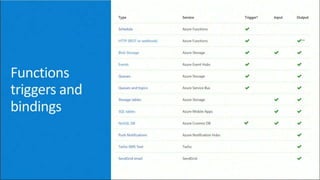
•Azure Functions are great for processing data,
integrating systems, working with IoT, simple API’s
and microservices
•Azure Functions provide templates for a number of
key scenarios
•Azure Functions supports
• Triggers - a way to start execution
• Bindings - a way to simplify code for input and output of
data
20
Microsoft Azure
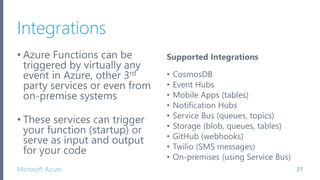
Integrations
• Azure Functions can be
triggered by virtually any
event in Azure, other 3rd
party services or even from
on-premise systems
• These services can trigger
your function (startup) or
serve as input and output
for your code
21
Supported Integrations
• CosmosDB
• Event Hubs
• Mobile Apps (tables)
• Notification Hubs
• Service Bus (queues, topics)
• Storage (blob, queues, tables)
• GitHub (webhooks)
• Twilio (SMS messages)
• On-premises (using Service Bus)
Microsoft Azure 22
Microsoft Azure
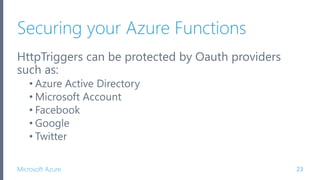
Securing your Azure Functions
HttpTriggers can be protected by Oauth providers
such as:
• Azure Active Directory
• Microsoft Account
• Facebook
• Google
• Twitter
23
Microsoft Azure
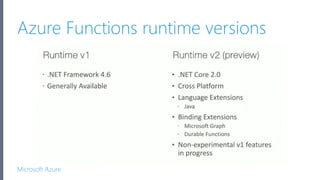
Azure Functions runtime versions
Microsoft Azure
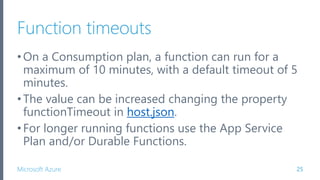
Function timeouts
•On a Consumption plan, a function can run for a
maximum of 10 minutes, with a default timeout of 5
minutes.
•The value can be increased changing the property
functionTimeout in host.json.
•For longer running functions use the App Service
Plan and/or Durable Functions.
25
Microsoft Azure
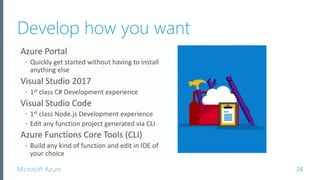
Develop how you want
26
Demo 1:
Azure Functions from Portal
Demo 2:
Debugging from Visual Studio
Microsoft Azure
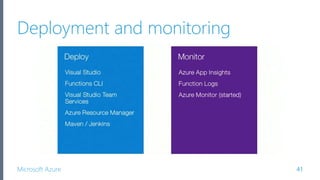
Deployment and monitoring
41
Microsoft Azure
Build and deployment
•Visual Studio (dev)
•Visual Studio Team Services (devops)
•Functions CLI (ops)
•Azure Resource Manager (ops)
•Maven / Jenkins / TeamCity? (devops)
42
Microsoft Azure
Building and deploying with VSTS
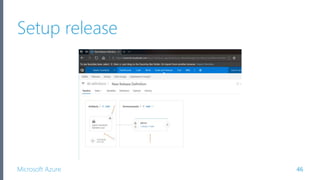
•Setup an automated build
•Setup release / continuous release
•Plus many other options…
43
Demo 3a:
Setup continuous build
Microsoft Azure
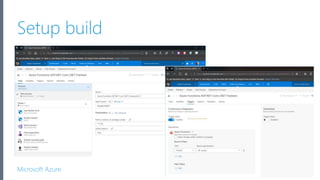
Setup build
45
Microsoft Azure
Setup release
46
Microsoft Azure
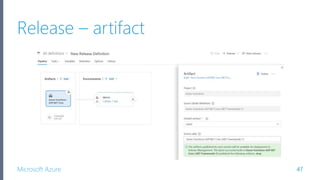
Release – artifact
47
Microsoft Azure
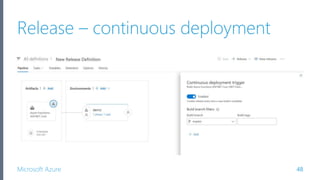
Release – continuous deployment
48
Microsoft Azure
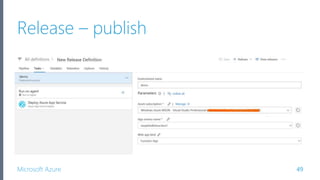
Release – publish
49
Demo 3b:
Demo build and release
Microsoft Azure
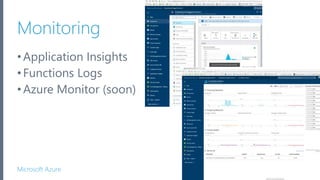
Monitoring
•Application Insights
•Functions Logs
•Azure Monitor (soon)
51
Demo 4:
Monitoring
Microsoft Azure
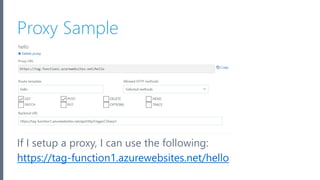
Proxies
•Proxies provide more control over all functions or
just select methods
•When using a custom domain, it’s used in the proxy
53
Microsoft Azure
Routing Example
Take our current function url:
https://tag-function1.azurewebsites.net/api/HttpTriggerCSharp3
If we add a route in the function.json like so:
"route": "helloworld"
Our function URL would then be like this:
https://tag-function1.azurewebsites.net/api/helloworld
54
Microsoft Azure
Proxy Sample
55
If I setup a proxy, I can use the following:
https://tag-function1.azurewebsites.net/hello
Demo 5:
Setting up routing and proxies
Microsoft Azure
Common scenarios for Azure Functions
57
Microsoft Azure
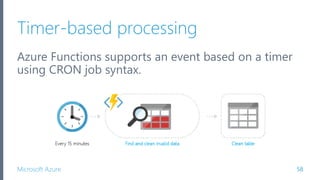
Timer-based processing
Azure Functions supports an event based on a timer
using CRON job syntax.
58
Microsoft Azure
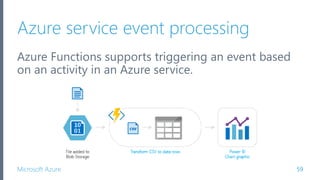
Azure service event processing
Azure Functions supports triggering an event based
on an activity in an Azure service.
59
Microsoft Azure
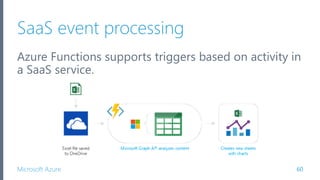
SaaS event processing
Azure Functions supports triggers based on activity in
a SaaS service.
60
Microsoft Azure
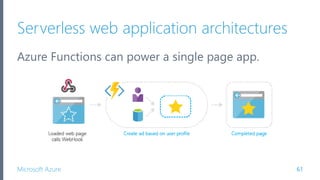
Serverless web application architectures
Azure Functions can power a single page app.
61
Microsoft Azure
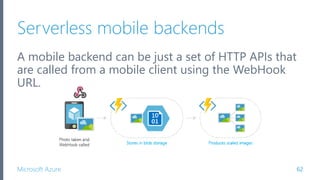
Serverless mobile backends
A mobile backend can be just a set of HTTP APIs that
are called from a mobile client using the WebHook
URL.
62
Microsoft Azure
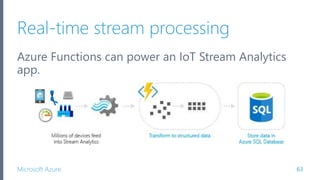
Real-time stream processing
Azure Functions can power an IoT Stream Analytics
app.
63
Microsoft Azure
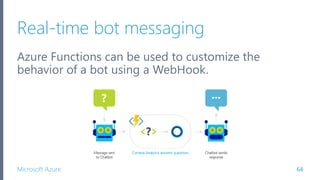
Real-time bot messaging
Azure Functions can be used to customize the
behavior of a bot using a WebHook.
64
Microsoft Azure
Best practices for Azure Functions
65
Microsoft Azure
Approach to building functions
“A key to realizing the full value is to write only the
smallest unit of logic to do a single scope of work and
to keep the dependencies to a minimum.”
– Joseph Fultz and Darren Brust, MSDN Magazine
66
Microsoft Azure
Best practices
•Functions should “do one thing”
•Functions should be idempotent
•Functions should finish as quickly as possible
67
Microsoft Azure
Where to get started
•Start small, replace 1 API or background processing
item
•Integration is a great place, often it’s a new layer on
top of old layers
68
Microsoft Azure
Pricing
69
Microsoft Azure
Pricing
•No upfront cost
•No termination fees
•Pay only for what you use
70
Microsoft Azure
Two kinds of pricing plans
Consumption plan - When your function runs, Azure
provides all of the necessary computational resources. You
don't have to worry about resource management, and you
only pay for the time that your code runs.
App Service plan - Run your functions just like your web,
mobile, and API apps. When you’re already using App
Service for your other applications, you can also run your
functions on the same plan at no additional cost.
71
Microsoft Azure
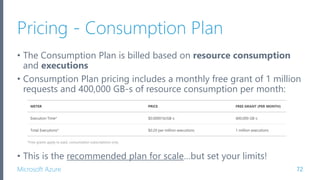
Pricing - Consumption Plan
• The Consumption Plan is billed based on resource consumption
and executions
• Consumption Plan pricing includes a monthly free grant of 1 million
requests and 400,000 GB-s of resource consumption per month:
• This is the recommended plan for scale…but set your limits!
72
Microsoft Azure
Pricing - App Service Plan
• Your functions run on dedicated VMs
• Dedicated VM’s are allocated to your App Service apps and
function apps are always available whether code is actively
running or not
• Good option if you have under utilized VMs
• A VM decouples the cost from both runtime and memory
size – you can limit the cost for long- running functions to
the cost of the VMs they run on
73
Microsoft Azure
One more demo…
74
Microsoft Azure
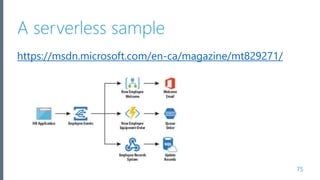
A serverless sample
75
https://msdn.microsoft.com/en-ca/magazine/mt829271/
Microsoft Azure
Summary
77
Microsoft Azure
Summary
• With Azure Functions, the focus is on the code and not
managing the infrastructure.
• When used as the serverless compute component of a
serverless architecture, you have the following benefits:
• Reduced time to market
• Lower total cost of ownership
• Pay per execution
78
Microsoft Azure
Azure serverless compute
•It’s now becoming easier than ever to create small,
targeted microservice architecture using a variety of
services
•Azure provides many services that can help you
achieve a low-friction, high-throughput and low-cost
solution
•Azure Functions, Logic Apps, Event Grid are just a
few in the serverless architecture family
79
Azure Functions are bricks.
You are the architect!
Microsoft Azure
Thank you!
CallonCampbell@Outlook.com
TheFlyingMaverick.com
@Flying_Maverick
81
Microsoft Azure
What’s next?
•Try Azure Functions for free:
https://azure.microsoft.com/en-us/try/app-service/
•Blog:https://blogs.msdn.microsoft.com/appservicete
am/tag/azure-functions/
•Twitter: @AzureFunctions
•Learn more at Microsoft Virtual Academy and
Channel 9
82
Microsoft Azure
References
• https://azure.microsoft.com/en-us/services/functions/
• https://functions.azure.com/
• https://portal.azure.com/
• https://docs.microsoft.com/en-us/azure/azure-functions/
• https://azure.microsoft.com/en-us/pricing/details/functions/
• Azure Functions in Practice
• Azure - Serverless Architecture with Azure Functions
• Visual Studio Tools for Azure Functions Preview
• Azure Storage Explorer
83

Azure functions: Build apps faster with serverless architecture (March 2018)

Editor's Notes

  • #4 Overview – of Serverless and what are Azure Functions Dev tooling – along with build, deployment and monitoring capabilities
  • #5 The essence of serverless is less server. The details of the server are abstracted away from you. You don’t need to worry about optimizing which operating system to run on, patching, etc Don’t need to worry about optimizing utilization and scaling up and down for demand Event driven process Tell Azure how or when to run your code (is it based on a schedule, or when a new customer is added to salesforce, or when items are added to a queue, a table or storage, etc) Micro build You’re only charged for the usage.
  • #6 Dynamically and elastically scale to meet demand. Allows you as the developer to focus on your business logic. Everything else is taken cared for you. This drastically increases time to market.
  • #7 If you look at Quest, what used to take them 6-8 months in development can now be done in 1-2 with Azure fully managed platform services. 3 key points: 1. Reduce time to market 2. Focus on innovating new features 3. Enables your business to be more competitive
  • #8 It’s now becoming easier than ever to create small, targeted microservice architecture using a variety of services. Azure provides services like Azure Functions, Logic Apps, and Event Grid that can help you achieve a low-friction, high-throughput and low-cost solution.
  • #10 Microsoft Flow is a consumer based engine based entirely on Azure Logic Apps
  • #14 Azure Event Grid which is a messaging service built to easily build application with event-based architectures. Simply select the Azure resource you would like to subscribe to, and give the event handler or webhook endpoint to send the event to. While Event Grid integrates natively with Azure Services, it can just as easily be leveraged by anything that supports the HTTP protocol.
  • #16 Event Grid is similar to Azure Service Bus in that a Topic is an endpoint that receives messages, and a Subscription is used to receive messages through the Topic that will be handled by a message listener. These concepts are basically the same, but there are some differences in how they work. Event Grid uses a concept of events instead of messages since it’s an event-based messaging system. Because Event Grid is based on events, it lends itself nicely to microservice architectures using serverless compute options like Azure Functions and Logic Apps. in addition to other implementations. NOTE: If using Azure Functions as your handler, use the Event Grid trigger over the generic HTTP trigger as it automatically validates Event Grid Function triggers.
  • #17 1. It can be used in a serverless application to connect data sources and event handlers. 2. In an ops automation scenario you can notify Azure Automation when virtual machines are created, or when a SQL database is spun up. 3. Finally you can use Event grid to connect your application with other services. The possibilities are really limited by your imagination.
  • #18 Azure Functions is an event driven, compute-on-demand experience. Basically just provide your code and Azure will take care of the rest…meaning that when an event happens, Azure will automatically take care of everything to run that code at scale. Azure functions can also runs EXE’s or call into DLL’s.
  • #19 Azure Functions are built on top of Azure App Service and WebJobs SDK -> this means that Azure Functions gets all the benefits of using Azure App Service
  • #20 So what do I mean by serverless scale. Well back in the old days and propbably still today we have people building monolith applications…which don’t scale. So people started to breakdown their applications into microservices and maybe even use Service Fabric. With Azure Functions we take it one step further and can create nano services.
  • #23 Any number of input and output bindings, but only have a single trigger.
  • #24 Only HttpTriggers can be protected.
  • #25 With runtime v2 you can now host on Windows or Linux (in preview)
  • #26 The limit of 10minutes is being increased to 20minutes.
  • #27 Supports remote debugging for C# only. Executing locally is handled by the Azure Functions CLI When you’re ready it provides the capability to publish to Azure.
  • #28 https://portal.azure.com/ I’ll now show you how to get started creating and running a simple HttpTrigger function from the Azure Portal.
  • #29 Let’s now use Visual Studio to create an Azure Function and see how we can debug it.
  • #32 Use the QuickStart process to create a premade function or using the left side navigation, create your own custom function.
  • #33 There are a number of templates available for different languages including some prebuilt samples. Looking at these samples and experiment functions is a great way to see what you can do.
  • #34 When you’re function is ready, save and run it immediately in the portal and see the output in the logs. You can also test your functions from the right navigation pane.
  • #35 File -> New Project, look under Cloud and then select “Azure Functions (Preview)”.
  • #37 Storage account connection should be “AzureWebJobsStorage”. You will then add your connection string to that keys value in the AppSettings. AppSettings are shared across functions.
  • #39 Using the Azure Storage Explorer, I can get my connection string for the storage account. Get Primary Connection String and add to AppSettings to key “AzureWebJobsStorage”. I can also insert some sample test data to be consumed by my function.
  • #41 Adjust timing polling. Open up Host.json and using intellisence, add “queues” : {“maxPollingInterval”: 1000} where this value is in milliseconds.
  • #45 https://portal.azure.com/ I’ll now show you how to get started creating and running a simple HttpTrigger function from the Azure Portal.
  • #46 Create new build, select “ASP.NET Core (.NET Framework)” Select “Hosted VS2017” as your agent Go to Triggers tab and enable “continuous integration” Click save.
  • #47 Create a new release Select your artifacts from the build Click on the continuous deployment toggle Configure the environment your deploying to Click save
  • #48 Can choose ASP.NET core for Azure Functions
  • #51 https://portal.azure.com/ I’ll now show you how to get started creating and running a simple HttpTrigger function from the Azure Portal.
  • #53 https://portal.azure.com/ I’ll now show you how to get started creating and running a simple HttpTrigger function from the Azure Portal.
  • #54 Instead of having to set the route in the function.json on each of our functions. Also if your using a custom domain it's used in Proxies. These are in Preview.
  • #57 Let’s now use Visual Studio to create an Azure Function and see how we can debug it.
  • #59 For example, you could execute code that runs every 15 minutes and cleans up a database table based on custom business logic.
  • #60 For example, you could execute a function that reads newly discovered log files in an Azure Blob Storage container. The data can then be transformed into a row in an Azure SQL Database table, or DocumentDB or perhaps feed it into another service. C# Azure Function for reacting to Azure Insights Events
  • #61 For example, when a file is saved in OneDrive, this triggers a function that uses the Microsoft Graph API to modify the spreadsheet, creating additional charts and calculated data.
  • #62 The app calls functions using the WebHook URL, saving user data and deciding what data to display. Or, you can do simple customizations, such as changing an ad based on user profile information. Node.js Azure Function for generating SAS tokens C# Azure Function for generating SAS tokens
  • #63 For example, a mobile application could capture an image, then call an Azure Function to get an access token for uploading to blob storage. A second Azure Function is triggered by the blob upload and resizes the image to be mobile-friendly.
  • #64 For example, IoT devices send messages to Azure Stream Analytics, which then calls an Azure Function to transform the message. This function processes the data and creates a new record in an Azure SQL Database.
  • #65 For example, you can create an Azure Function that processes a message using Cortana Analytics and call this function using the Microsoft Bot Framework.
  • #67 When building your Azure Functions consider this… Smallest unit of logic Single scope of work Keep dependencies to a minimum
  • #68 Azure Functions should be SINGLE PURPOSE in nature. Think of them as short concise statements rather than compound sentences. Azure Functions should be IDEMPOTENT in nature. This means that the resulting state of the function should be identical if called subsequent times with the same parameters. Azure Functions should be quick and short lived - keeping execution time brief. For longer running jobs consider using Azure WebJobs, or hosting the service in Azure Service Fabric, or using Durable Functions extension.
  • #69 Start small and look at replacing a single API or perhaps a background processing item. Integration is another great place to start as it’s often a new layer on top of old existing layers.
  • #71 Only pay for the time your code is running. You’ll be charged based on the number of resources your Azure Functions needs, and only for as long as it takes your code to execute.
  • #72 On a Consumption compute plan, you are currently limited to 5 minutes of computation. On a regular App Service Plan, running for 10 minutes is quite reasonable. Long-running functions is more on the order of an hour.
  • #73 Resource consumption in GB-s (gigabyte-seconds) is computed as a combination of memory size and execution time for all functions running in a Function App. Executions counted each time a function is executed in response to an event, triggered by a binding.
  • #76 This example is curtesy of MSDN Magazine and illustrates how you can use Event Grid to pass events or commands to Azure Functions and Logic Apps. https://msdn.microsoft.com/en-ca/magazine/mt829271/
  • #77 https://portal.azure.com/ I’ll now show you how to get started creating and running a simple HttpTrigger function from the Azure Portal.
  • #80 Other serverless Azure services are: Azure Functions Azure Logic Apps Event Grid Reference: https://www.simple-talk.com/cloud/cloud-development/serverless-architecture-azure/