ASP
OBJECTS
AN ASP OBJECT IS SOMETHING THAT
TYPICALLY HAS
 METHODS(determine the things one can
do with objects)
 PROPERTIES(attribute that describes the
object)
 COLLECTIONS(constitutes different sets
of key value pairs)
WORKING OF ASP OBJECTS
client
request
server
Request object
Response object
Session object
response
Server object
Asp error object
Application object
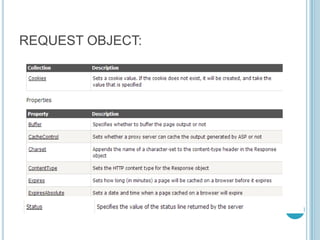
REQUEST OBJECT:
BEFORE LEARNING
ABOUT RESPONSE
OBJECT LET’S
UNDERSTAND THE GET &
POST METHOD
These two methods
are used to send
data captured by
various form
elements
GET METHOD
The browser submits the
form data as the part of
the url.
The data captured is in
the form elements is
appended in the URL.
POST METHOD
Send data captured by
form elements back to the
server as a separate bit
stream
IF METHOD IS NOT
SPECIFIED IN YOUR
FORM THEN BY
DEFAULT METHOD USED
BY THE BROWSER IS A
GET METHOD
REQUEST OBJECT:
Collection:
1.The form collection
2.Query String(important)
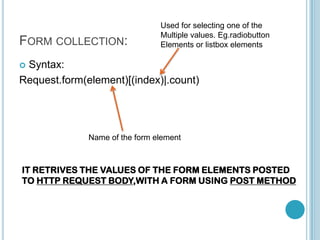
FORM COLLECTION:
 Syntax:
Request.form(element)[(index)|.count)
Name of the form element
Used for selecting one of the
Multiple values. Eg.radiobutton
Elements or listbox elements
IT RETRIVES THE VALUES OF THE FORM ELEMENTS POSTED
TO HTTP REQUEST BODY,WITH A FORM USING POST METHOD
<body>
<form action="nextpage.asp" method="post">
<p>ENTER YOUR NAME:<input name="USERNAME"
size="20" type="text"></p>
<p>CHOOSE YOUR CITY:<select name="CITY">
<option>DELHI</option>
<option>BANGALORE</option>
<option>KOLKATTA</option>
</select>
<input type="submit"></p>
</form>
</body>
Elements
TextBox &
Dropdown list
that contain
values
 WHEN SUBMIT BUTTON IS CLICKED THE
FORM IS POSTED TO ASP PAGE nextpage.asp
 The following form data is sent back to
server(Remember post method)
 USERNAME=Anamika&CITY=DELHI
 These are the values which are entered in the text
box and selected from the dropdown list
NOW TO SHOW THESE VALUES IN THE NEXT
PAGE WE USE:
 <body>
Welcome <%=Request.Form(“USERNAME”)%>
City Selected<%=Request.Form(“CITY”)%>
</body>
These are just the values captured from the form
elements of previous page
USERNAME=Anamika&CITY=DELHI

Asp objects

  • 1.
  • 2.
    AN ASP OBJECTIS SOMETHING THAT TYPICALLY HAS  METHODS(determine the things one can do with objects)  PROPERTIES(attribute that describes the object)  COLLECTIONS(constitutes different sets of key value pairs)
  • 3.
    WORKING OF ASPOBJECTS client request server Request object Response object Session object response Server object Asp error object Application object
  • 4.
  • 6.
    BEFORE LEARNING ABOUT RESPONSE OBJECTLET’S UNDERSTAND THE GET & POST METHOD
  • 7.
    These two methods areused to send data captured by various form elements
  • 8.
    GET METHOD The browsersubmits the form data as the part of the url. The data captured is in the form elements is appended in the URL.
  • 9.
    POST METHOD Send datacaptured by form elements back to the server as a separate bit stream
  • 10.
    IF METHOD ISNOT SPECIFIED IN YOUR FORM THEN BY DEFAULT METHOD USED BY THE BROWSER IS A GET METHOD
  • 11.
    REQUEST OBJECT: Collection: 1.The formcollection 2.Query String(important)
  • 12.
    FORM COLLECTION:  Syntax: Request.form(element)[(index)|.count) Nameof the form element Used for selecting one of the Multiple values. Eg.radiobutton Elements or listbox elements IT RETRIVES THE VALUES OF THE FORM ELEMENTS POSTED TO HTTP REQUEST BODY,WITH A FORM USING POST METHOD
  • 13.
    <body> <form action="nextpage.asp" method="post"> <p>ENTERYOUR NAME:<input name="USERNAME" size="20" type="text"></p> <p>CHOOSE YOUR CITY:<select name="CITY"> <option>DELHI</option> <option>BANGALORE</option> <option>KOLKATTA</option> </select> <input type="submit"></p> </form> </body> Elements TextBox & Dropdown list that contain values
  • 14.
     WHEN SUBMITBUTTON IS CLICKED THE FORM IS POSTED TO ASP PAGE nextpage.asp  The following form data is sent back to server(Remember post method)  USERNAME=Anamika&CITY=DELHI  These are the values which are entered in the text box and selected from the dropdown list
  • 15.
    NOW TO SHOWTHESE VALUES IN THE NEXT PAGE WE USE:  <body> Welcome <%=Request.Form(“USERNAME”)%> City Selected<%=Request.Form(“CITY”)%> </body> These are just the values captured from the form elements of previous page USERNAME=Anamika&CITY=DELHI