
AWS Kinesis
Quick Introduction to Amazon Kinesis Stream
02.06.2017, AOE Meetup, Julian Kleinhans
Julian Kleinhans
Software Architect @ AOE GmbH
@kj187
Amazon Kinesis
Amazon Kinesis is a real-
time data processing
platform ... ... which makes it easier to
work with real-time,
streaming data in the AWS
Cloud.
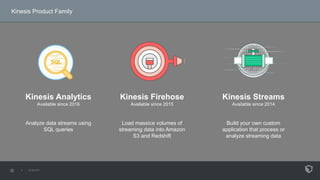
Kinesis Product Family
Kinesis Firehose
Available since 2015
Load massice volumes of
streaming data into Amazon
S3 and Redshift
Kinesis Analytics
Available since 2016
Analyze data streams using
SQL queries
Kinesis Streams
Available since 2014
Build your own custom
application that process or
analyze streaming data
AWS Kinesis Streams
High-throughput, low-latency
service for real-time data
processing over large, distributed
data streams
AWS Kinesis Streams
It`s like a message queue,
but more scalable and with
multiple concurrent
readers of each message
Typical Use Cases
Process and analyse Log
data, Finance data,
Mobile or Online
Gaming data in real-time
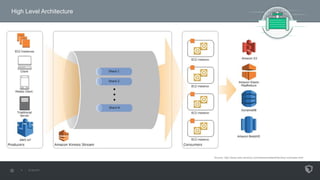
High Level Architecture
Source: http://docs.aws.amazon.com/streams/latest/dev/key-concepts.html
Key Concepts
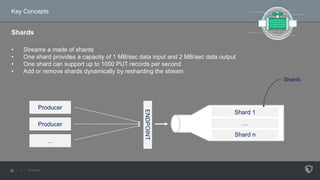
Shards
• Streams a made of shards
• One shard provides a capacity of 1 MB/sec data input and 2 MB/sec data output
• One shard can support up to 1000 PUT records per second
• Add or remove shards dynamically by resharding the stream
Producer
Producer
… ENDPOINT
Shard 1
…
Shard n
Shards
Key Concepts
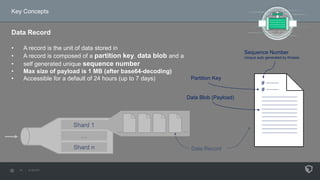
Data Record
• A record is the unit of data stored in
• A record is composed of a partition key, data blob and a
• self generated unique sequence number
• Max size of payload is 1 MB (after base64-decoding)
• Accessible for a default of 24 hours (up to 7 days)
Shard 1
…
Shard n
......
Data Record
#
Partition Key
Data Blob (Payload)
#
Sequence Number
Unique auto generated by Kinesis
Key Concepts
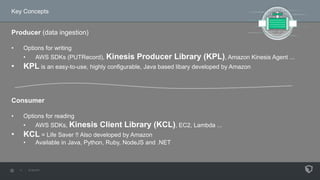
Producer (data ingestion)
• Options for writing
• AWS SDKs (PUTRecord), Kinesis Producer Library (KPL), Amazon Kinesis Agent ...
• KPL is an easy-to-use, highly configurable, Java based libary developed by Amazon
Consumer
• Options for reading
• AWS SDKs, Kinesis Client Library (KCL), EC2, Lambda ...
• KCL = Life Saver !! Also developed by Amazon
• Available in Java, Python, Ruby, NodeJS and .NET
Consumer
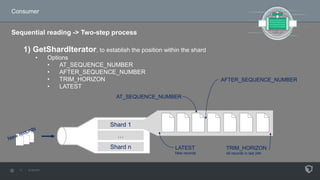
Sequential reading -> Two-step process
1) GetShardIterator, to establish the position within the shard
• Options
• AT_SEQUENCE_NUMBER
• AFTER_SEQUENCE_NUMBER
• TRIM_HORIZON
• LATEST
Shard 1
…
Shard n LATEST
New records
AFTER_SEQUENCE_NUMBER
AT_SEQUENCE_NUMBER
TRIM_HORIZON
All records in last 24h
Consumer
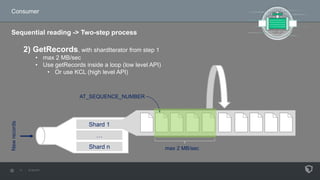
Sequential reading -> Two-step process
2) GetRecords, with shardIterator from step 1
• max 2 MB/sec
• Use getRecords inside a loop (low level API)
• Or use KCL (high level API)
Shard 1
…
Shard n
Newrecords
AT_SEQUENCE_NUMBER
max 2 MB/sec
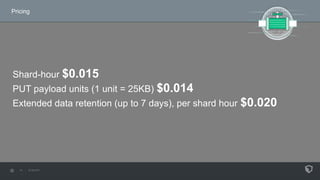
Pricing
Shard-hour $0.015
PUT payload units (1 unit = 25KB) $0.014
Extended data retention (up to 7 days), per shard hour $0.020
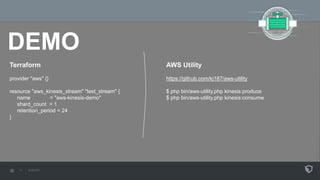
DEMO
Terraform
provider "aws" {}
resource "aws_kinesis_stream" "test_stream" {
name = "aws-kinesis-demo"
shard_count = 1
retention_period = 24
}
AWS Utility
https://github.com/kj187/aws-utility
$ php bin/aws-utility.php kinesis:produce
$ php bin/aws-utility.php kinesis:consume
Thank you
Any Questions ?

AWS Kinesis

  • 1.
    AWS Kinesis Quick Introductionto Amazon Kinesis Stream 02.06.2017, AOE Meetup, Julian Kleinhans
  • 2.
  • 3.
    Amazon Kinesis Amazon Kinesisis a real- time data processing platform ... ... which makes it easier to work with real-time, streaming data in the AWS Cloud.
  • 4.
    Kinesis Product Family KinesisFirehose Available since 2015 Load massice volumes of streaming data into Amazon S3 and Redshift Kinesis Analytics Available since 2016 Analyze data streams using SQL queries Kinesis Streams Available since 2014 Build your own custom application that process or analyze streaming data
  • 5.
    AWS Kinesis Streams High-throughput,low-latency service for real-time data processing over large, distributed data streams
  • 6.
    AWS Kinesis Streams It`slike a message queue, but more scalable and with multiple concurrent readers of each message
  • 7.
    Typical Use Cases Processand analyse Log data, Finance data, Mobile or Online Gaming data in real-time
  • 8.
    High Level Architecture Source:http://docs.aws.amazon.com/streams/latest/dev/key-concepts.html
  • 9.
    Key Concepts Shards • Streamsa made of shards • One shard provides a capacity of 1 MB/sec data input and 2 MB/sec data output • One shard can support up to 1000 PUT records per second • Add or remove shards dynamically by resharding the stream Producer Producer … ENDPOINT Shard 1 … Shard n Shards
  • 10.
    Key Concepts Data Record •A record is the unit of data stored in • A record is composed of a partition key, data blob and a • self generated unique sequence number • Max size of payload is 1 MB (after base64-decoding) • Accessible for a default of 24 hours (up to 7 days) Shard 1 … Shard n ...... Data Record # Partition Key Data Blob (Payload) # Sequence Number Unique auto generated by Kinesis
  • 11.
    Key Concepts Producer (dataingestion) • Options for writing • AWS SDKs (PUTRecord), Kinesis Producer Library (KPL), Amazon Kinesis Agent ... • KPL is an easy-to-use, highly configurable, Java based libary developed by Amazon Consumer • Options for reading • AWS SDKs, Kinesis Client Library (KCL), EC2, Lambda ... • KCL = Life Saver !! Also developed by Amazon • Available in Java, Python, Ruby, NodeJS and .NET
  • 12.
    Consumer Sequential reading ->Two-step process 1) GetShardIterator, to establish the position within the shard • Options • AT_SEQUENCE_NUMBER • AFTER_SEQUENCE_NUMBER • TRIM_HORIZON • LATEST Shard 1 … Shard n LATEST New records AFTER_SEQUENCE_NUMBER AT_SEQUENCE_NUMBER TRIM_HORIZON All records in last 24h
  • 13.
    Consumer Sequential reading ->Two-step process 2) GetRecords, with shardIterator from step 1 • max 2 MB/sec • Use getRecords inside a loop (low level API) • Or use KCL (high level API) Shard 1 … Shard n Newrecords AT_SEQUENCE_NUMBER max 2 MB/sec
  • 14.
    Pricing Shard-hour $0.015 PUT payloadunits (1 unit = 25KB) $0.014 Extended data retention (up to 7 days), per shard hour $0.020
  • 15.
    DEMO Terraform provider "aws" {} resource"aws_kinesis_stream" "test_stream" { name = "aws-kinesis-demo" shard_count = 1 retention_period = 24 } AWS Utility https://github.com/kj187/aws-utility $ php bin/aws-utility.php kinesis:produce $ php bin/aws-utility.php kinesis:consume
  • 16.

Editor's Notes

  • #2 Quick Introduction Oberfläche Mächtiges Thema Bei Bedarf -> Folgetermin Wer hat schon mal was von Kinesis gehört? Wer hat schon mal damit gearbeitet?
  • #4 WAS ist Kinesis ?? Service für Echtzeitverarbeitung von Datenströmen Grundgedanke von Amazon ist die Arbeit mit RealTime und Streaming Daten in der Cloud erheblich zu vereinfachen 3 verschiedene Produkte
  • #5 Analytics – jüngste Service, 2016 Standard-SQL Streaming-Daten analysieren Firehose - 2015 Einfaches Laden großer Mengen von Streaming-Daten in AWS Streams - 2014 Für Custom Anwendungen (Flexibel)
  • #6 Amazon selbst beschreibt Kinesis Streams als ... Ich selbst beschreibe das immer ganz gerne so ..
  • #8 Typische Anwendungsfälle -> Verarbeitung von Logfiles in Echtzeit, Analyse von Finanzdaten wie Aktienkursen, oder die Analyse von Daten in Onlinespielen Man muss sich vorstellen das in manchen Anwendungsfällen Daten als ein kontinuierlicher Strom, 24 Stunden am Tag, 7 Tage die Woche gibt. Und oft will man dann solche Datenströme sofort verarbeiten und in kürzester Zeit Informationen daraus ableiten, wenn möglich innerhalb von Sekunden. Aktien Broker -> fallende Aktie -> erst 10-20min später auf seinem Dashboard
  • #9 Jeder Stream kann mehrere Leser und Schreiber haben.
  • #10 Ein Stream besteht aus 1 oder n Shards Shard ist die Basiseinheit für den Druchsatz eines Streams bis zu 1000 Transaktionen pro Sekunde (also 1 MB pro Sekunde) schreiben bis zu 2000 Transaktionen pro Sekunde (also 2 MB pro Sekunde) lesen bis zu 1000 PUT records schreiben Nicht ausreichend? -> Scaling -> new Shards -> Resharding
  • #11 Besteht aus Partition Key und einem Data Blob Mit dem Partition Key kann man beeinflussen in welchen Shard ein Record geleitet werden soll Dann wird jedem Record beim schreiben eine (im Shard eindeutige) Sequence Number automatisch zugewiesen Die Records sind nach Erstellung per default nur für 24 Stunden erreichbar. (Einstellbar bis 7 Tage)
  • #13 AT_SEQUENCE_NUMBER um bei einer bestimmten Sequenznummer anzufangen AFTER_SEQUENCE_NUMBER um nach einer bestimmten Sequenznummer anzufangen TRIM_HORIZON um mit dem ältesten gespeicherten Record anzufangen LATEST um neue Records zu lesen wenn sie ankommen
  • #15 Shard-hour, für jedes shard was man nutzt Eine PUT-Nutzlasteinheit wird in Nutzlasten von je 25 KB gezählt, die einen Datensatz ausmachen. 5KB Datensatz = 1 PUT-Nutzlasteinheit 33KB Datensatz = 2 PUT-Nutzlasteinheit 1MB Datensatz = 45 PUT-Nutzlasteinheit